
Ecommerce Inventory Management Software: Top Features to Look For
Choosing ecommerce inventory management software is not just about keeping a digital list of products. The right platform helps you see what is in stock, what is running low, where items are located, and how stock decisions affect sales, fulfilment and cash flow.
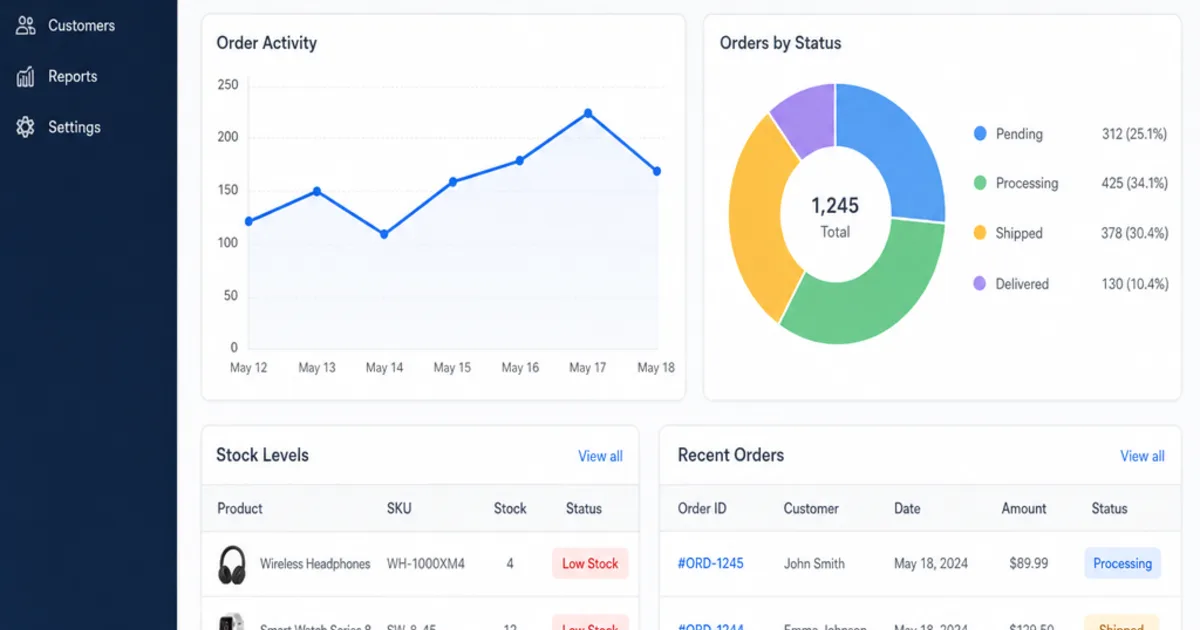
Ecommerce inventory management software keeps one reliable record of what you hold, what is already promised to customers and what is on its way, then shares that position with every channel you sell through. It records each stock movement, from a goods receipt to an order, return or adjustment, so the quantity a customer sees reflects what you can actually ship.
The practical problem is rarely a missing feature list. It is that a website, a marketplace, a spreadsheet and a warehouse each hold a slightly different number, and nobody is sure which one is right. This guide explains what the software category does, which quantities it should keep apart and how to choose an approach that fits your catalogue, channels and team.

Ecommerce stock control starts with knowing what is on the shelf and what is already promised. Illustrative photograph, not an OpsMavix client.
Image credit: Tiger Lily, Pexels License. Resized, no other edits.
Key Takeaways
- Ecommerce inventory software should keep on hand, committed, unavailable, available and incoming stock as separate quantities.
- Every channel should draw from the same available figure, with any buffers set deliberately.
- Variants, bundles and multiple locations need checking with your own products before you buy.
- Replenishment decisions should count stock already on order, or the system will prompt duplicate purchases.
- Integrations need visible error handling, not just a working demonstration of the normal path.
- Compare configuration, connectors, packaged software and a custom system against one shared test scenario.
In this guide:
- 1. Understand What Ecommerce Inventory Software Does
- 2. Separate the Stock Quantities That Matter
- 3. Keep Every Sales Channel on One Available Figure
- 4. Model Variants, Bundles and Locations Properly
- 5. Plan Replenishment From the Live Position
- 6. Test Integrations and Exception Handling
- 7. Compare the Available System Approaches
- 8. Run a Structured Trial Before You Commit
- Frequently Asked Questions
- How OpsMavix Can Help
1. Understand What Ecommerce Inventory Software Does
Start with the decisions it supports
Inventory software is useful because it answers operational questions quickly and consistently. Can we accept this order? Should we reorder this SKU today? Which location should ship it? Why did the count change on Tuesday?
A digital product list cannot answer those questions on its own. The system needs a record of each movement, the reason for it and the person or integration that made it. With that history, a quantity becomes something you can explain rather than something you have to trust.
Know the core capabilities
| Capability | What it should do | Question to ask in a demonstration |
|---|---|---|
| Stock ledger | Record receipts, sales, returns, transfers and adjustments with reasons | Can we see why this SKU changed and who changed it? |
| Channel sync | Publish available quantities to each connected channel | How quickly does a sale on one channel reduce stock on the others? |
| Order allocation | Reserve stock against open orders | What happens when an order is cancelled or partly shipped? |
| Purchasing | Raise purchase orders and receive goods against them | Can we receive a short delivery and keep the remainder open? |
| Catalogue structure | Handle variants, bundles and units of measure | Does selling a bundle reduce its components correctly? |
| Reporting | Show stock value, movement, ageing and replenishment needs | Can each report show its cutoff and underlying transactions? |
If you want the mechanics in more depth, our walkthrough of how inventory management software works follows the data flow step by step. For a channel-by-channel view of running one stock pool across Shopify, Amazon and eBay, see inventory management software for ecommerce.
2. Separate the Stock Quantities That Matter
Agree the definitions first
Many overselling and purchasing mistakes start with one word, stock, being used for several different numbers. Shopify’s documentation is a clear public example of the distinction. Its inventory states guide defines on hand as committed plus unavailable plus available, treats committed units as set aside for unfulfilled orders, and says incoming inventory cannot be sold until it is received.
Your platform may use different labels, but the underlying distinctions are worth keeping whichever system you choose.
| Quantity | Plain-English meaning | Common mistake |
|---|---|---|
| On hand | Everything physically at the location | Publishing it to channels as if it were all sellable |
| Committed | Units reserved for orders not yet shipped | Releasing them when a customer changes an address |
| Unavailable | Units held back, for example damaged or in quality checks | Leaving them in the sellable figure |
| Available | Units you can still sell | Calculating it differently on each channel |
| Incoming | Units due from suppliers or transfers | Treating them as sellable before they arrive |
Work through a hypothetical availability check
Assume a hypothetical SKU has 240 units on hand. Thirty-five are committed to open orders and 12 are unavailable because they are damaged or awaiting inspection. A further 150 are due from a supplier next week.
| Component | Units |
|---|---|
| On hand | 240 |
| Less committed to open orders | 35 |
| Less unavailable | 12 |
| Available to sell now | 193 |
| Incoming, not yet sellable | 150 |
The channels should see 193, not 240 and not 343. The incoming 150 matters for purchasing decisions, which we return to in section 5, but it should not be sold as stock in hand unless you deliberately offer pre-orders with their own rules. Our guide to available to promise covers that wider calculation.
3. Keep Every Sales Channel on One Available Figure
Make one record authoritative
When each channel keeps its own count, every sale has to be copied elsewhere before the others are correct. The safer model is one authoritative available quantity, with each channel receiving that figure, less any buffer you have chosen on purpose.
Ask how the software sends updates. Some connections push changes as they happen; others poll on a schedule. Either can work, but you need to know the delay, because the delay is the window in which two channels can sell the same last unit.
Size the sync risk with a hypothetical example
Suppose a hypothetical best seller sells 6 units an hour across all channels at peak, and one marketplace connection updates every 15 minutes. In the worst case, that marketplace can be working from a figure up to 1.5 units out of date (6 ÷ 60 × 15). Holding back 2 units on that channel for that SKU would cover the gap at that rate.
The better fix is usually a faster or more reliable sync, not a larger buffer everywhere. Our guide to safety buffers per channel explains how to size them from measured lag and sales velocity, and how to prevent overselling covers the wider process.
Channel checklist
- Each channel reads from the same available quantity.
- Buffers are set per channel and per SKU where needed, and are documented.
- Cancellations and returns put stock back only after the right check.
- Failed updates are visible and owned by a named person.
- Marketplace listings that cannot be updated automatically are flagged.
4. Model Variants, Bundles and Locations Properly
Track each sellable variant
Size, colour and pack quantity usually need their own SKU and stock record. The product family is useful for browsing and reporting, but replenishment and availability happen at variant level. Test this with your most awkward product, not the simplest one in the demonstration catalogue.
Calculate bundles from components
If you sell bundles or kits, their availability should come from the components rather than a separate count. Consider a hypothetical gift set made of 1 mug and 2 coasters. With 60 mugs and 90 coasters available, the most gift sets you can sell is 45, because 90 coasters ÷ 2 = 45 is lower than 60 mugs ÷ 1. If you also sell mugs on their own, each standalone sale reduces the bundle figure too.
| Component | Available | Needed per set | Sets possible |
|---|---|---|---|
| Mug | 60 | 1 | 60 |
| Coaster | 90 | 2 | 45 |
| Gift set available | 45 |
Our guide to product kitting software goes further into assembled kits and shared components.
Hold stock by location
If you use a second warehouse, a shop or a third-party fulfilment provider, each location needs its own on hand and available figures. Decide which locations feed which channels, how transfers are recorded while in transit and who confirms receipt at the other end. Multi-channel inventory management covers the channel side of that design.
5. Plan Replenishment From the Live Position
Count what is already on order
A reorder point tells you when to buy. The common formula is average daily sales multiplied by lead time in days, plus safety stock, explained step by step in how to calculate reorder point. The part many setups miss is comparing that reorder point with the right stock figure.
Return to the hypothetical SKU from section 2. It sells an average of 18 units a day, the supplier lead time is 12 days and you hold 60 units of safety stock.
| Replenishment measure | Calculation | Units |
|---|---|---|
| Lead time demand | 18 × 12 | 216 |
| Reorder point | 216 + 60 | 276 |
| Available now | From section 2 | 193 |
| Incoming on open purchase order | Supplier confirmed | 150 |
| Stock position for reordering | 193 + 150 | 343 |
Comparing 193 with 276 would suggest an urgent order. Including the 150 already on order shows a position of 343, which is 67 units above the reorder point, roughly 3.7 days of sales at the average rate. A system that ignores open purchase orders would prompt a duplicate order here.
Review the results, not just the rules
Reorder points drift as demand and lead times change. Schedule a review of fast movers, slow movers and ageing stock. Our inventory ageing guide explains how to spot stock that is quietly tying up cash.

Small teams need replenishment prompts they can trust and act on quickly. Illustrative photograph, not an OpsMavix client.
Image credit: Kampus Production, Pexels License. Resized, no other edits.
6. Test Integrations and Exception Handling
Map what moves between systems
Inventory software usually sits between sales channels, a shipping tool, accounting software and sometimes a warehouse provider. For each connection, write down which system owns the record, what is sent, in which direction and how often.
| Connection | Typical data | Ownership question |
|---|---|---|
| Sales channels | Orders, cancellations, available quantities | Which system decides the published quantity? |
| Shipping tool | Dispatch confirmations and tracking | When is stock treated as shipped? |
| Accounting software | Purchase invoices, stock value, sales | Which postings come from the inventory system? |
| Fulfilment provider | Receipts, stock counts, dispatches | Whose count wins when they disagree? |
| Suppliers | Purchase orders and delivery notes | How are short or substituted deliveries recorded? |
Demonstrate the failure paths
A normal order syncing correctly proves only one path works. Ask the supplier to show what happens with an unknown SKU, a duplicated order, a cancelled order after allocation, a partial delivery and a channel that is temporarily unavailable.
Users should be able to see failed transfers, understand who owns them and confirm the correction was accepted. If errors are only visible in a technical log, they will be found late.
7. Compare the Available System Approaches
Match the approach to a demonstrated gap
| Approach | Where to investigate it | What to check |
|---|---|---|
| Configure your ecommerce platform | One storefront and simple stock | Location limits, reservations, reporting and permissions |
| Add a connector or app | Tools work individually but quantities drift | Sync timing, error handling and who owns the master figure |
| Packaged inventory or order management software | Established multichannel workflows fit your needs | Supported channels, bundles, purchasing, edition and total cost |
| Focused custom application | A valuable gap has clear boundaries | Data access, support, maintenance and integration scope |
| Full ERP, packaged or custom | Finance, production or wholesale also need connecting | Process fit, migration, implementation capacity and continuity |
Packaged software often provides well-tested channel connectors and purchasing tools that would take time to reproduce. A custom application can fit unusual bundles, allocation rules or reporting that a package handles awkwardly. Neither is automatically cheaper over its life, so compare them on the same requirements.
Compare the full cost
Include subscriptions or licences, setup, data migration, connector fees, training, internal time and future changes. Ask how pricing changes as order volume, users, locations or channels grow, and confirm current prices directly with each supplier rather than relying on old comparison articles.
8. Run a Structured Trial Before You Commit
Use one scenario for every option
Choose a real week of activity: a bundle, a variant-heavy product, a return, a short supplier delivery and a sale on two channels close together. Ask each option to process the same scenario and mark every requirement as demonstrated, configurable, requiring development or unsupported.
Score the results with agreed weights
Here is a hypothetical scorecard. Each option is scored from 1 to 5 per criterion, multiplied by the weight, giving a maximum of 500.
| Criterion | Weight | Option A | Option B | Option C |
|---|---|---|---|---|
| Stock accuracy across channels | 30 | 4 | 5 | 3 |
| Variants and bundles | 20 | 3 | 5 | 4 |
| Integrations and error handling | 20 | 5 | 3 | 4 |
| Purchasing and receiving | 15 | 3 | 4 | 5 |
| Reporting | 15 | 4 | 3 | 4 |
| Weighted total out of 500 | 385 | 415 | 385 |
Option B leads in this hypothetical case, but its integration score of 3 would need a closer look before signing. A score should prompt questions, not replace judgement.
Practical selection checklist
- Your problems are written down before demonstrations start.
- Must-have requirements are separated from preferences.
- On hand, committed, unavailable, available and incoming are kept apart.
- Every channel uses the same available figure, with documented buffers.
- Bundles reduce components correctly.
- Reorder prompts include open purchase orders.
- Failed integrations are visible and recoverable.
- Permissions match the roles in your team.
- You can export your data if you change system later.
- Total cost covers implementation, growth and support.
Frequently Asked Questions
What is ecommerce inventory management software?
It is software that records stock movements and shares one reliable available quantity with every channel you sell through. It usually also handles order allocation, purchasing, receiving and stock reporting.
What is the difference between on hand and available stock?
On hand is everything physically at a location. Available is what you can still sell after removing units committed to open orders and units held back, such as damaged or quarantined stock.
Should incoming stock be shown as available?
Usually not. Incoming stock should inform purchasing decisions, but it should only be sold before arrival if you deliberately run pre-orders with clear rules and customer messaging.
How do I stop overselling across channels?
Run every channel from one authoritative available figure, keep sync delays short and visible, and use small per-channel buffers only where measured delays justify them.
Do I need software that handles bundles?
If you sell kits, gift sets or multipacks that share components with single items, yes. Bundle availability should be calculated from the components so one sale reduces every affected listing.
Is my ecommerce platform’s built-in inventory enough?
It can be, particularly with one storefront and one location. Check its limits on locations, reservations, bundles, purchasing and reporting against your actual workflows before adding another system.
How should I compare packaged and custom options?
Give every option the same scenario, score the results against agreed weights and compare full lifetime cost, including implementation, integrations, support and future changes.
Can OpsMavix build ecommerce inventory software?
Yes. OpsMavix can build a focused inventory application or a wider custom system, and can configure or integrate suitable existing tools where those approaches fit the requirements better.
How OpsMavix Can Help
OpsMavix can map how stock moves between your channels, warehouse, suppliers and accounts, then define the system scope needed to keep one reliable available figure.
That may involve tightening your current platform, connecting existing tools, building ecommerce inventory automation, developing an inventory automation system or adding wholesale order management where trade orders share the same stock.
Contact OpsMavix with one recent oversell or stock discrepancy, the records behind it and the handoff that creates the most rework. We can use that evidence to define requirements and a practical pilot.
Keep reading
Getting value from OpsMavix? Add us as a preferred source on Google — you'll see more of our operations content in your AI Overviews, AI Mode and Search.