
How to Prevent Overselling Across Amazon, Shopify, eBay and Etsy
To prevent overselling, run every sales channel off one shared stock pool that updates in real time, add small safety buffers on your fastest movers, and stop treating each marketplace as its own separate count. This guide walks through how multichannel sellers actually stop selling stock they no longer have.
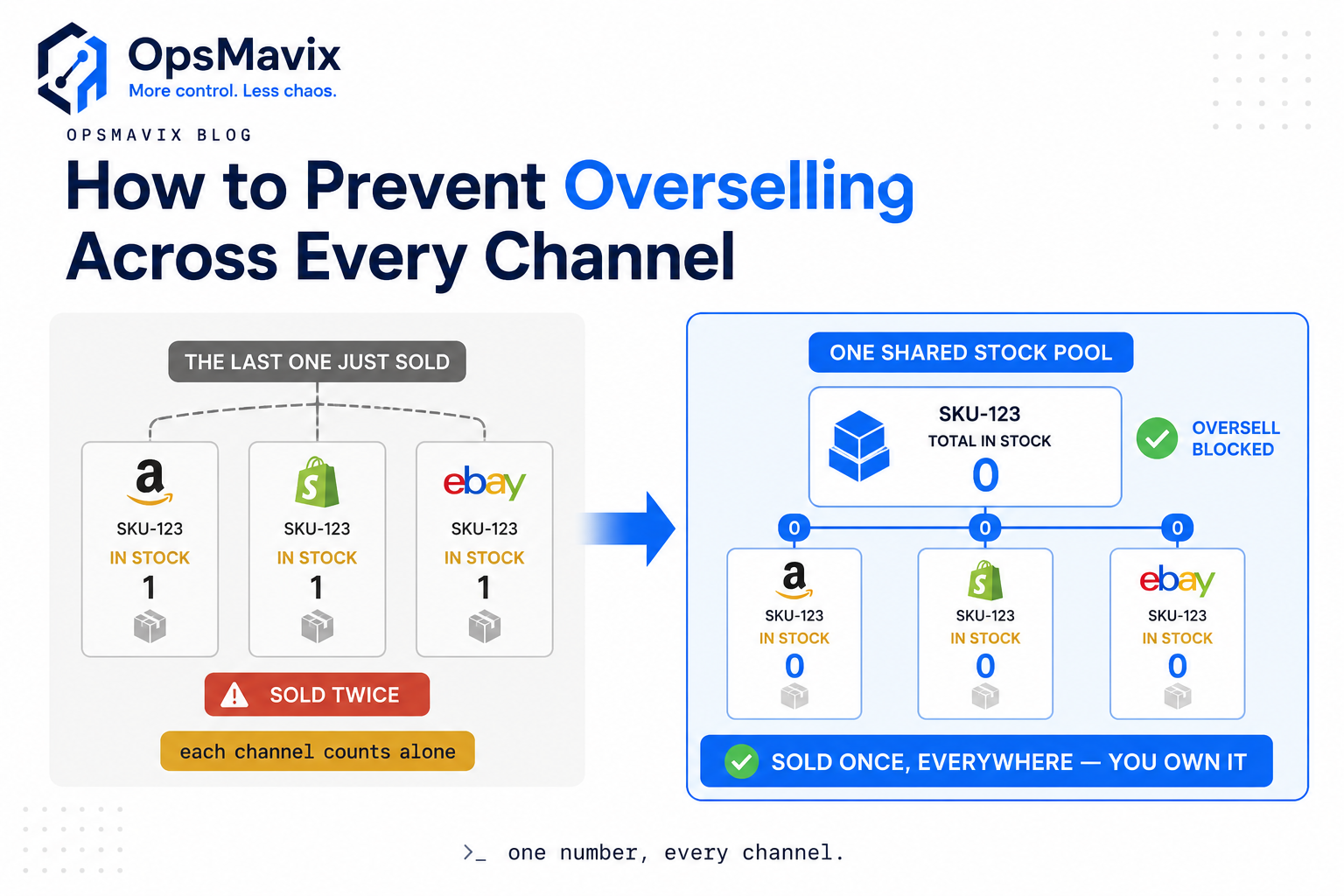
Here’s how to prevent overselling: every channel you sell on — Amazon, Shopify, eBay, Etsy — has to draw from one shared stock pool that updates the moment an order lands, not from separate counts you top up by hand. Overselling happens when two buyers on two different platforms both grab the last unit before either platform knows the other exists. The fix isn’t faster manual updates. It’s removing the gap where a stale number can be sold twice.
Most sellers discover this the hard way: a Saturday spike, three channels, one popular SKU, and by Monday you’re emailing two customers to say the thing they paid for isn’t coming. The apology costs you the margin, the review, and the repeat order. This is a timing problem before it’s an inventory problem, and timing problems get solved by architecture, not effort.
Key Takeaways
- One stock pool, not four. Overselling is almost always caused by each channel holding its own count. Merge them into a single source of truth and the double-sale window closes.
- Real-time sync beats scheduled sync. A feed that refreshes every 15 minutes still leaves a 15-minute window where the last unit sells twice. On fast movers, that window is where the damage lives.
- Buffers absorb the lag you can’t remove. A small safety buffer on high-velocity or thinly-stocked SKUs covers the seconds between a sale and the sync catching up.
- Bundles and multi-packs are silent oversell traps. If a kit and its components share physical stock but not a linked count, you’ll sell the same unit twice under two listing names.
- Your fastest sellers need the tightest rules. The 20% of SKUs that drive most orders are where overselling concentrates. Protect those first.
- Overselling is a trust cost, not just a refund cost. A cancelled order on Amazon dents your metrics in ways a refund total never shows.
Why Overselling Happens in the First Place
Overselling isn’t carelessness. It’s the predictable result of running multiple channels that each believe they own the stock.
Say you have 3 units of a SKU. Amazon shows 3. Shopify shows 3. eBay shows 3. That’s 9 units of promised availability against 3 real ones. The channels aren’t lying — they simply have no way to know a sale happened somewhere else until something tells them. Between that sale and that update, the number is fiction.
One inventory manager told us they’d “solved” overselling with a shared spreadsheet the team updated after each order. It held until a bank-holiday rush, when four orders for the same last-in-stock item came in across two marketplaces inside the same ten minutes. Nobody was slow. The system just had no way to reserve a unit the instant it sold. The spreadsheet was always describing the past.
That’s the core insight: manual syncing can only ever describe stock as it was, not as it is. The faster you sell, the wider that gap grows.
Build One Stock Pool Every Channel Reads From
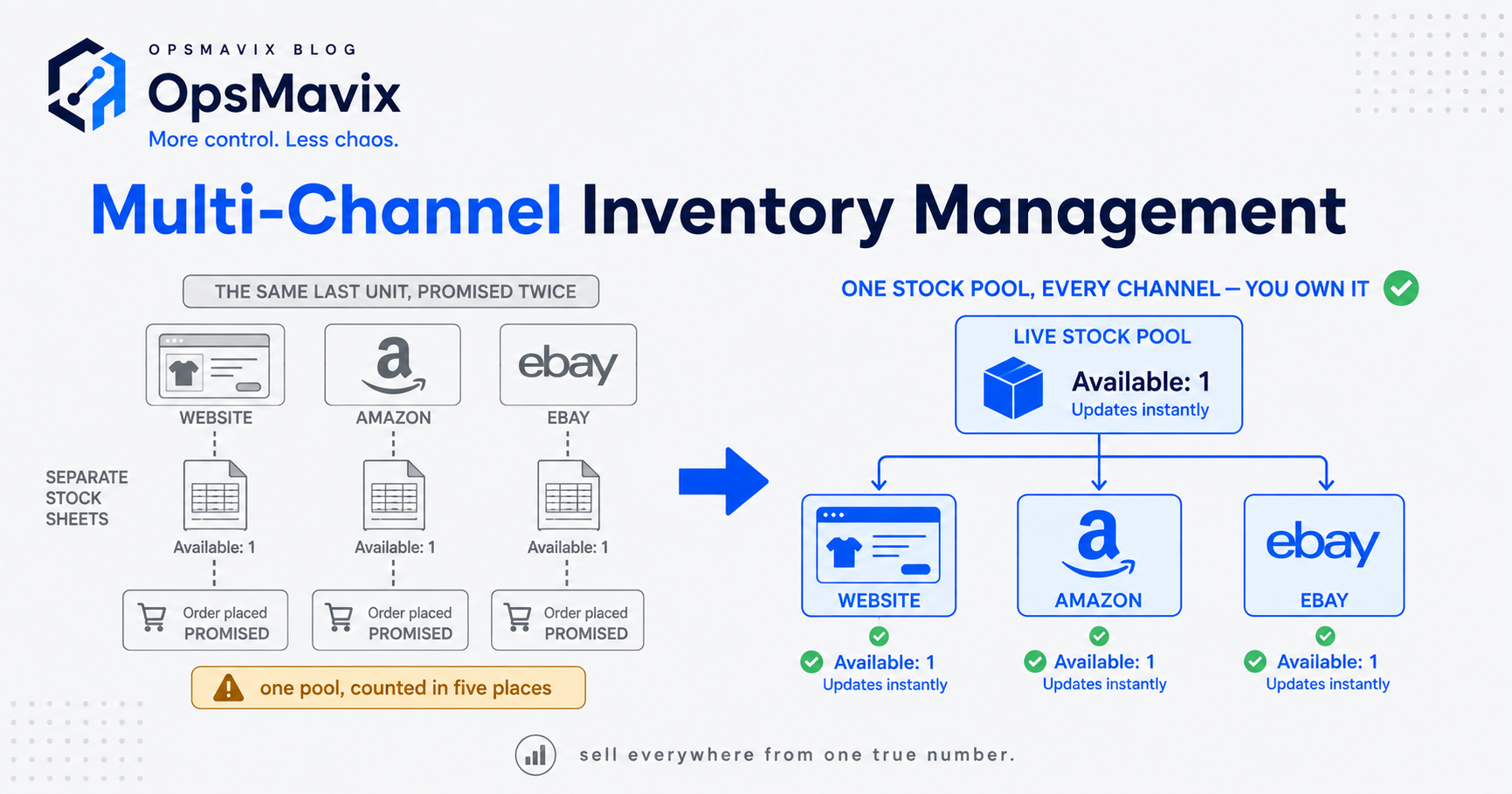
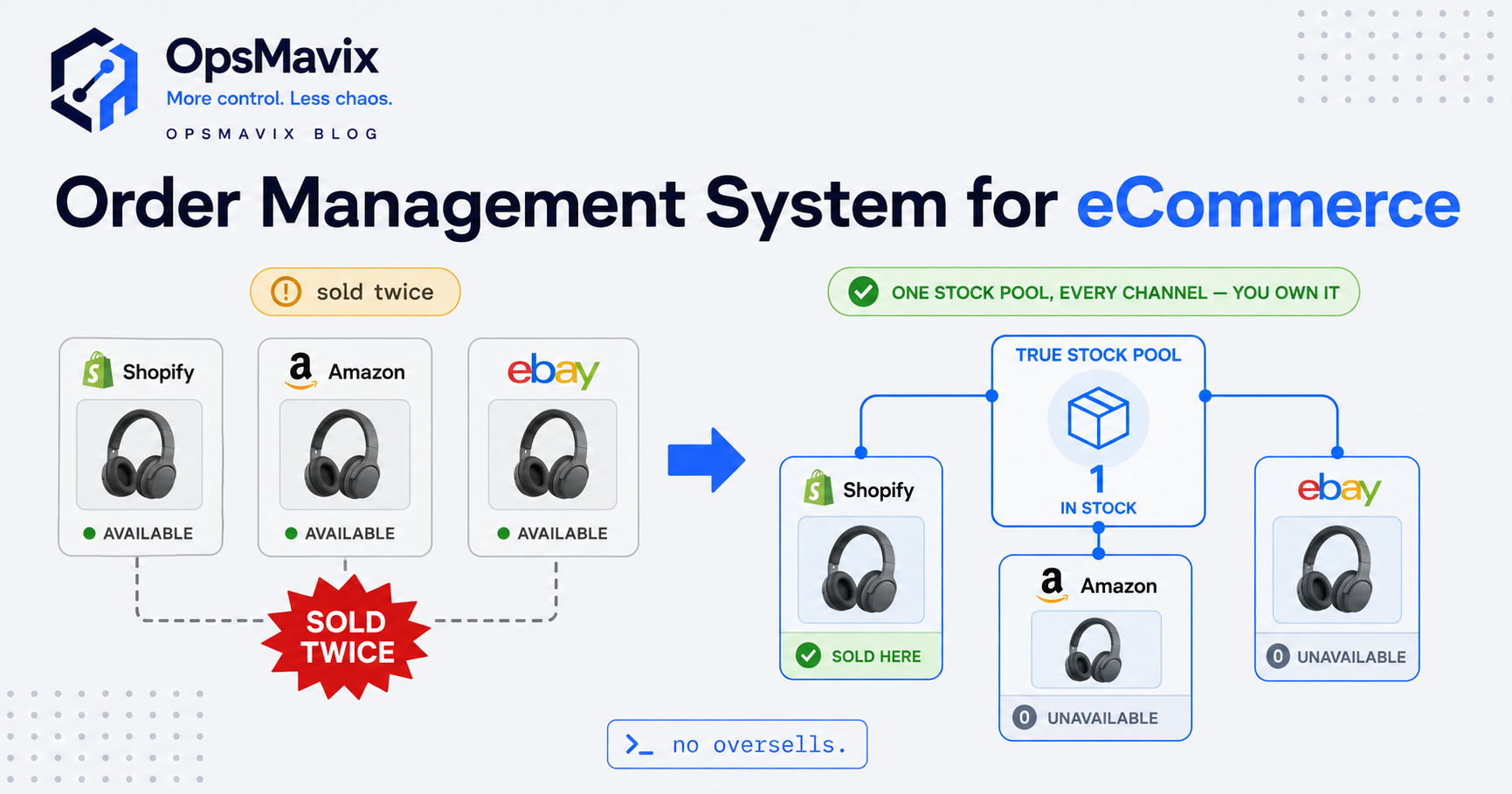
The single most effective way to prevent overselling is to stop each channel from counting independently. Instead, hold one master quantity per SKU and have every listing — Amazon, Shopify, eBay, Etsy — read from and write to that one number.
When a unit sells anywhere, the master count drops immediately, and every channel is pushed the new figure. Sell the last unit on eBay and Shopify, Amazon and Etsy all reflect zero before the next buyer can add it to a basket.
This is what people mean by a “single source of truth,” and it’s the difference between four systems arguing and one system deciding. If you’re building toward a fully automated inventory system, the shared pool is the foundation everything else sits on. Sync, buffers and reporting are all downstream of getting this one thing right.
A wholesale-and-DTC seller described the moment it clicked for them: they stopped thinking of Amazon stock and Shopify stock as separate piles and started thinking of it as one pile with several shop windows. The windows show the same shelf. Nobody’s shelf runs out of sync with itself.
Real-Time Sync Is What Actually Closes the Window
A shared pool only prevents overselling if updates travel fast. Scheduled syncs — every 15 minutes, every hour — reintroduce exactly the gap you’re trying to remove.
Here’s the maths that matters. If your top SKU sells every few minutes during a promotion and your sync runs every 15, you have a rolling 15-minute window in which the “last unit” is visible on three channels simultaneously. Slow sellers survive this. Your bestsellers don’t, because velocity and oversell risk are the same curve.
Real-time (event-driven) sync flips it: the sale triggers the update, rather than a clock. The instant an order confirms, the deduction and the push happen together. There’s no scheduled pause for a second buyer to slip through.
Where sellers get caught even with sync running:
- Bundles and multi-packs. A 3-pack listing and the single share the same physical units. If the bundle doesn’t decrement the components (and vice versa), each sells its own phantom stock. Link them or you’ll oversell one through the other.
- Marketplace lag you don’t control. Amazon and eBay update feeds on their own schedules. You can push instantly; they may take minutes to display it. Buffers cover this gap (next section).
- Returns and restocks re-entering the pool. A return that quietly adds stock back before it’s inspected can create availability that isn’t sellable yet.
If you’re seeing counts drift for reasons like these, it’s worth reading up on the common types of stock discrepancies — overselling is often the visible symptom of a count that was already wrong upstream.
Use Buffers to Absorb the Lag You Can’t Delete
Even perfect internal sync can’t force Amazon or eBay to redraw a listing in the same second you sell out. So you don’t rely on zero being reflected instantly. You stop selling before you hit zero.
A safety buffer holds back a small quantity from what channels can sell. Set a buffer of 2 on a SKU with 10 units, and channels show 8. The 2 held back absorb the handful of seconds (or minutes, on slow-feed marketplaces) between the real last sale and every channel catching up.
Buffers aren’t a blunt “hold 5 back on everything.” Tune them by risk:
- High-velocity SKUs get a slightly larger buffer — they’re where two-buyers-at-once actually happens.
- Thin stock (1–3 units) is where a single missed sync becomes an oversell, so the buffer matters most proportionally.
- Slow, deep-stocked lines barely need one. A buffer on 400 units of a slow mover just parks sellable stock for no reason.
The honest trade-off: buffers cost you a sliver of availability to buy certainty. Most sellers find that trade wildly favourable, because a cancelled order is far more expensive than briefly showing “out of stock” a couple of units early.
Count the Real Cost of Overselling
It’s tempting to price an oversell as “one refund.” It isn’t.
When you cancel an Amazon order you couldn’t fulfil, you take an order defect hit that can quietly suppress your Buy Box and ranking for weeks. On eBay, cancellations feed your seller metrics. On Shopify and Etsy, the cost is softer but real: the customer who was excited on Tuesday is telling people you’re unreliable by Friday.
Put a rough number on it. A £40 oversold order isn’t a £40 problem — it’s the refund admin, the support time, the lost repeat purchase, and a marketplace metric ding that can cost you far more than £40 in suppressed visibility on your best-selling line. Multiply by a busy weekend and the “small glitch” is a genuine leak.
Operators tell us the switch that changed their mindset was seeing overselling as a ranking and reputation cost, not a refund line. Once it’s framed that way, spending a little availability on buffers and a little effort on one stock pool stops being optional.
Build vs Buy vs Own the System
You’ve got three honest routes, and the right one depends on how tangled your operation already is.
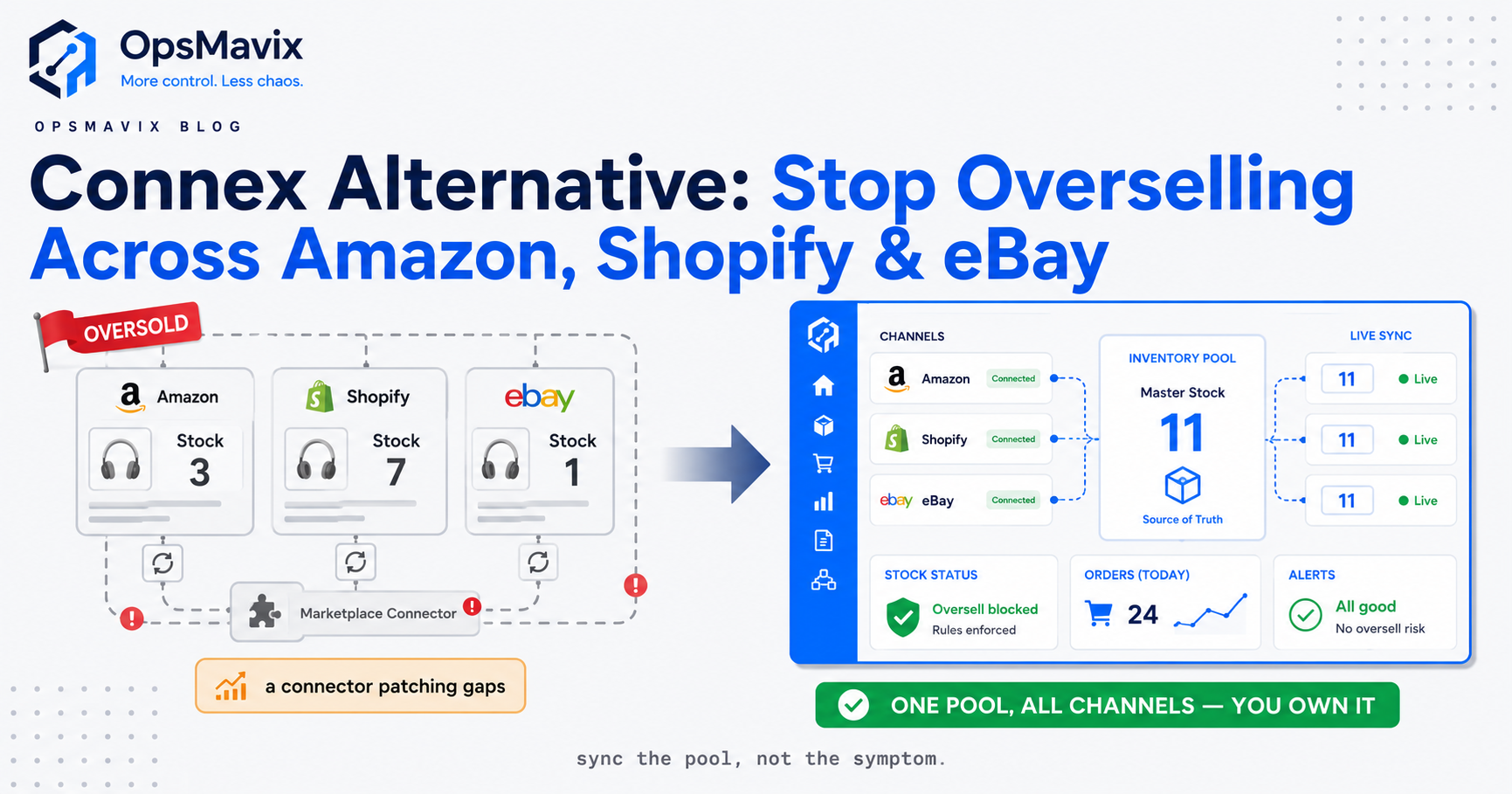
Off-the-shelf multichannel tools solve the core sync well and are the fastest start. If overselling is your only real problem and your workflow is standard, a connector may be all you need — start there. Their ceiling shows up when your stock lives in more than one place, when bundles and manufacturing feed the same pool, or when the tool’s rules don’t match how you actually pick, pack and reorder. You bend your operation to fit the box.
Spreadsheets and manual sync are where most sellers begin and where overselling is born. Once you’re multichannel and busy, they can’t keep up by design — they always describe the past.
One operations system you own is the right-sized middle when a connector isn’t enough but a full ERP is overkill. Your stock pool, sync rules, buffers, bundles, purchasing and reporting live in one place, shaped to how you run rather than how a vendor assumed you would. It’s not a cheaper clone of any one tool and it’s not an ERP — it’s the practical layer that fits between them, and you own it. If part of your stock is held with a fulfilment partner, the same single-pool thinking applies to running inventory through a 3PL.
Start with the smallest thing that closes the double-sale window: one stock pool, real-time sync, buffers on your fast movers. If your operation outgrows the box after that, you’ll know exactly which walls you’re hitting — and that’s the point where owning the system pays for itself.
Keep reading
Getting value from OpsMavix? Add us as a preferred source on Google — you'll see more of our operations content in your AI Overviews, AI Mode and Search.