
The Min/Max Inventory System: How It Works and When to Use It
A min/max inventory system sets two levels per line — a minimum that triggers a reorder and a maximum you top back up to. This guide covers the order-up-to-max formula with a worked example, how min/max compares to reorder point and EOQ, where the method breaks on demand swings and moving lead times, and how an owned system re-tunes the thresholds per SKU instead of leaving them to rot.
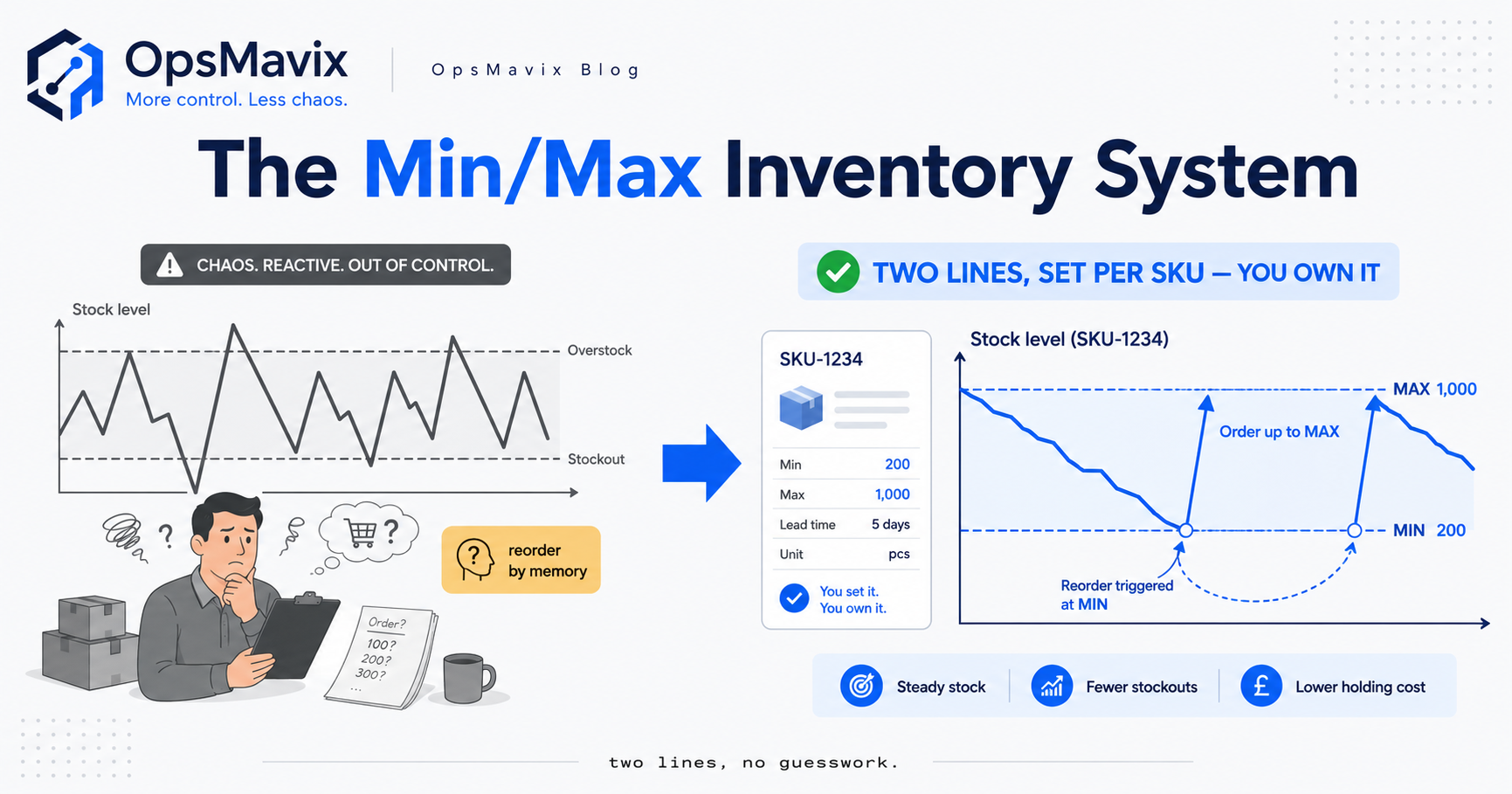
A min/max inventory system is a stock-control method that sets two levels for every line: a minimum (the stock level that triggers a reorder) and a maximum (the level you order back up to). When a line drops to or below its minimum, you buy enough to bring it up to the maximum — so the two thresholds do all the work, and nobody has to decide “should I order, and how much?” line by line.
It is one of the oldest and simplest replenishment rules in operations, which is exactly why it’s everywhere and why it quietly costs businesses money once they outgrow it. The method is easy to state and easy to run by hand on a short catalogue. The hard part — the part that decides whether it saves you money or freezes it — is setting the two numbers honestly and keeping them current as demand and lead times drift. This post covers both halves: the mechanics and the formula with a worked example, and the honest limits nobody puts on the box.
What a min/max inventory system actually is
Strip away the jargon and a min/max system is a pair of numbers attached to each stock line. The minimum is the floor — the point at which you have just enough left to cover demand while a new order arrives, so hitting it means “buy now”. The maximum is the ceiling — the most of that line you want sitting on the shelf, chosen so you’re not tying up cash or space in stock you won’t sell for months. Replenishment becomes a rule instead of a judgement call: watch the level, and when it touches the minimum, order back up to the maximum.
The appeal is that it removes two decisions at once. A plain reorder trigger tells you when to buy; min/max tells you when and how much, because the maximum defines the target and the gap between on-hand stock and that target is your order. That is why min/max is the default replenishment logic baked into most spreadsheets, basic warehouse management software, and the “reorder level / reorder quantity” fields in accounting packages. It is also, unhelpfully, often the only logic those tools offer — which is fine until your business stops being simple enough for it.
How the two thresholds work in practice
In day-to-day running the system sits idle most of the time. Stock arrives, sells down, and as long as it stays between the two lines nothing happens. The moment on-hand quantity crosses the minimum, the line flags for reorder. You (or the system) then place an order sized to lift stock back to the maximum, and the cycle repeats.
Two details decide whether it behaves. First, the minimum has to account for lead time — the full clock from placing the order to the stock being sellable on the shelf, not just the courier’s leg. If the minimum only covers a couple of days of sales but the supplier takes ten, the shelf empties long before the delivery lands. Second, the minimum usually needs a safety-stock buffer baked in, because demand and lead time both vary and the minimum is meant to survive the bad-luck case, not the average one. In effect, a well-set minimum is a reorder point — lead-time demand plus a buffer — which is why the two methods are close cousins, covered in full in the reorder point system guide.
The order-up-to-max formula, with a worked example
The maths behind min/max is deliberately light. The trigger is a comparison, and the quantity is a subtraction:
Order quantity = Maximum level − stock currently on hand (placed when stock hits or falls below the minimum).
Because you only order up to the maximum, this is sometimes called an order-up-to or (s, S) policy in inventory theory — s is the minimum, S is the maximum, and you refill to S whenever you drop to s (reorder point is the same idea seen from the trigger side). Here is a worked example with illustrative numbers — the method is what transfers to your own lines.
Take a single SKU that sells an average of 20 units a day. Its supplier’s honest lead time — order placed to shelf-ready — averages 7 days. On a busy week the line has hit 32 units a day, and the supplier has slipped to 11 days at his worst.
- Lead-time demand: 20 × 7 = 140 units — what you’ll sell during a normal wait.
- Safety stock (max-minus-average method): (32 × 11) − (20 × 7) = 352 − 140 = 212 units — the cushion for busy days landing on a slow delivery. The reasoning behind this buffer is set out in the safety stock calculation guide.
- Minimum = lead-time demand + safety stock = 140 + 212 = 352 units. This is the reorder trigger, worked exactly as you would in how to calculate reorder point.
Now the maximum. A common approach is to add a sensible order cycle of cover on top of the minimum — say you want to place roughly one order a fortnight, so you carry about 14 days of average demand as your working (cycle) stock: 20 × 14 = 280 units. Set the maximum = minimum + cycle stock = 352 + 280 = 632 units.
Put it together. When the line drops to 352 on hand, you order up to 632, so the order quantity is 632 − 352 = 280 units. If a big order had already dragged stock down to 300 before you checked, you’d order 632 − 300 = 332 units instead — the subtraction self-corrects for how far you overshot the trigger. Same two thresholds, order size adjusts to reality.
How to set the min and the max per SKU
The formula is the easy 20%. Setting the two numbers honestly, per line, is the 80% that decides the outcome. The minimum is driven by average daily usage, honest lead time, and variability — the three inputs any reorder point needs, and each is a place people go wrong. Usage pulled from an unrepresentative window (a promotion, a dead patch) sizes the floor for a day that never repeats; lead time measured as “how long the courier takes” rather than the full order-to-shelf clock sets the minimum too low so it fires too late; and a blanket safety buffer over-protects steady lines while under-protecting the volatile ones.
The maximum is a commercial decision as much as a maths one. Push it high and you order less often but freeze more cash and risk the surplus ageing into dead stock; pull it low and you order constantly, paying the ordering cost over and over. The sensible maximum balances how much you’re willing to hold against how often you want to buy — the same trade-off economic order quantity tries to optimise, and one reason a flat “add two weeks of cover” rule leaves money on the table across lines with very different value and demand. High-value or fast-moving lines deserve a tighter maximum than the long tail, which is where a simple ABC analysis earns its keep: set the top 20% carefully, use a rougher rule for the rest.
Min/max vs reorder point vs EOQ
These three get muddled constantly because they overlap, but they answer different questions.
| Method | Answers | Order quantity | Best for |
|---|---|---|---|
| Reorder point | When to order | Not specified — a separate decision | Any line where you want a clean trigger |
| Min/max | When and how much (up to a ceiling) | Maximum − on-hand | Steady lines you want on autopilot |
| EOQ | How much per order, cost-optimally | Fixed economic quantity | Lines with known, stable demand and clear order/holding costs |
Reorder point is just the trigger — the minimum, essentially. It tells you when to buy but says nothing about quantity, so it’s often paired with a fixed order quantity or with EOQ. Min/max wraps a trigger and a quantity together: the minimum is the reorder point, and “order up to max” supplies the quantity for free. Economic order quantity (EOQ) ignores timing entirely and instead solves for the order size that minimises the combined cost of ordering and holding stock; its classic form is Q* = √(2DK/h), where D is annual demand, K is the fixed cost per order, and h is the annual holding cost per unit (Wikipedia: Economic order quantity).
The practical relationship: use a reorder point (or a min) to decide when, and EOQ to decide how much — and min/max is the shortcut that bolts a rough version of both together with two numbers and a subtraction. Min/max trades EOQ’s cost-optimality for simplicity. That trade is fine on a small, steady catalogue and expensive on a large or volatile one, where the difference between a tuned order quantity and “top up to a round number” adds up across hundreds of lines.
Where min/max breaks: demand swings and moving lead times
Here is the honest catch, and it’s the same disease that kills any static rule. Min/max works on one assumption: that the past is a fair guide to the near future, so the two numbers you set stay roughly right. When that assumption holds, the method is quietly excellent. When it doesn’t, min/max fails silently — the thresholds don’t move, so nothing tells you they’ve gone wrong.
Demand swings are the first failure. Set a minimum off a quiet month and then run into a season, a promotion, or an erratic run of B2B orders, and the floor is now too low: it fires late and you stock out on your best lines at the worst time. Set it off a peak and the minimum is too high all through the quiet months, hoarding cash in stock that isn’t moving — the seed of a slow-moving inventory problem. A fixed pair of numbers cannot tell the difference between “December” and “February”; it treats every week as the week you set it.
Moving lead times are the second, and quieter. A supplier who took 7 days when you set the minimum drifts to 12 over a lean year, and every minimum built on the old figure is now too small — you’ll stock out on a schedule you can’t see, because the number on the screen still looks fine. Nothing in a plain min/max system watches lead time and re-tunes the floor when it moves.
The third failure is simply scale. Doing the per-line maths honestly is manageable for fifty lines and impossible for five thousand — so people set the numbers once, or copy a blanket figure across everything, and the thresholds rot between reviews. Min/max didn’t fail; the maintenance did. The effect on the shelf is identical: stockouts on one side, dead cash on the other, and the classic swing of losing sales one month and drowning in surplus the next.
When min/max is genuinely the right tool
None of that makes min/max wrong — it makes it a tool with a job. If a line has slow, steady demand — much the same handful of units every week — from a supplier whose lead time barely moves, a min/max pair you set once and check occasionally genuinely works. Nothing is drifting, so the numbers stay roughly right, and you shouldn’t buy software to manage a problem you don’t have. Plenty of consumable, MRO, and long-tail lines fit this exactly, which is why min/max has survived for decades.
It stops being enough at three points — worth naming because each is a signal to change tools, not push harder: when demand swings, when lead times move so last quarter’s floor is silently wrong, and — most commonly — when you have too many lines to re-tune by hand. Past those points the numbers rot between reviews, and the only real fix is a system that reads live stock and recalculates the thresholds itself.
How an owned system sets and adjusts min/max automatically
Once per-line maintenance outgrows a person, the fix isn’t a bigger spreadsheet — it’s a system that does the noticing for you. Instead of someone re-checking hundreds of lines and reacting late, it watches every line’s live quantity against its minimum and, the moment one drops through, either raises the alert or drafts the purchase order up to the current maximum. More importantly, it doesn’t leave the thresholds frozen: it recalculates the minimum from recent real sales and each supplier’s actual recent lead time, so the floor tracks a season instead of missing it, and adjusts the maximum as a line’s value and velocity change rather than carrying a stale “two weeks of everything” rule.
That’s the difference between min/max as a static rule and min/max as a living control. The numbers mean exactly what this post described — the maths doesn’t change — but they’re re-tuned continuously so they’re honest in peak season, not just on the day someone typed them in. Built around your own setup, the alert also knows more than “you’re low”: the right supplier, their real lead time, the quantity to order up to, and any minimum-order or price-break to hit while buying. That is what a right-sized inventory automation system is built to handle — the middle ground for a business that has outgrown spreadsheets and disconnected tools, tied into the wider operations control system so the reorder, the PO, and the goods-in speak to each other instead of living in separate tabs.
FAQ
What is a min/max inventory system?
It’s a stock-control method that holds two levels for each line: a minimum that triggers a reorder and a maximum you order back up to. When on-hand stock falls to or below the minimum, you buy enough to lift it to the maximum. The two thresholds decide both when to order and how much, so replenishment runs as a rule instead of a judgement call each time.
How do you calculate the order quantity in a min/max system?
Order quantity = maximum level − stock currently on hand, placed when the line hits or drops below its minimum. If a line’s maximum is 632 units and it’s sitting at 352 when it triggers, you order 280; if a big sale had dragged it to 300, you’d order 332. The subtraction self-corrects for how far past the trigger you overshot.
What’s the difference between min/max and reorder point?
A reorder point only answers when to order — it’s essentially the minimum on its own. Min/max adds the how much: the maximum is the refill target, so “order up to max” supplies the quantity automatically. In practice a well-set minimum is a reorder point, and min/max is a reorder point with a ceiling bolted on to size the order.
When does a min/max system stop working?
When demand swings (seasonality, promotions, erratic B2B orders), when supplier lead times drift so last quarter’s minimum is silently too small, or when you have too many lines to re-tune by hand. In all three cases the two fixed numbers stop matching reality and fail quietly — the fix is a system that reads live stock and recalculates the thresholds itself rather than leaving them frozen.
How OpsMavix can help
The min/max method on this page is the easy part — you can set two numbers per line in a spreadsheet this afternoon. What OpsMavix builds is the part that keeps them true after the spreadsheet would have gone stale: owned inventory systems, for businesses stuck between spreadsheets and a full ERP, that hold a live minimum and maximum per SKU. Minimums recalculated from your real sales and each supplier’s honest lead time, maximums sized to a line’s value and velocity rather than a blanket rule, safety stock set to how much each line actually varies — re-tuned as seasons and suppliers drift, firing the alert or draft PO before you run out, grouped by supplier, owned outright with nothing a vendor can switch off.
If you’re stocking out on your sellers one month and staring at stock that won’t shift the next, that swing is a min/max nobody’s had time to maintain — leaking money from both ends. Book a Free Operations Leak Audit.
Sources
Keep reading
Getting value from OpsMavix? Add us as a preferred source on Google — you'll see more of our operations content in your AI Overviews, AI Mode and Search.