
Product Kitting Software: How to Sell Bundles Without Losing Your Stock Count
Product kitting software assembles individual component SKUs into sellable kits or bundles and calculates kit availability from the shared component pool. It stops the overselling and stock drift that spreadsheets create when the same part lives in several bundles at once.
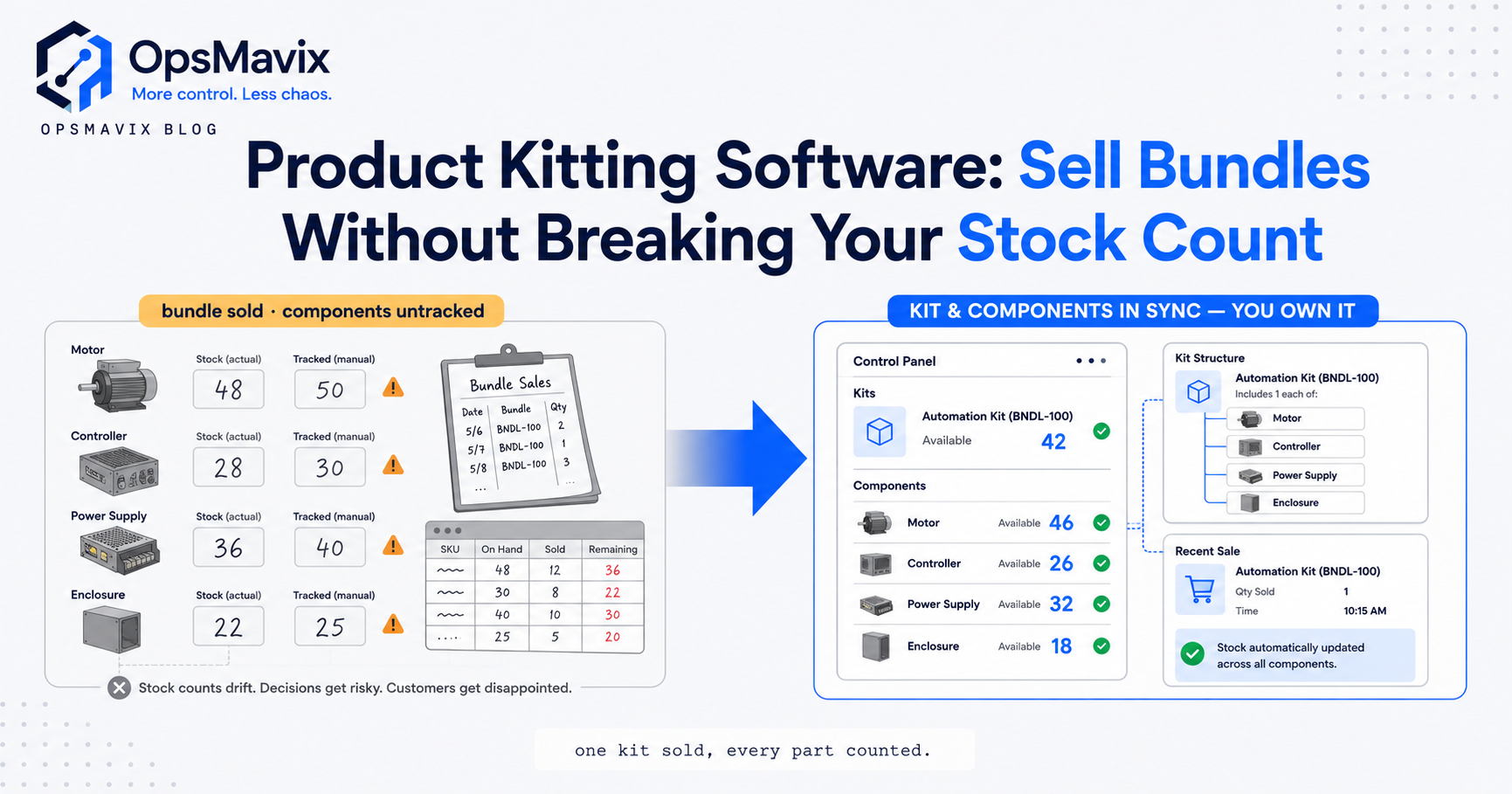
Product kitting software assembles individual component SKUs into a single sellable kit or bundle and keeps the stock maths honest, so when someone buys the “Starter Bundle” the system knows exactly how many of each component that consumes and how many bundles you can still sell. That last part is where most operations quietly break: the same box of screws sits inside four different kits, and nothing tells you the real availability until you have already oversold.
If you sell products in packs, gift sets, seasonal boxes, or “buy these three together” bundles, kitting is the layer that decides whether your stock figures mean anything. Get it right and every channel shows a truthful number. Get it wrong and you are refunding customers for components you never actually had.
Key Takeaways
- Kitting is pack-for-sale, not manufacturing. A kit is a sellable grouping of existing SKUs; the components stay real stock items you can also sell on their own.
- Kit availability is a calculation, not a count. Sellable kits equal the lowest number your scarcest component allows, recomputed every time any component moves.
- The shared-component trap is the whole problem. When one SKU lives in several kits, spreadsheets double-count it and you oversell across bundles.
- Assembled vs on-demand changes everything. Pre-built kits hold their own stock; virtual kits are assembled at pick time. The maths and the pick list differ.
- Kitting is not a bill of materials. A BOM is a manufacturing recipe that consumes parts into a new made item; kitting bundles finished goods for fulfilment.
- Channels need the kit number, not the component number. Your website, marketplaces, and warehouse must all read from one availability figure or you are back to overselling.
What Product Kitting Software Actually Does
At its core, kitting software lets you define a parent SKU (the kit) made up of child SKUs (the components) with a quantity for each. A “Camping Starter Kit” might be one tent, two sleeping bags, and one gas stove. The software then does three jobs spreadsheets cannot do reliably: it calculates how many kits are sellable from current component stock, it decrements the right components when a kit sells, and it exposes a single availability figure to every sales channel.
The important shift is that the kit is not a thing you count on a shelf (unless you choose to pre-build it). It is a promise the system can keep only if the components exist. Good kitting software treats availability as a live calculation, not a static number typed into a stock field.
The Stock Maths: Component Availability vs Kit Availability
This is the part operators get burned on. Say your bundle needs one of Component A, two of Component B, and one of Component C. You have 40 of A, 30 of B, and 12 of C. How many kits can you sell?
You divide each component’s free stock by how many the kit needs, then take the smallest result. A gives you 40. B gives you 15 (30 divided by 2). C gives you 12. So you can sell 12 kits — capped by C. Sell one kit and everything recalculates: A drops to 39, B to 28, C to 11, and sellable kits drop to 11.
Now add the trap. Component C also sits inside two other bundles you sell. Every one of those bundles is competing for the same 12 units of C. A spreadsheet showing “12 available” next to three different kits is lying three times over. Proper product kitting software nets that shared pool across every kit that uses it, so the three bundles together can never promise more C than exists.
Assembled Kits vs Virtual (On-Demand) Kits
There are two ways to run kitting, and choosing wrong makes the warehouse miserable.
Assembled (pre-built) kits are put together in advance and stored as their own physical unit. You physically make 50 gift boxes, they get their own location, and they are picked as one item. Fast to pick, but you have committed components into boxes you cannot easily sell separately, and your stock is now split between “loose” and “in a kit.”
Virtual (on-demand) kits exist only as a definition. Nothing is pre-built. When an order lands, the system explodes the kit into its components and the picker collects each one. No stock is committed early, components stay fully flexible, but every kit order means a multi-line pick and pack.
Most growing businesses want virtual kitting for flexibility and only pre-build the handful of high-volume bundles where pick speed matters. The software should let you run both models side by side and still give one honest availability number for each.
Why Kitting Is Not a Bill of Materials
People conflate these constantly, and it causes real design mistakes. A bill of materials is a manufacturing recipe: raw components are consumed and transformed into a new item that did not exist before. Flour, sugar and eggs become a cake, and you cannot get the eggs back.
Kitting is different. The components in a kit are finished, sellable goods that keep their own identity. You are grouping them for sale and fulfilment, not transforming them. Un-kit a bundle and you have your components back on the shelf. That distinction changes how stock is valued, how it is picked, and how availability is reported.
Treat a kit like a BOM and you will over-engineer the workflow. Treat a manufactured product like a kit and your stock valuation will be wrong.
What Kitting Does to Your Pick and Pack
Kitting decisions land hardest in the warehouse. A virtual kit turns one order line into several pick locations, so slotting matters: if a kit’s components are scattered across the building, every bundle order becomes a marathon. This is exactly where warehouse slotting software pays off — putting frequently-kitted components near each other cuts the pick path.
Pre-built kits move the labour earlier: you batch-assemble during quiet hours instead of scrambling per order. The trade-off is forecasting. Build too many and you have stranded stock locked inside boxes; build too few and you are un-boxing during a rush.
Good software also handles the ugly edge cases: partial kits when one component is out, substitution rules, and packaging or insert SKUs (the branded box itself is often a component you forget to stock). Operators will tell you the forgotten insert or gift bag is a surprisingly common cause of a bundle order stalling at the pack bench.
Getting One Honest Number Across Every Channel
The whole point of kitting software is that your website, your marketplaces, and your warehouse read from the same availability figure. Sell a kit on Amazon and the component pool drops everywhere at once, so the loose-component listing on your own site updates too. Sell a loose component and every kit that uses it recalculates.
This only works when kitting is not a bolt-on but part of your core inventory logic. A bundle plugin on the storefront that does not talk to the warehouse is how you get the classic failure: the site says “in stock,” the shelf says otherwise. Real kitting lives inside a fully automated inventory system where every channel and every kit share one source of truth.
The before-and-after is stark. Before: a spreadsheet per bundle, a person manually reconciling shared components on Friday, and a monthly refund pile from oversells. After: one availability number that is right by construction, and the Friday reconciliation job simply disappears.
Build, Buy, or Own Your System
Off-the-shelf kitting features inside a storefront or a mid-market inventory tool are genuinely fine if your bundles are simple and your channels are few. If you sell a handful of fixed kits through one shop, buy the plugin and move on — do not over-build.
The ceiling shows up when kitting collides with your reality: shared components across dozens of overlapping bundles, mixed virtual and pre-built models, seasonal SKUs, packaging components, and three or four sales channels that all need the truth at once. That is the point where bolt-on tools start fighting each other and someone ends up back in a spreadsheet reconciling by hand.
OpsMavix sits in that middle ground — not a plugin, not a full ERP you will spend two years configuring, but an operations system shaped to how your bundles and stock actually behave. The honest answer is that most businesses should start with what they have and only move when the manual reconciliation and the oversells start costing real money and real weekends. When they do, the fix is a system that treats kit availability as a first-class calculation rather than a number someone remembers to update.
If your bundles are quietly eating your stock accuracy, that is the leak worth closing first.
Keep reading
Getting value from OpsMavix? Add us as a preferred source on Google — you'll see more of our operations content in your AI Overviews, AI Mode and Search.