
How Does Inventory Management Software Work: A Plain Walkthrough
How does inventory management software work? This walkthrough follows the actual data flow (receipts, SKUs, stock moves, reorder points and reporting) instead of reciting a feature list, then shows where a growing firm's spreadsheet breaks. If you're outgrowing spreadsheets and disconnected tools, it explains the owned-system middle ground and when it's the right call.
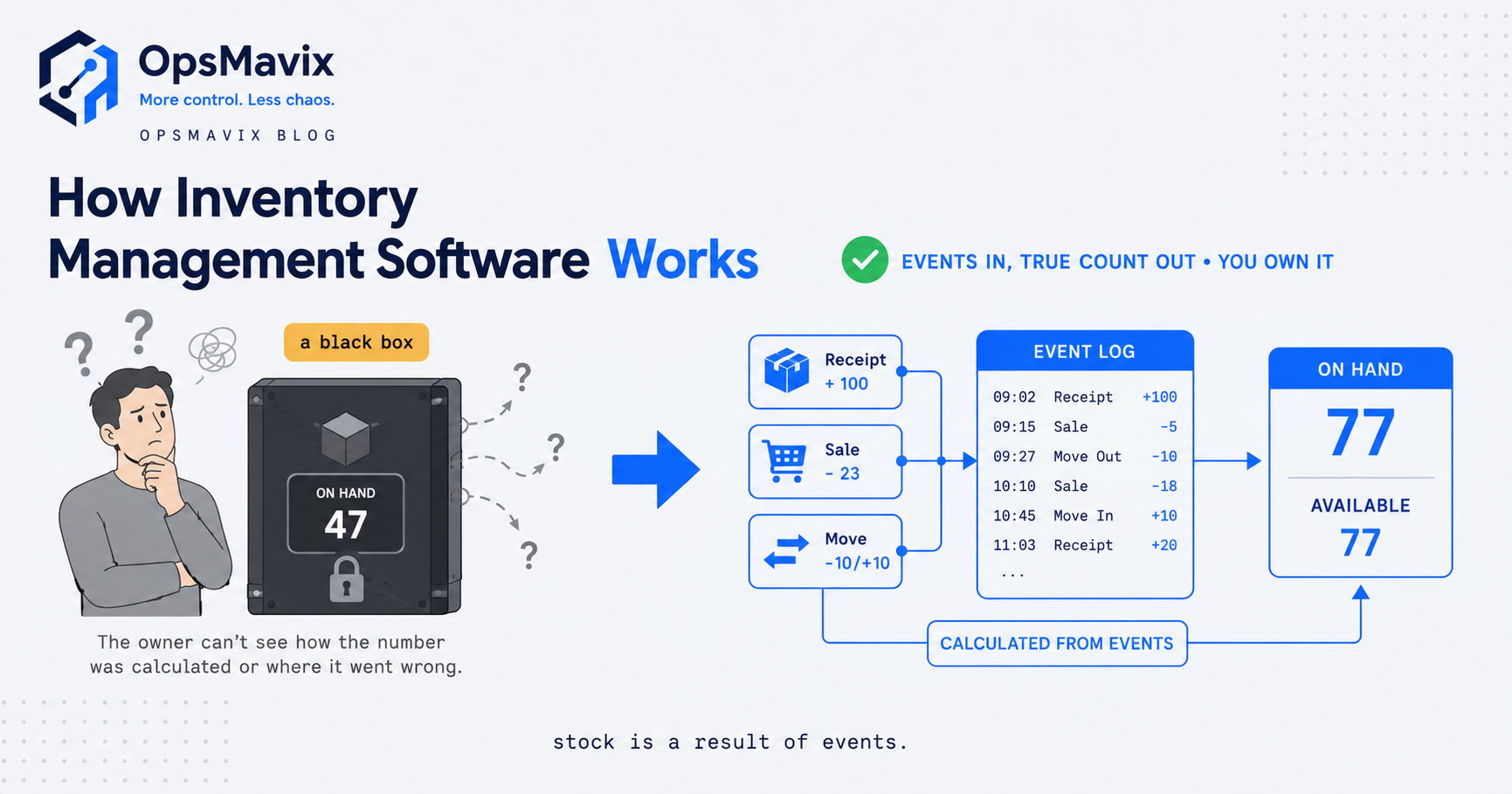
How does inventory management software work? At its core it keeps one running record of every item you hold, and updates that record automatically every time stock moves: when a delivery arrives, when a sale ships, when something gets picked, transferred, counted or returned. Each of those events is a small entry against a product code, and the software’s whole job is to catch every entry, keep the running total correct, and let anyone who needs it read the same current number. That’s the mechanism underneath the category. The dashboards, the alerts, the forecasting all sit on top of that one habit: record each movement once, keep the count live.
Most “how it works” pages skip the mechanism and hand you a feature list instead, which tells you what the software has but not what it does with your goods. So this walkthrough follows the actual data flow, from a receipt at goods-in to a reorder that fires on its own, and shows the exact point where a growing business’s spreadsheet stops keeping up. If you already know you need something better than a shared sheet, the useful question isn’t “what features exist” but “how does the data actually move, and which version of that is right-sized for me.”
How Inventory Management Software Works: The Data Flow
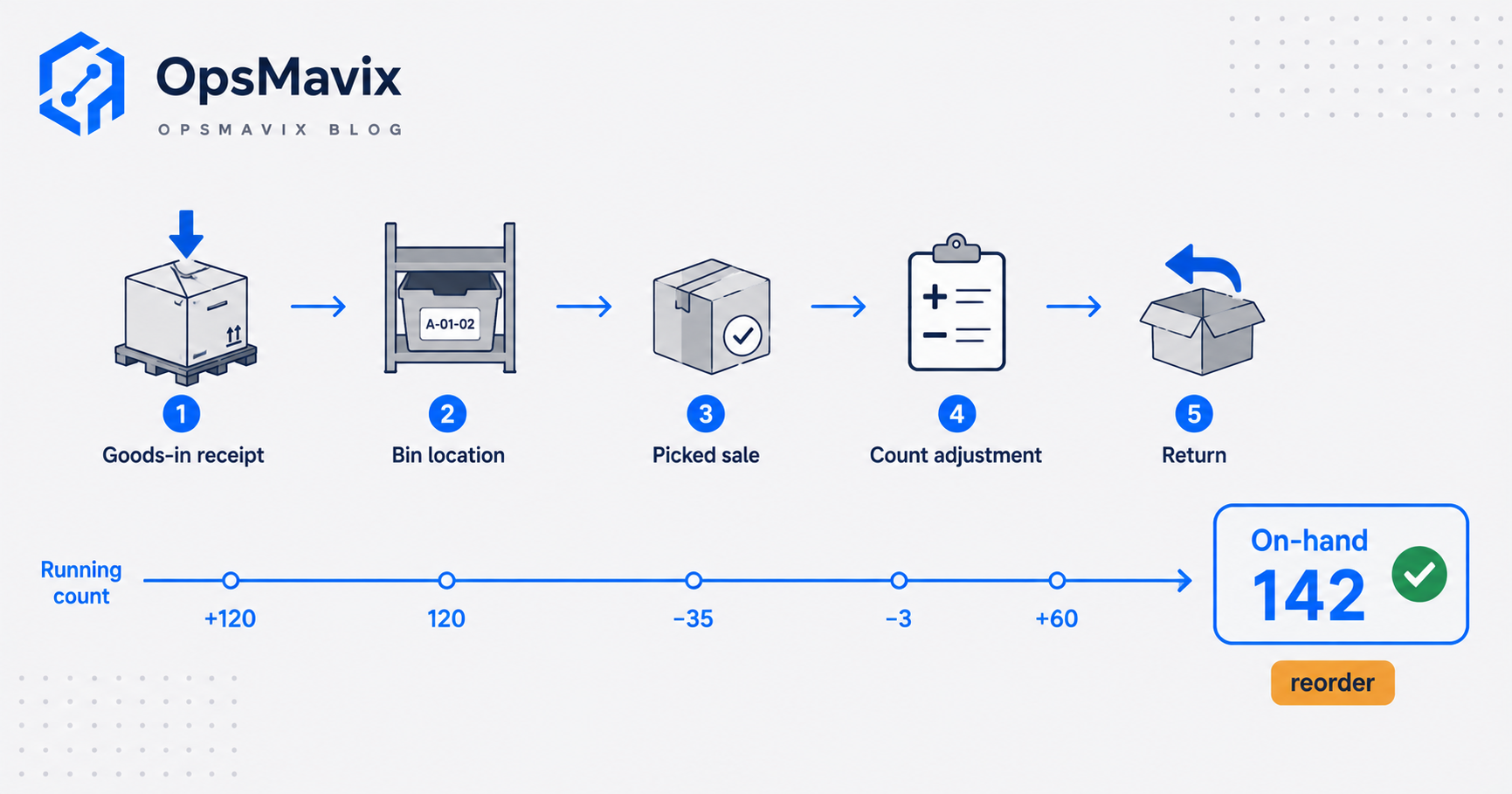
Picture a single crate of stock and follow it. It arrives on a pallet at your back door. Someone books it in, and the software adds those units to the on-hand figure for that product. The crate sits in a bin location, and the record knows where. An order comes in, someone picks from the crate, and the software subtracts the picked units the moment the pick is confirmed. A monthly count spots two units missing, and the record is corrected with an adjustment. A customer sends one back, and it goes back on. Nobody has re-typed a total at any stage. Each event nudged the same running number.
That is the difference between software that works and a document that stores numbers. A spreadsheet holds a figure you typed; inventory software holds a figure that is the sum of every movement it has recorded. This approach has a name in accounting and warehousing: a perpetual inventory system, defined as one where stock quantity and availability are updated on a continuous, real-time basis as a function of doing business, rather than counted from scratch at set intervals. The older way (count everything periodically, trust the number until the next count) is exactly what a spreadsheet quietly recreates, and it drifts the moment reality moves faster than your typing.
So the real work the software does breaks into three plain jobs:
- It captures every movement once, at the point it happens, and treats that entry as the truth.
- It keeps the running on-hand and available figures correct for every product, in every location, without re-keying.
- It lets every function read the same current number so sales, buying and the warehouse stop working off separate copies.
Everything else is built on those three. Get them right and the count is trustworthy. Get them wrong and no report saves you, because you are summarising numbers that were already stale when they were written down.
The Building Blocks: SKUs, Receipts and Stock Moves
Three concepts do most of the work. Once they click, the whole system reads as obvious.
The SKU. A stock keeping unit is the unique code that identifies one specific, sellable thing: not “t-shirts” but “navy t-shirt, size medium.” A SKU is a distinct type of item for sale, purchase, or tracking in inventory, and, unlike a barcode standard shared across the whole retail world, it is specific to your business and set up however you choose. The SKU is the hook every movement hangs off. If two genuinely different items share a code, or the same item carries two codes, every count downstream is wrong, so the SKU list is the foundation the rest of the system stands on.
The receipt (goods-in). When a supplier delivery lands, someone books it in against a purchase order: this many units of this SKU, into this location. That receipt is the “in” side of the ledger. Done properly it also flags a short delivery (you ordered 100, 90 came) so the gap is caught at the door rather than discovered weeks later when a picker finds an empty shelf. The receipt is where trustworthy stock begins, because a count is only ever as good as the honesty of what went in.
The stock move. Every other event is a movement of units against a SKU: a pick that subtracts on dispatch, a transfer between locations, a positive or negative adjustment after a count, a return that adds back. The discipline that makes it work is simple and strict: every stock movement, receipts, picks, transfers, returns, is recorded in the software. Miss one and the running total silently goes wrong. Capture them all and the on-hand figure stays true on its own. This is the exact discipline that a fully automated inventory system is built to enforce, so the movements get recorded by scans and events rather than by someone remembering to update a sheet.
Reorder Points and Reporting: What the Live Count Buys You
A trustworthy live count is not the goal in itself. It is what makes the two things you actually want possible: automatic replenishment and reporting you can act on.
Reorder points. A reorder point is the stock level at which the software should tell you (or tell the purchase system) to buy more, set so the new delivery lands before you run dry. The standard formula is plain: reorder level equals average daily usage multiplied by lead time, plus safety stock. In words: how fast the item sells, times how long the supplier takes, plus a cushion for the days both go against you. The software watches the live count fall toward that number and flags replenishment automatically. A spreadsheet can hold the formula, but it cannot watch, so someone has to remember to look, for every SKU, before it runs out. That remembering is where stockouts are born.
Reporting. Once movements are captured and the count is live, reporting is almost free, because the numbers already exist. You can see what is selling and what is dead, what is trapped as cash on a shelf, which supplier runs late, where your stock value sits today rather than at the last stocktake. This is what an inventory management dashboard surfaces: not new data, but a clear window onto the running records the system already keeps. The dashboard is downstream of the discipline. If the movements are captured honestly, the report is real. If they are not, the report is a tidy-looking lie, which is more dangerous than no report at all.
The Blind Spot It Fixes: Where the Spreadsheet Breaks
A spreadsheet is a genuinely good tool, and plenty of small businesses run on one for years without pain. It breaks at a specific, predictable point, and knowing that point matters more than any feature comparison.
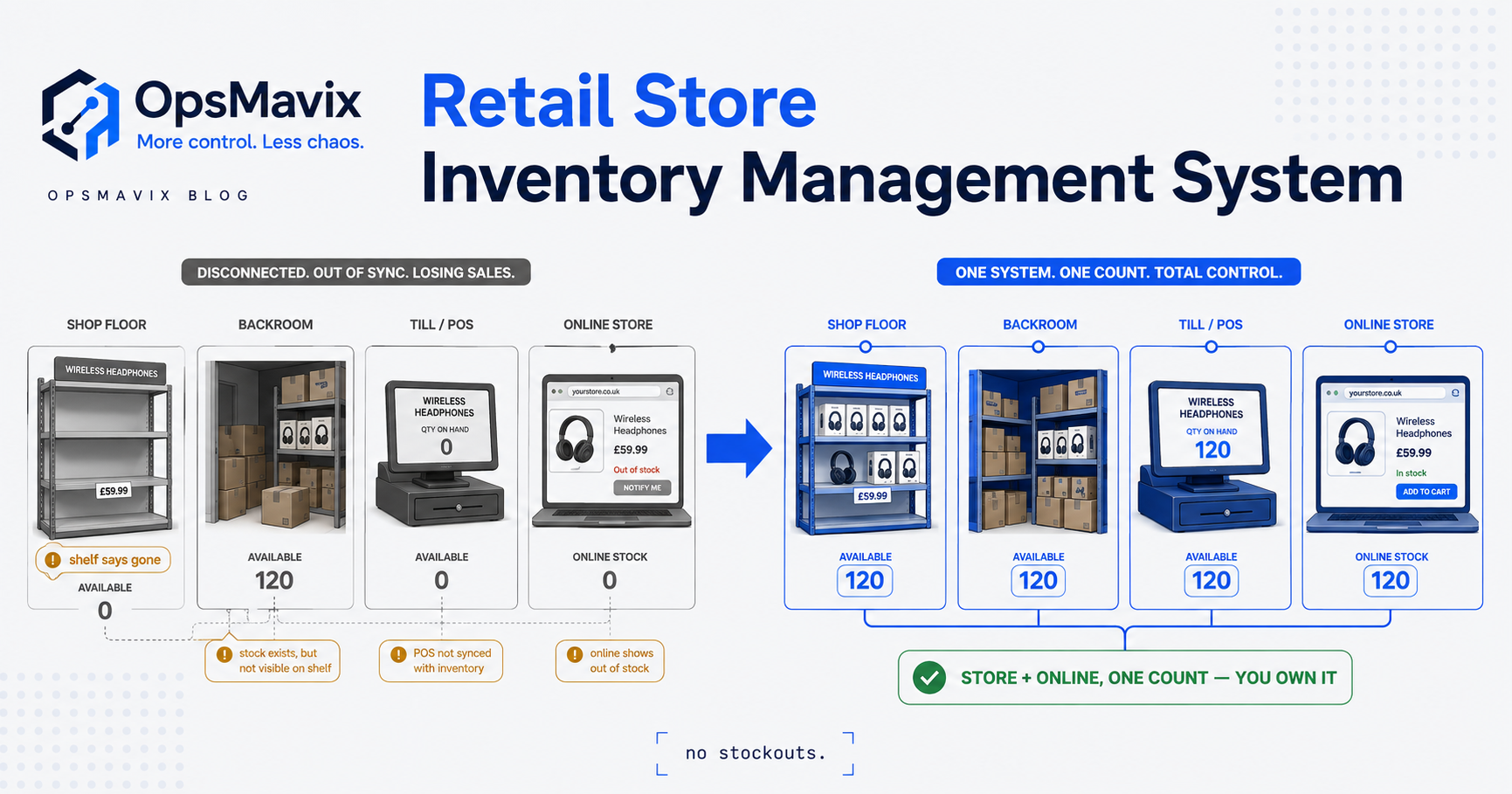
The break is not the size of the sheet. It is the number of hands and channels touching the same stock at the same time. One person, one sales channel, low volume: a sheet is fine, because there is only ever one version of the truth and one editor. Add a second salesperson taking phone orders, a website drawing from the same stock, a warehouse picking against a printout, and a bookkeeper reconciling last month, and the sheet now has four editors and no referee. Two of them sell the last unit within the same hour. The website says “in stock” because it synced last night. The count that was right on Monday is fiction by Wednesday, and nobody typed a wrong number: they typed correct numbers at different times, into copies that never met.
That is the blind spot. A spreadsheet stores a figure; it does not watch movements, it does not enforce that each event is recorded once, and it cannot show two people the same live number at the same moment. So the failures are always the same shortlist: overselling stock you do not have, dead stock nobody noticed because it never triggered a review, stockouts on your best lines because no one clocked the reorder point in time, and hours lost every week to manual counts and reconciliations that only exist to patch a count you cannot trust. None of these are the fault of careless staff. They are the structural limit of asking a document to do a ledger’s job.
Generic Tool vs Full ERP vs Owned System
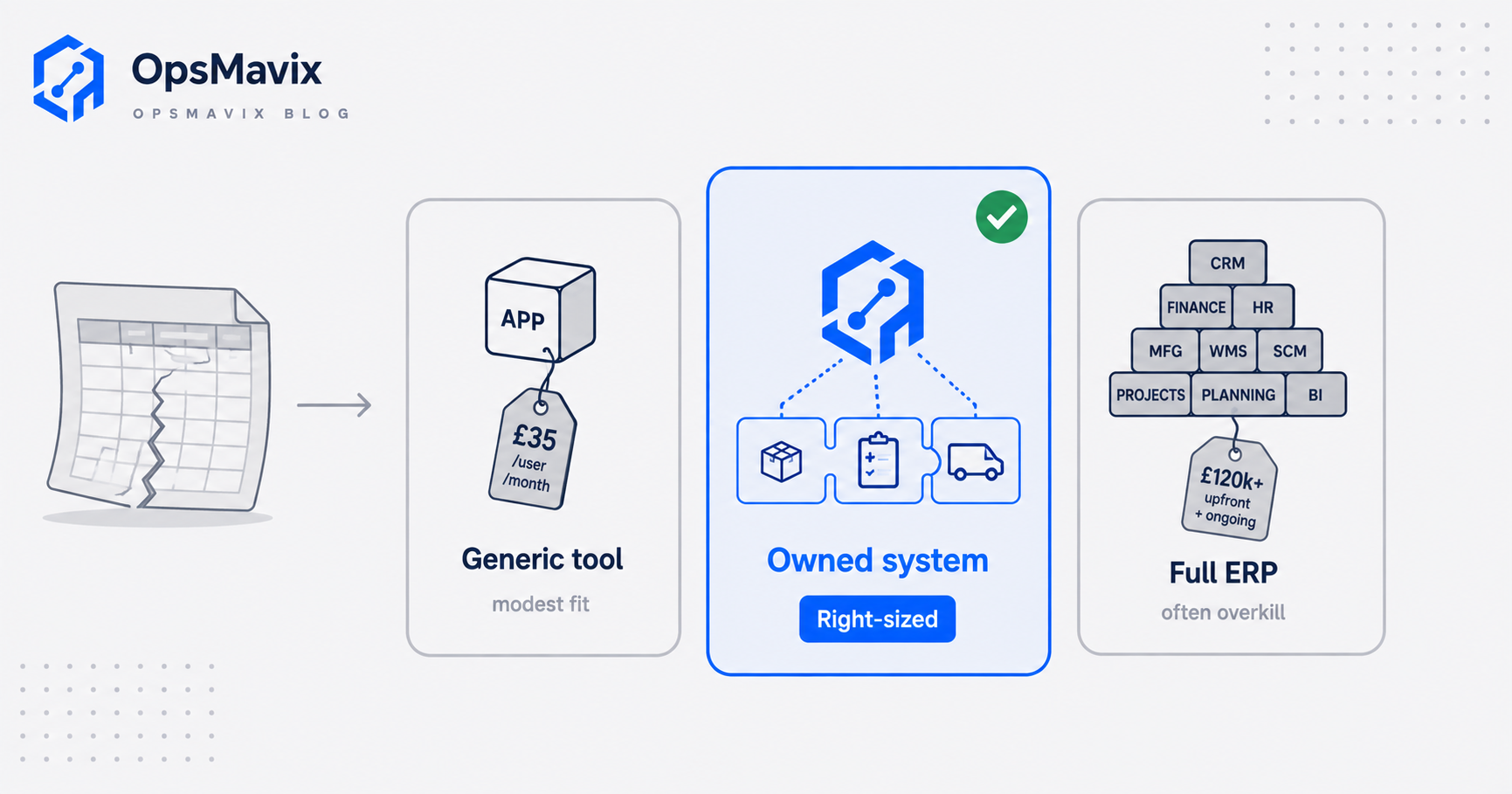
Once the spreadsheet breaks, there are three honest roads, and the right one depends entirely on how much of your operation actually leaks. Here is the fair version of each.
| Cheap / generic tool | Full ERP | Right-sized owned system | |
|---|---|---|---|
| What it is | Off-the-shelf stock app (per-seat subscription) | Large integrated suite covering finance, stock, production, HR | A system built around how you already run, owned by you |
| Best when | Standard workflow, modest volume, few channels | Large, complex, multi-site, many modules genuinely needed | Outgrown generic tools but a full suite is overkill |
| Setup time | Days to weeks | Many months, often with consultants | Weeks, scoped to the leak that hurts |
| Cost shape | Low monthly, rises per seat and per feature | High upfront plus per-seat licence forever | One build cost, you own the result, extend when ready |
| Fit to your process | You bend to its workflow | You bend hard to its model | Shaped to your workflow |
| Integrations | Whatever the vendor offers | Broad but on the vendor’s terms | Built to talk to the tools you keep |
| When it goes wrong | You outgrow it and hit a wall | You pay for modules you never switch on | Needs a partner to build and support it |
Read the table honestly and the advice writes itself: buy the cheapest thing that closes your real leak. If a generic tool fits how you work and the price is fair, use it. If you are a large, genuinely complex operation that needs finance, stock, production and more running as one, an ERP earns its cost. The owned system is for the middle, the business outgrowing spreadsheets but not looking to bend itself to a full ERP, where the fix is a sharp system for the two or three things that actually leak, built around your process and extended later rather than rented whole. This is the same reasoning behind any well-scoped inventory system built around how a business runs: match the tool to the leak, not to the brochure.
Integrations and Why Ownership Matters
Inventory software is never the only system a business runs, which is why how it connects matters as much as how it counts. Your accounts package needs stock values. Your ecommerce platform needs live availability so it stops overselling. Your suppliers, your shipping, your point of sale all either feed the count or read from it. An inventory system that cannot exchange data with those is an island, and an island quietly recreates the spreadsheet problem one layer up: two systems, two versions of the truth, someone re-keying between them.
Integration is where the count either stays live across the whole business or dies at a boundary. When a web order automatically draws down the same stock pool the trade desk sells from, overselling stops. When goods-in updates the value your accounts system reports, month-end stops being a reconciliation marathon. The events flow between systems the same way movements flow within one, recorded once and read everywhere.
This is where ownership earns its keep. With a rented platform, the integrations you get are the ones the vendor decided to build, on their timeline; when your business changes and you need a new connection, you file a feature request and wait. With an owned system, the integrations are built to fit the specific tools you already run and intend to keep, and when a new channel or supplier appears you extend what you own instead of hoping it reaches a roadmap. The whole point of an inventory automation system is that real events update the shared count without human re-keying, and that only holds if the system connects to where those events actually happen.
A Worked Example: The Distributor Who Counted by Hand
The figures below are illustrative, not a claim about a specific client, but the shape is one growing distributors recognise instantly.
A UK wholesaler turning over roughly £2.5M sells about 800 SKUs into trade over the phone and through a website. Stock lives in one shared spreadsheet, updated by two office staff and reconciled monthly against a physical count. On paper it works. In practice, two leaks run constantly.
- Overselling. Phone and web draw from the same stock but the sheet only reflects web sales after an overnight export. Say five oversells a month at an average £220 order: cancelled orders, apologetic calls, and a couple of trade customers a year who quietly move to a competitor who does not promise stock they lack.
- Manual counting and stockouts. Reorder points live in a column nobody watches under pressure, so best-sellers run dry a few times a quarter, and staff spend perhaps half a day each week counting and reconciling to trust the number at all. Half a day of skilled office time weekly is real money over a year, and it produces nothing except a count that is stale again by Wednesday.
Now the two roads. Road one: a per-seat stock app that would fix the count but force the trade desk to work its way, drop the two custom supplier feeds they rely on, and meter every user forever. Road two: a right-sized owned system that does exactly what leaks. One live stock pool that phone and web both read in real time, killing the oversells; reorder points the system watches and flags on its own, ending the surprise stockouts; and the manual weekly count replaced by cycle counts the software schedules, so the number stays trustworthy without the half-day ritual. It reads from the accounts and ecommerce tools they already keep, and when a third channel appears they extend what they own.
The wholesaler’s problem was never “we lack inventory software” in the abstract. It was “our count is not live and two specific things leak because of it.” Named that way, a vague software decision becomes a scoped, two-leak build, which is the decision most growing businesses at this stage should actually be making.
FAQ
How does inventory management software work, in one sentence?
It keeps a running record for every product and updates that record automatically each time stock moves (a delivery received, an order picked, a transfer, a count adjustment, a return), so the on-hand figure stays current without anyone re-typing a total. Every function then reads the same live number instead of working from separate, drifting copies.
What is the difference between inventory software and a spreadsheet?
A spreadsheet stores a figure you typed and trusts it until you type a new one. Inventory software stores a figure that is the sum of every movement it has recorded, so the count corrects itself as events happen and shows every user the same current number at the same time. The spreadsheet breaks not at a certain size but at the moment several people and channels touch the same stock at once, because it cannot referee two correct-but-conflicting edits made minutes apart.
What is a SKU and why does it matter so much?
A SKU (stock keeping unit) is the unique code for one specific sellable item, such as a particular size and colour, set up by and specific to your business. It matters because every movement in the system hangs off it: if two different items share a code, or one item has two codes, every count and report downstream is wrong. A clean SKU list is the foundation the whole system stands on.
How do automatic reorder points work?
You set, per product, the stock level at which more should be bought, calculated as average daily usage times supplier lead time plus a safety-stock cushion. The software watches the live count fall toward that level and flags replenishment, or raises a draft purchase order, on its own. A spreadsheet can hold the same formula but cannot watch it fall, so a person has to remember to check every SKU before it runs out, which is where stockouts come from.
Do I need a full ERP to get this, or is that overkill?
Usually overkill, unless you are large and genuinely complex across finance, production, stock and more. A full ERP does everything, costs a lot, takes months to implement, and charges per seat forever while you bend your process to fit it. Most growing businesses have two or three things that actually leak and the rest running fine, and are better served by a right-sized system that closes those, integrates with the tools they keep, and can be extended toward more later if the business genuinely grows into it.
How OpsMavix Can Help
OpsMavix builds right-sized, owned inventory and operations systems for growing UK businesses whose stock control has outgrown spreadsheets but does not justify a full ERP. Rather than sell you a platform and meter it per seat forever, we follow your actual data flow (how goods come in, how movements get recorded, where the count goes stale, which channels see which numbers), find the two or three things genuinely leaking time and money, and build a system that closes exactly those: a live count shaped to how you already run, connected to the accounts and ecommerce tools you keep, and owned outright so you extend it when you are ready instead of waiting on a vendor’s roadmap. It is the practical middle between a generic tool you will outgrow and a suite that is overkill. If you are not sure where your stock count is leaking, start by finding out: Book a Free Operations Leak Audit
Sources
- Perpetual inventory (Wikipedia): defines the continuous, real-time inventory model that inventory software implements, versus periodic counting.
- Stock keeping unit (Wikipedia): definition of the SKU as a distinct, business-specific item identifier used to track stock.
- NetSuite UK, Inventory Management Controls: inventory-control practices including recording every stock movement, reorder points and cycle counting.
- Pallite Group, How to Calculate Reorder Level: UK guide giving the reorder-point formula (average daily usage times lead time, plus safety stock).
Keep reading
Getting value from OpsMavix? Add us as a preferred source on Google — you'll see more of our operations content in your AI Overviews, AI Mode and Search.