
How to Set a Safety Buffer Per Channel So You Stop Overselling Best Sellers
A flat 5% buffer on every listing hides stock where you did not need to and still lets your fastest SKU oversell on Amazon. This guide sizes a safety buffer per channel from measured sync lag and peak sales velocity, shows which channels earn a bigger number, and explains when the honest answer is to fix the sync instead.
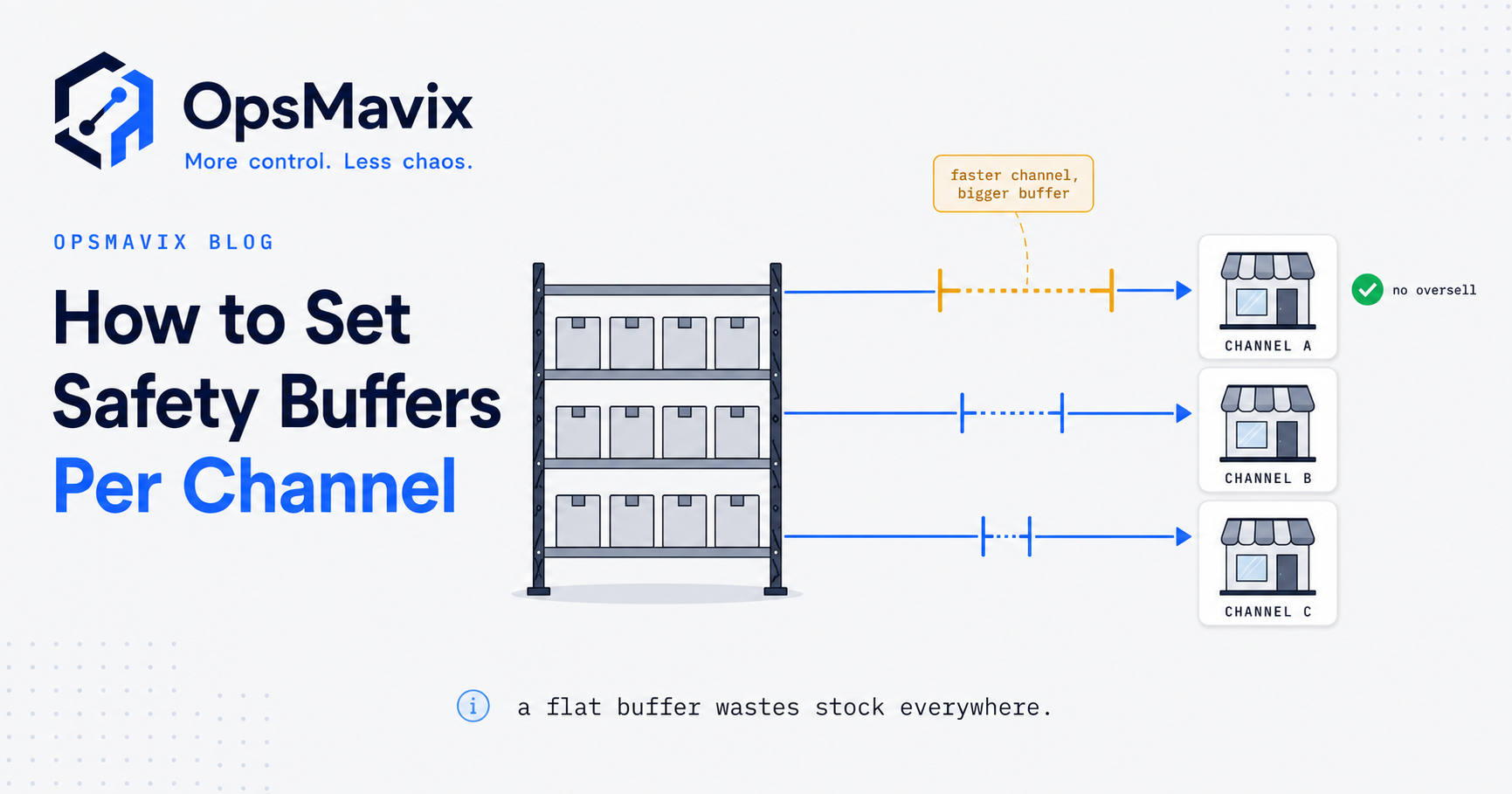
A safety buffer per channel is the number of units you deliberately hide from one sales channel so that it stops selling a product before your real stock reaches zero. You size it from how long that channel takes to learn about sales made elsewhere and how fast the product sells there at its busiest, then adjust for stock depth, marketplace penalties and bundles.
The practical problem is that most sellers set one flat number, such as 5 units or 10%, across every listing. That hides stock on slow lines that could never oversell, while leaving the fastest product exposed on the channel where a cancellation costs the most. This guide shows how to calculate each buffer, when to change it and what the held-back stock really costs.

Every channel needs to stop selling before the last unit has already gone elsewhere. Illustrative photograph, not an OpsMavix project.
Image credit: Bench Accounting, Unsplash License. No edits.
Key Takeaways
- A channel buffer covers update delay, not demand uncertainty; supplier safety stock is a separate calculation.
- Base buffer = peak units per hour on the channel × exposure window in hours, rounded up.
- The exposure window is the slowest order detection on the other channels plus the time to publish a new quantity on this one.
- Marketplaces that score seller cancellations justify a penalty factor; your own site usually does not.
- Bundles must be buffered in component units, because the bundle and the single item drain the same stock.
- A buffer only costs or protects anything when stock falls into the buffer zone, so lower it when the sync improves.
In this guide:
- 1. Understand What a Channel Buffer Protects Against
- 2. Measure the Exposure Window for Each Channel
- 3. Calculate the Base Buffer Per Channel
- 4. Adjust for Stock Depth and Velocity Bands
- 5. Weigh Marketplace Penalties Before You Round
- 6. Buffer Bundles at the Component Level
- 7. Choose Between Fixed and Percentage Buffers
- 8. Review, Lower and Cost Your Buffers
- Frequently Asked Questions
- How OpsMavix Can Help
1. Understand What a Channel Buffer Protects Against
Latency, not demand uncertainty
When a unit sells on your website, Amazon and eBay do not know instantly. Your system has to detect the order, recalculate available stock and push a new quantity to each channel, which then has to publish it. Until that happens, the other channels keep offering stock that may already be gone.
A channel buffer covers that gap. It differs from the safety stock you hold against late suppliers or demand spikes, covered in safety stock calculation, which is measured in days of demand rather than minutes of sales.
Where it sits in your wider controls
A buffer assumes every channel already runs from one shared stock figure with a working sync. That architecture is covered in how to prevent overselling; this guide deals only with sizing the number subtracted before each channel sees it:
Quantity published to a channel = available stock - that channel’s buffer (never below zero)
| Control | What it protects against | Unit of measure |
|---|---|---|
| Supplier safety stock | Late deliveries and demand above forecast | Days of demand |
| Channel buffer | Sales made during the sync delay | Minutes of peak sales |
| Allocation | One channel taking stock promised elsewhere | Units reserved per channel |
2. Measure the Exposure Window for Each Channel
Split the delay into two parts
A channel is exposed for as long as it takes a sale elsewhere to reach it:
- Inbound detection: how long your system takes to learn about an order on each channel. Event notifications can arrive within seconds; polling every 10 or 15 minutes cannot.
- Outbound publication: how long a new quantity takes to go live on this channel after you send it.
The exposure window for a channel is the slowest inbound detection among the other channels plus this channel’s outbound publication time. Use the slowest, because the last unit can sell anywhere.
Test it rather than trusting the label
“Real time” in a product description is not a measurement. For each channel, change a quiet SKU’s quantity and time how long the channel takes to show it, then time how long an order on that channel takes to appear in your system. Repeat at your busiest hour and during any bulk overnight update, and use the slowest busy-period result.
Hypothetical exposure windows
| Channel | Inbound detection | Outbound publication | Slowest other inbound | Exposure window |
|---|---|---|---|---|
| Own website | 1 min | 1 min | 10 min (Amazon) | 11 min |
| Amazon | 10 min | 15 min | 5 min (eBay) | 20 min |
| eBay | 5 min | 5 min | 10 min (Amazon) | 15 min |
For Amazon, eBay is the slowest other channel to report a sale (5 minutes), plus 15 minutes to publish, giving 20. Your own test results replace these illustrative figures.
3. Calculate the Base Buffer Per Channel
The formula
Base buffer (units) = peak units sold per hour on that channel × exposure window in hours
Round up to a whole unit. Use the busiest single hour for that SKU on that channel over a recent period that includes normal promotions, such as the last 90 days. Oversells happen in spikes, and an average spreads the spike across quiet hours.
Worked example: one SKU across three channels
A hypothetical fast-moving product has 240 units available.
| Channel | Peak units per hour | Exposure window | Calculation | Raw units at risk | Base buffer |
|---|---|---|---|---|---|
| Own website | 18 | 11 min | 18 × 11 ÷ 60 | 3.3 | 4 |
| Amazon | 24 | 20 min | 24 × 20 ÷ 60 | 8.0 | 8 |
| eBay | 6 | 15 min | 6 × 15 ÷ 60 | 1.5 | 2 |
The website would show 240 - 4 = 236, Amazon 240 - 8 = 232 and eBay 240 - 2 = 238.
Buffers are not added together
These are not 14 units locked away. Each channel simply stops selling slightly earlier than the others, and while stock is high every unit remains sellable somewhere. Buffers only change what customers can buy when stock falls towards the largest one, which is why section 8 measures cost in that zone.
Lumpy channels
On a trade portal, demand often arrives as one large order rather than a steady rate. Use the largest single order accepted for that SKU last quarter as the raw exposure instead. Whether to accept such orders against live stock at all is an available to promise decision.
4. Adjust for Stock Depth and Velocity Bands
Sort SKUs into velocity bands
Group SKUs by raw units at risk on each channel rather than calculating every one individually.
| Band | Raw units at risk | Suggested treatment | Review |
|---|---|---|---|
| Fast | 1 or more | Individual calculation per channel | Monthly |
| Moderate | 0.2 to under 1 | 1 unit on channels that penalise cancellations; 0 elsewhere | Quarterly |
| Slow | Under 0.2 | No buffer | When velocity changes |
A hypothetical line peaking at 1 unit per hour on Amazon has 1 × 20 ÷ 60 = 0.33 units at risk: moderate band, so 1 unit on Amazon and none on your own site. A line peaking at 0.3 units per hour has 0.3 × 20 ÷ 60 = 0.1; buffering it hides stock for almost no protection. Move the thresholds if unbuffered bands produce oversells.
Check the buffer against stock depth
Amazon’s base buffer of 8 hides a very different share of stock as availability falls:
| Available units | Amazon shows | Share hidden from Amazon |
|---|---|---|
| 240 | 232 | 3.3% |
| 40 | 32 | 20% |
| 12 | 4 | 66.7% |
| 8 | 0 | 100% |
At low stock, keeping the full buffer protects against cancellations but takes the listing to zero while you still own stock. Set a low-stock threshold per SKU, such as twice the largest channel buffer, and record which rule applies below it: keep buffers and let higher-risk channels go to zero first, ring-fence the last units for the channel where you control the checkout, or reduce a marketplace buffer only where you have measured a short, reliable exposure window.
5. Weigh Marketplace Penalties Before You Round
Why the same oversell costs more on some channels
On your own website an oversell usually means a refund and an apology. On a marketplace it can also count against a published performance metric.
Amazon’s Order Performance programme policy defines Cancellation Rate as “all seller-cancelled orders represented as a percentage of total orders during a given 7-day period”, says it “only applies to seller-fulfilled orders”, and sets the policy that sellers “maintain a CR that is under 2.5% in order to sell on Amazon”.
eBay’s seller performance policy counts a transaction defect when “the seller cancels the order unexpectedly (e.g. because it was out of stock, or because they sold it to someone else)”, and allows up to 2% of transactions with defects in an evaluation period.
Worked example: how little room a short window leaves
Assume, hypothetically, 160 seller-fulfilled Amazon orders in a 7-day period.
| Seller cancellations | Cancellation rate | Under 2.5%? |
|---|---|---|
| 3 | 3 ÷ 160 = 1.875% | Yes |
| 4 | 4 ÷ 160 = 2.5% | No |
Four oversold orders in one week reach the level. One busy afternoon on a fast SKU with a 20-minute window and no buffer could produce that.

A buffer is only as reliable as the stock figure it is subtracted from. Illustrative photograph, not an OpsMavix project.
Image credit: Rifki Kurniawan, Unsplash License. No edits.
Apply a penalty factor before rounding
Multiply raw units at risk by a penalty factor, then round up once. The factor is a business judgement, not a published rate; this hypothetical seller uses 1.0 for its website and 1.5 for both marketplaces.
| Channel | Raw units at risk | Penalty factor | Adjusted | Final buffer |
|---|---|---|---|---|
| Own website | 3.3 | 1.0 | 3.3 | 4 |
| Amazon | 8.0 | 1.5 | 12.0 | 12 |
| eBay | 1.5 | 1.5 | 2.25 | 3 |
Rounding twice inflates small numbers: 1.1 rounded up is 2, and 2 × 1.5 = 3, whereas 1.1 × 1.5 = 1.65 rounds up to 2.
Raise the factor temporarily, with an end date, when inputs are likely to break: a promotion that may exceed the historical peak, peak trading, an untested connector change or a stock count in progress.
6. Buffer Bundles at the Component Level
Why bundles break simple buffers
A bundle has no stock of its own; its availability comes from components that are often sold individually too. Both listings drain the shared component during the same exposure window, so the buffer must be expressed in component units.
Worked example: a gift set and its parts
Hypothetically, component C (a mug) has 100 units available and component D (a gift box) has 40. The gift set contains 2 × C and 1 × D. On Amazon, single mugs peak at 9 per hour and gift sets at 6 per hour, with a 20-minute window and a 1.5 penalty factor.
| Exposure on Amazon | Calculation | Units of C | Units of D |
|---|---|---|---|
| Single C sales | 9 × 20 ÷ 60 | 3.0 | 0 |
| Gift set sales | 6 × 20 ÷ 60 = 2.0 sets | 4.0 | 2.0 |
| Total raw exposure | 7.0 | 2.0 | |
| After penalty factor | × 1.5 | 10.5 | 3.0 |
| Buffer, rounded up | 11 | 3 |
Amazon then sees:
- Single mug listing: 100 - 11 = 89
- Gift set: the lower of (100 - 11) ÷ 2 = 44.5, rounded down to 44, and 40 - 3 = 37, so 37
A common failure is that the gift set gets no buffer because it has no stock record, while the mug is buffered by 3. Component C then has 3 units of protection against 7 units of raw exposure. The same applies to multipacks drawing on one item. For kit availability generally, see product kitting software.
7. Choose Between Fixed and Percentage Buffers
How each behaves as stock changes
Exposure depends on sales rate and delay, not stock depth. A percentage buffer ties protection to stock depth instead, so it misbehaves at both ends. Compare a 10% buffer with the fixed 12 units calculated for Amazon, where raw risk is 8 units:
| Available units | 10% buffer | Fixed buffer | Effect of the percentage |
|---|---|---|---|
| 400 | 40 | 12 | Hides 32 more units than the risk needs |
| 120 | 12 | 12 | Same as fixed |
| 40 | 4 | 12 | Leaves 4 units of risk uncovered |
| 10 | 1 | 12 (shows 0) | Almost no protection |
A percentage is weakest when stock is low, which is exactly when oversells happen. It can still work as a cap, such as “never hide more than 50% of stock from this channel”, or for sharing stock between locations, which is a different job from covering sync delay.
Check what your tools support
Do not assume a feature exists; check the documentation:
- Sellercloud’s safety quantity is “a specific number of product units that is subtracted from the available inventory sent to sales channels”. It can be set as a default per channel, overridden per product, and set per warehouse for specific channels.
- Shopify’s inventory tracking settings let each product or variant stop or continue selling when inventory reaches zero. Make sure “continue selling” is off for items you are protecting.
- eBay’s out-of-stock control keeps a Good 'Til Cancelled listing alive at zero quantity and hides it from search, so a buffer that takes eBay to zero need not end the listing and lose its sales history.
Store each buffer with its channel, SKU or component, inputs, owner and any end date. A buffer nobody can explain is one nobody dares to lower.
8. Review, Lower and Cost Your Buffers
Measure what held-back availability costs
A buffer only has an effect when available stock falls to or below it. The cost is demand a channel turns away while it shows zero and you still have stock. Hypothetical inputs for the SKU above: Amazon buffer 12; website and eBay together sell 12 units a day; the product sells into the buffer zone 6 times a year; Amazon averages 8 orders a day; half of turned-away Amazon customers do not buy elsewhere from you; contribution is £9 per unit.
| Step | Calculation | Result |
|---|---|---|
| Days Amazon shows zero per sell-down | 12 ÷ 12 (ignoring smaller buffers elsewhere) | 1 day |
| Days dark per year | 1 × 6 | 6 days |
| Amazon orders turned away | 6 × 8 | 48 |
| Orders lost entirely | 48 × 50% | 24 |
| Contribution forgone | 24 × £9 | £216 a year |
If, hypothetically, each Amazon oversell costs £15 in handling alone, the buffer pays for itself by preventing more than £216 ÷ £15 = 14.4 oversells a year, before any metric risk.
Lower buffers when the sync improves
If Amazon’s publication time falls from 15 to 5 minutes, its window becomes 5 + 5 = 10 minutes.
| Measure | Before | After |
|---|---|---|
| Raw units at risk | 24 × 20 ÷ 60 = 8.0 | 24 × 10 ÷ 60 = 4.0 |
| Buffer after 1.5 factor | 12 | 6 |
| Days dark per year | 12 ÷ 12 × 6 = 6 | 6 ÷ 12 × 6 = 3 |
| Contribution forgone | £216 | 3 × 8 × 50% × £9 = £108 |
Halving the delay halves the buffer and its cost, which is why fixing a slow connection usually beats raising a buffer.
Run a monthly review
- List every oversell and seller cancellation by channel and SKU.
- Identify the failed input: exposure window, peak sales, an uncounted bundle or a wrong stock figure.
- Re-test windows on channels with repeat incidents and recalculate fast-band buffers.
- Remove expired temporary increases and lower buffers that were never reached over a full trading cycle.
If oversells happen at random stock levels rather than near zero, the cause is usually a wrong stock record, a dropped update or two systems overwriting each other. No buffer fixes that; repair the sync using the controls in how to prevent overselling.
Frequently Asked Questions
What is a safety buffer per channel?
A number of units subtracted from available stock before the quantity is published to one sales channel, so it stops selling stock that has already sold elsewhere but is not yet reflected on its listing.
How do I calculate a channel buffer?
Multiply the SKU’s peak hourly sales on that channel by the exposure window in hours, apply any penalty factor, then round up.
Is a channel buffer the same as safety stock?
No. Safety stock covers supplier delays and demand above forecast over days or weeks. A channel buffer covers sales made during a sync delay of minutes. Most businesses need both.
Should every SKU have a buffer?
No. Slow lines that cannot sell even one unit during the exposure window gain almost nothing. Focus individual calculations on fast lines.
Is a percentage buffer ever better than a fixed one?
Rarely for sync delay, because risk depends on sales speed rather than stock depth. A percentage can work as a cap or for allocating stock between locations.
How should bundles be buffered?
In component units, adding single-item and bundle sales that consume each component, then deriving bundle availability from the buffered components.
Can OpsMavix build a system that sets channel buffers automatically?
Yes. OpsMavix can build focused applications or a full custom ERP, and can configure or integrate suitable existing tools where those approaches fit the requirements.
How OpsMavix Can Help
OpsMavix can measure how long stock updates take to reach each channel, then turn the results into visible buffer rules by channel, SKU and component.
That may mean configuring your existing multichannel tool, connecting it more reliably to your stock records, or building ecommerce inventory automation or a wider inventory automation system that publishes each channel’s quantity with an audit trail.
Contact OpsMavix with one recent oversell, the order and stock records behind it and the channel update that took longest. We can use that evidence to define requirements and a practical pilot.
Keep reading

Getting value from OpsMavix? Add us as a preferred source on Google — you'll see more of our operations content in your AI Overviews, AI Mode and Search.