
What Is an Operations System? A Plain-English Guide
An operations system is the connected layer that runs your stock, orders, production and reporting off one set of numbers. Here's what it is, what it replaces, and when you actually need one.

An order arrives. Someone enters it into a spreadsheet, copies it into the accounts package and messages the warehouse. Later, the customer changes the quantity, and the team has to work out which records need updating.
That is the gap an operations system is designed to close.
An operations system is the connected set of software, records and workflows used to manage a business’s daily work, such as stock, orders, purchasing, production and reporting. It gives people a dependable place to record what happened, see what needs doing and pass work to the next person.
For a growing business, this can mean connecting tools it already uses, introducing a specialist application or building a focused internal system. The right scope depends on the work that needs controlling and how closely the different processes need to fit together.
Illustration: OpsMavix.
Key Takeaways
- An operations system connects everyday records and workflows so teams can act on consistent information.
- Its value comes from clearer handovers, fewer repeated entries and better visibility of outstanding work.
- Stock, orders, production and reporting are common components; purchasing, approvals and finance connections may also matter.
- A focused system can sit alongside existing accounting software. An ERP can also provide operational capabilities as part of a broader platform.
- Start with a defined problem and test the proposed system using real transactions, including changes and exceptions.
- Dependable data still requires clear ownership, accurate capture and people who use the process consistently.
1. What an operations system actually does
An operations system makes daily work traceable. Each important event is recorded against the relevant customer, product, order, purchase or job, and the people who need that information can use it without reconstructing the history.
In a product business, that might mean:
- An accepted sales order becomes visible to the fulfilment team.
- A stock reservation reduces the quantity available for another order.
- A confirmed dispatch records the goods that actually left.
- A production update shows which operation is complete and what remains.
- An exception report identifies missing stock, overdue work or a failed update.
Each event has its own meaning. A customer placing an order does not necessarily mean goods have left the warehouse, an invoice has been issued or payment has arrived. The system should preserve those distinctions.
One agreed record for each important fact
The business needs to know where each type of information is maintained. Inventory might belong in a stock application, invoices in accounting software and customer enquiries in a CRM.
Those tools can form a connected operations system when their responsibilities and update rules are clear. They do not have to share one physical database, and every update does not have to happen instantly. The information needs to be current enough for the decision it supports.
Our guide to building one source of truth for your business explains how to define those records and responsibilities.
2. The problems it helps solve
Disconnected processes put people in the role of moving information between tools. Someone copies orders, updates stock, explains changed dates and reconciles the figures before a report can be trusted.
The symptoms can look unrelated, but they often share the same cause: work moves faster than its records.
| Everyday problem | What an operations system should provide |
|---|---|
| The same order is typed into several tools | Shared references and controlled transfer of order information |
| Sales cannot trust availability | Stock movements, reservations and holds reflected in the availability figure |
| Nobody knows why a job is late | Current stage, blocker, due date and responsible person |
| Reports take hours to reconstruct | Consistent definitions and reports built from maintained records |
| Changes get lost in messages | Approved amendments recorded against the relevant order or job |
| One colleague must explain every exception | Shared history, documented rules and an assigned next action |
Software alone does not guarantee these outcomes. If a warehouse movement is never recorded, the stock figure can still be wrong. If a task has no owner, displaying it on a screen does not ensure it gets done.
The improvement comes from combining the right records with a process people can follow.
3. The core parts of an operations system
The required components vary by business. A wholesaler may start with inventory and orders, while a manufacturer may need works orders, material consumption and production status. A service business may focus on jobs, resources, approvals and delivery milestones.
Stock and inventory
Inventory records should explain what is held, where it is, what is reserved and what can be used or sold. Depending on the operation, that may include batches, serial numbers, inspection holds, returns and movements between locations.
An inventory automation system can connect these events. Accuracy still depends on recording physical movements and investigating discrepancies.
If your team regularly checks the shelf before trusting the screen, start with why stock does not match the system.
Sales orders and fulfilment
An order workflow connects the customer’s agreement to the work needed to fulfil it. It should make quantities, promised dates, changes, dispatches and outstanding balances clear.
For repeat B2B orders, wholesale order management may be the main requirement. For multiple online channels, ecommerce inventory automation may be needed to keep orders and availability aligned.
Purchasing and replenishment
Purchasing connects demand to suppliers. Useful records include what was ordered, the expected arrival date, what has been received and which outstanding jobs depend on it.
Where replenishment rules are used, they need appropriate lead times, quantities and stock assumptions. Automating an inaccurate rule can simply create the wrong purchase suggestion faster.
Production and job tracking
Manufacturers need to see the relationship between demand, works orders, materials and progress on the floor. Depending on scope, the system may also capture setup time, labour, scrap, subcontract work and job costs.
Manufacturing production tracking brings those operational updates into a shared view. A useful job record should let the team distinguish planned work, work underway and completed output.
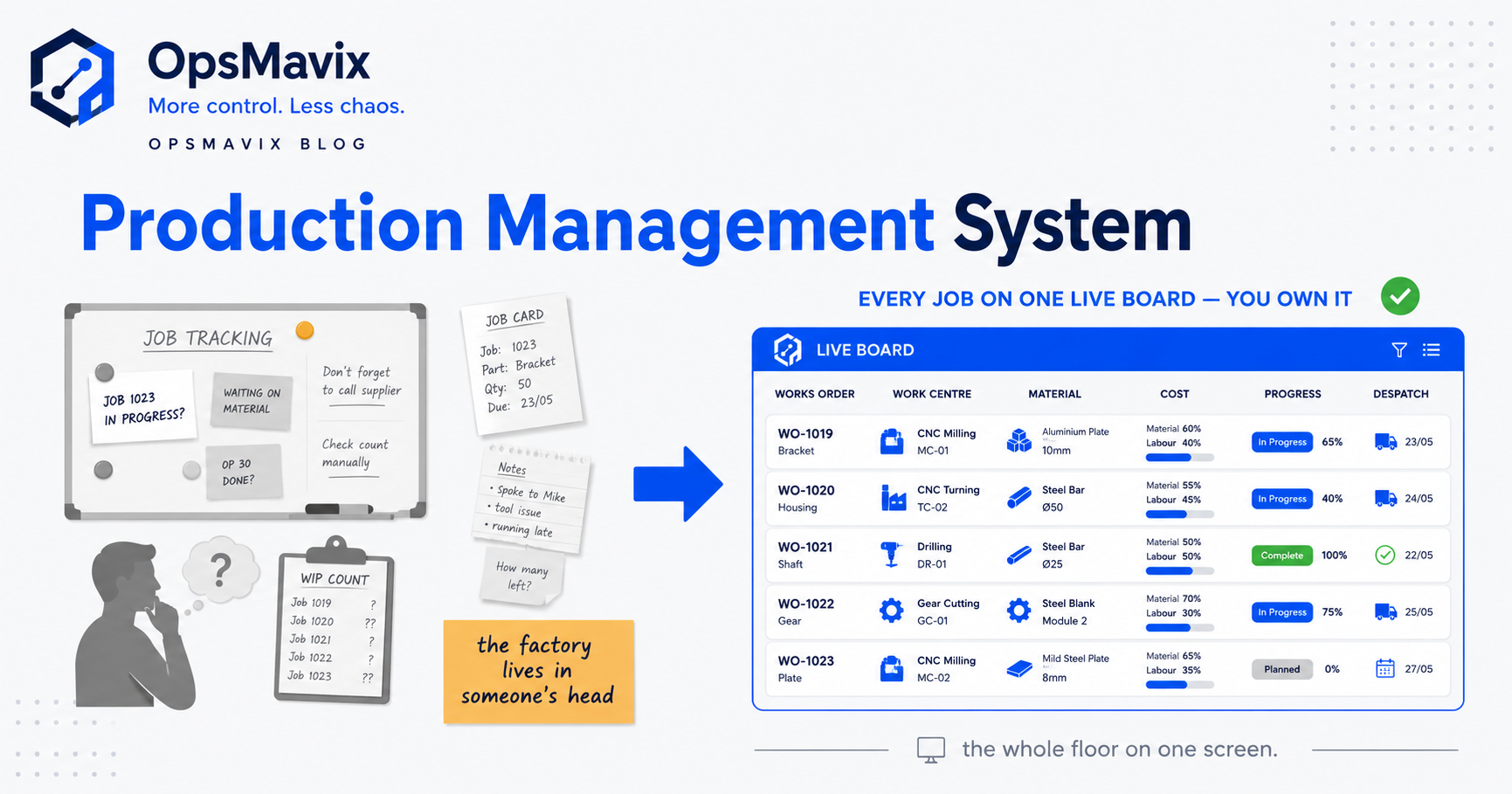
Illustration: OpsMavix.
Reporting, approvals and finance connections
Reporting should help people identify what needs attention: late orders, stock shortages, blocked jobs or approvals waiting too long.
An operations dashboard can present that information, with a route back to the underlying records. Finance connections can pass the required transaction information to the accounting system and return relevant invoice or payment status.
Define what triggers an invoice, what requires approval and how corrections are handled. These are workflow decisions that should be agreed before automation is switched on.
4. How it works: an order and stock example
This example is illustrative. A wholesaler has 50 units of one product, with no reservations or stock holds. A customer orders 12 units, and the business reserves all 12. It then dispatches seven, leaving five reserved for the remaining shipment.
| Event | On-hand quantity | Reserved quantity | Available for new orders |
|---|---|---|---|
| Before the order | 50 | 0 | 50 |
| Order accepted and 12 units reserved | 50 | 12 | 38 |
| Seven reserved units dispatched | 43 | 5 | 38 |
In this simplified example, availability is on-hand quantity minus reservations. Real operations may also need to account for holds, safety buffers, incoming supply and delivery dates.
Notice that accepting the order changes availability while the goods remain physically in the warehouse. Dispatching seven units then reduces both on-hand stock and the reservation by seven. Availability stays at 38 because those dispatched units were already committed.
The related order record should now show:
- Ordered: 12 units.
- Dispatched: Seven units.
- Outstanding: Five units.
- Remaining reservation: Five units.
Customer service can explain what has been sent and what remains. The warehouse can act on the remaining quantity. Finance can use the agreed billing rules without assuming that dispatch and payment are the same event.
What if something changes?
If the customer cancels the remaining five units, an authorised cancellation should release the unused reservation and preserve the order history. If a returned product arrives damaged, it should follow the agreed returns process before becoming available to sell again.
These exceptions are useful tests of a proposed operations system. They reveal whether it maintains the relationships between records or merely displays a list of transactions.
5. Operations system vs spreadsheets
Spreadsheets are useful for analysis, planning, calculations and straightforward shared processes. Modern spreadsheet tools also offer collaboration and controls: Microsoft documents Excel co-authoring and version history, and Google documents collaboration and protected ranges in Sheets.
The practical question is how much work your team must do to maintain the operational rules around the file.
For example, changing an order quantity may require updating a reservation, adjusting a pick task and notifying the person responsible. A spreadsheet-based setup can be extended to support such behaviour, but someone must design, test and maintain it.
| Area | Spreadsheet-based process | Dedicated operations application |
|---|---|---|
| Record structure | Flexible cells and tables | Defined records and relationships, where configured |
| Input controls | Validation and protection require setup | Can provide required fields and role-specific actions |
| Handovers | Often supported through comments, messages or added automation | Can create assigned tasks and controlled status changes |
| Connected updates | Depend on imports, queries, scripts or integrations | Depend on the application’s workflows and integrations |
| Exceptions | May require notes and manual reconciliation | Can provide specific flows for changes, returns and partial completion |
| Ongoing support | Workbook logic and dependencies need maintenance | Configuration, integrations and application support need maintenance |
A new application should earn its place through better control or less effort. Its name and interface do not guarantee better data.
For a more detailed decision guide, read why spreadsheets stop working as your business grows.
6. Operations system vs ERP
The terms overlap. An operations system describes the capability to manage day-to-day work. Enterprise resource planning, or ERP, generally describes a broader integrated platform that can combine operational functions with financial management and other business areas.
A focused operations system may connect inventory, orders and production while retaining the accounting package you already use. An ERP may put more of those processes within one platform.
ERP is not limited to large corporations. For example, Microsoft describes Business Central as ERP for small and midsize businesses. Scope, cost and implementation effort vary by product and project.
| Question | A focused operations system may fit when… | Broader ERP may fit when… |
|---|---|---|
| What needs fixing? | A defined operational workflow or set of connected workflows | Several operational and financial processes need coordinated change |
| Does existing finance software work well? | You can retain it with appropriate integrations | You need finance and operations within a wider shared platform |
| How broad is the requirement? | The main gaps are specific and can be scoped clearly | Planning, reporting and transaction control span many business areas |
| What should the business compare? | Fit, integration effort, support and total cost | Fit, implementation scope, migration, training and total cost |
Neither route has a universal implementation duration or price. Data quality, process complexity, integrations and the amount of change all affect the work involved.
The most useful comparison starts with your requirements and tests how each option handles them. Our operational systems vs ERP guide explores that choice further.
7. Signs your business needs a better operations system
You already have an operating approach, even if it consists of spreadsheets, messages and personal knowledge. The question is whether it still supports the business reliably.
Look for recurring patterns:
- The same information is entered into several tools.
- Staff confirm stock or job status manually before trusting a screen.
- Changes reach one department but miss another.
- Reports require repeated reconciliation.
- One colleague is essential to explain the current position.
- Customers identify delays before the internal team does.
- More orders create a disproportionate increase in administration.
One isolated mistake does not prove that the software needs replacing. Review the frequency, impact and underlying cause. Some problems can be resolved through clearer responsibilities or better configuration of existing tools.
For a broader review, use our guide to signs your business needs operational systems.
8. Buy a package, connect your tools or build a custom system?
There are three practical routes, and a business may use a combination.
Buy a standard application
A packaged tool is worth considering when its standard workflows fit your requirements. You gain an existing product, documentation and a supported development path.
Test your difficult cases before committing. A demonstration of a straightforward order does not show how the product handles split deliveries, customer changes, returns or your particular approvals.
Connect the tools you already use
Integration may be enough when each tool works well within its own area but people spend time transferring information between them.
Agree which system controls each field, how records are matched and how quickly updates must arrive. Make failures visible and assign someone to resolve them. Repeated transfers should not create duplicate transactions.
Build a custom operations system
A custom build may fit when the requirements are specific and standard tools would need substantial workarounds or adaptation. It lets you design records, screens and workflows around the agreed process.
Before building, distinguish essential differences from habits that would benefit from simplification. Reproducing every spreadsheet workaround in software can preserve the problem.
Clarify ownership and support in writing: source code, data exports, documentation, hosting access, third-party licences and the ability to use another developer. An owned system can still have hosting, maintenance and support costs.

Illustration: OpsMavix.
9. How to choose what to implement first
Start where the problem has a clear consequence and the change can be measured. Stock is a sensible starting point for some businesses; others gain more from order handovers, approvals or production visibility.
Use three questions:
- What repeatedly goes wrong? Describe the actual failure, such as an order being promised against unavailable stock.
- What would prevent or expose it earlier? Identify the record, rule or handover that is missing.
- What must connect for that improvement to work? Include the dependencies needed to make the result dependable.
A narrow scope still needs to cover the complete workflow. Fixing dispatch visibility may require changes to how sales orders and stock reservations are recorded.
Choose a few measures before the pilot: duplicate-entry time, order corrections, stock discrepancies, report preparation time or the age of unresolved blockers. Compare them after the process has settled, allowing for changes in workload.
Why This Happens
Growing businesses often add tools one problem at a time. A stock file solves an immediate question. A separate order tracker helps sales. A production board helps the floor.
Over time, the work crosses those boundaries more often. People become responsible for carrying changes between tools, and manual checks become part of almost every handover.
An operations system addresses those connections. It gives the business a deliberate structure for records, responsibilities and updates instead of relying on informal coordination to keep them aligned.
What To Do Next
Choose one recent transaction that caused a delay, correction or repeated enquiry. Follow it through every person and tool involved.
- Map the current process. Record where information is created, copied, changed and checked.
- Identify the authoritative records. Decide where order details, stock, job progress and financial status belong.
- Define the required behaviour. Include normal work and exceptions such as cancellations or partial completion.
- Evaluate the options. Test existing tools, packaged software, integrations or a custom build against those requirements.
- Pilot with real users. Validate the records and handovers before expanding the scope.
- Make the changeover clear. Establish which system becomes authoritative and how old records remain available.
- Review the result. Check the measures, resolve workarounds and improve the process before adding more functions.
This gives you a concrete basis for a system decision and a way to assess whether the investment improves daily work.
FAQ
What is an operations system in simple terms?
It is the combination of connected software, records and workflows used to manage daily business activity. It helps people see what has happened, what needs doing and who is responsible, across areas such as orders, inventory, production and reporting.
Is an operations system the same as a computer operating system?
No. A computer operating system, such as Windows or Linux, manages the computer’s resources and applications. This article uses “operations system” to describe the tools and workflows that manage business activity.
Is an operations system the same as ERP?
The capabilities overlap. An ERP can provide operational functions alongside broader financial and business management. A focused operations system may address selected workflows and connect to an existing accounting package. Choose based on requirements rather than the label alone.
Can an operations system work with existing accounting software?
Yes, when a suitable integration is available or can be built. Define which transactions and statuses are shared, who controls each field and how failed or corrected updates are handled. Check the capabilities of the specific products involved.
Does an operations system automatically make stock accurate?
It can improve capture and control, but physical movements still need to be recorded correctly. Receiving, transfers, consumption, dispatch, returns and adjustments must follow the agreed process, supported by checks and investigation of discrepancies.
Do we need every component from the start?
Usually you can phase the work. Start with a clearly defined workflow and include the connections required for it to function reliably. Extend the scope once the team is using it and the results have been checked.
How much does an operations system cost?
Cost depends on scope, users, integrations, data preparation and the approach chosen. Compare implementation, migration, training, subscriptions or hosting, support and future changes over the same period. A useful quotation should identify what is included and what remains outside the scope.
What should we look for in a demonstration?
Use a real business example. Ask the provider to show an initial transaction, an authorised change, an exception and the resulting reports. Check who performs each action, where the records are maintained and how another team sees the update.
How OpsMavix Can Help
OpsMavix builds operations systems for growing businesses that are outgrowing spreadsheets, repeated data entry and disconnected tools.
We start by mapping how work moves through your business and identifying where information, responsibility or control breaks down. From there, we can scope the stock, order, production and reporting workflows needed to address the problem, including connections to tools you already use.
For a custom build, the scope should make ownership, integrations, delivery requirements and ongoing support clear before work begins.
Bring one process that repeatedly costs your team time or creates conflicting information. We can use it to define the first improvement and what a suitable operations system needs to do.
Book an Operations Leak Audit.
Sources
- Microsoft: Dynamics 365 Business Central — an example of ERP positioned for small and midsize businesses.
- Microsoft Support: Collaborate on Excel workbooks with co-authoring — collaboration and version-history capabilities.
- Google Docs Editors Help: Collaborate in Sheets — collaboration, version history and protected ranges.
Worked figures are illustrative. Images are linked from existing OpsMavix media assets.
Keep reading
Getting value from OpsMavix? Add us as a preferred source on Google — you'll see more of our operations content in your AI Overviews, AI Mode and Search.