
Will ERP Fix Your Supply Chain or Just Add Another Bill?
An ERP system in supply chain management connects inventory, purchasing, orders, manufacturing and finance in one system. Learn how ERP works across the supply chain, its key modules, benefits, limitations and implementation steps.
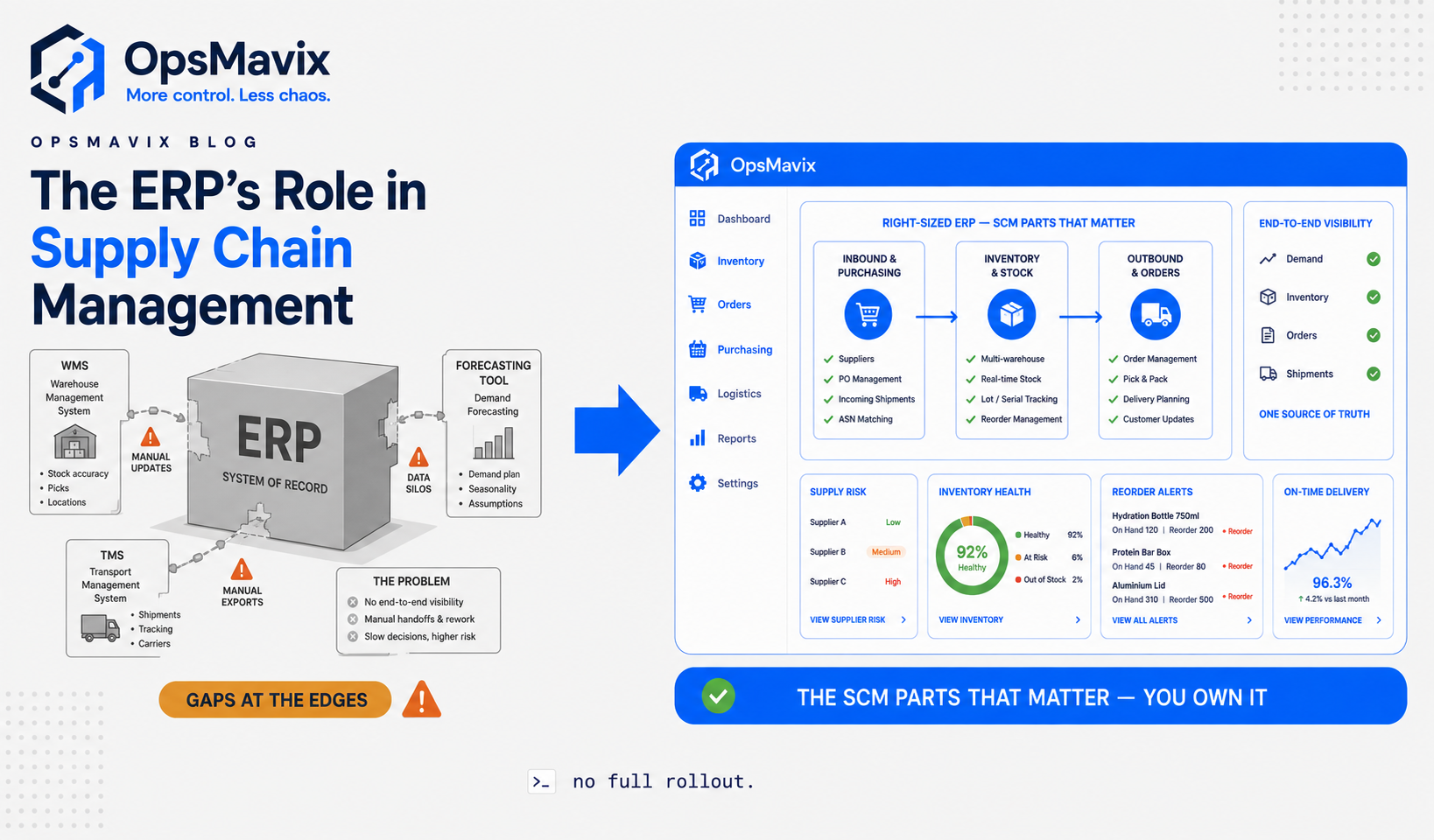
An ERP system in supply chain management connects the data and day-to-day transactions behind purchasing, inventory, production, orders, warehousing and finance. Instead of each team working from separate spreadsheets or disconnected systems, ERP creates one shared record of what is in stock, what is on order, what customers have bought, what needs to be produced and what those movements cost.
That is the simplest way to think about ERP in the supply chain: it turns separate operational activities into one connected flow of data.
Image: OpsMavix — ERP system in supply chain management.
Quick answer: what is the role of ERP in supply chain management?
The role of ERP in supply chain management is to provide a single system of record for the transactions and data that move goods through a business.
A good ERP system can connect:
- demand and sales orders;
- purchasing and supplier records;
- inventory and warehouse movements;
- manufacturing and material requirements;
- shipping and fulfilment;
- invoices, costs and financial reporting.
When a customer order changes, purchasing, stock availability, production requirements and finance can all work from the same information. That is the main advantage over running the supply chain through separate spreadsheets, inboxes and standalone tools.
ERP does not automatically replace every specialist supply chain system. Advanced forecasting, warehouse execution, transport optimisation and supplier collaboration may still require dedicated SCM, WMS or TMS software.
What does ERP mean in supply chain management?
ERP stands for enterprise resource planning. It is a system that brings different business functions onto a shared data model.
In supply chain management, that shared model matters because almost every decision depends on another department’s data.
Sales needs to know what inventory is available.
Purchasing needs to know what is selling, what is already on order and what supplier lead times look like.
Warehouse teams need accurate receipts, locations, allocations and dispatch instructions.
Manufacturing needs bills of materials, component availability and production demand.
Finance needs the cost and accounting impact of all those movements.
Without a connected system, the same product, supplier or order can exist in several places with different quantities, dates or values. ERP reduces that duplication by giving the business one operational record.
This is also why master data matters so much. Product codes, units of measure, supplier records, lead times, bills of materials and warehouse locations need to be accurate because every connected process relies on them.
How an ERP system works across the supply chain
The clearest way to understand ERP supply chain management is to follow a transaction from demand to delivery.
1. Demand enters the system
Demand can come from customer orders, ecommerce channels, sales forecasts, contracts or internal replenishment requirements.
The ERP records that demand against products, quantities, delivery dates and customer commitments.
2. The system checks stock and availability
The ERP compares demand against:
- stock on hand;
- stock already committed;
- incoming purchase orders;
- work in progress;
- expected production;
- stock in other locations.
Instead of simply asking “how much stock do we have?”, the business can see the more useful picture:
on hand → committed → incoming → available
3. Purchasing or production requirements are created
If there is not enough available stock, the ERP can trigger or recommend a response.
Depending on the business, that could mean:
- raising a purchase order;
- creating a replenishment request;
- generating a manufacturing order;
- transferring stock between warehouses;
- changing the promised delivery date.
Manufacturing businesses may use MRP — material requirements planning — to calculate which materials and components are needed based on demand, bills of materials, lead times and existing stock.
4. Goods are received and inventory updates
When suppliers deliver goods, the receipt updates inventory.
Because the transaction is connected, the same receipt can also affect:
- available stock;
- open purchase order quantities;
- supplier delivery performance;
- inventory valuation;
- accruals or accounts payable.
That is where ERP creates value: the physical movement and the financial record do not need to be re-entered in separate systems.
5. Orders are picked, packed and shipped
Customer orders can move through allocation, picking, packing, shipping and invoicing.
In simpler operations, the ERP may handle this itself.
In more complex warehouses, a dedicated warehouse management system (WMS) may run detailed execution such as barcode scanning, wave picking, slotting or labour management, while the ERP remains the central record for orders, inventory and finance.
6. Finance records the cost and revenue impact
Supply chain activity has a direct financial effect.
Purchasing affects payables and cash requirements. Inventory affects working capital. Shipping affects fulfilment cost. Production affects material and labour cost. Customer orders become invoices and revenue.
An ERP ties those operational events back to finance so leaders can see the commercial effect of supply chain decisions.
Core ERP modules used in supply chain management
Different ERP products use different names, but the core supply chain functions usually look like this:
| ERP function | What it does in the supply chain | Typical business questions it answers |
|---|---|---|
| Inventory management | Tracks stock, locations, movements, reservations and valuation | What do we have? Where is it? What is available? |
| Procurement | Manages suppliers, purchase orders, receipts, prices and approvals | What do we need to buy? From whom? When will it arrive? |
| Order management | Controls customer orders, allocation, fulfilment and delivery status | Can we promise this order? When can it ship? |
| Manufacturing / MRP | Converts demand into material and production requirements | What do we need to make and what components are missing? |
| Warehouse management | Supports receipts, put-away, picking, packing and stock movement | What needs to be received, picked or dispatched today? |
| Demand and supply planning | Uses demand, stock and lead times to guide replenishment | What will we need next and when? |
| Supplier management | Holds supplier data, lead times, performance and purchasing history | Which suppliers are late, expensive or high-risk? |
| Finance | Connects inventory, purchasing, sales and production to accounting | What is the working-capital and margin impact? |
| Reporting and analytics | Brings operational KPIs into one view | Where are shortages, delays and exceptions building up? |
Dedicated SCM products sell the same functions as separate modules. Our guide to supply chain management software modules explains each one and which a growing business can leave out.

Image source: Pexels — https://www.pexels.com/photo/modern-warehouse-operations-with-employees-and-forklift-30824313/
8 benefits of ERP in supply chain management
1. One source of truth
This is the biggest benefit.
Instead of sales, purchasing, warehouse and finance keeping their own versions of stock and order information, ERP gives them a shared record.
That reduces reconciliation work and makes disagreements easier to resolve because there is one authoritative transaction history.
2. Real-time supply chain visibility
ERP can make important operational information visible in one place:
- open customer orders;
- shortages;
- late purchase orders;
- stock by location;
- incoming goods;
- production requirements;
- backorders;
- supplier lead times;
- order fulfilment status.
The purpose is not simply to create more dashboards. It is to give teams enough information to act before a shortage or delay becomes a customer problem.
3. Better inventory control
Inventory becomes easier to manage when purchasing and sales use the same numbers.
Businesses can use ERP to track:
- minimum and maximum stock;
- reorder points;
- safety stock;
- stock reservations;
- batch or lot information;
- serial numbers;
- expiry dates;
- inventory valuation;
- stock transfers.
This can reduce both stockouts and the opposite problem: buying excess stock “just in case” because nobody trusts the system.
For a deeper comparison of stock-focused platforms, see our guide to supply chain management software.
4. Faster purchasing and replenishment
ERP can automate or support the purchasing decisions that are often managed manually in spreadsheets.
For example, the system can identify items below reorder levels, use supplier lead times, group purchasing requirements and create draft purchase orders for review.
The goal is not to remove people from the decision. It is to remove the repetitive work of collecting the information needed to make the decision.
5. More reliable production planning
Manufacturers can connect sales demand to material availability and production requirements.
MRP can use bills of materials, stock, open purchase orders and lead times to answer:
- what needs to be manufactured;
- what raw materials are required;
- what is missing;
- when purchasing should order;
- when production should begin.
More advanced constraint-based planning may still require specialist software, but ERP provides the transactional foundation those planning tools need.
6. Better coordination between teams
ERP reduces the handoffs where information is normally retyped or passed through email.
A goods receipt can update inventory and purchasing. A sales order can reserve stock. A completed manufacturing order can increase finished-goods inventory. A shipment can update fulfilment and invoicing.
The benefit is not only speed. It also reduces the chance that one department is acting on old information.
7. Stronger cost and margin visibility
A supply chain decision is also a financial decision.
ERP can connect material cost, purchase price, freight, stock valuation, production cost and sales revenue so managers can see how operational changes affect margin and working capital.
This is especially useful for distributors and manufacturers where a small change in landed cost or stockholding can materially change profitability.
8. Better reporting, traceability and control
ERP creates a transaction history.
That can make it easier to understand:
- who approved a purchase;
- when a receipt was recorded;
- how stock moved between locations;
- what was shipped against an order;
- which lot or serial number was used;
- how the transaction affected finance.
For regulated or quality-sensitive operations, that traceability can be as important as the automation itself.
ERP vs SCM vs WMS vs TMS: what is the difference?
One reason this topic becomes confusing is that ERP overlaps with several specialist supply chain systems.
| System | Main job | Best used for |
|---|---|---|
| ERP | Shared business record connecting supply chain activity with finance and other departments | Companies that need integrated orders, inventory, purchasing, production and accounting |
| SCM software | Planning and coordinating the broader supply chain | Advanced forecasting, supply planning, supplier collaboration and network decisions |
| WMS | Running warehouse execution in detail | Barcode workflows, put-away, picking, packing, slotting, waves and labour management |
| TMS | Managing transportation | Carrier selection, routing, load planning, freight rates and shipment tracking |
| APS / planning system | Advanced planning and scheduling | Constraint-based production, scenario planning and complex demand/supply optimisation |
The important point is that these systems do not always compete with ERP.
They often sit around it.
A common architecture is:
ERP = system of record
WMS/TMS/SCM = specialist execution or planning layer
The ERP owns the core product, supplier, order, inventory and financial records, while specialist applications handle areas where greater depth is required.

Image source: Pexels — https://www.pexels.com/photo/cargo-containers-in-a-port-8783533/
Where ERP systems can fall short in the supply chain
ERP is powerful because it is broad. That breadth is also its limitation.
Advanced demand forecasting
Basic forecasting may be built in, but companies with volatile demand, promotions, long lead times or complex product mixes may need more advanced statistical or machine-learning planning.
Network optimisation
ERP can record warehouses, suppliers, routes and stock positions.
It is less likely to tell you the mathematically optimal network design: how many distribution centres you should have, where stock should sit or how to balance service level against logistics cost.
Complex warehouse execution
Many ERPs cover receiving, picking and stock transfers.
High-volume warehouses may need deeper WMS functionality such as:
- wave and batch picking;
- advanced slotting;
- labour management;
- automated equipment integration;
- complex replenishment logic;
- handheld and voice workflows.
See our guide to warehouse management system software if warehouse execution is the main problem.
Transportation management
If your operation uses multiple carriers, complex routes, own-fleet planning or high freight spend, a TMS can go much deeper than a standard ERP shipping module.
Supplier collaboration
An ERP usually manages the company’s own supplier records and purchase transactions.
Large or global supply chains may need specialist tools for:
- supplier portals;
- sourcing events;
- risk monitoring;
- contract management;
- forecast collaboration;
- multi-tier supplier visibility.
Business-specific workflows
The most important limitation is often not a missing “module”. It is process fit.
A business can buy a large ERP and still keep spreadsheets if the system does not match how important exceptions are actually handled.
That is why implementation design matters as much as product selection.
ERP integration in supply chain management
A supply chain rarely runs on one application.
Ecommerce platforms, marketplaces, couriers, accounting tools, WMS software, EDI platforms and supplier systems may all need to exchange information.
Good integration starts with a simple rule:
Decide which system owns each type of data
For example:
- products → ERP;
- customers → ERP or CRM;
- ecommerce orders → ecommerce platform, then ERP;
- stock availability → ERP or WMS;
- accounting entries → ERP or accounting platform;
- tracking events → carrier or TMS.
Every important data object should have one authoritative source.
If two systems can independently change the same stock quantity, product code or order status, the integration will eventually create conflicts.
Use real-time integration where timing matters
Not every integration needs to run every second.
But stock availability, order status and fulfilment can be time-sensitive.
If a webshop sells an item while the warehouse is working from yesterday’s inventory export, overselling becomes much more likely.
Integrate at clean process boundaries
A connected process is easier to maintain when one system clearly owns a stage.
For example:
webshop receives order → ERP manages allocation and fulfilment → accounting records invoice
is cleaner than passing control backwards and forwards between systems throughout the same process.
How to implement ERP in a supply chain
The strongest ERP implementations start with the operation, not the software.
Step 1: Map the current supply chain
Document how demand, purchasing, inventory, production, fulfilment and finance work today.
Include the exceptions, not just the ideal process.
Step 2: Identify the real operational problems
Examples include:
- stock figures cannot be trusted;
- purchase orders are created too late;
- nobody can see incoming stock;
- ecommerce and warehouse quantities disagree;
- production runs short of components;
- orders are manually copied between systems;
- landed costs are unclear;
- reporting takes hours of spreadsheet work.
These are more useful requirements than “we need an ERP”.
Step 3: Clean master data
Before migration, review:
- product records;
- SKUs;
- supplier records;
- units of measure;
- lead times;
- bills of materials;
- warehouse locations;
- customer data;
- opening stock.
Bad data moved into a new ERP becomes bad data with more automation behind it.
Step 4: Define the future-state process
Decide exactly how the new flow should work.
Who creates a purchase order?
What triggers replenishment?
When is stock considered available?
What happens when a supplier is late?
How are partial deliveries handled?
What happens when a customer changes an order?
The system should support clear decisions, not automate unclear ones.
Step 5: Configure and integrate
Set up the ERP around the approved process and connect the systems that still need to remain outside it.
Step 6: Test real scenarios
Do not test only perfect transactions.
Use realistic examples such as:
- partial receipts;
- backorders;
- supplier delays;
- stock corrections;
- order amendments;
- returns;
- manufacturing shortages;
- cancelled orders.
Step 7: Train by workflow
Users usually learn better when training follows the work they actually do.
Train “receive a supplier delivery” or “release a customer order” rather than simply walking through menus.
Step 8: Go live with clear ownership
After go-live, someone needs to own:
- master data;
- process changes;
- user questions;
- integration issues;
- reporting definitions;
- continuous improvement.
ERP is an operating system for the business, not a project that ends the day the software launches.

Image source: Pexels — https://www.pexels.com/photo/a-woman-on-an-aisle-holding-a-clipboard-7018659/
Supply chain KPIs an ERP can help track
A useful ERP implementation should make operational performance easier to measure.
Common supply chain KPIs include:
- inventory accuracy;
- inventory turnover;
- days inventory outstanding;
- stockout rate;
- order fill rate;
- on-time-in-full delivery (OTIF);
- order cycle time;
- supplier on-time delivery;
- purchase price variance;
- forecast accuracy;
- manufacturing schedule adherence;
- picking accuracy;
- backorder rate;
- return rate;
- landed cost;
- gross margin by product or order.
The right KPI set depends on the business.
A wholesaler may care more about stock availability, order fill and supplier lead time. A manufacturer may care more about component shortages, production adherence and material usage. A distributor with its own fleet may place much more weight on transport performance.
Example: ERP in a wholesale supply chain
Consider a wholesaler selling through ecommerce and trade accounts.
Before ERP, it uses:
- an ecommerce platform for orders;
- a spreadsheet for purchasing;
- separate accounting software;
- warehouse stock counts;
- email to track supplier delivery dates.
The business technically has all the information it needs, but no single place connects it.
A customer buys 20 units online.
The website reduces its own stock number, but the purchasing spreadsheet is not updated.
At the same time, the warehouse has already allocated 15 units to a trade order.
The buyer believes 35 units are available and delays replenishment.
The shortage is discovered when the warehouse starts picking.
With a connected ERP flow:
- both orders enter the same order record;
- inventory is allocated against real availability;
- the system shows the remaining available quantity;
- the reorder rule identifies the shortage;
- purchasing sees the requirement and supplier lead time;
- the purchase order is raised;
- the expected receipt is visible to sales;
- when goods arrive, inventory and purchasing update together;
- fulfilment and finance use the same transactions.
The benefit is not a more complicated system.
It is fewer places where the numbers can disagree.
When do you need a full ERP?
A full ERP becomes more valuable as operational complexity spreads across several functions.
Common signs include:
- multiple warehouses or sites;
- manufacturing as well as distribution;
- thousands of SKUs;
- complex purchasing rules;
- several sales channels;
- international entities or currencies;
- detailed stock valuation requirements;
- high transaction volume;
- intercompany processes;
- growing finance and reporting complexity.
If the pain is broad, a full ERP can be the right answer.
If the pain is narrow — for example stock accuracy, ecommerce orders and purchasing — a smaller connected operations system may solve the problem with less disruption.
Our guide to distribution ERP software covers the point where a broader ERP starts to make sense.
Full ERP vs a right-sized operations system
For growing businesses, the real choice is not always “ERP or spreadsheets”.
There is often a middle ground.
| Factor | Full ERP | Right-sized operations system |
|---|---|---|
| Scope | Broad across the business | Focused on the workflows causing pain |
| Best for | Multi-function complexity | Growing companies with a smaller number of connected problems |
| Implementation | Usually larger and longer | Can be phased around the highest-value workflow |
| Process fit | Often configuration around a standard model | Can be designed around the actual operation |
| Integrations | Can replace many existing systems | Often keeps good existing tools and connects them |
| Ownership model | Usually licensed software | Can be built and owned outright |
| Expansion | Add modules and entities | Add capabilities as complexity grows |
The key is to avoid buying more system than the business can realistically adopt.
The correct scope is the smallest one that creates a reliable operational flow without leaving important work in parallel spreadsheets.
An inventory automation system or wholesale order management system can sometimes cover the highest-value supply chain workflows without a full ERP replacement.
How to choose an ERP system for supply chain management
Do not start with a vendor list.
Start with the supply chain requirements that differentiate your operation.
Ask:
-
How complex is inventory?
Single or multi-warehouse? Lots? Serials? Expiry dates? Consignment? Multiple units of measure? -
How complex is purchasing?
Reorder points? Contracts? Imports? Long lead times? Approvals? Supplier minimums? -
Do you manufacture?
If yes, how complex are BOMs, routings, capacity, subcontracting and planning? -
How complex is fulfilment?
Simple pick-and-ship, or advanced warehouse execution? -
Do you run your own transport?
If not, a large TMS module may add little value. -
What needs to integrate?
Ecommerce, marketplaces, accounting, carriers, EDI, CRM, supplier portals? -
Which data must be real time?
Stock and order availability usually matter more than low-frequency reference data. -
What does finance need?
Stock valuation, landed cost, multi-company, currencies, tax and consolidation can materially affect the ERP choice. -
What will users actually adopt?
A system that covers every theoretical requirement but sends staff back to spreadsheets is not a successful implementation. -
What should the system still handle in three years?
Choose for the next stage of complexity, not an imagined enterprise future that may never arrive.
Frequently asked questions
What is an ERP system in supply chain management?
An ERP system in supply chain management is software that connects supply chain transactions such as purchasing, inventory, manufacturing, order management, warehousing and finance through shared data. It gives different teams one operational record instead of separate versions of the same information.
What is the main role of ERP in the supply chain?
The main role is to act as the transactional backbone and system of record. ERP connects demand, supply, stock movements, orders and financial consequences so decisions are made from consistent information.
What are the main benefits of ERP in supply chain management?
The main benefits include real-time visibility, better inventory control, faster purchasing, improved coordination, reduced manual data entry, stronger traceability, better production planning and clearer cost and margin reporting.
Which ERP modules are most important for supply chain management?
The most important modules are usually inventory, procurement, order management, manufacturing or MRP, warehouse management, supplier management, planning, finance and reporting.
Is ERP the same as supply chain management software?
No. ERP covers the broader business and connects supply chain activity with areas such as finance. SCM software is more focused on planning and managing the supply chain itself. Many businesses use ERP as the core system and add specialist SCM, WMS or TMS software where they need deeper capability.
Can ERP replace a WMS?
Sometimes. A standard ERP can be enough for straightforward warehouse operations. Businesses with high order volume, complex picking, advanced slotting, warehouse automation or detailed labour management often use a dedicated WMS integrated with the ERP.
Can ERP replace a TMS?
For simple shipping, often yes. For complex carrier management, route optimisation, own-fleet planning, freight audit or multi-leg transportation, a specialist TMS usually provides much deeper functionality.
How does ERP improve inventory management?
ERP improves inventory management by connecting receipts, orders, reservations, transfers, purchasing and production to the same stock record. That makes it easier to see on-hand, committed, incoming and available quantities and to automate replenishment based on real operational data.
What is MRP in ERP?
MRP means material requirements planning. It uses demand, bills of materials, current inventory, open orders and lead times to calculate which materials need to be purchased or produced and when.
What are the biggest ERP implementation risks in supply chain management?
Common risks include poor master data, unclear process ownership, over-customisation, trying to roll out too much at once, weak integration design, unrealistic testing and poor user adoption.
How OpsMavix can help
OpsMavix builds connected operations systems for product businesses that have outgrown spreadsheets and disconnected tools.
That can mean a full ERP implementation when the operation genuinely needs one.
It can also mean a smaller owned system focused on the workflows causing the biggest problems — inventory, orders, purchasing, production or reporting — while keeping the tools that already work.
The starting point is not a software demo.
It is understanding where the operation is leaking time, money or control.
See what we’d build for your business
Sources
- ProcureWave — ERP in Supply Chain Management: Complete Guide: https://procurewave.com/erp-in-supply-chain-management-guide
- ERP Research — Best ERP for Supply Chain: https://erpresearch.com/erp-modules/supply-chain-management
- TechTarget — What role do ERP systems play in supply chain management?: https://www.techtarget.com/enterprise-software/feature/What-role-do-ERP-systems-play-in-supply-chain-management
- Microsoft Dynamics 365 — ERP in Supply Chain Management: https://www.microsoft.com/en-us/dynamics-365/topics/erp/erp-supply-chain-management
- Pexels image licence: https://www.pexels.com/license/
Getting value from OpsMavix? Add us as a preferred source on Google — you'll see more of our operations content in your AI Overviews, AI Mode and Search.