
Supply Chain Planning Systems for SMBs: The Planning You Actually Need vs the Enterprise Suite You Don't
Supply chain planning systems sound like enterprise territory — Kinaxis, o9, six-figure suites and a planning department. For a growing product business, the planning you actually need is four connected decisions: what will sell, when to reorder, how much buffer to hold, and how long your suppliers really take. This guide shows UK owners how to get that planning right-sized and built into the ops system they already run, when they're outgrowing spreadsheets and disconnected tools.
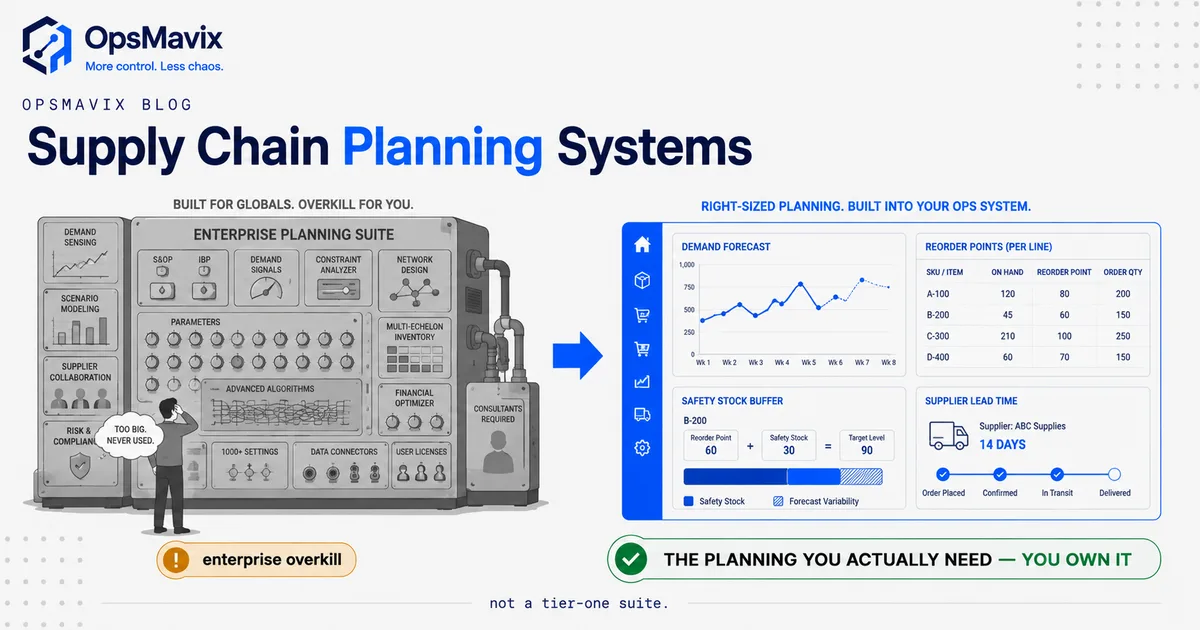
Supply chain planning systems, stripped of the enterprise marketing, do one job: they help you decide what to buy or make, how much, and when, before you run out or over-order. For a large manufacturer that job needs a dedicated planning suite and a team to run it. For a growing UK product business it comes down to four connected decisions done well: what will sell (forecasting), when to reorder (reorder points), how much buffer to carry (safety stock), and how long your suppliers actually take to deliver (lead time). Get those four honest and connected, and you have real planning. Buy a Kinaxis- or o9-tier suite to get them, and you’ve spent six figures on a jet to cross the road.
The trap most owners fall into isn’t under-investing in planning. It’s assuming the only “real” planning tool is the enterprise one they saw demoed, so they either buy far too much system, or they buy nothing and keep planning in a spreadsheet that quietly lies to them. There’s a middle, and it’s where most scaling businesses actually belong.
What Supply Chain Planning Systems Actually Do
A supply chain planning system answers questions about the future so your buying and production stop being reactions to the present. Ordering software tells you what to do now: raise this PO, ship this order. Planning tells you what will be true, so the “now” decisions are already right. That distinction is the whole point, and it’s why planning and execution are different jobs even when they live in the same system.
Concretely, planning does four things:
- Predicts demand — how much of each product you’ll sell over the coming weeks, based on your own sales history, seasonality and known events (a promotion, a big contract, a seasonal peak).
- Signals replenishment — tells you the point at which stock is low enough that you must reorder now to avoid a stockout, given how fast it sells and how long resupply takes.
- Sizes the buffer — decides how much safety stock to hold so normal demand wobble and supplier lateness don’t empty a shelf.
- Accounts for lead time — factors in how long each supplier really takes, so you order early enough that the goods land before you run dry.
Enterprise suites layer far more on top — multi-echelon optimisation across regional warehouses, constraint-based production scheduling across plants, thousands of what-if scenarios re-run nightly. That reach is real, and at genuine scale it earns its cost. The question for a growing business isn’t whether that capability exists. It’s whether you have the problem it solves yet. Most don’t, and the honest four-decision core is where nearly all the value sits for a smaller business. This is the same discipline covered in our operations planning and control guide, applied specifically to what you buy and hold.
The Four Decisions That Make Up SMB Planning
Here’s what each of the four decisions looks like in practice — and where a spreadsheet quietly breaks down on each one.
1. Forecasting: what will actually sell
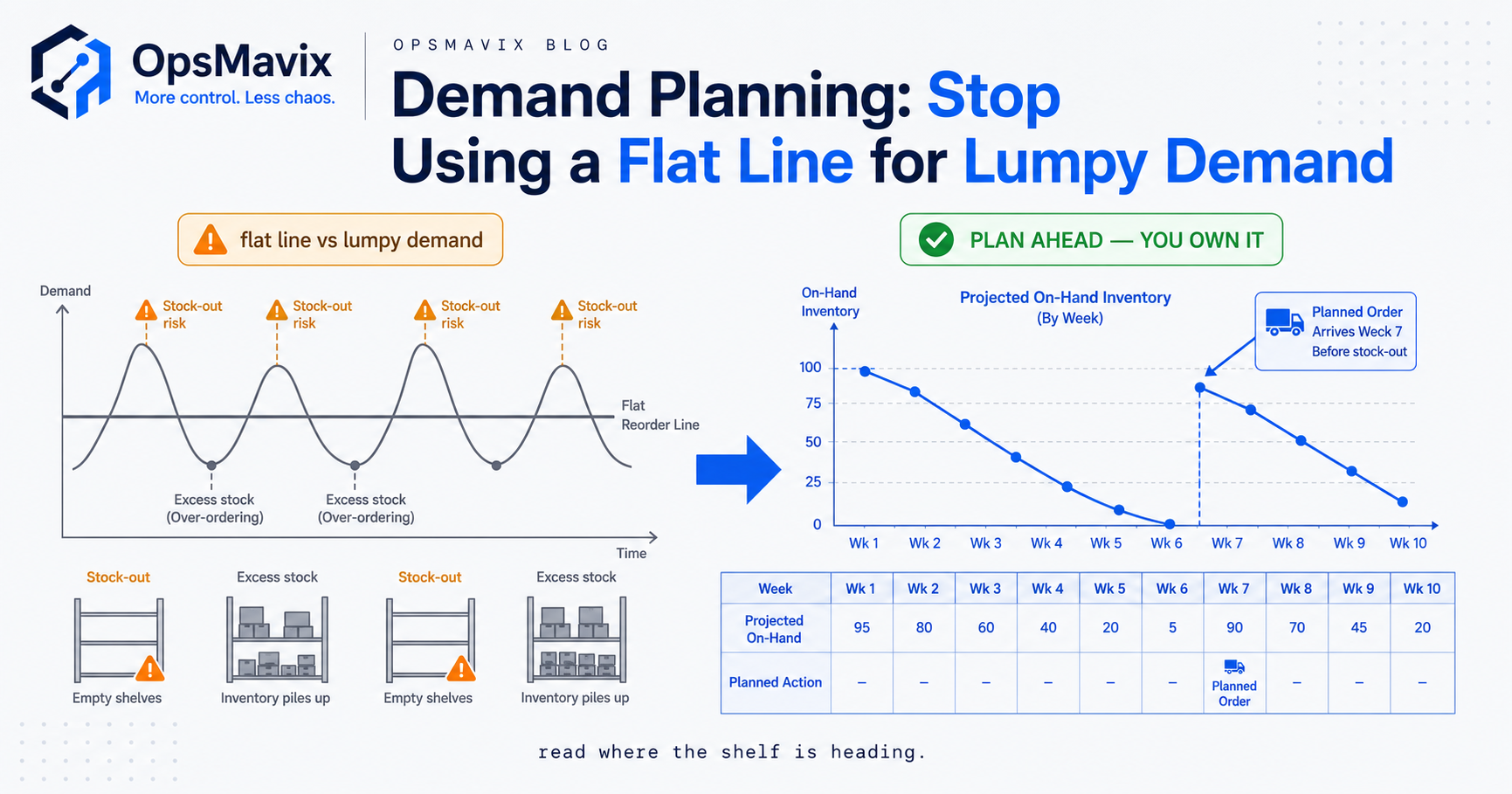
You don’t need a machine-learning demand-sensing engine to forecast for a few hundred SKUs. You need your real sales history, adjusted for what you already know is coming. A simple approach beats gut feel by a wide margin and is enough for most product businesses: a moving average of recent sales, weighted toward the recent weeks, nudged up or down for known seasonality and planned promotions. The failure isn’t a lack of sophistication; it’s forecasting off a spreadsheet nobody updates, so the “forecast” is really last quarter frozen in place. Our short-term demand forecasting example walks through what this looks like for a small operation without any enterprise tooling, and the demand forecasting for small business guide covers the practical version end to end.
2. Reorder points: when to pull the trigger
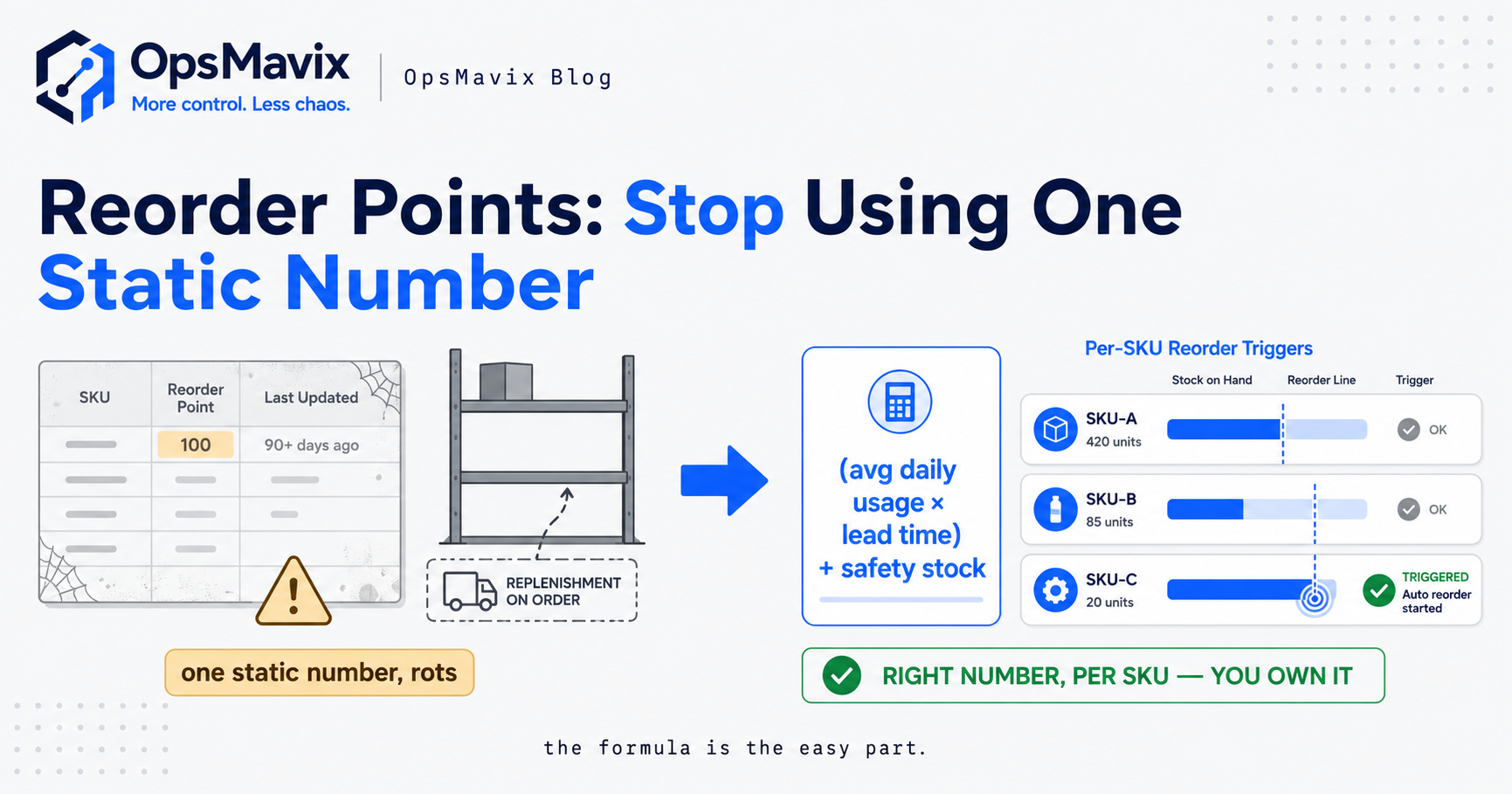
A reorder point is the stock level at which you place the order. Below it, you risk running out before resupply arrives; above it, you’re carrying more cash in stock than you need. The maths is not hard (average daily demand multiplied by lead-time days, plus your safety stock), but it only works if the inputs are current. When lead time drifts from four weeks to seven and nobody updates the number, your reorder point is set for a supplier that no longer exists, and you stock out on your best line. The full method is in our how to calculate reorder point guide.
3. Safety stock: the buffer against reality
Safety stock is the cushion that absorbs two kinds of surprise: demand higher than forecast, and delivery later than promised. Too little and a normal bad week empties the shelf; too much and you’ve tied up cash and warehouse space in insurance you didn’t need. Right-sizing it means holding buffer in proportion to how variable each item’s demand and supply actually are — steady, predictable lines need little; erratic or long-lead items need more. A single blanket “keep two weeks of everything” rule over-buffers your reliable lines and under-buffers your volatile ones at the same time. See safety stock calculation for the practical formulas.
4. Supplier lead time: the input everything else rides on
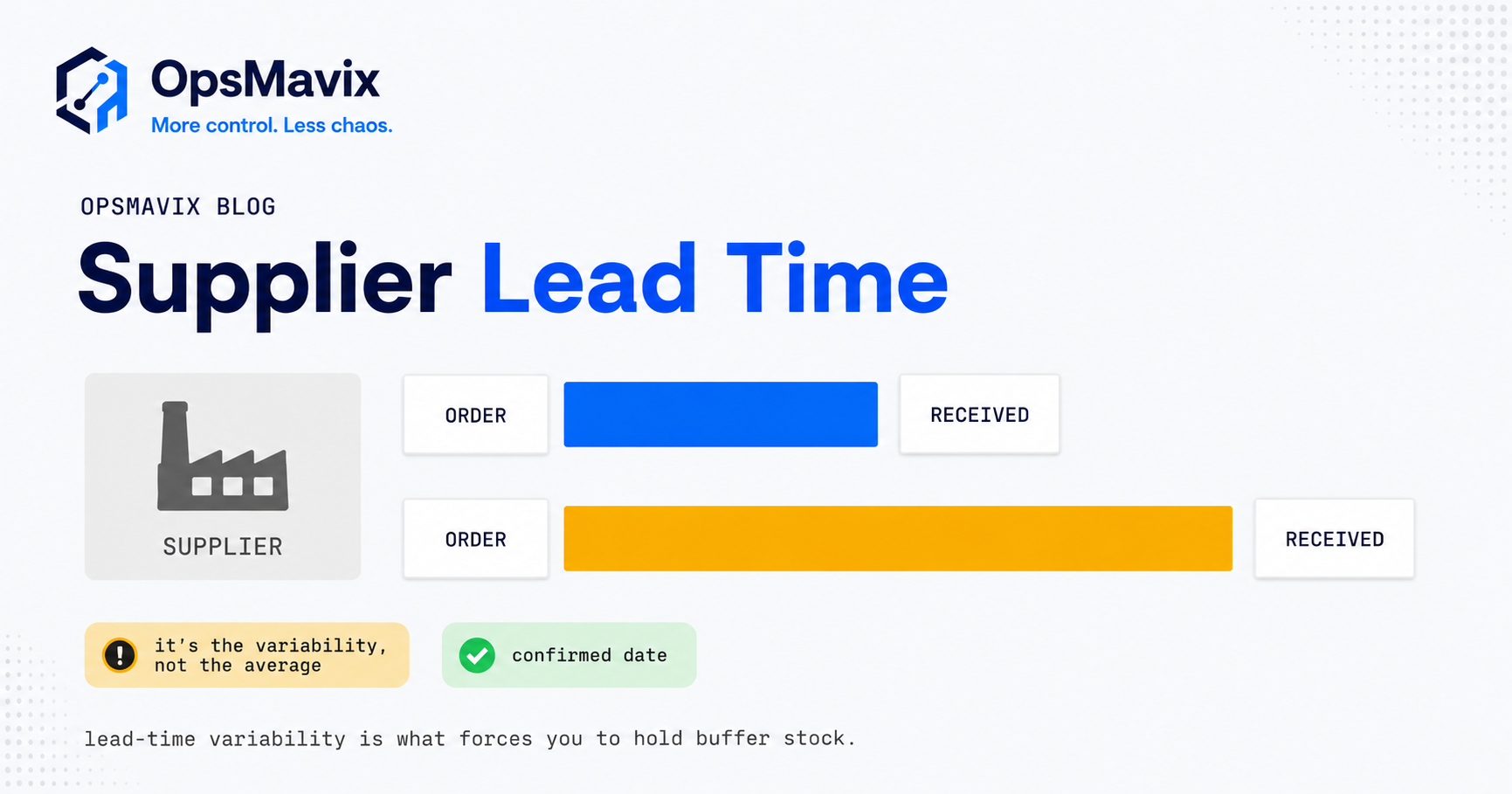
Every number above depends on knowing how long your suppliers really take: not the lead time on the quote, the one you actually get. This is the input most spreadsheets get wrong, because nobody records actuals. You plan off “four weeks” while your real average is closer to six, so every reorder point and safety-stock figure downstream is quietly too low. A planning system worth having tracks the gap between promised and actual lead time per supplier, so your buffers reflect who delivers on time and who doesn’t. Our supplier lead time management guide covers why this single number moves everything.
The reason these four are a system and not four spreadsheets is that they share inputs. Lead time feeds the reorder point and the safety stock. The forecast feeds both. Change one and the others should move automatically. In four separate spreadsheets, they don’t — someone has to remember to update all of them, and someone never does.
Basic S&OP Without the Ceremony
Sales and operations planning (S&OP) sounds like a boardroom process with a dedicated planner and a monthly cross-functional meeting. At enterprise scale it is. For an SMB, the useful core of S&OP is much smaller: a regular, honest look at what sales expects to happen next, checked against what operations can actually supply — and a decision made where the two don’t line up.
That’s it. Sales says “the new contract kicks in next month, expect volume up 30% on these lines.” Operations checks whether current stock, on-order quantities and supplier lead times can cover that. Where they can’t, you decide now — bring an order forward, raise safety stock on those lines, or tell sales what’s realistic — instead of discovering the gap when the orders land and the shelf is empty.
You don’t need software to hold that conversation. You need a system that makes the two sides of it visible in one place: here’s the demand we expect, here’s the supply we’ve got coming, here’s where they don’t meet. When that view lives in the same system that already knows your stock, orders and suppliers, the meeting takes twenty minutes and rests on real numbers. When it lives in a slide deck someone rebuilds by hand each month, it becomes theatre. As one operations owner put it, the plan is out of date the moment the meeting ends. Basic S&OP is a habit supported by good data, not a suite you buy.
Enterprise Planning Suites vs Right-Sized Planning
When planning gets painful, the market points you at enterprise suites — Kinaxis, o9, the SAP and Oracle planning modules. They’re genuinely powerful. They’re also built for a problem most growing businesses don’t have. Here’s the honest comparison.
| Consideration | Enterprise planning suite (Kinaxis / o9-tier) | Spreadsheet planning | Right-sized planning in your ops system |
|---|---|---|---|
| Built for | Global manufacturers, thousands of SKUs, multi-plant networks | One person who knows the tab | Growing SMBs outgrowing spreadsheets, nowhere near enterprise scale |
| The four core decisions | Yes, plus far more you won’t use | Possible, but manual and error-prone | Yes, automated and connected |
| Multi-echelon / scenario engine | Deep — the main reason to buy it | None | Not included, because you don’t need it yet |
| Setup time | Months to over a year, consultant-led | Immediate, but fragile | Scoped to the decisions you actually make |
| Cost model | Six figures plus annual licence, forever | “Free,” paid for in errors and firefighting | Build cost, then you own it |
| Fit | You staff a planning function to run it | Fits until it silently doesn’t | Shaped to how you already buy and hold |
| Data ownership | Lives in their platform | Lives on someone’s laptop | Your database, your rules |
| Fails when | You use 15% and pay for 100% | Volume, SKUs or people grow | You genuinely reach multi-plant, multi-echelon scale |
Be fair to the enterprise suites: if you run thousands of SKUs across multiple plants and regional warehouses, constantly re-planning against capacity constraints, that’s exactly what they’re for, and a spreadsheet would be reckless. And be fair to the spreadsheet: for a very small, stable operation, a well-built sheet can carry you for a while, and you shouldn’t buy software to replace something that still works.
The trap is the middle, where most scaling UK businesses live. You’ve outgrown the spreadsheet: the errors, the one person who understands it, the numbers that drift. But you’re nowhere near needing, or wanting to pay forever for, an enterprise suite you’d barely touch. One operations director we spoke to summed up the whole dilemma: too small for the enterprise tool, too big for the spreadsheet, and no one offering the middle. That middle — the four core decisions, automated and owned — is the right-sized answer. It’s the same reasoning behind choosing an inventory automation system over a bloated platform: the value is in the specific slice you’ll actually use, done well.
Why Planning Belongs Inside Your Ops System
Here’s the argument against buying planning as a separate product at all: planning is only as good as the data it runs on, and that data already lives in your operations system. Your sales history, your current stock, your open purchase orders, your supplier records: the raw material for every forecast, reorder point and buffer is sitting in the system that runs your day-to-day. Bolt a separate planning suite on top and you spend the first six months just building integrations to feed it the data you already had.
When planning lives inside the ops system, three things happen that never happen with a bolted-on suite:
- Inputs stay live. A sale updates the forecast base. A late delivery updates the supplier’s real lead time. A reorder updates the on-hand count. Nobody re-keys anything, so nothing drifts. This is the same stop re-keying orders discipline applied to planning inputs.
- The plan and the action are one click apart. The system says “reorder point hit on this line” and the purchase order is raised from the same screen, against the same supplier record, with the real lead time already in it. No export, no reconcile, no second tool.
- You own the logic. Your business has quirks — a supplier with a fixed monthly order window, a product built to order, a channel that spikes on paydays. In an owned system those rules go straight into the planning logic. In a rented suite you file a feature request and wait, or bend your process to what the platform supports.
That last point is where ownership stops being a slogan and becomes money. A growing business changes constantly: new suppliers, new channels, new products, new lead-time realities. An owned planning layer gets extended because the code is yours. A rented suite becomes, over a few years, a ceiling you pay to sit under. For an owner who was quoted six figures for a system he’d half-use, the appeal of the middle path isn’t just the lower price — it’s never being held hostage to a partner-driven roadmap again.
A Worked Example: The £4M Wholesaler
Numbers make it concrete. These figures are illustrative, not a claim about a specific client, but the shape is one growing distributors recognise instantly.
A UK wholesale distributor turning over about £4M carries roughly 600 active SKUs across two suppliers in the EU and one domestic. Planning happens in a shared spreadsheet: a buyer eyeballs recent sales, guesses reorder quantities, and raises POs when a line “looks low.” Lead times in the sheet were entered eighteen months ago.
On paper it works. In practice three leaks run constantly:
- Stale lead times. The main EU supplier’s real lead time crept from four weeks to seven after a freight change, but the sheet still says four. Reorder points set for four-week resupply mean the top 20 lines stock out for roughly a week each, twice a year. Conservatively, that’s £18,000 of lost sales the business never sees as a line item — it just looks like “demand we couldn’t meet.”
- Blanket safety stock. The rule is “hold three weeks of everything.” Steady lines are over-buffered; erratic ones still stock out. Across 600 SKUs that over-buffer ties up an estimated £40,000 of cash in stock that isn’t earning, while the volatile lines the buffer was meant to protect keep running dry.
- Guessed reorder quantities. With no economic order logic, the buyer rounds up “to be safe,” so slow movers arrive in quantities that take a year to clear. Roughly £25,000 of cash sits in overstock that won’t turn this year, some of it ageing toward write-off.
Add the visible pieces (lost sales, trapped cash, the buyer’s two days a week spent firefighting POs) and the spreadsheet is costing this business well into five figures a year in avoidable loss, on top of cash frozen in the wrong stock. And it compounds every season the inputs drift further from reality.
The fix is not an enterprise suite. It’s the four decisions, connected and live: a forecast built off real sales, per-supplier lead times that update from actual delivery dates, safety stock sized to each line’s volatility instead of a blanket three weeks, and reorder points that recalculate when any input changes. Built into the system that already holds the stock and supplier records, owned outright. No planning department. No six-figure licence. Just planning that tells the truth.
FAQ
What’s the difference between supply chain planning and inventory management?
Inventory management tracks what you have and where it is right now — the current, factual count. Supply chain planning looks forward: what you’ll sell, when you’ll run low, how much buffer to hold, and when to reorder given supplier lead times. Management is the present; planning is the future. They’re tightly linked — planning runs on the data management provides — but they answer different questions, which is why a good system does both and keeps them connected rather than treating planning as a separate bolt-on.
Do SMBs really need a supply chain planning system, or is a spreadsheet enough?
A spreadsheet is fine for a very small, stable operation, and you shouldn’t replace something that still works. It breaks down predictably: as SKU count grows, as the number of people touching it grows, and as the business depends on numbers that only one person understands. The tell is when planning errors — stockouts, overstock, cash trapped in the wrong lines — start costing more than a proper system would. At that point the spreadsheet isn’t free; it’s the most expensive tool you own, you just don’t see the bill.
Isn’t enterprise planning software like Kinaxis or o9 the “real” option?
They’re real and genuinely powerful — for the businesses they’re built for: large manufacturers with thousands of SKUs, multiple plants, and multi-echelon networks that need constant scenario re-planning. For a growing SMB, that reach is capability you pay for and never use, on a rollout that can outlast the problem you had. The core planning decisions of forecast, reorder point, safety stock and lead time don’t require an enterprise suite. They require good, connected data and logic sized to your business.
What’s the minimum planning a growing business should have?
Four things done honestly: a forecast built from your real sales history and known events; a reorder point per line that reflects true demand and true lead time; safety stock sized to each line’s actual variability rather than a blanket rule; and per-supplier lead times based on what suppliers actually deliver, not what they quote. If those four are current and connected, you have real planning. If they live in four separate spreadsheets nobody keeps in sync, you have the appearance of planning and the cost of not having it.
Can planning be built into the system we already use to run operations?
Yes, and that’s usually the better answer than buying a separate planning product. Your sales history, stock, open orders and supplier records already live in your ops system — the exact inputs planning needs. Building the planning logic into that system means the inputs stay live automatically, the plan and the resulting purchase order are one step apart, and you own the logic so it bends to your quirks instead of the reverse. A separate suite spends its first months just re-importing the data you already had.
How OpsMavix Can Help
OpsMavix builds right-sized, owned operations systems for growing UK product businesses that have outgrown spreadsheet planning but have no use for a six-figure enterprise suite. Instead of selling you a Kinaxis- or o9-tier platform where you’d use a fraction and rent the rest forever, we map how you actually forecast, reorder, buffer and buy, find where stale lead times, blanket safety stock and guessed order quantities are leaking cash, and build the specific planning your business needs — forecasting off your real sales, per-supplier lead times that update from actual deliveries, safety stock sized to each line’s volatility, and reorder points that recalculate when any input changes — wired into the system that already runs your operations, owned outright by you. It’s the practical middle between a spreadsheet that’s run out of road and an enterprise suite that’s overkill. If you’re planning off numbers you already suspect are wrong, start by seeing exactly where the leaks are: Book a Free Operations Leak Audit
Sources
- OpsMavix — How to Calculate Reorder Point — the reorder-point method referenced above, for SMBs without enterprise tooling.
- OpsMavix — Safety Stock Calculation — sizing buffers to demand and supply variability rather than a blanket rule.
- OpsMavix — Supplier Lead Time Management — why the gap between quoted and actual lead time moves every downstream planning number.
Keep reading
Getting value from OpsMavix? Add us as a preferred source on Google — you'll see more of our operations content in your AI Overviews, AI Mode and Search.