
Amazon Inventory Management: FBA, FBM and the Oversell Trap
Amazon punishes both ends of getting stock wrong. Stock out and you lose ranking and the Buy Box; oversell and you risk cancellations and account health. The hard part is that your stock isn't just on Amazon — it's split across FBA, FBM, and every other channel you sell on. Here's why spreadsheets can't hold that, and what one true synced count fixes.
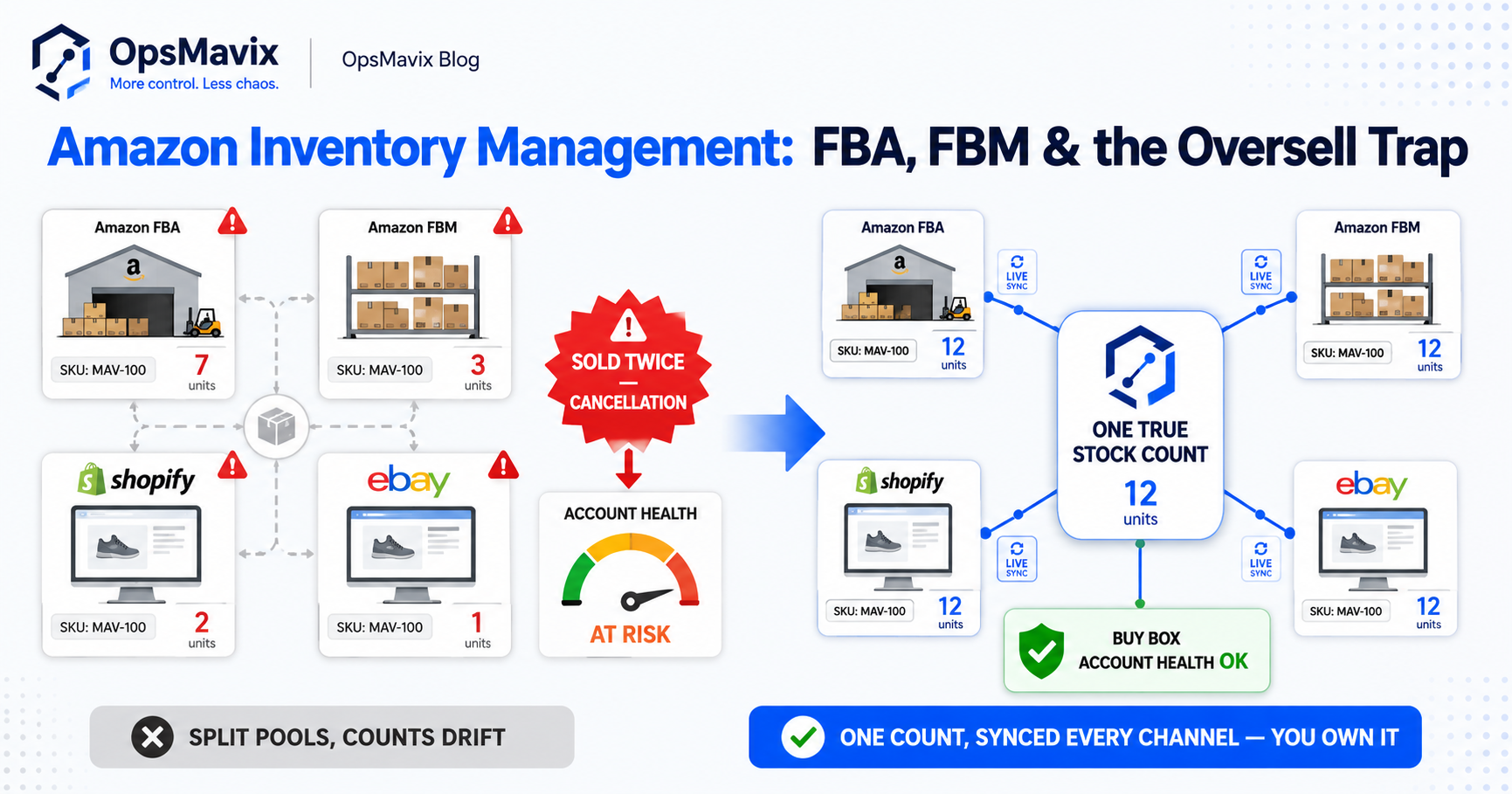
Amazon inventory management is hard for a reason most software glosses over: Amazon punishes you at both ends. Run out and you lose search ranking and the Buy Box — visibility you then have to claw back. Oversell because another channel sold the last unit first, and you’re cancelling Amazon orders, which puts your account health at risk. What decides which way it goes is your stock count — and on Amazon that count is never in one place. It’s split across FBA, FBM, your own store, and whatever marketplaces you’ve added. The fix isn’t a better dashboard inside Seller Central; it’s one true stock number that every channel — Amazon included — reads from and writes to in real time.
This post is specifically about the realities of holding stock as an Amazon seller: FBA versus FBM, why stockouts hurt more on Amazon than anywhere else, how overselling sneaks in across channels, and why reconciling Amazon’s numbers with your own is its own quiet headache. If you sell on more than just Amazon, the broader pattern is covered in how to stop overselling across Shopify, Amazon and eBay — here we go Amazon-deep.
Key Takeaways
- On Amazon, stockouts don’t just lose the sale — they cost ranking and the Buy Box, and that visibility is slow and expensive to win back.
- Overselling triggers cancellations, which Amazon ties to account health — so a stock-sync slip can quietly threaten the whole channel.
- FBA and FBM split your stock into two pools that have to be tracked as one, alongside every other channel you sell on.
- Restock timing on FBA is a planning problem spreadsheets handle badly — you’re forecasting against lead times and inbound limits, not just current stock.
- Amazon’s numbers rarely match yours line-for-line; reconciling them by hand is where errors and wasted hours live.
- The durable fix is one true stock count synced across Amazon and all channels — not a faster way to update three places by hand.
1Why Amazon Stockouts Cost More Than the Lost Sale
Run out of stock on your own website and you lose orders until you restock. Annoying, recoverable. Run out on Amazon and the damage outlasts the empty shelf. When a listing goes out of stock, it loses visibility — Amazon’s search surfaces products it can actually fulfil, so an unavailable item drifts down the rankings. And if you held the Buy Box, going out of stock is the fastest way to hand it to a competitor.
The cruel part is the recovery curve. Coming back into stock doesn’t instantly restore where you were — ranking is built on sales velocity and history, and a gap resets momentum you’d spent weeks building. So the true cost of an Amazon stockout isn’t the few days of missed orders; it’s the slower sales for weeks afterward while the listing climbs back. That’s the leak most sellers never put a number against, because it shows up not as a single missed order but as a listing that quietly underperforms its old self.
2FBA vs FBM: Two Stock Pools, One Truth
Most growing Amazon sellers don’t pick one fulfilment method — they run both. FBA (Fulfilled by Amazon) holds stock in Amazon’s warehouses and lets them pick, pack, and ship; FBM (Fulfilled by Merchant) means the stock sits with you and you ship it yourself. There are good reasons to split: FBA for the fast movers that benefit from Prime, FBM for bulky, slow, or seasonal lines where Amazon’s storage costs don’t make sense.
The problem is that splitting fulfilment splits your stock count. The same product can have units in an Amazon fulfilment centre and units on your own shelf, so “how many do I have?” now has two answers that have to be added up correctly every time — or you’ll either oversell or sit on dead stock you forgot you held. Spreadsheets handle this with a column for each, until someone forgets to update one and the two pools drift apart. Amazon inventory management isn’t about Amazon’s count or your count; it’s about treating both as one true number that always agrees with itself.
3How Overselling Sneaks In Across Channels
Overselling rarely happens on Amazon alone — it happens because Amazon isn’t the only place that can sell your stock. The general mechanics of how a stock-sync delay double-sells the last unit, and how live sync plus buffers prevent it, are covered in the multichannel overselling breakdown. What’s different on Amazon is the stake.
On most channels a cancellation is an apology and a refund. On Amazon it’s that plus a hit to account health, because Amazon tracks order defects, cancellations, and late shipments as metrics that govern your standing on the platform. Enough of them and you’re not just losing trust — you’re risking the channel itself. A stock-sync delay that feels like a minor admin slip is, on Amazon, a direct input into whether your account stays in good standing.
4Restock Timing: The Planning Problem Spreadsheets Lose
Knowing your current stock is the easy half. The hard half is knowing when to reorder so FBA never runs dry — and that’s a forecasting problem, not a counting one. You’re working backwards from supplier lead times, shipping time into Amazon’s network, and how long inbound stock takes to become sellable. Get the timing wrong and you either stock out (and trigger the ranking damage from section 1) or you over-send and tie up cash in stock that sits there.
There’s also the inbound side: Amazon limits how much you can send into FBA at a given time, so you can’t simply over-ship to be safe. Restocking becomes a rolling plan — what to send, how much, and when — across dozens or hundreds of SKUs, each with its own velocity and lead time. A spreadsheet can hold today’s snapshot; it can’t keep that plan live as sales come in and lead times shift. So sellers either burn hours every week rebuilding a restock sheet or wing it and pay for it later. The honest fix is a system that watches velocity against lead times and surfaces what to reorder and when before a bestseller runs out — the forecasting logic explored in AI stock control, which only works once the underlying count is trustworthy.
5Reconciling Amazon’s Numbers With Your Own
Even with one channel, Amazon’s view of your inventory and your own records rarely line up perfectly. Units get lost or damaged in the fulfilment network, returns flow back in on Amazon’s timeline rather than yours, and reimbursements and adjustments land in Seller Central without ever touching your own books. So you end up with two ledgers — Amazon’s and yours — that should match and quietly don’t.
Reconciling them by hand is grim work: exporting reports, matching SKUs, chasing discrepancies, and doing it often enough that small gaps don’t compound. Most sellers do it late or not at all, and the drift becomes phantom stock — a screen number that no longer reflects reality, which is exactly how overselling and bad restock decisions start. The fix isn’t more frequent manual reconciliation; it’s a system that pulls Amazon’s movements automatically and keeps your one true count aligned, so reconciliation stops being a monthly firefight.
6Why a Spreadsheet Can’t Be Your Amazon Inventory System
A spreadsheet is a snapshot of a moment, maintained by someone remembering to update it. Amazon inventory is the opposite: FBA plus FBM plus every other channel, changing continuously, with stakes on every miss. The spreadsheet model breaks the instant two things are true at once — more than one place can sell your stock, and stock changes faster than a person can retype it. Both are true for any Amazon seller past the hobby stage.
The usual escape hatch is an Amazon-only inventory tool bolted onto Seller Central. Better than a spreadsheet for the Amazon slice — but it’s still only the Amazon slice. It doesn’t know about the unit that just sold on your own site, so it can’t stop the cross-channel oversell that does the real damage. The goal of eCommerce inventory automation isn’t to manage Amazon better in isolation; it’s to make Amazon one of several channels all drawing from a single live count — so the number is true everywhere, not just inside one tool.
Spreadsheets vs Amazon-Only Tools vs One Custom Synced System
| Spreadsheet / manual | Amazon-only inventory tool | One custom synced system | |
|---|---|---|---|
| Stock count | One sheet, updated by hand | Accurate for Amazon only | One live count across all channels |
| FBA + FBM | Two columns, drift apart | Tracked within Amazon | Treated as one true number |
| Cross-channel oversell | Happens whenever channels race | Can’t see other channels | Prevented by live sync + buffers |
| Stockout warning | Noticed once it’s out | Amazon alerts, Amazon-only | Forecast-led, before it runs dry |
| Restock timing | Manual sheet, rebuilt weekly | Amazon restock suggestions | Velocity vs lead time, all SKUs |
| Reconciling Amazon vs your books | Manual export-and-match | Within Amazon’s view | Pulled and aligned automatically |
| Ownership | Yours, but fragile | Vendor app, per-seat fees | Owned outright, built for you |
Common Questions
Does Amazon manage inventory for me with FBA?
FBA handles storage, picking, packing, and shipping for the units in Amazon’s warehouses — but it doesn’t manage your inventory across the rest of your business. It doesn’t know about your FBM stock, your own website’s sales, or your other marketplaces. So FBA solves fulfilment for one pool of stock; it doesn’t give you a single true count across everywhere you sell. That gap is exactly where overselling and bad restock decisions live — and it’s the part you still have to manage yourself.
How do I stop overselling between Amazon and my other channels?
You need one live stock count that every channel reads from and writes to in real time, so a sale anywhere reduces the number everywhere within moments. Stock buffers on fast movers absorb any brief sync delay so a near-miss never becomes an oversell. What makes overselling inevitable is a count that only updates when a human remembers to — fix that and the oversells stop. The full mechanics are in the multichannel overselling guide.
How do I handle FBA and FBM stock together?
Treat them as one inventory held in two locations, not two separate inventories. The total you can actually sell is FBA units plus FBM units, minus anything already committed — and that math has to be live, not reconstructed at the end of the day. A custom system tracks both pools as a single true number, so you never oversell by double-counting and never sit on FBM stock you’d forgotten you held. Splitting fulfilment is fine; splitting your count is what causes trouble.
Why do Amazon’s inventory numbers never match my own records?
Because units get lost, damaged, returned, or adjusted inside Amazon’s network on Amazon’s timeline, and those movements don’t automatically reach your books. Over time the two ledgers drift, and the gap becomes phantom stock — a screen number that no longer matches reality. Reconciling by hand is slow and usually done too late to catch the drift. The durable fix is a system that pulls Amazon’s movements automatically and keeps your one true count aligned, so the two views stay in step without a monthly chase.
Do I need a custom system, or is an off-the-shelf Amazon tool enough?
If Amazon is genuinely your only channel and your volume is modest, an off-the-shelf tool may be enough. The moment you sell anywhere else — your own store, eBay, wholesale — or run both FBA and FBM at scale, an Amazon-only tool can’t see the whole picture, and the oversells that hurt most happen in the gap between channels. A custom system is built around your actual channels and fulfilment mix, and you own it outright rather than renting per-seat access. The deciding factor is breadth, not size.
How OpsMavix Can Help
OpsMavix builds custom eCommerce inventory automation that gives Amazon sellers one true stock count across FBA, FBM, and every other channel you sell on — so the number is the same in Seller Central, on your own site, and in your books, in real time. A sale anywhere updates everywhere; buffers on fast movers stop the cross-channel oversells that put account health at risk; and restock timing stops being a weekly spreadsheet rebuild and becomes a forecast that warns you before a bestseller runs dry and costs you ranking. Amazon’s movements get pulled in and reconciled automatically, so the two ledgers stop drifting into phantom stock. It’s built around your actual operation and you own it outright — no per-seat fees, nothing a vendor can switch off — backed by our founder delivery guarantee.
If you’re managing Amazon stock across FBA, FBM, and other channels by hand, the oversells and stockouts aren’t bad luck — they’re a structural leak in how your count is kept. Book a Free Operations Leak Audit and we’ll map exactly where your stock number breaks across Amazon and your other channels, what those oversells and stockouts are costing you, and what it would take to run the whole thing off one number you can trust.