
Production Management System: Right-Sized and Owned, Not a Bloated Suite
Most guides push a production management system as a giant MRP or ERP suite you rent forever. This is the honest version: what a production management system actually needs to do for a growing UK product business, where the generic platforms overshoot, and why a right-sized owned system usually wins on cost, control and adoption.
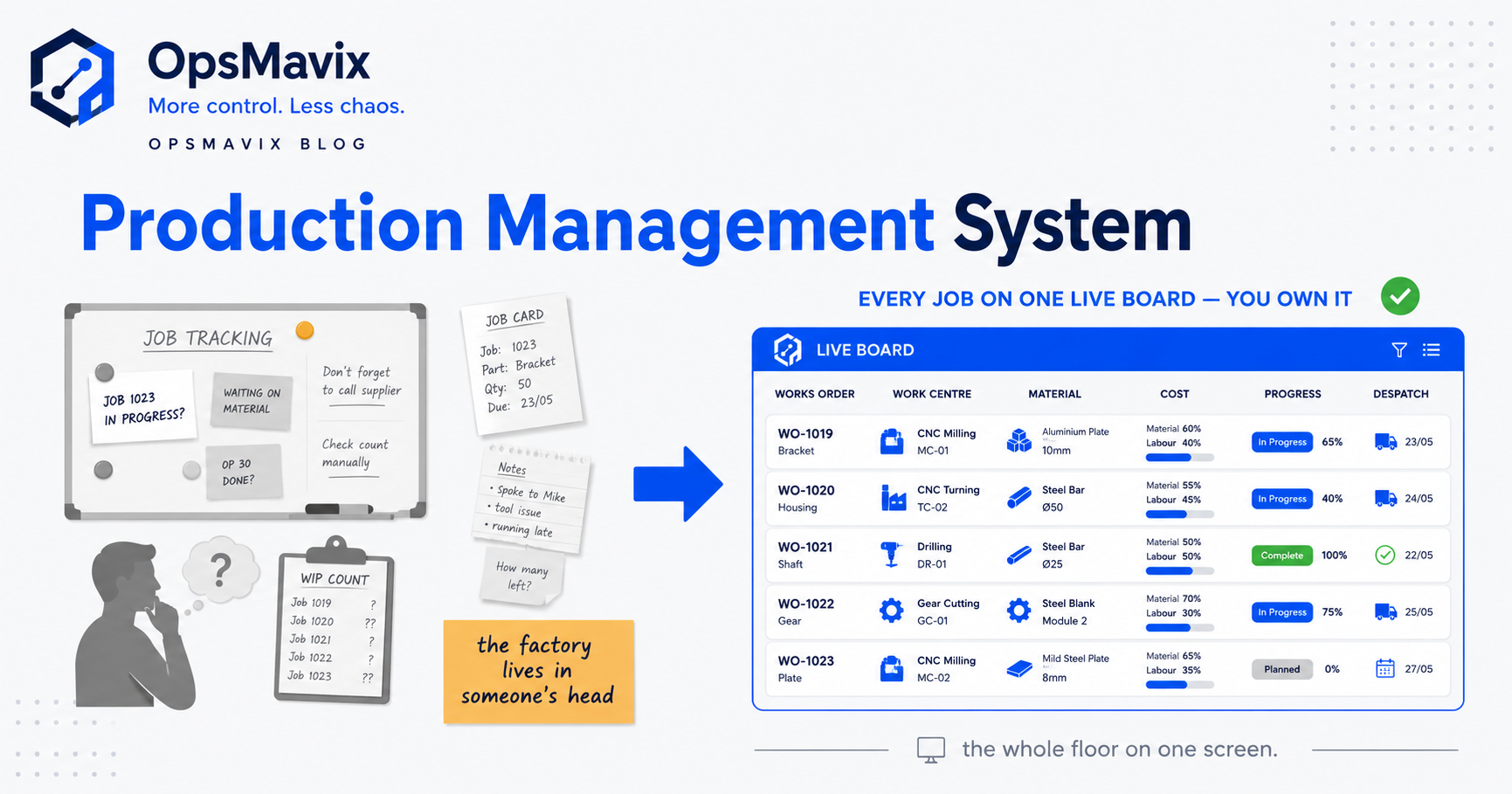
A production management system is the software that plans, tracks and controls how you turn raw materials into finished goods — works orders, job stages, work-in-progress, materials, labour and the stock that flows through all of it — on one shared source of truth. That is the honest definition, and it is deliberately narrower than the marketing you will meet the moment you start searching. Most vendors will try to sell you a production management system as a wall-to-wall MRP or ERP suite that also runs your finance, HR, CRM and a dozen modules you will never switch on. This guide separates the job the system actually has to do from the platform someone wants you to rent to do it.
Quick summary: UK manufacturers are getting more out of their factories with fewer people — average output per manufacturing employee rose 2.9% year-on-year in 2025, worth roughly £7,000 more per worker in real terms, on total factory output of nearly £639bn (The Manufacturer / ONS via FourJaw). That is what production control buys you: more throughput from the same floor. The catch is that most growing product businesses do not need an enterprise suite to get it — they need a right-sized system that nails a handful of workflows, and they usually want to own it rather than rent a platform forever.
Contents
- What a production management system actually does
- The four jobs that actually matter
- Where the generic suites overshoot
- Rented suite vs right-sized owned system
- Worked example: a 30-person contract manufacturer
- Do you need MRP, or do you need control?
- What “owned” actually means
- How to size the system to your business
- Signs you have outgrown spreadsheets
- FAQ
- How OpsMavix Can Help
What a production management system actually does
At its core, a production management system answers four questions that a growing product business asks itself every single day: What are we making, where is each job, what is it costing us, and do we have the stock to finish it? Everything else a vendor bolts on — demand forecasting, capacity simulation, quality modules, maintenance scheduling, HR — is either an extension of those four questions or a different system wearing the same badge.
The four core questions are the same whether you run a 12-person workshop or a 12-site plant, but the machinery needed to answer them is wildly different. A small manufacturer can answer all four with a focused system built around how they actually make things. A large, multi-site, multi-currency operation genuinely needs the heavy planning engine of a full MRP system and the consolidation of a proper ERP. The expensive, common mistake is a growing business being sold the second when it needs the first.
Production management sits in the middle of your operation — upstream it touches purchasing and supplier orders; downstream it touches dispatch, invoicing and stock. That is why so many vendors argue you “may as well” buy the whole connected suite. It is a reasonable-sounding argument that quietly commits you to paying for, and running, far more system than the problem requires.
The four jobs that actually matter
Strip the marketing away and a production management system earns its keep on four concrete jobs. If it does these well, on one shared truth, it is doing its job. If it does forty things and these four badly, it is shelfware.
- Works orders and job status. Every job visible — what stage it is at, who is on it, when it is due — without walking the floor or pinging someone on WhatsApp. This is the heartbeat of production control. When a customer rings to ask where their order is, the answer should be on a screen, not in someone’s head.
- Work-in-progress (WIP). What is on the floor right now and what it is worth. WIP is where money hides in a manufacturer — half-finished value sitting between raw material and finished goods that nobody has counted. Losing visibility of WIP is how businesses discover, at month end, that the numbers do not add up.
- Job costing. Real cost per job — materials, labour, machine time — captured as the job runs, not reconstructed weeks later from invoices. This is the number that tells you whether a job made money or quietly lost it, and whether your quoting is based on fact or hope.
- Stock that matches reality. One live stock figure the shop floor and the office both trust, tied to what production consumes and produces, so you stop promising stock you cannot ship and stop halting jobs for parts you thought you had.
Notice what is not on that list: forecasting the next three quarters, simulating finite capacity across six work centres, or running your payroll. Those are real capabilities that real businesses need — at a certain size. Below that size they are cost and complexity you carry without using. A good production management system for a growing business is defined as much by what it leaves out as what it includes.
Where the generic suites overshoot
The generic MRP and ERP production suites are not bad software. SAP, Oracle NetSuite, Microsoft Dynamics, Infor, Odoo and the rest are genuinely powerful, and for large or complex manufacturers they are the right answer. The problem is what happens when that class of system is aimed at a business that is not that size yet.
You pay for breadth you cannot use. The suite’s value scales with your complexity — multiple sites to consolidate, hundreds of components to net, statutory reporting across jurisdictions. If you are one site, one company, one currency, you are paying the most for the features you use the least.
Configuration becomes a project, not a purchase. These platforms are built to flex to any manufacturer, which means they arrive as a kit that has to be configured to become yours. That configuration — data migration, mapping your process onto the vendor’s template, integration, testing, training — is where the real time and money go, and it is routinely several times the licence cost.
Adoption is the failure point. A system built around a vendor’s generic template asks your people to change how they work to suit the software. On a busy floor, that is exactly where rollouts stall — the spreadsheet stays open “just in case,” and you end up running two systems.
You are renting, forever. The licence is a subscription that never ends and generally only goes up, per user, per module, per year. You are renting access to an asset, and the switching cost is engineered to keep you there.
None of this is an argument against ever buying a suite. It is an argument against buying one to solve a problem a smaller, owned, right-sized system would solve with a fraction of the cost and risk.
Rented suite vs right-sized owned system
Here is the honest side-by-side. The point is not that one column is always right; it is that the two are built for different businesses, and a growing product business is usually mis-sold the left column.
| Dimension | Generic MRP/ERP production suite | Right-sized owned system |
|---|---|---|
| Scope | Whole company — finance, HR, CRM, production, the lot | The workflows that are actually bleeding: jobs, WIP, costing, stock |
| Fit | You adapt your process to the platform’s template | Built around how you already make things |
| Cost shape | Per-user, per-module subscription forever, plus a large implementation | One build cost to own it; you keep the finance package you already run |
| Time to value | Months of configuration before it is genuinely yours | Weeks, because it targets a narrow, known problem |
| Adoption risk | High — generic UX, heavy change, spreadsheets linger | Lower — it mirrors the real workflow, so people use it |
| Ownership | You rent access; switching cost is by design | You own the system and the data outright |
| Right for | Multi-site, multi-entity, high-complexity manufacturers | Growing single-site product businesses in the messy middle |
The row that people underweight is ownership. A rented suite is a permanent line on your P&L that you do not control and cannot switch off without ripping out your operations. An owned system is an asset: you paid for it once, it is yours, it does what your business does, and nobody can re-price it out from under you at renewal. For a business that plans to still be here in ten years, that difference compounds.
Worked example: a 30-person contract manufacturer
Make it concrete. Take a fictional but typical case: a 30-person UK contract manufacturer turning over a few million pounds a year, running maybe 40–60 live jobs at any time across two work centres. Today they run production on a shared spreadsheet, a whiteboard on the wall, and the memory of the two people who have been there longest.
The pain. Jobs slip because nobody notices a due date until it is late. WIP is invisible, so the owner cannot tell you what the floor is worth mid-month. Job costs are reconstructed after invoicing, which means they only find out a job lost money once it is too late to do anything about it. And twice a quarter a job stalls because a “in-stock” part was not actually in stock.
Option A — buy the suite. A generic production suite quotes a per-user subscription across the team plus a configuration project to map their process onto the platform. It is real money every year forever, plus months of one of their best people running an implementation on top of their day job. When it lands, it will do far more than they need — and the risk is that the floor never fully adopts it, and the whiteboard survives.
Option B — right-size and own it. Instead, they get a system that does exactly the four jobs: every works order on one board with its stage and due date; WIP value visible live; job costing captured as work happens; and a stock figure that ties to what production consumes, sitting alongside their existing purchasing so parts get reordered before they run out. It connects to the Xero they already use rather than replacing it. They own it. It mirrors their actual workflow, so the whiteboard comes down because the screen is genuinely better.
The outcome that matters. Recall the sector number: UK manufacturers grew output per employee by roughly £7,000 per worker in 2025, largely by getting more throughput from the same people (FourJaw / ONS). For a 30-person shop, control is the lever that unlocks exactly that — fewer late jobs, less value stuck invisibly in WIP, and quoting based on real costs instead of hope. They did not need an enterprise suite to get it. They needed the four jobs done well, and to own the thing that does them.
Do you need MRP, or do you need control?
This is the fork in the road, and getting it right saves you a fortune. MRP — Material Requirements Planning — is a planning engine: it explodes a bill of materials, nets your stock against demand, and tells you what to order and make and when, across potentially hundreds of components. It is genuinely powerful and genuinely necessary at scale. If that describes your problem, read up on what a real MRP system does and plan accordingly.
But for a lot of growing manufacturers, the pain is not planning — it is control. They do not need a machine to compute what to order across 400 parts; they need to see where their jobs are, what WIP is worth, and what things actually cost. That is a visibility and control problem, and answering it with a heavyweight planning suite is like buying a lorry to carry a rucksack. The honest test: if you wrote down your top five operational headaches and they are all “I cannot see X” rather than “I cannot calculate X across hundreds of variables,” you need control, not MRP.
Where MRP and purchasing do meet control is at the edges — reordering parts before a job stalls, for instance, which is really a purchase order software problem sitting next to your production data rather than a full planning engine. A right-sized system connects those edges without making you buy the whole planning cathedral.
What “owned” actually means
“Owned” is not a slogan; it is a specific, measurable difference in your position.
You own the data. Your jobs, costs, stock history and customer records are yours, in a system you control, not held inside a vendor’s platform behind an export button and a renewal negotiation.
You own the logic. The system encodes how your business makes things — your stages, your costing rules, your stock flows — not a generic template you bent yourself around. When your process changes, the system changes to match, because it is yours.
You own the cost curve. You pay to build it once and it is an asset on your side of the table. There is no per-user meter running while you sleep, and no renewal where the price jumps because you added three people.
This is the OpsMavix position in one line: a right-sized, owned operations system for the large middle that the enterprise suites price out and the spreadsheet has outgrown — outgrowing spreadsheets and disconnected tools. It is not an ERP alternative for everyone. If you genuinely need multi-site consolidation and finite-capacity planning across hundreds of parts, buy the suite. If you need the four jobs done well and want to own the thing that does them, you do not.
How to size the system to your business
Right-sizing is the whole game, and it is a series of honest questions rather than a feature checklist.
- One site or several? Several to consolidate → you are leaning toward a suite. One → lean lighter.
- Is the problem planning or visibility? Netting hundreds of parts against demand → MRP territory. Seeing where jobs are and what they cost → control, right-sized.
- Does your finance package already work? If Xero, QuickBooks or Sage is fine, do not replace your finance system to fix a shop-floor problem. Connect to it instead.
- How much change can the floor absorb? If the honest answer is “not a year-long rollout,” that rules out the heavy suite by itself.
- Would fixing four workflows solve most of the pain? Jobs, WIP, costing, stock. If yes, you have your answer and it is not an enterprise platform.
Production never stands alone, so size the neighbours too. If most of your pain is scheduling the floor, manufacturing scheduling software may be the sharper first target. If it is upstream — suppliers, lead times, inbound parts — that is a supply chain management software question. And if the ambition is one connected view across the whole operation rather than production alone, that is an operations control system, built at your size rather than bought at enterprise scale. Match the system to the actual leak, not to the biggest brochure.
Signs you have outgrown spreadsheets
You do not need a consultant to tell you it is time. The tells are consistent across growing product businesses:
- Jobs slip because a due date went unnoticed until it was already late.
- Nobody can tell you what WIP is worth on any given Tuesday.
- Job costs are only known after the invoice goes out — too late to act on.
- The stock number is fiction, so you either oversell or over-order to be safe.
- Two people hold the operation in their heads, and a holiday is a crisis.
- The spreadsheet has become a second job for whoever “owns” it.
If three or more of those are true, you have outgrown the spreadsheet. That does not mean you have grown into an enterprise suite — most businesses in this position are squarely in the middle. The right move is a system sized to that middle: enough to end the pain, not so much that you spend a year and a fortune buying capability you will not use for another decade.
FAQ
What is the difference between a production management system and an ERP?
A production management system controls how you make things — works orders, WIP, job costing, production stock. An ERP is a company-wide system of record that runs finance, HR, purchasing, sales and production off one database. Production management is one domain; ERP tries to be all of them. A growing manufacturer usually needs the first done well long before it needs the second.
Do I need MRP to manage production?
Not necessarily. MRP is a planning engine for netting demand and supply across many components — essential at scale, overkill for many growing shops. If your real problem is seeing where jobs are and what they cost rather than computing what to order across hundreds of parts, you need production control, not MRP. Our MRP system guide covers where the line sits.
How much does a production management system cost?
It depends entirely on scope and how you buy it. A rented enterprise suite is a per-user, per-module subscription forever, plus a configuration project that is often several times the licence. A right-sized owned system is built once, sized to the handful of workflows you actually need, and becomes an asset you own rather than a bill you rent. We never quote a figure without seeing your operation first — anyone who does is guessing.
Can a production system connect to my accounting software?
Yes, and a good one should. A right-sized production management system is designed to sit alongside the finance package you already run — Xero, QuickBooks or Sage — feeding it real job costs and stock movements, rather than forcing you to rip out and replace a finance system that already works. Replacing finance to fix production is the wrong operation entirely.
Is a spreadsheet ever enough to manage production?
For a very small, simple operation, yes — a spreadsheet is honestly fine until it isn’t. You have outgrown it when jobs slip unnoticed, WIP is invisible, costs are only known after invoicing, and the operation lives in two people’s heads. At that point the spreadsheet has become a liability, not a tool — but that is a cue to right-size, not automatically to buy an enterprise platform.
How OpsMavix Can Help
OpsMavix builds right-sized, owned production management systems for growing UK product businesses — manufacturers, warehouses, wholesalers and ecommerce-with-stock operations stuck in the messy middle between spreadsheets and a full enterprise suite. We do not sell a generic platform and we are not an MRP or ERP vendor; we build the system that does the four jobs that actually matter — jobs, WIP, job costing and real stock — around how you already work, connected to the finance package you already run, and owned by you rather than rented forever. Start by finding out exactly where your operation is leaking time and money, and what the honest, right-sized fix looks like. Book a Free Operations Leak Audit.