
Job Costing Software for Manufacturing: Cost vs Quote, Live
Job costing software for manufacturing should show you what a job is really costing against what you quoted, while there is still time to act. Here is what it must capture, why accounting add-ons and full ERP both miss the point for smaller manufacturers, and the right-sized owned alternative for shops outgrowing spreadsheets and disconnected tools.
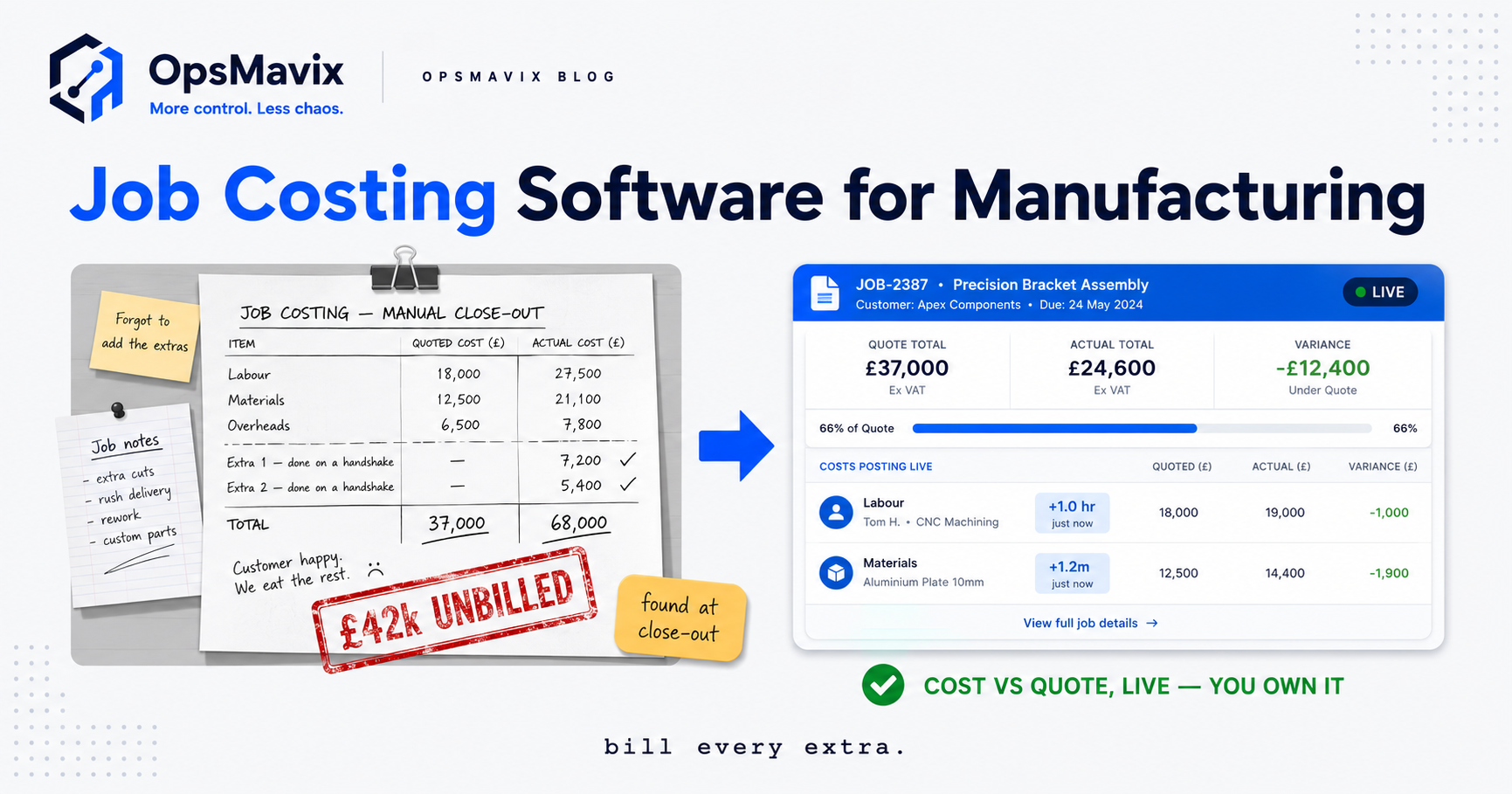
Job costing software for manufacturing is the system that tracks what a single job or production run actually costs to make — its materials, labour, machine time and overhead — and sets that against the quote you priced it on. Done properly, it answers the one question that decides whether a busy shop actually makes money: not “are we winning work?” but “are we winning the right work at the right price?” A job that looks profitable on the quote can quietly bleed margin on the floor, and without live job costing you find out weeks later, in a month-end report, long after you could have done anything about it.
The reason quoted-versus-actual margin gets lost is structural, not careless. You quote on standard costs — a labour rate, a material price, an overhead recovery — that were probably set a while ago and treated as fixed. Then the real job happens: the setup on a short run takes longer than the standard allows, a material price crept up, a part got re-worked, an operator chased a missing component for half a day. Each slip is small. None of them show up on the quote. They only surface if something is capturing actual cost as the job runs and comparing it to what you priced. Most smaller manufacturers have nothing doing that, so the gap between estimate and actual is exactly where the margin disappears — silently, one job at a time.
Quick summary: The blind spot between quoted cost and actual cost is a measurable drain, and closing it moves real money. A Forrester study of manufacturers running Infor’s cloud suite found a 70% reduction in revenue leakage and a 114% return on investment over three years, driven largely by eliminating exactly that gap between what was quoted and what a job actually cost (Infor). You do not need an enterprise suite to close it — you need a right-sized system that captures real cost per job and shows it against quote while the job is still open. And most growing UK manufacturers are better off owning that system than renting a platform forever.
Contents
- What job costing software actually captures
- Estimate versus actual: the number that matters
- Live job costing versus after-the-fact
- Why accounting add-ons fall short
- Why a full ERP overshoots for SMB manufacturers
- The right-sized owned alternative
- Spreadsheets vs add-on/ERP vs owned system
- Worked example: a Yorkshire fabrication shop
- FAQ
- How OpsMavix Can Help
What job costing software actually captures
Real job costing lives or dies on how completely it captures cost against a specific job or run. Miss a category and every margin number it produces is fiction. There are four that matter, and a fifth that most systems fudge.
Materials. Not the quoted material cost — the issued material cost. What was actually drawn from stock and consumed on this job, at what you actually paid for it, including offcuts, scrap and the second length you needed after the first was cut wrong. If your system costs materials at last year’s price or at the quoted quantity, it is flattering every job.
Labour and time. The hours real people booked to this job, at their real loaded rate. This is where most manual costing collapses, because the honest number requires someone to record time against the job as they work — not reconstruct it from memory on Friday. Booked-versus-standard hours is often the single biggest swing between quote and actual.
Machine time. For anyone running CNC, press, laser, injection or similar, machine hours are a cost in their own right — capital, power, tooling, maintenance — and setup and changeover on short runs are the most consistently underestimated element of the lot. A standard that assumes a clean run ignores the hour of setup that a one-off job demands.
Overhead. The recovery rate that spreads your fixed costs — rent, supervision, indirect labour, the things that exist whether or not this job runs — across the work. Set it when volume was different and every quote inherits a stale assumption.
Bulleted, the capture set looks like this:
- Materials — issued quantity at actual cost, including scrap and re-issues
- Direct labour — hours booked to the job at loaded rates
- Machine and setup time — run time plus changeover, priced as its own cost
- Overhead — a recovery rate that is actually kept current
- Bought-in and subcontract — outsourced operations, coatings, plating, carriage — the costs that quietly land on a job and never make it back to the quote
Get those onto one job record and you can finally answer, per job, the only question that pays the wages.
Estimate versus actual: the number that matters
Job costing without a comparison is just bookkeeping. The point is not to know a job cost £8,200. The point is to know you quoted it at £7,600, so it lost £600 you will never bill for — and to know why, so the next quote for that customer or that part is not wrong the same way.
That comparison — estimate versus actual, line by line — is the entire value. It turns costing from a backward-looking accounting chore into a forward-looking pricing tool. When the variance is in labour, you learn your standard hours are optimistic. When it is in setup, you learn short runs need a minimum charge. When it is in materials, you learn a price rise never made it into the quote sheet. Each variance is a correction to how you price the next job. A shop that reviews estimate-versus-actual on every job is quietly re-pricing itself toward its real costs; a shop that does not is repeating the same margin leak on every repeat order.
Do this at the level of the individual job and run, not just the monthly total. The month can look fine while a specific product line, customer or job type loses money on every order — the winners hide the losers. Per-job costing is what separates the two. This is the same discipline that underpins a proper production management system: one shared record per job, carrying its own numbers.
Live job costing versus after-the-fact
Timing decides whether costing is worth anything. There are two ways to run it, and only one of them lets you protect margin.
After-the-fact costing reconstructs the numbers once the job is closed and invoiced — usually at month-end, from timesheets, delivery notes and memory. It tells you what happened. It is genuinely useful for pricing the next quote, and useless for the job in front of you, because that job is already shipped. If it went wrong, you funded the customer’s discount out of your own pocket and found out too late to say anything.
Live costing accrues cost against the job as the job runs. Material issued today lands on the job today. Hours booked this morning show this afternoon. The moment actual cost crosses the quoted cost — while the job is still open — someone can see it and act: query the scope, flag the change, stop the over-run, or at least learn the lesson before the next three identical jobs repeat it. Live is what makes the difference between “we lost £600 on that job” and “this job is tracking £600 over — why?”
You do not need real-time to the second. You need it current enough that a job manager reviewing open work sees trouble while there is still time to do something. For most shops that is same-day, not month-end. That live view is the natural companion to a project operations dashboard — jobs, stages and cost margin on one screen, current enough to act on.
Why accounting add-ons fall short
The costing module in your accounting package is built for the accounts, not the floor. Xero, QuickBooks, Sage and the “project” or “job” bolt-ons around them are excellent at what they are for: recording what was spent and billed so the books balance. They are financial systems, and job costing inside them inherits a financial system’s blind spots.
The first is timing. Accounting-driven costing updates when documents flow through the ledger — when a supplier invoice is entered, when a timesheet is processed. That is inherently retrospective. By the time a cost is “in”, the job that incurred it is usually done. You get after-the-fact costing wearing a job-costing label.
The second is granularity. Accounting add-ons are built around invoices and nominal codes, not works orders, operations and setups. They struggle to capture issued material versus purchased material, machine setup as distinct from run time, or re-work as its own cost. The floor-level detail that explains why a job over-ran does not fit the shape of a ledger.
The third is behaviour. Nobody on the shop floor wants to open the accounting system to book time against a job, so they don’t — and the costing quietly runs on estimates dressed up as actuals. An add-on that the people making the parts will not touch cannot capture what the parts actually cost.
None of this makes accounting software bad. It makes it the wrong tool for live, floor-level job costing — because that was never the job it was built for.
Why a full ERP overshoots for SMB manufacturers
The other answer the market offers is a full ERP or MRP suite, and for most growing UK manufacturers it overshoots on every axis that matters. A tier-one manufacturing ERP genuinely does live job costing well. It also brings a heavy planning engine, multi-site consolidation, demand forecasting, MRP, quality, maintenance and finance modules — priced, implemented and maintained accordingly.
For a 15-to-60-person shop, the mismatch shows up in four places:
- Cost. Licensing, implementation and the specialist to keep it running dwarf the problem you were solving. You are renting a cathedral to house one workbench.
- Time. A meaningful ERP implementation runs in quarters, sometimes years. The margin leak is happening now.
- Adoption. The more the system does, the more there is to fight through to book an hour of time. Complexity the floor resents is complexity the floor routes around — and job costing dies the moment people stop feeding it.
- Fit. Off-the-shelf suites impose a generic process. Your shop has its own way of quoting, staging and running work, and the parts that make you competitive are usually the parts the suite handles worst.
The tell is simple: you are being sold a hundred modules to fix one problem, and you will pay to own, learn and maintain the ninety-nine you did not need. A smaller manufacturer rarely needs the enterprise machine — it needs the one number the enterprise machine happens to produce.
The right-sized owned alternative
Between the accounting bolt-on that is too shallow and the ERP that is too much sits the option most manufacturers are never offered: a right-sized system, built around how your shop actually works, that you own outright.
Right-sized means it does the handful of jobs that decide your margin — capture material, labour, machine and overhead against each job; compare live actual to quote; flag the over-runs while jobs are open — and deliberately does not carry the modules you will never switch on. It fits how you already quote and run work, rather than forcing your shop through a generic template. That fit is what gets the floor to actually use it, and a job-costing system the floor uses is worth more than a perfect one it ignores.
Owned means the system is yours — your data, your logic, no per-seat licence climbing every year, no vendor able to sunset the feature you depend on or price you out at renewal. You paid to build the asset once instead of renting a diluted version of it forever. The same throughput gains the sector is banking — average output per manufacturing employee rose 2.9% year-on-year in 2025, worth roughly £7,000 more per worker in real terms (The Manufacturer via FourJaw) — come from control, and control is worth more when you own the thing providing it.
This is precisely the layer a focused job management system is built to hold, and it is the heart of OpsMavix manufacturing production tracking: the real cost of every job, against quote, live, on a system you keep.
Spreadsheets vs add-on/ERP vs owned system
| Factor | Spreadsheets | Accounting add-on / full ERP | Right-sized owned system |
|---|---|---|---|
| Cost captured per job | Manual, patchy, often estimates | Add-on: shallow · ERP: full but heavy | Materials, labour, machine, overhead, subcontract |
| Estimate vs actual | Rebuilt by hand, if at all | Add-on: retrospective · ERP: yes, complex | Live, line-by-line, per job |
| Timing | Month-end, from memory | Add-on: after-the-fact · ERP: real-time | Same-day, while the job is open |
| Shop-floor adoption | Nobody updates it live | Add-on: low · ERP: fought through | Built to fit how the floor works |
| Fit to your process | Bent to fit, breaks silently | Generic template imposed | Shaped to your actual workflow |
| Setup / machine time | Usually ignored | Add-on: no · ERP: yes | Captured as its own cost |
| Cost to run | “Free” until it breaks | High licence + implementation + specialist | Build once, own it, no per-seat rent |
| Who owns it / the data | You, but it is unusable | The vendor | You — data, logic and all |
| Time to value | Immediate and misleading | Quarters to years | Weeks, scoped to the leak |
Worked example: a Yorkshire fabrication shop
Pennine Fab, a 24-person steel fabrication shop near Leeds (illustrative), ran mixed batches — brackets, frames, one-off weldments — quoting from a standard cost sheet last updated eighteen months earlier.
Pain. The accounts looked healthy in aggregate, but the owner could not say which jobs made money. Short-run weldments felt tight; nobody could prove it. Time was booked to day-sheets and typed up on Fridays; material was costed at quote quantity, not issued quantity; setup time on one-offs was invisible. When a repeat customer’s frames came back for re-work, the re-work cost landed nowhere. A rough reconciliation found roughly £42,000 of labour, re-work and setup across a year that had been incurred on jobs but never made it into a quote or an invoice — pure leaked margin, spread thin enough that no single job raised a flag. A related exposure sat in downtime nobody was pricing: unplanned downtime can cost manufacturers up to £24,000 per hour, and 80% of firms struggle to quantify its impact (Made Smarter).
Over-buy. The instinct was a full manufacturing ERP. Quoted at a multiple of the leak to buy, months to implement, and a system the fabricators — who would not open the accounting package — were never going to feed. It would have “solved” a £42k problem by committing to a far larger recurring cost and a fight to get anyone to use it.
Right-sized. Instead: a focused owned system built to their workflow. Operators book time and material to a job from a tablet at the bench in seconds. Each job carries live actual cost — material issued, hours booked at loaded rates, setup and machine time, subcontract coating — against its quote. Open jobs tracking over quote surface on a dashboard the same day. Overhead and material rates are kept current, so the standard the next quote uses is real.
Outcome. Within the first months the short-run weldments were exposed as the persistent loser and re-priced with a minimum setup charge; two customers’ repeat frames were re-quoted to their true cost; re-work started getting booked, so its cost finally showed. The leak did not need an enterprise suite to close — it needed the one number the suite happens to produce, on a system the floor would actually use and the owner would actually keep.
FAQ
What is the difference between job costing and process costing in manufacturing? Job costing tracks cost against a distinct job or batch — a specific order, run or one-off — which suits made-to-order, mixed and short-run manufacturing. Process costing averages cost across continuous, identical output, which suits high-volume, uniform production. Most UK SMB manufacturers running varied work need job costing, because the whole point is telling the profitable jobs from the losers rather than smearing them into one average.
Can I do job costing in Xero or QuickBooks? Up to a point, and only after the fact. Accounting packages and their project add-ons record cost once documents flow through the ledger, so the numbers arrive after the job has shipped and stay at invoice-level granularity. They are fine for a retrospective view to help price the next quote. They are the wrong tool for live, floor-level costing that captures issued material, setup and re-work while the job is still open.
How is live job costing different from a month-end job cost report? Timing, and what you can do with it. A month-end report is an autopsy — accurate, useful for future pricing, and too late to save the job it describes. Live costing accrues cost as the job runs, so an over-run shows while the job is still open and someone can query scope, stop the bleed or re-price before the next identical job repeats the loss.
Do I need a full ERP to get proper job costing? No. A tier-one ERP does job costing well, but it brings a planning engine, forecasting, finance and dozens of modules you did not ask for, at a cost and complexity built for large multi-site operations. A growing shop usually needs the one number — real cost per job against quote — not the whole machine that happens to produce it. A right-sized owned system delivers the number without the overhead.
What does “owning” a job costing system actually mean? You hold the asset — the data, the logic, the system itself — instead of renting a seat on someone else’s platform. No per-user licence climbing each year, no vendor able to deprecate a feature you rely on or reprice you at renewal, no export battle if you ever move. You pay once to build a system shaped to your shop, and it stays yours.
How OpsMavix Can Help
OpsMavix builds right-sized, owned operations systems for UK manufacturers who are outgrowing spreadsheets and disconnected tools. For job costing that means one focused system that captures real cost per job — materials, labour, machine and setup time, overhead and subcontract — and shows it live against quote, current enough to catch an over-run while the job is still open rather than at month-end.
We build it around how your shop already quotes and runs work, so the floor will actually use it, and you own the result outright — your data, your logic, no per-seat rent climbing every year. We sell the outcome, not the software: fewer jobs that quietly lose money, quotes priced on real costs, and a clear line of sight from quote to actual on every job. It starts by finding where the margin leaks today.
Sources
- Infor — Forrester study of manufacturers on Infor’s cloud suite: 70% reduction in revenue leakage and 114% ROI over three years, driven by eliminating the gap between quoted and actual cost: https://www.infor.com/blog/the-new-cost-reality
- Made Smarter — unplanned downtime can cost manufacturers up to £24,000 per hour, and 80% of companies struggle to quantify its impact: https://www.madesmarter.uk/resources/blog-smart-manufacturing-how-uk-smes-can-reduce-costs-improve-efficiency-by-reducing-waste/
- The Manufacturer / ONS via FourJaw — average output per UK manufacturing employee rose 2.9% year-on-year in 2025, roughly £7,000 more per worker, on total factory output of nearly £639bn: https://fourjaw.com/blog/uk-manufacturing-output-increases-by-21bn-in-2025