
Job Management Software: What It Really Does and How to Right-Size It
Job management software runs a job from quote to completion, scheduling, materials, labour, time and cost in one place. This guide explains what it actually does, why so many firms get sold a bloated generic platform, and the right-sized owned alternative for businesses that have outgrown spreadsheets and disconnected tools.
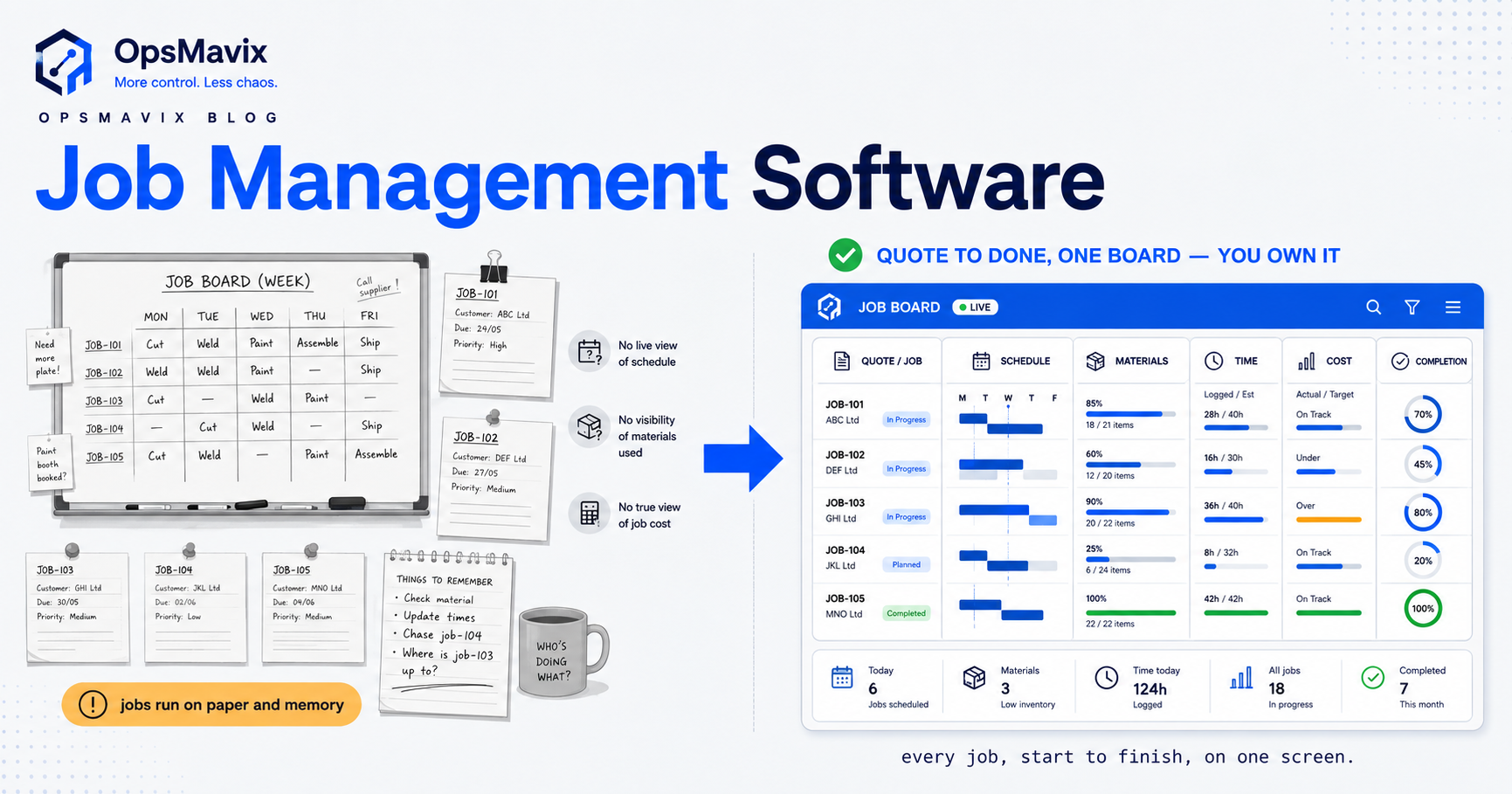
Job management software is the working layer that runs a job end to end, from the quote you send, through scheduling, materials, labour and time, to the moment it is finished, invoiced and reconciled against what you thought it would cost. It is not a diary, and it is not an accounting package. It is the place your team looks to answer the two questions that decide whether a project-based business makes money: where is this job right now, and is it still profitable.
Most firms do not choose to buy it. They arrive at the need. A whiteboard becomes a shared calendar, the calendar spawns a spreadsheet of costs, the costs live in a different spreadsheet from the quote, and the “real” status of any job now lives in the head of one person who is on holiday when the client rings. At that point the question stops being “which app do we bolt on” and becomes “what do we all run jobs from”. That is what job management software is meant to answer, and it is where a lot of businesses get sold far more system than the problem needs.
Quick summary: UK small business owners spend an average of 11 hours a week on administration and finance-related tasks, roughly six working days a month, and 54% say paperwork actively gets in the way of running the business (American Express / Small Business Saturday UK SME Barometer). For a job-driven business, most of that lost time is exactly what good job management is supposed to remove: re-keying quotes into schedules, chasing where materials are, and reconstructing after the fact what a finished job actually cost.
Contents
- What job management software actually does
- The core functions, and which ones you really use
- Job management vs field service vs ERP vs job costing
- Why so many firms get over-sold
- Generic suite vs right-sized owned system
- Who genuinely needs a full platform
- The right-sized owned alternative
- Worked example: a £4m fabrication shop
- How to choose without over-committing
- FAQ
What job management software actually does
Strip away the marketing and a job management system does one thing: it keeps a single, live record of each job as it moves through your business, and it makes that record the thing everyone acts from.
That record ties together four moving parts. The schedule, who is doing what and when, and what is at risk of slipping. The materials, what each job needs, what has been ordered, what has arrived, and what it cost. The time and labour, hours booked against the job rather than lost in timesheets nobody reconciles. And the cost, the running total against the quoted price, so profit is something you watch during the job, not discover after it.
The reason this matters is simple. In a job-driven business, margin does not leak in one big event. It leaks in a hundred small disconnections: the extra material nobody logged, the day the job slipped, the hour that went unbooked, the change the client asked for that never made it back into the price. Together they are the difference between a profitable quarter and a busy one.
Most “operations software” for jobs is really the first thing dressed up as the second. It shows you the leak after the invoice. It does not close it while the job is live.
The core functions, and which ones you really use
A full job or field-service platform usually claims to cover a long list. It helps to know the list, because the gap between what a platform sells and what you actually switch on is where the money goes.
- Quoting and estimating. Building a priced quote from labour, materials and margin assumptions, ideally so the quote becomes the job rather than being re-typed into one.
- Scheduling and dispatch. Assigning people and resources to jobs across a calendar, spotting clashes and slippage.
- Materials and purchasing. Knowing what each job needs, raising purchase orders, and tracking what has landed. For the purchasing side specifically, purchase order software shows the pattern that matters here.
- Time and labour tracking. Booking hours to jobs, so labour cost is real, not estimated at year end.
- Job costing. Comparing actual cost against the quote as the job runs. This is the heart of it; our guide to what job costing is explains why a job that finishes on time can still lose money.
- Progress and status. One shared view of where every job is, so “let me find out and call you back” stops being the standard answer.
- Invoicing and handover. Turning the finished job, including changes and extras, into an invoice that matches what was actually done.
Most project-based firms live and die by four of these: quote-to-job, scheduling, materials, and job costing. The rest is either handled elsewhere or not complex enough to justify a dedicated module you pay for forever.
Job management vs field service vs ERP vs job costing
These terms get used interchangeably by vendors who want to sell you the widest possible thing. They are not the same.
Field service management is a specific flavour of job management built around engineers who travel to a customer site, mobile apps, van stock, GPS, on-site sign-off. If your work happens at customer premises, it fits. If your jobs happen in your own workshop, factory or yard, a field-service tool sells you a mobile-first model you will half-use.
ERP is the wide system of record for the whole business, finance, HR, operations, in one database. Job management is often a module inside it. An ERP can run jobs, but you buy and implement a great deal of machinery to get there, and you reshape your process around a finance-first design.
Job costing is not software at all, it is a discipline: assigning every cost to the job that caused it so you know the true margin. Good job management software operationalises job costing. Bad job management software lets you schedule and dispatch beautifully while the costing stays in a spreadsheet, which is how firms end up “organised but not profitable”.
Job management software, done right, sits in the middle: broader than a scheduler, narrower than an ERP, and built so the schedule, the materials, the time and the cost all read from the same job record. The label matters less than one question, which part of running a job is actually costing you money right now.
Why so many firms get over-sold
Here is the honest bit, because this is where most advice goes soft.
The market is built to sell you breadth. A generic job or field-service platform has to appeal to plumbers, glaziers, IT installers, manufacturers and construction firms all at once, so it ships with every module any of them might want. You are then quoted per-user, per-month, forever, for a tool you will run at maybe a third of its capability, and asked to bend your process to fit the seventy percent you did not need.
The failure mode is predictable. Adoption stalls, because the tool assumes a way of working that is close to yours but not yours. The team quietly keeps the old spreadsheet running alongside the new system “just for now”, and now you are paying for both. The costing never gets switched on properly because it did not fit, so you still cannot answer the profit question, the reason you bought the thing.
None of this means off-the-shelf is wrong. If your work is genuinely standard, a packaged tool is the right call and you should buy it. The trap is the middle-sized firm whose process grew the way it did for good reasons, being sold a generic platform as if that process were the problem.
Generic suite vs right-sized owned system
Most growing job-driven firms sit between spreadsheets that have run out of road and a platform that is too much. Here is the honest comparison.
| Factor | Spreadsheets & calendars | Generic job / field-service suite or ERP | Right-sized owned system |
|---|---|---|---|
| Best for | Very small or simple job volumes | Large or highly standard operations | Firms “outgrowing spreadsheets and disconnected tools” |
| One live job record | No, status is scattered | Yes, if you adopt the whole tool | Yes, built around your actual job flow |
| Fit to your process | Total, but fragile and manual | Partial, you adapt to the template | High, it is built to fit |
| Quote flows into the job | Re-keyed by hand | Sometimes, within the vendor’s model | Yes, quote becomes the job |
| Job costing (actual vs quoted) | Separate spreadsheet, after the fact | A module, often left unconfigured | Built in, live while the job runs |
| Setup cost | Near zero | High (licences plus implementation) | Moderate, one-off build |
| Ongoing cost | Hidden in wasted admin time | Per-user, per-module, forever | You own it, no per-seat rent |
| Time to value | Immediate, then degrades | Months to over a year | Weeks, focused on the real bottleneck |
| Main risk | Errors, version chaos, key-person risk | Over-scoping, low adoption, lock-in | Scoped too narrow if pain is genuinely broad |
The pattern owners recognise: spreadsheets are free until the cost of errors and admin becomes the biggest line item, and generic suites solve that but charge you for seventy functions to fix four problems.
Who genuinely needs a full platform
A wide platform earns its place when the complexity is real and permanent, not aspirational. Strong signals:
- A large mobile field workforce where dispatch, routing and on-site apps are the core of the operation.
- Genuine multi-site or multi-entity complexity, with jobs and stock moving between locations.
- A dedicated operations or planning function, people whose full-time job is scheduling and who will actually adopt and configure the tool.
- Regulatory or traceability requirements demanding end-to-end records across every job.
- Job volumes and variability high enough that automated scheduling materially changes throughput. For that specific need in a production setting, manufacturing scheduling software is the right lens.
If several of these are true, evaluate a mature platform properly. If not, a platform is a cargo ship to cross a river.
The right-sized owned alternative
There is a middle path between “make the spreadsheets last another year” and “buy the enterprise suite”. Build a system that covers only the parts of the job that are actually costing you money, and own it outright.
This is where OpsMavix sits, and it is worth being precise about what we are and are not. We are not a job-management software vendor and we do not sell generic custom code. We build a right-sized, owned operations system for firms where a full platform or ERP is genuinely too much, focused on the outcome: one live job record, a quote that becomes the job, and profit you can see while the job is running rather than after it. For how that same idea works across the wider business, an operations control system is the general version of this pattern.
A right-sized job system usually starts by connecting the two or three places the margin leaks, typically the quote-to-job handoff, materials and purchasing, and live job costing, so the quote, the schedule, the materials and the cost all reference the same record. It is built to your process rather than forcing your process into someone else’s template, it carries no per-seat rent because you own it, and it is scoped to weeks not quarters because it is not trying to cover every trade at once.
The trade-off is honest. If your complexity is genuinely broad and permanent, a right-sized system scoped too narrowly will leave gaps, and a platform is the better call. The skill is telling the difference, which is exactly what an audit does before anyone builds anything.
Worked example: a £4m fabrication shop
Take a metal fabrication business turning over about £4m a year, twelve on the shop floor, running maybe forty live jobs at any time, each quoted individually.
The pain. Quotes are built in a spreadsheet, then re-typed into a wall planner. Material orders sit in a purchasing inbox with no link to the job that needs them, so parts arrive late and nobody knows until the job stalls. Hours are logged on paper and keyed in weeks later, if at all. Job costing happens at year end, when the accountant reveals that three big jobs everyone remembers as “good” actually lost money on unbilled changes and overtime. The owner spends most of a day a week reconstructing where jobs stand for client calls.
The cost of that kind of leakage is not trivial in project work: across UK construction, the total cost of avoidable error is estimated at 10% to 25% of project cost, or £10bn to £25bn a year across the sector (Get It Right Initiative). A fabrication shop is not a construction site, but the mechanism is the same, small disconnections between quote, materials, time and cost, compounding into lost margin.
The over-buy option. A tier-one field-service platform is quoted, built around mobile engineers, van stock and GPS dispatch, none of which a fixed workshop uses, at a per-user monthly licence plus a six-figure implementation. Most of it would never be switched on.
The right-sized option. A system that does four things: the quote becomes the job record, purchase orders are raised against that job so materials are tracked to it, hours are booked to the job on the floor, and one screen shows quoted-versus-actual cost live for every open job. No mobile dispatch module, no routing engine, no per-seat rent. Built in weeks, scoped to the real leaks.
The outcome that matters. Materials stop arriving late because they are ordered against the job and visible. Overtime and changes hit the cost figure the day they happen, so the loss-making job gets caught while it can still be re-priced or recovered. The lost day a week comes back, and the owner can answer “where is my job and is it still profitable” in one click. That is the difference between buying software and fixing the actual problem.
How to choose without over-committing
A simple decision path:
- Name the leak. Write down the two or three points in a job, quote handoff, materials, time, costing, where errors, delays or admin actually cost you. Be specific.
- Count the modules you would use. If a platform’s value is concentrated in a few functions, that is a signal you are over-buying.
- Check the adoption risk. Will the team truly move off their spreadsheets, or run both?
- Compare total cost over three years, licences plus implementation plus internal time, not the sticker price.
- Decide breadth versus depth. Broad, permanent complexity points to a platform. Concentrated pain and a wish to own the result points to a right-sized build.
FAQ
What is job management software?
Job management software is the system that runs a job end to end, from quote through scheduling, materials, labour and time, to completion and invoicing, keeping one live record everyone acts from. Its core value is answering two questions at any moment: where is this job, and is it still profitable. It differs from a simple scheduler by tying cost to the schedule, and from an ERP by being far narrower.
What is the difference between job management software and field service software?
Field service software is a type of job management built for engineers who travel to customer sites, so it centres on mobile apps, dispatch, routing and on-site sign-off. General job management suits work that happens in your own workshop, factory or yard. If your jobs do not involve a travelling workforce, a field-service tool sells you a mobile-first model you will only half use.
Do small businesses need job management software?
Rarely the full enterprise kind. Most small, job-driven firms feel real pain in only two or three places, usually the quote-to-job handoff, materials, and job costing, and can fix that with a right-sized owned system rather than a multi-module platform. The trigger to move off spreadsheets is not company size, it is when re-keying, late materials and after-the-fact costing become one of your biggest hidden costs.
Is a right-sized owned system cheaper than a generic job platform?
Usually over a three-year horizon, yes, because you pay a one-off build cost and then own it, rather than per-user, per-module licences that continue forever. It is not always cheaper up front, and if your complexity is genuinely broad, a platform can be better value. The real saving is scope: you pay to fix the parts of the job that are leaking, not for seventy functions you will never switch on.
Can job management software track profit on each job?
It should, and this is the function most often left unconfigured. Proper job management compares actual cost, materials, labour and changes, against the quoted price while the job runs, so a job heading for a loss is caught in time to act. If a tool schedules and dispatches well but leaves costing in a separate spreadsheet, it will keep you organised without keeping you profitable.
How OpsMavix Can Help
OpsMavix builds right-sized, owned operations systems for growing UK businesses that are outgrowing spreadsheets but not looking for a full job platform or ERP. We are not a software vendor and we do not sell generic custom code, we sell the outcome: one live job record, a quote that becomes the job, and profit you can see from quote to completion, built around your real process, owned by you, with no per-seat rent and backed by a delivery guarantee. We start by finding where your jobs actually leak time and margin, then build only what fixes it. When you are ready to find the leaks in yours, Book a Free Operations Leak Audit.
Sources
- American Express / Small Business Saturday UK, SME Business Barometer, UK small business owners spend an average of 11 hours a week on admin and finance tasks, and 54% say paperwork gets in the way: https://www.conveniencestore.co.uk/news/amexs-barometer-shows-smes-spend-nearly-twice-the-time-on-admin-than-growing-businesses/721491.article
- Get It Right Initiative (GIRI), Call to Action, total cost of avoidable error in UK construction estimated at 10-25% of project cost, or £10-25bn per year across the sector: https://getitright.uk.com/reports/call-to-action
- Get It Right Initiative (GIRI), research on the cost of error, direct avoidable-error cost in the order of 5% of project value, roughly £5bn per year: https://getitright.uk.com/news/giri-activity/giri-commissions-new-research-on-cost-of-error