
Accounting Software for the Manufacturing Industry: The Margin Blind Spot
Generic accounting software for the manufacturing industry keeps a clean ledger but cannot see the shop floor, so under-costed jobs and unbilled extras leak margin quietly. This is an honest look at what manufacturing accounting really needs, and the right-sized owned system that feeds real production cost into the tools you already run.
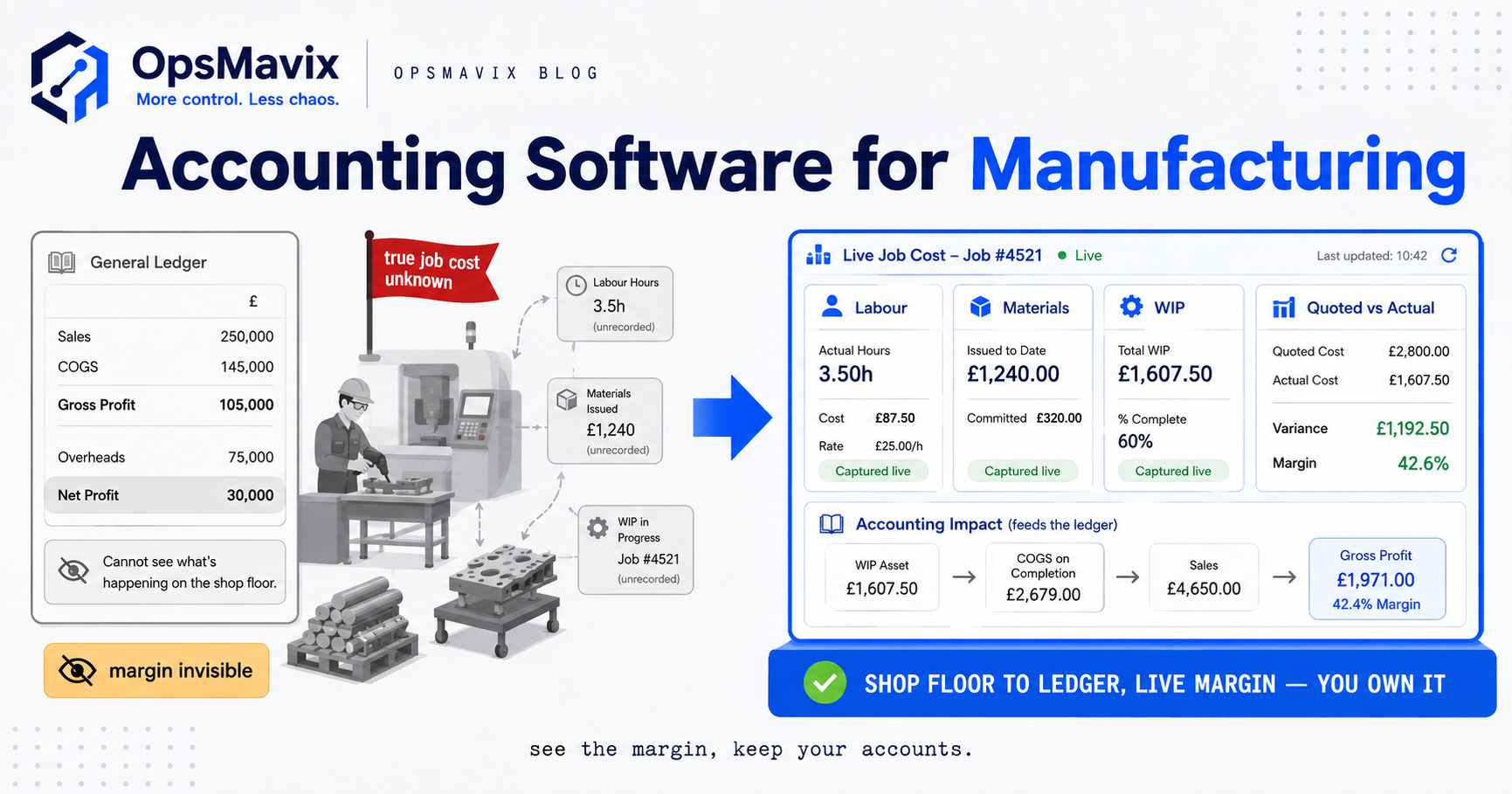
Accounting software for the manufacturing industry is usually one of two things: a general-purpose ledger like Xero, QuickBooks, or Sage that any business could use, or a heavyweight manufacturing ERP with finance bolted into it. The first keeps clean books. The second runs the whole factory. The gap between them is where most growing manufacturers actually live, and it is where margin quietly disappears.
Here is the blind spot. Standard accounting software records what money came in and what went out, and it is very good at that. What it cannot see is the shop floor: which job burned three extra hours of skilled labour, which build swallowed more raw material than the BOM allowed, which quote you won at a price that was never going to make money. Your books can look healthy while individual jobs lose you cash, because the ledger nets everything together and never asks “what did this job actually cost to make?” That question is the difference between bookkeeping and manufacturing accounting.
Quick summary: The costing most manufacturers rely on still lives in spreadsheets beside the accounting software, and spreadsheets leak. Research into operations teams found that professionals spend an average of 3.6 hours per week fixing spreadsheet mistakes — more than 22 full working days a year, per person. If your true job cost is being reconstructed by hand in Excel every month, that is not a costing system. It is a margin blind spot with a formula bar.
Contents
- What manufacturing accounting needs beyond bookkeeping
- Why generic accounting software leaves margin invisible
- Connecting the shop floor to the ledger
- Generic accounting vs full ERP vs owned system
- Integrations and ownership
- A Worked Example: a UK metal fabricator finds its leak
- FAQ
- How OpsMavix Can Help
- Sources
What manufacturing accounting needs beyond bookkeeping
A retailer’s accounting and a manufacturer’s accounting are not the same job. A retailer buys a thing and sells it. A manufacturer buys materials, adds labour and machine time, turns it into something else, then sells that. Every transformation step has a cost, and if you cannot attribute those costs to specific jobs and products, you are guessing at margin. Manufacturing accounting needs four things a plain ledger does not give you:
- Job and product costing. The real, all-in cost of making a specific job or unit — materials, labour, machine time, and a fair share of overhead. Without it, “gross margin” is an average that hides your winners and losers.
- Bill of materials (BOM) costing. What a product should cost in materials at the prices you actually pay now. When steel or components move, your standard cost moves, and quotes built on last year’s numbers quietly stop making money.
- Work-in-progress (WIP) valuation. The value of everything half-made on the floor right now. Most SMB manufacturers cannot value it accurately, which distorts stock, cost of sales, and month-end.
- Labour cost capture. Who worked how long on what. Labour is often the largest and least-tracked cost in a job, and when it lands in general overhead instead of the job, under-costing is guaranteed.
None of this is exotic. It is the basic arithmetic of “did we make money on that?” Generic accounting software was never built to collect it, and a full ERP is a heavy, expensive way to get it. For the deeper mechanics of cost per job, our guide to job costing software for manufacturing goes further.
Why generic accounting software leaves margin invisible
Xero, QuickBooks, and Sage are genuinely good tools — at what they are for. They handle invoicing, VAT, bank reconciliation, payroll, and statutory reporting cleanly, and for a lot of the business, that is all you need. This post is not an attack on them. The point is narrower: a general ledger is blind to the shop floor by design, and manufacturers who lean on it alone inherit that blindness.
Consider what happens on a job. A customer asks for a small change mid-build. Someone on the floor makes it, because that is good service. Extra materials get pulled from stock and two extra hours get worked, but nobody raises a variation and nobody bills it. In the accounts, the materials vanish into “cost of goods” and the labour into payroll. The job looks fine. It was not fine. You just did unpaid work and your ledger applauded you for it. Multiply that across a busy quarter and you have a serious, invisible leak.
The same blindness hits quoting. If you do not know your true cost to make a product, every quote is a guess dressed as a number. Win a batch at a margin that was never real, and the ledger will not warn you until the year-end shows profit that somehow evaporated. Generic accounting tells you that you made less than expected. It never tells you which jobs did it or why, because it was never given the shop-floor data to answer.
And when the costing does get done, it usually lives in a spreadsheet beside the accounting software — rebuilt by hand every month, out of date the moment it is finished, error-prone in exactly the way the research above describes. That is not a system. It is a monthly act of faith.
Connecting the shop floor to the ledger
The fix is not to replace your accounting software. It is to feed it the truth from the floor. Manufacturing margin becomes visible the moment two worlds that never normally speak start sharing data: what physically happened when you made the thing, and what the ledger recorded when you sold it. In practice that means capturing production reality where it happens:
- Materials issued to a job, priced at what you actually paid, not a stale standard.
- Labour and machine time booked to the job, so the largest variable cost stops hiding in overhead.
- Variations and extras logged as they occur, so the unbilled-work leak gets caught at the source and can be invoiced.
- WIP valued from live job data, so month-end reflects what is genuinely on the floor.
Once you are capturing that, actual-versus-quoted margin per job stops being a spreadsheet archaeology project and becomes a number you can see. The costed output flows into the accounting software you already run, so finance keeps its clean ledger and gains the one thing it never had: cost that reflects the shop floor. This is the same principle behind good production tracking — capture reality once, at source, and let everything downstream inherit it. Tightening the money side, an invoice approval workflow makes sure the extras you now capture actually get billed, and that supplier costs land against the right job before they are paid.
Generic accounting vs full ERP vs owned system
There are three honest ways to close the manufacturing-margin blind spot. Each is right for a different firm.
| Factor | Generic accounting software | Full manufacturing ERP | Right-sized owned system |
|---|---|---|---|
| What it is | A clean general ledger (Xero, QuickBooks, Sage) | One integrated platform running the whole factory | A focused system that captures real production cost |
| Job / product costing | Not really — averages, not per-job truth | Yes, deep and integrated | Yes, scoped to how you actually cost work |
| WIP and BOM cost | Blind to both | Full support | Captures what your operation needs |
| Labour cost capture | Lands in overhead | Booked to the job | Booked to the job, at source |
| Sees the shop floor | No, by design | Yes | Yes, that is its whole point |
| Typical year-one cost | Low subscription | £15k–£200k+ for a UK SMB | Scoped to the workflow you fix first |
| You own it | You rent the ledger | You rent the platform | You own the system |
| Fit to your process | Generic, fits everyone loosely | You bend to fit the system | Built around your process |
| Works with your accounts | It is the accounts | Replaces them | Feeds and complements them |
| Best for | Simple firms, or as the ledger layer | Multi-site, deep-MRP, regulated | Firms between the two |
The honest read: if your costing genuinely fits in your accounting software and your jobs are simple, stay where you are. If you are a large, multi-site, deeply regulated manufacturer, a full ERP with integrated finance may earn its cost — our ERP software for manufacturing guide covers when it does. If you are between the two, and most growing manufacturers are, the right-sized owned system closes the leak without replacing the tools that already work.
Integrations and ownership
The point of a right-sized system is that it does not fight your existing stack. You almost certainly do not want to rip out Xero or Sage — they do statutory accounting well and your accountant knows them. So the sensible architecture is: capture production cost in a system built for your floor, then push clean, costed data into the accounting tool through its API. Finance keeps its ledger. You gain true job cost. Nobody re-keys anything.
Two things matter more than the feature list. First, ownership. A full ERP is a platform you rent and bend your operation around; when the vendor changes pricing or sunsets a module, that is your problem. A right-sized owned system is yours — built around your process, changed when you need it changed. Second, staging. Start with the single costing gap bleeding you most, prove the number, then connect the next piece. That is how you build toward integrated manufacturing accounting without a big-bang go-live or betting the company on one project. For the operational backbone this usually sits on, see our production management system guide.
A Worked Example: a UK metal fabricator finds its leak
Halewood Fabrication (illustrative) is a 25-person metal fabricator in the North West. They run Xero for the books and it works fine — VAT filed on time, bank reconciled, payroll clean. Costing lives in a shared spreadsheet the estimator updates “when there’s time.” On paper, the business is profitable. On the floor, the owner has a nagging feeling that some jobs make money and some do not, and he cannot prove which.
An audit of a single quarter found the pattern:
- Unbilled extras. Across roughly 60 jobs, small customer changes were made and never invoiced. Averaged out at about £220 of unbilled materials and labour per affected job on maybe 18 jobs, that is close to £4,000 in a quarter walking out the door unbilled — call it £16,000 a year.
- Under-costed quotes. The spreadsheet still used steel and consumable prices from the previous year. On higher-material jobs, true cost was running around £600–£900 over the figure the quote was built on. On the dozen or so material-heavy jobs that quarter, that is several thousand pounds of margin that was never really there.
- Labour buried in overhead. Fabrication hours were tracked loosely, so skilled labour that overran on tricky jobs landed in general payroll rather than against the job. The jobs that looked most profitable were sometimes the worst offenders once real hours were attributed.
Halewood did not replace Xero and did not buy a full ERP. They put in a right-sized owned system that captures materials, labour, and variations against each job at source, values WIP from live data, and pushes costed figures into Xero. Within the first month, actual-versus-quoted margin per job was a number the owner could see on screen. The unbilled extras started getting invoiced. The estimator’s prices tracked real cost. The leak did not need a six-figure platform to close. It needed the shop floor and the ledger to finally talk to each other. (Figures are illustrative, not a client result.)
FAQ
Can’t Xero, QuickBooks, or Sage do manufacturing accounting?
They do the ledger well — invoicing, VAT, reconciliation, payroll, statutory reporting. What they do not do is capture true job cost from the shop floor: materials at real prices, labour booked to the job, WIP valuation, actual-versus-quoted margin. Add-ons and manual spreadsheets try to bridge that gap, but the accounting software itself is blind to production by design. The usual right answer is to keep it for the ledger and feed it costed data from a system that can see the floor.
What is the difference between bookkeeping and manufacturing accounting?
Bookkeeping records money in and out and produces clean statutory accounts. Manufacturing accounting also answers “what did it cost us to make this, and did we make money on it?” per job and per product. That requires job costing, BOM cost, WIP valuation, and labour capture — exactly the things a general ledger does not collect.
Do I need a full ERP to get proper job costing?
Not usually. Full ERP delivers deep, integrated costing, but it is a large, disruptive project — year-one cost runs from £15,000 to well over £200,000 for a UK SMB, and manufacturing ERP projects fail to meet objectives at a high rate. If your costing gap is a few workflows, a right-sized owned system fixes it far faster and cheaper, and you can still grow toward ERP later if the business demands it.
How does a right-sized system work with my existing accounting software?
It captures production cost where it happens on the floor, then pushes clean, costed data into your accounting tool through its API. Your accountant keeps the ledger they know; you gain job-level cost you never had. Nothing gets ripped out, and nobody re-keys the same numbers twice.
What does poor job costing actually cost me?
It shows up as unbilled extras, quotes priced below true cost, and labour hidden in overhead — margin that leaks while the ledger still shows a profit. Because standard accounting nets everything together, the loss is invisible until year-end, and even then it will not tell you which jobs caused it. That is the specific gap manufacturing costing is meant to close.
How OpsMavix Can Help
OpsMavix builds owned, right-sized operations systems for UK manufacturers who are outgrowing spreadsheets but not looking to bend the business around a packaged ERP. We do not replace the accounting software that already works for you. We close the blind spot around it: capturing real materials, labour, and variations against each job through live production tracking, valuing work-in-progress from that data, and feeding true, costed figures — with extras billed via a tight invoice approval workflow — into the ledger you already run.
We start with a free Operations Leak Audit to find where your margin is leaking — usually unbilled extras, under-costed quotes, or labour lost in overhead — then build a system around the one costing gap bleeding you most, and grow from there. The result is a system you own, sized to your operation, that finally shows which jobs make money and which do not. If you genuinely need a full ERP, we will tell you honestly before you spend a penny.
Sources
- Doss — spreadsheet error research (survey of 1,003 operations professionals): 3.6 hours per week fixing spreadsheet mistakes, over 22 working days a year per person: https://www.doss.com/research/spreadsheet-error-costs-operations-thousands
- The Manufacturer (citing Oxford Economics / Make UK, “The True Impact of UK Manufacturing”): manufacturing is worth £518bn and nearly a quarter (23%) of total UK GDP once supply chains are counted: https://www.themanufacturer.com/articles/report-reveals-true-impact-of-manufacturing-is-nearly-a-quarter-of-uk-gdp/
- Blue Lotus 360 — UK ERP Pricing Guide: year-one totals £15,000–£48,000 (small business) and £67,000–£200,000 (medium): https://bluelotus360.com/uk/erp-pricing-guide/
- Godlan (citing Panorama Consulting 2026 ERP Report): 73% of discrete manufacturing ERP projects fail to meet objectives, average cost overruns of 215%: https://godlan.com/erp-implementation-failure-statistics/