
Fully Automated Inventory System: What's Real, What's Marketing
A "fully automated inventory system" is mostly a marketing phrase — no serious stock operation runs with zero people. But a lot genuinely does automate: capture, decrement on sale, channel sync, reorder triggers and cycle counts. Here's an honest map of what's real, where automation quietly fails, where humans must stay in the loop, and how to build it around your actual flow instead of buying hands-off magic that doesn't survive contact with a real warehouse.
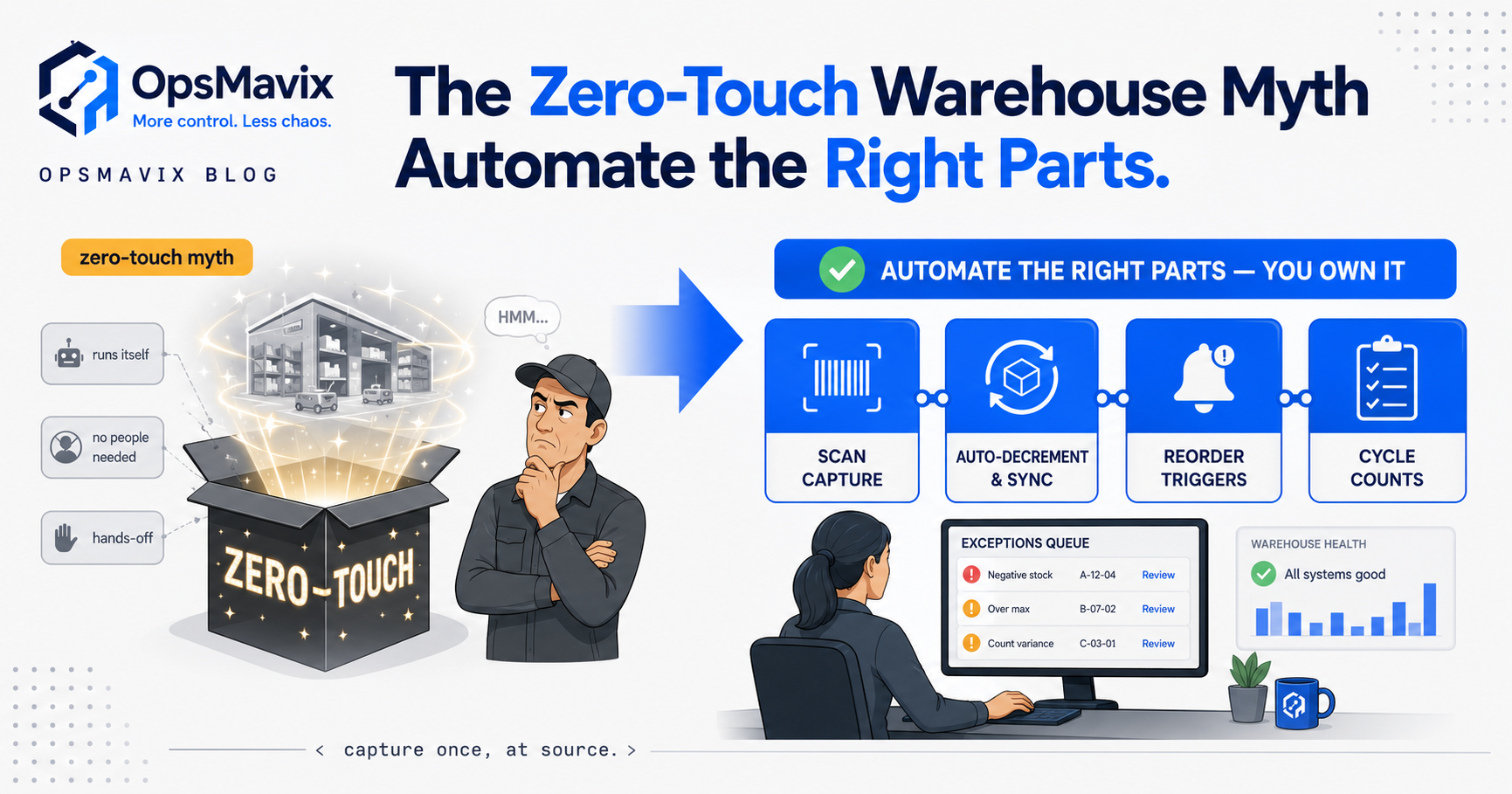
A fully automated inventory system, sold the way most vendors sell it, does not exist — and if a demo promises hands-off, zero-touch stock that runs itself, that’s the marketing talking. What genuinely automates is narrower and far more useful than the fantasy: capturing movements by scan instead of typing, decrementing the moment a sale lands, syncing quantities across your channels, firing reorder triggers when a line hits its point, and directing cycle counts onto the right SKUs. That’s real, and it removes most of the manual re-keying and maths where errors actually enter. The part that stays human — exceptions, discrepancies, judgement calls — is not a failure of automation. It’s the point of it.
This post is an honest map of which pieces you can genuinely hand to the machine, and where a person has to stay in the loop or the whole thing quietly rots. If you’re being sold automation as magic, the useful question isn’t “how automated can it be” — it’s “which tasks should stop being manual, and which shouldn’t.” Get that split right and inventory automation pays for itself. Get it wrong and you’ve bought a faster, more confident way to be wrong.
Key Takeaways
- “Fully automated” is mostly marketing. No serious stock operation runs with zero people. The honest goal is removing manual re-keying and maths — not removing humans.
- The automatable core is five things: auto-capture (scan, not type), auto-decrement on sale, cross-channel sync, reorder triggers, and directed cycle counts. Each removes a specific error source.
- Most error enters at capture. Someone typing quantities into a spreadsheet is where the count drifts; barcode capture alone fixes the majority of it — often the single biggest win.
- Humans must stay on the exceptions. Discrepancies, damaged stock, short-shipments and judgement calls need a person — automation should route those there, not silently guess.
- A small, low-SKU business may get 90% of the benefit from barcode capture alone. Full automation isn’t the target for everyone — right-sized is.
- Off-the-shelf automation assumes a generic flow. The value is in automating your real process, quirks included, not reshaping your operation to fit the tool’s.
What “Fully Automated” Actually Means (and the Zero-Touch Myth)
Strip the homepage language and “fully automated inventory system” is doing two jobs at once. One is honest: a system that captures and updates stock without someone re-typing numbers into a spreadsheet. The other is fantasy: a warehouse that runs itself, figures staying perfect with no human near them. The first is achievable and worth paying for. The second collides with reality the first time a supplier ships 90 units against an order for 100, or a customer returns something damaged.
Automation doesn’t remove the messy edges of a real operation — it decides who handles them and when. A good system does the repetitive, rule-based work relentlessly, then hands the weird 5% to a person who can judge it. A bad one automates straight through that 5% and produces a clean number that’s quietly wrong.
Auto-Capture: Where Most Error Actually Enters
If you automate one thing, automate capture. The single largest source of inventory error in most stock-holding businesses is a human reading a number and typing it somewhere — at receiving, picking, dispatch, the count. Every keystroke is a chance to fat-finger a digit, log to the wrong SKU, or record it an hour later from memory — not carelessness, just what happens when people log stock between other jobs with a spreadsheet as the system of record.
Scanning replaces the keystroke with a barcode read. The quantity that lands in the system is the quantity that physically moved, captured when it moved, tied to the exact SKU — no transcription, no “I’ll update it later,” no reconstructing the day from a paper picking list at 6pm. A barcode inventory system is the least glamorous automation and almost always the highest-return: it fixes the error at the point it would otherwise be created. One warehouse manager described the pre-scan reality as “guessing and manually counting material” — capture automation ends the guessing. For many smaller operations this is the honest ceiling: a few hundred SKUs and one location may get the overwhelming majority of the benefit from scan-based capture alone, no reorder trigger or forecast in sight.
Auto-Decrement and Cross-Channel Sync: Stop Overselling
The second automatable piece is keeping the number right after capture, as sales happen. Auto-decrement means a sale drops stock the instant it’s confirmed — no batch update at end of day, no window where the website still shows twelve because the last three sold this morning. Cross-channel sync extends that across every place you sell: sell one on Amazon, and the website, trade counter and phone orders see the drop too.
This is where overselling lives, and overselling is one of the most expensive stock failures because the customer already paid. An operator dealing with disconnected channels described the cost bluntly: they would “consistently oversell items we didn’t even have on hand.” That’s not a forecasting problem — it’s a synchronisation problem: stock shows available in one channel’s view but not another’s, so two customers buy the last unit. Connecting them to one shared figure is a solved problem.
The catch is that sync is only as good as the number it’s syncing. If capture is still manual and the base count is wrong, cross-channel sync just spreads that wrong number everywhere at once, faster — which is why stock never matches the system even after a business “went automated.” Capture first, then sync on top of a figure you can trust.
Auto-Reorder Triggers: The Reorder Point Firing Itself
Once the count is trustworthy and current, reordering can genuinely automate. A reorder trigger watches each line against its reorder point and fires when stock crosses it — raising a purchase order, or at least a flagged suggestion, without anyone remembering to act. It removes two failure modes: the stockout you didn’t see coming and the panic over-order that follows.
The honest nuance is what “fires” should mean. Fully hands-off reordering — the system places the order and emails the supplier with no human between — works for stable, high-volume lines where the maths is dependable and a wrong order is cheap. For everything else, the right design is a trigger that proposes: it does the watching and the arithmetic, then puts a ready-to-approve order in front of a buyer who knows the supplier’s on a two-week lead time this month. A well-built reorder point system is designed around exactly that split. And even automated triggers drift if you set the points once and forget them — keeping them sensible as demand and seasons shift stays a periodic human review.
Automated Cycle Counts: Directing the Count, Not Removing It
Counting stock is the task people most want to automate away, and it’s the one where “fully automated” is most obviously a myth — someone still has to physically look at the shelf. What genuinely automates is which shelf, when, and why. Instead of a disruptive annual stocktake or blind rolling counts, an automated schedule tells you which SKUs to verify today: the high-value lines, the fast movers, the ones whose movements look odd.
That’s an efficiency and an accuracy gain at once: you count the SKUs most likely to be wrong or most expensive to get wrong, far more often than you’d manage counting everything. The system does the prioritising; a person does the counting — and that count keeps every other automation honest, because capture, decrement and reorder all assume the system’s number matches reality, and a directed cycle count is the periodic check that it still does. Remove the human count and the automated figure has nothing anchoring it to the physical world; it drifts indefinitely while looking clean on screen. Automation directs the count. It does not abolish it.
Where Humans Must Stay in the Loop
The tasks that resist automation aren’t leftovers — they need a brain, and a well-designed system routes them to one deliberately. Discrepancies are the obvious case: when the count says one thing and the shelf says another, the system’s job is to flag it fast and route it to someone, not to silently overwrite one with the other — the overwrite buries the very signal that something’s wrong.
Exceptions are the rest of it. A supplier short-ships. A pallet arrives damaged. A return comes back unsellable, or sellable-after-inspection, and only a person can tell which. None of these fit a rule cleanly, and forcing automation to guess through them generates confident wrong data. The mark of good inventory automation isn’t how few exceptions reach a human — it’s how cleanly they do: surfaced immediately, with context, instead of hiding until month-end turns up an unexplained gap nobody can trace. Take the re-keying and the arithmetic away and a small team runs a surprisingly large operation — the humans aren’t gone, they’re finally pointed at the judgement calls instead of the transcription.
Off-the-Shelf “Automation” vs a System Fitted to Your Flow
Most packaged inventory tools automate a generic flow — a vendor’s idea of how stock should move — and expect you to bend your operation to fit it. That works when your process really is standard. It grinds when it isn’t: the kitting step the tool won’t model, the consignment stock it can’t represent, the two-stage receiving your quality process requires. You end up with automation for the 80% that fits and a spreadsheet for the 20% that doesn’t — quietly reintroducing the manual re-keying you bought the tool to remove.
A system fitted to your actual flow automates the operation you genuinely run, quirks included — not because bespoke is better, but because automation only pays when it covers the whole path a unit takes. That’s the OpsMavix frame: not a cheaper clone of a big platform, but a right-sized system matched to how stock actually moves for you, with no leftover manual workaround eating the benefit. So when a demo dazzles you, ask it to run your messiest real scenario — the short-shipment, the awkward return — not the happy-path the salesperson chose. Automation that only handles the tidy case isn’t automating your business; it’s automating the brochure.
An Honest Automation Roadmap: Crawl, Walk, Run
You don’t buy full automation; you sequence it, and the order isn’t negotiable because each stage depends on the one before. Crawl is capture: get scanning in at receiving, picking and dispatch so the base count stops drifting. For many businesses — especially smaller, low-SKU ones — this stage alone delivers most of the value, and stopping here is right-sized, not a half-measure. Walk keeps that count in motion: auto-decrement and cross-channel sync so the figure stays live everywhere and overselling stops — which only works because crawl came first. Run is the intelligence layer on top: reorder triggers firing off dependable data, directed cycle counts keeping it anchored, and eventually forecasting if the volume justifies it — a separate discipline with its own honest limits, which the AI angle on stock control covers where it helps and where it’s marketing over an unsolved base.
The mistake almost everyone makes is buying “run” first — forecasting and auto-ordering — while capture is still a spreadsheet and someone’s typing quantities from memory: the roof before the walls. The before/after that matters isn’t manual-versus-magic; it’s a count nobody trusted, re-keyed in three places, versus one live figure captured once at source.
FAQ
Can an inventory system be fully automated with no staff involved?
No — not any system running a real operation. Capture, decrement, channel sync, reorder triggers and cycle-count scheduling all automate genuinely and remove most manual work. But exceptions — short-shipments, damage, counts that disagree with the shelf — need human judgement, and a well-built system routes those to a person rather than guessing through them. “Zero staff” is a marketing line, not a target.
What part of inventory should I automate first?
Capture, by scanning. Most inventory error enters when a person types a quantity into a spreadsheet at receiving, picking or dispatch, often from memory hours later. Barcode capture records the exact quantity against the exact SKU as stock moves, which stabilises the base count more than any other single change. Reorder triggers and forecasting come later, once there’s a trustworthy number to work from.
Will a fully automated inventory system stop overselling?
It can, if the automation is the right kind. Overselling is usually a synchronisation problem: stock shows available in one channel’s view but not another’s, so two customers buy the last unit. Auto-decrement on sale plus cross-channel sync keeps one shared figure live everywhere and closes that gap — provided the count is accurate first, since syncing a wrong number just spreads it faster.
Do small businesses need full inventory automation?
Usually not, and that’s fine. A business with a few hundred SKUs and one location often gets around 90% of the achievable benefit from barcode capture alone. Full automation suits higher volume, multiple channels and complex reordering. Right-sized beats maximally automated: automate the tasks that actually hurt, and stop when the pain’s gone.
How OpsMavix Can Help
The split between what should stop being manual and what shouldn’t is what we design around. OpsMavix builds inventory automation that starts where your error actually enters — scan-based capture at receiving, picking and dispatch — then keeps that figure live with auto-decrement and cross-channel sync, and only adds reorder triggers and directed cycle counts once the base is solid. Every piece is fitted to the flow you genuinely run, so there’s no leftover spreadsheet quietly undoing the benefit, and exceptions get routed to a person with context rather than silently overwritten. You own the system outright — no per-seat fees, nothing a vendor can switch off.
If a demo has promised you hands-off, zero-touch stock, the useful first step is mapping which tasks should genuinely automate and which need to stay human — before you spend a penny on the wrong end. Book a Free Operations Leak Audit
Keep reading
Getting value from OpsMavix? Add us as a preferred source on Google — you'll see more of our operations content in your AI Overviews, AI Mode and Search.