
2-Way vs 3-Way Matching: Which Should You Use?
2-way matching compares the purchase order and the invoice; 3-way matching adds the goods received note so the bill has to agree with what physically arrived. This guide gives you a side-by-side table, the one gap that decides between them — paying for goods you never received — and a plain framework for choosing, plus how an owned system runs the match automatically at receipt so nothing gets paid before it's verified.
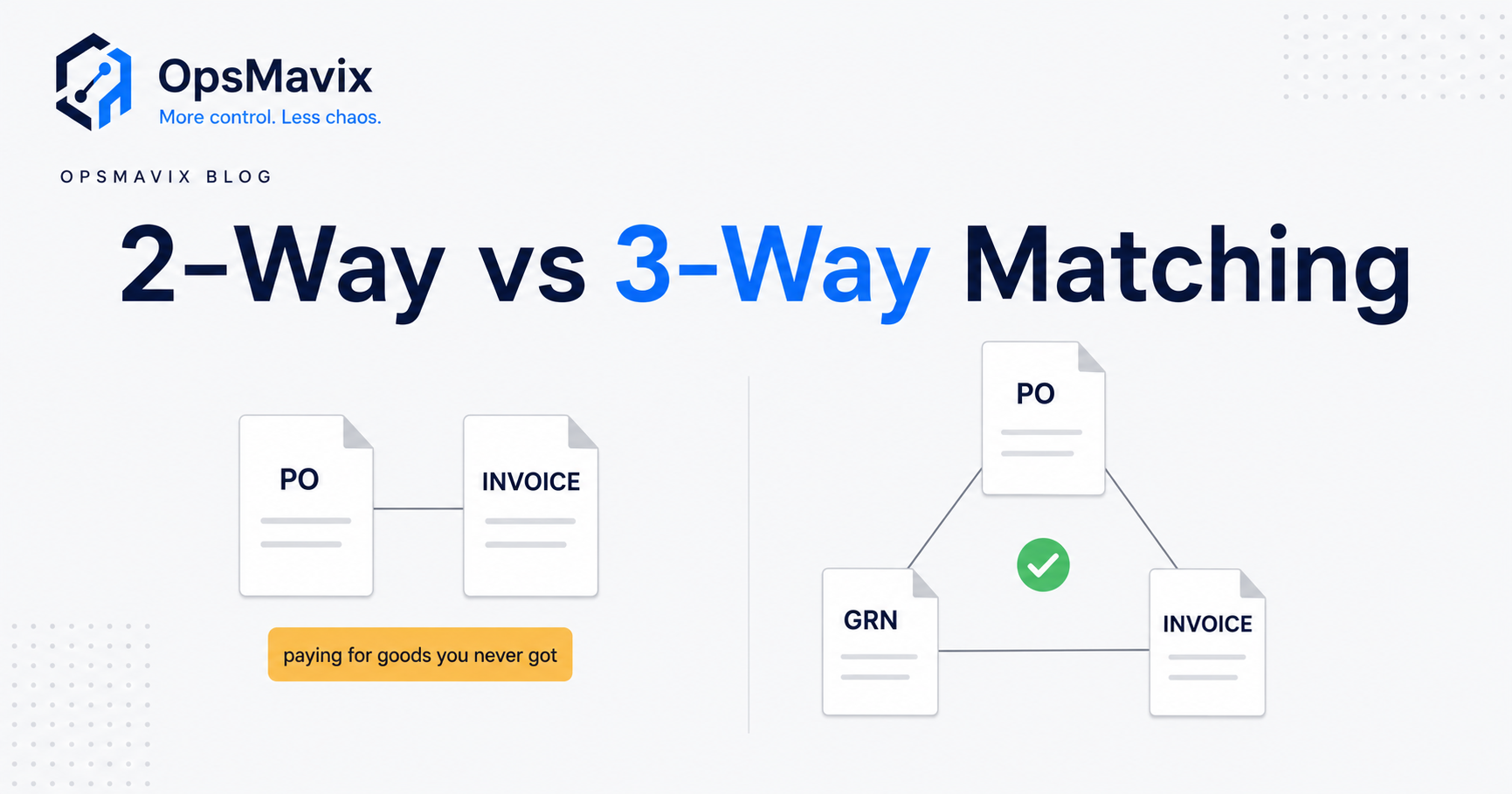
The choice between 2-way vs 3-way matching depends on what you need to verify before approving a supplier invoice. Two-way matching compares the invoice with the purchase order. Three-way matching adds a receipt record. Use receipt or acceptance evidence where delivery matters, with rules that reflect the purchase and agreed payment terms.
A purchase order can agree perfectly with an invoice while the delivery is incomplete. Equally, a service invoice can match the agreed rate while the work remains unfinished. The useful question is what evidence your team needs, rather than whether every supplier should pass through the same document check.
This guide compares the two approaches, explains the exceptions and shows how to choose a workable policy. It also covers what to test before automating approvals, so a green matching result means what your finance and operations teams expect.
The receipt adds delivery evidence to the purchase order and supplier invoice comparison.
Key Takeaways
- Two-way matching checks the invoice against the purchase order. The exact price, quantity and amount checks depend on your software and configuration.
- Three-way matching adds receipt evidence. It helps identify invoices for quantities that have not been recorded as received.
- Services can also need acceptance evidence, such as approved timesheets, completed milestones or a service receipt.
- Partial deliveries, previous invoices, returns and units of measure must be handled explicitly.
- A successful match is one control within invoice approval. It does not independently verify supplier bank details, detect every duplicate or authorise payment.
- Start with your existing system’s capabilities, define exception owners and pilot the policy before considering integration or custom development.
In this guide:
- 1. Understand What Each Matching Level Checks
- 2. Compare Two-Way and Three-Way Matching
- 3. Follow a Short Delivery Through the Match
- 4. Choose the Evidence for Goods and Services
- 5. Handle Partial Deliveries, Returns and Tolerances
- 6. Separate Matching from Approval and Payment
- 7. Compare Configuration, Integration and Custom Development
- 8. Pilot the Policy and Measure the Result
- Frequently Asked Questions
- How OpsMavix Can Help
1. Understand What Each Matching Level Checks
Invoice matching compares a supplier’s bill with the records supporting the purchase. Before choosing a matching level, establish what each record represents and which checks your application actually performs.
Two-way matching compares the order and invoice
The purchase order records the authorised purchase. The invoice records the supplier’s charge. A two-way check compares these records under the configured rules.
However, the label does not guarantee identical behaviour across products. Oracle’s match approval level documentation describes two-way quantity matching within tolerances. Microsoft describes two-way matching principally through price information in its accounts payable matching overview.
Ask your supplier to demonstrate the actual checks. Does the system compare unit prices, line totals, ordered quantities, cumulative invoiced amounts, discounts and additional charges? A headline feature name is not an acceptance test.
Three-way matching adds the receipt
A receipt records what your organisation received against the order. Adding it allows the invoice to be compared with delivery evidence as well as purchasing information.
For physical goods, the evidence may be a goods received note or an electronic warehouse receipt. It should reflect the actual count rather than an unchecked copy of the supplier’s delivery note. Our goods receiving process guide explores that operational step.
The receipt must link to the correct order line. A delivery photograph in an inbox may help resolve a dispute, but it cannot support an automated quantity comparison unless the relevant facts are recorded and connected.
Receipt and acceptance are different
Goods can arrive but fail inspection. A service can be submitted but not accepted. Decide whether receipt alone provides enough evidence, or whether a separate quality or acceptance decision is required.
Oracle describes four-way matching as adding accepted quantities from inspection. That is an additional control, not a claim that every business needs another document for every purchase.
2. Compare Two-Way and Three-Way Matching
The central difference is the receipt check. Other controls may operate alongside either method, so avoid assuming that the document count tells you everything about payment protection.
What changes when receipt evidence is added?
| Question | Two-way matching | Three-way matching |
|---|---|---|
| Main records compared | Purchase order and invoice | Purchase order, receipt and invoice |
| Agreed price checked? | According to configured price rules | According to configured price rules |
| Ordered or cumulative billed quantity checked? | Confirm the application’s rules | Confirm the application’s rules |
| Invoice compared with recorded receipt quantity? | Not as part of the two-way check | Yes, where receipt matching is configured |
| Can a short delivery create a matching exception? | Not from the missing receipt comparison alone | Yes, if the receipt is accurate and linked |
| Does it prove goods passed inspection? | No | Only if acceptance is included in the workflow |
| Does it prevent every duplicate invoice? | No | No |
| Does a passed match authorise payment automatically? | Depends on the approval policy | Depends on the approval policy |
| Operational dependency | Reliable order and invoice information | Reliable order, invoice and receipt information |
Avoid the speed-versus-safety shortcut
Two-way matching may complete sooner because it does not wait for a receipt record. That does not make it suitable for every purchase. Three-way matching can also be quick when receipts are recorded promptly and clean invoices pass configured checks.
The practical delay often comes from missing references, late receipts or an exception without an owner. Adding automation to those gaps can move the chasing into another queue without resolving it.
Compare complete workflows. A two-way policy with documented service acceptance elsewhere may provide stronger evidence than a three-way policy whose receipts are entered without verification.
Use different policies where the risks differ
Do not assume one setting must govern the entire organisation. A stock purchase, a recurring subscription and a project milestone may need different evidence and approval routes.
Microsoft’s three-way matching policy examples demonstrate policies applied at different levels, including item and supplier combinations. Check whether your application supports the distinctions your team needs.
3. Follow a Short Delivery Through the Match
A simple example shows why an order-to-invoice comparison cannot establish what arrived.
A hypothetical purchase
A wholesaler orders 100 units at £4 each. The purchase order totals £400 before any tax or additional charges. The receiving team counts 92 units, while the supplier invoices all 100.
| Record | Quantity | Unit price | Illustrative goods amount |
|---|---|---|---|
| Purchase order | 100 | £4 | £400 |
| Receipt | 92 | £4 reference price | £368 equivalent |
| Supplier invoice | 100 | £4 | £400 |
| Quantity awaiting explanation | 8 | £4 | £32 |
These figures are hypothetical. The receipt amount is shown only to explain the quantity difference; it is not a prescription for inventory valuation or accounting entries.
What the two checks reveal
An order-to-invoice check can find agreement between the ordered and billed quantities and prices. It does not reveal the eight-unit delivery gap unless another control supplies that evidence.
With an accurately linked receipt, the difference between 92 received and 100 billed becomes visible. Whether that difference blocks posting, approval or payment depends on the configured workflow.
The appropriate resolution might be a corrected invoice, a credit, a later receipt or an authorised exception. A delivery scheduled in two parts does not automatically mean the supplier made an error. Check the order and agreed billing terms before deciding.
Do not repair the match by inventing a receipt
Changing the receipt to 100 merely to make the invoice pass destroys the evidence you need. Record the actual delivery and resolve the commercial difference separately.
Likewise, do not silently edit the supplier’s invoice to a different amount. Finance needs an accurate record of the document received and a documented resolution under its procedures.
For the wider workflow, see our three-way matching guide. This comparison focuses on selecting the evidence and control level.
4. Choose the Evidence for Goods and Services
Physical delivery is an important distinction, but it is not the whole decision. The stronger test is whether payment approval needs evidence that an obligation has been fulfilled.
When can two-way matching be appropriate?
It can fit purchases where an approved order and invoice provide the required matching evidence, with any necessary confirmation handled elsewhere.
For example, a recurring software charge may be checked against the agreed period, quantity of licences and price. The service owner may separately confirm that the subscription remains authorised and active.
This does not mean all subscriptions are automatically payable. Renewals, unused licences, changed rates and cancelled services still need the checks assigned by your purchasing policy.
Services can need formal acceptance
A consultant’s invoice can match a purchase order while the claimed days remain unapproved. A project invoice can match a milestone price while the deliverable has not been accepted.
Useful evidence may include:
- Approved timesheets linked to the billed period.
- A signed milestone acceptance record.
- Confirmation that maintenance work was completed.
- An authorised service receipt against the order.
- A review of the agreed scope and any variations.
Decide whether that evidence forms part of matching or a separate approval stage. Do not create a fictional warehouse receipt for services merely to satisfy a screen.
A practical policy matrix
| Purchase | Evidence to consider | Policy to assess |
|---|---|---|
| Stock or raw materials | Actual received quantities against order lines | Three-way receipt matching |
| Goods requiring inspection | Receipt plus the required acceptance decision | Receipt matching with acceptance controls, or four-way matching where supported |
| Time-based services | Agreed rates and approved time | Two-way plus acceptance, or a service-receipt workflow |
| Project milestones | Contract milestone and documented acceptance | Amount matching plus milestone approval |
| Recurring subscriptions | Agreed term, price and continuing authorisation | Two-way with service-owner review where needed |
| Advance payments | Contractual payment schedule and authorisation | A defined advance-payment exception |
Rent, utilities and other invoices without a purchase order may follow a separate non-PO approval process. Calling that process two-way matching does not create the missing order record.
5. Handle Partial Deliveries, Returns and Tolerances
A useful policy must cope with normal purchasing activity, not only one order, one receipt and one invoice.
Match the right quantities across the whole order
Suppose the hypothetical 100-unit order arrives as 60 units followed by 40. If the supplier invoices the first 60 and later the remaining 40, the system needs to connect each invoice to the appropriate evidence.
It must also account for quantities already invoiced. Otherwise, the same receipt might appear available to support another bill. Test cumulative behaviour rather than checking each document in isolation.
Our purchase order tracking guide covers the visibility needed to distinguish ordered, received, outstanding and invoiced quantities.
Keep returns and corrections understandable
A return can change the position after receipt or invoice approval. Agree how the return, supplier credit and affected order line will be linked and reviewed.
Record corrections with reasons and appropriate authorisation. A history that shows only the latest balance can conceal why an invoice passed before a return was entered.
Also test units of measure. An order for cases of 12 and an invoice for individual units may be commercially consistent while appearing numerically different. Use approved conversions and make the underlying quantities visible.
Set tolerances deliberately
A tolerance specifies a permitted difference under the policy. It is not an explanation of why the difference occurred.
For each tolerance, define:
- Which field it applies to: price, quantity, charges or total.
- Whether it is an amount, percentage or combined limit.
- Whether it applies per line, invoice or cumulative order.
- Which purchases are excluded.
- Who can change the setting or approve an override.
Microsoft’s matching overview distinguishes price, receipt quantity and charges checks. Use that distinction when specifying requirements rather than relying on one broad “allow variance” setting.
Avoid increasing a tolerance simply because the exception queue is busy. First establish whether the cause is rounding, poor master data, late receipt entry or a genuine supplier discrepancy.
6. Separate Matching from Approval and Payment
An invoice can pass a document comparison while failing another control. Keep matching, authorisation and payment release visible as separate decisions.
A match does not verify everything
Neither method independently establishes that supplier bank details are genuine, the purchase was properly authorised or the invoice has never been submitted before.
Keep appropriate controls for supplier records, duplicate detection, purchasing authority and payment release. A copied invoice with a different reference may require a check beyond a simple document-number comparison.
Where responsibilities are separated, preserve that separation in the software. Allowing one person to create an order, record receipt and release a discrepancy without review may undermine the intended control.
Decide what an exception actually stops
Ask the application supplier to demonstrate a failed match from entry through payment selection. Does it display a warning, require approval, prevent posting or exclude the invoice from a payment run?
Microsoft’s policy documentation explains that processing with discrepancies depends on approval settings. A warning on screen is not necessarily a hard stop.
Test both routine users and authorised exceptions. Record who approved the override, their reason and the evidence used. There may be valid commercial reasons for a payment before receipt, but those should follow the agreed route.
Give each exception an owner
| Exception | Typical lead for investigation | Evidence needed |
|---|---|---|
| Missing receipt | Receiving team or service owner | Delivery or completion record |
| Price above agreement | Buyer | Approved price or variation |
| Quantity discrepancy | Receiving team and buyer | Count, delivery references and supplier response |
| Suspected duplicate | Accounts payable | Original invoice and existing posting |
| Acceptance outstanding | Responsible project or quality owner | Approval or rejection decision |
Your organisation may assign these roles differently. The important point is that the queue identifies a responsible person, a next action and an escalation path. Our invoice approval workflow guide explores the surrounding process.
7. Compare Configuration, Integration and Custom Development
You may already own software that supports the required controls. Establish the gap before commissioning another application.
Demonstrate what the current system can do
Bring a clean invoice, a short delivery, a service acceptance and a partial receipt to the demonstration. Ask the supplier to show the policy, evidence links and final approval outcome.
Include the people who order, receive and approve. A feature may work in finance but fail operationally because receiving staff cannot access the relevant order or enter the actual quantity.
Compare the routes against the same workflow
| Route | Where it can fit | What to prove |
|---|---|---|
| Configure existing software | Required records and checks already exist | Policy settings, access, exception routing and enforcement |
| Integrate purchasing, receiving and accounts | Each application works, but evidence is disconnected | Stable identifiers, duplicate handling, update timing and reconciliation |
| Add a packaged AP or purchasing platform | Standard requirements fit its supported workflow | Receipt matching, service acceptance, exports and ongoing costs |
| Implement a full ERP | Wider purchasing, stock, finance or production needs justify it | End-to-end fit, implementation scope and support |
| Develop a focused custom system | A valuable workflow remains unsupported | Requirements, validation, maintainability and handover |
A full ERP can be appropriate, and OpsMavix can build full ERP systems as well as focused operational workflows. The scope should follow the requirements rather than an assumption that larger or smaller software is always better.
Make integration failures visible
An interface can fail after goods are received but before finance sees the receipt. Show pending updates and failed transactions so an old figure is not mistaken for a confirmed one.
Specify retries, duplicate protection, reconciliation and record ownership. Custom development does not remove these dependencies; it gives you another implementation whose behaviour must be tested.
Compare configuration, implementation, migration, training and ongoing support costs. Use measured chasing time and actual discrepancies to assess value, rather than assuming every unmatched invoice represents lost money.
8. Pilot the Policy and Measure the Result
Start with a defined group of purchases and a manageable team. A pilot should prove that the policy works in ordinary and exceptional cases before it expands.
Write acceptance tests before switching
The pilot should demonstrate that:
- A clean invoice follows the intended matching and approval route.
- A short delivery produces the expected exception.
- An invoice arriving before receipt follows the agreed policy.
- Partial deliveries and earlier invoices are handled cumulatively.
- Unit conversions and approved charges are transparent.
- Service acceptance is linked where required.
- A return or correction retains an understandable history.
- A duplicate is investigated under the separate duplicate control.
- A failed integration cannot silently create a passed result.
- Authorised overrides retain the approver, reason and evidence.
Test the outcome at payment selection as well as invoice entry. A control that appears to work on one screen may behave differently later in the process.
Establish a baseline
Track missing receipts, unresolved discrepancies, time spent chasing and the age of exceptions. Separate invoices waiting for legitimate delivery or acceptance from avoidable delays.
If an improvement releases staff time, record that as capacity unless it produces a demonstrated cash saving. A supplier credit may resolve an error without proving that every invoice had the same problem.
Expand after the process is understood
Assign owners for policy changes, access reviews and support. Review tolerances after observing the pilot, and retain the reasoning behind changes.
The aim is a matching result that your team can explain: which records were checked, what differed and why the invoice was allowed to proceed. That is more useful than a higher automatic-match rate achieved by weakening the rules.
Frequently Asked Questions
What is the difference between 2-way and 3-way matching?
Two-way matching compares the supplier invoice with the purchase order under the configured rules. Three-way matching adds receipt evidence. The extra comparison helps identify billed quantities that are not supported by the recorded delivery.
Is three-way matching always better?
No. The appropriate policy depends on the purchase, payment terms and evidence required. Three-way matching can strengthen delivery verification, but inaccurate receipts or poorly managed exceptions can undermine the control.
Can services use three-way matching?
Yes, where the application supports a service receipt or equivalent acceptance record. Approved time, milestone completion or service-owner acceptance may supply the evidence. The absence of physical goods does not remove the need to confirm that the work was delivered.
Does two-way matching check quantity as well as price?
It depends on the application and configuration. Some systems describe two-way matching through price checks, while others include order-to-invoice quantity matching. Ask for a demonstration of line, total and cumulative checks rather than relying on the name.
Does a three-way match automatically stop payment?
Not necessarily. The system may warn, require approval or enforce a hold at a particular stage. Test invoice entry, posting and payment selection to confirm that your configured policy produces the intended outcome.
How should partial deliveries be matched?
Link the invoice to the relevant receipt evidence and account for quantities already billed. Keep undelivered quantities and authorised advance-billing arrangements visible. Do not assume the entire order must arrive before any valid invoice can proceed.
Is four-way matching the same as three-way matching?
No. Four-way matching adds an acceptance or inspection quantity check in systems that support it. It can fit purchases where arrival and acceptance are separate requirements, but it should be chosen according to the actual workflow.
Do we need custom software to automate matching?
Not necessarily. Configuration or a supported integration may be sufficient. Consider custom development when a demonstrated gap remains and its value justifies the implementation, maintenance and support involved.
Where should we start?
Bring one recent invoice, its purchase order, the receipt or acceptance evidence and the approval history. Trace where the comparison or decision failed, then test the simplest route that resolves that specific gap.
How OpsMavix Can Help
OpsMavix builds invoice approval workflows that connect purchasing evidence, operational confirmation and finance decisions.
We start by mapping how your orders, receipts, service acceptance records and invoices are created. Then we assess configuration, integration and custom development against the controls your team needs.
OpsMavix can help you:
- Define matching policies for different purchases.
- Connect invoices to the correct order and receipt records.
- Record partial deliveries and service acceptance.
- Route discrepancies to the responsible people.
- Make tolerances, overrides and approval history visible.
- Test failed updates, duplicate transactions and payment-stage controls.
- Plan a limited pilot and a maintainable handover.
The scope can be a focused workflow or part of a full ERP. The goal is a process your team can operate, with evidence behind each approval and clear ownership of exceptions.
If your team keeps chasing receipts or approving invoices without the evidence it needs, book an Operations Leak Audit. Bring a recent disputed invoice and its supporting records. We will map the gap and assess which change could resolve it.
Keep reading
Getting value from OpsMavix? Add us as a preferred source on Google — you'll see more of our operations content in your AI Overviews, AI Mode and Search.