
Purchase Order Tracking System: Closing the Open-PO Blind Spot
Raising a purchase order is the solved part. A purchase order tracking system covers the part that actually leaks — which POs are open, what's due when, what arrived short, and which suppliers are running late. Here's what tracking gives you that a PO log can't, and the point where a shared spreadsheet stops being enough.
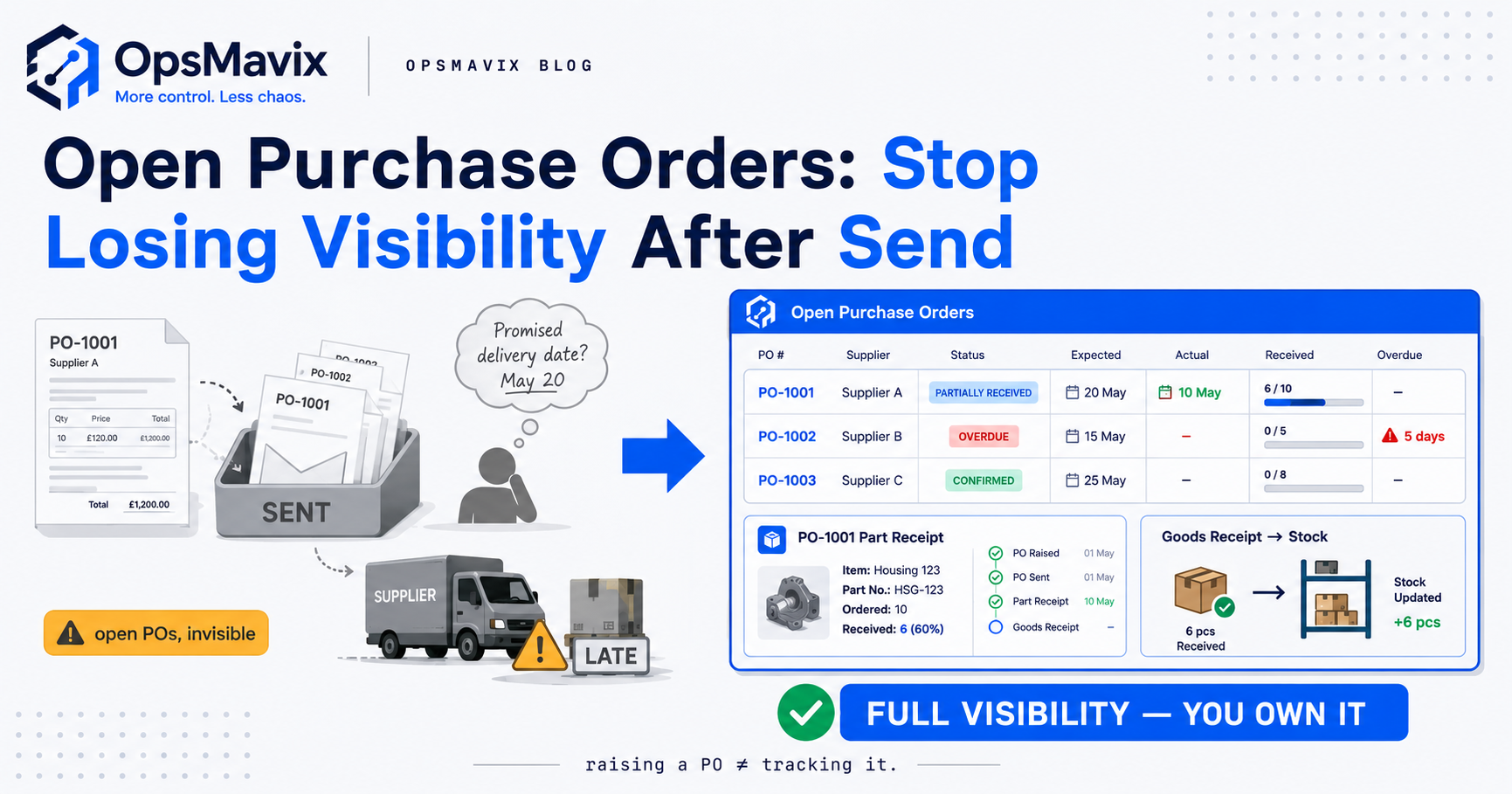
A purchase order tracking system tells you, at any moment, which POs are open, what’s due to arrive when, what turned up short, and which suppliers are running late — the questions a business can rarely answer once the order has left the building. Raising the PO is the part most teams have already solved: they can produce a clean order, get it approved, and email it. The gap opens the second it’s sent. The order drops into an inbox, the promised date lives in someone’s memory, and nobody has one live view of everything inbound. That blind spot is where stock lands late, arrives short, and gets chased only when a line runs out on the shop floor.
This post is about that gap, not about raising POs — a separate job covered elsewhere. Tracking is the discipline of following a purchase order from “sent” to “received and closed,” and knowing at a glance where every open order sits along that path. And the honest bit up front: if you raise a handful of POs a month from reliable suppliers, a shared log may still be all you need.
Key Takeaways
- A purchase order tracking system follows every PO from sent to received to closed, giving one live view of what’s on order, what’s due when, and what’s overdue.
- Raising a PO is the solved part. The leak is downstream: no live open-order list, promised dates in memory, and short deliveries nobody catches until stock runs out.
- Expected versus actual dates are the engine of tracking — without a due date on every open PO, “overdue” is invisible and chasing stays reactive.
- Part-receipts are where tracking earns its keep — a half-delivered PO isn’t done, and the outstanding balance is what feeds a backorder.
- A spreadsheet PO log breaks quietly — no alerts, it goes stale the moment someone forgets to update it, and it can’t link the order to what was booked in.
- Low volume with reliable suppliers may not need a system — a shared log is fine until the open-PO count and the chasing outgrow it.
What PO Tracking Is (and Why It’s Not Raising a PO)
Raising a purchase order and tracking one are two different jobs that get treated as one. Raising is the front half: pick the supplier, list the lines, agree the price, approve it, send it. Plenty of businesses do that competently from their accounts tool or a template, and they’re right that the PO itself is handled. The order exists, it’s tidy, it’s gone. Job done — except the job has barely started.
Tracking is the back half, and it decides whether the goods turn up when you need them. It’s the running answer to a set of live questions: which orders are still open, when each was promised, whether that date has passed, and what’s still outstanding. None of that is captured by raising the PO — it accumulates afterwards, and unless something holds it, it lives in fragments. A tracking system holds all of it in one live state per order.
The Open-PO Blind Spot: You Don’t Know What’s Inbound
Ask a stretched operations manager “what’s currently on order across all your suppliers” and watch the pause. The honest answer is often a shrug and a scroll through the sent folder. The individual POs exist, but there’s no single list of what’s open, so no reliable picture of what’s inbound. That’s the blind spot: not that the orders are lost, but that the set of them is invisible.
The cost is quiet and constant. You reorder a line because the shelf looks low, not knowing there’s already a PO in flight for it — so you double-buy. Or you plan production around stock that’s “coming,” when nobody can confirm it was ever sent. As one operations lead put it in an audit: “We don’t find out an order’s late — we find out we’re out of stock, and then we go looking for the order.” Lateness isn’t something you see coming; it’s something you discover at the shelf, too late.
Expected vs Actual Dates: Where Overdue Becomes Visible
The most useful field in PO tracking is the expected delivery date, because it turns “overdue” from a feeling into a fact. Every open PO should carry a promised date — the one the supplier gave, not a guess. Once it does, the system compares promised against today and surfaces anything that’s slipped. Overdue stops being something you notice by accident and becomes a list you read every morning.
That flips chasing from reactive to scheduled. Instead of finding out an order’s late when the line runs dry, you see it the day it passes its date — or a few days before, while there’s still time to push. The supplier gets chased with the PO number and promised date in hand, not a vague “did that ever arrive?” Late suppliers build a visible record instead of a private grudge, and that record tells a genuinely unreliable supplier from one bad week — and lets sales commit to a customer date on a confirmed inbound one, not optimism.
Part-Receipts and the Link to Backorders
Deliveries rarely arrive as clean as the PO that ordered them. A supplier ships eight of the ten, splits the order across two dates, or sends it short and promises the rest “next week.” A part-delivered PO is one of the easiest things to lose: it looks handled, but it isn’t closed, and the outstanding balance is precisely the bit that gets forgotten.
Tracking receipts against the order stops that. Each delivery is booked against its PO, the received-so-far count climbs, and the order stays open with a clear outstanding balance until every line is complete. Nothing’s marked done because a delivery came; it’s done when the order is fulfilled. That balance is also where purchasing meets backorder management — the bit that hasn’t arrived is, functionally, a backorder against your supplier, and if a customer order was waiting on those goods, the two are linked. A system that knows a PO is only half-received tells you exactly what’s still owed, and so what you can promise the customer downstream.
Booking Goods In Against the PO
Tracking only stays true if receiving is tied to the order. The moment goods land, they need to be booked in against the PO that ordered them — not counted onto the shelf as an anonymous quantity, and not left until someone gets to the paperwork tomorrow. The goods-receiving step is where tracking either updates in real time or falls behind, and a day’s lag is enough to make the open-order view unreliable.
Booking in does two things at once: it updates the order — received-so-far climbs, the balance drops, the PO closes when complete — and it updates stock, because the goods are now available to use. That’s the join a spreadsheet can’t make: a delivery signed for in the warehouse doesn’t touch a PO log in the office, so the two drift apart within a week. It’s also where discrepancies surface honestly: you ordered ten, you’re booking eight, and the system holds the gap — what you chase now, and refuse to pay for later.
Closing the Loop: Tracking Feeds Three-Way Matching
Tracking a PO to full receipt isn’t the finish line — paying for it correctly is, and the record tracking builds is what makes that possible. By the time an order’s booked in, you hold two of the three documents that matter: what you ordered (the PO) and what actually arrived (the receipts). The invoice is the third, and lining all three up before you pay is three-way matching — the discipline that catches short deliveries billed in full, price creep between quote and invoice, and the duplicate invoice paid twice.
None of that works without the tracking record underneath it. If you don’t know what arrived against the PO, you’re paying on trust. A system that’s tracked receipts all along makes the match almost automatic: the invoice can’t clear until it agrees with what was ordered and booked in. Tracking is what you do while the order is open; matching is how you close it out with the money — skip the tracking and the match has nothing to stand on.
Why a Spreadsheet PO Log Breaks
Most businesses start tracking POs in a spreadsheet, and for a while it holds. A tab with one row per order, a status column, a due date — better than nothing, and for low volume genuinely fine. The trouble is the ways it breaks are quiet, so it keeps looking fine long after it’s stopped being true.
Three failures do it in. It can’t alert: a due date in a cell does nothing when it passes, so “overdue” is only visible if someone remembers to sort the column — which means late orders sit unnoticed exactly when you’re busiest. It goes stale the instant someone forgets to update it, and someone always does; one delivery booked in the warehouse but not typed into the sheet, and the open-order view is now lying to everyone who reads it. And it can’t link to receipts or stock, so part-deliveries and short deliveries live or die on whoever updated the row. A log is a snapshot maintained by discipline, and discipline is the first thing to go when things get busy.
What a Right-Sized PO Tracking System Does
Strip it back and a right-sized tracking system does a short list of things well. It holds every open PO in one live list, each with a status, an expected date, and a received-so-far balance. It flags overdue orders on their own, so chasing is scheduled. It books deliveries in against the PO — updating both the order and stock in one action — and handles part-receipts by keeping the order open until the balance clears, then hands that receipt record to invoice matching.
The “right-sized” part matters as much as the tracking. This isn’t an enterprise procurement suite with supplier scorecards and catalogue punch-out; it’s the open-order visibility a growing business actually uses, tied to their real stock and sitting alongside the supplier-order side of the operation rather than bolted on as a tool that can’t see anything else. The before-and-after is the honest measure. Before: orders in a sent folder, dates in memory, lateness discovered at the shelf. After: one list you read in ten seconds — what’s inbound, what’s overdue, what arrived short, what’s ready to pay.
When a Simple Log Is Still Enough (the Honest Bit)
A tracking system earns its cost when tracking becomes work — and sometimes it hasn’t yet. If you raise a handful of POs a month from a short list of suppliers you trust, who deliver on time and complete, then a shared spreadsheet or a well-kept email thread may be all you need. The open-PO count is low enough to hold in your head, and chasing is rare. Building a system for that is solving a problem you don’t have.
It changes when tracking outgrows the log — usually volume and variability that tip it, not a number you can name in advance. More open POs than anyone can carry in their head. Suppliers who deliver late or short often enough that chasing is a regular job. The moment you’re missing due dates, double-ordering because nobody could see what was open, or paying short deliveries in full — that’s the log telling you it’s done. Our steer is the same one we give on the raising side: switch when the leak outgrows the fix, not before.
FAQ
What is a purchase order tracking system?
It follows every PO from the moment it’s sent to the moment it’s received in full and closed, holding a live list of open orders — each with its status, expected date, and received-so-far balance. So you can answer at a glance what’s on order, what’s due when, and what’s overdue. It’s distinct from software that raises POs; tracking is about visibility after they’ve left, through to receipt and payment.
How is tracking a PO different from raising one?
Raising is the front half: pick the supplier, list the lines, approve it, send it. Most businesses handle that fine. Tracking is the back half — following the order to delivery — and it’s the part that usually leaks. Raising proves you ordered; tracking tells you which orders are open, whether they’re late, and what arrived short.
Can I track purchase orders in a spreadsheet?
For low volume with reliable suppliers, yes — a shared log is genuinely fine. It breaks in three ways as you grow: it can’t alert you when a due date passes, it goes stale the moment someone forgets to update it, and it can’t link the order to what was booked in. When you’re missing due dates, double-ordering, or paying short deliveries in full, it’s outgrown its usefulness.
How does PO tracking connect to receiving and invoices?
Tightly, and that’s the point. Booking a delivery in against the PO updates both the order’s received balance and your stock in one action, so tracking stays true in real time. That same receipt record makes three-way matching possible — the invoice is checked against what was ordered and what arrived before it’s paid, catching short deliveries, price creep, and duplicate bills.
How OpsMavix Can Help
OpsMavix builds right-sized purchase order tracking systems for businesses stuck in the gap — too busy for a spreadsheet PO log, too small to justify an enterprise procurement platform. We build the visibility you actually use: one live list of every open PO with its status, expected date and outstanding balance; overdue orders flagged so chasing is scheduled; deliveries booked in against the order so receipts move both the PO and your stock; and part-receipts held open until the last unit lands, feeding backorder visibility and invoice matching. It sits alongside how you already buy and receive, owned outright.
If the open-PO blind spot is costing you late stock, missed short-deliveries and invoices you can’t check against what arrived, start by seeing where the visibility actually breaks. Book a Free Operations Leak Audit and we’ll map where your buying loses track today, what it’s worth to close, and whether a shared log or a right-sized tracking system is the honest fit for the volume you run now.
Keep reading

Getting value from OpsMavix? Add us as a preferred source on Google — you'll see more of our operations content in your AI Overviews, AI Mode and Search.