
SCM Inventory Management System: The One True Count at the Heart of Your Supply Chain
An SCM inventory management system is the inventory core of supply-chain management: one master quantity per SKU per location, movements as first-class events, per-location reorder, and stock allocated to real demand. This guide shows UK wholesalers and distributors how to get that core right (owned and right-sized) instead of renting a bolt-on module of a suite you'll barely use.
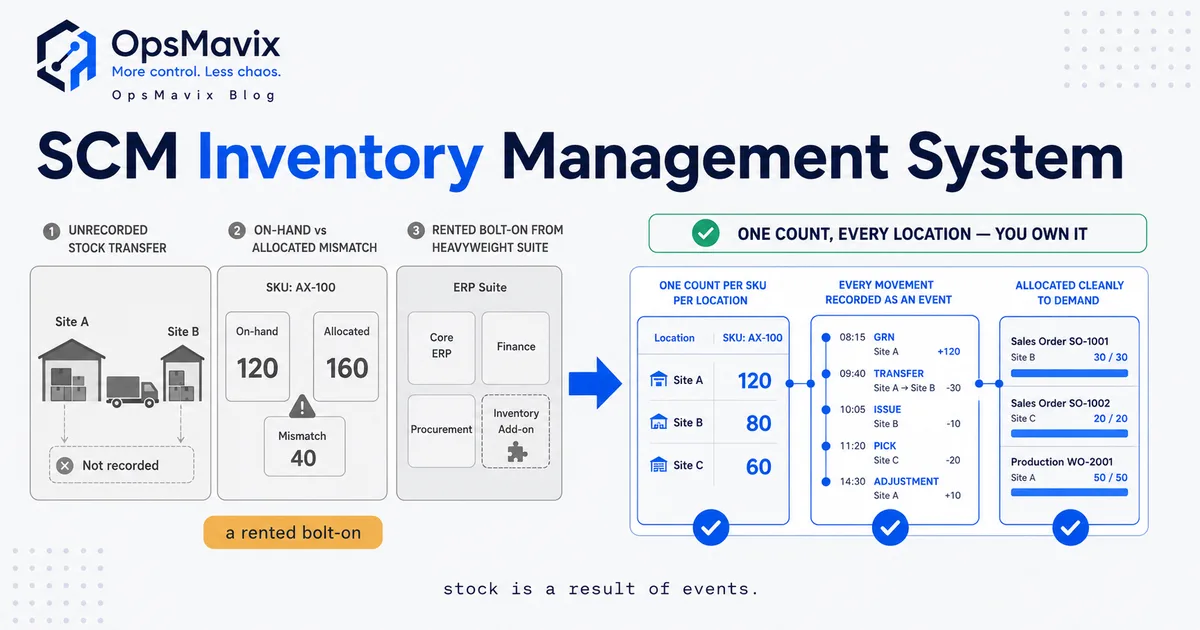
An SCM inventory management system is, stripped to its core, one thing done properly: it holds a single master quantity for every SKU in every location, and it changes that quantity the instant stock physically moves. Everything a supply chain does (buying, receiving, storing, allocating, picking, shipping, returning) is a movement of stock, and the job of the inventory core is to record each of those movements as an event and keep the count honest. Get that core right and demand planning, reorder logic and order promising all have solid ground to stand on. Get it wrong and every clever thing you build on top is planning off fiction.
Most growing UK distributors don’t have an inventory problem so much as a truth problem. Stock exists, it’s on shelves, it moves through the warehouse every day. But the number the business plans and promises from has quietly detached from what’s actually there. A pick short here, an unrecorded transfer there, a return that never got booked back in, a supplier delivery keyed in three days late. None of them looks fatal on its own. Together they produce the thing every operations manager dreads: a system count that everyone has stopped believing, so people go and physically look before they trust it.
What an SCM Inventory Management System Actually Does
An SCM inventory management system sits at the centre of the supply chain and answers one question continuously: how many of each SKU do we own, where is each unit, and how much of it is already spoken for? Purchasing, warehousing, sales and finance all lean on that answer. If it’s right, they coordinate. If it’s soft, they each start keeping their own private version, and coordination collapses into phone calls and guesswork.
Underneath the dashboards and reports, the core does a small number of specific jobs, and it has to do all of them well:
- One master quantity per SKU per location. Not a warehouse total, not a company total — a quantity tagged to a physical place (a warehouse, a bin, a van, an in-transit leg). The same SKU can sit in three locations at once, and the system holds each figure separately while knowing the sum.
- Every movement as a recorded event. Goods received, picked, shipped, transferred, returned, adjusted, written off. Each one is a transaction that changes the count, with a timestamp and a reason, never a silent overwrite.
- A distinction between on-hand, allocated and available. You might have 40 on-hand but 32 already allocated to open orders, leaving 8 available to promise. Conflating those three numbers is how distributors oversell stock they technically “have.”
- Per-location reorder logic. Each location carries its own minimum, reorder quantity and supplier lead time, so replenishment reflects how that site actually sells rather than one blunt company-wide level.
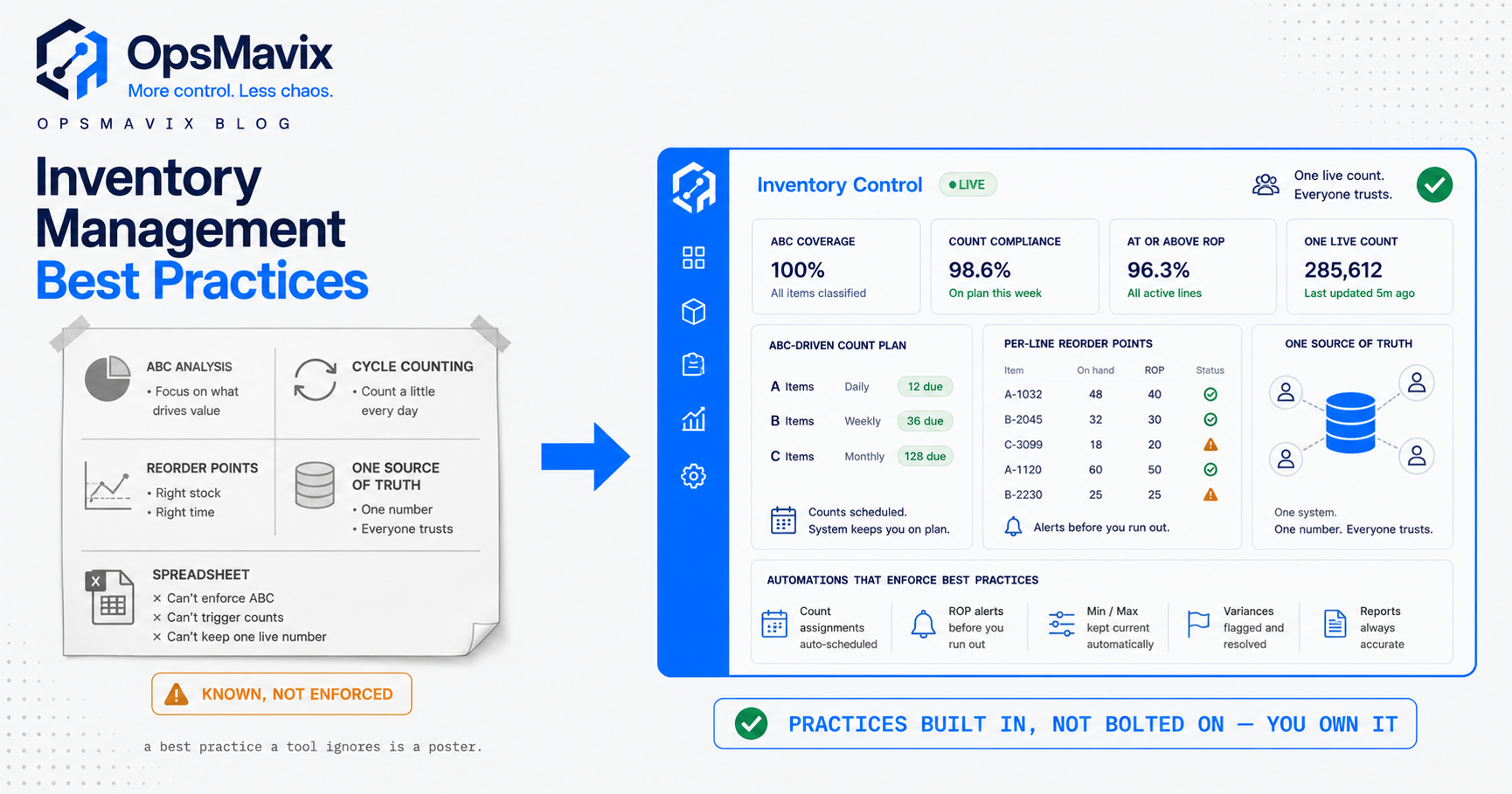
That’s the whole spine. Demand planning, supplier scorecards, ABC analysis, service-level reporting: all of it is downstream of the count. This is the same discipline covered from the buying angle in our purchase order inventory management guide and from the definitional angle in custom inventory systems: the value isn’t the clever layer on top, it’s the trustworthy quantity underneath it.
Movements as First-Class Events
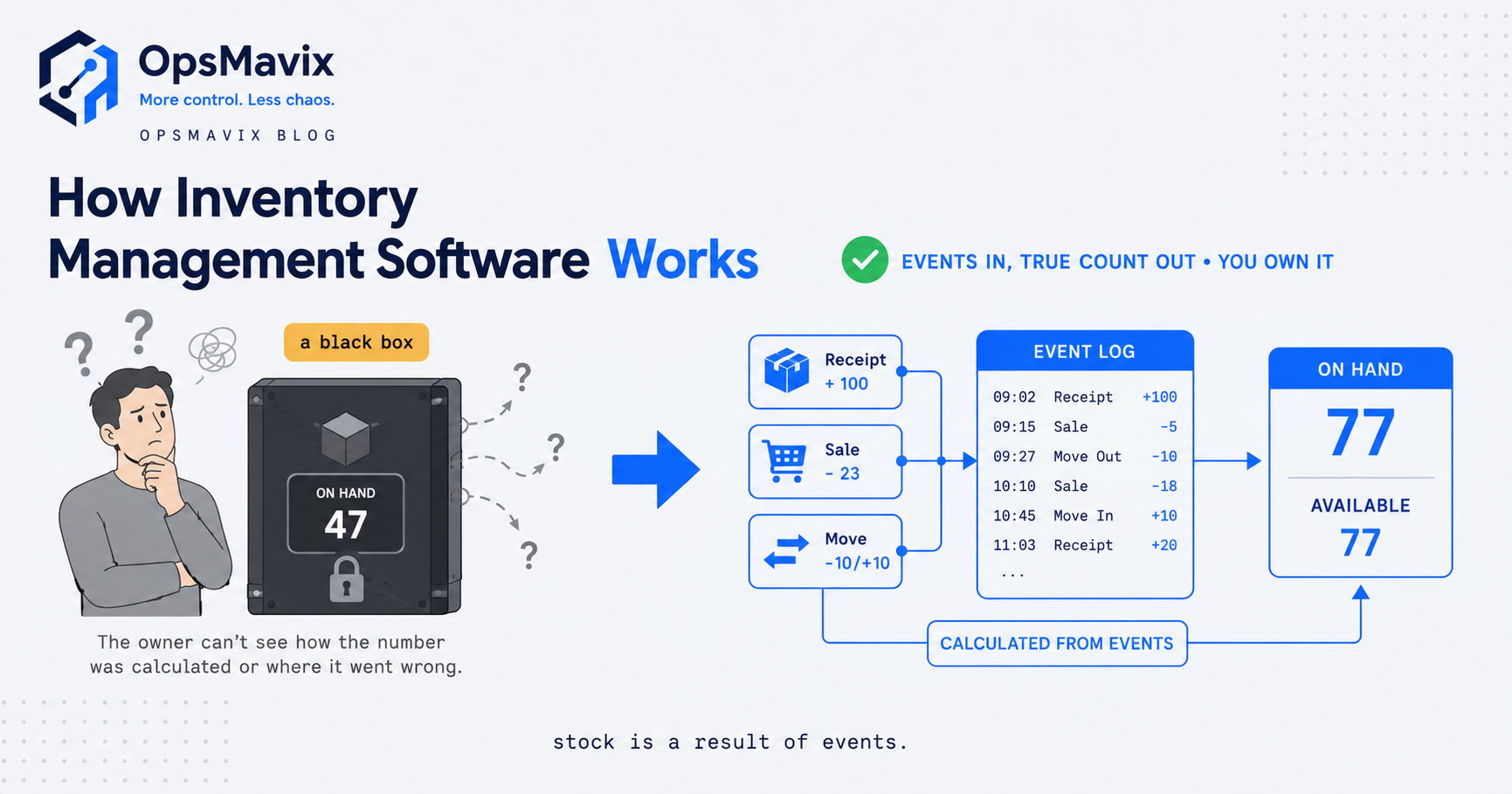
Here’s the design idea that separates a real inventory core from a spreadsheet with a stock column: stock levels are not something you set, they’re something that results from events. You never type “we now have 37.” You record “received 50,” “picked 8,” “picked 5,” and the 37 falls out of the arithmetic. The current quantity is always the running total of every movement, and because every movement is stored, you can replay exactly how you got to today’s figure.
This matters for two practical reasons distributors feel constantly. First, auditability: when a count looks wrong, you don’t argue about it, you scroll the movement history for that SKU and location and find the exact transaction: the pick that was double-entered, the return that never got booked, the adjustment someone made on a Friday. A count you can explain is a count people trust. Second, concurrency: in a busy warehouse, goods-in, picking and returns all happen to the same SKU at the same time. If the count is an event stream, those actions each append cleanly. If it’s a single editable number, two people editing “the stock figure” at once quietly overwrite each other, and the drift starts.
The failure mode to hunt for in any tool is the silent overwrite: anywhere a stock figure gets set directly, or synced in an overnight batch that flattens a day of movements into one guess, or updated by hand from a stocktake sheet. Each of those is a place where the event trail breaks and the count starts to float free of reality. Event-first inventory is exactly the inventory automation system principle: let each real-world action update the truth automatically, the moment it happens, instead of asking someone to remember to key it in later.
How Stock Drift Takes Hold in Distribution
Stock drift is the slow divergence between what the system says you have and what’s actually on the racking, and in wholesale and distribution it has a very specific anatomy. It rarely arrives as one big error. It accumulates from small, individually forgivable gaps in the movement record.
A wholesale operator described the shape of it to us plainly: the business “promises stock he may not have.” Sales looks at a screen, sees a number, quotes a lead time, and commits. Only at the pick face does anyone discover the number was fiction. By then a customer is already expecting the goods.
The usual sources, in the order they bite:
- Unrecorded transfers. A pallet moves from the main warehouse to the trade counter or a satellite depot to satisfy a local order, and nobody raises the transfer. For as long as it’s uncounted, the stock exists in both places or neither, and every plan that touches those SKUs is now wrong.
- Timing gaps on goods-in. A supplier delivery lands but isn’t booked in until the paperwork catches up. For those hours or days the system under-states stock, so you either turn away orders you could have filled or fire off a needless purchase order.
- Returns limbo. Customer returns come back to the yard but sit unprocessed. Physically you own them; systemically they don’t exist, so they can’t be re-sold and they quietly rot your available-to-promise.
- On-hand-versus-available confusion. The count says 40, sales promises against 40, but 32 were already allocated to open orders. Eight real units, promised as forty. This one causes the most visible damage because it directly oversells.
There’s a second, deeper failure the same operator flagged, and it’s worth naming because it’s endemic to this vertical. The reorder engine itself is often a black box: in one distributor it was “an Excel workbook of complex macros written by a guy who left… Nobody knew how the macros worked.” The business’s entire replenishment nervous system depended on a spreadsheet nobody could open the hood on. When it breaks, and it always eventually breaks, reordering stalls, stock goes wrong, and there’s no one to fix it. This is the stock discrepancy problem with a bus-factor bolted on: the count drifts and the tool that’s supposed to correct it is un-maintainable.
None of this is your warehouse staff being careless. It’s an architecture that lets movements go unrecorded and lets one number be edited in place. Close those gaps (make every movement an event, split on-hand from allocated) and the “drift” has nowhere to come from.
Per-Location Reorder and Allocation to Demand
Once the count is trustworthy, two mechanics turn it from a record into a decision engine: per-location reorder and allocation to demand. Both are worthless on a soft count and powerful on a solid one.
Per-location reorder means each stocking location carries its own reorder point, reorder quantity and lead time, because a main distribution centre, a regional depot and a trade counter don’t sell the same SKU at the same rate or restock from the same supplier on the same timeline. A single company-wide reorder level over-stocks the quiet sites and starves the busy ones. Right-sized reorder logic flags replenishment per location, and crucially checks whether the smarter move is a transfer from an over-stocked site before it raises a fresh purchase order. That “move it, don’t buy it” prompt is often where the system pays for itself, because it converts stranded stock back into fillable orders instead of dead capital. The mechanics of setting those levels are covered in how to calculate reorder point, and the transfer-versus-buy decision in multi-location inventory rebalancing.
Allocation to demand is the other half, and it’s where distribution differs from simple retail. Stock isn’t just on-hand or not; it’s committed against specific open orders. A proper core reserves stock to a sales order the moment the order is confirmed, so that quantity drops out of available-to-promise and can’t be sold twice. When supply is tight, allocation rules decide who gets the limited stock: the order that’s due first, the customer on a priority tier, the line that’s already part-picked. Without allocation, “available” is just “on-hand,” and on-hand gets promised repeatedly until someone at the pick face loses the race.
Together these two mechanics are what let sales quote with confidence and purchasing buy without padding. But note the dependency: both run entirely on the master count and the on-hand/allocated split. If the count drifts, per-location reorder buys the wrong things and allocation reserves stock that isn’t there. The foundation is non-negotiable first.
Owned Core vs a Bolt-On Module of a Heavyweight Suite
When stock drift starts costing real money, the market offers two loud answers. One is a cheap standalone inventory app. The other, the one enterprise sales teams push hardest, is the inventory module of a full SCM or ERP suite: buy the whole platform, and inventory comes “included.” The quiet third answer, an owned right-sized core built around how you actually move stock, is usually the one that fits a growing distributor best. Here’s the honest comparison.
| Consideration | Cheap standalone inventory app | Inventory module of a heavyweight SCM/ERP suite | Right-sized owned core |
|---|---|---|---|
| Best when | One site, simple range, low order volume | Genuine enterprise: many sites, deep finance/procurement/HR needs | Growing distributor outgrowing the app, nowhere near enterprise scale |
| The count model | Often a single editable figure, weak location logic | Proper event-based core, but generic and heavy | Event-based, modelled to your exact sites and flows |
| Allocation & per-location reorder | Basic or absent | Full-featured but rigid, configured their way | Shaped to how your depots and trade counters really work |
| Cost model | Low monthly fee | High licence + per-seat/module, forever, most unused | Build cost, then you own it — no rented core |
| Fit | You bend your process to the app | You bend your whole business to the suite | The system fits how you already run |
| Implementation | Days | Months, consultant-led, migration-heavy | Scoped to the leak you actually have |
| What you’re paying for | A tool that runs out of road | Reach across functions you may never use | The specific slice that stops your drift |
| Data ownership | Lives in their platform | Lives in their platform | Your database, your rules, queryable however you like |
Be fair to both alternatives. The cheap app is genuinely right if you run one warehouse with a steady range; don’t overspend to solve a problem you don’t have. And a full suite earns its keep at real enterprise scale, where you actually need finance, procurement, warehouse management and demand planning welded together across dozens of sites; there, an integrated inventory module beats a stack of disconnected tools. Our supply chain management software overview walks through where that integrated-suite logic holds.
The trap is the middle, where most growing UK distributors actually live. You’re past the standalone app; it can’t hold your locations or your allocation rules. But you’re nowhere near needing, or wanting to rent forever, a platform whose inventory is one module of twelve. You’d pay enterprise licence fees, endure a months-long implementation, and use a fraction of it, all to get an inventory core you could have had built to fit. The wholesale distribution software question is really this: do you want the count that runs your business to be a rented module configured someone else’s way, or a core you own and can extend as you grow?
A Worked Example: The Regional Distributor
Numbers make it concrete. These figures are illustrative, not a claim about a specific client, but the shape is one distributors recognise instantly.
A UK trade distributor runs a main warehouse, a regional depot and a trade counter, supplying roughly 1,800 SKUs to trade customers on account. Average order value is around £420. Stock is “tracked” in an accounting package plus a spreadsheet of reorder macros, with goods-in and transfers keyed in when the office gets to them.
On paper it holds together. In practice three leaks run constantly:
- Overselling from a soft count. Sales quotes against on-hand without an allocated split, so fast-moving lines get promised to two customers at once. Across a quarter this triggers roughly 12 short-shipped orders, each needing a same-day chase, a partial delivery or a goodwill discount. Call it £1,900 in emergency carriage, discounts and admin, plus two accounts that start double-ordering “to be safe,” which distorts demand further.
- Unrecorded transfers and late goods-in. Stock moves between the depot and trade counter by phone, and deliveries book in days late. The count drifts on around 40 SKUs at any time, so purchasing over-buys slow lines to feel safe. Conservatively £4,000 of cash sits in overstock that won’t turn this season, while three bestsellers stock out mid-quarter.
- The macro black box. The reorder engine is a spreadsheet the original author left behind. When it errors mid-quarter, reordering stalls for a week; two key lines run dry and a good customer sources them elsewhere. Hard to price exactly, but the near-miss on the account is worth far more than the week of lost margin.
Add the visible pieces (emergency carriage, goodwill discounts, stalled reordering, firefighting) and a single quarter clears £2,000–£3,500 in avoidable loss, before you count the £4,000 in cash trapped in the wrong stock. And it recurs every quarter until the architecture changes.
The fix isn’t a supertanker suite. It’s one master count per SKU per location, every movement recorded as an event, an on-hand/allocated/available split so nothing gets promised twice, per-location reorder that suggests “transfer from the depot” before “raise a PO,” and reorder logic that lives in owned, documented code instead of a departed employee’s macros. No enterprise licence. No module you’ll never open. Just one true count, owned.
FAQ
What is the difference between an SCM inventory management system and inventory software?
They overlap heavily; the difference is scope and intent. Basic inventory software mainly answers “how many do we have?” An SCM inventory management system treats that count as the shared foundation the whole supply chain coordinates on: it splits on-hand from allocated and available, records every movement as an event across multiple locations, and feeds reorder and demand-allocation logic. In practice, a well-built inventory core is the inventory heart of supply-chain management; the extra “SCM” framing is about how tightly it’s wired to purchasing, warehousing and order promising.
Why does treating stock movements as events matter?
Because it’s the difference between a count you can trust and one you can only hope is right. When every goods-in, pick, transfer, return and adjustment is a recorded event, the current quantity is the running total of all of them, so you can always replay how you got there, find the exact transaction behind a discrepancy, and let simultaneous warehouse actions update cleanly. When stock is a single figure people edit or overwrite in a batch, those edits collide silently and the count drifts away from reality. Events give you auditability and concurrency; a single editable number gives you neither.
Do I need a full SCM or ERP suite to get this?
Usually not. If your actual problem is that your stock count drifts and you oversell what you don’t have, you need a trustworthy inventory core with per-location reorder and demand allocation: a specific slice, not a twelve-module platform. A full suite makes sense at genuine enterprise scale across many sites and functions, where you’d use most of it. For a growing distributor, a right-sized owned core is typically cheaper, faster to go live, and shaped to your locations and flows rather than the other way round.
How does allocation to demand stop overselling?
By separating what you own from what’s already promised. When a sales order is confirmed, the system reserves that stock against the order, so the quantity drops out of available-to-promise and can’t be sold again. “Available” then means genuinely uncommitted stock, not raw on-hand. When supply is tight, allocation rules decide which orders get the limited units (earliest due, priority customer, already part-picked) instead of leaving it to whoever reaches the pick face first. Without allocation, on-hand gets promised repeatedly until someone loses the race.
We’re not ready to replace everything: where do we start?
Start with the smallest change that closes your biggest leak, which for almost every distributor is a trustworthy master count: one quantity per SKU per location, every movement recorded as an event, and on-hand split from allocated so nothing gets promised twice. Layer per-location reorder and demand allocation on top once the count is solid. You rarely need to rip out your accounting or warehouse tools at once; you need to stop each function keeping its own private version of the stock figure. A short audit will tell you which leak is costing the most and what the cheapest fix actually is.
How OpsMavix Can Help
OpsMavix builds right-sized, owned inventory cores for growing UK wholesalers and distributors whose stock count has drifted away from what’s actually on the racking. Instead of selling you a cheap app that can’t hold your locations, or a full SCM suite where inventory is one rented module of many, we map how your goods actually move (goods-in, transfers, picks, returns, allocation), find where the drift, overselling and blind reordering are leaking margin and cash, and build the specific system that gives you one master count per SKU per location, every movement recorded as an event, a clean on-hand/allocated/available split, and per-location reorder that suggests a transfer before a purchase order. It’s the practical layer between an app that’s run out of road and a suite that’s overkill, and the reorder logic lives in documented code you own, not a departed employee’s macros. If sales is promising stock you may not have, start by seeing exactly where the leaks are: Book a Free Operations Leak Audit
Sources
- Practitioner detail in this guide (the “promises stock he may not have” and the reorder engine as “complex macros written by a guy who left” patterns) is drawn from OpsMavix’s own conversations with UK wholesale and distribution operators, attributed generically.
- Where a specific UK figure could not be independently verified, this guide states the framing qualitatively rather than cite an unverified statistic, in line with the OpsMavix blog quality standard.
Keep reading
Getting value from OpsMavix? Add us as a preferred source on Google — you'll see more of our operations content in your AI Overviews, AI Mode and Search.