
What Is an Order Management System and When You Need One
What is an order management system? It is the single source of order truth that captures, validates and tracks every order through to delivery. This guide covers the order lifecycle, the re-keying leak that manual entry creates, and how to pick between a cheap tool, a full ERP and a right-sized owned system when you are outgrowing spreadsheets and disconnected tools.
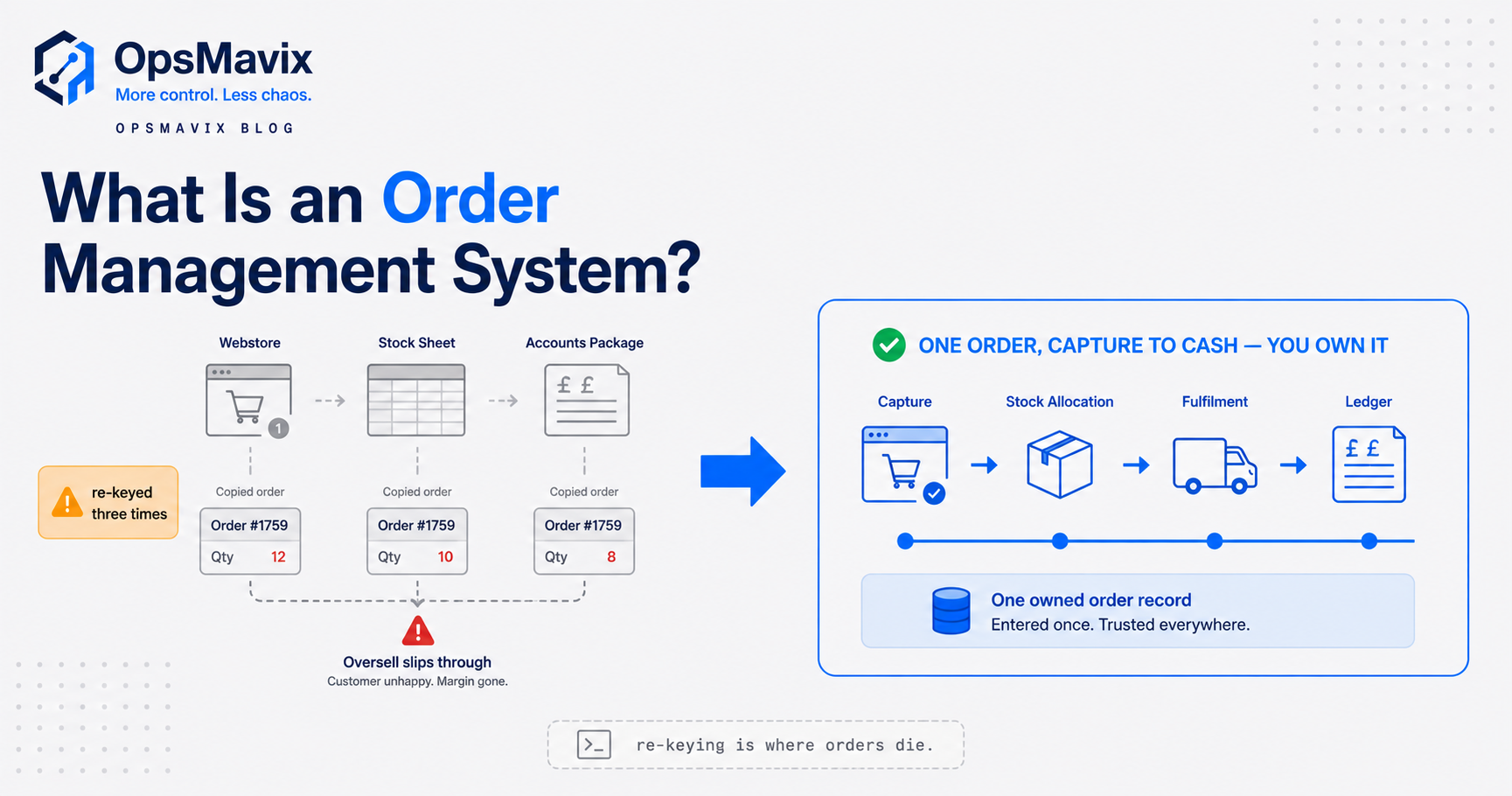
An order management system (OMS) is the software that captures every customer order, validates it, tracks it through fulfilment and delivery, and keeps one accurate record of where each order stands from the moment it lands to the moment it closes. Sage defines it as software that helps businesses “track, manage, and fulfil customer orders across their entire life cycle, from order capture through to delivery and returns.” That is the textbook answer. The reason a growing business actually goes looking for one is usually messier and more specific.
Most owners do not wake up wanting an OMS. They wake up tired of the same order being typed three times: once when it arrives by email, again into a spreadsheet so the warehouse can pick it, and a third time into the accounts package so it can be invoiced. Every re-key is a chance to get a quantity, a price or a delivery date wrong, and every wrong order costs a phone call, a credit note or a lost customer. The OMS exists to end that. It is the one place an order lives, so everyone reads from the same record instead of keeping their own copy.
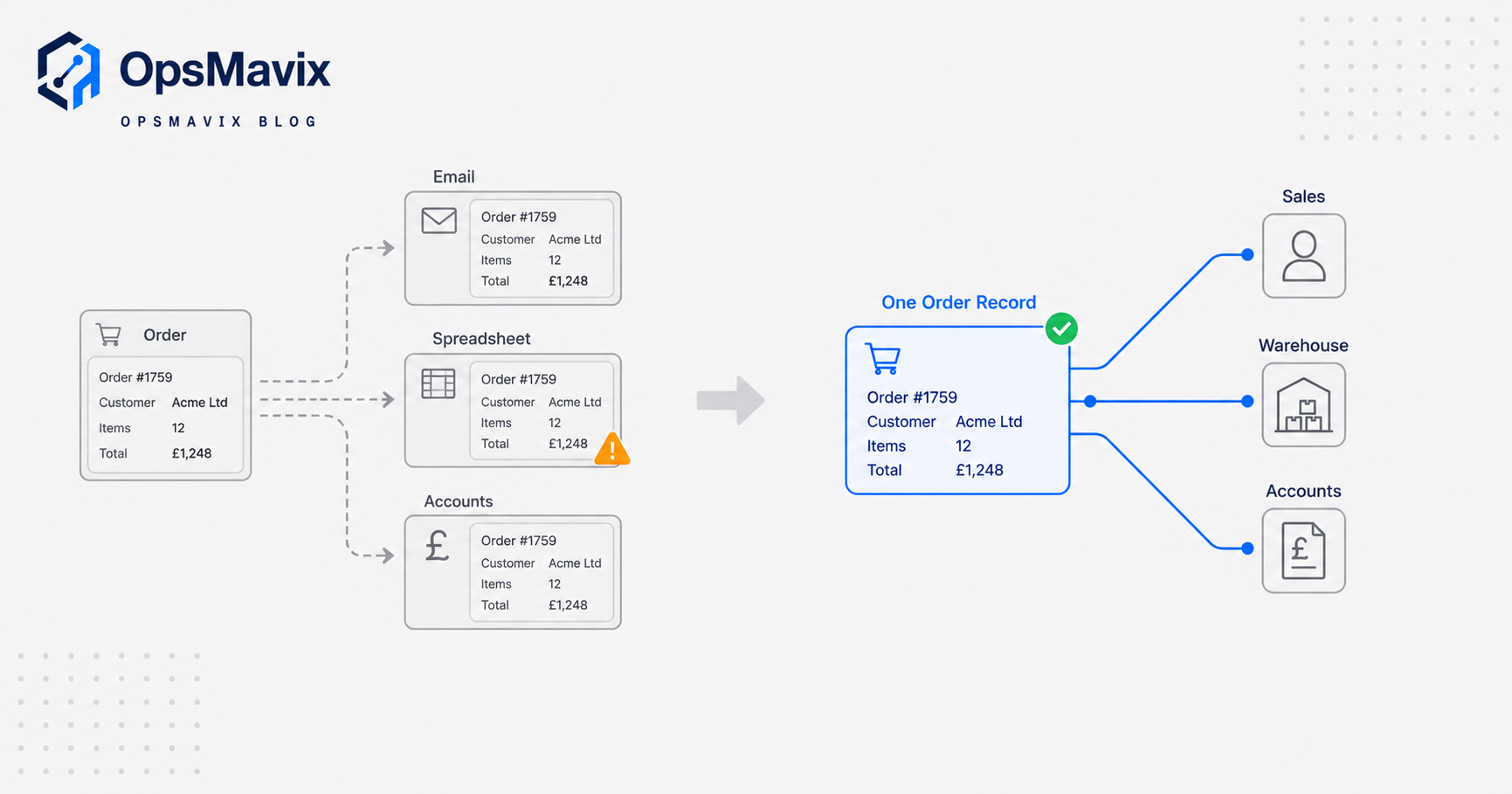
What an Order Management System Actually Does
Stripped of the marketing, an OMS does a small number of concrete jobs and has to do all of them well:
- Captures orders from every channel into one record. Phone, email, a web form, a trade portal, a marketplace: whatever the source, the order lands in a single system in a single format, so nobody has to collate three inboxes.
- Validates before it commits. It checks the price is current, the customer’s account is in good standing, and the stock actually exists before the order is promised. This is the step manual entry skips, and it is where over-selling starts.
- Allocates stock to the order. A confirmed order reserves the units it needs, so those units drop out of what is available to promise and cannot be sold twice.
- Tracks status through fulfilment. Picked, packed, dispatched, delivered, returned. Each state change is recorded against the order, so anyone can answer “where is order 4471?” without walking to the warehouse.
- Feeds accounts and reporting. The same record that the warehouse picks from becomes the invoice and the sales figure, with no re-keying between them.
The value is not any single feature. It is that all of these read and write to one order record. When sales, the picker and the bookkeeper are all looking at the same live status, coordination stops being a series of phone calls. Amazon Business frames order management as “the end-to-end process that captures, validates, fulfils and reconciles customer orders,” and the word that matters there is reconciles: the loop only closes when what you invoiced matches what you shipped matches what you promised.
The Order Lifecycle It Manages
An OMS is built around the order lifecycle, the sequence of states every order passes through. The exact labels vary by vendor, but the shape is consistent. Amazon Business describes it as four broad stages: capture and validation, confirmation, fulfilment and delivery, then returns and reconciliation. Broken down into the states a growing business actually feels, it looks like this:
- Capture. The order arrives and is recorded with customer, lines, quantities, price and required date.
- Validate. Price, credit and stock availability are checked. Bad orders get caught here rather than at the pick face.
- Reserve and allocate. Available stock is committed to the order so it cannot be promised elsewhere.
- Fulfil. The warehouse picks and packs against the order. ShipBob’s UK guide breaks this operational core into receiving, picking, packing and shipping.
- Deliver. The order goes to a carrier and delivery is tracked to completion.
- Return and reconcile. Returns come back into stock, credits are raised, and the invoice is squared against what actually shipped.
- Analyse. The closed order becomes data: margin, lead time, fulfilment rate, repeat behaviour.
The point of naming the stages is that each is a gate. An order should only move forward when the current stage’s conditions are met, and a good OMS refuses to promise stock it has not confirmed or dispatch an order that has not been picked. Manual order entry has no gates. An order jumps straight from “an email in someone’s inbox” to “promised to the customer” with nothing checked in between, which is exactly why it goes wrong.
The Real Leak: Orders Re-Keyed Across Email, Spreadsheet and Accounts
Here is the OpsMavix view, and it is not the one the software vendors lead with. For most growing UK businesses the problem is not that they lack a place to store orders. It is that they have three places, and none of them agree.
The order arrives by email. Someone reads it and types it into a spreadsheet so the warehouse can pick it. Someone else later types the same order into the accounts package to invoice it. That is the same order entered by hand three times, and every hand-off is a place where a quantity slips, a price is stale, or a line is missed. Amazon Business cites research that 47% of organisations name too many manual steps as a major challenge in handling orders, and that 51% had to correct billing mistakes on more than 26% of their invoices. Those two numbers are the same leak seen from two ends: manual steps at the front produce billing corrections at the back.
The damage is rarely one big failure. It is the steady drip: the order shipped short because the spreadsheet said 40 and the shelf had 8, the invoice that had to be credited because the price on the email was last year’s, the customer chasing a delivery nobody can locate because the status lives in a picker’s head. None of it looks fatal on its own. Together it is a business that re-checks every order by hand before it trusts it, which is slow, expensive and impossible to scale.
An OMS closes the leak by making the order a single record that each function reads from and writes to in turn. The warehouse does not get a re-typed copy; it gets the order. Accounts does not re-enter it; it invoices the same record that shipped. There is nothing to re-key, so there is nothing to mistype. This is the same principle that sits under a sales order management software build: one order, entered once, trusted by everyone downstream.
Signs You Have Outgrown Manual Order Entry
You do not need an OMS on day one. Spreadsheets and an inbox are genuinely fine at low volume, and it is not worth the money or the disruption to replace them before they hurt. The honest question is whether you have crossed the line where manual entry has become the bottleneck. The signs are specific:
- The same order is typed more than once. The single clearest signal. If an order is re-keyed from email to spreadsheet to accounts, you are paying for that labour and its errors every day.
- Nobody can answer “where is that order?” without asking around. Status lives in people’s heads and inboxes rather than in a record.
- You over-sell stock you do not have. Sales promises against a number that was already committed to other orders.
- Month-end is a reconciliation slog. What you invoiced, what you shipped and what you promised have to be manually matched because no system did it as you went.
- One or two people are the system. The order process only works because a specific person remembers how, and it stalls when they are off.
- Growth makes it worse, not better. Every extra order adds proportional admin instead of running through the same rails.
If most of those are true, you have outgrown manual entry, and the cost of staying is now higher than the cost of fixing it. If only one is true, fix that one thing first and leave the rest alone.
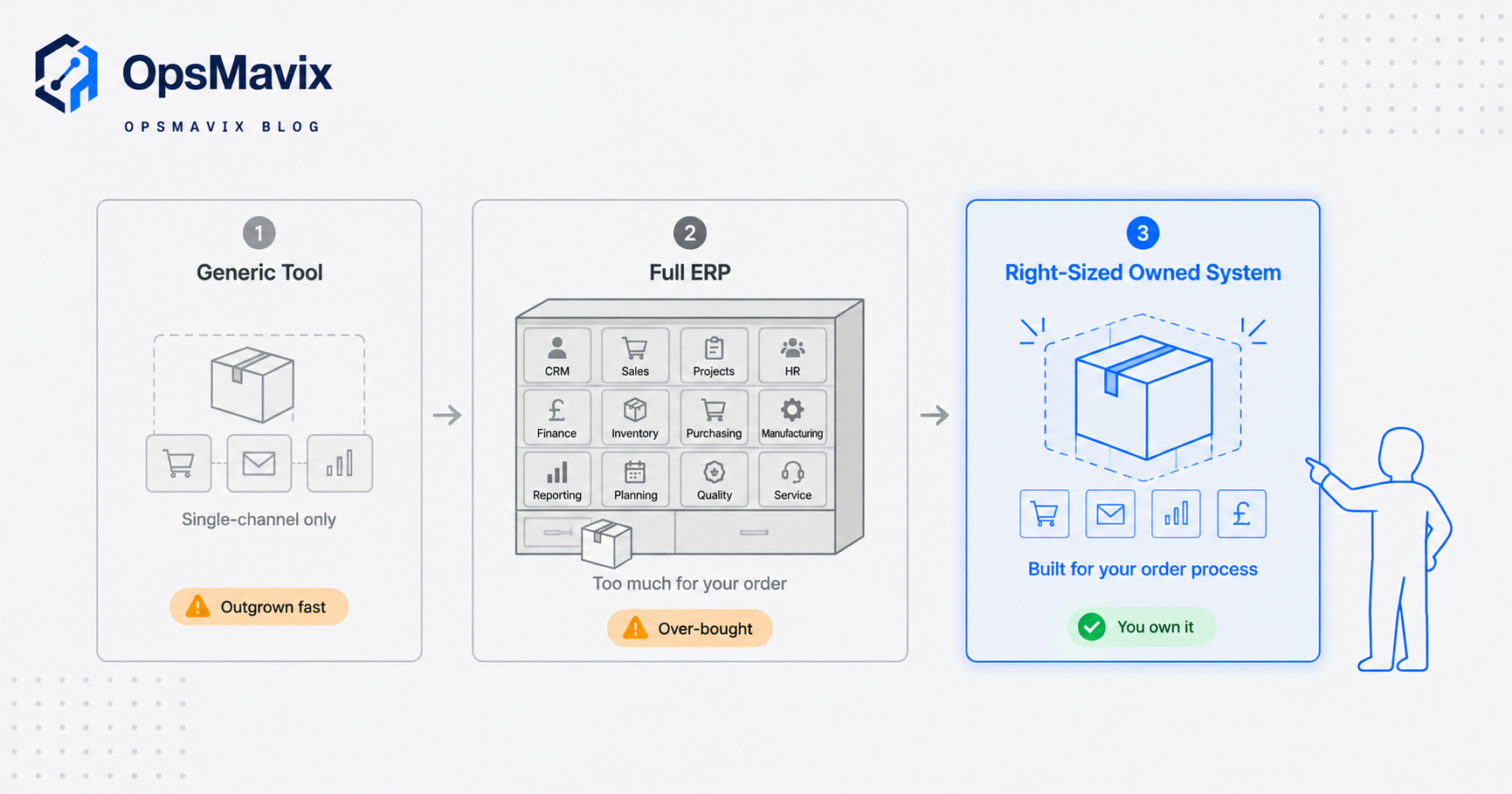
Generic Tool vs Full ERP vs Right-Sized Owned System
Once you have decided you need to fix order management, there are three honest routes. None is wrong for everyone. The right choice depends on how much of your problem each one actually closes and how much you pay for capability you will never use.
| Cheap / generic OMS tool | Full ERP | Right-sized owned system | |
|---|---|---|---|
| Best for | A single channel, standard flow, low volume | Large, complex, multi-entity operations | businesses that have outgrown spreadsheets and disconnected tools |
| Setup time | Days to weeks | Many months, sometimes over a year | Weeks, built around your real flow |
| Cost shape | Low monthly per-seat fee | High licence plus implementation, per-seat forever | One build cost, you own it; expandable later |
| Fit to how you work | You bend to the tool’s fixed flow | You bend the business to the ERP | Built around your actual order process |
| Handles your odd rules | Rarely (custom pricing, trade terms) | Yes, but via costly configuration | Yes, natively |
| Channel lock-in | Often tied to one platform | Broad but heavy | None; owns the order truth centrally |
| Who controls changes | The vendor’s roadmap | The vendor plus consultants | You |
| Risk | Outgrown quickly | Over-bought, slow, expensive to change | Needs a capable build partner |
The generic tool is the right answer when your order flow is simple and single-channel, and you should take it. The full ERP is the right answer when you genuinely are a large, multi-entity operation that needs finance, HR, manufacturing and orders in one suite, and can absorb the implementation. The trap is buying the ERP for an order-management problem: paying for and bending to a system where you will use a fraction of it, per seat, forever.
The right-sized owned system sits between the two. It is built around how your orders actually run, it holds the single source of order truth so no channel owns it, and it can expand into fuller operations or even a full ERP later when you genuinely need that. You buy the piece that closes your real leak, and nothing you do not.
Integrations and Why Ownership Matters
An OMS is only as good as what it connects to. In practice the order record has to talk to a handful of systems: your stock or inventory data, your accounts package for invoicing, your sales channels or trade portal, and your carriers for dispatch and tracking. When those connections work, an order flows from capture to cash without anyone re-typing it. When they do not, you are back to manual bridges between silos, which is the leak you were trying to close.
This is where ownership matters more than it first appears. A channel-locked tool tends to keep the order truth inside its own platform, which is fine until you add a second channel, change accounts software, or want a report the vendor does not offer. Then the data you generate is trapped behind someone else’s roadmap, and you are paying to integrate around a system you do not control.
An owned order system keeps the single source of order truth in the middle, under your control, with the channels and the accounts package plugged in around it. Add a marketplace, swap a carrier, change your invoicing tool: the order record stays put and the integration changes at the edge. You are not renting access to your own order history, and you are not waiting on a vendor to decide your workflow is worth supporting. For businesses selling across more than one channel, that central ownership is the difference between adding channels cleanly and re-keying between them, which is why an order management system for ecommerce is worth designing around ownership from the start.
A Worked Example: The Wholesaler Doing 60 Orders a Day
The figures below are illustrative, not a claim about a specific client. They show the shape of the arithmetic, not a guaranteed result.
Take a UK wholesaler processing about 60 orders a day. Orders arrive by email and phone. An admin re-keys each one into a picking spreadsheet, and later into the accounts package to invoice. Say each order takes roughly four minutes of re-keying and checking across those hand-offs. That is 240 minutes a day, about four hours, or near enough £45 a day in admin time at a modest loaded rate, which is roughly £11,000 a year spent typing orders that were already typed once by the customer.
Then the errors. Suppose 3% of orders carry a mistake from a re-key: a wrong quantity, a stale price, a missed line. At 60 orders a day that is under two bad orders daily, but each one costs a credit note, a re-pick, a re-ship or a lost customer. Put a conservative £30 average cost on fixing one, and that is roughly £50 a day, another £12,000 or so a year, before you count the goodwill.
The admin time and the error cost together sit around £23,000 a year, and neither number appears on any invoice, which is why it goes unnoticed. A right-sized owned order system that captures each order once and lets the warehouse and accounts read the same record removes most of the re-keying and the re-key errors it causes. The point is not the exact pounds. It is that the cost of doing nothing is already being paid, quietly, every day, and it grows with every order you add.
FAQ
What is the difference between an OMS and inventory software?
They overlap but answer different questions. Inventory software answers “how many do we have and where,” tracking stock quantities and movements. An OMS answers “where is each order and what does it still need,” tracking orders through their lifecycle. A good order system leans on accurate inventory to validate and allocate, which is why the two are often built together, but the OMS is about the order, not the shelf.
Do I need an OMS if I only sell on one channel?
Often not yet. If you sell through one channel at low volume and that channel’s built-in order handling copes, adding a separate OMS is premature. The trigger is not channel count on its own; it is re-keying. The moment orders are being typed by hand into a second or third system, you have the leak an OMS fixes, whether you sell on one channel or five.
Is an OMS the same as an ERP?
No. An ERP is a broad suite that runs finance, HR, manufacturing, inventory and orders together. An OMS handles the order lifecycle specifically. Every ERP includes order management, but you do not need to buy an entire ERP to get it. Buying the whole suite for an order problem is a common and expensive mistake.
How long does it take to put an order system in place?
A generic tool can be running in days. A full ERP implementation often runs many months. A right-sized owned system typically lands in weeks because it is scoped to your real order flow rather than a vendor’s full feature set. The honest variable is not the software; it is how tangled your current process is and how clearly it can be mapped.
Will an OMS work with my accounts package?
It should, and if it will not, that is a reason to look elsewhere. The whole value is one order record flowing into invoicing without re-keying. An owned system is built to connect to the accounts software you already use rather than forcing you to switch. Confirm the specific integration before you commit to anything.
How OpsMavix Can Help
OpsMavix builds right-sized, owned operations systems for businesses that have outgrown spreadsheets but do not want to bend themselves to a full ERP. For order management that means one place where every order is captured once, validated against real stock and price, tracked through picking and dispatch, and handed clean to your accounts package, so nobody re-keys the same order three times. You own the system and the order truth inside it, it is built around how your orders actually run, and it can expand into fuller operations later when you need that. We start by finding the leak, not selling the software. Book a Free Operations Leak Audit
Sources
- Amazon Business UK: What Is Order Management? A UK Guide - UK definition of order management and its stages, plus the manual-steps and billing-correction statistics cited above.
- Sage: What is an Order Management System? - vendor definition of an OMS and its lifecycle stages and benefits.
- ShipBob UK: What is Order Fulfilment? - the receiving, picking, packing, shipping and returns steps of the fulfilment core.
- Whistl: Order Fulfilment Meaning and Strategies - UK view of the fulfilment process and in-house versus outsourced models.
Keep reading
Getting value from OpsMavix? Add us as a preferred source on Google — you'll see more of our operations content in your AI Overviews, AI Mode and Search.