
Resource Scheduling Software: Getting the Right People on the Right Jobs
Resource scheduling software answers one question all day long — who is doing what job, when, and who is actually free to take the next one. For a services, project or field team, that question lives on a whiteboard or a spreadsheet until the double-bookings, idle staff and last-minute scrambles make it too expensive to leave there. Here's what resource scheduling really has to do, and when a right-sized custom system beats both the whiteboard and the enterprise suite.
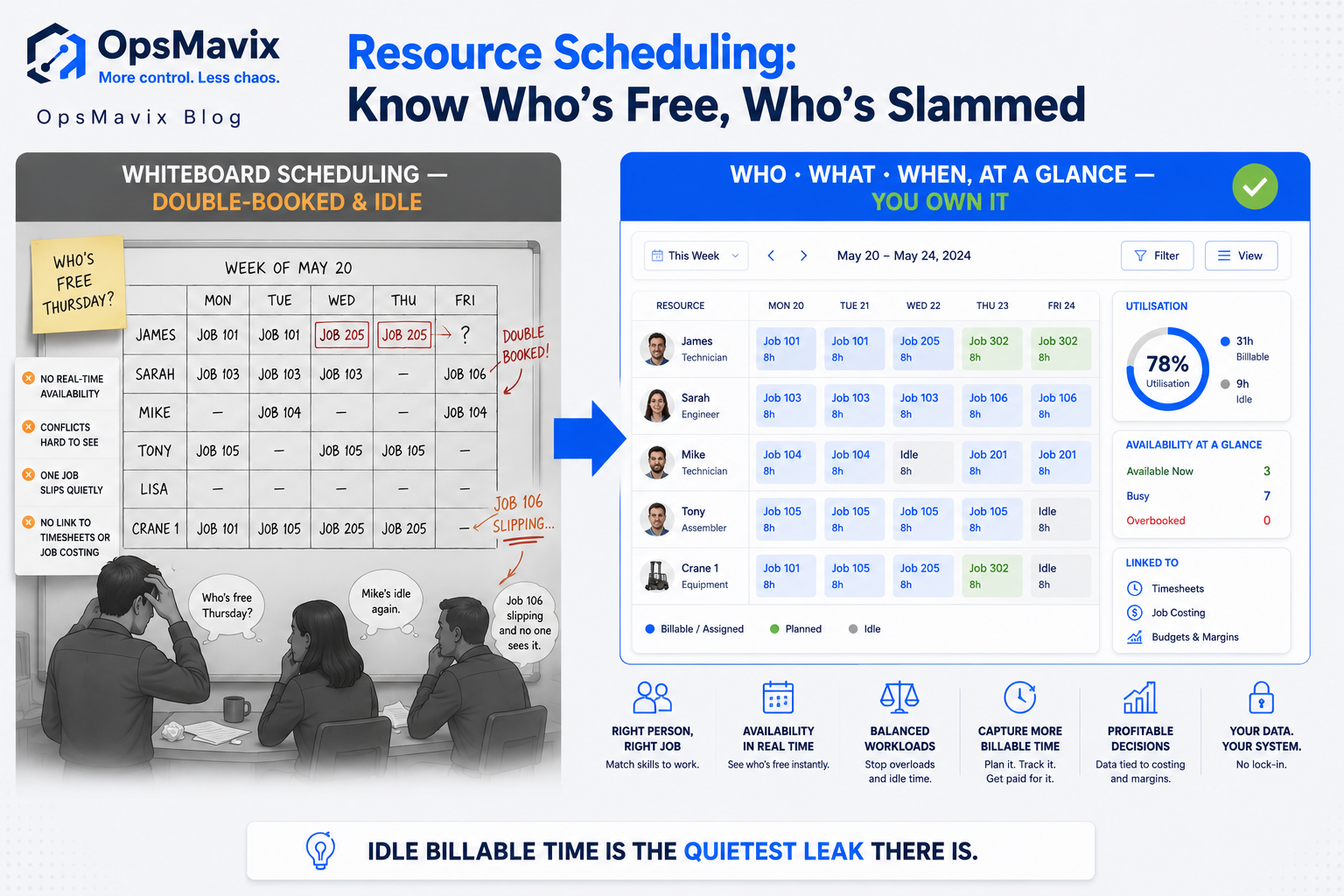
Resource scheduling software is the tool that decides who does which job, when, and whether they’re free to take the next one — assigning your people, teams and equipment to specific jobs and projects across a timeline you can actually see. That’s the whole game for a services, project or field team: an installer, an engineer, a crew, a machine, matched to the work that needs them, in a view where a clash or a gap is obvious before it costs you. It’s not the same as asking whether the business has enough hours overall to hit its workload — that’s the aggregate feasibility question. Resource scheduling is the day-to-day allocation underneath it: this person, this job, this Tuesday.
This post is about that allocation and where it breaks. Most growing teams run it on a whiteboard, a shared calendar or a colour-coded spreadsheet, and it holds together right up until it doesn’t — two jobs booked on the same crew, an engineer sitting idle while another’s drowning, a client asking where their fitter is and nobody sure. Here’s what resource scheduling has to do to be worth its name, and when a right-sized system built around how you actually dispatch beats both the manual board and the enterprise workforce suite.
Key Takeaways
- Resource scheduling is the daily allocation of specific people, teams and equipment to specific jobs over time — distinct from capacity planning, which asks whether you have enough hours in aggregate.
- The board or spreadsheet works until the team grows past what one person can hold in their head — then double-bookings, idle time and “where is he?” calls start costing real money.
- Utilisation is the number the whiteboard hides: how much of your paid team’s time is billable versus idle, and you can’t manage what you can’t see.
- Scheduling isn’t just filling slots — it’s matching the right skills and genuine availability to the job, and reacting cleanly when a job overruns and knocks everything downstream.
- A schedule is only honest if it connects to timesheets and job costing — planned versus actual, so you know whether the job made money and whether your estimates hold.
- A right-sized custom system models your jobs, your crews and your rules, gives one live board everyone trusts, and you own it — no per-head licence creep.
What Resource Scheduling Software Actually Does (and Who the Full Version Is For)
At the enterprise end, workforce and resource management platforms are heavy machines: skills databases, shift and rota engines, demand forecasting, field dispatch with GPS routing, sub-contractor management, mobile apps, and deep payroll and ERP integration. When you run hundreds of engineers across regions with SLAs to hit, every one of those pieces earns its keep — the routing alone saves more than it costs. The complexity is doing real work.
The trouble starts when a team of fifteen fitters buys the same machine. What they actually need is modest and specific: one board that shows every person and every job across the week, that stops two jobs landing on the same crew, that flags when someone’s got a gap they could be billing, and that lets a dispatcher drag a job when the morning falls apart. That’s not enterprise workforce management. That’s the core of resource scheduling, shaped to how one team dispatches — and it’s the part they’ll actually use every single day.
1. The Job Is Killing the Double-Booking, Not Buying a Calendar
Ask a services owner what actually hurts about scheduling and it’s rarely “we don’t have software.” It’s the mess around the board. One person owns the whiteboard, another quotes a job and promises a date without checking it, a client rings to move a slot and it gets updated in one place but not the other. Then Tuesday arrives and the same two-man crew is booked on two sites twenty miles apart, and someone’s day is already ruined.
That’s the core leak — every job scheduled by memory and a marker pen is a double-booking or a no-show waiting to happen. A double-booked crew doesn’t just lose that job; it burns the drive time, the apology, and often the client. Software fixes it only if it captures how you really dispatch — the recurring maintenance runs, the emergency call-outs, the two-day installs that need the same team both days. One live board, one version of the truth, where booking a crew on a job that’s already taken is a thing the system won’t let you do quietly.
2. Utilisation Is the Number the Whiteboard Can’t Show You
Here’s what the marker pen hides: how much of your paid team’s time is actually earning. You’re paying eight engineers whether they’re on a billable job or sitting in the yard, and the whiteboard tells you where they are today but never adds it up. One project manager we spoke to found that fixing the visibility mattered more than fixing the schedule — the schedule looked full, but half the “full” was travel, rework and waiting for parts that nobody was counting as unbillable.
Utilisation is billable hours over paid hours, and it’s the single number that tells you whether your team is the right size and priced right. A resource scheduling system that’s worth building shows it live: who’s fully booked, who’s got gaps you could be selling, how much of the week went to non-billable time and where. Suddenly the idle Thursday afternoon isn’t invisible — it’s a slot you can fill, or a sign you’ve hired ahead of the work. This ties directly into capacity planning at the aggregate level, but it starts here, with one honest view of who’s actually free.
3. Matching Skills and Availability, Not Just Filling a Slot
A slot isn’t filled just because a name is in it. The gas job needs the ticketed engineer, not whoever was free. The two-day install needs the same crew both days, not a different pair on day two who don’t know the site. The machine only runs if the operator who’s certified on it isn’t already booked elsewhere. Scheduling that ignores skills and genuine availability doesn’t save you time — it sends the wrong person and creates a second problem: the callback, the re-visit, the job done twice.
A right-sized system models the constraints that actually govern your dispatch: who’s qualified for what, who’s on leave or already committed, which jobs need continuity of crew, which need specific kit. Then the board stops offering you impossible bookings. You see the engineers who can genuinely do this job and are genuinely free, not a wall of names you have to cross-check in your head against the holiday sheet and the certifications folder. The match becomes the system’s job, not the dispatcher’s memory.
4. The Real Test Is What Happens When a Job Slips
Every schedule is fiction until reality hits it. A morning install runs three hours over. A customer cancels at 8am. An engineer calls in sick. A part doesn’t turn up. The plan you made on Friday meets Monday and everything downstream has to move — and this is exactly where the whiteboard fails hardest, because moving one job by hand means finding, checking and re-booking everything it collides with, live, while the phone’s ringing.
A resource scheduling system earns its place in the scramble. Drag the overrunning job and see immediately what it clashes with. Reassign the sick engineer’s list and watch the affected clients flag for a call. Find the nearest free qualified person for the emergency without scrolling three tabs. The point of the software isn’t the tidy plan — it’s how fast and cleanly you recover when the plan breaks, which it will, most days, before lunch. A board that can’t absorb a slip without a phone-around isn’t a scheduling tool; it’s a snapshot of a plan that’s already wrong.
5. A Schedule That Doesn’t Connect to Time and Cost Is Half a Tool
The plan is only half the loop. The other half is what actually happened — and if your schedule never meets your timesheets, you’re guessing at everything that matters. Did the job take the hours you booked for it? Did that crew’s day cost more than it billed? Are your estimates any good, or has every install quietly been running 30% over while everyone shrugged and moved on? The schedule says what you intended; only actuals say whether it worked.
Tie scheduling to timesheet software and job costing and the loop closes. Planned hours meet logged hours, so overruns surface as a pattern instead of a vague feeling. Each job’s labour cost lands against what it billed, so you know which work actually makes money and which you should stop quoting cheap. Next quarter’s estimates get built on what jobs really took, not what you hoped. A schedule sitting on its own is a wish; joined to time and cost, it becomes the thing that tells you whether the business model works — the same planned-versus-actual view a project operations dashboard pulls together.
6. The Real Cost Is the Lock-In and the Per-Head Creep, Not the Licence
The sticker price on an enterprise workforce suite is the least of it. The expensive part is the implementation, the per-head fee that climbs every time you hire, and the dependency on a platform you can’t leave. Teams that buy the big system routinely describe running a slice of it — the scheduling board and the mobile app switched on, the forecasting and routing modules configured, paid for and never touched — with an implementation partner on call to keep it breathing.
A right-sized custom system flips that. No per-head fee as your crews grow. No workforce modules to configure and ignore. Nothing a vendor can sunset or re-price at renewal, because you hold it. You’re not renting your dispatch desk from a platform that assumes you run three hundred engineers — you own a board scoped to the way your team actually schedules, built once and maintained as you grow into it. The whiteboard was free; the enterprise suite is priced for someone ten times your size. The right thing sits between them.
7. When a Full Workforce Platform Is the Right Call (the Honest Bit)
Sometimes the big platform is correct, and we’ll say so. If you run hundreds of field engineers across regions, need GPS routing and optimisation, manage a large sub-contractor network, juggle SLAs with penalty clauses, or schedule shift-based labour at a scale where a minute of routing saves real money, a full workforce suite earns its cost — the modules a smaller team would call overkill become the things that pay for it.
The decision isn’t “custom good, platform bad.” It’s matching the tool to the way you actually dispatch. The mistake cuts both ways: don’t run a genuinely large, route-optimised field operation on a lightweight board, and don’t buy an enterprise workforce suite for a team of twenty that just needs to stop double-booking and start seeing who’s idle. And if a good shared board is honestly still enough for now, stay there a while longer — switch when the leak outgrows the fix, not before.
FAQ
What is resource scheduling software?
Resource scheduling software assigns specific people, teams and equipment to specific jobs and projects over time — it answers who is doing what, when, and who is free to take on more. For a services, project or field team it replaces the whiteboard or shared spreadsheet with one live board where clashes and gaps are visible, so you stop double-booking crews and stop paying for idle time you couldn’t see. The enterprise versions add routing, forecasting and large-scale field dispatch; a right-sized version covers the core allocate-see-react loop built around how you actually schedule.
How is resource scheduling different from capacity planning?
Resource scheduling is the day-to-day allocation — this named person on this job this Tuesday, are they free, are they qualified. Capacity planning is the aggregate feasibility question — do we have enough total labour or machine hours to take on the workload at all over the coming weeks or months. You schedule to run the week; you capacity-plan to decide whether to accept the work and whether to hire. They connect — good scheduling data feeds honest capacity planning — but they answer different questions.
What is utilisation and why does it matter?
Utilisation is the share of your paid team’s time that’s actually billable — billable hours over paid hours. It matters because you pay your people whether they’re on a job or in the yard, and the whiteboard shows where they are today but never adds it up. A scheduling system that surfaces utilisation live tells you who’s got sellable gaps, how much of the week went to travel and rework, and whether you’ve hired ahead of the work or priced the jobs wrong.
Should resource scheduling connect to timesheets and job costing?
Yes — a schedule that never meets actual hours is a plan you never checked. Tie scheduling to timesheets and you see planned hours against logged hours, so overruns show up as a pattern instead of a hunch. Tie it to job costing and each job’s labour cost lands against what it billed, so you know which work makes money. That planned-versus-actual loop is what turns a scheduling board from a wish into a tool that tells you whether the business model holds.
Can a custom system handle our skills and availability rules?
Yes, and that’s a core reason to build rather than buy generic. A right-sized system models the constraints that actually govern your dispatch — who’s qualified or ticketed for what, who’s on leave or already committed, which jobs need the same crew across multiple days, which need specific equipment. The board then only offers bookings that are genuinely possible, instead of a wall of names you cross-check against the holiday sheet in your head. Off-the-shelf tools force a generic model that rarely fits how a specific team really works.
How OpsMavix Can Help
OpsMavix builds right-sized resource scheduling systems for teams stuck in the gap — too big for the whiteboard, too small to justify an enterprise workforce suite. We build the part you actually run: one live board that shows every person and job across the week, that won’t let you double-book a crew, that matches the right skills and genuine availability to the work, and that lets a dispatcher rebuild the day cleanly when a job overruns. It surfaces utilisation so idle time stops hiding, and it joins to timesheets and job costing so the plan meets reality and you know which jobs made money — the same planned-versus-actual view a project operations dashboard brings together. You own it outright: no per-head licence, nothing a vendor can switch off.
If you’re weighing resource scheduling software against building the right thing once, start by seeing where the scheduling actually leaks. Book a Free Operations Leak Audit and we’ll map where double-bookings, idle staff and blind reactions to slipped jobs cost you today, what it’s worth to close, and whether a full platform or a right-sized system is the honest fit for how your team schedules now.
Keep reading
Getting value from OpsMavix? Add us as a preferred source on Google — you'll see more of our operations content in your AI Overviews, AI Mode and Search.