
Job Costing Software: Tracking True Cost Per Job as You Go
Job costing software captures labour, materials and overhead against a specific job as the work happens — so you see estimate vs actual while the job is still live, catch it going over before delivery, and quote the next one sharper. Here's how it works.
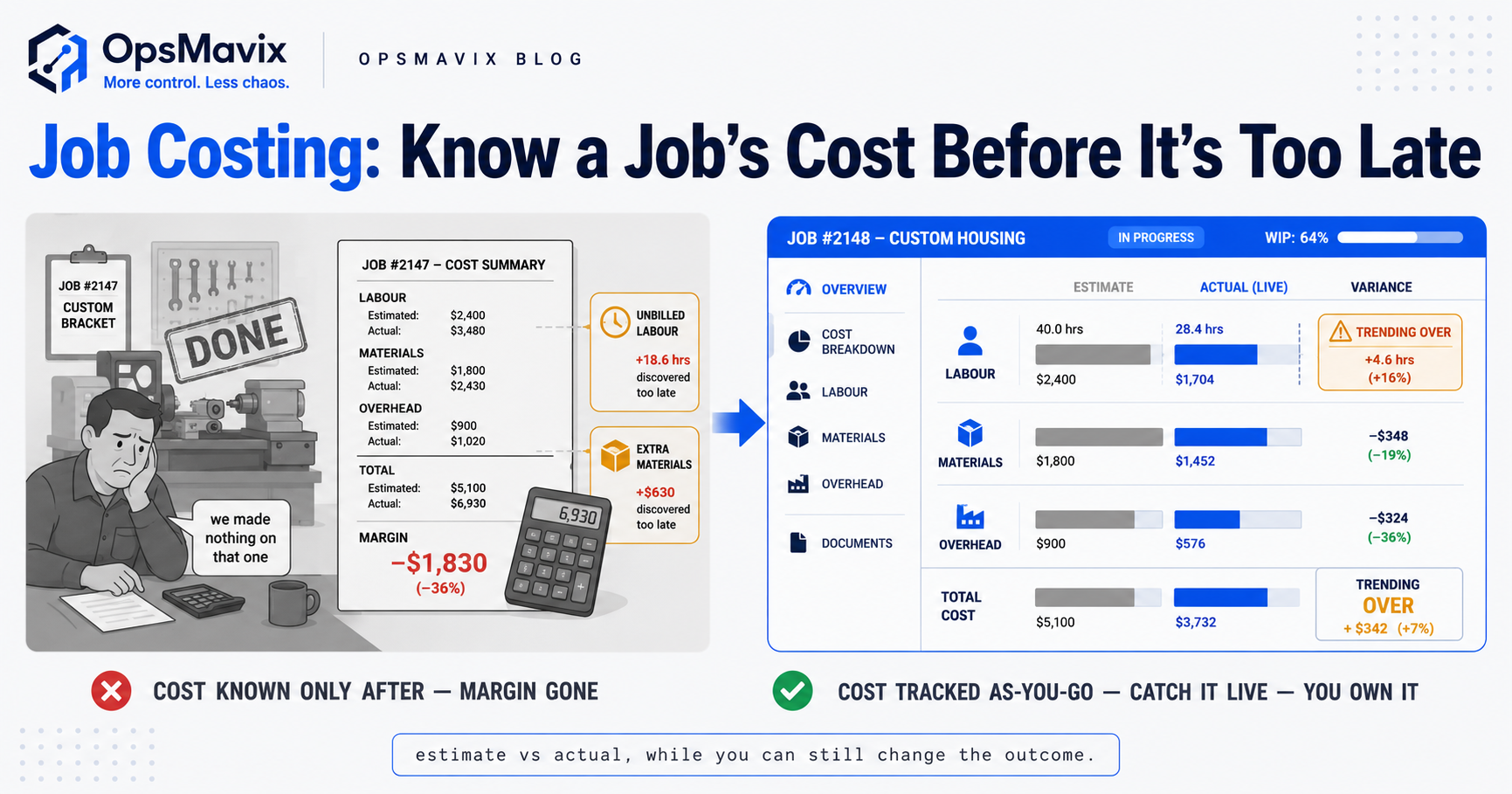
Job costing is tracking the true cost of a single job — its labour, its materials, its slice of overhead — as the work actually happens, so you know what that job is costing you while you can still do something about it. Not a category, not a monthly average across everything you made. One job, one running total, updated as hours get logged and materials get pulled.
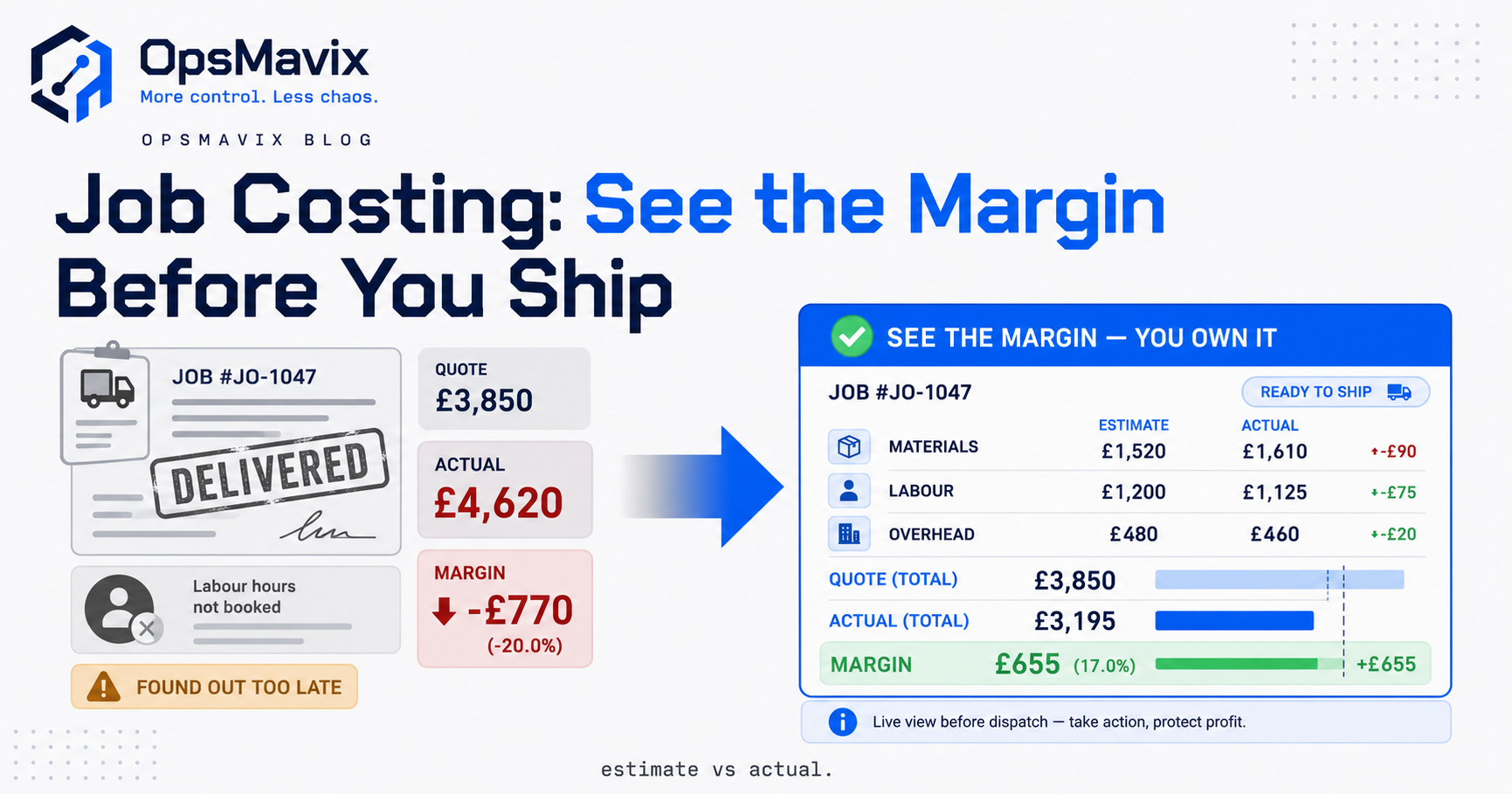
Most growing businesses only find out what a job cost weeks after it shipped, when the invoices land and someone reconciles them against the quote. By then the money’s gone. The job that quietly ate 40 extra labour hours, the material that got ordered twice, the “quick change” the customer asked for that nobody priced — you see all of it in the rear-view mirror, on a job you’ve already delivered and can’t reprice. Costing after the fact tells you which jobs lost money. It never tells you in time to stop one.
Key Takeaways
- Job costing captures labour, materials and overhead against one specific job in real time — a running total, not a month-end average.
- The whole point is estimate vs actual while the job is still live — so you see it creeping over budget before it’s delivered.
- Work-in-progress (WIP) visibility means you can see, right now, how much cost is tied up in jobs that aren’t finished or invoiced yet.
- Catching a job going over before delivery is what separates job costing from profitability reporting — one prevents the loss, the other reports it.
- Every actual you capture is a feedback loop: real costs make your next quote sharper instead of a hopeful guess.
- Overall margin after the fact is project profitability — a different job. This post is about seeing cost as it lands.
1. What Job Costing Actually Tracks
A job cost is built from three streams landing against one job number: labour (who worked on it and for how long), materials (what got consumed, at what price), and a fair share of overhead (the cost of simply running the place — rent, machines, admin — spread across the work). Job costing software is the plumbing that catches each of those the moment it happens and posts it to the right job, so the total is always current.
The distinction that matters: this isn’t accounting after the fact. Your accounts tell you the business made or lost money last month. Job costing tells you this job, right now, is at £6,200 of a £7,500 quote with a week of work still to go. Same underlying costs, completely different use — one is a report, the other is a live warning light.
Get the three streams flowing against real job numbers and you’ve turned costing from a monthly autopsy into something you can act on mid-job. That’s the entire shift.
2. Estimate vs Actual, While the Job Is Still Live
Here’s the feature that earns the whole system: a running comparison of what you quoted against what the job has actually cost so far. The estimate is fixed the day you win the work. The actual climbs as labour gets logged and materials get pulled. When the gap starts closing faster than the work’s getting done, that’s your signal — before delivery, not after.
A fabrication-shop owner described the problem in one line: “We’d know a job went bad the day we invoiced it. Never the day it started going bad.” That’s the difference between costing-after and costing-as-you-go. After tells you the £900 you lost. As-you-go flags the job at 70% of budget with 40% of the work left, while you can still slow the bleeding — pull a hand off, requote the change, or at least stop the next three jobs making the same mistake.
The estimate isn’t there to punish anyone. It’s the reference line that makes “actual” mean something. A £4,000 spend is fine on a £10,000 job and a disaster on a £4,500 one — you only know which by holding the actual against the estimate, live.
3. Capturing Labour Against the Job — In Real Time
Labour is where jobs quietly bleed, and it’s the hardest stream to catch honestly, because it lives in people’s heads and on scraps of paper until someone reconstructs a timesheet on Friday. Reconstructed hours are guessed hours. They land against the wrong job, get rounded, or get forgotten — and every one of them is cost that never shows up on the job it belongs to.
Real-time capture means the hours post to the job as they’re worked: a clock-in against a job number, a tap on a tablet at the bench, a shift booked to the job it was actually spent on. One project manager we spoke to put it bluntly — the moment they stopped trusting weekly timesheets and started booking hours to jobs at the point of work, half their “surprise” overruns turned out to be labour that had always been there, just invisible. The overruns didn’t get worse. They got seen.
Materials work the same way: consumption posted against the job as stock is pulled, at real cost, not back-filled from a delivery note three weeks later. The nearer to the moment you capture it, the truer the running total — and the earlier the warning.
4. Work-in-Progress Visibility: Money Tied Up in Unfinished Jobs
Work-in-progress is every job that’s started but not yet finished or invoiced — and it’s where a frightening amount of a growing business’s cash quietly sits. Labour’s been paid, materials bought and consumed, but no invoice has gone out. That’s money spent, not yet earned back, and most businesses can’t put a number on it at any given moment.
Job costing gives you that number live: total cost currently sitting in open jobs, broken down by job. It answers questions you otherwise can’t — which jobs have absorbed serious cost but haven’t been billed, whether a job’s been “nearly done” for three weeks while cost keeps posting to it, how much of this month’s spend is locked in work that won’t turn into cash until next month. A project operations dashboard makes WIP a figure you glance at, not one you reconstruct from the accounts once a quarter.
The contrarian bit: most operators obsess over the finished-job margin and never look at WIP at all. But WIP is where you can still intervene. A finished job’s loss is fixed. An open job carrying too much cost is a decision you can still make.
5. Catching a Job Going Over — Before You Deliver It
This is the line between job costing and everything downstream of it. Profitability reporting tells you a job lost money. Job costing tells you a job is going to lose money — while there’s still a job to save. Same data, opposite timing, and the timing is the entire value.
Picture a £7,500 install quoted at 90 labour hours. At day four the running total shows 68 hours logged with two rooms untouched. Costing-after finds this in next month’s numbers, as a £1,100 loss you record and mutter about. Costing-as-you-go flags it on day four, while you can add a second fitter, flag the scope creep to the client, or price the extra rooms as a variation instead of eating them. Nothing about the loss was inevitable. The information just arrived too late in the old way. The same live-signal logic drives a manufacturing execution system on the shop floor — catch the problem at the station, not in the month-end report.
The threshold does the watching for you. Set the point where a job crossing its budget-to-date raises a flag, and you stop relying on someone happening to notice. The job that’s about to go over surfaces itself, on the day it starts going, to the person who can still act.
6. The Feedback Loop: Better Actuals, Sharper Next Quote
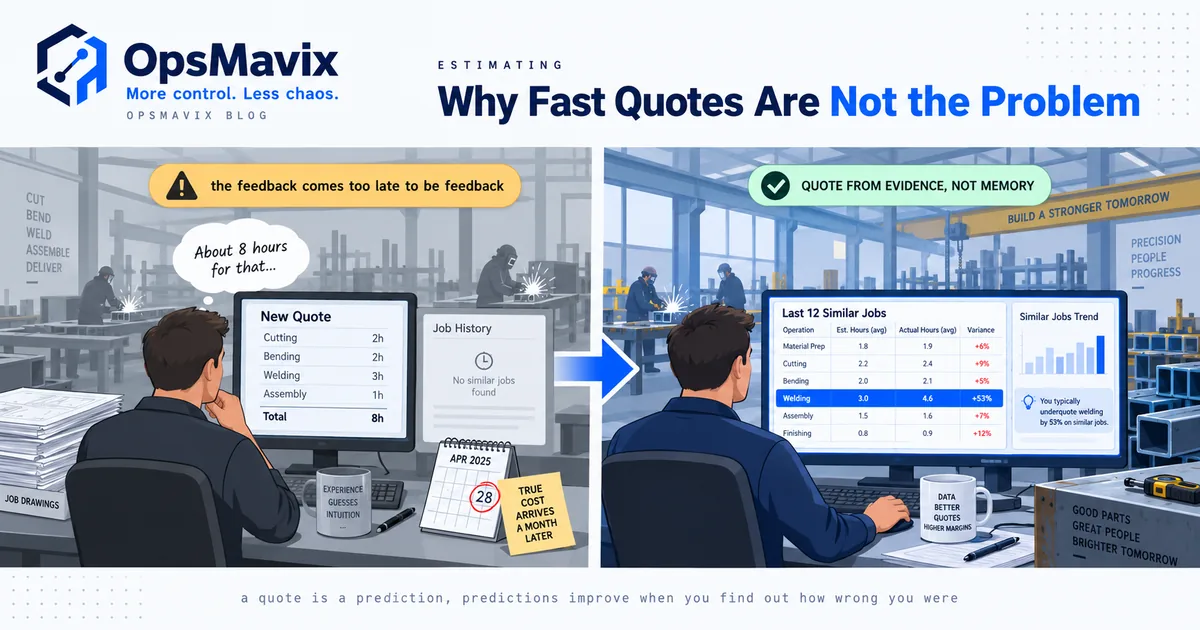
Every job you cost properly isn’t just a job you controlled — it’s data for the next quote. Most quoting is hope dressed as a number: “that’s about a two-day job, call it £X.” When real actuals flow back, the estimate stops being a guess. You quoted 90 hours, it took 112 — so the next one like it gets quoted at 110, and you either win the work at a price that actually pays or walk away from a job that was always going to lose.
A fabrication shop that captures true cost per job starts to see patterns the guesswork hid: this customer’s jobs always run 20% over because their drawings change mid-build; that job type always eats more finishing time than anyone estimates; this material’s real landed cost is higher than the quote assumes. Each of those is a correction you feed straight into the next estimate. The costing system quietly becomes an estimating system.
This is the loop off-the-shelf tools rarely close. They’ll store your quote and your actual in separate places and never introduce them. The value is in the join — actuals sitting next to estimates, on the same job type, so the pattern is impossible to miss.
7. Build vs Buy: Job Costing Shaped to How You Work
Generic job costing tends to fight how you actually operate. It assumes your labour comes off a timesheet system you don’t run, forces your jobs into cost categories that don’t match your trade, or buries the live estimate-vs-actual view under modules built for a different kind of business. The result is people stop entering data, and a costing system with no data is just an expensive form.
A right-sized system captures cost the way your work actually flows — booked at the bench, pulled from the stock you already track, allocated by the overhead logic that fits your setup — and puts the one view that matters, this job vs its estimate, right now, front and centre. It reads the data you already have instead of demanding a parallel universe of admin. For the businesses in the gap — outgrowing spreadsheets and disconnected tools — that’s the difference between a system people use and one they route around. And because it’s yours, the live cost feed can flow straight into a project operations dashboard alongside WIP, capacity and everything else you run the day on.
FAQ
What is job costing software?
Job costing software tracks the true cost of a single job — its labour, materials and share of overhead — as the work happens, keeping a running total against that specific job number. Unlike month-end accounting, which tells you whether the business made money overall, job costing tells you what this job is costing right now, against what you quoted, while the job is still live enough to act on.
How is job costing different from project profitability reporting?
Timing. Job costing tracks cost as it lands, so you can catch a job going over before you deliver it. Profitability reporting looks back at finished jobs to tell you the margin you actually made. Both use the same underlying costs, but one is a live warning light and the other is a verdict. If you want the after-the-fact margin view, that’s project profitability; this post is about seeing cost while the job’s still open.
What is work-in-progress (WIP) in job costing?
WIP is the total cost tied up in jobs that have started but aren’t yet finished or invoiced — labour paid and materials consumed, with no invoice out the door yet. It’s money spent but not yet earned back. Job costing gives you that figure live, broken down by job, so you can spot jobs that have absorbed serious cost without being billed, and see how much of your spend is locked in work that hasn’t turned into cash.
How does job costing make my next quote more accurate?
By feeding real actuals back into your estimating. When you know a job type quoted at 90 hours actually took 112, you quote the next one at a number that reflects reality instead of hope. Over time the patterns surface — which customers cause overruns, which job types eat more time than anyone estimates, which materials cost more than the quote assumes — and each becomes a correction you build into the next estimate.
Can job costing catch a job going over before it’s finished?
Yes — that’s the main reason to run it. Because cost posts to the job in real time and sits against the original estimate, you can set a threshold that flags a job crossing its budget-to-date while there’s still work left to do. Instead of finding the overrun in next month’s numbers, you see it on the day it starts, in time to add resource, flag scope creep, or price a change as a variation rather than absorb it.
How OpsMavix Can Help
OpsMavix builds custom job costing into the systems businesses use to run the day — capture shaped to how your work actually flows, not a generic form people route around. Labour booked at the point of work, materials pulled from the stock you already track, overhead allocated by logic that fits your setup, and the one view that matters — this job against its estimate, live — front and centre. It reads the data you already have, flags a job crossing budget before delivery, and shows your work-in-progress as a number you glance at, not one you reconstruct from the accounts.
If you only find out which jobs lost money once the invoices land, you’re catching your losers a month too late to save them — and the cost of that blind spot compounds every quote you base on a guess. Book a Free Operations Leak Audit.
Keep reading
Getting value from OpsMavix? Add us as a preferred source on Google — you'll see more of our operations content in your AI Overviews, AI Mode and Search.