
Capacity Planning: Can You Actually Take This Order On Time?
Capacity planning is how you check whether you actually have the machine hours and labour hours to deliver the work you've said yes to. Most late deliveries aren't a scheduling problem — they're a capacity problem nobody measured. This post covers load versus available capacity, finite versus infinite planning, finding the bottleneck, rough-cut capacity planning, and using all of it to decide whether you can accept an order and quote a delivery date you'll actually hit.
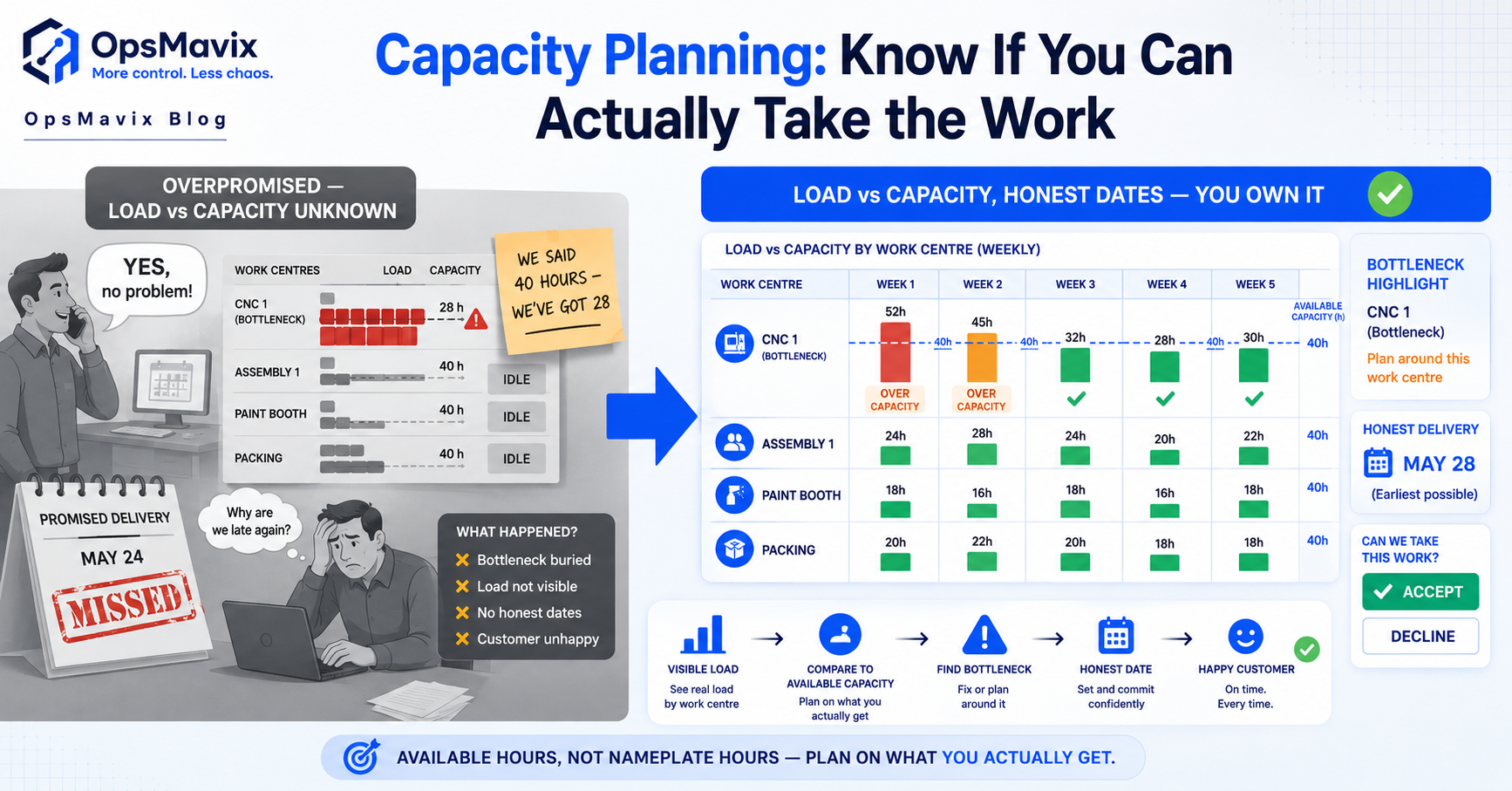
Capacity planning compares the work required with the usable resources available over a defined period. For a manufacturer, the practical buying question is whether an order can pass through the required work centres in time, alongside existing commitments and realistic material availability.
A full order book does not answer that question. Neither does adding up everyone’s paid hours. Setup, maintenance, skills, routing and bottlenecks can leave plenty of apparent capacity while one essential operation has no available slot. This guide explains a proportionate way to check capacity before promising a delivery date. All figures and order scenarios are hypothetical.

Capacity depends on the resources and operations that the actual work requires. Illustrative photograph, not an OpsMavix client.
Image credit: Nenad Stojković / Shixart1985, CC BY 2.0. Displayed at a reduced size; no additional edits.
Key Takeaways
- Compare load and usable capacity by resource and time period, not only at factory level.
- Separate labour effort, machine occupancy and elapsed lead time.
- Include setup, downtime, calendars and skill constraints in the assumptions.
- A bottleneck can determine output even while other resources remain underused.
- Check materials and routing sequence before making a customer promise.
- Start with a controlled planning process and improve software where the real gap warrants it.
In this guide:
- 1. Define the Capacity Question Before Calculating Hours
- 2. Calculate Usable Capacity From Real Calendars
- 3. Build the Load From Routing and Quantity
- 4. Distinguish Rough-Cut, Infinite and Finite Planning
- 5. Find the Bottleneck Before Adding More Work
- 6. Turn the Capacity Check Into a Delivery Decision
- 7. Keep the Plan Current With Actual Progress
- 8. Choose Software Around the Real Planning Gap
- Frequently Asked Questions
- How OpsMavix Can Help
1. Define the Capacity Question Before Calculating Hours
State the period and resource
Ask whether a specified order can be completed through its required operations by a target date. Identify the resources involved and the planning window. A monthly factory total may hide a two-day overload at one machine next week.
| Planning question | Useful scope |
|---|---|
| Can we accept this order? | Required work centres and dates alongside committed jobs. |
| Do we need another shift? | Sustainable resource demand over the relevant horizon. |
| Which work should move first? | Current bottleneck, dependencies and delivery commitments. |
| Is a capital purchase justified? | Evidence of persistent constraint and realistic alternatives. |
Distinguish effort from elapsed time
Four people working for two hours create eight labour-hours, but the elapsed duration is two hours if the work can genuinely run in parallel. A machine may remain occupied after an operator leaves it. Record the basis of each estimate rather than converting every activity into one interchangeable hour figure.
2. Calculate Usable Capacity From Real Calendars
Start with scheduled time
Use work-centre and staff calendars, with shifts, leave, maintenance and other known unavailability. Capacity should represent the resource that can actually perform the work, not nominal headcount or a machine’s theoretical maximum.
Suppose a hypothetical machine is scheduled for five eight-hour days: 40 hours. Planned maintenance removes four hours and scheduled unavailable time removes two more. That leaves 34 usable machine-hours before any further allowances in the planning policy.
| Calendar element | Hours |
|---|---|
| Scheduled week | 40 |
| Planned maintenance | -4 |
| Other known unavailable time | -2 |
| Usable scheduled capacity | 34 |
Avoid double-counting allowances
If breaks, setup or maintenance are already included in the calendar or job load, do not subtract them again through a general efficiency percentage. Where an allowance is necessary, explain its basis and review it against actual performance.
Skills and machine eligibility also matter. Two nominally available operators do not create two welding resources if only one is qualified and authorised for the required work. Define alternative resources and constraints rather than assuming every person or machine is interchangeable.
3. Build the Load From Routing and Quantity
Separate setup and run time
A useful estimate identifies each operation, its resource, setup time, run time per unit or batch, and relevant transfer or waiting assumptions. Low-volume work can be dominated by setup, while a repeated run may be dominated by cycle time.
For a hypothetical order of 100 pieces with two hours of setup and six minutes of machine time per piece, the load is 2 + (100 × 6 ÷ 60) = 12 machine-hours.
| Load element | Calculation | Hours |
|---|---|---|
| Setup | Fixed allowance | 2 |
| Run | 100 × 6 minutes ÷ 60 | 10 |
| Total machine load | 2 + 10 | 12 |
Add the work already committed
An order cannot use capacity twice. Include released work, relevant planned commitments and the agreed treatment of quoted demand. Keep uncertain enquiries separate from firm orders so planners can model alternatives without silently promising the same slot to several customers.
Rework, inspection, subcontract steps and packaging may also consume constrained resources. Check whether the route and estimates include them. Material availability and queue time belong in the delivery-date assessment even when they do not add direct machine load.
4. Distinguish Rough-Cut, Infinite and Finite Planning
Use each method for its purpose
| Method | Main use | Limitation |
|---|---|---|
| Rough-cut review | Check major constraints early using aggregate estimates. | Can miss detailed sequencing and dependencies. |
| Infinite-capacity loading | Show demand on resources without forcing all work into available slots. | Does not prove the work can finish on the displayed dates. |
| Finite-capacity scheduling | Place work within modelled resource limits. | Depends on accurate calendars, routes and configuration. |
Finite does not mean infallible. A schedule can be feasible within its model and still fail when material arrives late, a machine breaks or an estimate is wrong. Conversely, an infinite-capacity view can be useful because it exposes the overload that needs a decision.
Verify the application’s actual behaviour
Ask which resources are constrained, which calendars are used and how alternative machines, overlaps and priorities are handled. A product supporting finite capacity may require configuration for the specific planning function you use.
Microsoft’s manufacturing-process guidance describes work and machine centres, routings and capacity context in an existing ERP. Use such documentation to investigate available tools, then prove the relevant scheduling behaviour in a representative test.
5. Find the Bottleneck Before Adding More Work
Compare each required resource
Suppose the following hypothetical weekly plan already includes a proposed order.
| Resource | Usable hours | Required hours | Position |
|---|---|---|---|
| Cutting | 34 | 30 | Four hours spare. |
| Bending | 32 | 28 | Four hours spare. |
| Welding | 30 | 36 | Six hours overloaded. |
| Packing | 24 | 18 | Six hours spare. |
The factory has 120 usable hours and 112 required hours in total, yet the welding step is overloaded. Spare packing hours cannot automatically become welding hours. That is why an aggregate total can give the wrong answer.
Resolve the constraint deliberately
Options may include moving existing work with customer agreement, using an authorised alternative resource, splitting a batch, subcontracting a suitable operation or agreeing a later date. Overtime requires staff availability, applicable working arrangements and a realistic cost, rather than a planner simply extending a bar on the schedule.
Do not keep non-bottleneck machines busy by producing work that only enlarges the queue. Consider the complete flow and the orders customers actually need.

Material readiness and staging can affect flow even when machine capacity is available. Illustrative photograph, not an OpsMavix client.
Image credit: FIONASUN, CC0 1.0. Displayed at a reduced size; no additional edits.
6. Turn the Capacity Check Into a Delivery Decision
Follow the route and the dependencies
A customer date depends on material readiness, resource slots, operation sequence, inspection, subcontract work and despatch. Adding operation hours and dividing by shift length does not necessarily produce the elapsed lead time.
In a hypothetical route, cutting needs four hours, bending three and welding eight. If the work must complete each operation before the next begins, the minimum direct processing time is 15 hours. A two-day wait for welding adds elapsed time without adding another 16 labour-hours to the job.
State the conditions behind the promise
| Condition | Evidence to confirm |
|---|---|
| Material ready | Eligible stock or confirmed supply at the required point. |
| Capacity available | Identified slots or an accepted planning assumption. |
| Predecessors complete | Route sequence and transfer requirements. |
| Outside work ready | Subcontract or supplier commitment where required. |
| Release approved | Correct drawing, BOM and instructions. |
| Despatch feasible | Packing, inspection and carrier constraints. |
Give sales a clear answer with the relevant assumptions. If material confirmation or a resource decision remains open, describe the date as conditional rather than presenting it as a firm promise.
7. Keep the Plan Current With Actual Progress
Update remaining work, not just completion colours
Capture operation progress, actual time and remaining quantity using a method the floor can sustain. A job marked started can still have most of its load ahead of it. Review the remaining estimate where actual work differs significantly from the original assumption.
Separate blocked work from available work and make the reason visible: material, drawing approval, quality hold, equipment or customer decision. A planner needs to know whether moving the job is feasible, not just that it is late.
Maintain a usable review rhythm
Use a short operational review for immediate exceptions and a broader forward review for emerging overloads. Assign decision owners and record changes to customer commitments. The appropriate frequency depends on lead times and volatility; there is no universal meeting schedule.
Estimate-versus-actual data can improve future routings and quotes. Check comparable jobs and quantities rather than treating one unusual run as a permanent new standard.
8. Choose Software Around the Real Planning Gap
A spreadsheet can be a useful starting point
A simple controlled load sheet can work for limited resources and stable routes. It becomes harder to maintain when dependencies, overlapping operations, shared skills, revisions and frequent updates need coordination.
Assess existing ERP and production modules before replacement. Configuration may resolve calendars or constraints; an integration may connect reliable shop-floor progress to the planner; a focused custom dashboard may make exceptions usable without duplicating the planning engine.
Pilot acceptance tests
- Reproduce a manually checked load calculation.
- Show the calendar and assumptions behind usable capacity.
- Expose one overloaded resource despite spare aggregate hours.
- Model a material delay and a blocked operation.
- Keep uncertain enquiries separate from committed work.
- Apply an authorised change and identify affected dates.
- Update remaining work from actual progress.
- Recover from missing or duplicate integration messages.
A full ERP can be appropriate when production, purchasing, inventory and finance need a shared design. It is a wider scope decision, not an automatic consequence of discovering one overloaded machine.
Frequently Asked Questions
What is capacity planning?
It compares required work with usable resources over a defined period. In manufacturing, it helps assess whether operations can be completed alongside other commitments.
Is capacity the same as paid staff hours?
No. Skills, calendars, downtime, machine availability and the work required determine usable capacity. Paid hours can overstate what a particular resource can perform.
What is the difference between labour-hours and elapsed time?
Labour-hours measure effort across people. Elapsed time measures duration. Parallel work, waiting and unattended machine operation can make the two quite different.
Should setup time be included?
Yes where it consumes the relevant resource. Record whether setup is per job, batch or changeover and avoid subtracting the same allowance again elsewhere.
What is finite capacity planning?
It schedules against modelled resource limits. Its reliability depends on correct calendars, routes, constraints and current work data, rather than the feature name alone.
Why can we be overloaded with spare hours overall?
Spare time on one resource does not necessarily substitute for a constrained operation. Review each required work centre and skill, especially the bottleneck.
Does a capacity check guarantee delivery?
No. Material supply, estimates, breakdowns, approvals and outside work also affect delivery. Record the assumptions and monitor exceptions after the promise is made.
Can we plan capacity in a spreadsheet?
Yes for a limited, controlled process. Review the approach when dependencies and frequent changes make it difficult to keep one reliable plan and preserve decisions.
When should we consider a custom system or ERP?
After assessing existing configuration and integration options. A focused custom workflow can address a specific gap; a full ERP suits broader shared process requirements.
How OpsMavix Can Help
OpsMavix can map load, resource calendars and the flow of production progress, configure suitable tools, connect planning and shop-floor applications or build a focused custom system. We can also scope a full ERP where wider production, stock, purchasing and finance needs justify it.
Explore our manufacturing and production tracking systems. Contact OpsMavix with one order, its route and the current schedule so we can identify the constraint and define a testable planning improvement.
Keep reading

Getting value from OpsMavix? Add us as a preferred source on Google — you'll see more of our operations content in your AI Overviews, AI Mode and Search.