
Timesheet Software: Capturing Labour Time Against Every Job
Timesheet software captures the hours your team works against the specific job or task they were spent on — clocked to a job code, split into billable and non-billable, approved, and fed into job costing, payroll and client invoicing. Here's why paper and spreadsheet timesheets quietly lose billable hours, and what accurate capture actually changes.
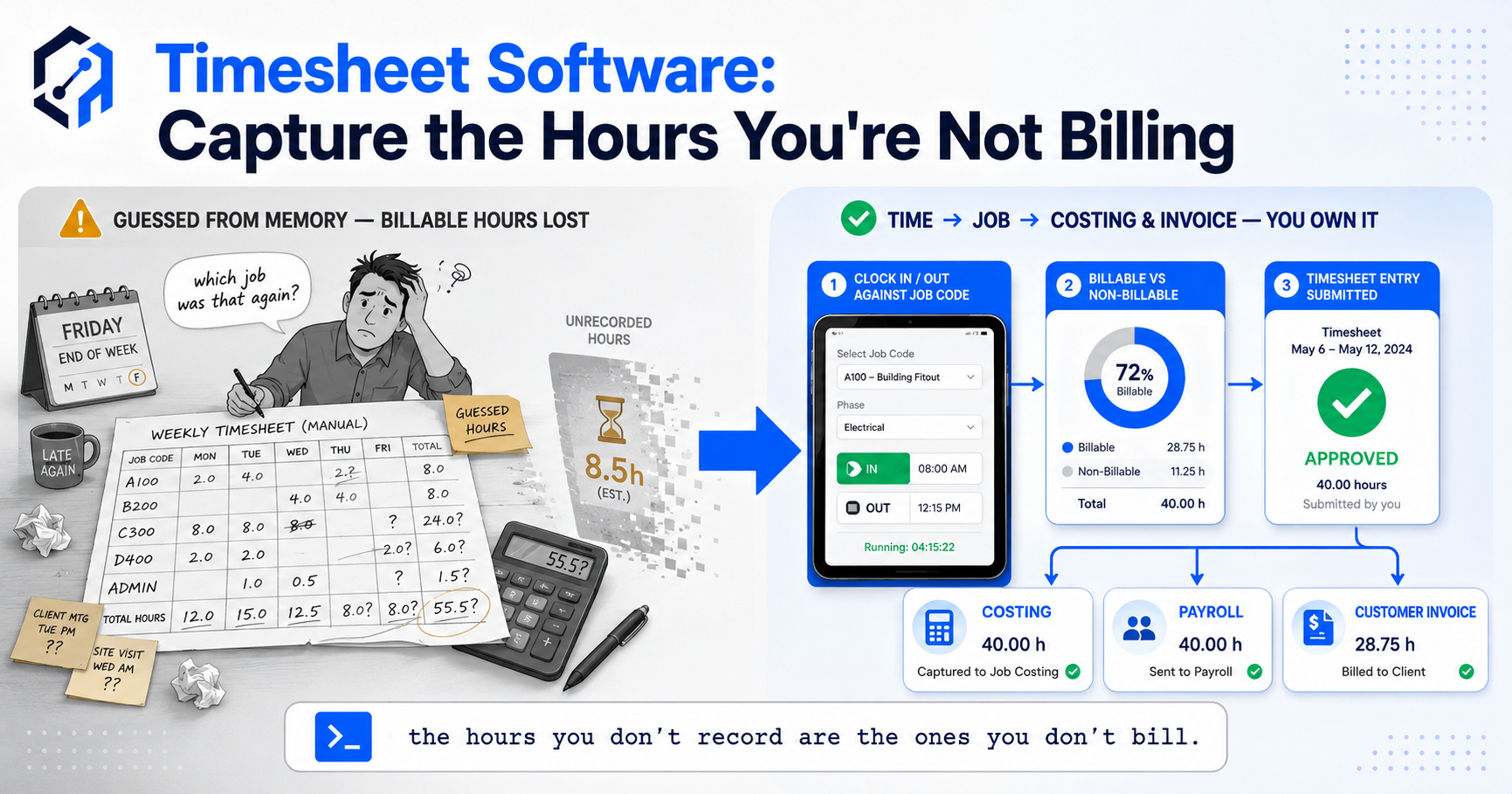
Timesheet software captures the hours your people work and records them against the specific job or task each hour was actually spent on — clocked to a job code, split into billable and non-billable, then approved and passed on to costing, payroll and invoicing. Not a weekly total someone types in from memory. Each block of time, tagged to the work it belongs to, at roughly the moment it happens.
The gap between those two things is where money goes missing. A weekly total filled in on Friday is a reconstruction — a best guess at where forty hours went, written by someone who’s already forgotten Tuesday. It’ll balance to forty because that’s what the payroll expects, but the split underneath it is invented. And every hour that lands on the wrong job, or gets rounded away, or quietly falls off the billable column because nobody remembered it, is either cost you can’t see or revenue you’ll never invoice.
Key Takeaways
- Timesheet software records labour time against the specific job or task it was spent on — not a lump weekly total, but hours tagged to job codes as they happen.
- The core split is billable vs non-billable: which hours you can invoice a client for and which you absorb — and paper timesheets lose billable hours constantly.
- Approval turns raw logged time into trusted data — a manager signs the week off before it flows anywhere near payroll or an invoice.
- Captured time is feedstock: the same hours flow into job costing, into payroll, and onto client invoices — enter once, use three ways.
- Timesheets filled in late from memory are guessed, and guessed hours quietly lose billable time that never gets recovered.
- Working out cost and margin per job from those hours is job costing’s job — this post is about capturing the time cleanly enough to feed it.
1. What Timesheet Software Actually Captures
A timesheet entry, done properly, is more than a number of hours. It’s a block of time tagged with three things: who worked it, how long, and — the part that matters — which job or task it went to. That last tag is what separates a timesheet system from a clock. A clock tells you someone was at work for eight hours. A timesheet tells you those eight hours were four on the Henderson install, three on the warehouse fit-out, and one on a quote that never landed.
That job tag is the whole game. Without it you have attendance, which payroll needs and nobody else can use. With it you have labour allocated to work — the raw material for knowing what a job cost, what to invoice, and where the week actually went. The software’s job is to make that tag cheap to add, so it gets added honestly, at the point of work, instead of reconstructed on Friday.
Get hours booked to real job codes as they’re worked and you’ve turned time from an attendance figure into an operational one. Everything downstream — costing, invoicing, capacity — runs on that single clean input.
2. Billable vs Non-Billable: The Split That Pays the Bills
For anyone who sells time — agencies, consultancies, trades, professional services — the most important thing on a timesheet isn’t the total. It’s the line between hours you can invoice and hours you absorb. Billable time is revenue. Non-billable is overhead you carry: internal admin, rework you can’t charge for, the quote that didn’t convert, the “quick favour” for a client that quietly ate half a day.
The trouble is that on paper, that line blurs the moment memory gets involved. An agency owner described the pattern: their team was “busy every single day,” yet billable utilisation looked thin, and nobody could say where the missing hours went. When they started tagging time as it happened, the answer was obvious — hours that were genuinely billable were being logged as vague “general” time because reconstructing the split on Friday was too much effort, so people rounded to the nearest lump. The work was billable. The record wasn’t.
That’s the quiet leak. A billable hour recorded as non-billable — or not recorded at all — is revenue you earned and will never invoice. It doesn’t show up as a loss. It shows up as a team that’s flat out while the numbers say you’re only two-thirds busy.
3. Why Paper and Spreadsheet Timesheets Leak
Paper and spreadsheet timesheets share one fatal flaw: they’re filled in at the end, not as the work happens. Nobody logs time at the moment they switch tasks — they scribble the whole week in on Friday afternoon, or worse, on Monday for the week before. By then Tuesday is a fog. The hours get reconstructed to add up to the expected total, distributed across jobs by rough feel, and signed off because the deadline’s now.
Reconstructed time isn’t dishonest — it’s just wrong. People genuinely don’t remember whether the Tuesday call was forty minutes or ninety, so they guess, and the guess favours round numbers and the jobs top of mind. Small jobs get swallowed into big ones. A twenty-minute task that interrupted a bigger one vanishes because it never made it onto paper. And the billable/non-billable split, the part that decides what you invoice, is exactly the detail memory loses first.
There’s a second leak on top of the memory one: spreadsheets don’t connect to anything. The hours sit in a file, someone re-keys them into payroll, someone else eyeballs them to build an invoice, and each hop is a place for a number to drift or a job to get mislabelled. The time was captured badly and then copied by hand three times. A job shop running twelve open jobs at once can’t reconstruct that on Friday and expect it to survive contact with reality.
4. Approval: Turning Logged Hours Into Trusted Data
Raw logged time isn’t finished data — it’s a draft. Before those hours flow into payroll or onto a client invoice, someone who knows the work needs to sign them off. That’s the approval step, and it’s what most people skip when they think about timesheets, because on paper approval means a manager squinting at a form they can’t verify anyway.
Done properly, approval is a real gate. A manager sees the week laid out by person and by job, catches the obvious wrong ones — eleven hours booked to a job that was finished Tuesday, a whole day with no job code, billable time that should clearly be non-billable — and either fixes them or sends them back before anything downstream trusts the numbers. It’s the difference between “the system says forty hours” and “forty hours a manager has actually confirmed.” One is data you can invoice from. The other is a rumour.
Approval also protects the person logging the time. A clear record they submitted, a clear sign-off from a manager, and a payroll figure nobody has to argue about at month-end. The gate isn’t bureaucracy — it’s what makes every number after it trustworthy enough to send to a client or a bank.
5. Where the Time Goes Next: Costing, Payroll and Invoicing
The reason to capture time cleanly is that the same hours feed three different things, and each one gets its number from the same entry. Enter once, use three ways. The hours go to payroll so people get paid for what they worked. They flow into job costing as the labour cost against each job. And the billable ones become lines on a client invoice. One clean capture, three destinations — no re-keying, no drift between what payroll paid and what the job was charged.
That single-source flow is where accurate capture earns its keep. When labour time posts straight to the job, job costing can hold that cost against the estimate live — but only if the hours arrived tagged and true. When billable hours flow straight to invoicing, you bill for everything you actually did, not everything someone remembered on Friday. And when payroll draws from the same approved record, the hours you paid for and the hours you costed a job are the same hours, which — astonishingly — is often not the case when three separate spreadsheets are involved.
The margin question — did this job make money once you weigh those hours against what you charged — is downstream of all this. That’s job costing and project profitability, and both are only as good as the time feeding them. Capture is the foundation. Get it wrong and every calculation built on top inherits the error.
6. The Job-Shop Scenario: Twelve Jobs, One Fitter, One Week
Picture a small fit-out firm. Four fitters, a dozen live jobs, work that jumps between sites through the day. On paper, each fitter fills a weekly sheet: a name, a total, a rough breakdown by site. It balances to forty every time. It’s also fiction — because a fitter who touched five jobs in a day can’t tell you on Friday whether Wednesday’s Henderson visit was three hours or five, so the sheet says “about four” and moves on.
Now run the same week through timesheet software built for how they work. The fitter taps a job code when they start, taps out when they leave, on a phone in the van. Wednesday’s Henderson visit is logged at 4 hours 20, because that’s when it started and stopped. A twenty-minute snag at a different site that would’ve evaporated on paper gets its own line — billable, because the client asked for it. At week’s end the supervisor approves four clean sheets in ten minutes, and the hours flow to payroll, to each job’s cost, and onto the invoices.
The before-and-after isn’t subtle. In the old week, that firm invoiced what the fitters could remember — call it thirty billable hours a head that survived the Friday reconstruction. In the new one, they invoice the hours that actually happened, snags and all, and it’s closer to thirty-four. Four billable hours a fitter, a week, that used to vanish into round numbers. Across four fitters that’s not a rounding error — it’s a fitter’s worth of billable time recovered from nothing but capturing it at the point of work.
7. Build vs Buy: Timesheets Shaped to How You Actually Work
Off-the-shelf timesheet tools tend to assume a shape of work you might not have. They’re built for salaried staff at desks, or they force your jobs into their idea of a “project,” or they capture time but refuse to talk to the costing and invoicing systems where those hours need to land. So people fill them in grudgingly, badly, at the end of the week — and you’re back to reconstructed fiction with a nicer interface.
The capture method has to fit the work, or it doesn’t get used. A fitter in a van needs a tap on a phone, not a desktop form. A workshop needs a clock-in against a job code at the bench. A consultancy needs time tagged to client and matter without breaking flow. Whatever the shape, the same rule holds — the easier it is to log an hour to the right job at the moment it’s worked, the truer the record, and a timesheet system people route around is worth nothing no matter how many features it has.
That’s the case for building it into how you actually run. Capture that fits your work, an approval step that matches who signs off what, and — the part generic tools rarely deliver — hours that flow straight into costing, payroll and invoicing without anyone re-keying them. For a business in the gap between spreadsheets and a full ERP, a project operations dashboard that carries live labour hours alongside job cost, capacity and billable utilisation turns time from a Friday chore into something you actually run the week on.
FAQ
What is timesheet software?
Timesheet software captures the hours your team works and records them against the specific job or task each hour was spent on. Rather than a lump weekly total typed in from memory, it logs time as it happens — clocked to a job code, split into billable and non-billable, and approved by a manager — then feeds those hours into job costing, payroll and client invoicing from a single clean record.
What’s the difference between timesheet software and job costing software?
Timesheet software captures labour time — it gets the hours logged against the right job, split billable vs non-billable, and approved. Job costing uses those hours: it weighs the labour cost against materials and overhead to tell you what a job is costing versus what you quoted. Capture is the input; costing is the calculation built on it. You need clean capture first, or the costing inherits every guessed hour.
How do timesheets handle billable vs non-billable hours?
Each block of logged time is tagged as billable (hours you can invoice a client for) or non-billable (internal admin, uncharged rework, quoting, favours you absorb). The billable hours flow onto client invoices; the split also shows your utilisation — how much of your paid-for time actually turns into revenue. Paper timesheets lose this constantly, because the billable/non-billable detail is exactly what memory drops when the sheet is reconstructed on Friday.
Why do paper and spreadsheet timesheets lose billable hours?
Because they’re filled in at the end, not as the work happens. Time reconstructed on Friday from memory gets rounded to the nearest lump, small jobs get swallowed into big ones, and short billable tasks vanish because they never made it onto paper. Spreadsheets add a second leak — they don’t connect to payroll or invoicing, so the hours get re-keyed by hand and drift at every hop. The result is billable time you did the work for but never invoice.
Why does timesheet approval matter?
Approval turns raw logged hours into data you can trust. Before time flows to payroll or a client invoice, a manager reviews the week by person and job, catches the obvious errors — hours booked to a finished job, missing job codes, billable time miscoded — and fixes or returns them. It’s the gate between “the system says forty hours” and “forty hours a manager has confirmed,” and it’s what lets you invoice from the numbers without arguing at month-end.
How OpsMavix Can Help
OpsMavix builds timesheet capture into the systems businesses actually run on — logging shaped to how your people work, whether that’s a tap on a phone in a van, a clock-in at the bench, or time tagged to client and matter at a desk. Hours land against real job codes as they happen, split billable and non-billable, run through an approval step that matches who signs off what, and flow straight into job costing, payroll and invoicing from one clean record — no re-keying, no three spreadsheets that disagree.
If your team is flat out every day while billable utilisation looks thin, you’re doing work you never invoice — and every Friday the reconstruction loses a few more hours you’ll never get back. Book a Free Operations Leak Audit.
Keep reading


Getting value from OpsMavix? Add us as a preferred source on Google — you'll see more of our operations content in your AI Overviews, AI Mode and Search.