
Field Service Software for Small Business: How to Right-Size It
Field service software for small business runs the whole job from the phone ringing to the invoice landing, scheduling, dispatch, the engineer's app, van stock and costing in one place. This guide covers what it actually does, why so many trades get sold a bloated platform, and the right-sized owned option for firms outgrowing spreadsheets and disconnected tools.
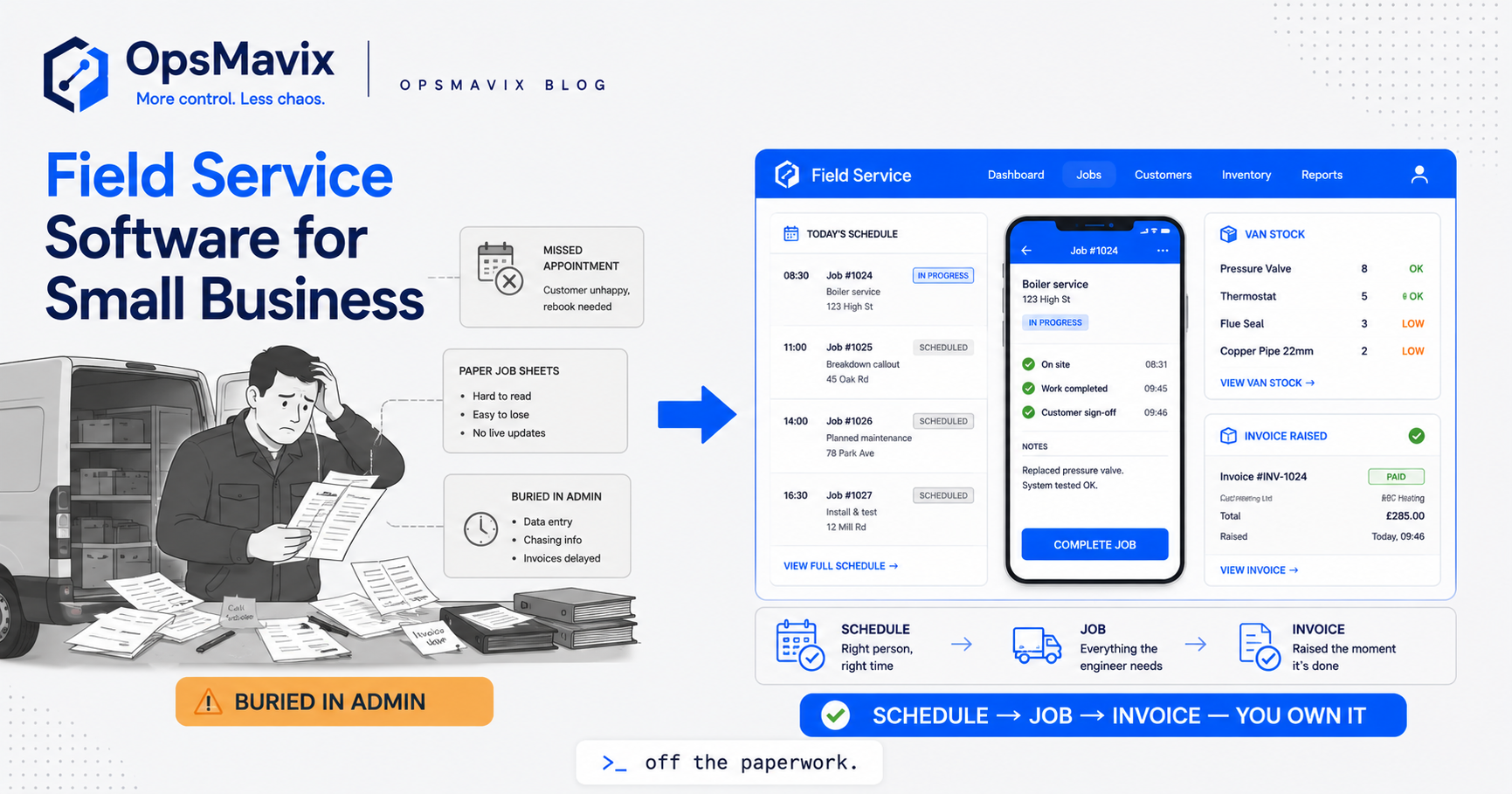
Field service software for small business is the system that runs a job from the moment the phone rings to the moment the invoice clears, when the work happens away from your office. It schedules the visit, tells the engineer where to go and what to bring, records what was done and what parts went on, and turns that into a bill. For a plumbing firm, an electrical contractor, an installer or any team of engineers on the road, it is the difference between a day that runs itself and a day spent chasing everyone by phone.
Most small field-service firms do not decide to buy it. They grow into the pain. One van becomes four, the wall planner becomes a group chat, the job sheet becomes a photo of a job sheet, and the person who knows where everyone is becomes the bottleneck for the whole business. Quotes get promised and forgotten, engineers turn up without the right part, and the invoice goes out three weeks late because nobody wrote down what was actually done. At that point the question is no longer “should we get software” but “what do we all run the day from”, and that is exactly where a lot of trades get sold far more system than the job needs.
Quick summary: UK tradespeople lose an average of seven hours a week to paperwork, up to 48 working days a year, and for HVAC professionals that unbilled admin works out at over £17,000 a year in lost time (Powered Now / Installer Online). Most of that is exactly what field service software is supposed to remove: re-keying jobs into a schedule, chasing what happened on site, and rebuilding an invoice from memory days after the van left.
Contents
- What field service software actually does
- The core functions, and which ones you really use
- The specific blind spot: the gap between the office and the van
- Generic app vs field-service ERP vs right-sized owned system
- Integrations and why ownership matters
- A Worked Example: a five-van heating firm
- FAQ
- How OpsMavix Can Help
- Sources
What field service software actually does
Strip away the marketing and field service software does one thing: it keeps a single live record of each job as it moves from the office to the road and back, and it makes that record the thing everyone acts from.
That record connects four moving parts. The schedule and dispatch, who is going where and when, and what is at risk of slipping when a job overruns. The engineer’s app, the job details, the customer history, the checklist and the photos, in the pocket of the person actually doing the work. The parts and van stock, what each job needs, what is on the van, and what has to be ordered before anyone drives out. And the job record itself, the labour, the parts, the time on site and the sign-off, so the invoice writes itself from what really happened rather than from a guess.
The reason it matters is money leaking in small amounts, all day. A job booked for the wrong slot. An engineer sent without the part, so it becomes two visits instead of one. A day’s labour that never made it onto the bill. A signed-off job that sits for a fortnight because the paperwork is in a van door pocket. None of these is a disaster on its own. Added up across a week of jobs, they are the difference between a firm that is busy and one that is profitable.
Most cheap tools solve the first half brilliantly and ignore the second. They get the van to the door. They do not close the gap between the visit and the invoice, which is where the margin actually goes.
The core functions, and which ones you really use
A full field-service platform will claim a long feature list. It helps to know the list, because the gap between what a platform sells and what you actually switch on is where the budget goes.
- Booking and scheduling. Turning an enquiry or call-out into a slot on the right engineer’s day, without double-booking or dead mileage.
- Dispatch and routing. Assigning jobs across the team and, in bigger operations, optimising the drive between them.
- The engineer’s mobile app. Job details, customer and asset history, checklists, photos and on-site sign-off, so the person on the tools is not phoning the office to ask what the job is.
- Parts and van stock. Knowing what each job needs and what is on each van, so engineers arrive equipped and stock gets reordered before it runs out.
- Job costing. Comparing what a job actually cost, labour, parts, travel, against what it was quoted, so you know which work is worth doing more of.
- Invoicing and payment. Turning the completed job, including the extras done on site, into a bill that goes out the same day, not next month.
- Customer record and history. What you did last time, what is under warranty, what is due for service.
Most small field-service firms live and die by four of these: booking-to-schedule, the engineer’s app, parts on the van, and getting the invoice out fast. The rest is either handled elsewhere or not complex enough to justify a module you rent forever.
The specific blind spot: the gap between the office and the van
Here is the pain that generic tools rarely fix, because it sits in the seam between two systems rather than inside either one.
The office knows what was booked. The engineer knows what actually happened. In most small firms those two facts never fully meet. The job was booked as a service; on site it turned into a repair with three parts and an extra hour. Someone scribbles it on the sheet, or texts it, or means to mention it and forgets. By the time the invoice is raised, the extra parts are a guess and the extra hour is gone. Multiply that across every van, every day, and you are giving work away without ever deciding to.
The knock-on effects are just as quiet. Because nobody logged the parts used, the van runs out of a common fitting mid-week, so the next job needs a second visit. Because the completed job sits unbilled, cash comes in slower than the work went out. Because the real cost of each job is never captured, the owner cannot tell which jobs, which customers or which engineers actually make money, so pricing stays a feeling rather than a fact.
This is the difference between a tool that schedules and a system that runs the business. Scheduling gets the van to the door. Closing the office-to-van gap is what stops the leak. The UK numbers make the scale plain: separate research puts the admin drain across UK small businesses at eight hours a week, 384 hours a year, the equivalent of ten full working weeks (HeyBRB / Electrical Times). For a field-service firm, most of that is the re-keying and reconstruction that a joined-up job record removes.
Generic app vs field-service ERP vs right-sized owned system
Most growing field-service firms sit between a cheap scheduling app that has run out of road and a platform that is too much. Here is the honest three-way comparison.
| Factor | Generic scheduling app | Full field-service ERP | Right-sized owned system |
|---|---|---|---|
| Best for | One or two vans, simple jobs | Large fleets, complex contracts, multi-depot | Firms “outgrowing spreadsheets and disconnected tools” |
| One live job record, office to van | Partial, scheduling only | Yes, if you adopt the whole suite | Yes, built around your actual job flow |
| Fit to how you work | Take it as it comes | You bend your process to the template | High, it is built to fit |
| Job costing (actual vs quoted) | Rarely, or bolt-on | A module, often left unconfigured | Built in, live per job |
| Van stock and parts | Basic or none | Full, and heavy to set up | Scoped to the parts that actually run out |
| Setup effort | Sign up today | Months, plus a consultant | Weeks, focused on the real bottleneck |
| Ongoing cost | Low per-user, per-month | Per-user, per-module, forever | You own it, no per-seat rent |
| Main risk | You outgrow it | Over-scoping, low adoption, lock-in | Scoped too narrow if pain is genuinely broad |
To be fair to the cheap app: if you run one or two vans and standard jobs, a packaged scheduling tool is the right call, and you should buy it rather than build anything. The trap is the firm whose way of working grew for good reasons being sold a generic platform as if that process were the problem. And to be fair to the ERP: if you run a large fleet with complex service contracts across multiple depots, that machinery earns its keep. The middle is where the mismatch lives, the four-to-twenty-van firm paying enterprise prices to use a fifth of an enterprise tool.
Integrations and why ownership matters
No field-service system lives alone. It has to talk to the accounts package for invoicing and VAT, to the payment provider so customers can pay on the spot, and often to a stock or supplier feed for parts. The question is not whether a tool integrates, most do, but who controls the joins.
With a rented platform, the integrations are the vendor’s to give and to take. A connector you rely on can be moved to a higher tier, deprecated, or priced up at renewal, and your data lives in their database on their terms. With a right-sized owned system, the joins are yours. It connects to your accounts and payment tools because you decided it should, your job and customer data is yours to export and build on, and when the business changes, you extend the system instead of waiting for a vendor’s roadmap or paying for the next tier.
Ownership matters most at the two points where field-service money moves. The first is invoicing: a system you own can push a completed job straight to your accounts and out as a bill the same day, rather than through a monthly export you pay extra to unlock. If approvals sit between a job and its bill, an invoice approval workflow keeps that fast without letting anything go out unchecked. The second is the job record itself: the history of every visit, asset and customer is the most valuable thing your firm builds, and owning it means it compounds into something you control rather than a hostage held on someone else’s server.
A Worked Example: a five-van heating firm
Take a heating and plumbing firm turning over about £900k a year, five engineers on the road, running maybe thirty jobs a day between service calls, breakdowns and installs. The figures below are illustrative, not a claim about a specific client.
The pain. Jobs are booked in a shared calendar and phoned out to engineers each morning. What actually happens on site comes back by text or on a paper sheet, when it comes back at all. The office rebuilds each invoice from those scraps, so extras get missed and bills go out one to three weeks late. Vans run dry on common parts because nobody logs what got used, turning single visits into repeat trips. At year end the accountant works out the margin per job for the first time, and two of the firm’s busiest service contracts turn out to have been run at a loss. Using the UK admin figure of seven hours a week per person, the office and engineers between them are losing well over a day a week to paperwork alone.
The over-buy option. A tier-one field-service suite is quoted, built for national fleets with contract SLAs, asset registers and route optimisation the firm will never use, at a per-engineer monthly licence plus a five-figure implementation and a consultant to configure it. Most of the suite would never be switched on, and the team would quietly keep the old calendar running alongside it.
The right-sized option. A system that does four things well: a booking becomes the live job record, the engineer’s phone shows the job and captures parts, time and photos on site, van stock is tracked against the parts that actually run out, and the completed job pushes straight to invoicing the same day. No route-optimisation engine, no contract-SLA module, no per-seat rent. Built in weeks, scoped to the real leaks.
The outcome that matters. Extras stop vanishing because they are logged on site, so invoices are complete and go out same-day, which pulls cash in faster. Vans stay stocked, so second visits drop and the engineers do more billable work in a day. The owner can finally see cost against quote per job, so the loss-making contracts get re-priced instead of quietly bleeding for another year. That is the difference between buying software and fixing the actual problem.
FAQ
What is field service software for small business?
It is the system a field-service firm runs the day from: it books and schedules jobs, sends the details to the engineer’s phone, records what was done and which parts went on, tracks van stock, and turns the finished job into an invoice. The point is a single live record that runs from the office to the van and back, so nothing is lost in the gap between what was booked and what actually happened on site.
What is the difference between a scheduling app and field service software?
A scheduling app gets the right engineer to the right job at the right time, and stops there. Field service software carries the job the whole way, capturing parts, time and sign-off on site, tracking van stock, costing the job against its quote, and pushing it to invoicing. A scheduling app tells you where the van is meant to be. A field service system tells you whether the job made money.
Do small field-service firms need a full ERP?
Rarely. A full ERP earns its place when you run a large fleet, complex service contracts and multiple depots, where the extra machinery genuinely gets used. Most small firms feel real pain in only three or four places, usually the booking-to-schedule handoff, the engineer’s app, van stock, and getting the invoice out fast, and can fix that with a right-sized owned system without buying and bending to an enterprise suite.
Is a right-sized owned system cheaper than a rented field-service platform?
Usually over a three-year horizon, yes, because you pay a one-off build and then own it, rather than per-engineer, per-module licences that run forever. It is not always cheaper up front, and if your complexity is genuinely broad, a platform can be better value. The real saving is scope: you pay to fix the parts of the job that leak, not for fifty features you will never switch on.
How does field service software help with job costing?
It captures the true cost of each job as it happens, the labour hours booked on site, the parts actually used off the van, and the travel, then sets that against what the job was quoted. That turns pricing from a feeling into a fact: you see which jobs, customers and contracts make money and which quietly lose it, in time to re-price rather than at year end when it is too late. The wider pattern is covered in our guide to job management software.
How OpsMavix Can Help
OpsMavix builds right-sized, owned operations systems for growing UK field-service firms that are outgrowing spreadsheets but not looking for a full field-service ERP. We are not a software vendor and we do not sell generic custom code, we sell the outcome: one live job record from booking to invoice, an engineer’s app that captures what really happened on site, van stock that stays stocked, and profit you can see per job, built around your real job flow, owned by you, with no per-seat rent and backed by a delivery guarantee. We start by finding where your jobs leak time and money between the office and the van, then build only what closes that gap. When you are ready to find the leaks in yours, Book a Free Operations Leak Audit.
Sources
- Powered Now / Installer Online, survey finding UK tradespeople lose around seven hours a week to admin, up to 48 days a year, costing HVAC professionals over £17,000 annually: https://www.installeronline.co.uk/news/admin-overload-could-cost-over-17000-a-year-for-hvac-professionals-survey-finds/
- HeyBRB UK Admin Drain Report 2026 / Electrical Times, UK small businesses losing an average of eight hours a week, 384 hours a year, the equivalent of ten full working weeks, to repetitive admin: https://www.electricaltimes.co.uk/uk-tradespeople-losing-ten-working-weeks-a-year-to-admin-they-could-automate-survey-finds/