
Purchase Requisition Approval Workflow: Routing, Thresholds and Audit Trail That Actually Hold
A purchase requisition approval workflow decides who signs off on a spend request, in what order, and leaves a record of why. Get the routing, thresholds and audit trail right and requests stop dying in inboxes or slipping through unapproved.
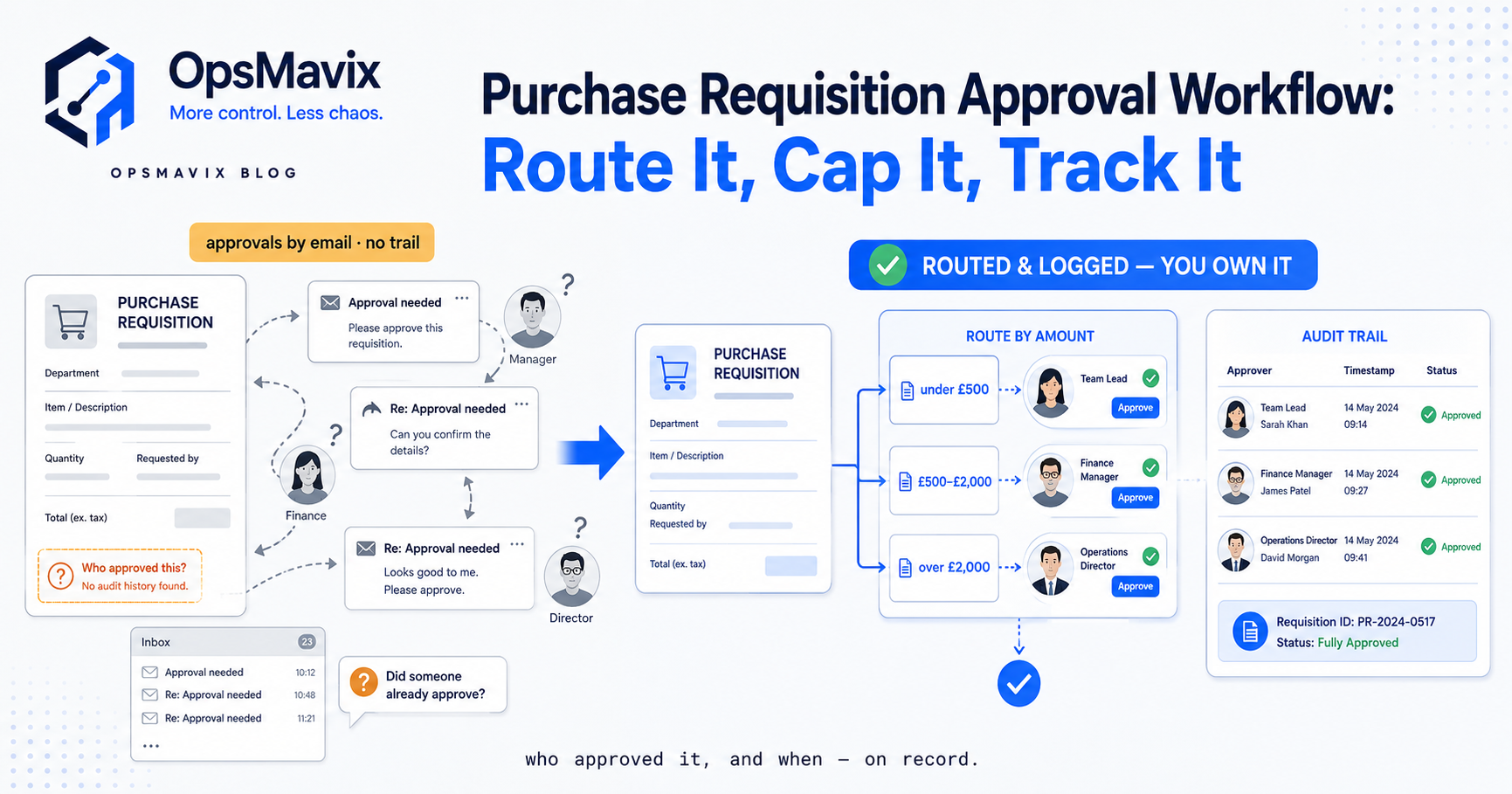
A purchase requisition approval workflow is the set of rules that decides who has to sign off on a spend request before it becomes a purchase order, in what order they see it, and what gets recorded when they say yes or no. Done properly it does two jobs at once: it stops money going out the door without the right eyes on it, and it stops legitimate requests from rotting in someone’s inbox for a week. The approval layer is where most purchasing pain actually lives. Not the form, not the PO. The routing.
That is the distinction worth holding onto. Plenty of teams have a requisition form. Fewer have a workflow that reliably gets each request to the correct person based on what it is and how much it costs, and fewer still can show, months later, exactly who approved a £4,000 order and when. This post is about that middle layer: routing logic, approval thresholds, and the audit trail that makes the whole thing defensible.
Key Takeaways
- Routing beats forms. A tidy requisition form is worthless if the request lands in the wrong inbox or no inbox at all. Design the routing first.
- Thresholds do the heavy lifting. Spend bands (who can approve what value) let low-value requests move fast while high-value ones get the scrutiny they deserve.
- The audit trail is not optional. Every decision needs a who, when, and ideally a why. “I think Dave approved it verbally” is not an audit trail.
- Escalation and cover prevent the bottleneck. If an approver is on leave and there is no deputy or time-out rule, the whole queue stalls.
- Separation of duties matters. The person raising the request should not be the only person approving it, especially above a threshold.
- The build-or-buy call turns on whether it connects to the rest of purchasing — approval in isolation just moves the mess.
What the approval workflow actually decides
Strip it back and an approval workflow answers four questions for every requisition:
- Who needs to approve this? A budget holder, a department head, finance, procurement, or several in sequence.
- In what order? Sequential (each approver only sees it once the previous said yes) or parallel (several approve at once).
- What triggers extra approval? Usually value, but also category (anything IT), supplier (a new, unvetted one), or budget line (already over-spent).
- What happens if nobody acts? Escalation, auto-reminder, or time-out.
Most spreadsheet-and-email setups only answer the first question, and only loosely. Someone raises a request, emails their manager, and hopes. There is no defined order, no trigger logic, and no fallback. It works right up until it doesn’t, which is usually the month a request for something urgent sits unread while the requester assumes it is moving.
Approval thresholds: the spine of the workflow
Thresholds are where a good workflow earns its keep. The principle is simple: not every purchase deserves the same level of scrutiny. A £60 box of consumables and a £22,000 machine part should not travel the same path.
A typical threshold ladder might look like this:
- Up to £500 — line manager approval only.
- £500 to £5,000 — line manager plus department head.
- £5,000 to £25,000 — add finance sign-off.
- Above £25,000 — director or budget-holder authorisation.
The exact bands are yours to set. What matters is that the workflow reads the value on the requisition and routes accordingly, automatically, without the requester having to know or guess who to copy in. When a request crosses a threshold mid-approval (someone edits the quantity up), the routing should re-evaluate, not carry on down the cheaper path.
One purchasing lead told us the single biggest change was not speed but consistency: once the bands were enforced by the system rather than by memory, the “who signs this?” question simply stopped being asked. That is the quiet win. Thresholds remove a hundred small decisions a week.
Sequential vs parallel routing
Once thresholds decide who, you still choose how they approve.
Sequential routing sends the request to approver one; only on their yes does approver two see it. It is cleaner for accountability and stops finance rubber-stamping something the department head is about to reject. The cost is time, each hop adds a wait.
Parallel routing sends it to everyone required at once. Faster, but you can end up with finance approving spend that the budget holder then kills, wasting their attention.
The pragmatic answer for most operations: sequential for anything above a meaningful threshold, parallel or single-step below it. Fast lane for the routine, careful lane for the material.
The audit trail: who, when, why
Here is the part teams skip until an auditor, a dispute, or a duplicate payment forces the issue.
An approval is not just a yes. A usable audit trail records:
- Who approved (a real identity, not a shared inbox).
- When they approved (timestamp, not “sometime last week”).
- What they saw (the requisition version and value at the moment of approval).
- Why, where it matters (a comment on a rejection or an over-budget override).
The “what they saw” point catches people out. If a requisition is edited after approval, the trail needs to show whether the change happened before or after sign-off. Otherwise an approver can be on the hook for a £15,000 order they approved at £3,000.
In email-based approvals none of this exists in one place. It is scattered across threads, some deleted, some never CC’d to finance. When a supplier queries an invoice six months on, reconstructing “was this actually approved and by whom” becomes an afternoon of archaeology. A proper trail makes it a two-second lookup.
This is the same discipline that governs the invoice side of the ledger. If you are formalising sign-off, do it consistently across purchasing and payables: the same routing, threshold and audit-trail logic that controls a requisition should control the invoice that follows it, so approval is enforced at both ends rather than just the front.
Escalation, cover and the bottleneck problem
Every approval workflow has a failure mode: the approver who is off, buried, or gone. Without a rule for it, the queue silently stalls and the requester is left guessing.
Three mechanisms handle it:
- Deputies — a named backup who can approve in the primary’s absence.
- Time-outs — if a request sits unactioned for X days, it auto-escalates to the next level or pings a reminder.
- Delegation — an approver going on leave hands their authority to someone else for a fixed window.
Operators tell us the escalation rule is the feature they underestimate most before they have it and rely on most after. It is the difference between “the process is slow this week because Priya is away” and the process simply not noticing Priya is away.
Separation of duties and control
Above a certain value, one signature is not control, it is a single point of failure or fraud. A workflow worth trusting builds in separation: the person raising a requisition cannot be the sole approver of it above a threshold, and ideally the person approving is not the same person receiving the goods and matching the invoice.
That last point connects the requisition to the receiving and matching end of the chain. Approval is the front gate; three-way matching is the back gate that confirms what was approved is what arrived and what you are being billed for. A strong approval workflow with no matching at the other end still lets reality drift from the paperwork.
Where the approval workflow sits in the wider picture
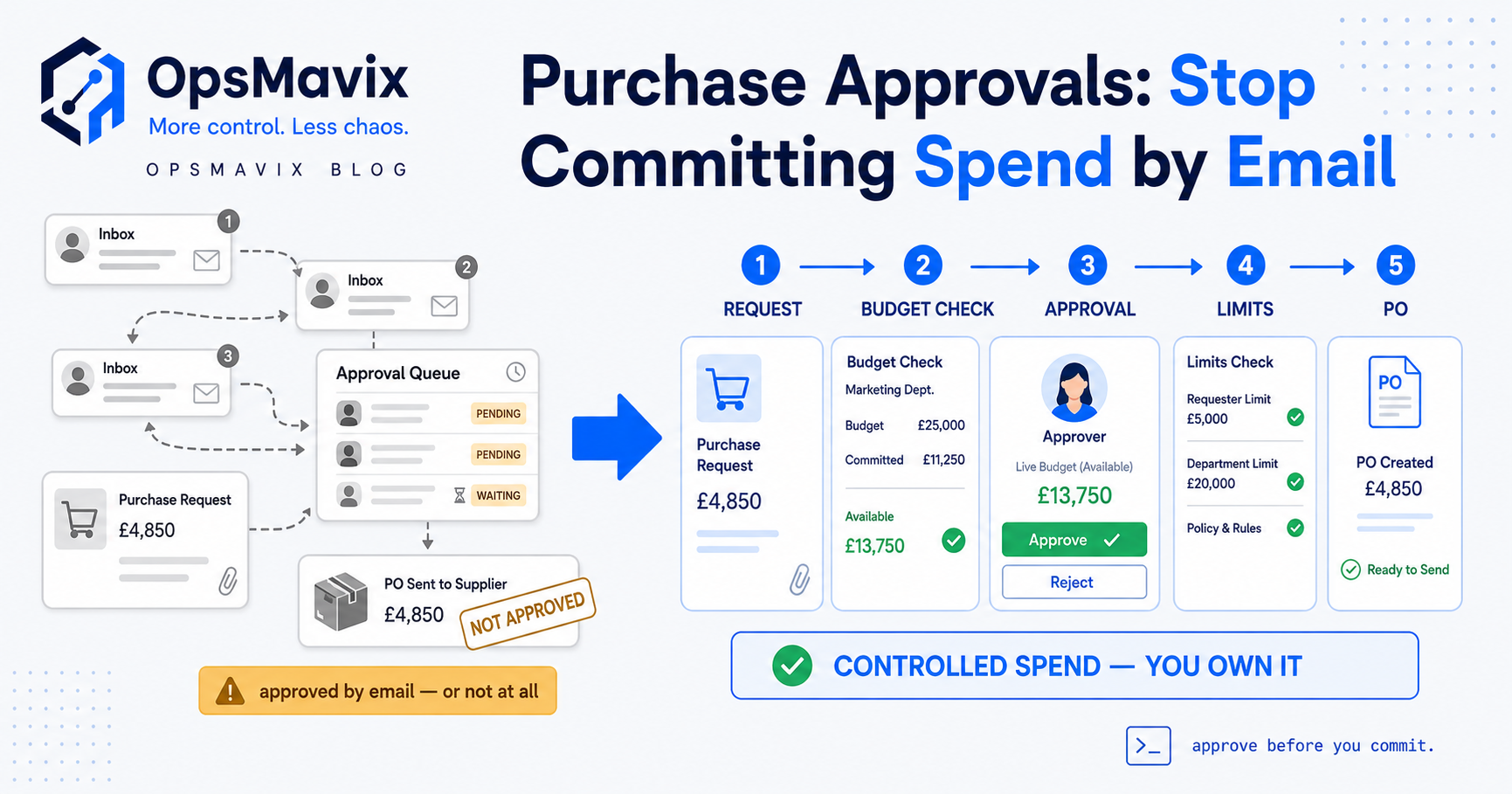
Approval is one stage in a longer flow: request, approve, order, receive, match, pay. Getting the approval stage right in isolation helps, but the leaks that cost real money tend to sit in the handoffs. An approved requisition that never becomes a tracked PO, or a PO that arrives with no record tying it back to who approved the original request, is where the money quietly goes missing.
That is why the approval workflow belongs inside the broader purchase requisition software picture rather than living as a standalone approvals app. And once an approved request becomes a live order, it needs a purchase order tracking system so the sign-off you worked to get is not lost the moment the PO is issued.
Build, buy, or own a system shaped around you
Honest version of the build-or-buy call.
Buying a standalone procurement or approvals tool works if your thresholds are simple and you are happy to run purchasing inside someone else’s model. The trade-off is you bend your bands, your escalation rules and your category logic to fit the product, and you get another disconnected tool that does not talk to your stock, your suppliers, or your invoices.
A spreadsheet plus email is where most growing operations start and where they eventually get burned, because it has no enforced routing and no real audit trail. It is fine until the first disputed invoice.
One system shaped around how you actually run is the middle path OpsMavix builds toward: approval thresholds set to your real spend bands, routing that matches your org, an audit trail finance can defend, and, crucially, the approval stage wired to the order, receipt and invoice stages so nothing falls between them. You own it, and it works the way your team already thinks rather than forcing a re-learn.
The test for any approach is simple. Pick a £5,000 purchase from three months ago and try to answer: who approved it, when, and against what version of the request. If that takes more than a minute, the workflow is the leak, not the paperwork.
Keep reading

Getting value from OpsMavix? Add us as a preferred source on Google — you'll see more of our operations content in your AI Overviews, AI Mode and Search.