
Purchase Requisition Software: Controlling Spend Before the PO Goes Out
Purchase requisition software is the tool that runs request-to-buy — the form, the budget check, the approval routing and the authority limits — so spend is approved before a purchase order commits it. This is a buyer's guide to what that software actually has to do, where the off-the-shelf procurement suite is overkill and where the accounts add-on is too thin, and when a right-sized custom requisition system beats both.
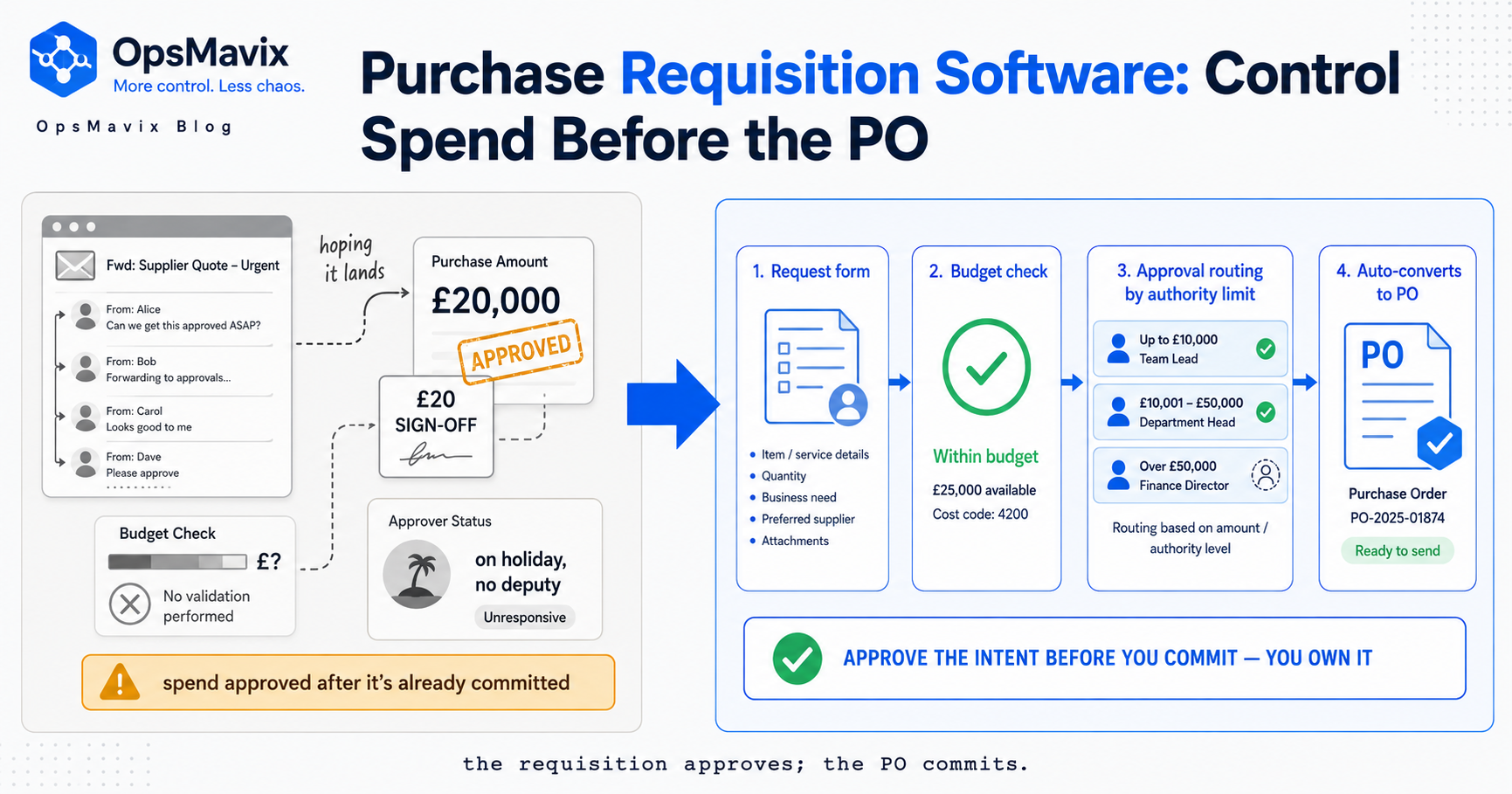
Purchase requisition software controls the request-to-buy step — capturing what someone wants to spend, checking it against a budget, routing it for approval, and turning the approved request into a PO — so spend is committed on purpose, before the money is gone, not after.
Purchase requisition software is the tool that runs the request-to-buy step — capturing what someone wants to spend, checking it against a budget, routing it to whoever has the authority to approve it, and turning the approved request into a purchase order without anyone re-typing it. It’s the layer that decides whether spend gets committed on purpose or by accident, and it sits before the purchase order, not after. If you’re evaluating one, the real question isn’t whether you need the function — you almost certainly do — it’s whether you buy an enterprise procurement suite, bolt a thin requisition module onto your accounts package, or build a right-sized system that fits how you actually purchase.
This is a buyer’s guide, not a definition. If you want the concept — what a requisition is, how the form and routing work, why skipping the step lets maverick spend in — that’s covered in our piece on the purchase requisition itself. Here we’re looking at the software: what a requisition system has to do to be worth running, where the market options fall short in opposite directions, and which side of the build-versus-buy line your business is on. The short version is that most tools are either far too heavy or far too shallow, and the gap between them is where mid-sized operations live.
Key Takeaways
- Purchase requisition software runs request-to-buy end to end: a request form with a budget check, approval routing, authority limits, and one-step conversion of an approved request into a purchase order.
- The seam that matters: requisition software approves the intent; purchase order software commits it to a supplier. A tool that blurs the two lets orders go out that never got approved.
- Budget-check-at-request is the feature that separates a real requisition system from a glorified form — the approver sees whether there’s room for the spend on the same screen as the request.
- Authority limits and routing are where control actually lives: the right approver by amount, department and category, with anything over a threshold escalating automatically instead of getting a rubber stamp.
- Build vs buy splits cleanly: enterprise procurement suites are overkill and slow to adopt; accounts-package add-ons can’t see your budgets or suppliers properly; a right-sized custom system fits the gap most growing businesses fall into.
- Spend visibility is the payoff — committed-but-not-yet-invoiced spend, live, by budget — and it’s the number most businesses can’t see at all until the invoices land.
Three Ways to Buy Requisition Control, Compared
If you are shopping for “purchase requisition software,” you are really choosing between three routes. Here is how they compare for a growing business:
| Capability | Thin module on your accounts package | Enterprise procurement suite | Right-sized custom system |
|---|---|---|---|
| Budget-check-at-request | Rarely (form only) | Yes (heavy config) | Yes, against your live budgets |
| Approval routing / authority limits | Basic | Full, complex | Modelled to your org |
| Committed-spend visibility | No | Yes, buried in reports | Live, by cost centre |
| Requisition to PO, no re-typing | Sometimes | Yes | Yes, one flow |
| Fit for a growing SMB | Outgrown fast | Overkill + overhead | Purpose-fit |
| Cost model | Add-on seat fees | Per-seat licence, climbs | Owned outright, no per-seat |
The gap the table hides is spend leaking out uncontrolled: the average organisation runs a ~30% maverick-spend rate, while best-in-class teams keep it under 10% (Ardent Partners). Requisition control is the lever that moves that number — the rest of this guide is what each row above actually takes.
1. What Purchase Requisition Software Actually Does
Strip a requisition system down and it does four jobs in sequence. It captures the request — item, quantity, cost, cost centre, justification — in a form structured enough that an approver can decide without a back-and-forth. It checks the budget — testing the request against the money available in that cost centre before anyone approves. It routes for approval — sending the request to the right person based on how much it is and what it’s for. And it converts to a PO — turning an approved request into a purchase order in one step, so what gets ordered is exactly what got signed off.
That sequence is the whole product. Everything else a vendor bolts on — supplier catalogues, punch-out to marketplaces, contract repositories — is downstream or a nice-to-have. Judge a tool on those four jobs first, because a system that does them cleanly and fits your process beats one with a longer feature list that fights the way you buy. A requisition system that makes the honest, in-budget request slower than an email hasn’t solved your problem; it’s given you a new one people will route around.
2. The Feature That Separates Real Software From a Form: Budget-Check-at-Request
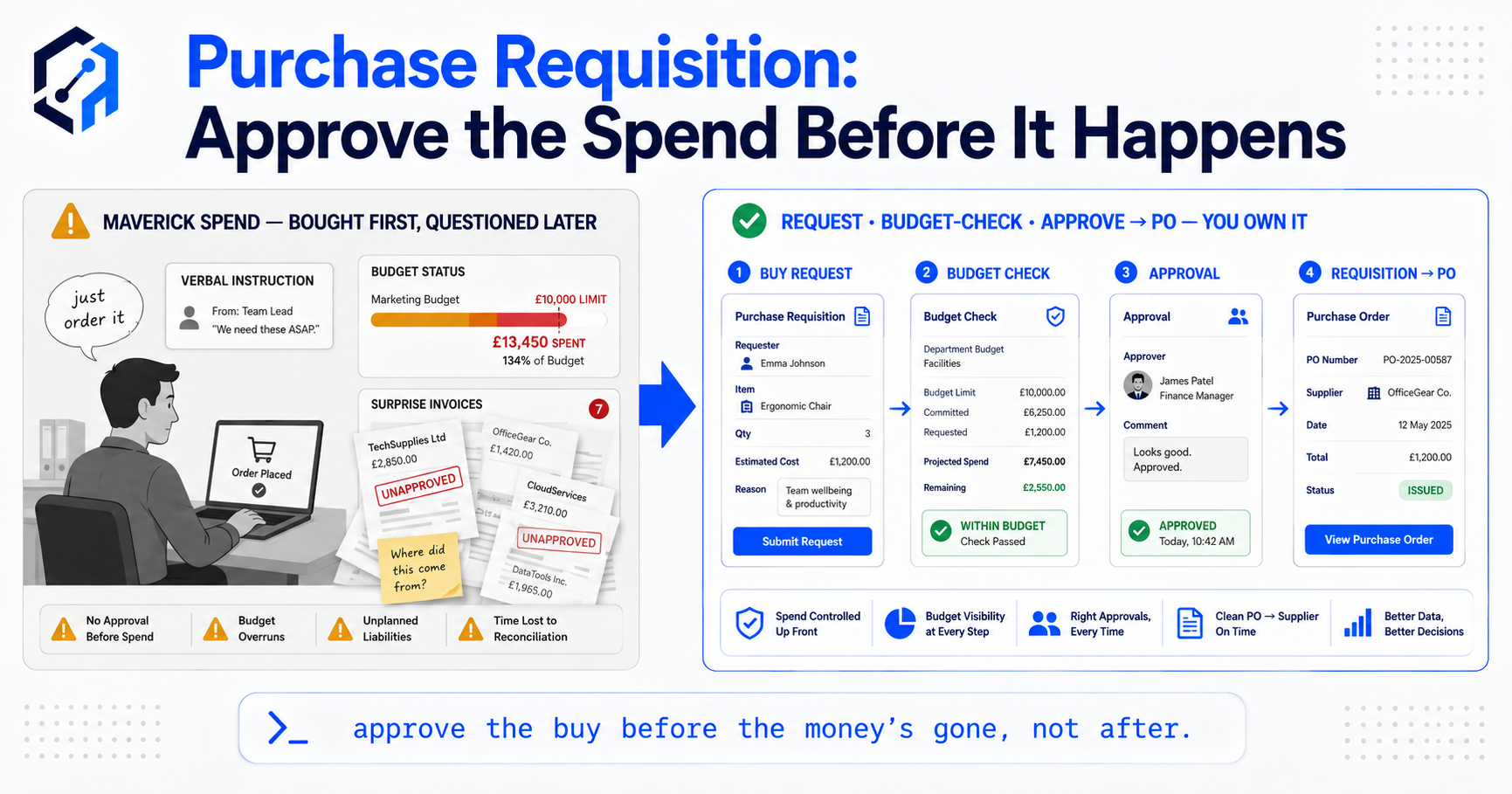
The single feature that tells you whether you’re looking at genuine purchase requisition software or a dressed-up web form is whether it checks the budget at the point of request. Anyone can build a form that emails a manager. What’s hard — and what actually controls spend — is showing the approver, on the same screen as the request, whether there’s room in the relevant budget. Without that, the approver is guessing: they see the number but not whether it breaks the cost centre for the quarter, so “approval” becomes a reflex rather than a decision.
A tool that does this properly nets committed-but-uninvoiced spend against live budgets, so the approver sees not just what’s been spent but what’s already been promised. That’s the difference between a requisition system and a request log. When comparing tools, ask the vendor to show you the approver’s screen and look for the budget line — if it isn’t there, or it’s pulled from a report that’s a day stale, the control is cosmetic.
3. Approval Routing and Authority Limits: Where Control Lives
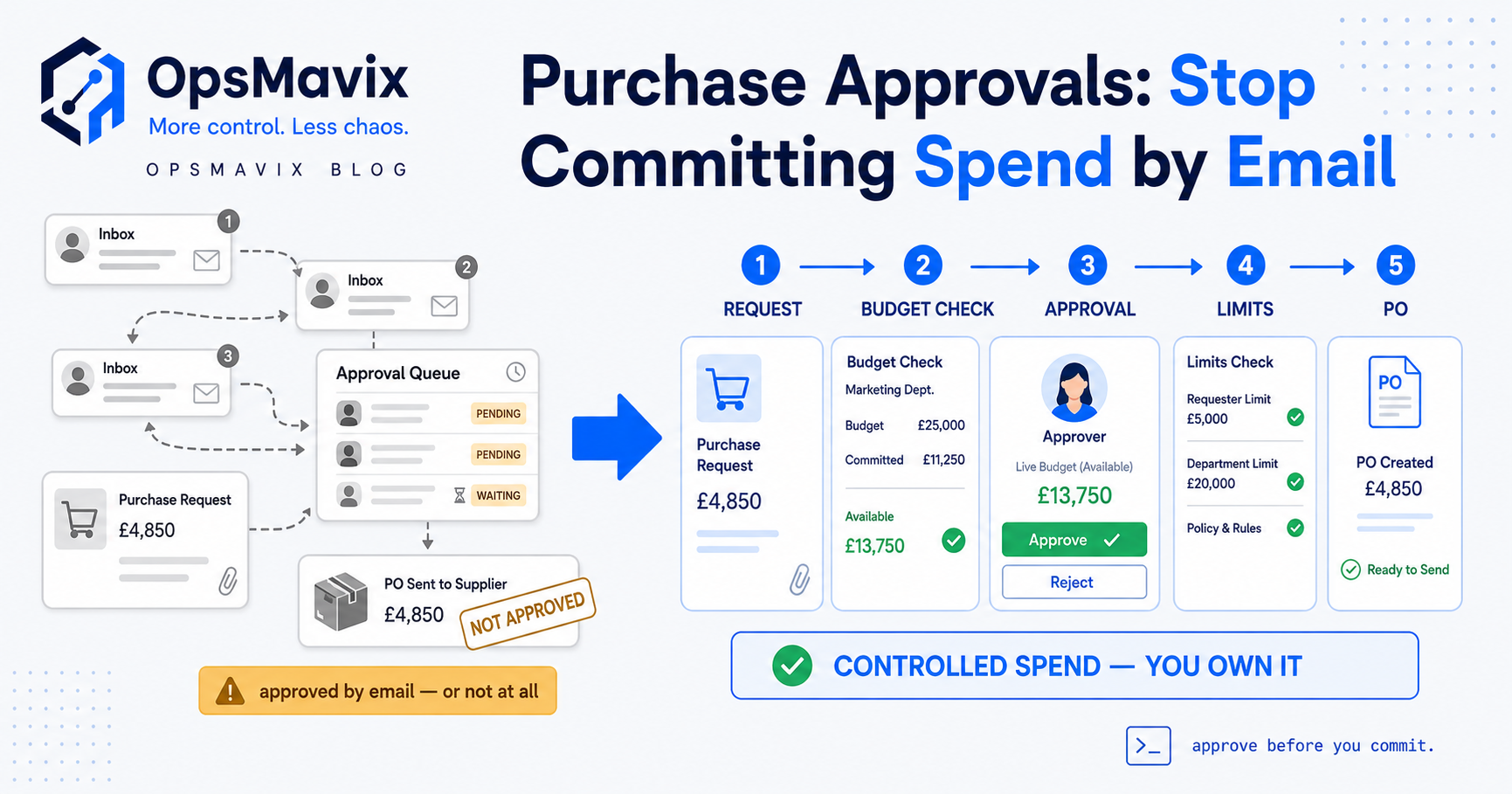
What approval routing and authority limits are — who approves what, by amount, department and category — is covered in the concept piece. The question for the software is whether that logic holds up under the cases that break thin tools, so when you demo a system, push on the edge cases rather than the happy path. Test the approver who’s away with no deputy defined, so requests stall in a dead inbox. Test the request that straddles two budgets and has to route against both. Test the large purchase split into two under-threshold requests to dodge escalation. A serious system has answers — a deputy chain, multi-budget routing, split detection; a thin one leaves those holes open, and holes in the routing are where off-process spend leaks through. The same stalled-queue delays that plague invoices show up here, so if you’ve ever tried to speed up invoice approvals you already know an approval queue is a leak — and it’s cheaper to fix at the requisition than at the bill. That discipline runs downstream through invoice approval workflow, but requisitions are where it should start.
4. The Seam: Requisition Software Approves, PO Software Commits
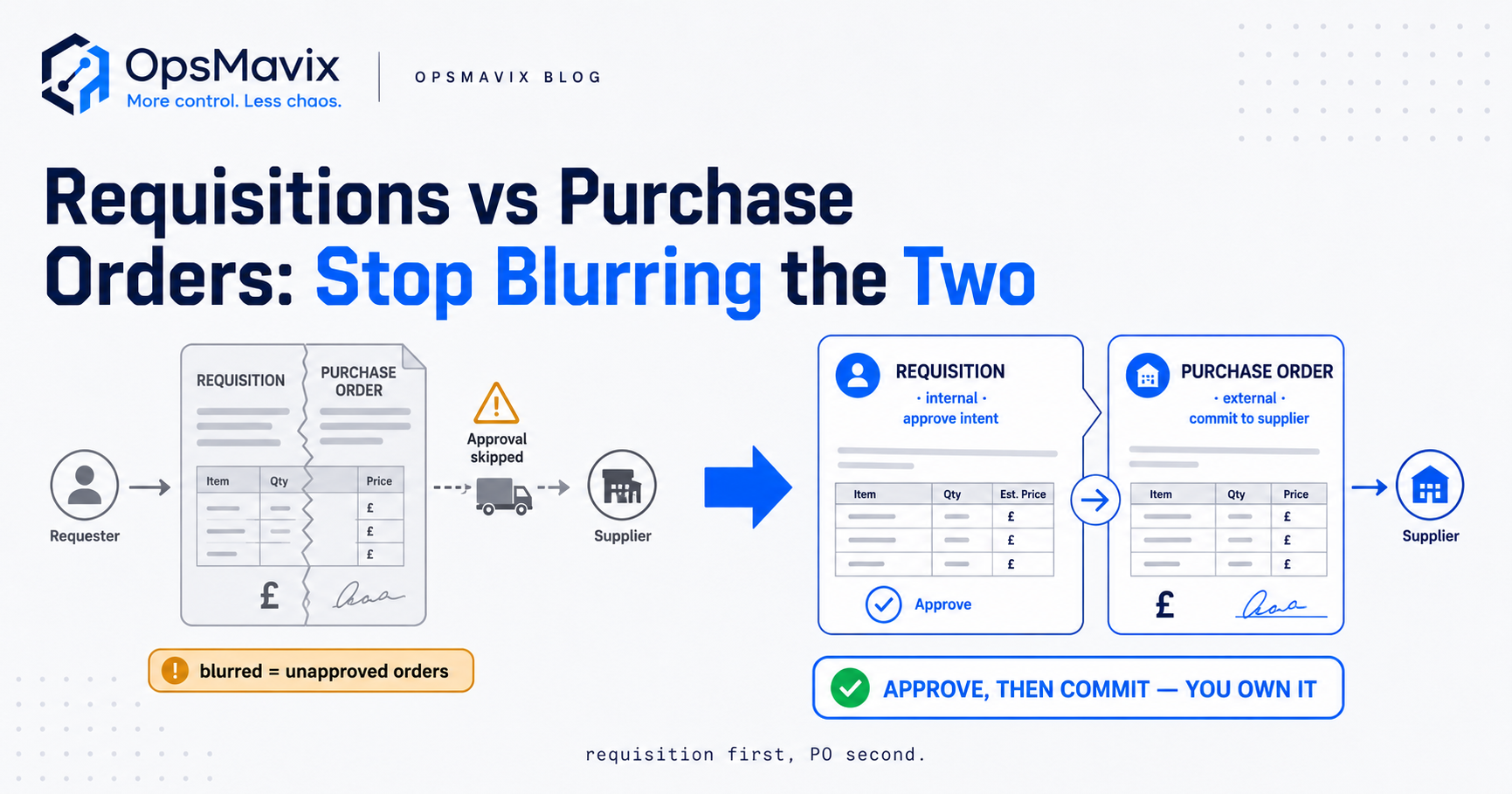
The distinction most buyers get wrong is that requisition software and purchase order software are two different product categories, not one tool with two names. Requisition software approves the intent to spend; PO software commits that spend to a supplier. (What actually separates a requisition from a PO is covered in the concept piece.) They do opposite jobs, and the boundary between them is where control either holds or collapses: when one tool blurs the two — or when the requisition is an email and the PO a spreadsheet — orders go out that never passed approval, because nothing structurally forces the sign-off to come first.
The clean design is one-step requisition-to-PO conversion: an approved request becomes a purchase order without re-keying, so the PO that reaches the supplier is, by construction, one that passed approval. Every re-key between the two is a chance for the quantity to grow, the number to change, or an unapproved line to sneak in. That’s why the two categories are halves of one seam rather than competing tools — the requisition owns the pre-PO approval, the PO owns the supplier-facing commitment, and the conversion is the join that guarantees what got ordered is what got approved. Get the seam wrong and you have two disconnected systems and a manual re-entry step that quietly undoes the control you paid for.
5. Spend Visibility: The Number You Can’t See Without It
The payoff of running requisitions in software rather than email is a number most businesses genuinely cannot see: committed spend. Once a request is approved and a PO is out, money is promised even though no invoice has arrived. A business without a requisition system finds out about that commitment when the bill lands — by which point the goods are ordered, delivered and as good as paid for. A proper requisition system shows committed-but-uninvoiced spend live, by cost centre, so you know your real position now rather than reconstructing it at month-end from a pile of invoices.
That visibility turns requisition software from a control into a management tool. You can see which budgets are running hot before they blow, catch a tail of small off-process orders that add up, and answer “how much have we actually committed this quarter?” without a finance archaeology dig. When comparing tools, ask whether the spend view nets commitments against budgets in real time — because a system that records approvals but can’t roll them into a live spend position gives you an audit trail without foresight. This is exactly the kind of live number a project operations dashboard is meant to surface, rather than something you assemble by hand.
6. Build vs Buy: Where the Off-the-Shelf Tools Fall Short
Now the decision the buyer’s guide exists for. The market splits into two disappointing extremes. At the top, enterprise procurement suites do requisitions properly but drown a mid-sized business in configuration, per-seat licences and adoption friction — you’re buying a platform built for a procurement department you don’t have, and most of it goes unused while the parts you need are buried under the parts you don’t. At the bottom, accounts-package add-ons bolt a requisition tab onto software built for bookkeeping, and they typically can’t see your operational budgets or your real supplier list properly, so the budget check — the one feature that matters — is weak or absent.
Between those sits the gap where most growing businesses live: too big to run request-to-buy on email and a spreadsheet, too small to justify an enterprise suite and the team to run it. Off-the-shelf tools tend to force one rigidity onto every purchase, or make you bend your buying process to fit the tool’s assumptions. Buying is the right call when your process is standard and you can live inside the vendor’s shape; it stops being the right call when you spend the first three months configuring the tool to grudgingly approximate how you already work — and still can’t get the budget check to see the numbers that matter.
7. When a Right-Sized Custom System Wins
A right-sized custom requisition system wins in one situation: when your buying process has a shape the off-the-shelf tools don’t fit, and the budget check needs to see numbers that live in your operational systems rather than an accounts package. That’s more common than it sounds. If your budgets are per-project, per-site or per-channel rather than a flat chart of accounts; if approval authority follows your actual org rather than a vendor’s default hierarchy; if the requisition needs to net against stock already on order — then a tool built to fit you does in one clean flow what a generic tool does in a tangle of workarounds.
The point isn’t to build for its own sake. It’s that a proportionate system does the same four jobs fitted to your process, so in-budget requests clear in seconds and only the big or unusual ones get real scrutiny — right friction: heavy where the money is, invisible where it isn’t. And because you own it, there’s no per-seat licence scaling against you and nothing a vendor can switch off. The routing carries straight through to invoice approval workflow automation and, once goods arrive, to three-way matching — one owned system controlling spend from the first request to the final payment, rather than three tools duct-taped at the seams.
8. How to Choose: A Short Evaluation Checklist
Make it a test list. When you demo any requisition system, put six questions to it: Does the approver see the live budget position on the request screen? Does routing key to amount, department and category — and what happens when the approver’s away or someone splits a request to dodge a threshold? Are authority limits real rules that escalate automatically, or just guidance? Does an approved requisition convert to a PO in one step with no re-keying? Can you see committed-but-uninvoiced spend by budget, now? And does the whole thing make the honest, in-budget request faster than the workaround — because if it doesn’t, people route around it and you’ve paid for control you don’t get. Run those past the enterprise suite, the accounts add-on and a right-sized custom build, and the answer usually sorts itself: the suite over-answers questions you didn’t ask, the add-on fails the budget check outright, and the gap in the middle is where your actual process lives.
FAQ
What is purchase requisition software?
Purchase requisition software runs the request-to-buy step: it captures a purchase request, checks it against a budget, routes it to the right approver by amount and category, and converts the approved request into a purchase order. It sits before the PO — it’s how spend gets authorised, not how it gets ordered. The value is that money is approved against budget and authority before it’s committed to a supplier, rather than discovered when the invoice arrives.
What’s the difference between purchase requisition software and purchase order software?
Requisition software approves the intent to spend; purchase order software commits that spend to a supplier. The requisition is internal — can we buy this? — and gets checked against budget and authority. The PO is external — supplier, send us this. The clean design converts an approved requisition into a PO in one step, so the order that reaches the supplier is one that passed approval. If a tool blurs the two, orders can go out that were never signed off.
Do I need a separate requisition system if I already have accounting software?
Often, yes — because most accounts-package requisition add-ons can’t see your operational budgets or supplier list properly, so the budget check (the feature that makes approval mean something) is weak. If your budgets are per-project, per-site or per-channel, or your approval authority follows your real org, an add-on bolted onto bookkeeping software usually can’t fit it. That’s the gap a right-sized custom requisition system closes.
Should we buy off-the-shelf requisition software or build a custom system?
Buy when your buying process is standard and you can live inside a vendor’s shape without months of configuration. Build when your budgets and approval chain have a shape the generic tools don’t fit — per-project budgets, org-specific authority, a budget check that needs numbers in your operational systems. Enterprise suites over-serve mid-sized businesses; accounts add-ons under-serve them on the budget check. The middle gap is where a right-sized custom system usually wins.
How OpsMavix Can Help
OpsMavix builds right-sized systems for businesses stuck in the gap — too messy for email-and-spreadsheet purchasing, not ready for an enterprise procurement suite — and request-to-buy is one of the clearest places that gap leaks money. We build a requisition process that fits how you actually purchase: a form that carries a live budget line, routing keyed to your amounts and categories, authority limits that escalate only what needs it, and one-step conversion from an approved requisition to a purchase order — so nothing gets ordered that didn’t get approved, and nothing gets re-keyed on the way. From there the same discipline carries through to invoice approval workflow automation and three-way matching, so spend is controlled from the first request to the final payment.
If purchases get committed before anyone with budget authority has seen them — orders placed off a quick email, invoices that are the first finance hears of the spend — you’ve got maverick spend, and it’s invisible one order at a time. We’ll show you where it’s happening, what it’s worth, and whether an off-the-shelf tool or a right-sized custom requisition system is the honest fit for how you buy. Book a Free Operations Leak Audit.
Keep reading
Getting value from OpsMavix? Add us as a preferred source on Google — you'll see more of our operations content in your AI Overviews, AI Mode and Search.