
The Purchase Requisition Process: From Request to Approved PO
The purchase requisition process is the request-to-buy workflow that runs before any money is committed — raise the request, check the budget, route it to the right approver, escalate what's over a limit, and convert the approved request into a purchase order. This is the step-by-step version: what each stage does, what a good request captures, and exactly where the process leaks money when it runs on email and memory instead of a system.
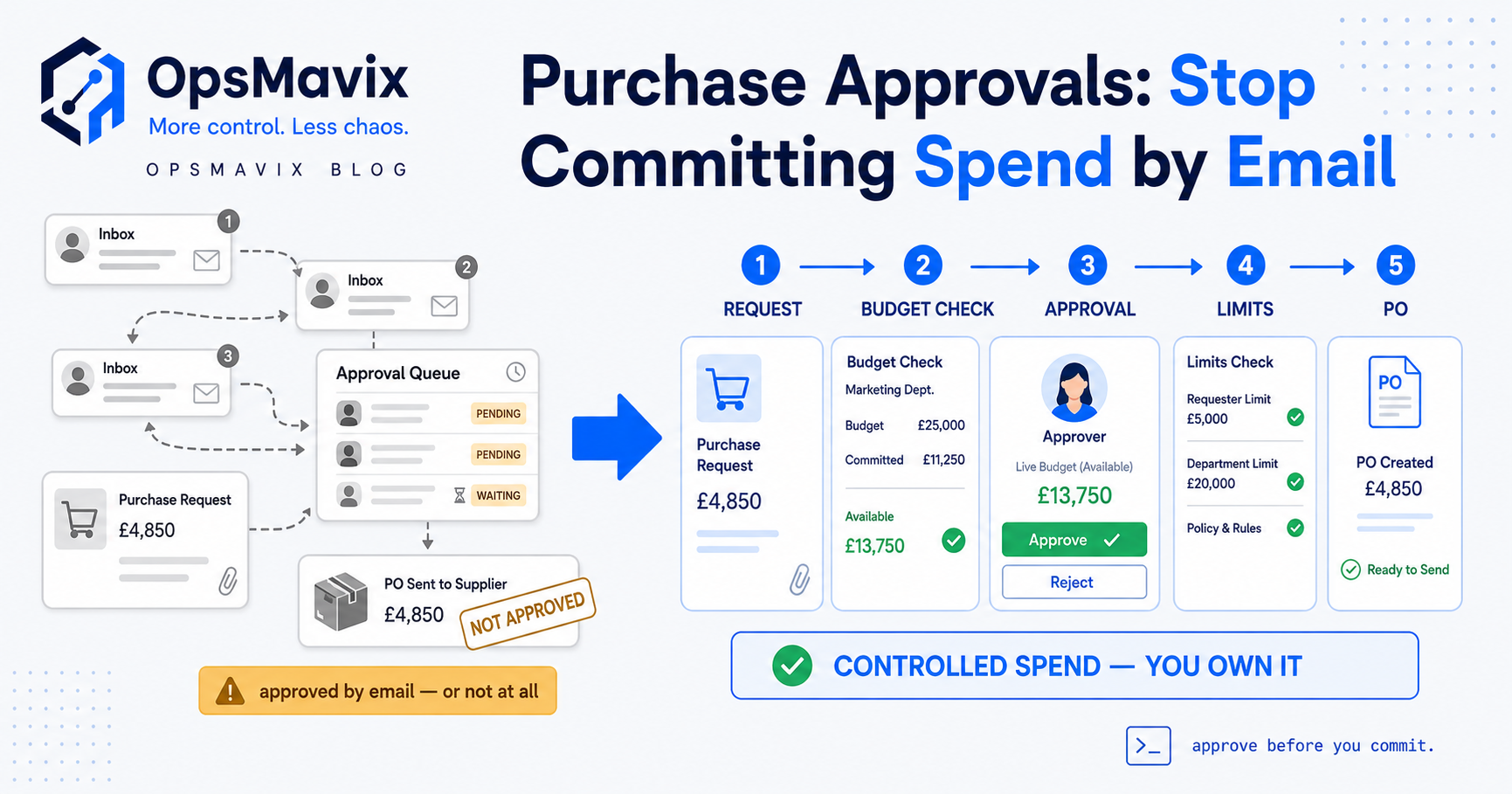
The purchase requisition process is the request-to-buy workflow that happens before money is ever committed: someone raises a request to buy something, it’s checked against a budget, it routes to whoever has authority to approve it, anything over a limit escalates, and the approved request converts into a purchase order. Five steps, in that order, and the point of them is to make sure spend gets signed off on purpose rather than discovered when the invoice lands. This is the how-to — the steps, the routing, and where each stage quietly leaks money when it runs on a chain of emails and someone’s memory.
If you want the concept — what a requisition is, and how it differs from a purchase order — that’s covered in our piece on the purchase requisition, and the sibling on purchase requisition vs purchase order draws the line between them. Here we stay on the workflow: how to raise a purchase requisition properly, how the approval process should route it, and what to fix when the honest, in-budget request is somehow slower than just buying the thing and sorting it out later.
Key Takeaways
- The purchase requisition process runs in five steps: raise the request, check the budget, route for approval, apply authority limits and escalation, then convert the approved request into a purchase order without re-keying.
- A good request captures enough to decide on — item, quantity, cost, supplier, cost centre and a one-line justification — so the approver doesn’t have to chase a back-and-forth before they can say yes.
- The budget check is the step most email processes skip — the one that turns approval from a reflex into a decision, by showing whether there’s room for the spend, not just the number asked for.
- Approval routing is where control lives: the right approver by amount, department and category, with authority limits that escalate anything over a threshold instead of rubber-stamping it.
- The convert-to-PO step is a re-keying trap — retype an approved request into a purchase order and the quantity can grow, the price can change, or an unapproved line can slip in.
- A light email flow is genuinely fine for a tiny team with one approver — you only need a system once the queue, the budget check or the authority limits start leaking. This post is about spotting that point.
The Process at a Glance: Five Steps From Request to PO
The shape: a request (someone says what they need to buy, structured), a budget check (is there money for it in the right pot?), approval routing (to whoever decides spend of that size and type), authority limits and escalation (small things clear at the front line, big things climb), and conversion to a purchase order (the internal can we buy this? becomes the external supplier, send us this.). Each step gates the next — run them on email and the order holds only as long as everyone remembers to follow it, which is the whole leak in the manual purchase request process.
Step 1 — Raise the Request: What a Good One Captures
Raising a purchase requisition means putting the intent to buy into a form structured enough to approve without a phone call. A request that says “need £400 of packaging, thanks” fails that bar — the approver has to find out which packaging, from whom, against which budget, for which job. One that captures item, quantity, unit cost and total, supplier, cost centre or project, and a one-line reason clears it: the approver reads it once and decides.
A good request front-loads the friction to the point where the person actually knows the answers. Otherwise the missing detail gets chased later — by the approver, or by finance working out at invoice time what the mystery order was for. “Half my job used to be working out what a request actually meant before I could approve it,” one purchasing manager told us — a whole role’s worth of chasing that a decent form removes.
Step 2 — The Budget Check: Is There Room for This?
The budget check separates a real purchase requisition process from a request log. It asks one question — is there money for this spend, in the right pot, right now? — and it’s the step almost every email process skips, because email can’t answer it. The approver sees the number asked for but not whether it breaks the cost centre for the quarter, so “approval” becomes a reflex: the amount looks reasonable, they say yes, and nobody sees the budget go red until month-end.
Done properly, the check nets the request against committed spend, not just what’s been invoiced — money that’s approved and ordered but not yet billed is still promised, and a budget that counts only invoices is flattering itself. The approver should see that live position on the same screen as the request. Without that, you get the classic manual failure: three managers each approve a reasonable-looking request in the same week, none can see the others, and the budget is £2,000 over before anyone notices. Each decision was fine on its own; the process had no way to see them together.
Step 3 — Approval Routing: The Right Approver, Not Just an Approver
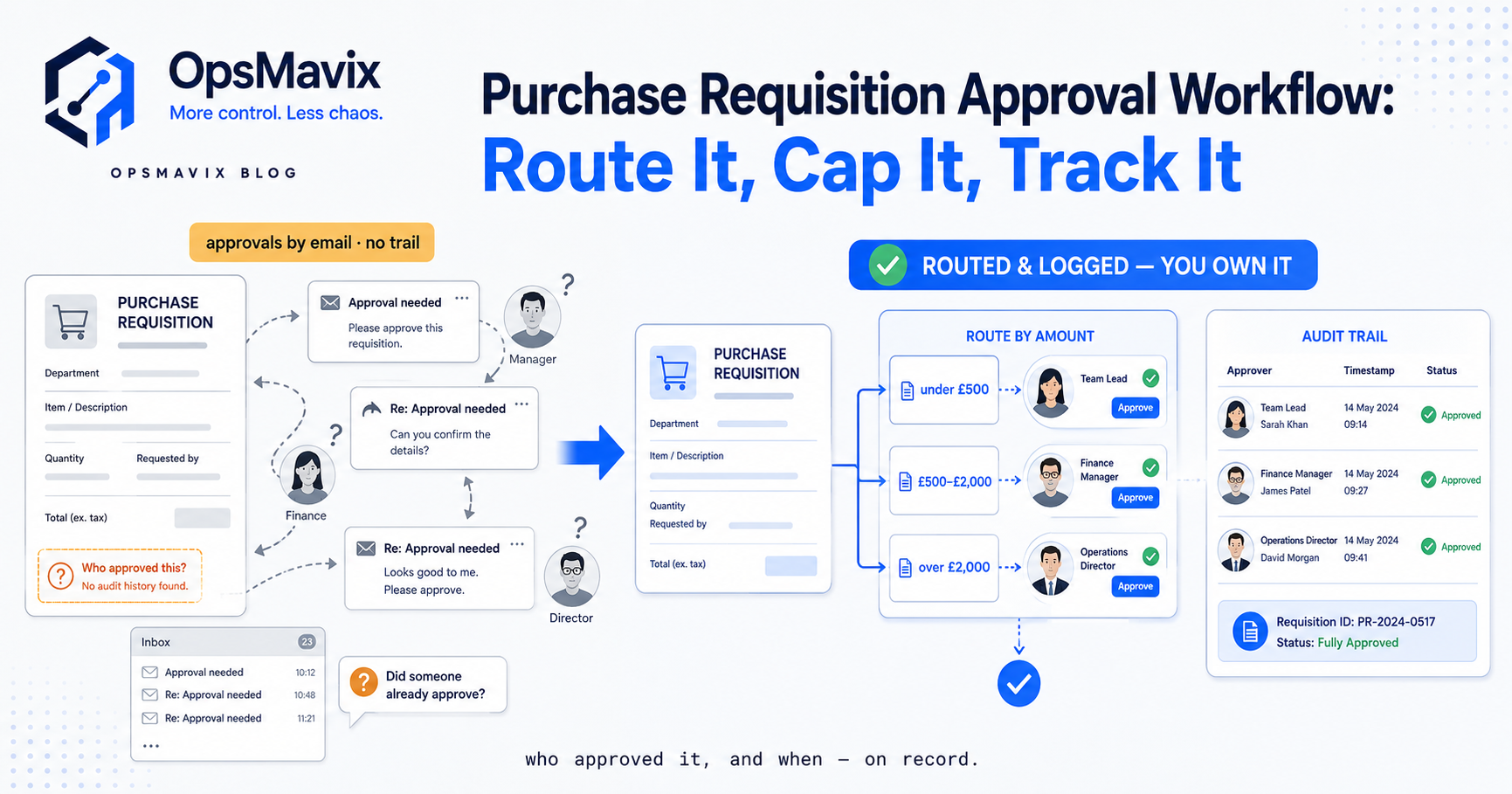
Routing decides who sees the request, and getting it right is most of what the approval process is for. The rule isn’t “send it to a manager” — it’s send it to the right approver for this spend, keyed to how much it is, which department or project it’s for, and what category it falls in. A £200 stationery order and a £15,000 machine part shouldn’t land in the same inbox just because a manager is free.
On email, this routing lives in people’s heads. Someone has to know that capital items over a threshold go to the finance director, that anything for the Leeds site goes to the site manager first. When that person’s on holiday the knowledge goes with them, and the request either stalls or gets approved by whoever’s around — which is how off-process spend gets a signature it shouldn’t have. The same stalled-inbox delay that plagues bills shows up here: if you’ve tried to speed up invoice approvals you know an approval queue is a leak, and it’s cheaper to fix at the requisition than the bill, because nothing’s been ordered yet — the spend is still a question, not a commitment.
Step 4 — Authority Limits and Escalation: What Climbs, and What Clears
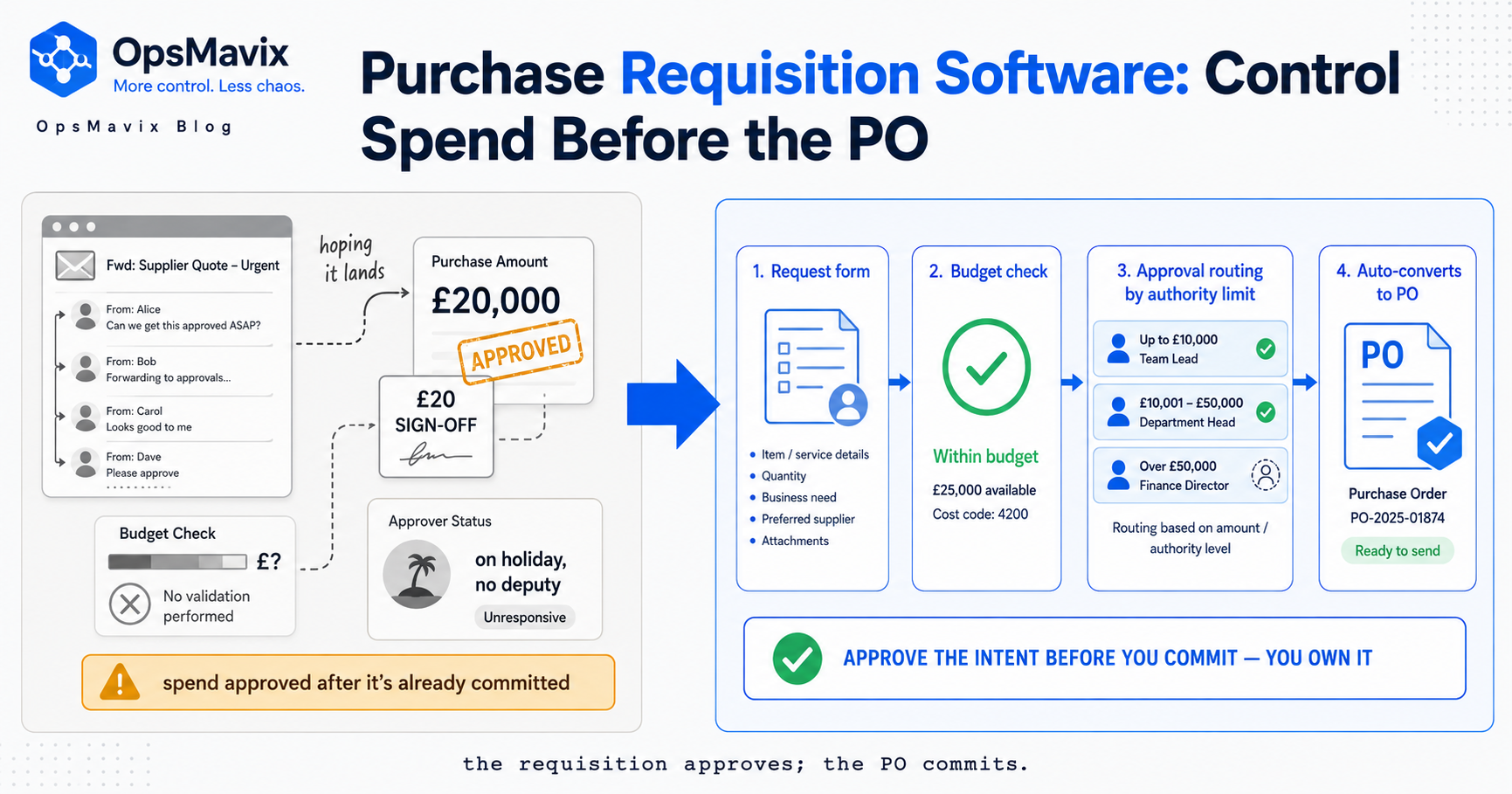
Authority limits are the rules for what a given approver can actually sign off; escalation is what happens when a request exceeds them. This turns a signature into a control. A team lead might clear up to £1,000; £1,000 to £10,000 climbs to a department head; above that, a director. Set well, most requests clear at the front line in seconds and only the big ones get senior scrutiny — the friction sits where the money is, not everywhere.
Test the step against the cases that break it. The sharpest is the split-to-dodge: a £12,000 purchase broken into two £6,000 requests so it never crosses the escalation threshold. In an email process nothing catches this — two requests, each under the limit, each waving through — and your control is bypassed by arithmetic. A real system flags the same supplier, requester and window; a manual one relies on an approver happening to remember the other half. The other break is the absent approver with no deputy: the request that needs a director who’s away, sitting in a dead inbox while the person who raised it just buys the thing and apologises later. Escalation needs a fallback chain, or the limit becomes a bottleneck that trains people to route around it.
Step 5 — Convert to PO: Don’t Re-Key the Approval
The last step turns the approved request into a purchase order — and the discipline of the previous four can leak out here if it’s done by hand. The clean design is one-step conversion: the approved requisition becomes the PO, carrying its lines straight through, so the order that reaches the supplier is, by construction, one that passed approval.
The manual version retypes it. Someone reads the approved request and keys a purchase order from it, and every re-key is a fresh chance for the quantity to grow, a price to change, or a line nobody approved to appear. This is exactly the re-keying problem that dedicated purchase order software exists to solve. The seam between requisition and PO is where control holds or collapses: get it wrong and you’ve got two disconnected documents and a re-entry step that quietly undoes everything the process was built to enforce.
Where the Manual, Email Process Leaks Money
Run the five steps on email and memory and the leaks are predictable. Maverick spend is the big one — purchases committed before anyone with budget authority saw them, because the “request” was a quick email or none at all, and finance first hears of it when the invoice arrives. Stalled queues are the second: requests sitting in an inbox because the approver’s away or nobody’s sure whose job it is to sign — and once the right path is slower than the workaround, people take the workaround, and the control is gone. Split-to-dodge is the third, defeating escalation limits with arithmetic no manual process catches. And the reconciliation tax underneath all of them: because nothing nets requests against a live budget, you find your real committed position by rebuilding it from invoices at month-end — too late to say no.
Put a £-frame on it. A business that can’t see committed spend doesn’t catch a £3,000 over-budget order when it’s raised, while saying no still costs nothing — it catches it at invoice time, when the goods are delivered and as good as paid. The process didn’t cost you the £3,000. Not seeing it in time did.
When to Systematise the Process — and When Not To
The honest part before any pitch: if you’re a small team with one approver and a handful of purchases a week, a light email flow is genuinely fine. There’s no routing to get wrong, and the budget lives in one head. A system there adds friction to a process that isn’t leaking. Don’t.
It needs systematising when the manual version starts failing at the seams the five steps hold: more than a couple of approvers, so routing depends on memory; a budget check that’s become guesswork; a split-to-dodge you’ve caught or suspect; requests that stall when someone’s away; or maverick spend found at invoice time more than once. Each maps to a specific step above that’s now leaking.
If you’re weighing a tool at that point, the purchase requisition software buyer’s guide covers where off-the-shelf options fall short — enterprise suites too heavy, accounts add-ons too shallow to run a real budget check.
FAQ
How do you raise a purchase requisition?
You raise a purchase requisition by submitting a structured request to buy something before it’s ordered: item, quantity, unit and total cost, supplier, the cost centre or project it’s for, and a one-line justification. The detail lets the approver decide without chasing you for it. In a system the form routes automatically to the right approver; on email you send the same detail to whoever signs it off. Either way, a good request is one that can be approved without a single follow-up question.
What are the steps in the purchase requisition process?
Five, in order: raise the request (structured enough to decide on), check the budget (room for this in the right pot, right now?), route for approval (the right approver by amount, department and category), apply authority limits and escalation (small requests clear at the front line, big ones climb), and convert to a purchase order (the approved request becomes the PO without re-keying). Each step gates the next — approval is meaningless without the budget check.
What’s the difference between the purchase requisition approval process and a purchase order?
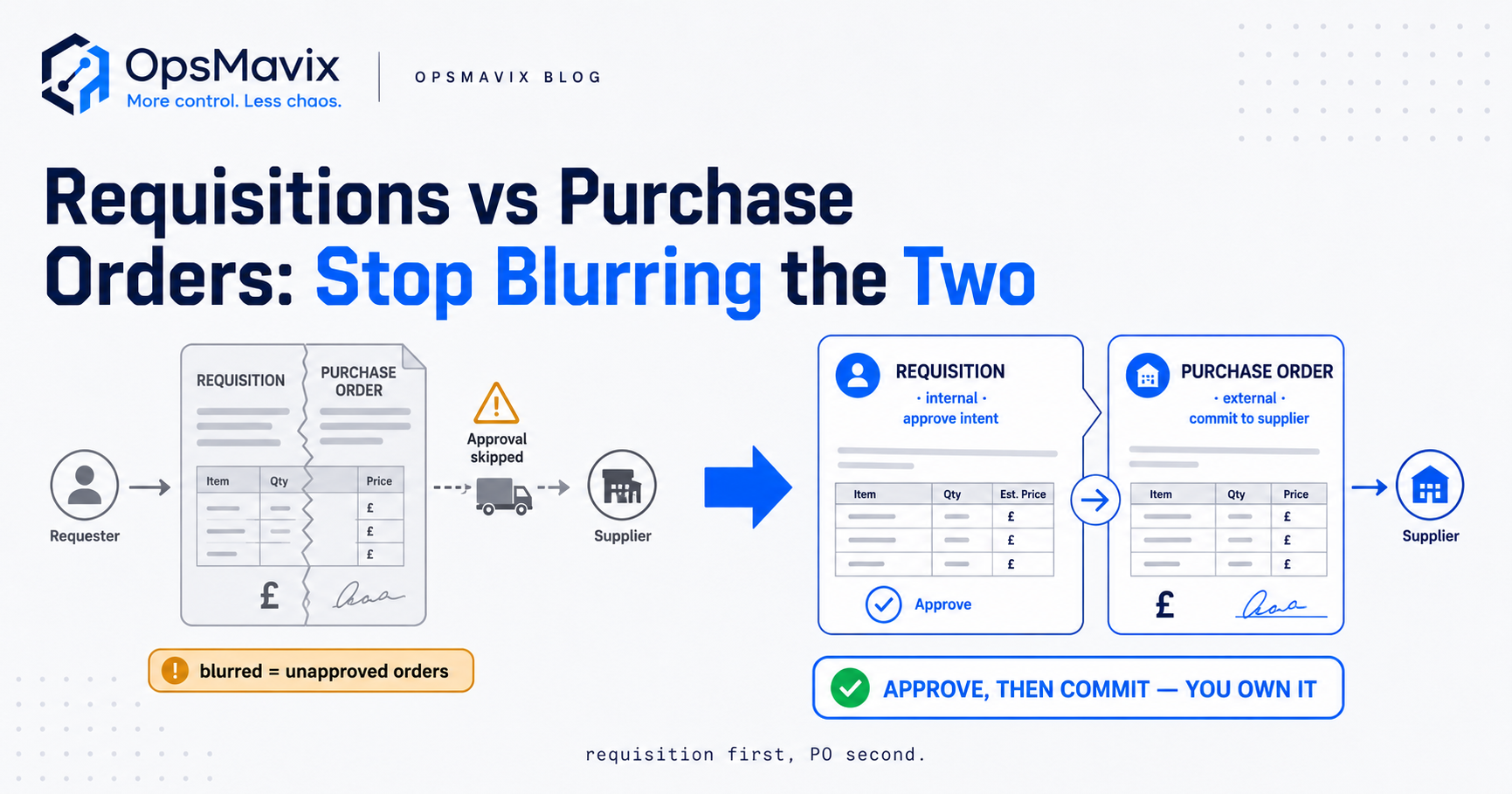
The requisition approval process is internal — can we buy this? — and runs the budget check, routing and authority limits before money is committed. The purchase order is external — supplier, send us this — and it’s what commits the spend. The requisition approves the intent; the PO commits it. The clean design converts an approved requisition into a PO in one step, so the order that reaches the supplier is one that passed approval. Full distinction in our purchase requisition vs purchase order piece.
Do we need software to run a purchase requisition process?
Not always. A small team with one approver and a few purchases a week can run request-to-buy on email fine — the routing is trivial and the budget lives in one head. You need a system once it starts leaking: multiple approvers where routing depends on memory, a budget check that’s become guesswork, authority limits defeated by split requests, or maverick spend surfacing at invoice time. The purchase requisition software guide covers what to look for when you reach that point.
How OpsMavix Can Help
OpsMavix builds right-sized systems for businesses stuck in the gap — too messy to keep running request-to-buy on email and memory, not big enough to justify an enterprise procurement suite. We build the five steps to fit how you actually purchase: a request form that captures enough to decide on, a budget check that shows the live committed position, routing keyed to your amounts and categories, authority limits that escalate only what needs it and catch the split-to-dodge, and one-step conversion so nothing gets ordered that didn’t get signed. The same discipline carries downstream into invoice approval workflow automation, and the committed-spend position surfaces on a project operations dashboard instead of being rebuilt from invoices at month-end.
If purchases get committed before anyone with budget authority has seen them, that’s maverick spend, and it hides one reasonable-looking email at a time. We’ll map where your request-to-buy process leaks today, put a figure on it, and tell you honestly whether you’ve outgrown the email flow. Book a Free Operations Leak Audit.
Keep reading
Getting value from OpsMavix? Add us as a preferred source on Google — you'll see more of our operations content in your AI Overviews, AI Mode and Search.