
Purchase Order Management Software: Control Spend Without the Chasing
A smoother purchase order process gives your organisation more control over spending, supplier commitments and internal approvals. With the right purchase order management approach, supported by suitable purchase order software, teams can reduce manual chasing, improve visibility and make everyday purchasing easier to manage.

A smoother purchase order process gives your organisation more control over spending, supplier commitments and internal approvals. With the right purchase order management approach, supported by suitable purchase order software, teams can reduce manual chasing, improve visibility and make everyday purchasing easier to manage. This article explains where purchase order processes usually slow down, how modern tools help, and what to consider when choosing a purchase order system for small business or growing teams.
Why does your purchase order process feel slower than it should?
Your purchase order process often feels slow because too much information lives in too many places: email threads, spreadsheets, chat messages, supplier quotes and finance folders. When a request needs several approvals, a missing budget code or an unclear supplier detail can hold everything up. A purchase order management system brings these moving parts into a clearer workflow, so people know what has been requested, who needs to approve it and what happens next.
A purchase order is meant to create control, not admin for the sake of admin. It confirms what is being bought, from whom, at what agreed cost and under which terms. Yet in many organisations, the process becomes a tangle of copy-and-paste tasks, duplicated entries and informal approvals. That is where purchase order management becomes more than a finance function; it becomes a practical way to protect cash flow, reduce confusion and give teams confidence before money is committed.
The aim is not to make purchasing rigid. It is to make purchasing visible, consistent and easier to follow. Whether you are exploring OpsMavix, reviewing another purchase order platform, or simply trying to improve the process you already use, the same principle applies: a good workflow should help people buy what they need without losing control of spend.
The hidden costs of a manual purchasing workflow
Manual purchasing can look harmless at first. A spreadsheet, a shared inbox and a few approval emails may be enough when spending is low and the team is small. Over time, however, those workarounds start to create friction. The work still gets done, but it depends heavily on memory, individual diligence and repeated checking.
One common issue is delayed approval. A manager may miss an email, a finance contact may be away, or a request may be sent without the right supporting information. Until someone notices, the supplier waits, the requester follows up and finance has no firm record of what is being committed.
Another issue is inconsistent data. Supplier names may be entered differently from one document to the next. Costs may be copied incorrectly. Purchase descriptions can be vague, making it harder to match invoices later. These small errors do not always create immediate problems, but they add up when finance teams need to reconcile orders, invoices and payments.
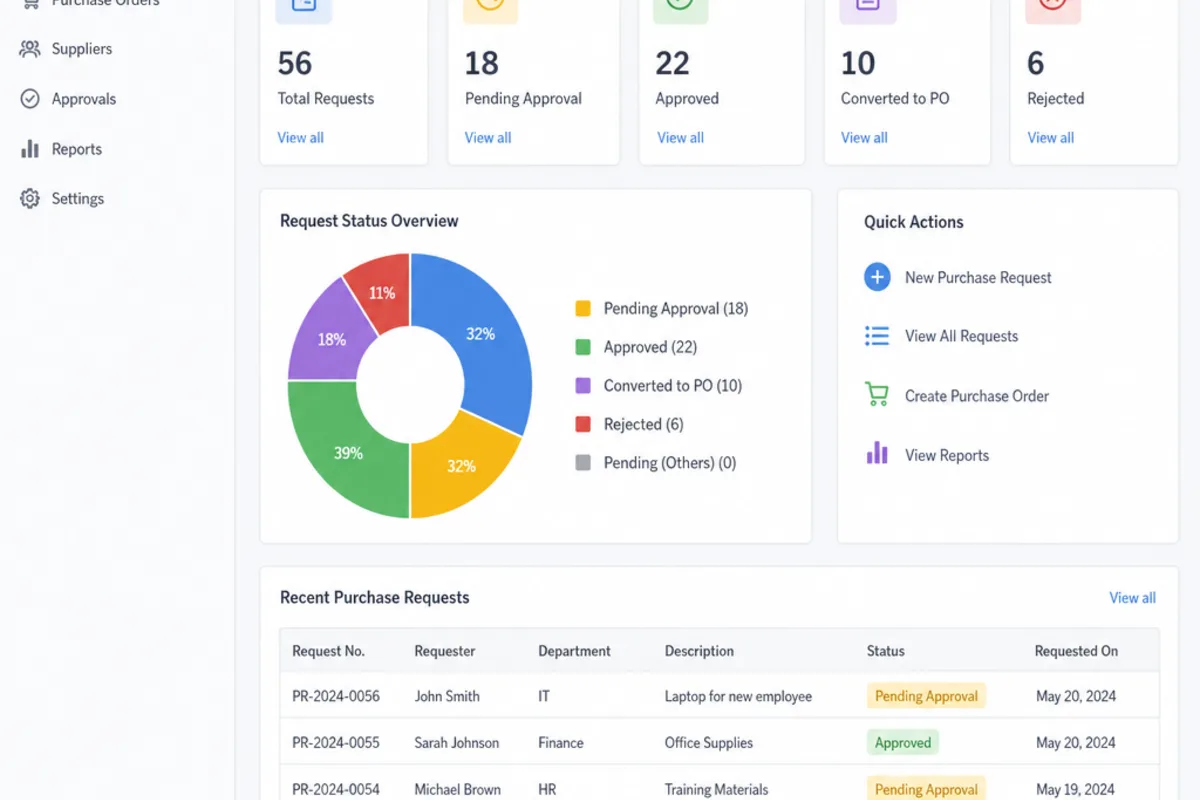
Manual processes also make it harder to see spend before it happens. If purchase requests are approved informally, decision-makers may only get the full picture after invoices arrive. That limits their ability to manage budgets proactively. A purchase order tracking software tool can help by showing the status of requests, approvals, orders and outstanding commitments in one place.
The cost is not only financial. People lose time chasing updates, searching inboxes and recreating information. Suppliers may receive late or unclear confirmation. Internal teams can become frustrated because the process feels slow, even when everyone is trying to do the right thing.
A better process starts with a clear workflow
Before choosing purchase order processing software, it helps to define the process you actually want. Technology can make a good workflow faster, but it cannot fully repair an unclear one. The strongest purchase order solutions usually begin with simple rules that everyone understands.
A clear workflow answers a few practical questions:
- Who is allowed to raise a purchase request?
- What information must be included before a request can move forward?
- Which purchases need manager approval, finance approval or both?
- What budget, department or project codes should be captured?
- When is a purchase order issued to the supplier?
- Who checks delivery, invoice matching and final payment readiness?
Once these points are agreed, a purchase order system can turn them into a repeatable process. Instead of relying on people to remember every step, the system guides the request through the right route. Requesters know what to provide, approvers see what they need to review, and finance teams have a more complete record from the beginning.
This is particularly useful for growing organisations. A process that works for five people can quickly become messy when there are several departments, more suppliers and higher spend. A cloud purchase order system can support that growth by giving different users access to the same live information, without forcing everyone to work from a single spreadsheet or shared folder.

What should purchase order management software actually do?
Purchase order management software should make it easier to request, approve, issue, track and review purchase orders from one organised place. At a minimum, it should reduce manual data entry, support approval workflows and give teams visibility of order status. The best fit depends on your size, approval structure, supplier volume and reporting needs.
A practical purchase order program should support everyday users as well as finance administrators. If it is too complex, people will look for shortcuts. If it is too basic, finance teams may still need spreadsheets to fill the gaps. The balance is a system that keeps controls in place while making the process feel straightforward.
Useful capabilities often include:
- Request capture: Forms that prompt users to add supplier details, descriptions, quantities, values and budget information.
- Approval routing: Rules that send requests to the right person based on value, department, category or project.
- Purchase order generation: A consistent document or digital record that can be shared with suppliers once approved.
- Status tracking: Clear visibility of whether a request is pending, approved, issued, received, invoiced or closed.
- Supplier information: A central place to store commonly used supplier details and reduce repeated entry.
- Audit trail: A record of who requested, approved, changed or issued each order.
- Reporting: Views that help teams understand committed spend, open orders and purchasing patterns.
Not every organisation needs every feature from day one. A purchase order system for small business might focus first on approvals, order creation and visibility. A larger organisation may need more detailed permissions, integrations and reporting. The important point is that the software should solve real workflow problems rather than simply digitising old habits.
The value of automation without losing control
An automated purchase order system can remove repetitive tasks without removing human judgement. Automation is most valuable where the same decision rules apply again and again. For example, low-value purchases might go to a line manager, higher-value purchases might also go to finance, and specialist categories might require an additional review.
When these routes are automated, requests do not sit in the wrong inbox or depend on someone forwarding a message. The system can move each request to the right person and make the current status visible. That does not mean every purchase is approved automatically. It means the administrative routing happens automatically, while people still make the commercial decision.
Automation can also help with reminders. Instead of a requester sending repeated follow-up messages, the system can show pending approvals and prompt action. This reduces awkward chasing and helps managers keep on top of outstanding tasks.
There is another benefit: consistency. When every requester follows the same process, finance teams receive cleaner information. Approvers can compare requests more easily because the same fields are presented each time. Suppliers receive clearer purchase orders, and invoice matching becomes less dependent on guesswork.
For automation to work well, keep the rules simple at the start. Overcomplicated approval chains can recreate the same delays you are trying to remove. Begin with the most common purchase types, test how they move through the workflow, then refine the process as your team learns what is genuinely needed.
Cloud systems make purchasing easier to manage across teams
A cloud based purchase order system is useful when purchasing activity is spread across people, departments or locations. Because the system is accessed online, authorised users can raise, review or track requests without needing to be at one specific desk or working from one local file. This supports more flexible working and helps keep information current.
Cloud tools can also reduce version-control problems. In a manual process, two people may update different copies of the same spreadsheet or save documents in separate folders. With a cloud purchase order system, users work from a shared source of information, which makes it easier to see the latest status.
For small businesses, the appeal is often simplicity. A cloud system can provide structure without requiring a heavy internal technology setup. For growing teams, it can create a more scalable foundation, because new users and approval routes can often be added as responsibilities change.
Security and access control still matter. A purchasing system should not give every person the same level of access. Requesters, approvers, finance users and administrators may all need different permissions. When reviewing a purchase order platform, look for practical controls that match how your organisation works, rather than assuming a single access model will suit everyone.
Building an approval process people will actually use
Purchasing approval software only works when the workflow feels realistic for the people using it. If approval steps are unclear or excessive, users may try to bypass the system. If the process is too loose, finance loses the control it needs. The goal is to create a route that is firm enough to protect spend and simple enough to follow every time.
Start by separating routine purchases from exceptions. Not every request needs the same level of scrutiny. Office supplies, recurring operational items and approved supplier purchases may follow a shorter path than unusual, high-value or contract-related requests. This keeps attention focused where judgement is most needed.
It also helps to define what approvers are checking. A manager may be confirming business need and budget relevance. Finance may be checking coding, supplier status or policy compliance. Senior leaders may only need to review larger commitments. When each person understands their role, approvals become faster and more meaningful.
A good approval process should include:
- Clear request requirements so users know what information to provide before submitting.
- Defined approval thresholds so purchases move to the right level of review.
- Named responsibility so every approval step has an owner, not a vague group inbox.
- Visible status updates so requesters do not need to chase manually.
- Escalation or delegation options so absence does not block urgent purchasing.
- A simple audit trail so finance can see how and when a decision was made.
The human side matters as much as the system. Explain why the process exists, not just how to use it. People are more likely to engage when they understand that purchase order management helps avoid surprise invoices, protects budgets and supports better supplier relationships.
Choosing the right purchase order platform
Selecting a purchase order management system is not only a software decision. It is a process decision, a finance decision and a user adoption decision. The right purchase order software should fit the way your organisation buys today while giving you room to improve.
Begin with your current pain points. Are approvals too slow? Are invoices hard to match? Do managers lack visibility of committed spend? Are suppliers receiving inconsistent purchase orders? Your answers will help you separate essential features from nice-to-have extras.
If you are comparing purchase order solutions, including options such as OpsMavix, focus on practical fit rather than long feature lists alone. A platform may look powerful, but it still needs to be easy enough for everyday users to adopt. Finance teams should be able to configure sensible controls, while requesters should be able to raise a purchase without needing lengthy guidance every time.
Questions to consider during evaluation include:
- Can the system support your approval rules without making them overly complicated?
- Does it provide clear visibility of open, approved and completed orders?
- Can users find supplier and order information quickly?
- Does it help reduce duplicate entry?
- Is reporting understandable for finance and operational managers?
- Can access permissions be matched to different roles?
- Will the system still suit you if purchase volumes increase?
You should also think about implementation. Even a strong purchase order platform needs clean starting data, agreed workflows and user communication. Plan how existing suppliers, budgets and open orders will be handled. Decide who will own the system internally. A thoughtful rollout is often the difference between software that is adopted and software that becomes another underused tool.
Practical steps to streamline your purchase order process
Improving purchasing does not have to mean changing everything at once. A gradual, structured approach can deliver visible improvements without overwhelming the team. The key is to reduce confusion first, then layer in automation and reporting once the basics are working.
Use this checklist as a practical starting point:
- Map the current journey. Follow a typical purchase from request to approval, supplier issue, receipt and invoice matching. Note every handover, delay and duplicated task.
- Remove unnecessary steps. If an approval does not add genuine value, reconsider it. Every extra step should have a clear purpose.
- Standardise request information. Agree the minimum details required for a purchase request, including supplier, description, cost, budget code and reason for purchase.
- Create sensible approval levels. Match approval effort to risk, value and business impact. Avoid sending every request to senior staff by default.
- Centralise supplier records. Keep commonly used supplier information in one place to reduce errors and inconsistent naming.
- Use purchase order tracking software. Make order status visible so requesters, approvers and finance do not need to rely on manual updates.
- Review open orders regularly. Close completed orders, follow up on old commitments and investigate anything that no longer looks relevant.
- Train users in plain language. Show people how the process helps them get purchases approved faster and with fewer queries.
Once these basics are in place, an automated purchase order system can take more of the repetitive work out of the process. For example, approval routing, reminders and consistent purchase order generation can be handled by the system while your team focuses on decisions, supplier communication and budget control.
Common mistakes that make purchase order systems harder to use
Even good purchase order system software can underperform if it is introduced without enough planning. One common mistake is copying the old process exactly into the new tool. If the old process had unclear approvals, duplicated checks or unnecessary forms, the new system will simply make those frustrations digital.
Another mistake is choosing software without speaking to the people who will use it every day. Finance may need strong controls, but requesters need speed and clarity. Managers need enough information to make decisions without being buried in irrelevant detail. A balanced process considers all of these needs.
Over-customisation can also become a problem. It is tempting to build a special route for every department, supplier or spending category. Some variation may be necessary, but too many exceptions make the system harder to maintain and explain. Start with common rules, then add exceptions only where there is a clear business reason.
Finally, do not overlook reporting. Many organisations focus on raising and approving orders, then realise later that they cannot easily analyse committed spend or identify bottlenecks. Reporting does not need to be complex, but it should answer practical questions: what is pending, what has been approved, what remains open and where delays are happening.
The role of visibility in better spending decisions
A streamlined purchase order process gives leaders earlier insight into spending. Instead of waiting for invoices, they can see what has already been requested or committed. This supports better budget conversations because the information is available before the money has fully left the business.
Visibility also helps with supplier management. When orders are recorded consistently, teams can see which suppliers are used frequently, which orders remain open and where follow-up may be needed. This can support more organised conversations with suppliers and reduce the risk of misunderstandings about what was ordered.
For finance teams, visibility reduces the stress of month-end and invoice reconciliation. If purchase orders are accurate and easy to find, invoices can be checked against approved commitments more efficiently. Discrepancies may still happen, but they are easier to investigate when the original order, approval and supplier details are all linked.
For operational teams, visibility creates trust. Requesters can see progress rather than wondering whether an email has been read. Approvers can see what is waiting for them. Managers can understand spending activity in their area. A purchase order management system therefore becomes a shared working tool, not just a finance control.
Making a purchase order system work for a small business
A purchase order system for small business should be simple, affordable in effort and proportionate to the level of purchasing activity. Small teams often do not need complex procurement structures, but they do need clarity. Even modest spending can become difficult to manage when requests, approvals and invoices are scattered across inboxes.
The best starting point is usually a lean workflow. Decide who can request purchases, who approves them and what information must be captured. Then choose purchase order management software that supports those essentials without forcing unnecessary complexity.
Small businesses should pay particular attention to ease of use. If only one person understands the purchase order program, the process becomes fragile. A cloud based purchase order system may help by allowing authorised team members to access the same information when needed, reducing dependency on one local file or individual inbox.
It is also worth thinking about future growth. You may not need advanced reporting or multiple approval layers now, but you may want the option later. The right purchase order solutions should let you start with the basics and develop the process as purchasing becomes more frequent or more structured.
A simple implementation plan for better adoption
Changing a purchase order process affects habits, so communication is essential. People need to know what is changing, when it is changing and what they should do differently. Keep the message practical: the new process is there to make purchasing clearer, reduce chasing and improve spend control.
A straightforward implementation plan might look like this:
- Confirm the process owner. Choose who will maintain the workflow, answer questions and review improvements.
- Clean up supplier and budget data. Start with the information users need most often.
- Configure the core workflow. Build approval routes around real purchasing behaviour, not theoretical complexity.
- Test with a small group. Use common purchase examples and check where users hesitate or make mistakes.
- Refine before launch. Adjust forms, wording and approval rules based on practical feedback.
- Train in short sessions. Show users how to raise, approve and track orders using realistic scenarios.
- Review after launch. Look for delays, repeated questions and workarounds, then improve the process.
This approach works whether you are implementing a new purchase order processing software tool or improving an existing purchase order system. Adoption is rarely about software alone. It depends on clear ownership, sensible design and ongoing attention.
The takeaway for a smoother purchasing operation
Streamlining your purchase order process is about creating a better route from need to approval to supplier commitment. A strong purchase order management approach reduces uncertainty, improves visibility and helps teams make purchasing decisions with better information. The right purchase order management software can support that process by centralising requests, automating approval routing and making order status easier to track.
If you are reviewing purchase order system software, whether that includes OpsMavix or another purchase order platform, start with your workflow rather than the feature list. Identify where time is being lost, where information is unclear and where spend is hardest to monitor. Then choose a purchase order program that helps your people follow a consistent, practical process.
A streamlined system does not need to be complicated. It needs to be clear, usable and trusted. When your team can raise requests easily, approvers can make informed decisions and finance can see commitments before invoices arrive, purchasing becomes less reactive and far more controlled.
FAQ
What is purchase order management software?
Purchase order management software is the system a business uses to request, approve, issue, track and review purchase orders from one organised place. It reduces manual data entry, supports approval routing and shows whether an order is pending, approved, issued, received, invoiced or closed, so spend is visible before money is committed.
What features should a purchase order system include?
Useful capabilities include request capture forms that prompt for supplier, quantity, value and budget information, approval routing rules based on value or department, purchase order generation, status tracking, central supplier records, an audit trail of who requested and approved each order, and reporting on committed spend and open orders.
Is a purchase order system worth it for a small business?
Yes, when purchasing is scattered across inboxes. A purchase order system for small business should be simple and proportionate: decide who can request, who approves and what information must be captured, then choose software that supports those essentials without forcing complexity you do not yet need.
How does automation help without removing control?
An automated purchase order system handles the administrative routing, sending each request to the right approver based on value, department or category, and prompting action on pending items. People still make the commercial decision. Keep rules simple at the start, because overcomplicated approval chains recreate the delays you are trying to remove.
Why choose a cloud based purchase order system?
A cloud purchase order system suits purchasing spread across people, departments or locations, because authorised users can raise, review or track requests without working from one local file. It reduces version-control problems and lets new users and approval routes be added as responsibilities change.
Keep reading
Getting value from OpsMavix? Add us as a preferred source on Google — you'll see more of our operations content in your AI Overviews, AI Mode and Search.