
Operations Control Solutions: The Control Room for Orders, Stock, Production and Jobs
Operations control solutions are the single live layer a growing business runs from — orders, stock, production and jobs in one view, with automations doing the chasing instead of your people. This guide explains the control-room concept, when you've outgrown spreadsheets but aren't ready for a full ERP, and how a right-sized owned system ends the daily firefighting.
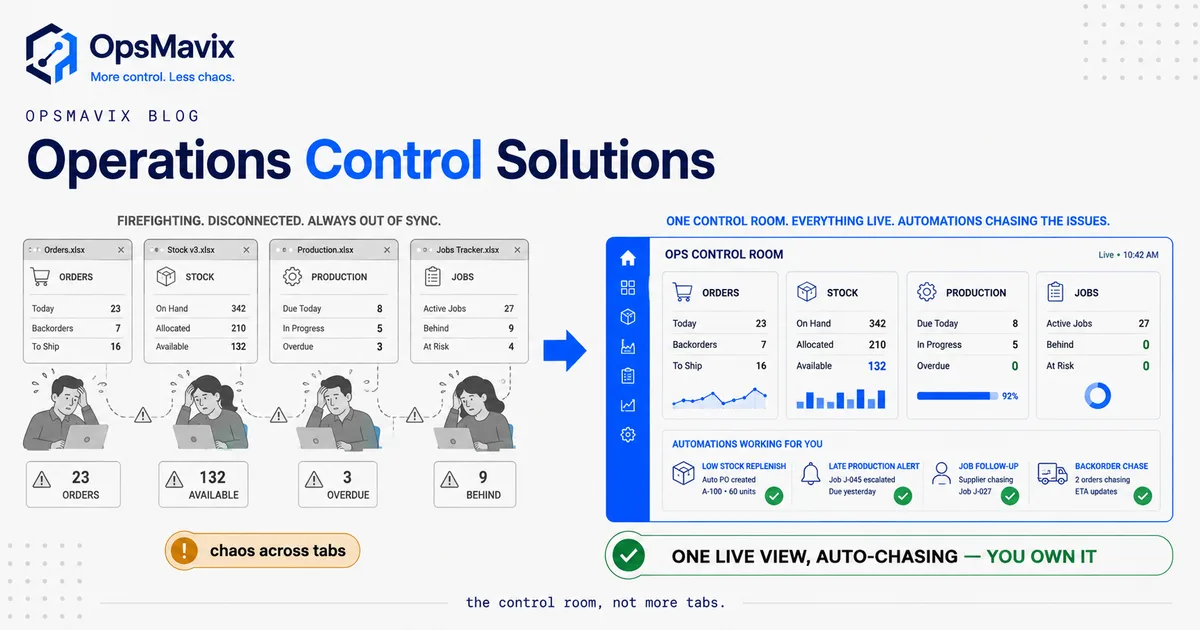
Operations control solutions are the single live layer a business runs from — one view where orders, stock, production and jobs all show their real, current state, and where automations do the chasing your people currently do by hand. They are not a report you read after the fact and not a full ERP you bend the whole company around. They sit exactly in the middle: the control room for a business that has outgrown spreadsheets but isn’t ready to be run by a heavyweight platform.
The need almost never arrives as a decision. It arrives as a symptom. A stock number nobody trusts. An order that got promised but never got made. A production job that slipped and only surfaced when the customer rang. A morning that starts with someone opening seven tabs and a WhatsApp thread just to answer “where are we?” The question underneath all of it is the same: what do we all actually run from? Operations control solutions are the answer to that question.
What an Operations Control Solution Actually Is
Strip away the branding and an operations control solution does one core job: it holds the current, true state of how work moves through your business, in one place, and keeps that state accurate as things happen. Every order taken, every unit received, every job started or finished, every purchase raised — each one updates the shared picture the instant it happens, and every person reads from the same picture.
That is the whole idea. The dashboards, the alerts, the colour-coded status — those are consequences. The thing that matters is that when your production lead, your office manager and the owner each ask “what’s the state of things?”, they see the same answer, current to the minute rather than to the last time someone updated a sheet.
Notice what it is not. It is not a passive dashboard you glance at once a day and then go back to working in the real systems. In a genuine operations control solution, the view and the work are the same surface — you don’t look at the state and then go elsewhere to change it. You act inside the control layer, and acting updates the truth for everyone. That distinction is the line between a reporting tool and a control system, and it’s covered in more depth in our guide to what an operations control system actually is.
The Control-Room Concept
Borrow the mental model from an air-traffic control room or a power-station desk. The people running it don’t need to walk the whole site to know its state — they have one screen that shows every aircraft, every reading, every alert, live. When something drifts out of range, the screen tells them before it becomes a crash. Their job is exception-handling, not data-gathering.
Most growing businesses run the opposite way. There is no control room. The “state of the business” is scattered across a stock spreadsheet, an orders inbox, a production whiteboard, an accounts package and at least one person’s head. To answer a simple question — is this customer’s order on track? — someone physically assembles the answer from four places, and by the time they’ve assembled it, it’s already slightly out of date. Every day starts with reconstruction instead of control.
One manufacturing operator described the fragile version of this vividly: the whole business balanced on “a 47-tab monster that only you understand,” with a recurring “3 AM panic when formulas break before a board meeting.” That’s not a control room. That’s a single point of failure the whole company is standing on. Another put it more bluntly — “the entire shop is run from my head.” When the state of the business lives in a spreadsheet or a skull, there is no control; there is only the person who happens to hold the truth today, and the firefighting that starts the moment they’re unavailable.
The control-room concept flips that. Instead of assembling the state on demand, the state is always assembled and always current. Instead of your best people spending their mornings finding out what’s going on, they spend them acting on what the screen already shows. The output isn’t a prettier report. It’s fewer fires, because problems surface as exceptions on one screen while they’re still small — the late job flagged the hour it slips, not the day the customer complains.
What Operations Control Solutions Pull Into One View
The specific value of operations control solutions is what they unify. For a product or ops-heavy business, four streams of truth usually live apart and need to live together:
- Orders. What’s been promised, to whom, by when, and what state each order is in — taken, confirmed, in production, ready, shipped, invoiced. Not an inbox and a spreadsheet; a live pipeline.
- Stock. One master quantity per item, per location, updated by every movement in real time — so “how many do we have” has a trustworthy answer, and reordering runs off reality instead of guesswork. This is the same fully automated inventory system discipline of letting events update the count automatically.
- Production or jobs. What’s being made or done, where each item sits in the process, what’s on time and what’s slipping — visible as status, not folklore. For makers, that’s the production tracking system view; for service teams it’s the live job board.
- Purchasing and reporting. What needs buying to keep the above moving, and the numbers that tell the owner whether the operation is healthy — pulled from the live data, not rebuilt by hand each month.
The reason these four have to share one surface is that they’re not really separate. An order commits stock. Committed stock triggers production or a purchase. Production status changes what you can promise the next customer. When each lives in its own tool, the joins between them become manual re-keying and stale copies — the exact leaks an operations control solution is built to close. One wholesale operator summed up the tax of keeping these apart: “hours every week copy-pasting orders into spreadsheets.” Every one of those hours is a join that a control layer should be making automatically.
Automations: The Chasing Your People Shouldn’t Do
A live view is half of it. The other half — the half that turns a nice screen into a control system — is automation doing the chasing. In most growing businesses, an enormous amount of skilled human time goes on being a human integration layer: copying an order from email into the system, checking whether stock covers it, emailing purchasing, nudging production, telling the customer, updating the sheet. It’s not judgement work. It’s relay work, and people are slow, expensive and forgetful relays.
An operations control solution automates the relay. A new order flows in and reserves stock, raises the purchase if cover’s short, and drops onto the production board without anyone re-typing it. A job that misses its stage deadline flags itself. A supplier who’s late gets chased by the system, not by someone remembering to. Low stock raises a reorder suggestion before you sell what you don’t have. The people are freed to do the parts that actually need a person — deciding, negotiating, fixing exceptions — while the routine chasing runs itself. The specific mechanics of ending the manual relay are in our guide to stop re-keying orders.
Here’s the OpsMavix point of view, and it’s a contrarian one: most software sold as “operations control” is really just a shared database with a dashboard bolted on. It shows you the state beautifully and then leaves all the chasing to your team anyway. That’s a viewer, not a control room. The value isn’t in seeing the fire faster — it’s in the system putting the fire out, or never letting it start, without a person in the loop. If a solution shows you a late order but still needs Sarah to chase it, you’ve bought a nicer window onto the same firefighting. Judge any operations control solution by how much chasing it removes, not how well it displays what’s on fire.
Off-the-Shelf App vs Full ERP vs Right-Sized Owned System
When the daily firefighting gets bad enough, the market offers two loud answers and one quiet one. The loud ones are “buy a cheap operations app” and “buy a full ERP.” The quiet one — build a right-sized system you own — is usually the one that actually fits a growing UK business. Here’s the honest comparison.
| Consideration | Off-the-shelf ops app | Full ERP | Right-sized owned system |
|---|---|---|---|
| Best when | One simple workflow, low volume, standard process | Large enterprise, many functions, big budget | Outgrown spreadsheets, nowhere near ERP-scale |
| Fit to your process | You bend your process to the app | You bend the business to the ERP | Shaped to how you already run |
| What it unifies | Usually one stream well, the rest bolted on | Everything, generically and heavily | Exactly your orders, stock, production and jobs |
| Automation | Fixed to the vendor’s templates | Powerful but rigid and consultant-gated | Built around your real chasing work |
| Cost model | Low monthly fee, per seat | High licence + per-seat/module, forever | Build cost, then you own it — no rented core |
| Time to value | Days, if it fits | Months, consultant-led | Scoped to the leak that hurts most |
| Ceiling | You hit a wall as you grow or add channels | Vast, but you pay for reach you won’t use | You extend it because the code is yours |
| Data ownership | Lives in their platform | Lives in their platform | Your data, your database, your rules |
Be fair to the off-the-shelf app: if you run one clean workflow at modest volume, a good tool may be everything you ever need — start there and don’t overspend. And be fair to the ERP: at genuine enterprise scale, across finance, HR, procurement and multiple sites, that reach earns its cost.
The trap is the middle, where most growing operations businesses actually live. You’re too complex for the single-purpose app, which keeps forcing your process into its shape. But you’re nowhere near needing — or wanting to pay forever for — a full ERP, most of which you’d never touch. One ERP-wary operator framed the real fear precisely: “either I learn to bend my shop to the software, or I stay on spreadsheets forever.” A right-sized owned solution is the third door out of that false choice — the specific slice of control you need, shaped to your business instead of the other way round. We break down that middle ground further in operational systems vs ERP.
A Worked Example: The 40-Person Manufacturer
Numbers make it concrete. These figures are illustrative — not a claim about a specific client — but the shape is one growing operators recognise instantly.
A UK manufacturer with around 40 staff takes orders by email and phone, tracks stock in a shared spreadsheet, runs the shop floor off a whiteboard, and invoices from an accounts package. Nothing is connected. Three leaks run constantly:
- The re-keying tax. Two office staff spend roughly a day a week each copying orders between the inbox, the stock sheet and the accounts package. Conservatively that’s around £10,000–£14,000 a year in skilled wages spent being a human integration layer — before you count the errors that re-typing introduces.
- Slipped jobs found too late. Because job status lives on a whiteboard only the floor sees, a slipped job surfaces when the customer chases, not when it slips. Say that’s 6 jobs a quarter rushed, expedited or apologised for — overtime, expedited freight and goodwill discounts quietly clearing £4,000–£6,000 a quarter.
- Blind reordering. Because the stock number is a day old and semi-trusted, purchasing over-buys slow lines “to be safe” and gets caught short on fast ones. A few thousand pounds of cash sits in overstock that won’t turn this quarter, while a stockout stalls a job during a busy week.
Add the visible pieces and the operation is leaking well into five figures a year, most of it invisible because no single number ever shows it. And it recurs every quarter until the architecture changes.
The fix isn’t a supertanker. It’s one control layer: orders captured once and flowing straight to stock, purchasing and the job board without re-keying; job status live on a screen the whole team reads; reorder suggestions off a real-time count; and automations chasing the late supplier and flagging the slipped job the hour it happens. No enterprise ERP. No per-seat licence forever. Just one true operational picture, owned — the difference between a morning spent finding out what’s going on and a morning spent running the day.
FAQ
What’s the difference between an operations control solution and a dashboard?
A dashboard shows you state; a control solution is where you act on it. In a dashboard, you look at the numbers and then go into your real systems to change anything — the view and the work are separate. In an operations control solution, the live view and the work are the same surface: you take the order, move the job, raise the purchase inside the control layer, and doing so updates the truth for everyone instantly. If you can only watch and not act, you’ve got a report, not control.
Isn’t this just an ERP by another name?
No. An ERP is a large, general platform spanning finance, HR, procurement and much more, and most growing businesses use a sliver of it while paying for all of it every month, and bending their process to fit it. An operations control solution targets the specific problem of running your day-to-day operation — orders, stock, production, jobs — from one live layer. It can be a right-sized owned system shaped to exactly how you work, without the licence weight, the modules you’ll never touch, or the “bend the business to the software” tax.
Do the automations replace my people?
They replace the relay work your people shouldn’t be doing — the copying, chasing and status-updating that eats skilled hours and adds no judgement. The automation captures the order, reserves the stock, raises the purchase, chases the late supplier and flags the slipping job. Your people are freed for the parts that genuinely need a human: deciding, negotiating and handling the exceptions the system surfaces. It’s less “fewer staff” and more “the same staff doing the work you actually hired them for.”
We’re not ready for a big system — where do we start?
Start with the smallest thing that closes your biggest leak, which for most growing operators is getting one live, trusted picture of orders and stock that the whole team reads from. Layer production/job status and automations onto that once the core picture is solid. You rarely need to replace everything at once; you need to stop each part of the business keeping its own private version of the truth. A short audit will tell you which leak is costing the most and what the cheapest fix actually is.
How is this different from operations management software?
The terms overlap, but the emphasis differs: operations management is the broad discipline of running the operation, while an operations control solution is specifically the live control layer you run it from — real-time state plus automation, not planning documents or after-the-fact reporting. For the wider picture of the discipline, see our guide to the operations management system.
How OpsMavix Can Help
OpsMavix builds right-sized, owned operations control solutions for growing UK businesses that have outgrown spreadsheets but aren’t ready to be run by a full ERP. Instead of selling you a cheap app that forces your process into its shape, or a heavyweight platform where you’d use a fraction and rent the rest forever, we map how work actually moves through your business, find where the re-keying, stale counts and late-surfacing jobs are leaking time and money, and build the specific control layer that gives you one live view of orders, stock, production and jobs — with automations doing the chasing your people do today. It’s the practical control room between an off-the-shelf tool that’s run out of road and an ERP that’s overkill. If your mornings start with reconstructing what’s going on instead of running the day, start by seeing exactly where the leaks are: Book a Free Operations Leak Audit
Sources
- OpsMavix operator interviews and vertical research (manufacturing, wholesale/distribution) — mined practitioner language on spreadsheet fragility, re-keying and firefighting. Voice-lines attributed generically; figures illustrative unless otherwise cited.
Keep reading
Getting value from OpsMavix? Add us as a preferred source on Google — you'll see more of our operations content in your AI Overviews, AI Mode and Search.