
Kitting Software: Bundles That Don't Oversell Their Parts
Kitting software exists to solve one quiet problem: a kit you sell is really several components, and unless the two stay in sync, you oversell parts you don't have. Here's what kitting software should actually track — kit recipes, component stock, build-to-order versus build-ahead — and when a right-sized custom system fits better than a rigid off-the-shelf tool.
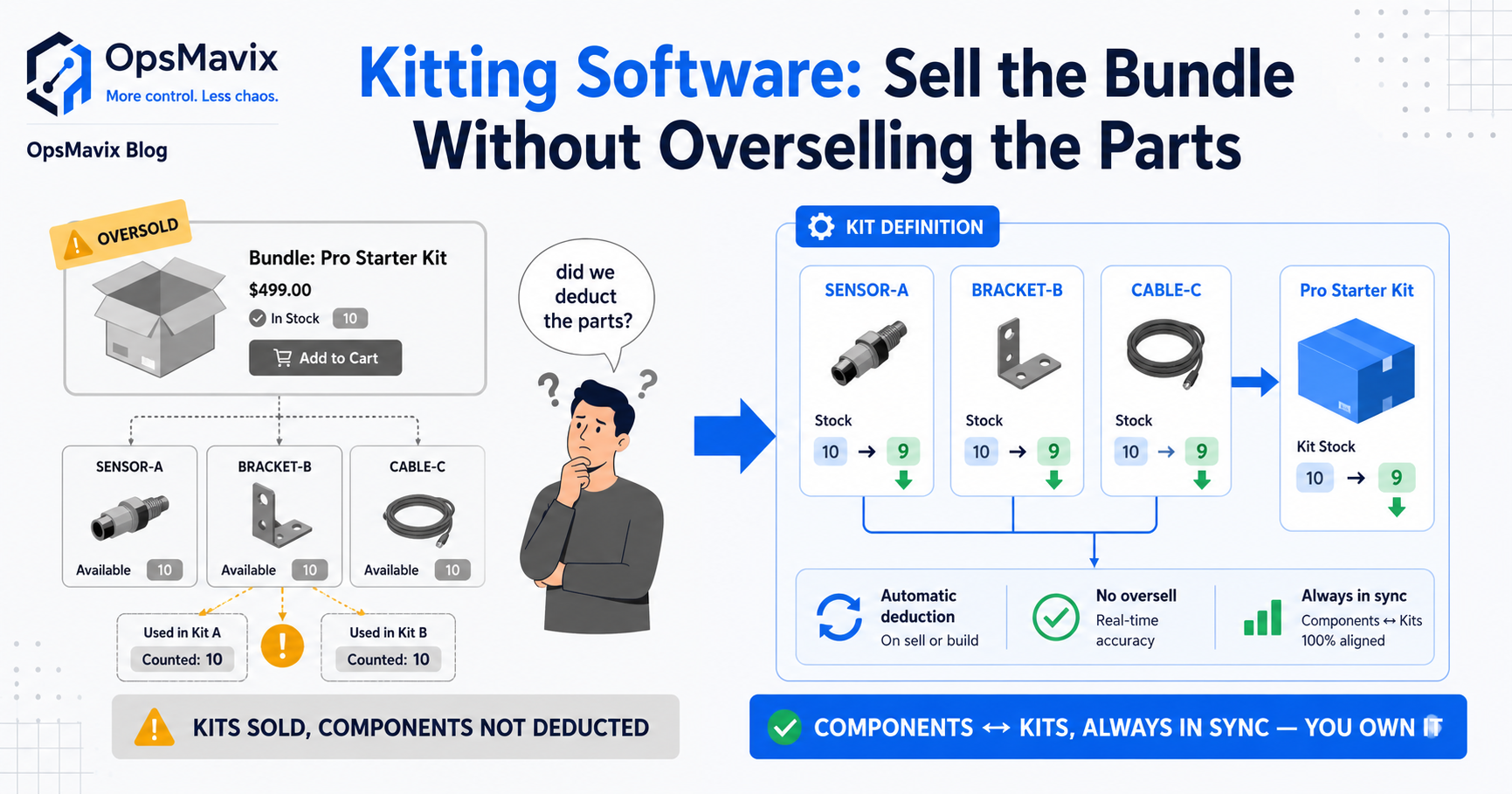
Kitting software keeps one thing honest that spreadsheets almost always get wrong: the kit you sell is really several separate components, and the stock of the kit and the stock of its parts have to move together. Sell a gift set, a starter bundle, or an assembled unit, and behind that single line sit three, five, ten SKUs that also live on their own shelves — sometimes in other kits too. When the kit count and the component count drift apart, you oversell parts you don’t have, promise assembly you can’t finish, and find out at the packing bench instead of at the order screen. Good kitting software makes the kit and its components one connected number, so availability tells the truth before you take the order.
This post is about what that actually means: kit recipes, component stock, build-to-order versus build-ahead, and where an off-the-shelf tool starts fighting the way you assemble. It’s not general picking — that’s a different job, covered in warehouse picking solution — and it’s not batch traceability either. It’s the bundling-and-light-assembly layer that sits on top of your stock.
Key Takeaways
- Kitting software tracks a sellable kit and its component parts as one connected number, so selling the kit draws down the components automatically.
- The core leak is overselling components: a shared part sits in several kits and standalone lines, and without a link, you promise stock that’s already spoken for.
- Build-to-order (assemble on demand) and build-ahead (hold finished kit stock) are different problems — the software has to handle whichever you actually run, or both.
- The kit recipe — the bill of materials for the bundle — has to be exact, versioned, and easy to change, or every substitution breaks the count.
- Off-the-shelf kitting features assume a generic bundle. If your kits share components, vary by channel, or need real assembly steps, a right-sized system usually fits better.
1. What Kitting Software Actually Tracks
The whole job of kitting software is holding two truths at once: the kit as a sellable unit, and the components it’s made from, kept in step. A kit has its own SKU, its own price, its own listing — but it has no independent existence on the shelf until someone assembles it. So the software has to know the recipe (what goes into the kit), the component stock (what’s on hand to build with), and the rule that selling one kit removes one of each component from availability.
That sounds obvious until you try to run it on spreadsheets. There, the kit is a row and the components are other rows, and nothing tells the kit row that its parts just got sold to a different order. The link that kitting software exists to hold — kit availability equals whatever your scarcest component allows — is exactly the link a spreadsheet can’t keep on its own.
2. The Core Leak: Kits That Oversell Their Components
Here’s the failure that sends most businesses looking for kitting software. A single component — say a branded box, or a part used across a range — sits inside several different kits and often sells on its own too. You’ve got 40 of it. But three kits and one standalone listing all quietly count on that same 40, each showing “in stock” as if it owned the lot. Sell across them freely and you’ll commit 60 units of something you have 40 of. The shortfall surfaces at assembly, with orders already confirmed and customers already told.
That’s the same drift that makes stock never match the system, except worse, because a kit multiplies the error — one oversold component can break every kit it belongs to. Kitting software fixes it by making component stock a shared pool that every kit and every standalone line draws from the same number. Sell a kit, and the components decrement everywhere at once, so the next order sees the true remaining count, not a stale one.
3. Build-to-Order vs Build-Ahead: Two Different Problems
Not all kitting works the same way, and the software has to match yours. Build-to-order kits are assembled when the order lands — you hold components, not finished kits, and availability is a live calculation from the parts on hand. Build-ahead kits are assembled in advance and held as finished stock — you pull kits off a shelf, and the components were consumed at build time, not at sale time. Many businesses run both: some bundles pre-made for speed, others assembled on demand to avoid tying up parts.
Off-the-shelf tools tend to assume one model and handle the other badly. If yours only understands finished-kit stock, build-to-order availability becomes a guess; if it only understands live component maths, you can’t hold a pre-built buffer for your fast movers. The distinction matters because it decides when components leave your available pool — at sale, or at build — and getting that moment wrong is how the count drifts again.
4. The Kit Recipe Has to Be Real, and Easy to Change
Every kit is a small bill of materials: this many of that, that many of this, plus the packaging. Kitting software lives or dies on how honestly it holds that recipe. If the recipe says two of a part and the kit really uses three, every build silently under-draws your components, and the count is wrong from the first order. Substitute a part when a supplier runs short and the recipe has to know — otherwise you’re consuming the wrong stock on paper while consuming the right stock in reality.
So the recipe can’t be a static list buried in a spreadsheet nobody updates. It has to be versioned, so you know which kits were built to which recipe, and quick to change, so a substitution or a component swap takes seconds and flows through to availability straight away. Rigid tools make recipe changes a chore, which is exactly why people stop keeping them accurate — and an inaccurate recipe is worse than no software at all, because it’s confidently wrong.
5. Assembly the Floor Will Actually Follow
A kit that’s correct in the system still has to be built by a person at a bench. Kitting software earns its place when it makes that build simple: a clear pick list of the components for each kit, in build order, with quantities the assembler can’t misread, and a confirm step that draws the components down the moment the kit is finished. Skip that and you’re back to memory — someone grabbing parts from feel, missing a component, over-picking another, and the count drifting with every build.
The tools that fail here are the ones the floor finds fiddly and quietly abandons. If building a kit means walking to a PC and typing into a stock sheet, it won’t happen when the bench is busy. If it’s a scan-and-confirm at the point of assembly, it sticks — and the stock stays true because the system learned about the build as it happened, not hours later.
6. Reporting: Can You Actually Fulfil the Kit?
The question kitting software should answer instantly is the one spreadsheets answer slowly and wrong: how many of this kit can I make right now, and what’s the component holding me back? True kit availability isn’t the kit’s own count — it’s whatever your scarcest component allows, across every other kit and standalone line competing for the same parts. A useful system shows that live: available-to-build per kit, the limiting component called out, and a clear view of what to reorder to unlock the bundles you sell most.
That view changes how you buy. Instead of reordering components blind, you can see which part is quietly capping three of your best-selling kits and pull it forward. It’s the same discipline as tying orders to one live stock figure — the moment kit demand and component supply are visible together, the “we’re out and didn’t know” surprise disappears. For the stock side of that picture, ecommerce inventory automation covers keeping the underlying numbers live across your channels.
7. Build vs Buy: When Off-the-Shelf Kitting Stops Fitting
Plenty of businesses run fine on the kitting feature bundled into their inventory tool — if your kits are simple, don’t share components, and don’t vary by channel, buy the ready-made thing and move on. The honest filter is whether your assembly is generic. It stops fitting when your kits share parts in tangled ways, when the same bundle sells differently across channels, when build-to-order and build-ahead both need to coexist, or when a real assembly step has to be tracked, not just a stock deduction.
That’s the gap a right-sized custom system fills — too complex for a spreadsheet’s kit column, too specific for a rigid tool that assumes one bundle shape. A built-for-you system models your kits the way you actually assemble them, keeps component and kit stock as one shared number, and shows true available-to-build across everything competing for parts. Where kitting shades into genuine production — multi-stage assembly, work orders, labour — manufacturing production tracking is the heavier layer above it, and batch and lot tracking covers traceability if your components carry lots you have to prove. The point isn’t more software. It’s kits that never oversell their parts, owned outright, shaped to how you build.
Off-the-Shelf Kitting vs a Right-Sized Custom System
| Off-the-Shelf Kitting Feature | Right-Sized Custom System | |
|---|---|---|
| Kit model | Usually one (finished stock or live maths) | Build-to-order and build-ahead together |
| Shared components | Handled simply, strains when tangled | Modelled as one shared pool across all kits |
| Kit recipe | Fixed template, awkward to change | Versioned, quick to edit, flows to availability |
| Available-to-build | Often the kit’s own count | True, from the scarcest component |
| Assembly step | Stock deduction only | Pick list + confirm at the bench |
| Fit to your bundles | Generic; you adapt to it | Built around how you actually assemble |
| Ownership | Licensed, per-seat, ongoing | Owned outright, maintained for you |
FAQ
What is kitting software?
Kitting software tracks a sellable kit alongside the component parts it’s made from, keeping the two stock figures in sync. When you sell a kit, it automatically draws down each component from a shared pool, so availability reflects what you can genuinely build. It holds the kit recipe (the bill of materials for the bundle), the component stock, and the rule that a kit can only be sold while all its parts are really there.
How does kitting software stop overselling components?
By making component stock a single shared pool that every kit and every standalone listing draws from the same number. Without that link, a component used in several kits gets counted as available by each one at once, so you commit more than you hold. Kitting software decrements the component everywhere the moment it’s committed, so the next order sees the true remaining count rather than a stale one that leads to oversells.
What’s the difference between build-to-order and build-ahead kitting?
Build-to-order kits are assembled when the order arrives — you hold components, not finished kits, and availability is calculated live from the parts on hand. Build-ahead kits are assembled in advance and held as finished stock, with components consumed at build time. Many businesses run both, and the difference decides when components leave your available pool — at sale or at build. Software that only handles one model will misreport the other.
Do I need dedicated kitting software or is a spreadsheet enough?
A spreadsheet works while kits are simple and don’t share components. It breaks once a component sits in several kits and sells on its own, because nothing tells one kit that its parts were just sold elsewhere. If you’re overselling bundles, finding shortfalls at assembly, or can’t answer “how many of this kit can I build right now,” that’s the point where a spreadsheet stops keeping up and a real system starts paying for itself.
Is a custom kitting system better than an off-the-shelf tool?
It depends on how generic your assembly is. If your kits are simple and don’t share parts, the kitting feature in an off-the-shelf inventory tool is fine. A right-sized custom system fits better when kits share components in tangled ways, vary by channel, mix build-to-order with build-ahead, or need a real assembly step tracked — and you own it outright, shaped to how you actually build, with no per-seat fees or vendor lock-in.
How OpsMavix Can Help
OpsMavix builds right-sized kitting and bundling systems for businesses stuck in the gap — too messy for a spreadsheet’s kit column, too specific for a rigid off-the-shelf tool. We build the part you actually run: kit recipes that stay true, component and kit stock held as one shared pool so bundles never oversell their parts, true available-to-build across every kit competing for the same components, and a scan-and-confirm assembly step the floor will actually use. It’s connected to the inventory numbers you already track and shaped to how you assemble, owned outright with nothing a vendor can switch off. If your kitting is simple enough for the feature in your current tool, we’ll tell you to keep it — that’s the honest answer.
If you’re not sure whether your bundles are quietly overselling their components, start by seeing where the assembly bench actually leaks. Book a Free Operations Leak Audit and we’ll map where kit and component stock drift apart today, what it’s costing in scrapped orders, re-picks and stockouts, and whether an off-the-shelf tool or a right-sized system is the genuine fit for how you build.
Keep reading
Getting value from OpsMavix? Add us as a preferred source on Google — you'll see more of our operations content in your AI Overviews, AI Mode and Search.