
Database for Small Business: What You Actually Need (It's Probably Not a Database)
Most owners googling "database for small business" don't actually want a database — they want their work to run itself. A database stores data; an operations system runs the work, with rules, workflows and alerts. Here's the honest difference, when a simple database is genuinely enough, and why a raw DB usually just moves the mess somewhere tidier.
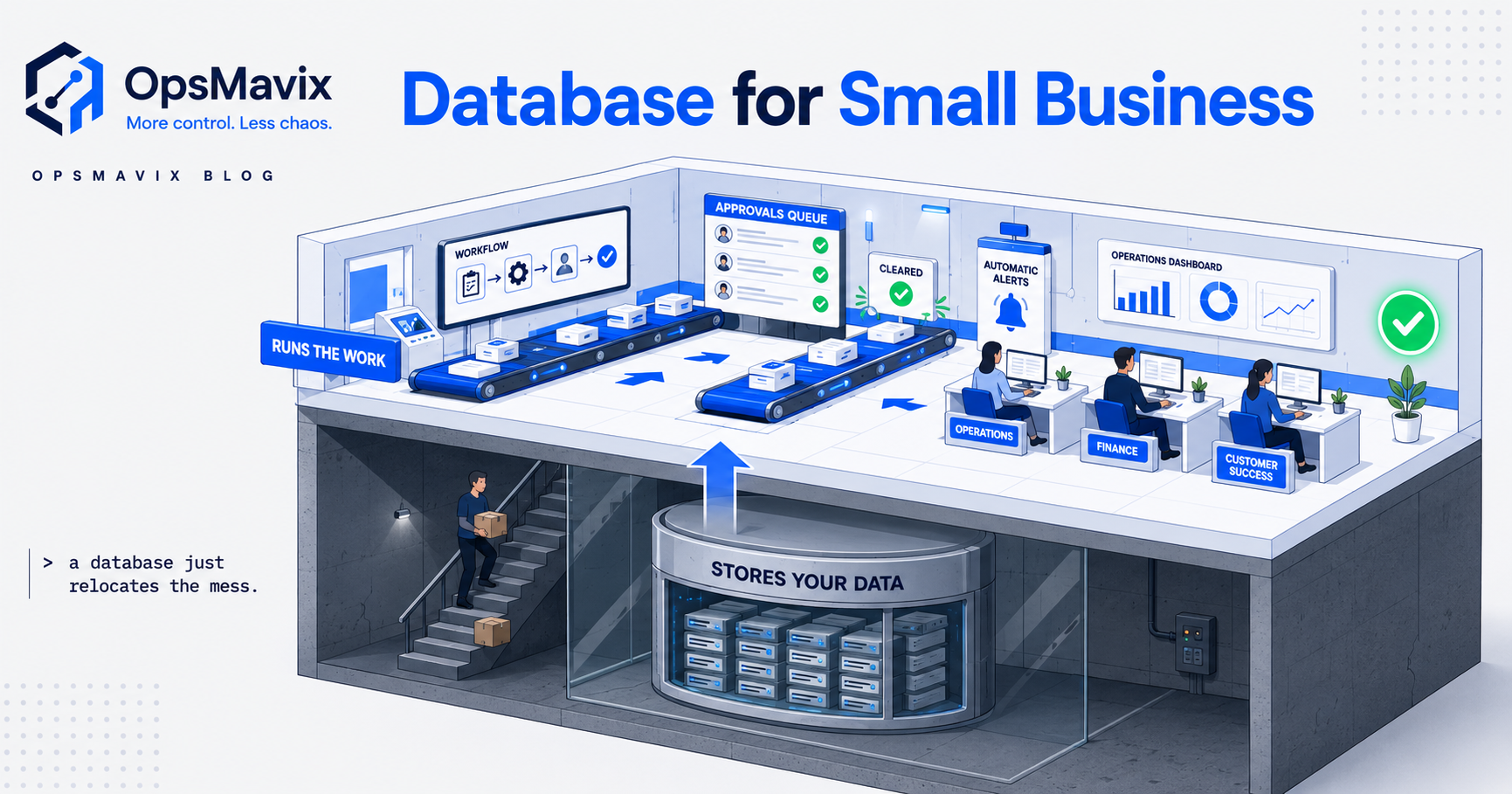
A database for small business is a structured place to store your information — customers, stock, orders, jobs — so it’s tidy, searchable, and not scattered across fifteen spreadsheets. That’s the honest answer. The thing most people don’t hear until later is that a database stores data; it doesn’t run the work. It won’t chase the unpaid invoice, stop two people selling the same unit, flag the job that’s gone quiet, or tell anyone what to do next. If you’re typing “database for small business” into Google because your operation feels chaotic, the chaos usually isn’t a storage problem. It’s a system problem — and a raw database, however neat, tends to move the mess somewhere tidier rather than end it.
This post is the database-specific version of that call. We cover what a database actually is versus the system you picture, when a simple database genuinely is enough, the honest read on Access, Airtable and Excel-as-a-database, and the line where “I need a database” quietly becomes “I need a small system.” If you want the broader build-or-buy question, that lives in custom software for business — this one stays on the database itself.
Key Takeaways
- A database stores data. An operations system runs the work — rules, workflows, who-does-what, and alerts. They are not the same purchase, and most “database” requests are really system requests.
- A simple database genuinely is enough when you mostly need to find and report on information, not act on it automatically.
- The mess you’re escaping is rarely “my data isn’t tidy.” It’s “nothing tells anyone what to do next.” A tidy database leaves that gap untouched.
- Access, Airtable, Notion and Excel-as-a-database each hold data fine — the wall is the same: they don’t enforce the process around the data, so a person still has to.
- The honest test: if the value comes from something happening when data changes, you’ve outgrown “a database” and want a small system built around it.
1. What a Database Actually Is (vs the One in Your Head)
Strip away the picture in your head and a database is something narrow: structured tables that store records and let you find, filter, sort and report on them reliably. That’s it, and it’s genuinely useful. A real database stops the same customer being typed in four different ways, kills the “which spreadsheet is the master?” question, and lets you pull a clean list in seconds instead of an afternoon of copy-paste.
What it is not is the working tool you’re imagining when you say “database.” Most owners use the word to mean “the thing that will sort out my operation” — a screen the team logs into, that knows the rules, fires reminders, and keeps everyone moving. That’s not a database. That’s a system that has a database inside it. The storage is one layer of maybe five. When the storage gets sold to you as the whole answer, you end up with beautifully organised data and the exact same daily scramble around it.
2. The Honest Line: Storage vs Running the Work
Here’s the distinction worth taping to the wall. A database answers questions: what’s our stock? who hasn’t paid? which jobs are open? A system acts on the answers: stock dropped below the reorder point, so raise the PO; the invoice is 14 days overdue, so chase it; the job’s had no update in a week, so flag it to the manager. One is a filing cabinet you can search. The other does the chasing for you.
This is the gap nobody warns you about until you’re in it. A database with perfect customer records still needs a human to remember to follow up. A database with live stock numbers still lets you oversell, because nothing stops the second sale — the data is right, but no rule sits between the data and the mistake. The value in an operation almost never comes from knowing something; it comes from the right thing happening once you know it. Databases are great at the first half and do nothing about the second.
3. When a Simple Database Genuinely IS Enough
This isn’t a pitch to over-build. Plenty of small businesses need a database and nothing more, and reaching for a system would be wasting money. Be honest with yourself first.
A plain database is the right call when:
- You mainly need to find and report, not act. A contact list, a product catalogue, an asset or member register, a research archive — where the win is “everything’s in one searchable place” and a human takes it from there.
- The process around the data lives in one or two heads and works fine. If the follow-ups, approvals and hand-offs aren’t dropping, you don’t have a workflow problem to automate yet.
- Volume and team are small. One or two people, low record counts, no two-people-touching-the-same-record collisions. The discipline of a person is still cheaper than a built system.
- You’re escaping spreadsheet sprawl, not process chaos. If the only real pain is “the data’s scattered and inconsistent,” a database fixes exactly that — and you should stop there.
If you read those and thought “that’s us,” buy or build a tidy database and don’t let anyone upsell you. The next sections are for the readers who felt the gap.
4. The Contrarian Bit: “I Need a Database” Is Usually a System in Disguise
Here’s the part most articles won’t tell you, because they’re selling databases. When a small-business owner asks for “a database,” they’re almost never describing a storage problem. They’re describing a control problem — things slipping, people forgetting, the same fire restarting weekly — and they’ve reached for “database” because it’s the word they have for “get this organised.”
So they build the database. Often a very good one. And the slipping continues, because tidying where the data lives never addressed why the work was falling through. We hear the end of that story constantly. One founder told us:
That arc is the tell. The build wasn’t wrong because the tool was bad; it was wrong because a database was being asked to do a system’s job. The data got tidy. Nothing started running. A raw database, in that situation, is the mess relocated to a nicer building — the same number of manual steps, now with cleaner inputs. Tidier is not the same as solved.
5. Access, Airtable, Notion, Excel-as-a-Database — The Same Wall
The specific tool matters less than people think, because they all hit the identical ceiling. Quick honest read:
- MS Access. A real desktop database, fine for a single power user. The wall is sharing, multi-user safety, and the fact that the workflow you bolt on lives in one person’s fragile build. When they leave, it ossifies.
- Excel-as-a-database. Not a database — a spreadsheet pretending. It has no enforced structure, so two people will desync it by Tuesday and there’s nothing stopping a bad entry. Great for sums, wrong for being the source of truth a team depends on.
- Airtable / Notion. Genuinely good databases with a friendly face, and you can get a long way. The ceiling is real, though: as the operation grows you hit field bloat, fragmented data that’s hard to oversee, and pricing that climbs with seats. The deeper limit is the same one — they store and display beautifully, but the rules and workflows around your data stay shallow, so a person keeps stitching the gaps.
None of these are bad tools. They’re storage tools, and they’re being asked to run operations. We go through this exact trade-off for one common case in PowerApps for inventory management — same lesson, different platform: the database part is easy; the system around it is the actual work.
6. From Database to System: What Actually Changes
So what does crossing the line look like in practice? The data layer barely changes — you still have customers, stock, orders, jobs. What gets added is everything that acts on them, and that’s the part that ends the scramble:
- Rules. Can’t sell stock that’s allocated. Can’t mark a job done with the sign-off missing. The database can’t stop a mistake; rules can.
- Workflows. A new order moves through pick → pack → dispatch on its own, each step prompting the next person, nothing waiting on someone’s memory.
- Who-does-what. The system knows whose turn it is and shows them their queue, instead of work living in one person’s head.
- Alerts. Low stock, overdue invoice, a job gone quiet, an approval sitting too long — surfaced the morning it happens, while it’s still cheap to fix.
That’s the difference between a screen you read and a screen that runs the day. For the full anatomy of that — the layers above the data — see what is an operations system. The short version: the database is the foundation, not the building.
Database vs Operations System — The Honest Comparison
| A database | An operations system | |
|---|---|---|
| Core job | Store, find, report on data | Run the work the data describes |
| When something changes | You look and decide | A rule fires and acts |
| Stops mistakes | No — data can be right, action still wrong | Yes — rules sit between data and error |
| Who drives the next step | A person, from memory | The system, by workflow |
| Right when | You need to find and report | The value is in something happening |
| What it leaves you with | Tidy data, same manual scramble | Work that moves without chasing |
FAQ
What is the best database for a small business?
There’s no single best one, because the right answer depends on whether you actually need a database or a system. If you genuinely just need tidy, searchable storage, a friendly cloud database like Airtable or Notion is a sensible start, and Access still suits a single power user. But if your real pain is work slipping — follow-ups forgotten, stock oversold, jobs gone quiet — no database will fix that, and you’ll want a small operations system built around the data instead. Decide which problem you have before you shop for a tool.
Is Excel a database?
Not really. Excel is a spreadsheet, and it can hold data in rows like a database, but it has no enforced structure, no reliable multi-user safety, and nothing stopping a bad or duplicate entry. For a one-person list it’s fine. As the source of truth a team relies on, it desyncs fast — which is usually the sprawl people are trying to escape when they go looking for a proper database in the first place.
Do I need a database or custom software?
Ask what creates the value. If it’s finding and reporting on information, you need a database. If it’s something happening when the data changes — an alert, a chase, a rule that blocks a mistake, a workflow that moves work along — you’ve described a system, and a database alone will leave that gap untouched. Most small businesses asking for a database are quietly describing the second one. The broader version of this decision is in custom software for business.
Will a database fix my messy operations?
Only the part of the mess that’s actually about storage. If the chaos is scattered, inconsistent data, a database fixes it cleanly. If the chaos is work falling through the cracks — people forgetting, no one knowing whose turn it is, the same fire weekly — a database makes that data tidy and changes nothing about why the work slips. That’s the trap: tidy is not the same as solved.
How much does a custom database or system cost for an SME?
A simple database can be near-free to set up yourself in a cloud tool, with the real cost being your time and the ceiling you’ll hit later. A right-sized operations system built around your data is a fixed build, typically in the low thousands to low tens of thousands once, depending on how many workflows, rules and integrations it covers — far below an enterprise platform, and you own it outright. The honest figure to weigh it against isn’t the build price; it’s what the slipping work costs you every month it continues.
How OpsMavix Can Help
OpsMavix builds the system, not just the database. We work with growing businesses who’ve already felt the ceiling — a spreadsheet that sprawled, an Access build that ossified, an Airtable base that got tidy but never started running — and who need the work itself to move without someone chasing it. We design the data model properly, then build the layer that earns its keep: the rules that block the oversell, the workflows that carry an order or a job from start to finish, the alerts that surface a leak the morning it starts. You own it outright — no per-seat tiers, nothing a vendor can sunset.
If you’re weighing a database right now, the honest first step is working out whether you actually need one — or a small system around it. Book a Free Operations Leak Audit and we’ll map where the work is really slipping, what it’s costing you in forgotten follow-ups and manual re-work, and whether a tidy database or a built-for-you system is the genuine fit. If a database is all you need, we’ll tell you that too.
Keep reading
Getting value from OpsMavix? Add us as a preferred source on Google — you'll see more of our operations content in your AI Overviews, AI Mode and Search.