
Cloud Stock Management Software: Why One True Count Beats Anywhere-Access
Cloud stock management software puts one live stock count in front of everyone, on any device, from anywhere. But 'cloud' is the easy part — the thing that actually saves you money is whether that count is accurate and whether you own it. This guide separates the marketing from the mechanics for UK teams that have outgrown spreadsheets and disconnected tools.
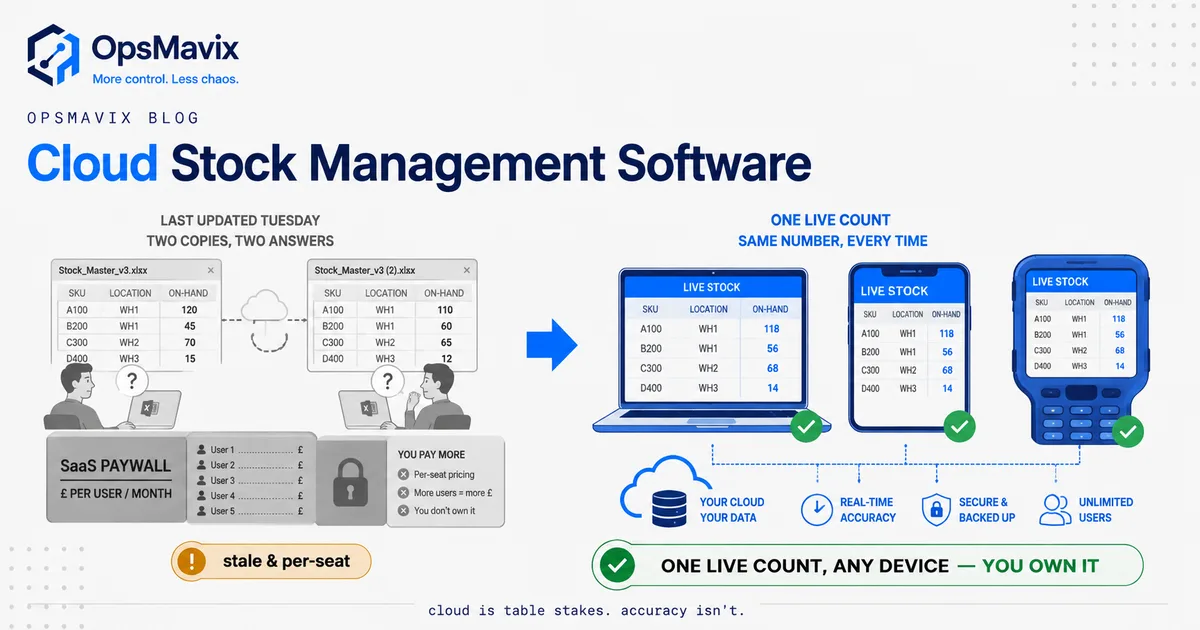
Cloud stock management software is any stock system that keeps your inventory count on a hosted server rather than on one computer, so everyone reads and updates the same figure from any device, anywhere. That’s the whole definition — and it’s also the part that matters least. The genuinely valuable question isn’t whether your stock count lives in the cloud. It’s whether that count is accurate, and whether you own it or you’re renting it by the seat. Get those two right and the cloud is just plumbing. Get them wrong and “cloud” is a nicer place to store numbers you still can’t trust.
Most growing UK businesses reach for cloud stock software at the moment the shared spreadsheet finally breaks — usually when two people edit it at once, or a warehouse count from Tuesday gets used to promise stock on Thursday and the promise turns out to be fiction. The instinct is right: you’ve outgrown the spreadsheet. The trap is treating “put it in the cloud” as the answer, when the cloud only fixes where the number lives, not whether the number is true.
What Cloud Stock Management Software Actually Does
At its core, cloud stock management software holds one master quantity for every product on a hosted database, and keeps that quantity current as stock moves. A goods-in receipt adds to it. A sale, a pick, a dispatch subtracts from it. A stock adjustment corrects it. Because the data lives on a server rather than one desktop, everyone (warehouse, office, shop floor, whoever’s on their phone in the van) reads and writes the same figure at the same time.
That shared, live figure is the entire value proposition. Not the app design, not the reports, not the barcode scanning — those are features that sit on top. The one thing that separates a real system from a fancier spreadsheet is this: when your warehouse manager says “we’ve got twelve,” the office sees twelve, the website sees twelve, and there are actually twelve on the shelf. When those four numbers agree, you can plan, promise and reorder off them. When they don’t, everything downstream is guesswork wearing a dashboard.
A capable cloud stock system does a handful of specific jobs well:
- Holds one count per SKU, updated the instant stock moves, not in an overnight batch.
- Lets multiple people work at once without overwriting each other — the thing a shared spreadsheet fundamentally cannot do safely.
- Tracks stock across locations if you hold it in more than one place, so you know not just how much but where.
- Connects to the places stock actually moves (your sales channels, your dispatch process, your accounts) so those movements update the count automatically.
If that sounds a lot like the discipline behind any inventory automation system, it is. “Cloud” describes where the software runs; automation describes whether the count stays honest without someone keying it in later. You want both, but only one of them is doing the heavy lifting.
Why “Cloud” Is the Easy Part
Here’s the uncomfortable truth the category name hides: almost every stock system sold today is cloud stock management software. The word has stopped meaning anything, because being hosted online is now the default, not a differentiator. Choosing software because it’s in the cloud is like choosing a car because it has wheels.
“Cloud” reliably gives you three genuinely useful things — access from anywhere, someone else handling backups and uptime, and a place other apps can connect to. All real. All worth having. And all of them are true of the good systems and the bad ones. The cloud tells you nothing about whether the count inside it is accurate, whether it fits how your business actually moves stock, or whether you’re free to change it when your business changes.
This is the OpsMavix point of view, and it’s contrarian on purpose: the cloud is a storage decision, not an operations decision. The operations decision is accuracy and ownership. A wrong number is still wrong when it’s hosted; a stale count is still stale when you can read it on your phone. Moving a broken process into the cloud gives you a broken process you can now break from anywhere. One operations manager we spoke to put the accuracy problem plainly: “our spreadsheet counts wind up being off, sometimes wildly so.” Nothing about hosting that spreadsheet online fixes the “wildly so.” Only changing how the count gets made, automatically, from real events, in real time, does that.
So use “cloud” as a baseline filter, then throw it away and ask the questions that matter: does the count update itself the moment stock moves, does it match how we work, and do we own it or rent it?
The Tuesday Spreadsheet vs the Live Count
The clearest way to see what cloud stock management software is actually for is to watch the exact moment a spreadsheet fails, because that moment is where most UK businesses first feel the pain.
Picture a small distributor. Every Tuesday, someone walks the racks with a clipboard and updates the master spreadsheet. For about a day, that spreadsheet is roughly right. Then the week happens. Orders ship, returns come back, a supplier delivery lands, three lines get picked for a big customer, two items break and get written off — and none of that touches the spreadsheet, because the spreadsheet only gets updated on Tuesdays. By Thursday, the number on the screen and the number on the shelf have quietly diverged. On Friday, sales promises next-day delivery on a product that ran out Wednesday. The customer gets a cancellation email. That’s the leak.
Now run the same week on a live count. The supplier delivery is booked in, so the count goes up. Each pick is confirmed on a scanner, so the count goes down. The write-off is recorded and the count corrects. The return is processed and the count goes back up. At no point is anyone “doing the spreadsheet,” because the count is a by-product of the work already happening. On Friday, the number sales sees is the number on the shelf, because every event that changed the shelf also changed the count. The Thursday cancellation never happens.
That is the difference cloud stock software is meant to deliver, and notice what’s actually doing the work. It isn’t the cloud — a spreadsheet in the cloud is still updated on Tuesdays. It’s that the count is fed by real events as they happen instead of by a weekly ritual. This is the same shift covered in how to prevent stock discrepancies: stop treating the count as something you do and make it something the system keeps. The cloud is just what lets everyone see the kept count at once.
Per-Seat SaaS Lock-In vs an Owned Cloud System
Once accuracy is sorted, the second decision, the one nobody markets to you, is ownership. Cloud stock management software comes in two shapes that look identical from the outside and behave very differently over three to five years: rented per-seat SaaS, and a cloud system you own.
Rented per-seat SaaS is the default. You pay a monthly fee, usually per user, sometimes per location or per order volume, forever. It’s fast to start and someone else runs the servers. The catch is threefold. First, the meter never stops and it climbs as you grow: every new warehouse hire, every extra channel, is another line on the bill. One team described their rented tool as costing “eight times more than Xero and realistically isn’t giving us eight times the value.” Second, the software is shaped for the average customer, not for you, so you bend your process to fit its assumptions. Third, and this is the one that bites hardest, your data and your workflows live on their platform, on their roadmap, at their mercy. Businesses that lived through a vendor sunsetting a popular stock product still describe it as watching a decision “invalidate two years’ worth of work” overnight, then scrambling for an alternative. That’s not a hypothetical; it’s the structural risk of renting your core operations.
An owned cloud system flips the arrangement. It’s still in the cloud, with the same anywhere-access, same backups, same integrations, but it’s built for how you move stock, the code and data are yours, and there’s no per-seat meter renting you back your own operation. You pay to build it, then you own it. When your business changes, you extend it instead of filing a feature request and waiting.
| Consideration | Per-seat SaaS (rented) | Full ERP | Owned cloud system |
|---|---|---|---|
| Best when | One standard workflow, small team, low volume | Large, complex, multi-function enterprise | Growing team that’s outgrown the tool but is nowhere near ERP-scale |
| Cost model | Monthly fee per seat/location, forever, rising as you grow | High licence + per-module, forever | Build cost, then you own it — no rented core |
| Fit to your process | You bend to the app’s assumptions | You bend the whole business to the ERP | Shaped to how you already run |
| Data & workflow ownership | Lives on their platform | Lives on their platform | Your database, your code, your rules |
| When your business changes | File a request, wait, or work around it | Costly reconfiguration | You extend it — the code is yours |
| Vendor risk | Price hikes, forced migrations, product sunsets | Lock-in at scale | None — you’re not renting the core |
Be fair to SaaS: if you run one simple workflow with a small, stable team and a standard product range, a good per-seat cloud tool may be everything you ever need, and building your own would be overkill. Start there and don’t overspend. The case for an owned system appears in the messy middle — when you’re too big and too specific for the off-the-shelf app to fit, but nowhere near needing to rent a full ERP most of which you’d never touch. That’s the same “outgrowing spreadsheets and disconnected tools” gap explored in operational systems vs ERP, applied to stock.
Access, Backups and Integrations — Real, but Not the Point
To be clear, the things “cloud” buys you are genuinely valuable — they’re just not the deciding factor, and it’s worth being precise about what they do and don’t cover.
Anywhere access means the warehouse, the office and the person on their phone all see the same figure. That’s real and it kills a whole class of “which version of the spreadsheet is current” chaos. But access to a wrong number just means everyone’s wrong together, faster. Access amplifies whatever accuracy you already have; it doesn’t create it.
Backups and uptime mean you’re not one dead laptop away from losing your stock history, and someone else patches the servers at 2am. Worth having, and a real upgrade on a spreadsheet living on one machine’s desktop. But whose backups they are matters — in a rented system your data is safe and hostage; in an owned one it’s safe and yours to export, query and keep whatever happens to any vendor.
Integrations are where cloud earns its keep, because stock never lives alone. It has to talk to your sales channels, your dispatch, and your accounts, so that every place stock moves updates the one count automatically. This is exactly the multi-channel inventory management problem — sell the same item on three channels and each must decrement the same pool in real time, or you oversell. But integration quality is a property of the specific system, not of “the cloud.” A rented tool integrates the way its vendor decided; an owned system integrates the way your business actually needs, because you build the join. The cloud makes integration possible; it doesn’t make it right.
So keep the backups, keep the access, keep the integrations. Just don’t mistake them for the win. They’re the floor, not the ceiling.
A Worked Example: The Warehouse That Oversold on Thursdays
Numbers make it concrete. These figures are illustrative, not a claim about a specific client, but the shape is one stock-holding businesses recognise instantly.
A UK wholesaler holds around 800 SKUs in one warehouse and sells through a trade phone line plus a Shopify store. Average order value is roughly £180. Stock is “managed” in a shared spreadsheet, counted properly on Tuesdays and patched from memory the rest of the week. It’s in Google Sheets, so technically it’s already “in the cloud” — which is exactly the point: cloud access alone changed nothing.
Three leaks run every week:
- Oversells from stale counts. Because the count is only truly right on Tuesday, by mid-week the website and the phone line quote stock that’s already gone. Roughly 6 orders a week get oversold, cancelled or part-shipped. Each one burns about £40 of admin and refund handling and costs a slice of goodwill — call it £240 a week, and two of those customers don’t come back.
- Reorder blindness. Buying decisions run off a spreadsheet that’s a day-to-several-days old, so the wholesaler over-buys slow lines and stocks out of fast ones. Conservatively, £8,000 of cash sits in overstock that won’t turn this quarter, while three bestsellers run dry during a promotion.
- The Tuesday tax. Someone spends the best part of a day each week walking racks and reconciling the sheet — roughly 4 hours of a manager’s time, every week, producing a number that’s accurate for about 24 hours before it starts rotting again.
Add the visible pieces (cancellations, refunds, lost repeat customers, the weekly count) and a single quarter clears £3,000–£4,000 in avoidable loss, before you count the £8,000 in cash trapped in the wrong stock. And it recurs every quarter until the count changes, not the hosting.
The fix isn’t a bigger subscription. It’s one master count fed by real events (goods-in, picks, dispatches, returns, write-offs) updating live, with the trade line and Shopify both reading from and writing to the same pool. The Tuesday walk becomes a spot-check, not a rescue mission. Built as an owned cloud system, there’s no per-seat meter climbing as the team grows, and when the wholesaler adds a second channel next year, they extend the system instead of renegotiating a contract. That’s the fully automated inventory system idea at a sensible size: the count keeps itself, and you own the thing that keeps it.
FAQ
What is cloud stock management software?
It’s stock-control software that stores your inventory count on a hosted server instead of one local computer, so everyone can read and update the same figure from any device, anywhere, at the same time. That shared, always-available count is the core benefit over a spreadsheet on one machine. The important caveat is that “cloud” only describes where the data lives — it says nothing about whether the count is accurate or whether you own it, which are the two things that actually determine whether the software saves you money.
Is cloud stock software better than a spreadsheet?
For anything past a very simple, single-person setup, yes, but for a specific reason. A shared spreadsheet can’t safely handle multiple people editing at once and it only updates when someone remembers to, so it drifts from reality between counts. Cloud stock software lets several people work simultaneously and, if it’s set up properly, updates the count automatically as stock moves. The upgrade that matters isn’t “it’s in the cloud” — it’s that the count becomes a live by-product of your operations instead of a chore you fall behind on.
Does “cloud” mean my stock count is accurate?
No, and this is the most common misunderstanding. The cloud only changes where the number is stored and who can see it. Accuracy comes from how the number is updated — whether every goods-in, sale, pick, dispatch and write-off feeds the count automatically in real time, or whether someone keys it in later. A stale or double-entered count is just as wrong in the cloud as in a spreadsheet; you can simply now read the wrong number from anywhere. Judge software on how it keeps the count current, not on where it hosts it.
Should I rent per-seat SaaS or build an owned system?
It depends on fit. If you run one standard workflow with a small, stable team and a simple range, a good per-seat cloud tool is often the sensible, cheaper choice — don’t over-engineer it. An owned cloud system makes sense when you’ve outgrown the off-the-shelf app (it keeps forcing you to work around it), the per-seat bill is climbing as you grow, or your process is specific enough that generic software can’t model it. With an owned system you pay to build once, the data and code are yours, there’s no per-seat meter, and you extend it as you change rather than filing feature requests and waiting.
We just need to get off spreadsheets — where do we start?
Start with the single biggest leak, which for most businesses is that the count is only accurate right after a manual stocktake and drifts all week. Fix that first: make each real stock movement update one live count automatically, and let your sales channels read from and write to that same count. Layer on multi-location or extra channels once the core count is trustworthy. You rarely need to replace everything at once — you need to stop the number on the screen and the number on the shelf from disagreeing. A short audit will tell you which leak costs the most and what the cheapest fix actually is.
How OpsMavix Can Help
OpsMavix builds right-sized, owned cloud stock management systems for growing UK businesses that have outgrown the shared spreadsheet but don’t want to rent a full ERP forever. Instead of selling you another per-seat subscription, we map how your stock actually moves — goods-in, picks, dispatches, returns, write-offs, across whatever channels and locations you run — find where the count drifts and where that drift leaks money, and build the specific system that keeps one live, accurate count that every device reads in real time. It’s hosted in the cloud, so you get the anywhere-access, backups and integrations you’d expect, but the code and data are yours, shaped to how you work, with no meter climbing as you grow. If your stock numbers are always a few days behind and you’re promising stock you don’t have, start by seeing exactly where the leaks are: Book a Free Operations Leak Audit
Sources
- EcommerceNews UK — Poor stock planning costs UK retailers £15 billion a year — estimated annual cost of poor stock planning to UK retailers, driven by stockouts and overstock rather than by where the count is stored.
Keep reading
Getting value from OpsMavix? Add us as a preferred source on Google — you'll see more of our operations content in your AI Overviews, AI Mode and Search.