
Best Inventory Software That Integrates With QuickBooks (and When You Outgrow the Add-On)
Inventory software that integrates with QuickBooks lets stock live in a proper stock system while QuickBooks stays your ledger, with movements, COGS and valuation flowing between them automatically. This is the honest guide to the real QB-integrating apps, how they actually connect (native vs middleware), where each caps out, and the pivot when you outgrow the bolt-on: a right-sized owned system that syncs to your accounts, QuickBooks or Xero.
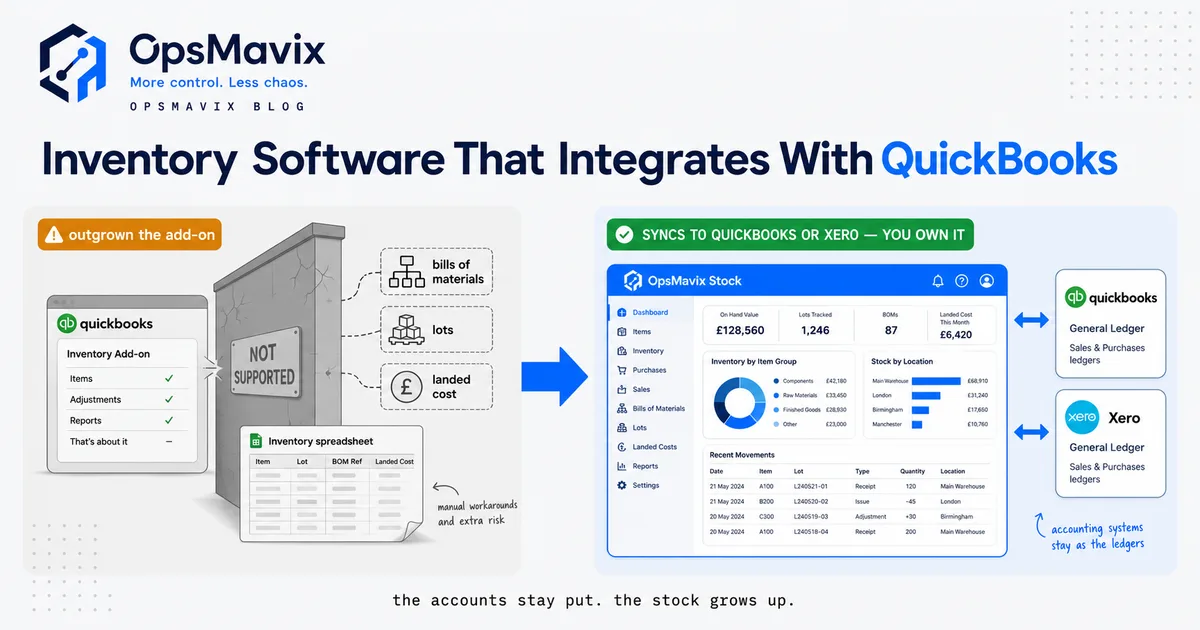
Inventory software that integrates with QuickBooks should connect operational stock records with the appropriate financial documents using clear ownership, matching rules, timing and reconciliation. The integration does not need to mirror every record in both directions. It needs to transfer the right records reliably and make failures visible without duplicate quantities or accounting entries.
This guide focuses on the handoff itself: what a connector sends, when it sends it, how corrections work and what to do when the arrangement becomes difficult to maintain. A stock application can still fit your warehouse even when a mapping or connector needs improvement.
The decision to change should follow a demonstrated gap. Configure the current application or repair an interface where that resolves the problem. Consider another packaged tool, focused custom integration or full ERP only when the wider requirements support it.

Operational stock movements and financial documents need identifiable links, even when different applications own them. Illustrative photograph, not an OpsMavix client.
Image credit: FIONASUN, CC0 1.0. Displayed at a reduced size; no additional edits.
Key Takeaways
- Describe each record flow instead of relying on a two-way sync label.
- Assign ownership of stock, item identity and financial transaction creation.
- Separate physical events from invoices, payments and valuation updates.
- Test repeated messages, partial fulfilment and corrections explicitly.
- Diagnose data, configuration and connector failures before replacing the application.
- Pilot the revised interface and reconcile opening records before cutover.
In this guide:
- 1. Replace Sync Labels with a Record Map
- 2. Understand the Documented Connector Model
- 3. Assign Stock and Identity Ownership
- 4. Separate Transaction Timing from Valuation
- 5. Make Failures and Retries Safe to Operate
- 6. Handle Returns and Corrections Deliberately
- 7. Decide Whether You Have Outgrown the Arrangement
- 8. Pilot the Interface and Preserve Reconciliation
- Frequently Asked Questions
- How OpsMavix Can Help
1. Replace Sync Labels with a Record Map
Define direction for each object
Write a small mapping table for products, contacts, orders, invoices, bills, credits, payments and valuation. For each object, list its owner and the destination’s corresponding record. Specify what event creates or changes it.
An order is not an invoice. A goods receipt is not a supplier bill. A payment status returning from finance does not mean stock movements also travel back from finance.
| Source event | Destination question | Required rule |
|---|---|---|
| Operational sale | Invoice, summary or no posting yet? | Agreed financial trigger |
| Supplier receipt | Does it create any finance record? | Receipt and billing kept distinct |
| Customer credit | What document corrects the original? | Linked correction reference |
| Stock adjustment | Does valuation need a posting? | Approved method and timing |
| Payment | Where is it recorded? | Status direction and matching |
Confirm the exact products
Record QuickBooks country edition, Online or Desktop product and subscription. Intuit’s UK guide describes stock tracking for Online Plus and Advanced. Connector support is a separate question and must be confirmed in its documentation.
A test performed in another country account or an unsupported edition is not proof that your proposed setup will work.
2. Understand the Documented Connector Model
Use named examples carefully
Cin7 Core’s QuickBooks Online guide describes configurable sync timing, error alerts and transaction settings. Katana’s overview distinguishes sales and purchase-related financial records from payment-status exchange and states that its connection supports Online, not Desktop.
Zoho Inventory’s US integration guide lists different directions for different modules, including one-way invoice flows. UK buyers should confirm the matching edition and supported scope before relying on that guide.
These examples show why integration is a transaction design rather than a promise that every screen always contains identical data. Confirm configuration and limitations in the current vendor documentation.
Compare the interface routes
| Route | Practical advantage | Responsibility to check |
|---|---|---|
| Vendor-maintained connector | Documented application-specific mapping | Supported editions, updates and monitoring |
| Integration platform | Flexible handoffs between existing tools | Event coverage, retries and connector dependencies |
| File import/export | Explicit, reviewable batch | Timing, manual steps and duplicate prevention |
| Custom interface | Tailored supported workflow | API coverage, maintenance and reconciliation |
A batch export can be sufficient for a process that only needs periodic finance posting. It should not be described as immediate operational stock synchronisation.
3. Assign Stock and Identity Ownership
Avoid independently editable balances
Decide which application owns physical quantities and which owns financial records. Follow the connector’s supported model for item types and tracking settings. Changing those settings without checking the model can create duplicate or inconsistent valuation.
Preserve stable SKU and document references. Descriptions are useful labels but can change, so they are weak primary identifiers for matching records.
Map units and existing products
Hypothetical conversion: the operational system receives four cartons of 12, or 48 units. A financial document might describe four cartons at £36 each, totalling £144. The interface needs to preserve the agreed quantity and price interpretation. Copying four into an each-unit field could misrepresent the transaction.
Check what happens when a SKU already exists in QuickBooks under a different type or unit. Resolve the rule before importing the full product list. Keep the mapping available for investigation rather than burying it inside one person’s spreadsheet.
For wholesale order operations, also define when a reservation is created and released. That operational commitment does not automatically require an accounting entry.
4. Separate Transaction Timing from Valuation
Define the financial trigger
Decide whether invoices are created on order acceptance, dispatch or another agreed event. Specify how partial shipment and deposits affect that process. The finance owner should approve the required treatment.
Physical stock may change before a supplier bill arrives. A customer payment may arrive before shipment. Do not force all these events onto one timestamp merely to make reports appear aligned.
Reconcile rather than expecting instant equality
Operational quantity, inventory valuation and the general-ledger balance can have different timing and adjustment rules. Ask how the proposed setup reconciles them and where pending transactions are visible.
| Check | Evidence needed |
|---|---|
| Invoice timing | The source event and destination date |
| Purchase timing | Receipt, bill and payment relationships |
| Valuation | Approved method and supported connector behaviour |
| Closed periods | Agreed correction process |
| Adjustments | Operational reason and financial consequence |
Do not automatically repost into a closed period to force a match. Investigate the cause and follow the approved finance procedure. Integration convenience should not decide accounting policy.
5. Make Failures and Retries Safe to Operate

A stock transaction should remain traceable when its financial update is delayed or rejected. Illustrative photograph, not an OpsMavix client.
Image credit: Nenad Stojković / Shixart1985, CC BY 2.0. Displayed at a reduced size; no additional edits.
Show actionable exceptions
Each failure should identify the source transaction, intended destination record, cause, last attempt and responsible person. Distinguish waiting, rejected, failed and completed states where the process needs them.
An alert is only useful if someone owns it. Define a review routine and escalation for records that remain unresolved beyond the acceptable delay. Show the effect on reports and decisions while a transaction is pending.
Test a lost acknowledgement
Hypothetical retry test: the destination creates invoice INV-104 for £240, but the response never reaches the source. Retrying should recognise the existing invoice through a stable identifier. It should not create another £240 invoice and a £480 total.
Preventing duplicates requires more than reducing the sync frequency. It requires a supported identity and replay rule. Test this behaviour in the supplier’s approved environment.
Also test events arriving out of order. A credit or cancellation reaching the destination before the original document needs a visible, controlled outcome. Silent omission is not a successful synchronisation.
6. Handle Returns and Corrections Deliberately
Separate financial and physical reversal
A refund can occur without goods returning. A returned item may be held for inspection. A credit note and a stock receipt therefore need different triggers where your process requires them.
Show partial returns, supplier credits and cancelled orders with existing payments. Keep links to the original transactions and confirm the supported correction route before changing records.
Avoid deleting the evidence
Ask whether editing, voiding or undoing an operational document changes a destination record that has already been paid or reconciled. Different connectors can behave differently. Follow the exact supported workflow and retain the relevant references.
| Scenario | Question to test |
|---|---|
| Partial dispatch | Are the unshipped quantity and financial document consistent? |
| Refund without return | Does physical stock remain unchanged? |
| Damaged return | Is receipt separate from saleable availability? |
| Supplier credit | Is the correction linked to the bill and stock disposition? |
| Re-authorised document | Can existing payments or postings duplicate? |
The right answer may include a controlled manual step. Document it and measure the workload instead of pretending the process is fully automatic.
7. Decide Whether You Have Outgrown the Arrangement
Diagnose the recurring failure
Group exceptions by cause: identity mismatch, account or tax mapping, unsupported event, access expiry, application limitation or unreliable data capture. Fixing an item map is different from replacing a warehouse workflow.
Check unused configuration and connector updates first. If the operational app fits and the interface is the problem, repairing or replacing the interface may be the smallest complete route.
Compare the full alternatives
Hypothetical workload example: eight weekly exceptions each take 15 minutes, totalling two hours. At £30 an hour over 48 weeks, the valued staff capacity is £2,880 annually. That is not automatically cash or enough to justify a large rebuild.
Compare configuration, another connector, another packaged app and custom development against the same gap. Include migration, validation, support and remaining manual work. A custom system can still encounter API delays, rejected documents and changing vendor behaviour.
OpsMavix can build a focused operational layer or a full ERP where appropriate, but the scope should follow the requirement. Practical ownership also needs deployment records, exports, third-party licence information and a maintainable support arrangement.
8. Pilot the Interface and Preserve Reconciliation
Start with a known baseline
Choose representative products and documents. Reconcile opening quantities, units, contacts, unpaid balances and relevant account mappings before sending new transactions.
Keep the test isolated from unintended live posting using the supplier’s supported method. Establish how the team will identify and remove or reverse test records through an approved process.
Use explicit acceptance tests
- A normal sale produces the intended financial record once.
- Partial fulfilment keeps outstanding quantities visible.
- A receipt and supplier bill follow the agreed timing.
- Refund and physical-return behaviour are distinct where required.
- Repeated messages do not duplicate quantities or postings.
- Failed records remain visible and recoverable.
- Account, tax and period handling are approved by finance.
- Operational and financial totals reconcile to known documents.
- A second person can operate the exception routine.
- Data exports preserve the references needed for handover.
Agree cutover timing and which system stops accepting changes first. Reconcile pending messages and opening records before the new interface becomes authoritative. Keep historical links and a support contact available through the transition.
Frequently Asked Questions
What does inventory software that integrates with QuickBooks mean?
It means an operational stock application exchanges defined records with QuickBooks. The relevant objects, directions, triggers and timing must be specified rather than assumed from the integration label.
Does two-way sync copy every stock movement both ways?
Not necessarily. Different modules can use different directions, and finance may receive documents or valuation rather than the operational movement history.
Can we use an Online connector with QuickBooks Desktop?
Only where explicitly supported. Check the exact product, country edition and subscription; Online compatibility does not establish Desktop compatibility.
Which application should own product identity?
Agree an authoritative record and stable mapping. Avoid matching only by description, especially where existing products have different units or types.
Should stock and the ledger always match immediately?
Not necessarily at every moment. Timing, valuation and pending records can differ. The agreed model needs reconciliation and visible explanations for those differences.
How do retries avoid duplicate documents?
Use a stable transaction identifier and a supported replay rule. Test the case where a destination record exists but its acknowledgement was lost.
Does a refund automatically return stock?
It should follow the actual process. A refund, physical receipt and decision to make goods saleable can be separate events.
When should we replace the add-on?
When a valuable gap remains after checking data, configuration and interface behaviour. Sometimes changing the connector is sufficient; sometimes the operational model needs a broader change.
What should an integration pilot prove?
It should prove normal transactions, partial work, corrections, retries, failures and reconciliation, with another team member able to maintain the routine.
How OpsMavix Can Help
OpsMavix can trace the specific stock-to-finance handoffs that require repeated correction, then assess configuration, integration and development options.
We can build inventory automation linked to wholesale orders or production tracking, retaining useful finance tools where appropriate. A full custom ERP is also possible when wider requirements justify it.
Contact OpsMavix with one failed or duplicated transaction, its source and destination records, and the desired outcome. We can define the cause and test a limited correction before recommending a larger change.
Keep reading

Getting value from OpsMavix? Add us as a preferred source on Google — you'll see more of our operations content in your AI Overviews, AI Mode and Search.