
Inventory Software for Retail Stores: Running One True Stock Count Across Every Shop
Inventory software for retail stores is what keeps stock straight when you run more than one shop, a stockroom and an online channel off the same products. This guide shows UK retailers how to get one true count across every location — without buying a bloated platform, when you're outgrowing spreadsheets and disconnected tools.
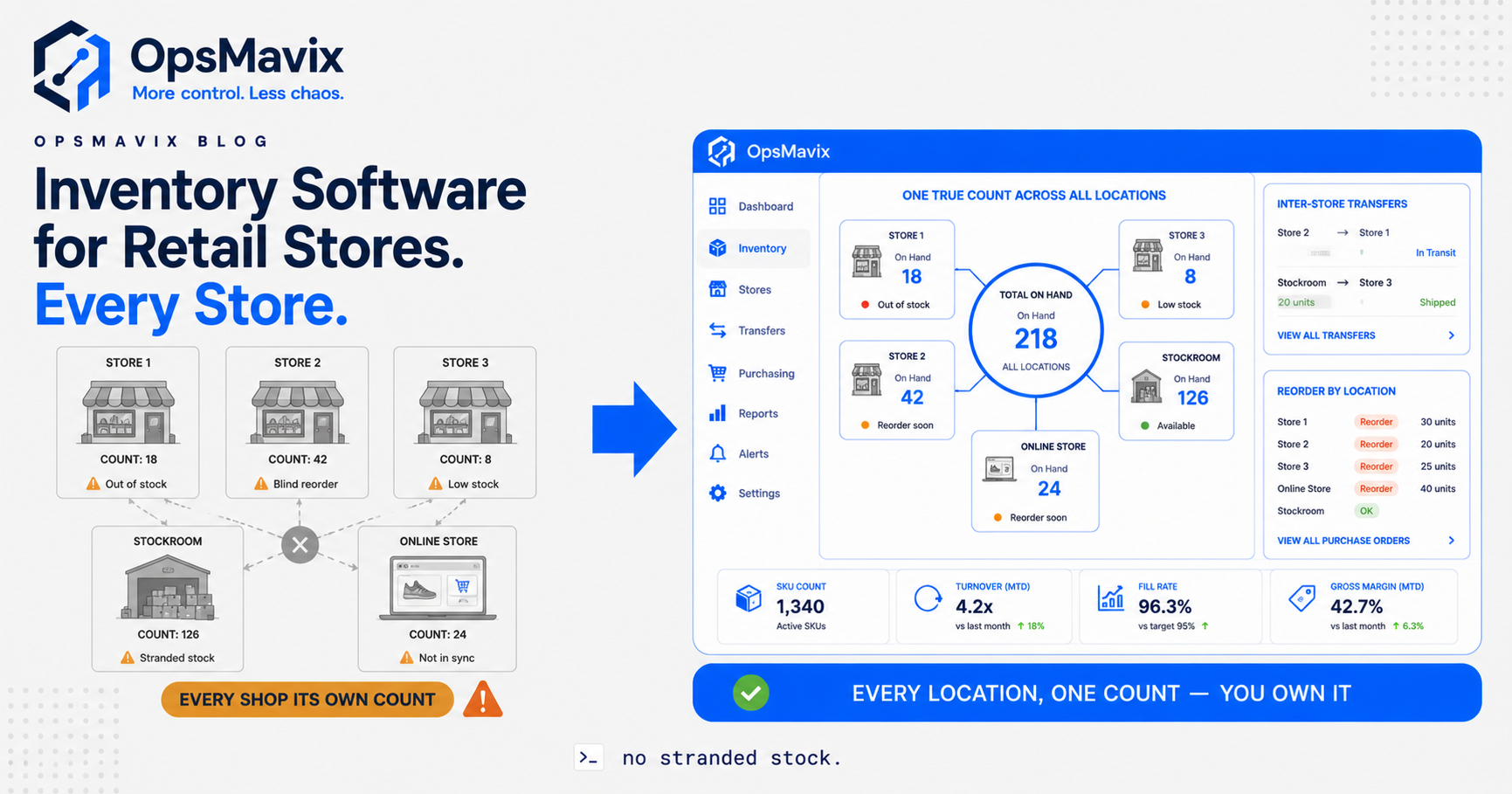
Inventory software for retail stores is the system that answers one deceptively simple question: exactly how many of each product do you have right now, and where is it? For a single shop that question is easy — you walk the floor and count. The moment you run a second shop, a stockroom that supplies both, and an online store selling the same lines, the answer stops being something you can see and starts being something you have to trust a system to tell you. Most growing UK retail chains discover, usually during a busy trading weekend, that the system they’ve been trusting is a spreadsheet updated last Tuesday.
The pain rarely arrives with the second store. It arrives with the third, or when online takes off, or when one branch keeps “borrowing” stock from another with a text message instead of a transfer record. Suddenly nobody can say with confidence whether the last three units of a bestseller are in the Leeds shop, the stockroom, or already sold online. You reorder to be safe, overstock one branch, run another dry, and the numbers you plan from are quietly fictional. This is a visibility problem before it’s an inventory problem, and you don’t fix visibility by counting harder.
Quick summary: Customer theft alone cost UK retailers a record £2.2 billion in 2023/24, part of a total retail crime bill of £4.2 billion, according to the British Retail Consortium. That is the loss retailers can see. Across a multi-store estate, the losses you can’t see — stock that’s miscounted, stranded in the wrong branch, or written off because nobody knew it existed — compound on top of it, and they all trace back to not having one true count.
Contents
- What Inventory Software for Retail Stores Actually Does
- The Multi-Store Blind Spot
- Inter-Store Transfers and Per-Location Reorder
- Off-the-Shelf Tool vs Full ERP vs Right-Sized Owned System
- Integrations and Why Ownership Matters
- A Worked Example: The Three-Shop Chain
- FAQ
- How OpsMavix Can Help
- Sources
What Inventory Software for Retail Stores Actually Does
Strip away the marketing and inventory software for a multi-store retailer does one core job: it holds a single master quantity for every product, tagged by location, and keeps that quantity accurate as stock moves. Every till sale, every online order, every delivery in, every transfer between shops, every write-off — each one adjusts the master count the instant it happens, and every branch reads from the same figure.
That’s the whole game. Not the dashboards, not the reports, not the barcode scanning — those are consequences. The thing that matters is that when your Manchester manager looks at “units on hand” for a SKU, they see the same truth as your online store, your stockroom, and head office, and that truth is current to the minute rather than to last stocktake.
Underneath that, a good retail inventory system does a handful of specific things well. It tracks stock per location rather than as one blurred pile, so you know not just how many you own but where they physically are. It records movements between locations as first-class events, not afterthoughts. It sets reorder points per branch, because the Leeds shop and the online channel don’t sell at the same rate. And it gives you one place to look instead of three shop counts and an ecommerce backend you reconcile by hand. This is the same discipline covered in our retail store inventory management system guide, extended to the specific mess that appears once you have more than one shop.
The Multi-Store Blind Spot
Here is the failure mode that defines multi-store retail. Each location behaves as if it owns its own stock, because operationally it does — the staff can only see what’s on their own shop floor. So each branch counts, orders and worries in isolation. Head office, meanwhile, adds up four separate counts of varying age and calls the total “inventory.” Nobody is looking at the same number, so nobody is looking at the truth.
Say a popular line sits at 3 units in Store A, 1 in Store B, 6 in the stockroom, and shows 4 available online. That’s 14 units of promised availability, but how many do you actually own, and are any of those the same units counted twice or already sold? Without one system deciding, the honest answer is “roughly fourteen, probably.” You reorder off “probably.” That’s the blind spot.
The cost shows up in three places at once. First, stranded stock: a size or colour dies in one branch while another branch turns customers away for the exact same item, because neither can see the other’s shelf. Second, phantom shrinkage: inventory accuracy across retail averages around 83%, with genuinely good operators reaching 95% or more and more than half of retailers sitting below 80%, which means for most chains one unit in six is misplaced, miscounted or gone unnoticed. Some of that is theft you can measure; a lot of it is drift you can’t. Third, corrupted planning: every buying decision you make rests on that soft 83%, so you over-buy the lines you think are thin and under-buy the ones you think are deep, across every branch, every week.
None of this is because your staff are careless. It’s because the architecture asks each shop to be the source of truth for stock the whole business is selling. Fix the architecture and the “carelessness” evaporates.
Inter-Store Transfers and Per-Location Reorder
Two mechanics separate real multi-store inventory software from a single-shop tool with extra logins: transfers and per-location reordering. Get these wrong and everything downstream stays fictional.
Inter-store transfers are where most spreadsheet setups quietly die. A customer wants a coat the Bristol shop has sold out of; Bath has two, so Bath posts one over. If that movement isn’t a recorded transaction — stock out of Bath, in-transit, then into Bristol — then for the hours or days it’s moving, it exists in both branches, or neither, depending on who updated what. Multiply that across dozens of informal “can you send me one” texts a week and your counts rot from the inside. Proper software treats a transfer as a tracked event with an in-transit state, so the units are always accounted for and never double-counted.
Per-location reorder points are the second half. A single reorder level for the whole business is useless when your flagship store turns a SKU five times faster than your quiet branch and your online channel spikes on weekends. Right-sized inventory software lets each location carry its own minimum, its own reorder quantity, and its own supplier lead time, then flags replenishment per branch — and, crucially, tells you when the smart move is a transfer from an overstocked shop rather than a fresh purchase order. That single suggestion, “move six from Store C instead of buying more,” is often where multi-store software pays for itself, because it turns stranded stock back into sales instead of markdowns.
Behind both sits the non-negotiable foundation: one master count per SKU per location, updated in real time. Transfers and reorder logic are only as trustworthy as the count they run on, which is exactly the inventory automation system discipline of letting each event update the truth automatically rather than waiting for someone to key it in later.
Off-the-Shelf Tool vs Full ERP vs Right-Sized Owned System
When multi-store stock becomes painful, the market offers two loud answers and one quiet one. The loud ones are “buy a cheap retail app” and “buy a full ERP.” The quiet one — build a right-sized system you own — is usually the one that actually fits. Here’s the honest comparison.
| Consideration | Cheap off-the-shelf retail tool | Full ERP | Right-sized owned system |
|---|---|---|---|
| Best when | One or two shops, standard workflow, low volume | Large, complex, multi-function enterprise | Growing chain outgrowing the tool but nowhere near ERP-scale |
| Multi-location logic | Basic or bolted-on; often per-store, not unified | Deep, but generic and heavy | Modelled to your exact stores, stockroom and online |
| Inter-store transfers | Frequently weak or manual | Full-featured but rigid | Shaped to how your branches actually move stock |
| Cost model | Low monthly fee per store/user | High licence + per-seat/module, forever | Build cost, then you own it — no rented core |
| Fit | You bend your process to the app | You bend your whole business to the ERP | The system is shaped to how you already run |
| Implementation | Days | Months, consultant-led | Scoped to the leak you actually have |
| Ceiling | You hit a wall as you add stores or channels | Vast, but you pay for reach you won’t use | You extend it because you own the code |
| Data ownership | Lives in their platform | Lives in their platform | Your data, your database, your rules |
Be fair to the cheap tool: if you run two shops with a simple range and steady demand, a good off-the-shelf retail inventory app may be everything you ever need. Start there and don’t overspend. And be fair to the ERP: at genuine enterprise scale, across finance, HR, procurement and hundreds of stores, that reach earns its cost.
The trap is the middle, where most growing UK chains actually live. You’re too big and too multi-site for the basic app, which keeps treating each store as an island. But you’re nowhere near needing — or wanting to pay forever for — a full ERP, most of which you’d never touch. You need the specific slice that unifies your stores’ stock, and you need it shaped to your business rather than the other way round. That’s the multi-channel inventory management problem applied to physical locations: one live pool, many shop windows.
Integrations and Why Ownership Matters
Retail inventory doesn’t live alone. It has to talk to the tills (your EPOS), the online store, the suppliers you raise purchase orders with, and the accounts package that values it all. The integration question decides whether your system is one connected truth or another silo pretending to be one.
The critical join is EPOS to inventory. Every till sale in every branch must decrement the master count in real time — not in an overnight batch, because an overnight batch means every branch trades all day off yesterday’s numbers. The same goes the other way: a delivery booked in at the stockroom, or an online order shipped, has to update the shared pool the instant it happens. Where those joins are event-driven, the count stays honest. Where they’re scheduled or manual, you’re back to negotiating a truce between stale figures.
This is where ownership stops being an abstract principle and starts being money. A rented platform integrates the way its vendor decided, on its roadmap, at its price. When your business changes — you add a click-and-collect flow, a new EPOS, a wholesale side to the business, a fourth region with different supplier lead times — you file a feature request and wait, or you bend your operation to what the platform already supports. An owned system gets extended. You add the join you need because the code is yours. Over a few years of a growing chain, that difference is the gap between a system that grows with you and a subscription that slowly becomes a ceiling you’re paying to sit under.
Ownership also protects the asset that matters most: your operational data. How every SKU sells in every location, transfer patterns, true shrinkage per branch — that history is the raw material for every buying and expansion decision you’ll make. In an owned system it lives in your database, queryable however you like. In a rented one it lives in theirs, exportable on their terms.
A Worked Example: The Three-Shop Chain
Numbers make it concrete. These figures are illustrative — not a claim about a specific client — but the shape is one multi-store retailers recognise instantly.
A UK homeware retailer runs three shops (Leeds, Harrogate, York), a central stockroom that feeds all three, and a Shopify store selling the same range. Average selling price is around £35. Stock across the estate is “tracked” in a shared spreadsheet each store updates after cashing up, plus a nightly export to Shopify.
On paper it holds together. In practice, three leaks run constantly:
- Stranded stock. A seasonal line sells out in Leeds while 11 units sit dead in York. Leeds turns away roughly 8 customers over two weeks before anyone notices York has them. At £35 with a 55% margin, that’s about £154 of margin walked out the door — and York’s units eventually get marked down 40% to clear, losing another £154 against full price.
- Informal transfers. Staff move stock between shops by text, without recording it. Over a quarter this quietly corrupts the count on around 30 SKUs, so the nightly Shopify export oversells 3 of them, triggering 5 cancelled online orders, refunds, and two one-star reviews mentioning “said in stock, wasn’t.”
- Blind reordering. Because head office plans off a spreadsheet that’s a day old and roughly 83% accurate, it over-buys slow lines and under-buys fast ones across all three shops. Conservatively, £3,000 of cash sits in overstock that won’t turn this season, while bestsellers stock out during peak.
Add the visible pieces — lost margin, markdowns, refunds, admin firefighting — and a single quarter clears £1,500–£2,500 in avoidable loss, before you even count the £3,000 in cash trapped in the wrong stock. And it recurs every season until the architecture changes.
The fix isn’t a supertanker. It’s one master count per SKU per location, real-time EPOS and Shopify updates instead of nightly exports, transfers recorded as tracked events, and per-location reorder points that suggest “move from York” before “buy more.” No enterprise ERP. No per-store licence forever. Just one true count, owned.
FAQ
What’s the difference between single-store and multi-store inventory software?
Single-store software only has to answer “how many are on this shop floor.” Multi-store software has to hold one master count per product per location, track stock moving between those locations, and let each branch reorder to its own rhythm — all while presenting head office a single, current view of the whole estate. Many cheap tools claim to be multi-store but really just run several single-store counts side by side, which is exactly the blind spot that costs chains money. True multi-store software unifies the count; it doesn’t just multiply it.
Do I need a full ERP to manage stock across several shops?
Usually not. An ERP is a large, general platform spanning finance, HR, procurement and much more, and most growing chains use a sliver of it while paying for all of it every month. If your actual problem is that your shops, stockroom and online channel can’t see one another’s stock, you need unified multi-location inventory — a fraction of what an ERP does. A right-sized owned system that handles your specific locations and transfers is often cheaper, faster to go live, and shaped to how you actually trade.
How does inventory software handle stock transfers between stores?
Properly, it treats a transfer as a tracked transaction with three states: stock leaves the sending branch, sits “in transit,” then arrives at the receiving branch. At every stage the units are accounted for in exactly one place, so they’re never double-counted or lost while moving. That’s the difference between a recorded transfer and the “can you post me one” text messages that quietly rot spreadsheet counts. Good software also suggests transfers from overstocked branches before recommending a fresh purchase order.
Will this connect to my existing tills and online store?
It should — and the connection is the whole point. Your EPOS tills and your online store are where stock actually moves, so both must update the shared master count in real time, not overnight. A right-sized system is built around the EPOS and ecommerce platforms you already use rather than forcing you to rip them out. The failure mode to avoid is any setup where a channel updates the count on a schedule or by hand, because that reintroduces exactly the drift you’re trying to kill.
We’re not ready for a big system yet — where do we start?
Start with the smallest thing that closes your biggest leak, which for almost every multi-store chain is getting one true count per location that every shop, the stockroom and online all read from in real time. Layer transfers and per-location reordering onto that once the count is trustworthy. You rarely need to replace everything at once; you need to stop each location keeping its own private version of the truth. A short audit will tell you which of your leaks is costing the most and what the cheapest fix actually is.
How OpsMavix Can Help
OpsMavix builds right-sized, owned operations systems for growing UK retailers running more than one shop, a stockroom and an online channel off the same stock. Instead of selling you a cheap app that treats every store as an island, or a full ERP where you’d use a fraction and rent the rest forever, we map how your locations actually move and sell stock, find where the drift, stranded inventory and blind reordering are leaking margin, and build the specific system that gives you one true count across the whole estate — real-time EPOS and online updates, tracked inter-store transfers, and per-location reorder logic, owned outright by you. It’s the practical layer between an off-the-shelf tool that’s run out of road and an ERP that’s overkill. If your shops can’t see each other’s stock and you’re reordering things you already own, start by seeing exactly where the leaks are: Book a Free Operations Leak Audit
Sources
- British Retail Consortium — Retail crime “spiralling out of control” (Crime Survey 2025) — record £2.2bn customer theft and £4.2bn total retail crime cost in the UK, 2023/24.
- Growsights — Top 15 Retail Inventory KPIs Every UK Business Should Track in 2026 — average retail inventory accuracy ~83%, with over half of retailers below 80% and high performers at 95%+.