
Wholesale Management Software: The System That Stops You Re-Keying Every Order Into Xero
Wholesale management software is meant to take an order once and carry it all the way to the invoice — customer-specific pricing, stock, credit check and accounts sync — without anyone re-keying it. Most UK wholesalers get sold an ecommerce tool or a full ERP, and neither fits a business outgrowing spreadsheets but not looking for an off-the-shelf ERP. Here's the right-sized third option.
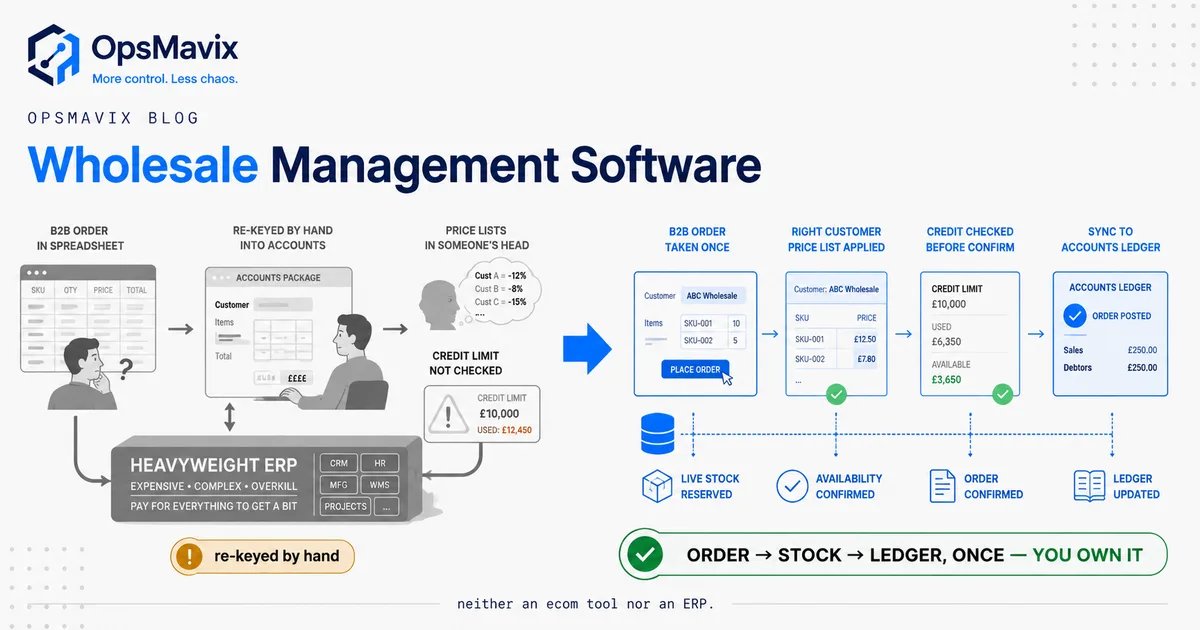
Wholesale management software is the system that lets an order arrive once — by email, phone, portal or trade rep — and travel all the way to a paid invoice without a single human re-typing it into a spreadsheet or an accounts package. It holds each customer’s agreed price list, checks stock, checks their credit limit, and pushes a clean invoice into Xero, Sage or QuickBooks automatically. If your business does most of that by hand right now, you don’t have wholesale management software. You have people acting as the software.
That is the real leak in most growing UK wholesale and distribution businesses. Not that the orders are wrong at the point of sale, but that the same order gets keyed two, three, sometimes four times: once when the customer sends it, again into a stock spreadsheet, again onto a Xero invoice, and one more time when someone reconciles what actually shipped. Every re-key is a chance to fat-finger a quantity, apply the wrong trade price, or oversell stock you don’t have. The cost isn’t dramatic on any single order. It’s a slow, constant bleed of hours and small errors that scales with your growth.
What Wholesale Management Software Actually Has to Do
Strip the category down and wholesale management software has one core job: keep a single, accurate thread running from the order a customer placed to the money in your bank, with the right price, the right stock, and the right credit terms applied automatically along the way. Everything else (dashboards, reports, barcode scanning) is downstream of that thread staying unbroken.
Underneath, a system that actually earns the name does a handful of specific things well:
- Holds a price per customer, not a price per product. Trade pricing is the whole business. Customer A pays a different rate to Customer B for the same SKU, and both differ from your published list. The system has to know that without anyone remembering it.
- Captures a B2B order the way B2B orders actually arrive — often as a bare list of codes and quantities, not clicks through a retail cart.
- Checks stock in real time across every channel so you don’t promise units that are already sold or on another order.
- Enforces credit terms. It flags a customer over their limit or past due before the order ships, not after.
- Pushes the invoice to accounts automatically, so the order is keyed once and the accounts package receives it clean.
Miss any one of those and humans stay wedged in as the integration layer, copy-pasting between tools. That is exactly the state most wholesalers are stuck in, and it’s the state good software is supposed to end. Our guide on how to stop re-keying orders walks through the mechanics of closing that specific gap.
The Re-Keying Leak: Order to Invoice, By Hand
Here is the failure mode that defines wholesale operations. An order lands — a fax, a photo of a handwritten sheet, an email with item codes, a phone call. Someone reads it, works out the customer’s agreed prices, checks whether the stock is there, then types the whole thing into a spreadsheet. Later, someone types it again onto a Xero invoice. The order exists in three places, keyed by hand each time, and the numbers only match if nobody slipped.
One distributor described the daily reality to us plainly: “I spend hours every week copy-pasting orders into spreadsheets.” Another pointed at the quiet danger in phone orders specifically: “on a telephone you can still hear wrong amounts.” These aren’t edge cases. This is the standard operating model in a huge slice of UK wholesale, and it holds together right up until volume climbs, staff turn over, or a customer disputes an invoice that traces back to a mis-keyed quantity nobody can now reconstruct.
The cost breaks into three parts, all recurring:
- Time. Skilled ops staff spending hours a week as human copy-paste machines. That is labour you’re paying for that produces nothing except moving data between two tools that should talk to each other.
- Errors. Wrong quantities, wrong trade prices, oversells. Each one turns into a credit note, a return, a chased short-payment, or a customer who quietly moves to a supplier that gets it right.
- Key-person risk. When the pricing logic and the reorder rules live in one person’s head or in “complex macros written by a guy who left,” as one operator put it, the whole flow is one resignation away from chaos.
None of this shows up as a line on the P&L called “re-keying.” It hides inside overtime, credit notes, and the customers who don’t come back. That’s what makes it a leak rather than a cost: you don’t see it, so you don’t fix it.
Customer-Specific Price Lists (the thing generic tools fumble)
If there is one feature that separates wholesale management software from a dressed-up retail tool, it’s pricing. Retail has one price per product. Wholesale has a matrix: this customer on this contract pays this rate for this SKU, that customer gets a volume break at 50 units, a third is on a special until quarter-end, while your published trade list sits behind all of it as the fallback.
Generic ecommerce platforms fumble this because they were built for a shopper who sees one price and clicks buy. Bolt “wholesale” onto them and you usually get a single blanket discount tier — 10% off everything for anyone tagged “trade” — which collapses the moment your real pricing is per-customer and per-product. Then someone is back in a spreadsheet maintaining the “real” prices, and the software you bought to end that is being kept accurate by hand.
Right-sized wholesale software treats the price matrix as a first-class thing:
- A default price list, plus overrides per customer, per customer group, and per product.
- Volume breaks and contract prices with start and end dates that apply themselves.
- The correct price applied automatically the instant an order is captured — so nobody has to look it up or remember it.
Get this right and a whole category of error and argument disappears. The customer is billed the price you agreed, every time, because the system knows the agreement. That’s a large part of what a proper B2B order management system is built around, and it’s the piece generic tools most often can’t do without a spreadsheet crutch.
B2B Order Capture Without a Retail Checkout
B2B orders don’t look like B2C orders, and pretending they do is where a lot of “wholesale” software falls over. A trade customer doesn’t browse and add to cart. They send a list — “20x AB-114, 6x AB-220, 100x CL-09” — because they already know exactly what they want and they order it every week. Forcing that buyer to click through a consumer-style checkout is friction they’ll refuse; they’ll just email or phone the order instead, and you’re back to keying it by hand.
Wholesale order capture has to meet the buyer where they are:
- A fast re-order flow built for repeat trade buyers — previous orders, favourites, bulk entry by product code, not a shopping-cart journey.
- A trade portal for customers who’ll self-serve, so their order lands as structured data instead of an email you have to interpret.
- A rep/CSR order screen for the orders that still come by phone or email, where your team captures once into the same system rather than into a spreadsheet.
The point isn’t to force every customer onto a portal — plenty of good trade buyers will phone forever, and that’s fine. The point is that however the order arrives, it gets captured once, into a system that already knows the customer’s prices and your stock. This is the same discipline covered in our sales order management software guide, applied to the specific shape of B2B ordering.
Credit Control and Multi-Channel Stock
Two things quietly separate a wholesaler that scales cleanly from one that grows into a mess: knowing who can afford to owe you more, and knowing what you actually have to sell.
Credit control is where wholesale differs sharply from retail. You ship on terms and get paid later, so every order is effectively a small loan. Wholesale software should check a customer’s credit limit and outstanding balance before the order is confirmed — flagging the account that’s over its limit or past due so someone decides deliberately whether to ship, instead of discovering the exposure at month-end when the debt’s already out the door. Without that gate, your best growth quarter can also be the quarter you extend credit to a customer who won’t pay.
Multi-channel stock is the other half. Most growing wholesalers now sell through more than one route — trade orders, a B2B portal, maybe an ecommerce side, maybe Amazon. If each channel reads its own stock figure, you oversell. One live pool that every channel draws from is the only way to promise availability honestly. That’s the core of multi-channel inventory management: one master count, many order routes, decremented in real time.
Put credit control and live stock together at the point of order capture and something valuable happens — the order is validated before it’s promised. Right price, real stock, good credit, all checked automatically in the moment, instead of unwound painfully after the fact.
Ecommerce Tool vs Full ERP vs Right-Sized Owned System
When re-keying and oversells get painful, the market offers two loud answers and one quiet one. Loud answer one: “put a B2B front-end on a Shopify-style ecommerce platform.” Loud answer two: “buy a full distribution ERP.” The quiet answer — build a right-sized system you own, shaped to your pricing and workflow — is usually the one that actually fits. Here’s the honest comparison.
| Consideration | Generic ecommerce / B2B tool | Full distribution ERP | Right-sized owned system |
|---|---|---|---|
| Best when | Simple flat-tier trade pricing, self-serve buyers | Large, complex, multi-function distributor | Growing wholesaler past spreadsheets, not near ERP-scale |
| Customer price lists | Usually one blanket trade discount | Deep but generic and heavy to configure | Modelled to your exact per-customer, per-SKU matrix |
| B2B order capture | Retail checkout bolted to trade | Full-featured but rigid | Shaped to how your orders actually arrive |
| Credit control | Weak or absent | Comprehensive | Built to your terms and limits |
| Accounts sync | Basic connector, often one-way | Its own accounting module you must adopt | Clean two-way sync to the Xero/Sage/QuickBooks you keep |
| Cost model | Low monthly fee, per-seat as you grow | High licence + annual + per-seat, forever | Build cost, then you own it — no rented core |
| Fit | You bend your pricing to the app | You bend your business to the ERP | The system is shaped to how you already run |
| Data ownership | Lives in their platform | Lives in their platform | Your data, your database, your rules |
Be fair to the ecommerce tool: if your trade pricing genuinely is a simple flat tier and most of your customers will happily self-serve, a good B2B ecommerce platform may be all you ever need. Start there and don’t overspend. And be fair to the ERP: at real scale — hundreds of staff, multiple warehouses, finance and procurement and HR all in one — that reach earns its keep.
The trap is the middle, where most growing UK wholesalers actually sit. Too big for QuickBooks and a spreadsheet, which can’t hold customer pricing or credit logic at all. Nowhere near needing — or wanting to pay forever for — a full ERP, most of which you’d never touch. You need the specific slice that captures orders once, applies the right price, checks stock and credit, and syncs to accounts. Our wholesale distribution software and wholesale accounting software guides go deeper on each side of that gap.
A Worked Example: The £6m Distributor
Numbers make it concrete. These figures are illustrative — not a claim about a specific client — but the shape is one wholesalers recognise instantly.
A UK distributor turns over about £6m, selling roughly 1,200 SKUs to around 300 trade accounts, each on their own agreed pricing. Orders arrive by email, phone and the odd fax. Two staff spend their mornings reading orders, looking up each customer’s prices in a master spreadsheet, checking stock in a second sheet, keying the order into a sales spreadsheet, then later raising the invoice in Xero by hand.
On paper it works. In practice, four leaks run constantly:
- Re-keying time. Two staff, roughly 2 hours each per day, on copy-paste order entry the system should do automatically. That’s around 20 hours a week of skilled time — conservatively £12,000–£18,000 a year in loaded cost, producing nothing but moved data.
- Pricing errors. With prices looked up by hand across 300 accounts, mistakes are inevitable. Say 1 in 40 orders ships on a wrong price. Some undercharge (margin lost outright), some overcharge (a credit note, an argument, a dented relationship). Across a year that’s a steady drip of leaked margin and admin.
- Oversells. Stock read from a spreadsheet that’s hours old means promising units already gone. A handful of oversells a month turns into back-orders, apologetic phone calls, and the occasional lost customer who found a supplier that could actually confirm stock.
- Credit exposure. With no automatic limit check, an account quietly drifts past its terms and keeps ordering. One bad debt of a few thousand pounds a year — entirely avoidable if the order had been flagged at capture — wipes out the margin on dozens of clean orders.
Add the visible pieces — wasted hours, credit notes, back-orders, one bad debt — and a single year clears well over £20,000 in avoidable loss, before you count the customers who drift away because the experience is sloppy. And it compounds: the bigger the distributor grows, the more the manual model costs.
The fix isn’t a supertanker. It’s one system that captures each order once, applies the customer’s price automatically, checks live stock and credit at the point of order, and pushes a clean invoice into Xero. No hundred-grand ERP. No per-seat licence forever. Just the order-to-invoice thread, unbroken and owned.
FAQ
What’s the difference between wholesale management software and an ecommerce platform?
An ecommerce platform is built around a shopper who sees one price and clicks buy. Wholesale management software is built around a trade customer on agreed terms — customer-specific price lists, credit limits, order-by-code, and shipping on account. You can bolt a “trade” mode onto an ecommerce tool, but it usually collapses to a single blanket discount and can’t hold real per-customer, per-product pricing without a spreadsheet propping it up. If your pricing is genuinely per-customer, that’s the line where you’ve outgrown a generic ecommerce tool.
Do I need a full ERP to run a wholesale business?
Usually not, and often it’s the wrong buy. A full distribution ERP spans finance, procurement, HR and much more, and most growing wholesalers use a fraction of it while paying the licence, the annual fee and per-seat costs on all of it. If your actual problem is that orders get re-keyed, prices get looked up by hand, and stock oversells, you need a focused order-to-invoice system — a sliver of what an ERP does. A right-sized owned system that handles your pricing, orders and accounts sync is often cheaper, faster to go live, and shaped to how you already run.
Will it sync with Xero, Sage or QuickBooks?
It should — that’s the point. The whole aim is that an order is keyed once and the accounts package receives the invoice clean and automatically, rather than someone re-typing it. A right-sized system is built around the accounts software you already use, with a proper two-way sync, so you keep your accountant, your VAT setup and your reporting exactly as they are. The failure mode to avoid is any tool that wants you to abandon your accounts package and adopt its own weaker accounting module.
How does customer-specific pricing actually work?
The system holds a default price list, then layers overrides on top: per customer, per customer group, per product, plus volume breaks and time-limited contract prices. When an order is captured for a given customer, the correct price is applied automatically — nobody looks it up or remembers it. That single mechanic removes a large slice of wholesale error and dispute, because every customer is billed the exact price you agreed, every time, without anyone maintaining a pricing spreadsheet by hand.
We’re not ready for a big system yet — where do we start?
Start with the smallest thing that closes your biggest leak. For most wholesalers that’s the re-keying: capture each order once, into a system that already knows the customer’s prices and your stock, and syncs the invoice to accounts. Layer credit checks, a trade portal and multi-channel stock on once the core thread is solid. You rarely need to replace everything at once — you need to stop your team being the copy-paste layer between tools. A short audit tells you which leak is costing the most and what the cheapest fix actually is.
How OpsMavix Can Help
OpsMavix builds right-sized, owned operations systems for growing UK wholesalers and distributors stuck in the gap between spreadsheets and a full ERP. Instead of selling you an ecommerce tool that can’t hold real trade pricing, or a distribution ERP where you’d use a fraction and rent the rest forever, we map how your orders actually arrive, where the re-keying, pricing errors and oversells are leaking time and margin, and build the specific system that carries an order once — from capture through customer-specific pricing, live stock and credit control, straight to a clean invoice in your Xero, Sage or QuickBooks — owned outright by you. It’s the practical layer between a tool that’s run out of road and an ERP that’s overkill. If your team spends its mornings copy-pasting orders into spreadsheets, start by seeing exactly where the leaks are: Book a Free Operations Leak Audit
Sources
- Operator and practitioner sentiment in this guide is drawn from OpsMavix’s own research interviews with UK wholesale and distribution operators. Voice-lines are attributed generically to protect participants’ privacy.
- Cost and time figures in the worked example are illustrative models based on typical wholesale operations, not claims about a specific client. Validate against your own order volumes, staff rates and error rates before acting on them.
Keep reading
Getting value from OpsMavix? Add us as a preferred source on Google — you'll see more of our operations content in your AI Overviews, AI Mode and Search.