
Wholesale Accounting Software: What It Actually Needs to Do (and What It Shouldn't)
Most wholesalers go looking for wholesale accounting software and get sold a bloated all-in-one platform that promises to run the entire business. This is the honest guide to the real split: your accounting software does the ledger and VAT brilliantly, and a right-sized operations layer handles stock, orders and pricing — then feeds clean numbers back. Get that division right and you stop paying for software that does two jobs badly.
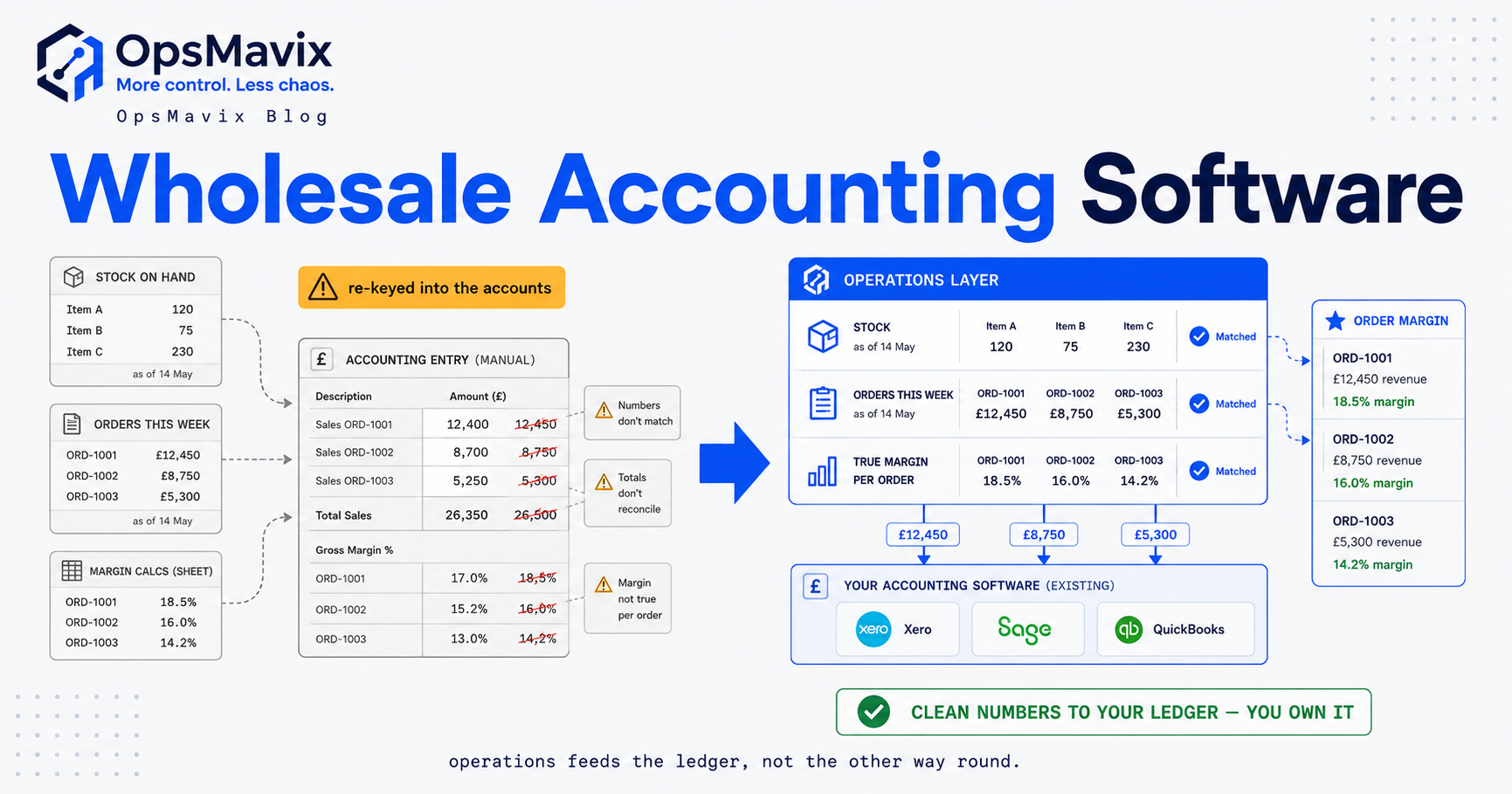
Wholesale accounting software is the system that runs a distributor’s books — the ledger, the VAT return, the invoices out and the bills in — and for that job the mainstream tools are genuinely excellent. Where it gets expensive is the assumption tucked inside the phrase: that the software running your accounts should also run your stock, your orders, your pricing tiers and your warehouse. It shouldn’t, and the businesses that force it to end up paying for a bloated platform that does two very different jobs badly. This is the honest version of how the pieces actually fit.
Quick summary: The wholesale and retail trade industry generated more turnover than any other UK sector in 2024, at £1,629.8 billion (ONS) — an enormous amount of stock moving through businesses whose accounting software was never built to control it. The right split is simple: dedicated accounting software (Xero, QuickBooks, Sage) owns the ledger, VAT and statutory reporting; a right-sized operations layer owns stock, orders and pricing, and feeds clean numbers back into the accounts. Trying to make one tool do both is where the cost and the mess come from.
Contents
- What “wholesale accounting software” actually means
- What your accounting software is brilliant at — leave it there
- Where accounting software runs out of road for a wholesaler
- The all-in-one wholesale suite pitch (and its catch)
- The right-sized alternative: an owned operations layer
- Comparison — all-in-one suite vs accounting software + operations layer
- Worked example — the cost of forcing one tool to do both
- How the clean-numbers handover works in practice
- FAQ
- How OpsMavix Can Help
- Sources
What “Wholesale Accounting Software” Actually Means
There are two things people mean by the phrase, and conflating them is the root of most bad software decisions.
The narrow meaning is the correct one: accounting software that a wholesaler uses to keep its books. That’s Xero, QuickBooks or Sage doing the ledger — sales and purchase invoices, bank reconciliation, VAT, the profit-and-loss and balance sheet. This is the book of record. Your accountant lives here, HMRC’s Making Tax Digital rules point here, and none of that should change (GOV.UK).
The broad meaning is where the trouble starts: a single platform that promises to be the accounting software and the stock system and the order-management system and the pricing engine for the whole distribution business. That’s not accounting software any more — that’s an ERP wearing an accounting badge. Whether you should buy one of those is a completely separate decision from “what keeps my books”, and the sales process usually blurs the two on purpose. Keep them apart and the rest of this gets clear. The same split holds if you think of yourself as a distributor rather than a wholesaler; see our guide to accounting software for a distribution business.
What Your Accounting Software Is Brilliant At — Leave It There
Be fair to the tools before criticising them, because the criticism is narrow. For a wholesaler, mainstream accounting software does a set of jobs that you genuinely should not try to move anywhere else:
- The ledger and statutory accounts. Double-entry, trial balance, P&L, balance sheet — the stuff your accountant and Companies House need.
- VAT and Making Tax Digital. VAT-registered businesses are required to keep digital records and file through compatible software, and your accounting package is that software (GOV.UK). This is not a job to reinvent in a stock tool.
- Sales and purchase invoicing, and bank reconciliation. The money-in, money-out record and matching it to the bank.
- Debtors and creditors. Who owes you, who you owe, and the aged reports that drive your credit control.
If a “wholesale accounting software” pitch tells you to migrate any of this into a bigger platform, treat that as a cost and a risk, not a feature. The ledger is the one part of the stack that already works. The problem was never your accounts. It’s everything around the accounts.
Where Accounting Software Runs Out of Road for a Wholesaler
Accounting software is built accounts-first, and its stock features are a light add-on — fine for a simple buy-and-resell shop, quickly outgrown by a real distributor. The gaps are consistent across the mainstream tools:
- Valuation is fixed and thin. Xero’s standard inventory supports only weighted-average cost; its higher Inventory Plus tier adds FIFO, and that’s the lot (inFlow). If you need standard costing, or landed cost baked into valuation, you’re stuck.
- One place, one bin. Xero treats all inventory as if it sits in a single location, with no real pick/pack workflow or bin locations even on the paid tier (inFlow). A wholesaler with two warehouses and a trade counter has already outgrown that — see multi-location inventory management for why one shared figure matters.
- No assemblies, kits or bills of materials. If you bundle, kit or break bulk, the accounting tool can’t represent it — there’s no assembly or sub-assembly support (inFlow).
- No serial, lot or expiry tracking. For food, chemicals, regulated or perishable lines, this is a hard stop, not an inconvenience (Unleashed).
- Reordering is manual. No automatic reorder points that raise a purchase order, no purchase-order suggestions, no demand forecasting — reorder levels, where they exist at all, are informational only (inFlow).
- Item ceilings. Xero manages efficiently up to around 4,000 inventory items; a broad-catalogue distributor bumps that ceiling (Unleashed).
None of this makes the accounting software bad. It makes it a ledger that does light stock, not a stock system that does accounts. So the wholesaler ends up doing what nearly everyone in this position does: running the “real” stock and orders in a spreadsheet beside the accounts, with a person re-keying between the two. That spreadsheet is the leak. It has no audit trail, one broken formula away from a silent error, owned by one person — and every movement gets entered twice, which is where the mismatches and the wrong margins live.
The All-in-One Wholesale Suite Pitch (and Its Catch)
Faced with those gaps, the obvious-looking answer is the one the market pushes hardest: buy a single all-in-one wholesale platform that does accounting, inventory, orders, purchasing and pricing in one login. No more spreadsheet, no more two systems — one throat to choke.
The pitch is seductive and, for some businesses, correct. But it carries a catch that rarely makes the demo:
- You’re buying a template. An all-in-one suite assumes a shape of business. It fits beautifully if your operation matches the shape its makers had in mind, and starts fighting you the moment your normal way of working is the thing the template treats as an exception — an odd pricing tier, a consignment arrangement, a bundle that isn’t quite a bundle.
- You often re-platform your accounts to get it. To use the suite’s stock strength you frequently have to move your ledger onto its accounting module too — a migration of the one thing that already worked, plus retraining your accountant, plus whatever the suite’s VAT handling does or doesn’t do well.
- You pay for breadth you don’t use. Per-seat pricing on modules half your team never opens, and a vendor roadmap you don’t control.
- The workarounds come back. When the template doesn’t fit, the side-spreadsheet quietly reappears — now beside a platform you’re paying five figures a year for. You’ve bought the bloat and kept the leak.
There’s a reason this pattern is so common in distribution specifically; the same dynamic plays out across supply chain management software, where breadth is sold as safety and turns into cost. The suite isn’t a scam. It’s just frequently the wrong size — too much platform for a business that needed one right-sized layer, and a forced migration of the accounts it never needed to touch.
The Right-Sized Alternative: An Owned Operations Layer
There’s a third option that the two-way “spreadsheet vs mega-suite” framing hides. Keep your accounting software exactly where it is — it’s doing its job — and add one right-sized operations layer that owns the jobs the ledger can’t: stock, orders, purchasing and pricing. Then wire that layer to feed clean numbers back into the accounts automatically.
This is the OpsMavix position, and it’s worth being precise about the boundary because it’s the whole point:
- The ledger stays in your accounting software. OpsMavix does not replace Xero, QuickBooks or Sage, and it does not do your VAT return. The book of record, statutory accounts and Making Tax Digital filing stay exactly where they are (GOV.UK). Your accountant notices nothing except that the numbers arriving are now right and on time.
- The operations layer owns stock and orders. One true stock figure across every location and channel, orders entered once and validated, purchasing driven by real reorder logic, pricing tiers handled the way you actually run them — the jobs an operations control system exists to do.
- It’s built to your shape, and you own it. Because it’s a right-sized system built around your actual flow rather than a template, your normal operation isn’t an “exception”. There’s no side-spreadsheet holding the parts a template couldn’t, and no per-seat creep — you own the layer.
The division of labour is the deliverable. Accounting software does what it’s brilliant at. The operations layer does what the ledger can’t. And a clean, automatic handover between them means nobody’s job is “keep the two systems agreeing”.
Comparison — All-in-One Suite vs Accounting Software + Operations Layer
Two honest routes out of the spreadsheet. They suit different businesses; the point is to pick with eyes open, not to be sold breadth as safety.
| All-in-one wholesale ERP / accounting suite | Your accounting software + a right-sized owned operations layer | |
|---|---|---|
| Runs the ledger & VAT | Its own accounting module (usually a migration) | Your existing Xero / QuickBooks / Sage, untouched |
| Runs stock, orders, pricing | Its modules, within the template | The operations layer, built to your flow |
| Fit to how you actually work | Great if your shape matches the template | Shaped to your operation; odd cases are built, not worked around |
| Migration risk | Re-platform accounts + retrain accountant | None — the ledger doesn’t move |
| Odd cases (bundles, tiers, consignment) | Workaround or a returning side-spreadsheet | Built the way you run them |
| Cost shape | Per-seat modules + vendor roadmap you don’t control | Right-sized to the jobs the ledger can’t do; you own it |
| Where the numbers live | One platform, one vendor | Ledger in accounts; operations truth in the layer; clean feed between |
| When it’s the right call | Your business genuinely matches the suite’s shape | You’re outgrowing spreadsheets, not looking for (or wanting) a full ERP |
Neither column is “the answer” for everyone. If your business genuinely matches a suite’s assumed shape and you’re happy to migrate the ledger, the left column can be right. The right column is for the very common case: a growing distributor whose accounts already work, whose stock and orders don’t, and who doesn’t want to buy — or re-platform onto — a whole ERP to fix one half of the picture.
Worked Example — The Cost of Forcing One Tool to Do Both
Numbers make the leak concrete. These figures are illustrative, not a study — plug in your own.
Take a wholesaler processing 80 stock and order movements a day — receipts, picks, adjustments, price overrides — currently kept in a spreadsheet and then re-keyed into the accounts. Say each re-key, including the check that it matched, takes about 90 seconds.
| Spreadsheet beside accounts | All-in-one suite | Accounting software + operations layer | |
|---|---|---|---|
| Movements re-keyed / day | 80 | 0 | 0 |
| Re-keying time / year (250 days) | ~500 hours | ~0 | ~0 |
| At £18/hour labour | ~£9,000/year | negligible | negligible |
| Ledger migration | none | re-platform accounts | none — ledger untouched |
| Fit to odd cases | side-spreadsheet | workaround or side-spreadsheet returns | built to your flow |
| Oversell risk across locations | high — no shared live figure | low, if template fits | low — one figure every channel reads |
| Margin accuracy | drifts with every missed re-key | depends on template fit | costed your way, posted clean |
| What you own | a fragile file | a subscription | the operations layer |
The ~£9,000 is only the visible line. It doesn’t price the oversells across two warehouses, the hour your accountant spends untangling a wrong stock valuation at year-end, or the pricing decision made on a margin that was never real. Preventing the oversell in the moment is a stock-system job, not a ledger job — how to prevent overselling walks through why the accounts can only ever tell you after it happened. Re-keying is the leak you can measure; the wrong margin is the one that costs more and shows up last.
How the Clean-Numbers Handover Works in Practice
The whole model rests on one thing being done properly: the operations layer feeding the accounting software cleanly and automatically. If that handover is manual, you’ve just rebuilt the spreadsheet problem with extra steps. Done right, it looks like this:
- Capture once, at the point it happens. A goods-in scan, a picker confirming a line, a sale on a channel — the movement is recorded a single time, where and when it occurs, and validated so a wrong code can’t propagate. Everything downstream reads from that one act.
- The operations layer holds the operational truth. One live stock figure per location, order status, real costs including landed cost. This is the source of truth for operations — not a copy of the ledger.
- Only the accounting-relevant facts flow to the ledger. Sales invoices, supplier bills, and the value of stock that moved as it becomes cost of sold goods — posted to the right accounts automatically, on a cadence your accountant is happy with. Purchasing and pick-lists stay in the operations layer where they belong; the accounts get the financial summary, not the operational noise.
- Nobody reconciles by hand. The role of “the person who exports from one system and types into the other” simply doesn’t exist. That role was the leak given a chair. Designing it out is the same discipline whether you’re taming re-keyed orders or purchasing — capture once, validate at entry, let the systems read from that single record.
The test of a good setup is boring: your accountant opens the ledger and the numbers are right, on time, and match the warehouse — and no one on your team can name the person whose job is keeping the two in step, because there isn’t one.
FAQ
Does OpsMavix replace my accounting software?
No — and it’s important to be blunt about it. Your accounting software (Xero, QuickBooks, Sage) stays exactly where it is as your ledger and book of record. It keeps doing the accounts, the VAT return and your Making Tax Digital filing (GOV.UK). OpsMavix builds the operations layer around it — stock, orders, purchasing, pricing — and feeds clean numbers back. If anyone pitches you a “wholesale accounting software” that wants to replace your ledger, that’s a migration you probably didn’t ask for.
Isn’t an all-in-one wholesale suite simpler than running two systems?
It looks simpler in the demo. In practice you’re not running two systems — you’re running one accounting tool doing what it’s good at and one operations layer doing what the ledger can’t, with an automatic feed between them. The all-in-one suite is “one system” only until your operation stops matching its template, at which point the side-spreadsheet comes back and you’re paying a platform fee for the privilege. Simplicity is about the right division of labour, not the number of logos.
Can’t I just use my accounting software’s built-in inventory?
For a simple buy-and-resell business with few SKUs, one location and one channel — yes, and you should. You’ve outgrown it when you hold stock in more than one place, bundle or kit, track lots or serials, need a costing method it doesn’t offer, or want reorder points that actually raise a purchase order. Xero’s native inventory, for instance, is single-location, weighted-average-cost, no assemblies and no automatic reordering (inFlow). Past that line, the stock job belongs in a dedicated layer that reports back.
Who still does my VAT and year-end?
Your accounting software and your accountant, exactly as now. The operations layer never touches the VAT return or statutory accounts — it just makes sure the sales, purchases and stock values landing in the ledger are correct and timely, so the VAT and year-end are built on real numbers instead of a reconciled guess.
How do I know if I need this rather than a bigger ERP?
The signal is the shape of your mess. If your accounts already work and it’s stock, orders and pricing that are chaotic — and you’re propping them up with spreadsheets beside the ledger — you need a right-sized operations layer, not a full ERP replacing everything. If you genuinely need to replace core finance, manufacturing planning and HR all at once, that’s an ERP conversation. Most growing wholesalers are in the first camp and get sold the second.
How OpsMavix Can Help
OpsMavix builds a right-sized, owned operations system for growing UK wholesale and distribution businesses — the layer that sits around your accounting software and handles the stock, orders, purchasing and pricing your ledger was never built to run. We don’t replace Xero, QuickBooks or Sage, and we don’t do your VAT; we make the numbers flowing into them clean, so your accounts are right and on time while your warehouse and your books finally agree. If you’re outgrowing spreadsheets but not looking for — or not wanting — a full ERP, and you’ve been eyeing an all-in-one suite that wants to swallow the whole business to fix one half of it, start with the leak instead of the software: Book a Free Operations Leak Audit.
Sources
- Office for National Statistics — Annual Survey of Goods and Services, UK: 2024
- inFlow — Xero Inventory Limitations: Multi-Location, Manufacturing & Reordering Gaps
- Unleashed — Xero Inventory Management Guide: How it Works & Limitations
- GOV.UK — Making Tax Digital for VAT