
Accounting Software With Inventory Management: Where the Two Systems Break
Accounting software with inventory management promises one place for your money and your stock, but growing businesses keep hitting the same stock-value mismatch: finance and the warehouse disagree on what you actually own. This guide explains why the join breaks, compares a cheap tool, a full ERP and a right-sized owned system, and shows the fix for a business that has outgrown spreadsheets and disconnected tools.
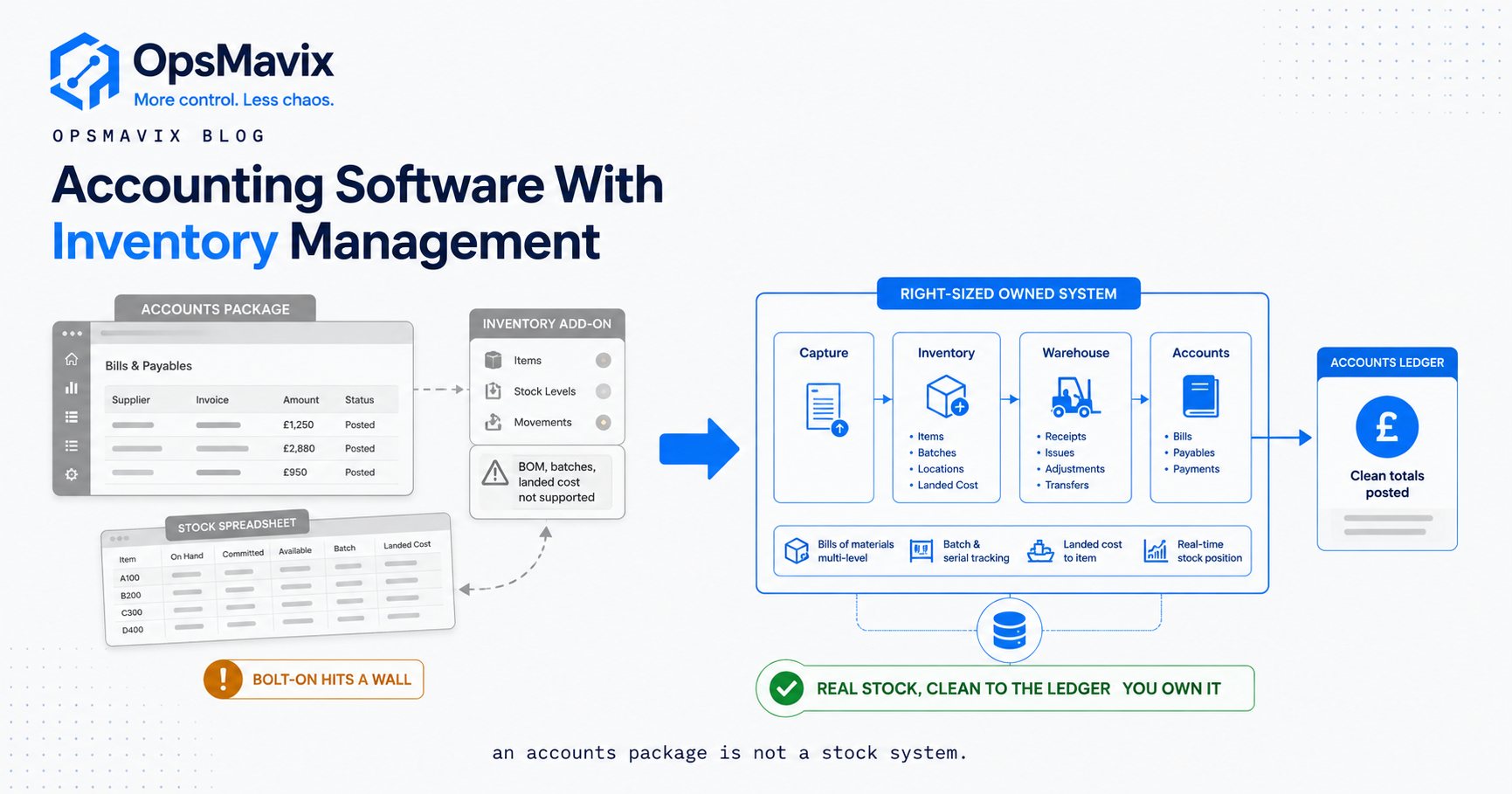
Accounting software with inventory management connects stock quantities and financial transactions, but the quality of that connection depends on the records, valuation rules and update process. The useful question is whether the warehouse and accounts can reconcile the same stock scope at the same cutoff using an agreed cost basis.
A warehouse quantity and a ledger value are not interchangeable measures. A difference can arise from a missed movement, a late bill, an incorrect unit, a valuation adjustment or simply comparing different dates and stock statuses. Buying another dashboard without defining those differences can create another number to reconcile.
This guide explains how to trace a stock-value mismatch, choose the authoritative records and compare existing configuration, inventory integrations and full ERP. The goal is an understandable quantity and value trail, rather than an unsupported promise that two systems can never disagree.

Physical stock quantities and financial inventory values need a shared scope, cutoff and unit basis.
Image credit: FIONASUN, CC0 1.0. Displayed at a reduced size; no additional edits.
Key Takeaways
- Compare the same stock scope and cutoff, including ownership, locations and statuses.
- Separate quantity accuracy from valuation, because a correct count can still use an incorrect cost.
- Define the authoritative record for movements and postings, with corrections and failed updates visible.
- Test receipts, returns, landed costs and period-end timing, not only a clean sale.
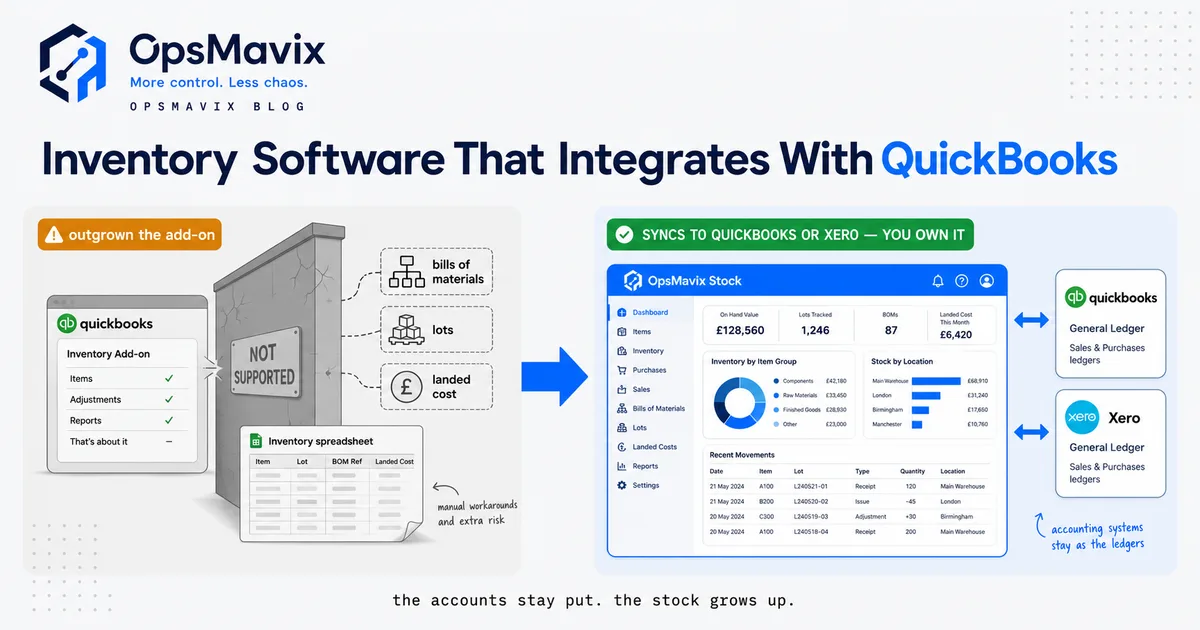
- Packaged integrations can be a suitable solution where their supported workflow meets the requirements.
- Include migration, support and reconciliation in total cost, and prove the selected route in a pilot.
In this guide:
- 1. Define the Quantity and Value Records
- 2. Trace Every Stock Movement
- 3. Keep Units and Valuation Policies Explicit
- 4. Build a Reconciliation Bridge
- 5. Design Integrations to Fail Visibly
- 6. Compare Configuration, Add-ons and ERP
- 7. Compare Total Cost and Exit Arrangements
- 8. Pilot and Reconcile a Complete Period
- Frequently Asked Questions
- How OpsMavix Can Help
1. Define the Quantity and Value Records
Ask what each figure actually includes
A stock report may show physical on-hand, available, reserved, in-transit or consignment quantities. The ledger may include inventory accounts for several sites and unfinished work. Establish the scope before comparing totals.
Record the date, time, unit basis and included statuses. Stock owned by another business should not automatically enter your financial inventory merely because it sits in your warehouse.
Assign authority for each record
Decide which system records receipts, issues, transfers and stock adjustments, and which maintains posted financial entries. A reporting copy should reference those records rather than become a second independently editable balance.
| Record | Definition needed |
|---|---|
| Physical quantity | Item, unit, owner, location and status |
| Available quantity | Eligibility and reservation rules |
| Operational valuation | Cost basis and included stock scope |
| Ledger balance | Accounts, entity and posting cutoff |
| Reconciliation | Known timing and policy differences |
A single application can still contain inconsistent records if events are missed or mappings are wrong. A supported connection between applications can work well when those responsibilities are clear.
2. Trace Every Stock Movement
Record the physical event and its financial consequence
Receiving, dispatch, returns, production consumption and adjustments affect the records differently. Not every location transfer changes inventory value, and not every financial adjustment changes physical quantity.
Use stable transaction references so a movement can be linked to its posting or reviewed exception. If an event is corrected, retain the original reference and the reason for change.
Test the less obvious movements
Review goods received before the supplier bill, goods dispatched before invoicing, damaged stock, customer returns awaiting inspection and transfers still in transit. Those are normal operational situations, not necessarily errors.
For manufacturing, include component issues, finished output and WIP. For third-party stock, include ownership. A system that supports a simple buy-and-sell product may not automatically support every transformation or custody requirement.
Our inventory systems page explains the operational movement layer. The financial relationship still needs the accounting rules agreed by your team.
3. Keep Units and Valuation Policies Explicit
Reconcile quantities before pricing them
A count of 20 cases and a financial report of 240 pieces may agree if the approved conversion is twelve pieces per case. Without that conversion, users can mistake a unit difference for a shortage.
Check product codes, pack sizes and transaction units. Do not correct a ledger value to match a warehouse report whose units have not been verified.
Use an approved cost basis
Purchase prices, freight, conversion costs and valuation adjustments need treatment appropriate to the applicable accounting framework. The IAS 2 overview describes inventory cost and write-down principles; it is not a substitute for defining the policy that applies to your business.
A report using today’s purchase price can differ from one using the approved accounting cost method. Keep those purposes distinct. Landed-cost allocations and supplier credits should retain a reviewable basis and transaction links.
Do not infer the direction of a cost-of-sales error from one missing charge alone. The outcome depends on what was posted, what remains on hand and which period is being compared.
4. Build a Reconciliation Bridge
Categorise differences before making adjustments
Start with an agreed operational valuation and explain each difference to the ledger. Separate known timing items, scope differences and confirmed errors.
Hypothetical reconciliation: the operational report shows £164,000 while the ledger shows £180,000 at the comparison point.
| Reconciliation item | Amount |
|---|---|
| Operational stock valuation | £164,000 |
| Goods in transit included in the ledger only | £10,000 |
| Reviewed cost allocation pending in the operational report | £4,000 |
| Unresolved difference requiring investigation | £2,000 |
| Ledger balance under review | £180,000 |
The example explains £14,000 and leaves £2,000 unresolved. It does not establish that the full £16,000 is missing physical stock, a write-off or a saving available from software.
Give unresolved items an owner
Each difference needs a reference, reason, responsible person and next action. Resolve the underlying entry or scope issue under the approved procedure. An unexplained balancing journal can conceal a recurring operational problem rather than repair it.

A historic ledger illustrates financial recordkeeping; modern reconciliation must also explain operational quantities and timing.
Image credit: Øyvind Holmstad, CC BY-SA 4.0. Displayed at a reduced size; no additional edits.
5. Design Integrations to Fail Visibly
Confirm supported transactions
A connector may support invoices but not every stock adjustment, landed-cost change or manufacturing event. Ask for a demonstration of the records your operation actually uses.
Xero’s inventory integration guidance describes approaches to connecting external inventory records and accounting movements. Confirm the applicable approach with the product supplier and finance team.
Retain pending and rejected work
An update can fail after the physical movement is complete. Show what is pending, what was accepted and which record needs investigation. A dashboard refresh is not proof that every source transaction arrived.
Test retries, duplicates, amended records, interrupted access and late posting into a closed period. Define who can resolve an uncertain result and how the records are reconciled afterwards.
6. Compare Configuration, Add-ons and ERP
Compare the same end-to-end example
Use one receipt, sale, return and period-end reconciliation across candidates. Record what is standard, configured, integrated or proposed development.
| Route | Where it can fit | What to prove |
|---|---|---|
| Configure current accounting inventory | Stock requirements fit existing functions | Quantities, valuation, access and reports |
| Add packaged inventory software | More operational depth is needed | Supported movements and ledger reconciliation |
| Improve an existing connection | Both systems work but the interface has gaps | Transaction coverage and failure handling |
| Build a focused custom system | A valuable requirement remains unsupported | Controls, maintenance and handover |
| Implement full ERP | Wider stock, purchasing, manufacturing and finance needs justify it | Complete scope and migration continuity |
Avoid automatic assumptions about size
A larger suite can be suitable where the connected requirements warrant it. A smaller tool can still be unsuitable if it lacks a required control. OpsMavix can build full ERPs as well as focused operational systems.
Choose the approach that demonstrates the required records and responsibilities, rather than assuming either an add-on or a single application must fail.
7. Compare Total Cost and Exit Arrangements
Include the work that remains
Account for implementation, migration, subscriptions, interface charges, devices, training, support and ongoing reconciliation. A low licence price is not the whole cost, and a custom build still requires maintenance.
Measure time spent preparing the current reconciliation. A pilot can show reduced effort, but that is released capacity unless actual spending falls. Do not count the entire value of an unexplained difference as an avoided loss.
Check export and recovery
Request sample exports containing products, quantities, units, costs and transaction references. Confirm document access, historical records and the treatment of data after termination.
For custom software, agree source rights, deployment instructions, credentials and the ability to appoint another maintainer. For every route, establish backup responsibility and demonstrate a restore.
Keep ownership practical: a source-code archive without deployment guidance or understandable data mappings can still leave the business dependent on one supplier.
8. Pilot and Reconcile a Complete Period
Define the opening position
Agree product and unit mappings, opening quantities, valuation and outstanding transactions. Decide which history moves and which remains in an accessible archive.
Suggested pilot checks include:
- Receipts and issues retain stable references.
- Transfers preserve the intended quantity and value treatment.
- Returns remain restricted until the agreed release decision.
- Costs use the approved basis and effective dates.
- Duplicate retries do not create duplicate postings.
- Rejected and uncertain updates remain visible.
- Operational valuation reconciles to the agreed ledger scope.
- Timing items have owners and expected resolution dates.
- Corrections preserve evidence and approval.
- Data exports and recovery arrangements work.
Review the outcome before expanding
Run through the relevant reporting cutoff, not just one clean transaction. Ask finance and warehouse users to explain the result together.
Track unresolved difference age, repeat causes and preparation effort. Expand after the team can maintain and reconcile the workflow through a normal period of activity.
Frequently Asked Questions
What is accounting software with inventory management?
It combines or connects stock records with financial transactions. The exact depth varies by product, edition and integration, so demonstrate your required movement and valuation workflow.
Why can stock value differ from the ledger?
Scope, timing, units, costs and missed or incorrect entries can all contribute. Compare the same basis and build a reconciliation before assuming stock is missing.
Is an accurate count enough for accurate valuation?
No. The quantities may be right while costs, ownership or accounting treatment are wrong. Quantity verification and valuation review are separate controls.
Must every transfer create a financial posting?
Not necessarily. The treatment depends on ownership, entities, locations and the agreed accounting policy. Define it explicitly for the transaction types involved.
Can an inventory add-on work well?
Yes, where its supported records, interface and reconciliation meet the requirements. Test exceptions and failed updates instead of dismissing the architecture.
Does one application guarantee agreement?
No. Incomplete movements, mappings and policy differences can still cause discrepancies within one system.
Do we need to replace the ledger?
Only if the existing product cannot meet justified requirements. Configuration, integration or full ERP should be compared against the actual gap.
Is an unexplained difference a software saving?
No. Investigate it first. A difference may be timing or scope, and released reconciliation time is not automatically cash saved.
Where should we start?
Take one reporting cutoff and reconcile quantities, valuation, pending transactions and the ledger. The unresolved items define the next testable improvement.
How OpsMavix Can Help
OpsMavix builds inventory systems and connected operational workflows that help teams trace movements and explain their financial consequences.
We define record ownership, units, transaction links and reconciliation with the responsible warehouse and finance users. The scope can be an improved connection, a focused system or a full ERP where wider requirements justify it.
We can help surface failed updates, structure reconciliation exceptions, plan migration and pilot a complete reporting period with usable exports and handover.
If stock and accounts keep disagreeing without an explanation, book an Operations Leak Audit. Bring both reports from the same cutoff and the movements behind one disputed item.
Keep reading

Getting value from OpsMavix? Add us as a preferred source on Google — you'll see more of our operations content in your AI Overviews, AI Mode and Search.