
Multi-Location Inventory Management: One Live Picture Across Every Site
Two warehouses, a shop and a 3PL — each with its own spreadsheet and its own version of the truth. Multi-location inventory management is about one live picture across every site, so a transfer, a reorder or a customer order draws on stock you can actually see. Here's how to run it without a full WMS.
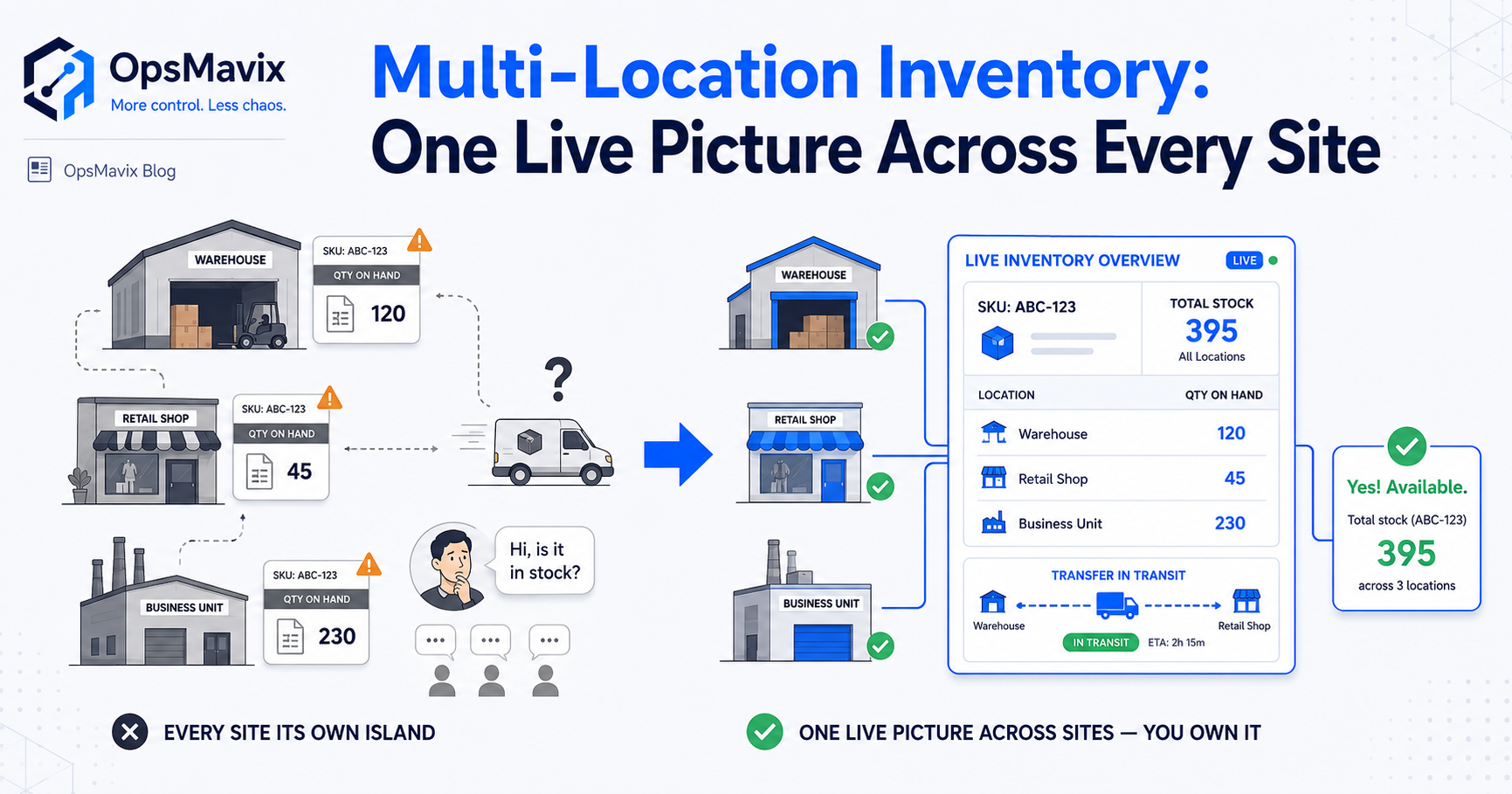
Multi-location inventory management is keeping stock accurate across more than one place — two warehouses, a shop and a stockroom, a main site and a 3PL — with one live picture instead of a separate count per building. The moment you hold stock in a second location, you inherit a new set of problems: the same SKU sitting in two places, transfers that vanish in transit, reorder points that only make sense per site, and no single screen that tells you how much you actually own. Most growing businesses solve it with a spreadsheet per location, which works right up until the day the numbers disagree and nobody knows which one to trust.
This post is about running multiple stock locations well without buying a full warehouse management system you don’t need. It’s the physical-location sibling of the multichannel overselling problem — that one is about selling the same stock across Shopify, Amazon and eBay; this one is about holding stock across real sites and keeping the picture straight.
Key Takeaways
- Multi-location inventory management means one live stock figure per location and one consolidated view across all of them — not a spreadsheet per site that quietly disagree.
- The three leaks that show up the moment you hold stock in two places: transfers lost in transit, reorder points that don’t fit each site, and no single number for what you truly own.
- A transfer isn’t a delete-here-add-there — it’s stock in transit that has to be tracked, or it goes missing between buildings.
- Per-location reorder points beat one blanket number: each site sells at its own pace and should trigger its own restock.
- You don’t need a £100k WMS to fix this. You need a system that models your sites the way they actually run — and that you own.
1. What “Multi-Location” Actually Changes
With one location, stock is simple: a number goes up when you receive, down when you ship. Add a second location and every question grows a “where.” How many do we have? becomes how many, and in which building. Can we fulfil this order? becomes can we fulfil it from the site nearest the customer, or do we move stock first. The single number you used to trust splits into one per site, plus a total — and the total is only as good as the weakest count feeding it.
That’s the real shift. Multi-location isn’t “the same problem, bigger.” It’s a new problem: reconciling several truths into one you can act on. Get it wrong and you’ve got stock you can’t find, sites reordering things another site is sitting on, and a total on the dashboard that nobody quite believes.
2. The Spreadsheet-Per-Site Trap
The usual first fix is a tab or a sheet per location. It feels organised. It holds together at low volume. Then the sites start disagreeing: the shop sold three this morning, the warehouse sheet still shows them available, and someone promises stock that’s already gone. Nobody’s lying — each sheet is right about its own site and blind to the others. There’s no shared figure, so there’s no single answer to “how many do we own, right now, across everything.”
This is the same pain warehouse operators describe on a single site, multiplied by the number of buildings: “the stock never matches the system, and I’m running a million messy spreadsheets for the warehouse.” Now run that across three locations with transfers moving between them, and manual reconciliation becomes a part-time job that still gets it wrong. The spreadsheets aren’t the problem — the lack of one shared number underneath them is.
3. Transfers Are Where Stock Disappears
The move most people get wrong is the transfer. You’re not deleting five from Warehouse A and adding five to Shop B in the same breath — because for the day or three the stock is on a van, it’s in neither place and both at once. Treat a transfer as an instant swap and you either double-count it (visible at both ends) or lose it (subtracted from A, not yet added at B, invisible until someone checks). Either way the total lies.
A transfer has three states, not two: left the source, in transit, arrived and confirmed. Track the in-transit leg and stock is never invisible and never in two places at once — it’s clearly moving, with an owner and an expected arrival. Skip that middle state and transfers become the single biggest source of “we’re sure we have it, we just can’t find it.” The stock isn’t lost. The system just never knew it was on a van.
4. Per-Location Reorder Points, Not One Blanket Number
One reorder point across all sites is a blunt instrument. Your city shop turns a line over in a week; the regional warehouse holds a month’s cover of the same SKU. Set one threshold for both and you either over-stock the slow site or run the fast one dry. Worse, a total-based reorder point hides the imbalance completely — you’ve got “plenty” on paper while the location that actually sells it sits empty.
Each site needs its own trigger, tuned to how it sells. Then the smarter question follows: when the shop runs low, do you reorder from a supplier, or transfer from a warehouse that’s overstocked two miles away? You can only answer that if you can see stock per location and in total at the same time. That’s the join a blanket number can’t give you — and it’s why per-site levels matter more the more sites you run.
5. One Consolidated View — Fulfil From the Right Place
The payoff of doing all this properly is a single screen that answers the questions a multi-site business actually asks. How much do we own across everything? Where is it? Which site should this order ship from — the nearest, the fullest, the one that won’t need a restock this week? Split across per-site spreadsheets, those are manual cross-references you do under pressure. Consolidated, they’re one glance.
That live total is also what stops the two classic multi-location mistakes: reordering stock you already own at another site, and promising a customer stock that’s technically in the business but in the wrong building with no transfer booked. The point of one view isn’t tidiness — it’s decisions you can make in time, from stock you can actually see. It’s the same discipline behind live inventory automation on a single site, extended to the where.
6. Counts and Accuracy Get Harder — Plan for It
More locations means more places for the count to drift, and drift compounds. A cycle count on a single site is manageable; across three, you need each location counting its own stock on its own rolling schedule, feeding the same shared figure — otherwise you’re back to sites that each think they’re right. The accuracy job doesn’t get bigger linearly; it gets bigger because every transfer between sites is a fresh chance for the numbers to part ways.
The fix is the same discipline that keeps a single warehouse honest, applied per site and joined at the total: count a slice regularly, chase every variance to its cause rather than just overwriting the number, and make each count correct the one figure everyone works from. Do that and the consolidated total stays trustworthy. Skip it and the dashboard becomes confident nonsense — a precise-looking number built on three sites quietly wrong in different directions.
7. Build It Around Your Sites — Without the Full WMS
You don’t need an enterprise warehouse management system to run a few locations well. Full WMS platforms are built for high-volume, many-site operations with complex allocation and picking logic, and they’re priced for it — the sort of tool a growing business ends up using a sliver of while paying for all of it. If you’re between “outgrown the spreadsheets” and “not ready for a six-figure WMS,” a right-sized system built around your actual sites usually fits the real problem better.
That means a system that models your locations — the two warehouses, the shop, the 3PL — with per-site stock, tracked transfers including the in-transit leg, per-location reorder points, and one consolidated view over the top. Built around how your stock actually moves between buildings, connected to the tools you already run, and owned outright with no per-seat fees and nothing a vendor can switch off. For the fuller build-versus-buy logic, when off-the-shelf inventory tools stop fitting walks the same line; and if your locations feed online orders, ecommerce inventory automation covers keeping those channels fed from the right site.
FAQ
What is multi-location inventory management?
It’s tracking stock across more than one physical location — multiple warehouses, a shop and a stockroom, a main site and a 3PL — so you have both an accurate figure per location and one consolidated total across all of them. The core challenge is reconciling several separate counts into one live picture you can trust, and tracking stock as it moves between sites rather than treating each building as an island.
Why do spreadsheets fail for multiple stock locations?
Because a sheet per site is right about its own location and blind to the others. There’s no shared number underneath, so the sites drift apart, transfers get miscounted, and nobody can answer “how much do we own across everything, right now.” At low volume it holds; as soon as transfers and pace-of-sale differ between sites, manual reconciliation becomes a job that still gets it wrong.
How should stock transfers between locations be tracked?
As a journey with three states, not an instant swap: left the source, in transit, arrived and confirmed. If you just subtract from one site and add to another in the same moment, stock either double-counts or goes invisible while it’s on the van. Tracking the in-transit leg means the total stays honest and stock in motion always has an owner and an expected arrival.
Do I need a full warehouse management system for multiple locations?
Usually not. Enterprise WMS platforms are built and priced for high-volume, many-site operations with complex allocation and picking — most growing businesses use a fraction of one. If you’re past spreadsheets but not at that scale, a right-sized system that models your specific sites, transfers and per-location reorder points typically fits the real problem better, and you own it outright.
Should reorder points be different per location?
Yes. Each site sells at its own pace, so a single blanket threshold either over-stocks the slow location or starves the fast one — and a total-based trigger hides the imbalance entirely. Per-location reorder points let each site restock on its own rhythm, and having stock visible per site and in total lets you choose between reordering from a supplier and transferring from an overstocked location nearby.
How OpsMavix Can Help
OpsMavix builds right-sized inventory systems for businesses holding stock across more than one site — too messy for a spreadsheet per warehouse, not ready for a six-figure WMS. We build the part you actually run: live stock per location, transfers tracked through the in-transit leg so nothing goes missing between buildings, per-site reorder points, and one consolidated view that tells you how much you own and where. Shaped around your real sites and the tools you already use, owned outright with no per-seat fees and nothing a vendor can switch off.
If your stock lives in several buildings and several spreadsheets that no longer agree, start by seeing where the numbers actually drift. Book a Free Operations Leak Audit and we’ll map where stock goes stranded, lost in transit or double-ordered across your sites today, what it’s costing you, and what a right-sized multi-location system would fix first.
Keep reading
Getting value from OpsMavix? Add us as a preferred source on Google — you'll see more of our operations content in your AI Overviews, AI Mode and Search.