
Supply Chain Management Software Packages: What Each Tier Really Costs You
Supply chain management software packages are sold as neat tiers — Starter, Professional, Enterprise — but the price on the page is rarely the price you pay. This guide shows UK operators how the tiers, per-seat fees and module upsells stack up over three years, and when a fixed-scope owned system beats an endless subscription.
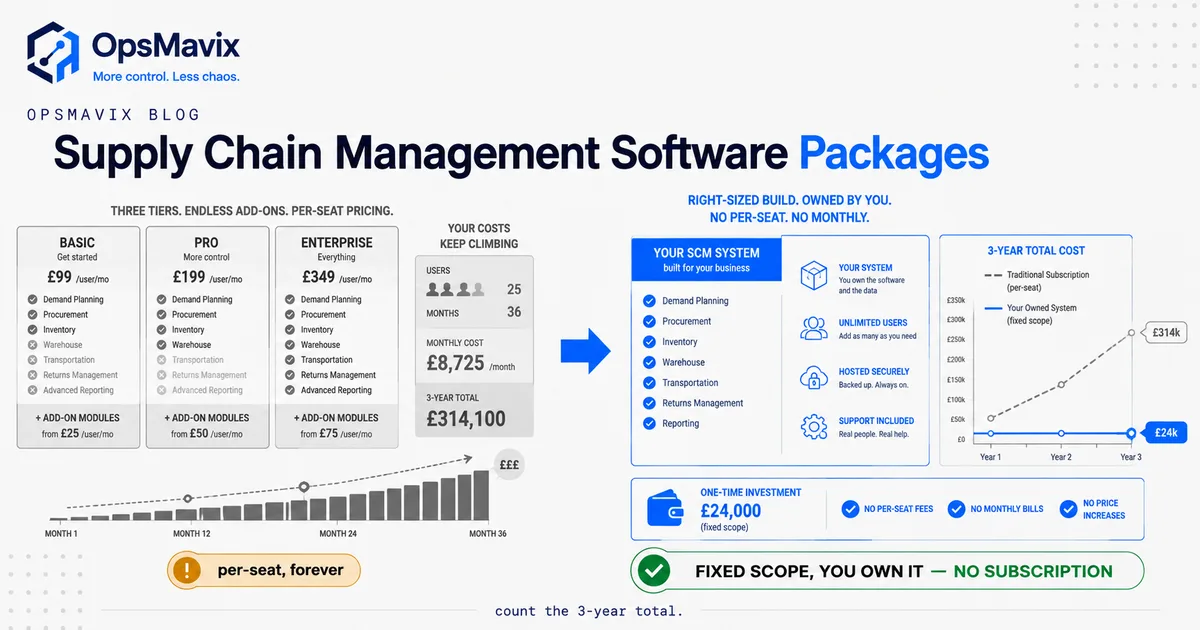
Supply chain management software packages are the tiered plans — usually named something like Starter, Professional and Enterprise — that vendors use to bundle features, user seats and modules into a monthly or annual price. The honest answer most buyers need first: the tier you pick on day one is almost never the tier you end up paying for, because packages are designed to price against your growth, and the number on the pricing page is a starting line, not a total. Understanding how supply chain management software packages are actually structured — what each tier includes, what it deliberately withholds, and where the upsells sit — is the difference between a predictable cost and a subscription that quietly triples over three years.
This matters because the packaging is a sales instrument, not a neutral menu. The lower tier is built to feel affordable and then run out of road at the exact point your business gets more complex. The middle tier is where the real capability lives, and it’s priced accordingly. And the modules you’ll discover you need — demand planning, multi-warehouse, supplier portals, quality tracking — are frequently the ones sitting one tier up or billed as add-ons. None of that is a scandal. It’s how the model works. The mistake is buying the price you see instead of the cost you’ll carry.
What Supply Chain Management Software Packages Actually Bundle
A supply chain management software package is a bundle of three separate things sold as one price: the capabilities (which functional modules you can switch on), the capacity (how many users, warehouses, orders or SKUs you’re allowed), and the service (support level, onboarding, updates). Every pricing page is a matrix of those three, and the tier names — Starter, Growth, Professional, Enterprise — are just labels for particular combinations.
The functional side is what most buyers focus on, and it typically spans some or all of the standard supply chain modules: inventory and stock control, purchasing and supplier management, order and fulfilment, warehouse operations, demand planning and forecasting, transport and logistics, and reporting. We break down what each of these does in detail in our guide to supply chain management software modules, because knowing which modules you genuinely need is the first defence against paying for a tier stuffed with ones you won’t touch.
But capabilities are only a third of the package. The capacity limits are where the price actually moves. A tier might include “up to 5 users,” “single warehouse,” or “up to 1,000 orders a month” — thresholds set precisely where a growing business tends to cross them. And the service tier decides whether you get real onboarding and a human on the phone or a knowledge base and a ticket queue. When you compare packages, you’re not comparing feature lists. You’re comparing three axes at once, and the vendor has arranged them so the combination you’ll actually need sits higher than the one you’re first quoted.
The Tier Ladder: What Each Level Really Includes
Almost every supply chain software vendor arranges packages on the same three- or four-rung ladder. The names change; the logic doesn’t.
- Entry / Starter tier. Core inventory and orders, a low user cap, a single location, basic reporting, self-serve support. Priced to clear the “is this affordable?” hurdle. Genuinely fine for a small, single-site operation with simple flows — and deliberately thin the moment you add a second warehouse, a sales channel, or forecasting.
- Mid / Professional tier. This is the tier most growing businesses actually need. Multi-location, purchasing workflows, more users, integrations, better reporting, sometimes light demand planning. It’s also where the price steps up sharply, because the vendor knows this is where the value is.
- Top / Enterprise tier. Advanced planning, multi-entity, custom permissions, API access, priority support, and “contact us” pricing — meaning it’s negotiated, and the ceiling is high. Often bundled with mandatory implementation fees.
- Add-on modules. Sold across all tiers or gated to the top one: demand forecasting, supplier portals, quality management, advanced analytics, EDI. Each carries its own recurring fee.
The pattern to notice: the capabilities that separate a real operational system from a glorified stock list — proper demand planning, multi-warehouse rebalancing, supplier collaboration — almost always live at the Professional tier or above, or as paid add-ons. If your operation has genuinely outgrown spreadsheets, the entry tier was never for you, and the vendor’s pricing already assumes that. This is the same territory covered in our supply chain management software overview: the question isn’t which tier is cheapest, it’s which capabilities close your actual leak — and where those capabilities sit on the ladder.
The Per-Seat and Module-Upsell Trap
Two mechanics turn a reasonable-looking package into a cost that compounds: per-seat pricing and module gating. Both are legitimate business models. Both also punish exactly the thing you’re trying to do — grow.
Per-seat (per-user) pricing charges you monthly for every person who logs in. It sounds fair until you count who actually needs access in a real operation: the warehouse team, the buyers, the sales-order clerks, the finance person who reconciles, the ops manager who reports, the director who checks dashboards. A system that touches the whole supply chain touches a lot of people. Once you multiply a monthly per-user fee across that whole list, the seat bill alone becomes a serious annual line before a single module upgrade — and every hire adds to it, permanently. You are, in effect, taxed for expanding the team that runs your operation.
Module gating is the second lever. The forecasting you’ll want once demand gets lumpy, the supplier portal you’ll need as you onboard vendors, the quality-tracking your first big customer audit demands — these are rarely in the tier you bought. Each is a “yes, we do that, it’s on the Professional plan” or “that’s an add-on.” The upgrade path is always available, always upward, and always recurring.
One finance director who’d been through an enterprise rollout put the trap plainly to us: he’d been quoted six figures up front and tens of thousands a year on top, for “a system where we don’t even use half the functions.” That’s the packaging working as designed — you pay for the tier that contains the three things you need, and it drags along the ninety you don’t. The per-seat and module model is excellent for the vendor’s revenue and merciless on a scaling SMB’s cost line. For the mindset behind that reaction — the operator who’s outgrown QuickBooks but refuses to be robbed by an ERP — this is the exact fear that a supply chain management ERP software decision has to confront honestly.
Total Cost Over Three Years — the £ Math Buyers Skip
The single most useful thing you can do before signing for any package is stop looking at the monthly price and build the three-year number. Vendors quote in months because a month is small. Operations decisions live in years. Here is the honest shape of what a package actually costs over that horizon — all figures qualitative ranges, because real pricing is negotiated and hidden, but the structure is universal.
- Year-one subscription. The tier price × 12, plus per-seat fees for everyone who logs in. Already well above the headline “from £X/month” figure once you count seats.
- Implementation and onboarding. Frequently a one-off fee equal to several months — or, at the top tier, several times — of subscription. Data migration, configuration, training. Sometimes mandatory, sometimes “optional” until you realise you can’t go live without it.
- Module add-ons. The forecasting, portal or analytics you’ll switch on in year one or two, each a recurring line.
- Renewal escalators. Annual price rises are standard. A quiet uplift each year compounds, and you’re rarely negotiating from strength once your data and processes live inside their platform.
- Integration and change work. Every time your business changes — new channel, new warehouse, new EDI partner — you’re on the vendor’s roadmap and price, or paying a partner’s day rate.
Stack those and the three-year total for a growing team routinely lands at a large multiple of the year-one subscription line — and at the end of it, you own nothing. You’ve rented capability and, crucially, your own operational data sits in their database on their terms. This is the calculation the pricing page is designed to keep you from doing, which is exactly why doing it is the best hour you’ll spend on the whole decision. Compare it honestly against the alternative before you assume subscription is the cheaper path — that’s the core of any real operational systems vs ERP evaluation.
Build vs Buy: When a Fixed-Scope Owned System Wins
Here’s the OpsMavix position, stated plainly: for a lot of growing UK operations, a fixed-scope system you own beats an endless subscription package — not always, but far more often than the market admits, because the market is mostly vendors selling subscriptions.
Be fair to buying. If your processes are genuinely standard, your team is small and stable, and an off-the-shelf package fits your flow without heavy configuration, buy it. You get capability fast, someone else maintains it, and for a simple, single-site operation the total cost may genuinely stay reasonable. Don’t build what you can rent cheaply and use as-is.
The build case gets strong when three conditions line up, and for scaling operations they usually do:
- Your processes aren’t standard. You have a way of running that’s a competitive edge, and a package forces you to reshape your operation to fit its assumptions. Every workaround is a permanent tax.
- Your team is growing. Per-seat pricing means the more successful you get, the more you pay, forever. A system you own has no per-seat fee — adding a user is free.
- You’ll only ever use a slice. If you’d genuinely use a fraction of an enterprise package and rent the rest, you’re funding reach you’ll never touch.
| Consideration | Subscription package | Fixed-scope owned system |
|---|---|---|
| Upfront cost | Low monthly entry price | Higher one-off build cost |
| Ongoing cost | Recurring forever, rising, per-seat | Hosting + support only; no per-seat |
| 3-year total | Compounds with team + modules | Front-loaded, then flattens |
| Fit | You bend to the software | Shaped to how you already run |
| Adding users | Costs more every time | Free |
| Data ownership | Lives in their platform | Your database, your rules |
| Changing the system | File a request, wait, or pay a partner | Extend it — you own the code |
| Best when | Standard flow, small stable team | Non-standard ops, growing team, specific leak |
The trap is assuming the subscription is “cheaper” because the first number is smaller. Over three years, for a growing team on a non-standard process, the owned system frequently comes out lower and leaves you with an asset instead of a lease. The right frame isn’t “buy vs build” as ideology — it’s a straight TCO comparison over the horizon you’ll actually keep the system. Run that math before the packaging runs it for you. For a deeper walk through the same decision, our best supply chain management software guide compares the honest trade-offs tier by tier.
A Worked Example: The Wholesale Distributor Pricing a Package
Numbers make it concrete. These figures are illustrative — not a quote for a specific product — but the shape is one every operations buyer recognises the moment they open a pricing page.
A UK wholesale distributor with 18 staff, two warehouses and a growing B2B order book sits down to price supply chain software packages. They’ve outgrown spreadsheets: reorder points are guesswork, purchasing is reactive, and nobody has one view of stock across both sites.
The Starter tier looks great — a low headline monthly fee. Then reality: it caps at one warehouse and five users. They have two sites and need at least twelve people in the system. So they’re on the Professional tier, several times the Starter price, plus per-seat fees for twelve users. Demand forecasting — the thing that would actually fix their reactive purchasing — is an add-on module. Multi-warehouse rebalancing is in, but the supplier portal they’ll want for their top vendors is another line. Implementation and data migration is a one-off fee equal to roughly four months of subscription. And the contract carries a standard annual uplift.
Year one, once seats, the forecasting module and implementation are counted, lands at several times the impression the Starter price first gave. Years two and three add the renewal escalator and a second module as the business grows. Over three years, they’ve spent a substantial recurring sum, every new warehouse hire has added to the per-seat bill, and their order history — the raw material for every buying decision they’ll make — lives in the vendor’s platform.
The alternative they didn’t price first: a fixed-scope owned system covering exactly their leak — one live stock view across both warehouses, reorder logic that ends the guesswork, and purchasing built around how they actually buy. A higher one-off build cost, then hosting and support only. No per-seat fee, so those new warehouse hires cost nothing to add. The forecasting they need built in, not rented as an upsell. Over the same three years, for a team that size on a non-standard wholesale process, the owned build lands lower on total cost — and they own it. This is the wholesale order management reality: the package that looks cheapest on the pricing page is often the most expensive thing in the room over the horizon that matters.
FAQ
What do supply chain management software packages usually include?
Most packages bundle three things at once: functional modules (inventory, purchasing, orders, warehouse, demand planning, reporting), capacity limits (number of users, warehouses, orders or SKUs), and a service level (support and onboarding). Tiers named Starter, Professional and Enterprise are just particular combinations of those three axes. The capabilities that separate a real operational system from a basic stock list — multi-location, forecasting, supplier collaboration — almost always sit at the mid tier or above, or as paid add-on modules.
Why is the package price on the website not the price I’ll actually pay?
Because the headline figure is usually a single low tier with minimal users and no add-ons. The real bill adds per-seat fees for everyone who logs in, the higher tier your operation actually needs, module upgrades for capabilities like forecasting, one-off implementation and data-migration fees, and annual renewal increases. The published “from £X/month” is an opening figure designed to feel affordable, not the total you’ll carry over the contract.
How do I calculate the true cost of a supply chain software package?
Build the three-year number, not the monthly one. Take the tier price × 12, add per-seat fees for every real user, add implementation and onboarding, add the modules you’ll switch on, and apply the annual escalator across all three years. Then compare that total against a fixed-scope owned system over the same period. The monthly framing makes subscriptions look cheap; the three-year framing shows what you’re actually committing to — and reveals that at the end you own nothing.
Is per-seat pricing worth it?
For a small, stable team, it can be fine. For a growing operation, per-seat pricing means every hire raises your software bill permanently — you’re taxed for expanding the team that runs your business. A system that touches the whole supply chain touches a lot of people (warehouse, buyers, sales, finance, ops), so seat counts climb fast. If you expect to grow the team, model the seat cost at your projected headcount, not today’s, and weigh it against an owned system where adding users is free.
When does building a custom system beat buying a package?
When your processes aren’t standard, your team is growing, and you’d only ever use a fraction of an off-the-shelf platform. In those cases a fixed-scope owned build — sized to your specific leak, with no per-seat fees and your data in your own database — frequently comes out lower on three-year total cost while leaving you an asset instead of a lease. If your flow is genuinely standard and your team small and stable, an off-the-shelf package you use as-is may be the better call. It’s a TCO comparison, not an ideology.
How OpsMavix Can Help
OpsMavix builds right-sized, owned operations systems for growing UK businesses that have outgrown spreadsheets but don’t want to rent an ERP forever. Instead of selling you a tier and upselling modules as you grow, we map how your supply chain actually runs, find where the leak is costing you — reactive purchasing, blind stock, re-keyed orders, guesswork reordering — and build the specific system that closes it: fixed scope, fixed price, no per-seat fees, and owned outright by you. Before you sign for any package, it’s worth knowing your real three-year cost both ways. If you’re weighing supply chain management software packages against a system you’d own, start by seeing exactly where your operation leaks and what each path genuinely costs: Book a Free Operations Leak Audit
Sources
- Pricing structures described here (tier ladders, per-seat fees, module gating, implementation costs, renewal escalators) reflect the standard commercial models used across major supply chain and ERP software vendors, cross-checked against publicly listed pricing pages and buyer-review platforms. Specific £ figures are given as qualitative ranges because vendor pricing is negotiated and rarely published in full — the structure is consistent even where exact numbers are not disclosed.
- Operator sentiment referenced is drawn from OpsMavix’s own buyer research with UK operations and finance leaders who have evaluated or implemented enterprise supply chain systems.
Keep reading
Getting value from OpsMavix? Add us as a preferred source on Google — you'll see more of our operations content in your AI Overviews, AI Mode and Search.