
Supply Chain Management Software Comparison: The Five Criteria That Actually Decide It
Most feature-by-feature SCM comparisons miss the point. This guide scores software on the five things that actually decide the outcome — process fit, true cost of ownership, integrations, ownership vs lock-in, and time to live — then maps the three real options (off-the-shelf SaaS, full ERP, and a right-sized owned system) to who each one genuinely suits.
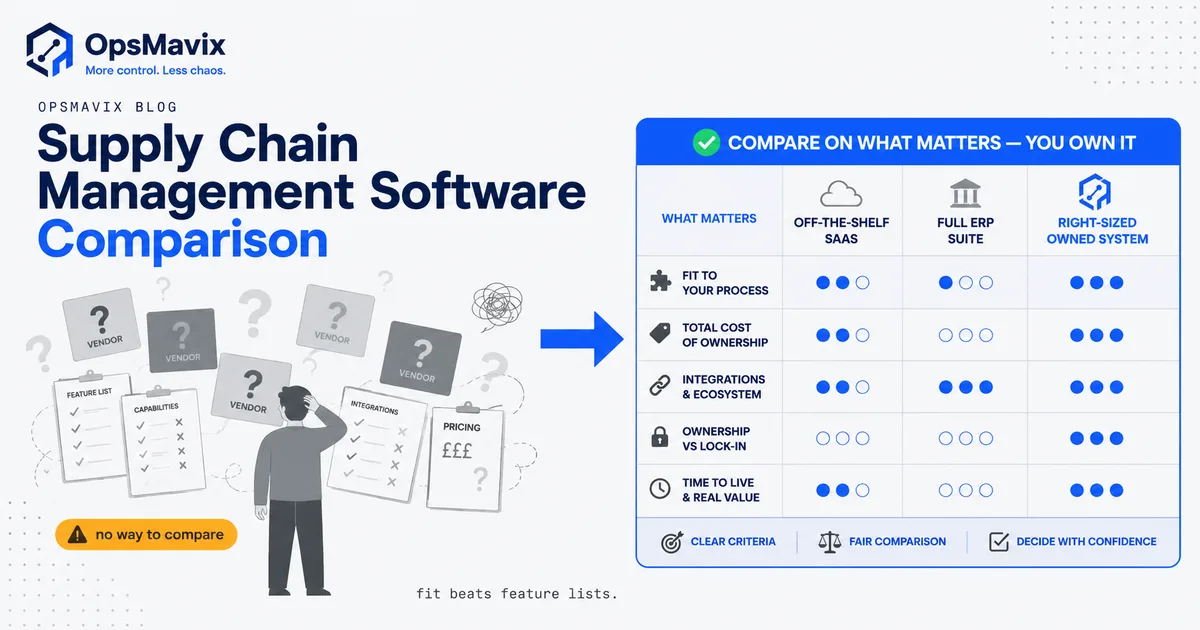
A useful supply chain management software comparison does not start with a feature grid. It starts with five questions: does the system fit how you actually run, what is the true multi-year cost, will it talk to the tools you already use, do you own it or rent it against someone else’s roadmap, and how long until it is live? Score any shortlist against those, and the right answer usually falls out on its own — often before you have watched a single demo.
Feature checklists mislead because every serious vendor ticks most of the boxes. Purchase orders, stock control, demand planning, supplier records, reporting: they all list them. The differences that decide whether you are happy in two years live somewhere else: in pricing shape, in how rigidly the software makes you work, and in who controls it. This comparison is built around those.
Key Takeaways
- Feature lists are a trap. Nearly every SCM tool covers the same core functions on paper. Compare on fit, cost shape, integrations, ownership and time-to-live instead.
- Per-seat pricing hides the real bill. Sticker price is rarely the true cost. Implementation, add-on modules, integration glue and annual renewals often dwarf the licence.
- Three broad options, not fifty. Off-the-shelf SaaS, a full ERP, and a right-sized owned system. Each suits a different kind of business.
- Off-the-shelf fits standard processes. If your operation matches the template, buy the box — it is faster and cheaper than rebuilding what exists.
- Full ERP fits genuine scale and complexity. Real value at the top end; overkill, and a lock-in risk, for a mid-sized team.
- A right-sized owned system fits the messy middle — businesses too complex for a single SaaS box but not big enough to absorb an ERP rollout.
The Five Criteria That Actually Decide a Comparison
Before you line up vendors, agree on the scoring. These five criteria separate a good decision from an expensive one.
1. Fit to your real process
Not the process in the sales deck — the one your team runs on a busy Tuesday. Does the software’s core model match how orders, stock and suppliers actually flow through your business, or will you spend the first year bending your operation to fit the software’s assumptions? A tool built for high-volume D2C ecommerce and a tool built for made-to-order manufacturing both call themselves “supply chain software.” They fit very different Tuesdays.
2. Total cost of ownership, not sticker price
Per-seat or per-module pricing is where budgets quietly break. A licence quoted at a comfortable monthly figure can double once you add implementation, the modules that were “extra,” the integration work to connect your existing tools, and the annual renewal that only ever climbs. One operations lead who had sat through the ERP process put the pattern bluntly: they had paid a six-figure sum up front and were then paying tens of thousands a year for a system they used half of. Score the three-year number, not the headline.
3. Integrations with what you already run
Your accounting package, your ecommerce channels, your carrier and warehouse tools. The SCM system has to sit inside that stack, not replace all of it on day one. A “150 integrations” badge means nothing if the three you actually need are not among them, or only work through a brittle middle layer you end up maintaining. Check the specific connections you depend on, and how they are supported.
4. Ownership versus lock-in
This is the criterion most comparisons skip, and the one operators regret ignoring. When you rent software, your priorities compete with a roadmap set by a company you have never met, and your data and workflow live inside their box. When you own the system, changes happen on your schedule and the leaving cost is not a threat held over you. Neither is automatically right, but you should know which one you are buying.
5. Time to live
A system that takes a year to implement is a year of paying full freight while still running the old spreadsheets alongside it. Some businesses can absorb that; most mid-sized teams cannot. Weeks-to-live and a-year-to-live are different products even when they cover the same features.
The Three Real Options, Side by Side
Strip the market down and you are choosing between three shapes, not fifty logos. Here is how they score against the five criteria.
| Criterion | Off-the-shelf SaaS | Full ERP | Right-sized owned system |
|---|---|---|---|
| Process fit | Great if you match the template; you adapt to it | Broad, but you reshape the business to fit | Built around your actual process |
| Total cost (3-yr) | Low–moderate; per-seat creeps as you grow | High; licence + implementation + annual | Higher build, no per-seat; flattens over time |
| Integrations | Pre-built connectors, best-effort for edge cases | Wide but often via paid partners/VARs | Built to fit your exact stack |
| Ownership | Rented; vendor roadmap rules | Rented; deep lock-in, partner-dependent | Owned outright by you |
| Time to live | Days–weeks | Months–a year+ | Weeks, scoped in stages |
| Best for | Standard, single-shape operations | Genuine scale/complexity, resourced teams | The messy middle |
Off-the-Shelf SCM SaaS: Who It Suits
If your operation is a clean match for a category — a straightforward ecommerce warehouse, a standard wholesale distributor, a single-brand fulfilment model — an off-the-shelf SaaS tool is usually the right call. It is fast to stand up, priced for a smaller team, and you should not pay to rebuild functionality that already exists in a mature product.
The honest weakness is rigidity. You configure inside the vendor’s model, and the day your workflow needs something the box does not do, the answer is “that is not how the system works.” Then you are running a workaround spreadsheet beside the software you bought to kill spreadsheets — the exact leak you were trying to close. For a wider view of this category, our roundups of supply chain management software and the types of supply chain management software map the field.
Full ERP: Who It Suits
A full ERP earns its place at genuine scale and complexity — multiple entities, real manufacturing depth, finance and operations that must live in one system, and a team with the resources to run a proper implementation. When those conditions hold, the integration of everything under one roof is worth the cost and the effort.
For a mid-sized business, the same system is often overkill and a lock-in risk. The pattern operators describe is consistent: a low initial quote that grows once it is actually implemented, a rollout measured in months to a year, and a dependency on partners or VARs that never really ends. As one owner who had been through it summed up the market, the choice felt like “the small tool is too small, the big ERP is too expensive — where is the middle ground?” That gap is real, and it is where most mid-market teams get stuck. We break the trade-off down further in ERP and supply chain management and operational systems vs ERP.
A Right-Sized Owned System: Who It Suits
The third option is the one comparisons rarely name: one operations system built around how you actually run, that you own outright. It suits the messy middle — businesses too complex for a single SaaS box (they mix stock, orders, suppliers, production and reporting in ways no template holds) but not large enough to justify an ERP rollout and its permanent partner bill.
The trade-off is honest. The upfront build costs more than a monthly SaaS subscription, and it is not the right move for a standard operation a box already fits. What you get in return is a system with no per-seat fee that grows as you hire, no roadmap set by a stranger, and a process that fits your business rather than the reverse. Over three years, for the right business, the “expensive” option is frequently the cheaper one once the workaround admin and per-seat creep are counted. For where this sits against the broader market, see our best supply chain management software breakdown.
How to Run Your Supply Chain Management Software Comparison
You do not need a fifty-row spreadsheet. Run it in four steps.
- Write down your real process first. Map how an order, a stock movement and a supplier interaction actually flow today, including the ugly parts. This is your fit test — everything gets scored against it.
- Score each option on the five criteria, not on feature counts. Fit, three-year cost, your specific integrations, ownership, time to live. Weight them by what actually hurts in your business.
- Cost the whole three years, including implementation, add-on modules, integration work and renewals — then divide by the value the system frees up. Sticker price alone will lie to you.
- Match the shape, not the brand. Standard operation, resourced-and-complex operation, or messy-middle operation. Each maps to one of the three options. Pick the shape, then shortlist inside it.
Build, Buy, or Own?
The honest take: if your operation is a clean fit for an off-the-shelf tool, buy the box — it is faster and cheaper than rebuilding what exists. If you have genuine scale, the complexity, and the resources to run it, a full ERP can be worth the weight.
The third path matters when neither fits, when you are too messy for a single SaaS box but not ready to absorb an ERP, and every option seems to cost you either in workarounds or in overkill. That is the middle where a right-sized system, shaped to how you already run and owned by you rather than rented against someone else’s roadmap, stops being a luxury and starts being the cheaper decision over time. Get clear on where your process leaks first. That answer tells you which of the three you are actually choosing between. See our supply chain management software solutions guide for a closer look at the owned-system path.
Keep reading

Getting value from OpsMavix? Add us as a preferred source on Google — you'll see more of our operations content in your AI Overviews, AI Mode and Search.