
Spreadsheet Controls: Why Bolting Governance Onto Excel Fights the Tool
Spreadsheet controls are the access restrictions, version control, change management and formula reviews businesses bolt onto their critical spreadsheets to reduce the risk of a costly error or an untraceable change. They exist because a spreadsheet has almost none of these protections built in — anyone can overwrite anything, and nobody can prove what changed or when. Here's what real controls look like, why the good ones are hard to enforce on a spreadsheet, and what changes when your operations live in a system that enforces them by default.
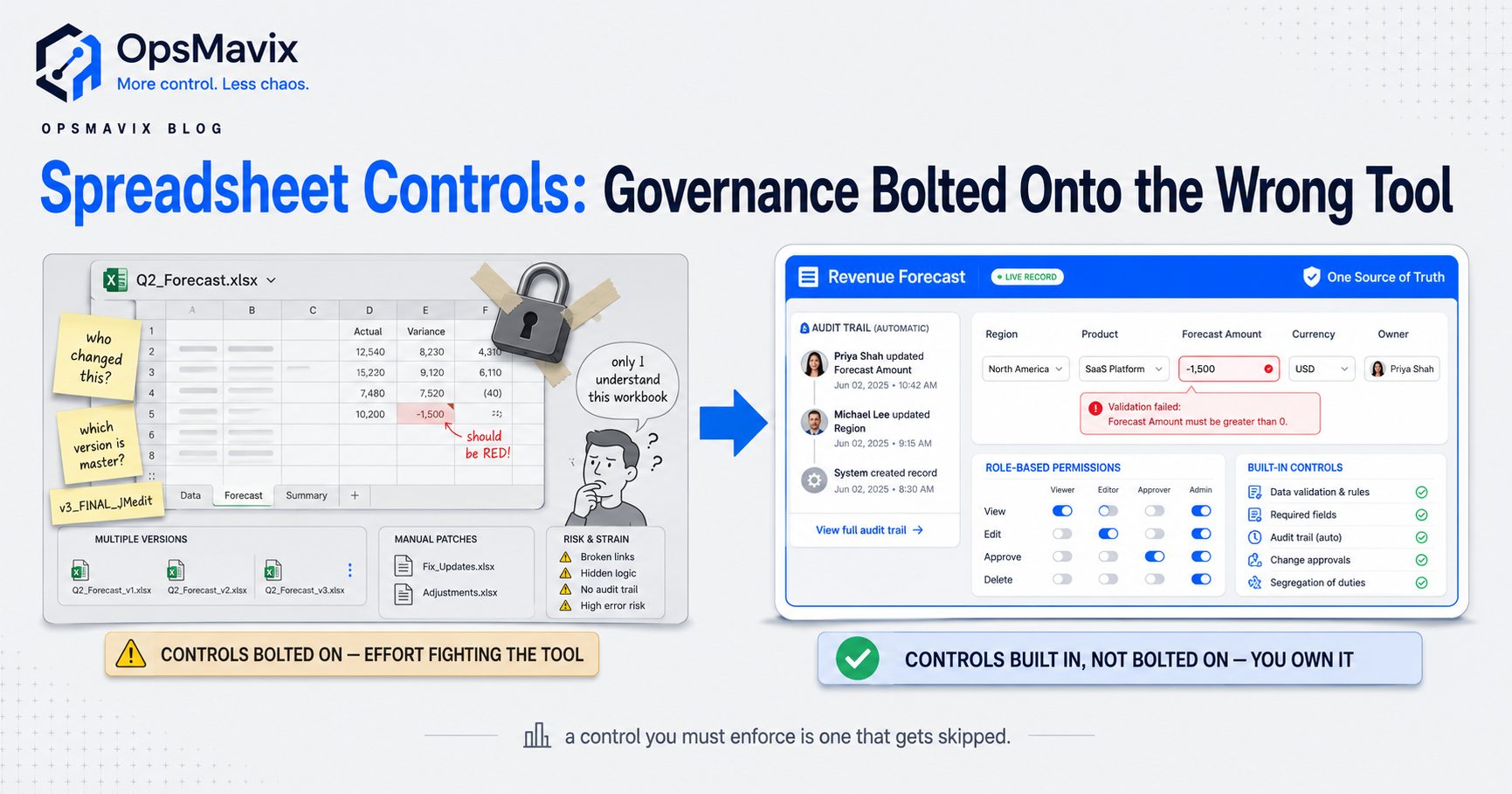
Spreadsheet controls are the rules and checks you put around a business-critical spreadsheet to reduce the risk of an error, an untraceable change or a fraud slipping through — things like access restrictions, version control, change management, backups, and someone reviewing the formulas before the output is trusted. They exist for one reason: a spreadsheet ships with almost none of these protections built in. Anyone with the file can overwrite anyone else’s work, delete a row, or nudge a formula, and afterwards nobody can prove who did what or when. Controls are how you try to fix that from the outside.
This post is about those controls and their ceiling. Finance, audit and operations teams spend real effort designing them — access reviews, locked cells, version logs, a documented inventory of every workbook that feeds a decision — because the alternative is running the business on numbers no one can vouch for. But most of those controls are you fighting the tool’s own nature. The reason they’re hard to enforce is the same reason the spreadsheet was risky in the first place, and it’s worth seeing clearly before you invest another quarter in policing files instead of replacing them.
Key Takeaways
- Spreadsheet controls are the access rules, version control, change management, backups and formula reviews layered onto a spreadsheet to reduce the risk of costly errors and untraceable changes.
- They exist because a spreadsheet has almost none of these protections natively: no audit trail, no real permissions, no enforced version, no validation on what gets typed.
- The five things controls try to cover — audit trail, permissions, versioning, key-person risk, silent formula errors — are exactly the five things a spreadsheet is worst at, so the controls are effortful and easy to skip.
- A detective control (reviewing formulas and access after the fact) catches errors late; a system enforces the control by design so the bad change can’t be made in the first place.
- The honest test isn’t “is the spreadsheet controlled?” — it’s “how much are we spending to control it, and would that effort be cheaper spent moving the process into something that controls itself?”
- Once operations live in a right-sized system, most of the control policy disappears because permissions, history and validation are how the thing works, not a governance layer bolted on top.
What Spreadsheet Controls Actually Are
In governance terms, spreadsheet controls fall into two buckets. Preventive controls try to stop a bad change happening — restricting who can open or edit the file, locking cells that hold formulas, validating what can be typed into a field, and change management so edits are requested and approved rather than made on a whim. Detective controls try to catch a bad change after it’s happened — reviewing access rights, re-checking formulas against what the output should be, reconciling the spreadsheet’s number against an independent source, and keeping backups so you can roll back.
Serious frameworks go further: an inventory of every business-critical workbook, each one classified by how much damage a wrong output would do, with proportionate rules around how it’s built, documented, tested and maintained. That’s a sensible response to a real problem. It’s also a lot of standing effort to manage risk that the tool created by existing. The question underneath every control below is the same — you’re paying to supervise a file that was never designed to be supervised.
1. No Audit Trail — You Can’t Prove What Changed
The first thing controls try to add is history, because a spreadsheet doesn’t keep one you can trust. Someone changes a price, a quantity, a formula — and there’s no reliable record of who, what, or when. Shared-drive versions and cloud history help a little, but they don’t tell you that this specific cell went from 1,200 to 12,000 last Tuesday and who did it. When the number’s wrong at month-end, the investigation is archaeology: open the file, guess what looks off, ask around, hope someone remembers.
A real audit trail — every change, attributed, timestamped, reversible — is table stakes in any system and nearly impossible to enforce on a spreadsheet by policy alone. This is the root of most inventory discrepancies: the stock figure drifts from the shelf and there’s no trail back to the edit that broke it. You can’t control what you can’t reconstruct.
2. No Real Permissions — Everyone Can Break Everything
Access restriction is the control most teams reach for first, and the one a spreadsheet resists hardest. File-level passwords and sheet protection are blunt: either someone can edit the workbook or they can’t, and the moment three people need to update three different things, protection comes off and stays off. There’s no clean way to say this person can log a goods-receipt but can’t touch the pricing tab, and can’t see margins at all. So the file gets shared wide, and now anyone who can enter data can also, accidentally, delete a column that a formula three tabs over depends on.
Granular, role-based permissions — the ordinary reality of any system — are what a spreadsheet fundamentally can’t do. This is why basic stock control on a spreadsheet stops scaling the moment more than one or two people touch it: the control you need (fine-grained, per-person, per-field) is the one the tool was never built to give.
3. Version Chaos — Which File Is the Truth?
Version control is a whole discipline because “the master” rarely stays the master. Someone emails a copy, someone works offline, someone renames it stock_FINAL_v3_JMedit, and now there are four files that disagree and no authority on which is real. The control is meant to guarantee one source of truth; in practice it’s a naming convention and a prayer. Two people update in parallel, one save clobbers the other, and a morning’s work vanishes with no error and no warning.
A system has no version problem because there’s one live record and everyone reads and writes the same one — the whole category of “which copy is right” simply doesn’t exist. That single-source-of-truth property is one of the defining differences between a spreadsheet and an operations system: not that the system is fancier, but that there is only ever one of it.
4. Key-Person Risk — The 47-Tab Monster Only One Person Understands
Here’s the control nobody writes a policy for, and the one that bites hardest. The critical workbook grows tabs and nested formulas for years until exactly one person understands how it holds together — and when they’re on leave, or they leave, the business is running on a machine no one can safely touch. One finance lead we spoke to described her month-end as “a 47-tab monster that only I understand,” with a recurring 3am panic when a formula broke the night before a board meeting and there was no one else who could fix it.
That’s not a technical gap; it’s a single point of failure sitting at the centre of your operations. Documentation is the usual control, and it helps, but nobody keeps documentation current on a workbook that changes every close. A system encodes the logic once, visibly, maintainably — so the knowledge lives in the tool, not trapped in one person’s head and one fragile file.
5. Silent Formula Errors — Wrong, Confidently, With No Alarm
The deepest problem is the one controls can only ever catch late. A spreadsheet will give you a wrong answer with total confidence — a dragged formula that stopped one row short, a SUM that quietly excludes the new region, a hardcoded number someone typed over a calculation months ago. Nothing turns red. The research on real-world business spreadsheets keeps finding the same thing — most workbooks of any size carry errors — and the reason those errors survive is that a spreadsheet has no concept of a rule it must obey. It computes whatever you tell it and never argues.
That’s why formula review is a control at all — because there’s nothing else stopping a bad number reaching a decision. But review is a detective control: it catches the error after it’s in the output, if it catches it at all, and only for as long as you keep paying someone to re-check by hand. A system moves the check upstream: validation rules, required fields, calculations that can’t be silently overwritten, so the wrong number is refused at entry instead of hunted down at review.
What Real Controls Look Like When Ops Live in a System
The point of walking the five failures isn’t that spreadsheets are evil — it’s that every control on the list is you supplying, by hand and policy, something a system provides by default. In a right-sized operational system the audit trail is automatic: every change attributed, timestamped, reversible, no review required to know what happened. Permissions are role-based and granular, so the warehouse hand logs receipts without ever touching pricing or seeing margin. There’s one live record, so version chaos can’t occur. The logic lives in the system, not one person’s head, so nobody is a single point of failure. And validation refuses the bad entry at the door instead of a reviewer catching it a week later.
That’s the shift OpsMavix argues for: not “control your spreadsheets harder,” but recognise that most spreadsheet controls are the cost of keeping a tool past the point it fits. A business replacing spreadsheet-run inventory with an owned system doesn’t write a spreadsheet-controls policy — the controls are how the system works. The governance you were maintaining becomes a property of the tool, and the standing effort goes away.
When a Controlled Spreadsheet Is Still Fine (the Honest Bit)
Not every spreadsheet needs replacing, and we’ll say so. A workbook that one person maintains, that feeds a low-stakes decision, that isn’t shared across a team, and whose worst-case wrong answer costs an afternoon rather than a customer — leave it alone. Controls on a spreadsheet like that are cheap because the risk is small, and building a system for it would be firing a cannon at a fly.
The line is stakes and shared use. When the spreadsheet feeds a decision that moves real money, when several people touch it, when a wrong output reaches a customer or a board, and when you’re spending genuine effort every month keeping it controlled — that’s when the control cost has quietly overtaken the cost of moving on. The honest question isn’t whether you can control the spreadsheet. It’s what the controlling is costing you, and whether that spend would buy you a tool that never needed policing.
FAQ
What are spreadsheet controls?
Spreadsheet controls are the rules and checks placed around a business-critical spreadsheet to reduce the risk of errors, untraceable changes or fraud. They split into preventive controls — access restrictions, locked formula cells, input validation, change management — and detective controls — reviewing access rights, re-checking formulas, reconciling against an independent source, and keeping backups to roll back. They exist because a spreadsheet has almost none of these protections natively, so the controls are supplied from the outside by policy and manual effort.
Why are spreadsheet controls so hard to enforce?
Because the things controls try to add — an audit trail, granular permissions, a single enforced version, protection against silent formula errors — are precisely the things a spreadsheet was never built to do. There’s no reliable record of who changed what, no clean per-person per-field access, no guarantee of one true copy, and no concept of a rule the sheet must obey. So the controls are effortful, easy to skip when the team is busy, and dependent on people remembering to run them.
What’s the difference between a preventive and a detective spreadsheet control?
A preventive control tries to stop a bad change before it happens — locking cells, restricting edit access, validating inputs, requiring changes to be approved. A detective control tries to catch a bad change after it’s happened — reviewing formulas, reconciling numbers, checking access logs. Detective controls catch errors late, only if you keep paying someone to run them; a system that enforces the rule by design prevents the bad change at entry, so there’s nothing to detect later.
Should we control our spreadsheets or replace them?
Control them while the stakes are low: a single-owner workbook feeding a minor decision, where a wrong answer costs an afternoon, is cheap to control and fine as-is. Replace the process when the spreadsheet feeds decisions that move real money, several people touch it, a wrong output can reach a customer or board, and you’re spending genuine effort every month keeping it controlled. At that point the control cost has usually overtaken the cost of moving the process into a system that controls itself.
How OpsMavix Can Help
OpsMavix builds right-sized operational systems for businesses stuck spending real effort controlling spreadsheets they’ve outgrown — outgrowing the workbook, not looking for a full ERP. Instead of writing another spreadsheet-controls policy, we move the process into a system where the controls are how it works: an automatic audit trail so every change is attributed and reversible, role-based permissions so people touch only what they should, one live record so version chaos can’t happen, logic that lives in the tool instead of one person’s head, and validation that refuses the wrong entry at the door. You own it outright — no per-seat licence, nothing a vendor can switch off — whether that’s inventory that stops drifting from the shelf or one operations dashboard everyone can trust.
If you’re maintaining controls on a spreadsheet and quietly wondering what it’s costing you, start by seeing the leak. Book a Free Operations Leak Audit and we’ll map where your spreadsheets cost you today — in hours spent policing files, wrong numbers that reached decisions, and the key-person risk sitting at the centre of it — what it’s worth to close, and whether a right-sized system is the honest fit for how you work now.
Keep reading
Getting value from OpsMavix? Add us as a preferred source on Google — you'll see more of our operations content in your AI Overviews, AI Mode and Search.