
Single Level vs Multi Level BOM: Which Structure Fits How You Build
A single level BOM lists only the direct components of one product; a multi level BOM breaks every sub-assembly down through all its layers. This guide shows when each fits, how sub-assemblies decide the structure, and what it means for costing and stock.
Examples reflect real UK production workflows.
A works order says you’re short one drive assembly. It’s Thursday afternoon, the line is waiting on it, and when someone finally digs into why, the drive assembly itself was never out of stock. It’s a £4 bearing buried inside it that ran out three days ago and nobody flagged it, because the bill of materials everyone was looking at only showed one layer deep.
That gap between what a BOM shows and what a build actually needs is the whole single level vs multi level BOM question. Get the structure wrong and you either drown a simple job in more detail than it needs, or you hide a real shortage several layers down where nobody thinks to look.
This guide is for UK manufacturers, fabricators and assemblers who build products from more than one part, whether that’s a simple kit bolted together from bought-in components or a multi-stage machine built from sub-assemblies you make yourself. It sets out what each structure actually shows, when each one earns its place, and what changes the moment you start building parts that go into other parts.
What is a single level BOM?
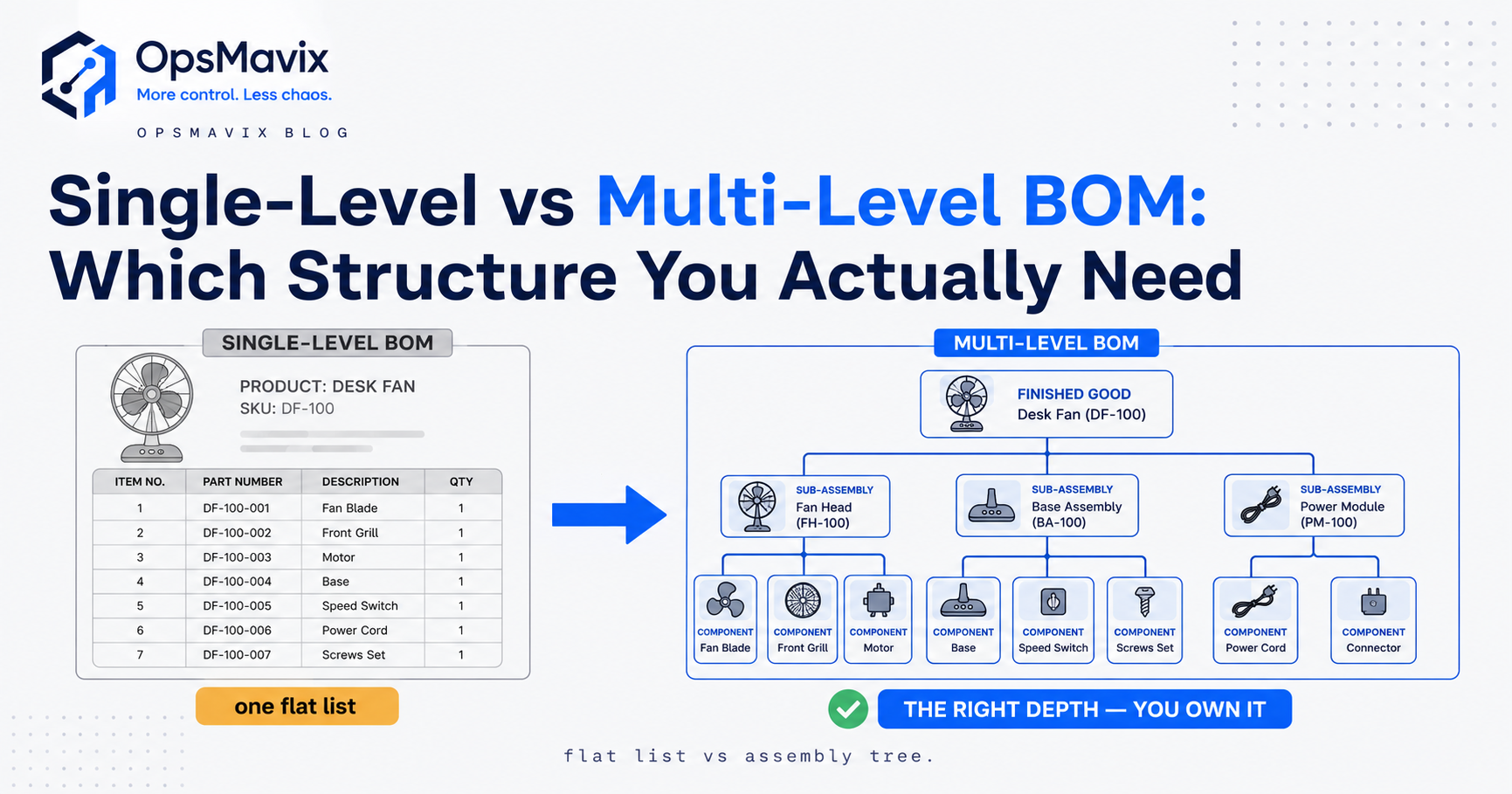
A single level BOM is a flat list: one parent product at the top, and directly beneath it every component that goes into it, with quantities, and nothing more. If one of those components happens to be something you build rather than buy, the single level BOM doesn’t distinguish it. It’s listed as a line, the same as a bought-in screw or a tube of adhesive.
Picture a wooden garden bench built from two bought-in end frames, three slats and a bag of fixings. Its single level BOM is four lines. It’s clean, it’s obvious, and it’s exactly what the person on the bench should have in front of them at the workstation.
A single level BOM answers one question only: what goes directly into this, right now? For a single stage of assembly, one job, one workstation, that’s genuinely all that’s needed. No layers, no noise, just the parts for this step.
What is a multi level BOM?
A multi level BOM keeps going where the single level version stops. Where a single level BOM lists a sub-assembly as one line, a multi level BOM opens that sub-assembly up and shows what it’s made of, and if any of those parts are themselves built rather than bought, it opens those too. The result is an indented tree: the finished product sits at level 0, its sub-assemblies at level 1, the components of those sub-assemblies at level 2, and so on down to raw materials and bought-in parts.
Take a fabricated control panel. Level 0 is the finished panel. Level 1 might be a welded enclosure, a wiring loom and a switch assembly, three things built in-house. Level 2 under the wiring loom is the individual cable runs, connectors and ferrules. A single level BOM of the panel shows three sub-assemblies and stops there. A multi level BOM shows the whole tree, all the way to the parts that actually get bought or made from raw stock.
Single level vs multi level BOM: the comparison
| Comparison point | Single-level BOM | Multi-level BOM |
|---|---|---|
| What it is | A flat list of one parent’s direct components | A full tree of every level, parent to raw materials |
| Structure | One layer deep, no breakdown of sub-assemblies | Indented levels, each sub-assembly expanded in turn |
| Where it fits | The shop floor, one assembly stage, a picking list | Engineering, full costing, production planning |
| Sub-assemblies | Shown as a single line, not broken down | Broken down into their own components and levels |
| Stock implications | Tells you what to consume for one build | Explodes finished-unit demand into raw material requirements |
| Costing implications | Sums the direct components at that level | Rolls cost up from raw materials through every level |
| When to use | Simple, single-stage products; instructions for one job | Products built from sub-assemblies; planning and purchasing |
| Limitations | Hides what’s actually inside a sub-assembly | More structure to build and keep accurate |
The table is the summary. What actually decides which one you need is whether your product has sub-assemblies at all.
Sub-assemblies: the real decision point
The rule of thumb is straightforward: if your product has sub-assemblies, you want a multi level BOM. If it doesn’t, a single level BOM is enough, and adding structure beyond that is just admin nobody asked for.
A sub-assembly is any part you build that then becomes a component of something else, a stage with its own inputs, its own labour, and often its own stock sitting on a shelf. Sub-assemblies matter because they can exist independently of the parent product. You might build a batch of wiring looms on a Monday, put them into stock, and consume them into three different control panels over the following fortnight. That loom needs its own BOM, its own stock record and its own works order, and the parent panel’s BOM should point at it rather than re-listing every cable and connector.
Flatten a real sub-assembly into the parent BOM and you lose the ability to track it properly. You can’t tell how many looms you have on the shelf, you can’t build them ahead of demand, and the cost you’re carrying for that loom stops reflecting what it actually costs to make. Keep it as its own level, connected rather than duplicated, and everything downstream, stock counts, purchasing, costing, gets sharper.
How costing and stock behave differently at each level
Structure isn’t only a question of tidiness. It changes the numbers you’re working from. In a single level BOM, cost is the sum of the direct components at that level, and any sub-assembly line simply carries whatever value has been assigned to it, current or not. In a multi level BOM, cost rolls up from the bottom: raw material costs feed into each sub-assembly, and each sub-assembly’s cost feeds into the parent. Change the price of one raw material several levels down and, if the structure is genuinely connected, the finished product’s cost updates on its own rather than waiting for someone to notice.
The same split applies to stock. A single level BOM tells you what to consume for one specific build. A multi level BOM lets you explode a demand for finished units all the way down into gross raw material requirements, which is the actual basis of a purchasing plan rather than a guess based on last time.
Get this wrong and the cost you’re quoting on can quietly drift away from reality. A single level BOM with a fixed sub-assembly value that hasn’t been touched in a year will happily keep producing the same cost even after the underlying materials have moved. A rolled-up multi level cost, tied to live prices, catches that the day the raw material price changes rather than the day a big job comes in thinner than it should have.
Where spreadsheets break down
A single level BOM lives happily in a spreadsheet. It’s a flat grid holding a flat list, and that’s what spreadsheets are built for. A multi level BOM in a spreadsheet is where the trouble starts. The tree structure, parents pointing at sub-assemblies pointing at further components, is exactly what a flat grid struggles to hold. People fake it with extra tabs, indentation and colour coding, and it works right up until a shared component changes and someone has to hunt down every place it appears by hand.
The failure is rarely dramatic. It’s a component price updated in one tab but not the other three. It’s a sub-assembly quantity that’s correct in engineering’s copy and wrong in the version on the shop floor. Small drifts, compounding quietly, until a costed quote or a works order turns out wrong and nobody can say which level introduced the error.
The point of a BOM structure is to make the same part mean the same thing everywhere it’s used. A spreadsheet can’t enforce that on its own, particularly once a component sits at more than one level of more than one product. For a full walk-through of what a BOM is and the fields it should carry, see what is a bill of materials, and for an interactive look at how the levels actually connect, see how a bill of materials works. Where the spreadsheet starts fighting you specifically, the options are set out in bill of materials software, and how a BOM feeds the shop floor once it’s live sits in works order processing software.
Worked example: a bicycle, shown two ways
Take a bicycle assembled from a mix of bought-in parts and parts built in-house. Built as a single level BOM, the parent is “bicycle” and the direct components are: frame, front wheel, rear wheel, handlebar assembly, drivetrain assembly, saddle, and a bag of fixings. Seven lines. Anyone at final assembly can work from that list without needing to know anything about what’s inside the wheel or the drivetrain.
The multi level BOM tells a longer, more useful story. Level 0 is the bicycle. Level 1 is the same seven items, but two of them, the wheel and the drivetrain, are sub-assemblies rather than bought parts, because this business builds its own wheels and its own drivetrain units. Level 2 under “front wheel” is a rim, a hub, thirty-two spokes and a tyre. Level 2 under “drivetrain assembly” is a chainset, a chain, a rear derailleur and a cassette. None of that appears in the single level view. It’s all there in the multi level one.
The practical difference shows up the moment something runs short. If spoke stock runs low, the single level BOM doesn’t mention spokes at all, it only knows about “front wheel”. Someone checking finished-bicycle stock against the single level BOM would see the wheel as available and have no idea the wheel-build team is about to stall. The multi level BOM shows the dependency directly: bicycles need front wheels, front wheels need spokes, spokes are short, therefore bicycles are at risk in a specific number of days once the wheel-build team runs out of stock to draw on. That’s the entire value of going multi level: it turns a hidden dependency into a visible one, several steps before it becomes a missed delivery.
Neither BOM is wrong here. The wheel-build team should be working from a single level BOM for the wheel itself, four lines, exactly what they need at that bench. The person planning purchasing and scheduling final assembly needs the multi level view, because that’s the only one that shows the whole tree and where it’s thin.
A practical checklist for choosing
Work through these before deciding which structure a given product needs.
- List whether the product includes any part that you build rather than buy. If the answer is no, a single level BOM is enough.
- If it does include a built part, check whether that part is ever held in stock, built ahead, or used in more than one parent product. Any of those means it needs its own level, not a line inside the parent.
- Decide who actually uses the BOM at each stage. The shop floor usually wants a flat, single level picking list. Planning and costing usually need the full multi level tree.
- Check how cost is currently assigned to sub-assemblies. If it’s a fixed value nobody’s updated recently, ask how far that’s drifted from the real, current cost.
- Confirm whether a shortage several levels down would actually be visible to whoever is scheduling the build, or whether it would only surface once the line stops.
- Ask whether the structure lives in one connected place or in several spreadsheets that have to be kept in step by hand.
Frequently asked questions
What is the main difference between a single level and multi level BOM?
A single level BOM lists only the components that go directly into one product, one layer deep. A multi level BOM expands every sub-assembly into its own components, layer by layer, down to raw materials. The single level view is flat; the multi level view is a tree.
Do I need a multi level BOM if I don’t build any sub-assemblies?
No. If every component in your product is bought in rather than built, a single level BOM already shows everything relevant. Multi level structure only adds value once a part in your BOM is itself something you make, stock and could run short on independently.
Can the same product have both a single level and a multi level BOM?
Yes, and in practice most multi-stage products do. A multi level BOM serves engineering, costing and planning, because it shows the full tree. A single level BOM, one per assembly stage, serves the person actually building it, because it’s the short list of parts for that specific job.
How does a multi level BOM affect costing?
Cost rolls up from the bottom. Raw material and bought-part costs feed into each sub-assembly’s cost, and each sub-assembly’s cost feeds into the finished product’s cost. If the structure is connected to live prices rather than fixed values, a change to a raw material cost several levels down updates the finished cost automatically instead of sitting unnoticed.
What’s a sub-assembly, exactly?
A sub-assembly is any part you build that then becomes a component of something bigger, and that typically has its own inputs, its own labour, and often its own stock. If a part could sit on a shelf on its own, get built ahead of demand, or go into more than one parent product, it’s a sub-assembly and it deserves its own BOM and its own level.
Can a spreadsheet handle a multi level BOM?
It can hold one, but it struggles to keep it accurate. The tree structure of parents pointing at sub-assemblies pointing at further components is awkward in a flat grid, and shared components tend to drift out of step across tabs. It works while the product is simple and breaks down as sub-assemblies and shared parts multiply.
How do I know if my BOM structure is actually wrong for my business?
The clearest sign is a shortage or a costing error that surfaces only after it’s caused a problem, a stalled build, a thin margin on a quote, a missed delivery, rather than being visible in advance. If that’s happening regularly, the structure isn’t showing the dependencies that actually exist in your product.
How OpsMavix can help
OpsMavix builds production systems for UK manufacturers where BOM structure, whether single level or multi level, stays connected to real stock, purchasing and works orders, rather than living in a spreadsheet that has to be kept in step by hand.
Go back to the opening scenario: a works order short a drive assembly, and the actual shortage buried in a bearing several layers down that nobody saw coming. Ask yourself the same question about your own production: if a low-level component ran short today, would anyone see it before it stalled a build, or would it only show up once the line stopped?
If it’s the second one, bring that example to a free Operations Leak Audit. We map your real BOM structure, your sub-assemblies and how stock, purchasing and works orders actually connect, and show you honestly where the structure is thin. That often turns into a right-sized manufacturing and production tracking system built around how you already build, rather than a generic tool you’d have to bend your process to fit. You can review our current project price bands before getting in touch.
Whichever level your products need, the goal is the same: one structure, kept honest, that tells you what’s actually short before it costs you a build.
Keep reading
Getting value from OpsMavix? Add us as a preferred source on Google — you'll see more of our operations content in your AI Overviews, AI Mode and Search.