
Bill of Materials Software: Keeping the BOM Itself Accurate
Bill of materials software isn't about planning what to buy — it's about keeping the BOM itself correct: what goes into what, across sub-assemblies, through every revision, with a cost that rolls up honestly. Here's where a spreadsheet stops coping, what accurate BOM management actually covers, and when a right-sized custom system fits better than a heavyweight platform.
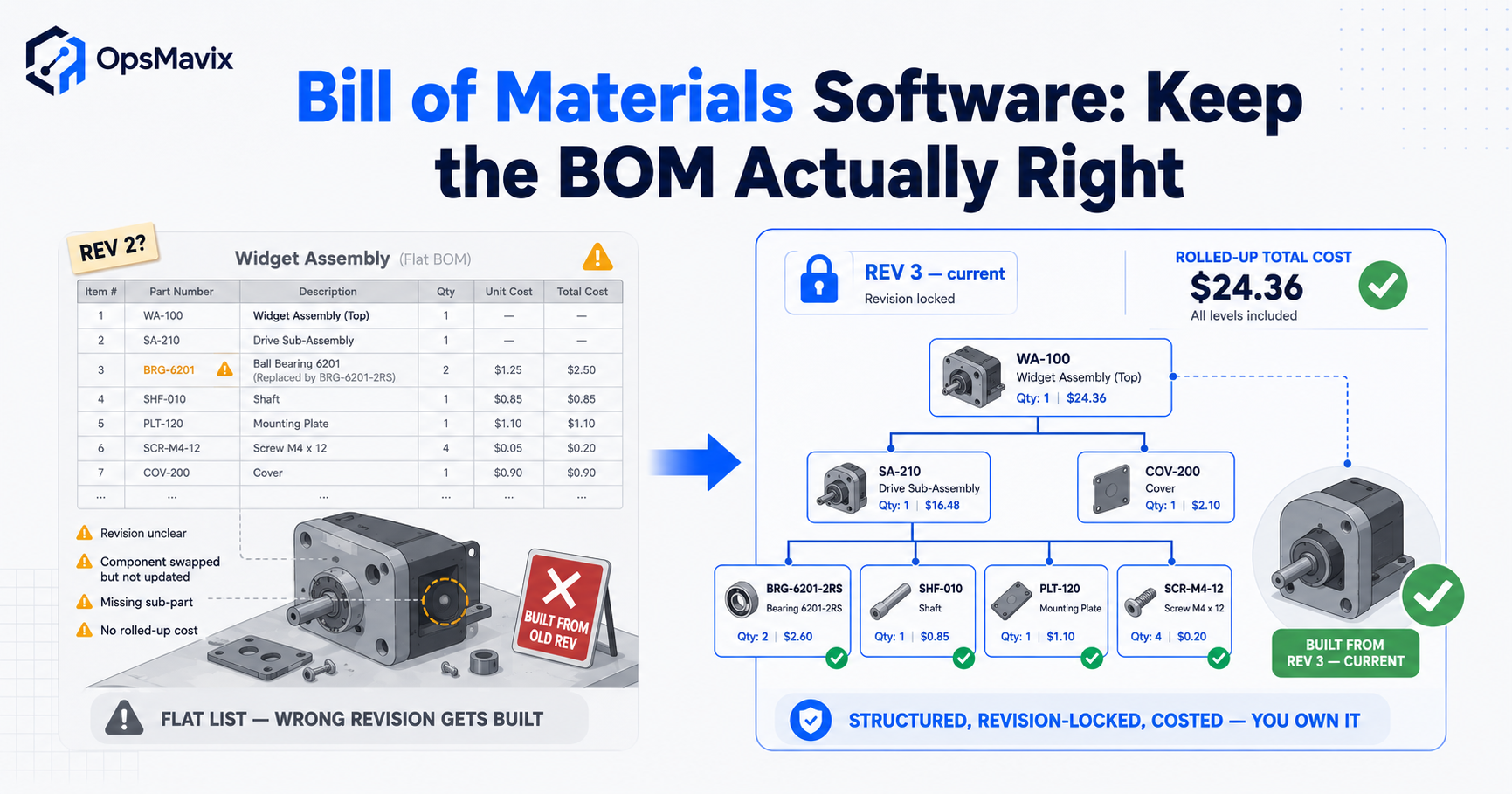
Bill of materials software keeps a product’s component structure, quantities and released revisions in a controlled record. Its value is not simply replacing a spreadsheet with a screen. It should let people find the right structure, understand a proposed change and use the same approved information for purchasing, production and costing.
For a growing manufacturer, the buying decision starts with the BOM itself: how complex it is, who edits it and which systems need its data. This guide explains the features to test, the boundary with planning and shop-floor software, and a practical pilot. All worked quantities and costs are hypothetical.

BOM software should keep production requirements aligned with the approved product structure. Illustrative photograph, not an OpsMavix client.
Image credit: Nenad Stojković / Shixart1985, CC BY 2.0. Displayed at a reduced size; no additional edits.
Key Takeaways
- Store stable item identities, quantities, units and revision status, rather than just descriptions.
- Test nested structures, shared components and reverse where-used queries.
- Preserve released records and make change approval and effectivity explicit.
- Check the assumptions behind cost roll-ups and material requirements.
- Assess existing ERP or manufacturing modules before replacing them.
- Use a real product and difficult change to compare configuration, integration and custom options.
In this guide:
- 1. Define the Records the Software Must Manage
- 2. Test Multi-Level BOMs and Where-Used Visibility
- 3. Keep Revisions and Approvals Operationally Useful
- 4. Understand What a Cost Roll-Up Actually Measures
- 5. Decide What Belongs in BOM Software, MRP and MES
- 6. Connect the BOM Without Creating Competing Masters
- 7. Choose Between Configuration, Integration and Custom Work
- 8. Run a Pilot That Exposes the Difficult Cases
- Frequently Asked Questions
- How OpsMavix Can Help
1. Define the Records the Software Must Manage
Items, structures and supporting documents
A BOM links a parent item to components with quantities and units. The item record carries its identity and relevant attributes; the BOM records how those items belong together for a defined output quantity. Drawings, specifications and work instructions should be connected without being confused with the parts list.
| Record | Minimum questions to answer |
|---|---|
| Item | What is its unique identity, unit and make-or-buy status? |
| BOM header | Which parent, output quantity and revision does this describe? |
| Component line | What quantity is required, in which unit and under what conditions? |
| Released version | Who approved it, when does it apply and can it be reconstructed? |
| Change record | What changed, why and which jobs or products are affected? |
A manufacturer can require more than this: alternatives, co-products, batches or customer-specific variants. Include those cases in the scope only where they occur, and test them explicitly rather than treating every BOM product as interchangeable.
One authoritative structure
Decide which application owns the item and BOM master. If design software, an ERP and a shop-floor application all hold versions, specify how approved changes move between them. A new database does not solve the problem if three teams still edit different masters.
2. Test Multi-Level BOMs and Where-Used Visibility
Nested structures represent sub-assemblies with their own components. A component can be shared by several products, and the same item can appear at different depths. The system should expand the relevant structure without duplicating shared item identities.
Check quantity multiplication
In a hypothetical enclosure, each finished unit requires two modules, and each module requires four spacers. The spacer requirement is 2 × 4 = 8 per enclosure. For 50 enclosures it is 400 before allowances, existing stock or production supply are considered.
| View | Purpose | What to test |
|---|---|---|
| Indented structure | See parent-child relationships. | Quantities clearly identified as per parent or another stated basis. |
| Flattened explosion | See accumulated component requirements. | Shared components combined without losing units or conditions. |
| Where-used | Find products affected by a component. | Direct and indirect parents shown at the relevant revisions. |
ERPNext’s BOM documentation is an example of an existing manufacturing application with BOM records and related production functions. It demonstrates why buyers should inspect the tools already available before assuming a custom build is necessary.
Prevent invalid structures
Test a circular relationship, missing component and invalid unit conversion. An assembly must not become its own descendant. Ask whether checks run when users save, release or import records, and whether an import can bypass ordinary validation.
3. Keep Revisions and Approvals Operationally Useful
A released BOM needs a stable identity
People should be able to retrieve what a particular job was authorised to build after the current product has changed. The application might retain an immutable version reference or a job snapshot; test the outcome, not just the name of the feature.
Demonstrate a draft change that remains unavailable to ordinary production, a rejected review and an approved successor. Check whether unauthorised users can edit released content, alter effectivity or bypass review through a bulk upload.
Changes have a start point
Agree whether a change applies by date, order, batch, serial or another controlled boundary. Then decide what happens to old stock and open work. Not every product supports every method, and different configurations can treat the same change differently.
Include drawing links and notifications in the test. A correct database entry is insufficient if the packing bench or subcontractor continues using an uncontrolled PDF.
4. Understand What a Cost Roll-Up Actually Measures
A cost roll-up combines component quantities with a chosen cost basis. It may also include routing, labour, overhead or subcontract operations if the application and configuration support them. A BOM-only materials total is not automatically the full manufacturing cost.
Hypothetical materials calculation
| Component | Quantity per unit | Assumed cost | Extended cost |
|---|---|---|---|
| Frame | 1 | £18.00 | £18.00 |
| Bracket | 4 | £2.50 | £10.00 |
| Fastener | 8 | £0.20 | £1.60 |
| Packaging set | 1 | £1.40 | £1.40 |
| Materials total | £31.00 |
For 50 units the materials allowance is £1,550. These invented inputs exclude labour, setup, scrap, freight and other costs. They are not supplier quotations or an estimate for a real product.
Record the basis and date
Distinguish standard, last purchase, average and other cost bases used by your business. Check currency conversion, purchase-unit conversion and rounding. Record the revision and effective date behind the calculation so a later price change does not silently alter a historical comparison.
5. Decide What Belongs in BOM Software, MRP and MES
The categories overlap, especially inside an ERP. The following distinction is useful when specifying work, rather than a rule that every supplier organises its product this way.
| Function | Main question |
|---|---|
| BOM control | What is the approved product structure? |
| Material requirements planning | What supply is needed and when, after demand and stock are considered? |
| Production scheduling | Where and when can work be performed? |
| Shop-floor execution | What operation is running and what actually happened? |
| Inventory | What stock exists, where and in what status? |
Avoid importing the wrong expectation
An accurate explosion can show a gross requirement but cannot by itself prove availability or promise a delivery date. Planning also needs stock, reservations, open supply, lead times and relevant capacity assumptions. Execution requires actual material and time transactions.
Microsoft’s supply-planning documentation illustrates the wider planning context in an existing ERP. Use a demo to establish which functions your proposed solution includes, rather than buying a parts database and expecting it to schedule a factory.
6. Connect the BOM Without Creating Competing Masters
Set record and event ownership
Engineering might release a structure, purchasing maintain suppliers and costs, and production record consumption. Agree the direction and timing of each interface and the identifier that joins records.
- Preserve item identity when descriptions change.
- Map purchase, stock and issue units explicitly.
- Record the approved version on production work.
- Distinguish a BOM edit from a physical inventory transaction.
- Make failed and duplicate messages visible and recoverable.
- Assign someone to investigate rejected updates.
A connector on a feature list does not prove that your required fields, revisions or exceptions are supported. Send a changed component, replay the message and check that the receiving system remains consistent.

BOM quantities only become useful purchasing information when stock units and inventory records agree. Illustrative photograph, not an OpsMavix client.
Image credit: FIONASUN, CC0 1.0. Displayed at a reduced size; no additional edits.
7. Choose Between Configuration, Integration and Custom Work
Start with the gap
If your present ERP already holds nested BOMs, the missing piece may be permissions, approval configuration, training or a connection to design data. If it stores the structure well but users cannot find the right revision on the floor, a focused delivery interface may be enough.
| Approach | Appropriate reason | Responsibility to clarify |
|---|---|---|
| Configure existing tools | Required controls already exist. | Administrator ownership, testing and user adoption. |
| Integrate applications | Authoritative data is separated from its operational use. | Field mapping, failures, monitoring and upgrades. |
| Add a focused custom system | A defined workflow gap is not handled adequately. | Maintenance, documentation and data export. |
| Implement a broader ERP | Multiple core processes need a shared design. | Migration, process ownership and phased rollout. |
Compare total obligations
Packaged software brings maintained functionality and an established product, but can require configuration, subscriptions and specialist support. Custom work can fit a specific process, but needs testing, maintenance and an accountable support arrangement. Ownership does not remove those obligations.
8. Run a Pilot That Exposes the Difficult Cases
Use one representative product family, including a nested assembly and a component shared by more than one product. Clean the data before judging the application: duplicate item numbers and inconsistent units will undermine any platform.
Acceptance checklist
- Import the agreed items and units without silent substitutions.
- Expand a nested structure and verify calculated quantities manually.
- Find every relevant use of a changed component.
- Reject a draft, release a revision and retrieve its predecessor.
- Keep an existing job on its authorised structure.
- Compare a materials roll-up against a checked calculation.
- Test an interface failure and a duplicate message.
- Export the records and demonstrate backup recovery.
Ask production, purchasing and engineering to perform their own tasks. Record whether each requirement is standard, configured, additional development or still unverified. Agree who accepts the pilot and the conditions for expanding it.
Frequently Asked Questions
What does bill of materials software do?
It manages product structures, component quantities, units and relevant revisions. Depending on the product, it may also provide approvals, where-used queries, costing and connections to manufacturing processes.
Is a spreadsheet sufficient for a small manufacturer?
It can be for a limited, stable process with clear ownership and release controls. Repeated concurrent changes, nested structures and manual links to stock are reasons to reassess the approach.
Does a multi-level BOM calculate total component quantities?
A properly configured explosion can multiply quantities through the structure. Check the quantity basis, output quantity, units and treatment of shared components before using the result for purchasing.
Can BOM software prevent the wrong revision being built?
It can help by controlling release and presenting authorised information. Printed copies, overrides and disconnected systems still need a process. Test the complete route from approval to the workstation.
Is BOM software the same as MRP?
No. A BOM defines the product structure. MRP uses that structure alongside demand, inventory and supply information to calculate material needs over time. They may be functions within one application.
Does the materials total show the true cost of a job?
Not alone. Job cost may include setup, labour, subcontract work, scrap and other expenses. Make clear which costs are included and which remain in separate systems.
Can we retain our accounting application?
Often, provided the operational and financial responsibilities are clearly separated and the required transactions can be integrated. Verify the connection and reconciliation rather than assuming a named connector covers the scope.
Should we build a custom BOM system?
Only where a documented gap justifies it after assessing configuration and integration. Compare the implementation and ongoing obligations with suitable packaged products.
What should we take to a software demonstration?
Bring a nested product, a shared component, a recent revision change, current units and one released job. Ask users to reproduce both normal work and a difficult exception.
How OpsMavix Can Help
OpsMavix can assess BOM data and release controls, configure existing tools, integrate design and operational applications or build a focused custom system. Where purchasing, production, inventory and finance require broader coordination, we can also scope a full ERP.
See our manufacturing and production tracking offering. Contact OpsMavix with one product and a recent change so we can define the real requirements and a testable first phase.
Keep reading
Getting value from OpsMavix? Add us as a preferred source on Google — you'll see more of our operations content in your AI Overviews, AI Mode and Search.