
Works Order Processing Software: What Stock and Accounts Tools Miss
Works order processing software runs the instruction to make or assemble something end to end — issuing materials against a bill of materials, booking the labour and time that went into the build, tracking work-in-progress on the floor, completing the finished item back into stock, and costing the job. Generic stock and accounts tools weren't built for any of that, which is why so many makers run works orders on a spreadsheet beside the software they already pay for. This buyer's guide covers what a works order actually is, what "processing" it really involves, why your stock and accounts systems can't do it, and when a right-sized works order system beats both the spreadsheet and a full MRP.
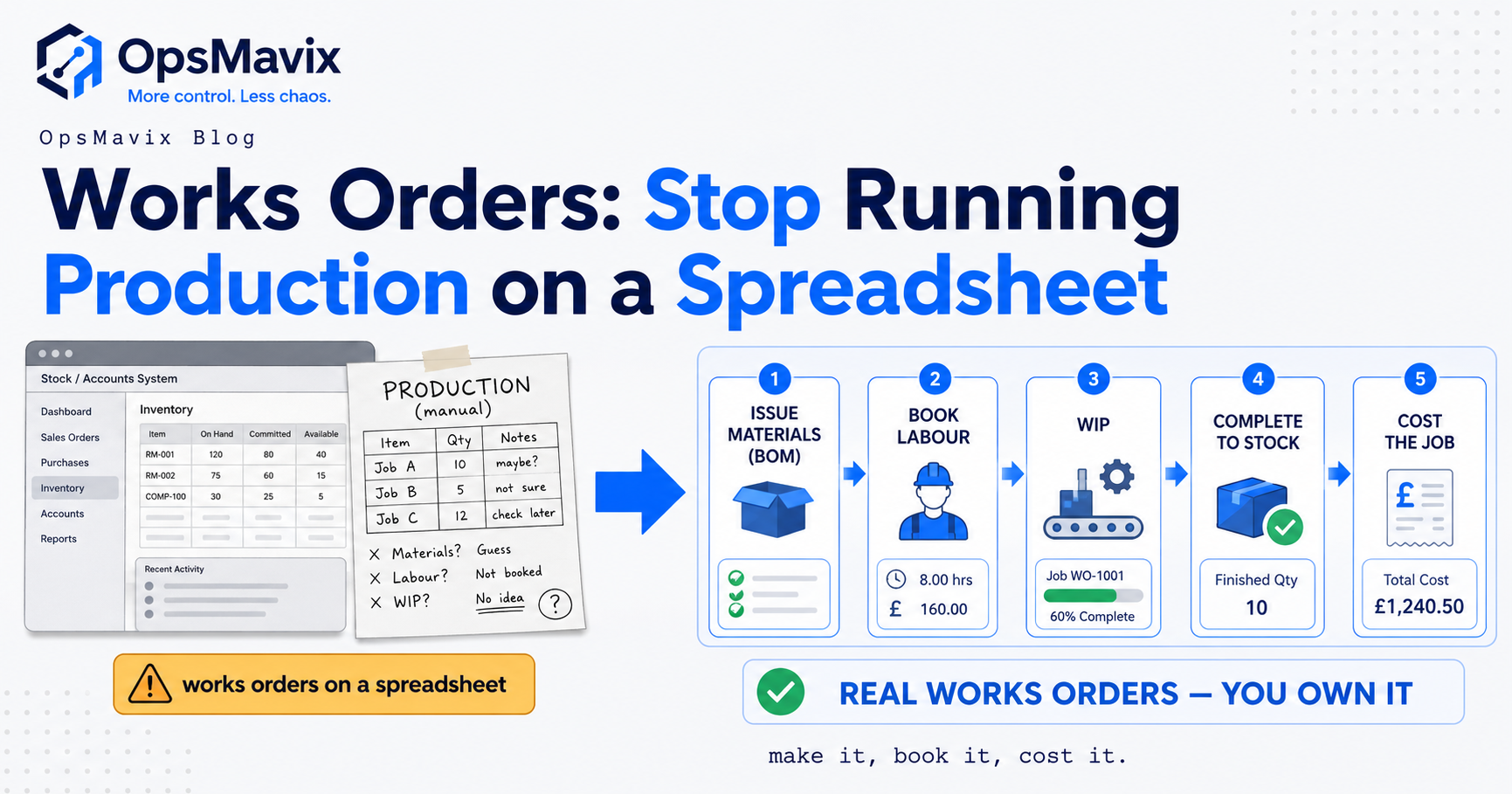
Works order processing software runs a works order from the moment it’s raised to the moment the finished item lands back in stock — issuing the right materials against a bill of materials, booking the labour and machine time the build consumed, showing what’s in progress on the floor, completing the made item into stock, and telling you what the job truly cost. A works order is simply the instruction to make or assemble something; “processing” it is everything between that instruction and a finished, costed product. Most stock and accounts software can name the finished item and hold a price for it — almost none can run the middle.
That gap is why so many makers run works orders on a spreadsheet sitting right next to the software they already pay for. The stock system knows quantities; the accounts system knows money; neither knows how a raw sheet, three bought-in parts and four hours of labour become one finished assembly — so the person who does know keeps it in Excel, by hand, off to the side. This is a commercial buyer’s guide, not a how-to. It covers what processing a works order involves, why generic tools can’t handle it, the hidden cost of the spreadsheet workaround, why full MRP or MES is often overkill, and when a right-sized system is the honest answer — and when it isn’t.
Key Takeaways
- A works order is the instruction to make something; processing it means the whole chain — issue materials against a BOM, book labour, track work-in-progress, complete to stock, and cost the job.
- Stock and accounts software wasn’t built for the middle of that chain. They handle the finished item’s quantity and price, but not material issue, backflush, WIP status or true job cost.
- The spreadsheet works-order is a real tax, not a free workaround — no live WIP, no automatic material backflush, no reliable costing, and it goes stale the moment someone forgets.
- Full MRP or MES is genuine overkill for many small makers — enterprise weight, per-seat pricing and modules you’ll never switch on, to solve a problem two-thirds their size.
- A right-sized works order system closes the gap without that weight: works orders raised from your real bills of materials, issue and backflush, live WIP, complete-to-stock and per-job costing, shaped to your floor.
- Simple kitting with no real WIP and no costing question may not need dedicated works order software at all — and we’ll say so.
What a Works Order Actually Is
A works order (also “manufacturing order” or “production order”) is the internal document that says: make this, in this quantity, from these components, by this date. It’s the make-side equivalent of a purchase order — a PO tells a supplier what to send you; a works order tells your own floor what to build, naming the finished item, the quantity, and — via a bill of materials — the parts that go into it. What makes it different from a line on an invoice is that it’s a conversion: several inputs disappear and one different output appears, with something real happening on the floor in between. It isn’t done when it’s raised — it moves through states (raised, materials issued, in progress, part-finished, completed), and each change is a fact about your stock, your capacity and your costs.
What “Works Order Processing” Really Covers
Processing a works order is five distinct jobs; the value is in all five working together, not any one alone.
Issuing materials against a BOM. When the build starts, the components on the bill of materials come out of stock against that specific order — so raw and component stock stays right, because every build depletes it automatically. Backflush lives here too: issuing components in bulk on completion rather than one at a time, which most small shops rely on to keep the admin sane.
Booking labour and time. A build costs hours as well as parts. Processing captures how long each operation took, so the labour is recorded rather than guessed. Without it, half the cost of everything you make is invisible.
Tracking work-in-progress. Between “started” and “finished”, stock is neither a raw component nor a sellable product — it’s WIP. A works order system holds that state, so “what’s on the floor, and how far along?” is answerable without walking the shop — the point where the job overlaps with shop floor tracking, often the same system seen from two angles.
Completing to stock. When the build is done, the finished item comes into stock as a sellable unit and the WIP clears. Inputs gone, output on the shelf, quantities right on both sides.
Costing the job. Because the system saw the materials issued and time booked, it totals what that build actually cost — not a standard estimate typed in months ago, but the real figure that tells you whether the product makes money.
Why Stock and Accounts Software Can’t Do It
Stock control software is built around one idea: a quantity of a thing, in a place, going up and down. It’s excellent at receipts, despatches, transfers and counts. But a works order isn’t a movement of one thing — it’s the disappearance of several things and the appearance of a different one, with a costed process in between. Ask a plain stock system to “consume ten components and produce one assembly, and remember the four hours it took,” and you’re asking for something it has no concept for — so people fake it with manual adjustments that quietly wreck the accuracy it was bought for.
Accounts software has the opposite blind spot. It’s brilliant at money — invoices, bills, margins, VAT — but it treats your finished product as a single line with a cost you typed in. It can give you the product’s standard cost; it cannot tell you the actual cost of works order 4471, because it never saw the materials leave the shelf or the hours go on. The works order is exactly the operational layer between stock and accounts, the conversion neither tool models — so when the tools you own leave that gap, it gets filled by hand.
The Spreadsheet Works-Order Tax
Running works orders on a spreadsheet feels free — no licence to buy. The cost is real, just paid in accuracy, time and blind spots.
There’s no live WIP. A spreadsheet is a snapshot of whenever someone last typed into it. Ask “what’s on the floor right now?” and the honest answer is “let me check with whoever keeps the sheet” — the exact phone call the software was meant to kill.
There’s no material backflush. Components come off stock only if someone remembers to deduct them, by hand, in a separate system. So the spreadsheet says the build happened while the stock system still thinks the parts are on the shelf — two records drifting apart until a stock count exposes the gap. A production manager put it plainly: “The works orders were never the problem. It was that nothing they touched updated anything else — every build was three places to type the same thing.”
And there’s no reliable costing. A spreadsheet holds a costed estimate, but it doesn’t see what got issued or how long the job ran, so the cost in the cell is a hopeful figure, not a measured one. You learn a product was underpriced from the year-end margin, not the job. Multiply the missing minutes, the reconciliation Fridays and the mispriced jobs across a year, and the “free” spreadsheet is one of the more expensive tools in the building.
MRP and MES Are Often Overkill for a Small Maker
The reflex answer to “our works orders are a mess” is to buy a big system — full MRP, or a manufacturing execution system. For a large, complex plant those are the right tools. But a maker running a dozen works orders a week is not that plant, and these systems are priced and shaped for someone ten times their size.
MRP wants demand forecasts, planning horizons, reorder logic and a data discipline a small shop can’t feed and doesn’t need. MES wants to instrument every operation on every machine. Both arrive with modules you’ll never switch on, per-seat pricing that punishes you for every person on the floor, and an implementation that turns a six-week problem into a six-month project. The usual ending is an expensive system used at a fraction of its scope, with a spreadsheet still running beside it.
The honest middle ground gets skipped. Between “spreadsheet next to the accounts package” and “enterprise MRP” sits a large, under-served band — most of UK small manufacturing — that needs the five jobs done well, connected to the tools they already run, and nothing heavier.
What a Right-Sized Works Order System Does
A right-sized works order system does the five jobs and stops there — no forecasting engine you won’t feed, no per-machine instrumentation you don’t need. Works orders are raised from your real bills of materials, so components explode automatically instead of being retyped. Materials issue and backflush against each build, so stock stays right without a reconciliation ritual. Labour gets booked in whatever way your floor will keep current. WIP is live, so “what’s on the floor?” is a glance. Completed builds land back in stock as sellable units, and each job carries its true cost.
The difference from the enterprise route is fit and weight. Built around your workflow, it uses your terms rather than forcing the floor to relabel itself to suit a data model, and it connects to the accounting and stock systems you already run instead of demanding you migrate onto a platform first. The bill of materials is the spine of the whole thing; if that isn’t clean, the works orders built on it inherit the mess, which is why BOM accuracy is the first thing worth getting right.
Before, a build is three places to type the same thing, stock that never ties out, and a margin you learn at year-end. After, it’s one order that issues its own materials, shows its own progress, completes to stock, and hands you the real cost — a fixed build from around £3k that you own, rather than a subscription that switches production off if you stop paying.
When an Off-the-Shelf Tool Genuinely Fits
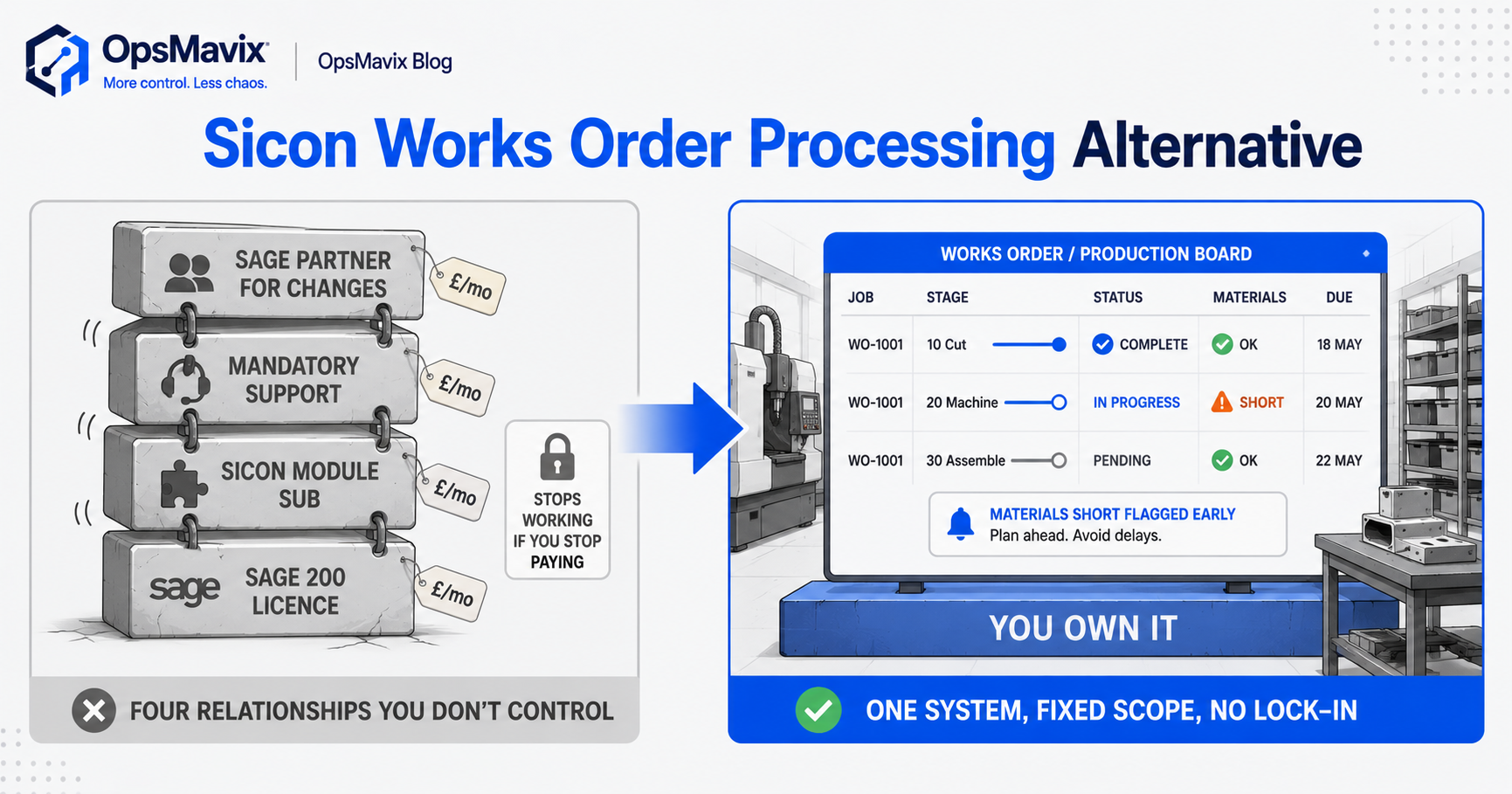
There are real cases where you shouldn’t build anything. If you already run Sage 200 and are happy inside it, a native module may be the pragmatic route — the trade-offs are in the Sicon Works Order Processing alternative. And if a well-fitting off-the-shelf tool matches how your floor runs, buy it; a good fit off the shelf beats a custom build every time.
There’s a simpler case still: you might not need dedicated works order software at all. If what you do is straightforward kitting — pick a fixed set of components, box them, done — with no meaningful work-in-progress and no costing question, a works order system is solving problems you don’t have, and a decent stock system with a bill-of-materials feature may cover you completely. If you can’t point to builds that sit in progress long enough to need seeing, and a real question about what each one costs, don’t buy the machinery.
FAQ
What is works order processing software?
It’s software that runs a works order — the instruction to make or assemble something — through its full lifecycle rather than just recording that it exists: issuing materials against a bill of materials, booking labour, tracking work-in-progress, completing the finished item back into stock, and totalling what the job actually cost. The defining feature is that it models a conversion — several inputs becoming one different output — which generic stock and accounts tools don’t.
Why can’t my stock or accounts software handle works orders?
Because each is built for a different core job. Stock software tracks quantities moving in and out of places; it has no native concept for consuming ten components and producing one assembly while recording the hours. Accounts software tracks money and treats your product as a single line with a cost you typed in — so it gives you a standard cost, not the real cost of a build. The works order lives in the operational gap between the two, which is why it ends up in a spreadsheet in the middle.
Do I need works order software, or is a spreadsheet fine?
It comes down to two questions: do you have builds that sit in progress long enough that you need to see their status, and a real question about what each job costs? If yes to either, a spreadsheet will quietly cost you in stock that never reconciles, WIP nobody can see, and margins you learn too late. If you do simple kitting with no meaningful WIP and no costing question, dedicated software may be overkill — a stock system with a bill-of-materials feature can cover you, and we’d say so rather than sell you a system you don’t need.
Is a full MRP or MES system a better answer?
For a large, complex plant, often yes. For a maker running a handful of works orders a week, usually no — MRP and MES are priced and scoped for operations many times bigger, and most end up used at a fraction of their scope with a spreadsheet still open beside them.
How OpsMavix Can Help
OpsMavix builds right-sized works order and production-tracking systems for makers too big for a spreadsheet beside the accounts package, too small for the weight and price of full MRP. We build the five jobs around how your floor genuinely runs, connected to the accounting and stock tools you already use rather than a platform you’re forced to migrate onto. Live in weeks, fixed scope from around £3k, and you own it outright.
If your works orders live in a spreadsheet beside software that can’t run them, or you’ve priced up an enterprise system that’s plainly too big for the job, that’s the gap we close. Book a Free Operations Leak Audit and we’ll map where your material issue, WIP visibility and job costing break down today, what the spreadsheet is quietly costing you, and whether a right-sized system is worth the build.
Keep reading
Getting value from OpsMavix? Add us as a preferred source on Google — you'll see more of our operations content in your AI Overviews, AI Mode and Search.