
Production Monitoring System: One Live Picture of the Floor
A production monitoring system answers the question you keep walking the floor to ask — what's actually running right now, where are the jobs, and where did we just stop. Not a report you read after the shift. Here's what a live picture of the floor is really for, why standalone monitoring dashboards get ignored, and how to build one that catches a stoppage while it's still costing you minutes, not hours.
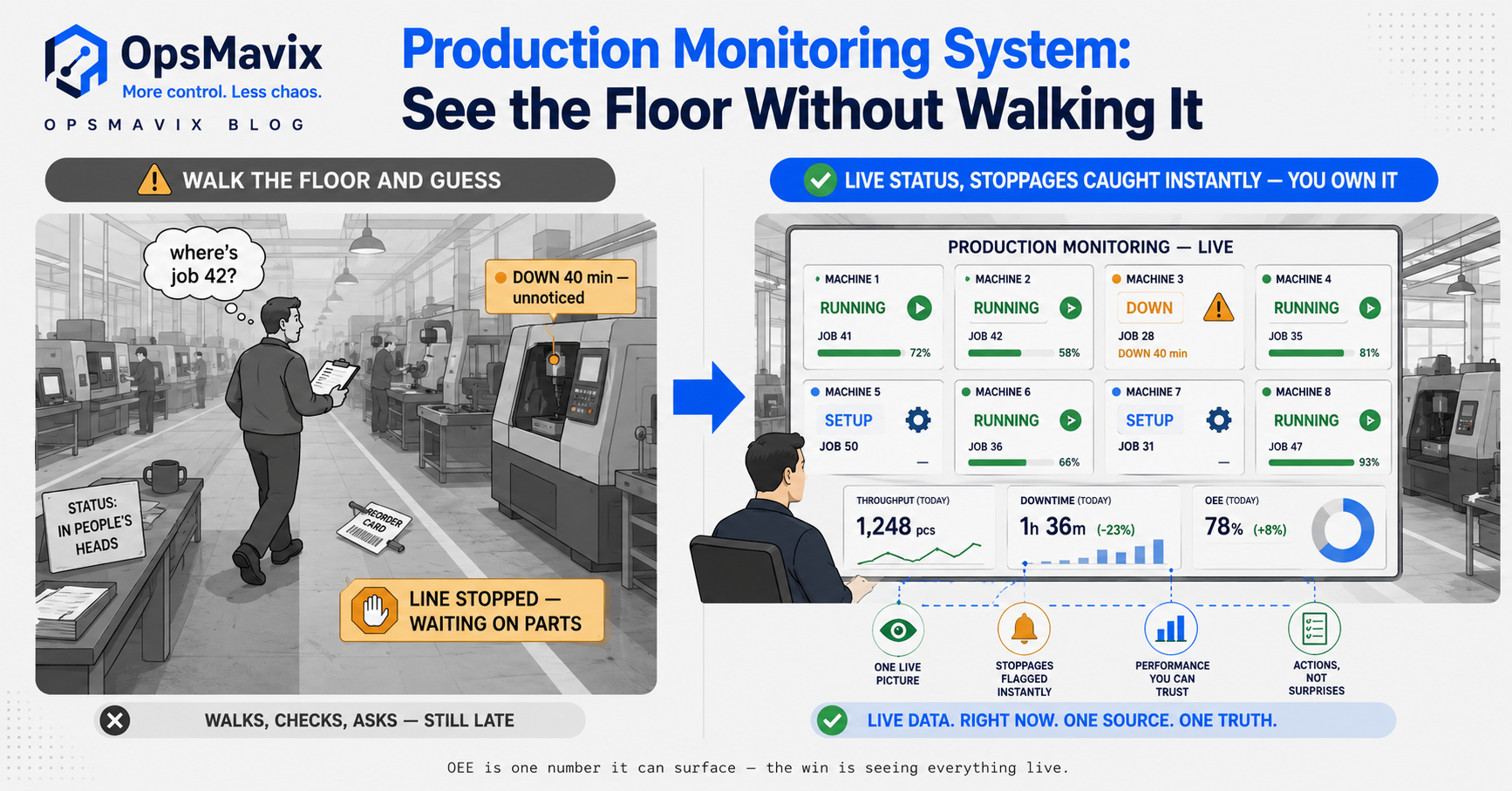
A production monitoring system is the single live picture of your shop floor: what’s running right now, where every job sits, and where the line just stopped — without you walking out to check. It’s the difference between finding out a machine went down twenty minutes ago and finding out at the end of the shift when the numbers don’t add up. Most small manufacturers don’t have this. They have a foreman who knows, a whiteboard that’s already stale, and a stack of paper travellers that only tell you where a job was when someone last wrote on it. A monitoring system replaces “go and ask” with “look at the screen.”
This post is about live visibility specifically — the real-time picture, not the metric and not the basic job tracker. It can surface OEE as one figure among several, but the job here is simpler and more immediate: know what the floor is doing while it’s doing it, and catch a stall early enough to still fix it.
Key Takeaways
- A production monitoring system is a live picture of the floor — what’s running, where jobs are, where it stopped — not a report you read after the shift.
- The leak it kills: stoppages you find out about too late, when the recovery window has already closed.
- It’s distinct from OEE (the measurement) and from a job tracker (where the job is) — this is real-time floor visibility, the thing you keep walking out to check.
- Standalone monitoring dashboards get ignored when the live number isn’t tied to the job, the reason and the order it belongs to.
- Built right, it turns “how’s the floor doing?” from a walk-and-ask into a glance — and turns a stall into an alert instead of a surprise.
1. The Real Job: Knowing the Floor Without Walking It
Ask any owner-operator how they know what the floor is doing and the honest answer is: they walk it. Several times a day. They stick their head round the corner, ask the foreman, count what’s stacked at each station, and build a picture in their head that’s out of date the moment they sit back down. That picture is the production monitoring system most small manufacturers actually run — and it only exists while someone’s standing on the floor holding it.
A live system does the walking for you. One screen shows which machines are running and which are idle, how many jobs are moving through each stage, and what’s queued where. Not because a screen is fancier than a walk, but because the walk doesn’t scale — you can’t be on the floor and quoting a new job and chasing a late supplier at the same time, and the moment you’re not looking, the picture goes dark.
2. Catching the Stoppage Early Is the Whole Point
The difference between a good day and a bad one on the floor is rarely one big disaster. It’s a line that stopped at half nine and nobody flagged it until eleven. Ninety minutes of a machine sitting idle, a job not moving, an operator waiting on material that never came — and by the time it surfaces, you’ve lost the recovery window. You can’t buy that time back at the end of the shift.
Live monitoring changes when you find out. A station that should be running and isn’t shows up the moment it stalls, not at the daily catch-up. A queue building past where it should be flags before it becomes a bottleneck you’re firefighting. The value isn’t the data — it’s the earliness. A stoppage you see at half nine is a phone call and a fix. The same stoppage at the end of the shift is a late order and an apology.
3. What “Live” Actually Has to Show
A monitoring screen that shows the wrong things is just another display nobody looks at. The picture that earns a glance is narrow and honest: which machines or stations are running, idle or down right now; how many jobs are at each stage and which are behind their due time; throughput against what you expected by this point in the day; and any stoppage flagged with how long it’s been down. That’s the floor in one view — running, stuck, and behind.
Notice what’s not on it: everything else. A live floor view is not a monthly report, not a finance dashboard, not a wall of every metric you could theoretically capture. The fastest way to kill a monitoring system is to cram it so full that the one thing that matters — that line’s been down eighteen minutes — gets lost in noise. Show the state of the floor now. Put the analysis somewhere else.
4. Where the Data Comes From — Honestly
Live visibility is only worth having if the live data is true, and this is where monitoring gets sold dishonestly. You don’t always need sensors wired into every machine. For a lot of shops the practical version is operator-driven: a scan or a tap when a job starts, when it moves stage, when a machine goes down and why. That’s not second-best — it captures the reason, which a sensor never can. A sensor knows the machine stopped; only a person knows it stopped because the tooling snapped.
The trap is the opposite extreme — the expensive machine-monitoring platform that streams beautiful real-time data with no idea which job was running or why it stopped. Accurate signal, no context. The right level of instrumentation is the one your floor will actually keep up in peak season. If logging a stoppage means walking to a PC and typing, it won’t happen when it’s busy — which is exactly when it matters. Make it a tap at the station, and the live picture stays true.
5. Why Standalone Monitoring Dashboards Get Ignored
Plenty of manufacturers have bought a monitoring dashboard and watched it become wallpaper. The reason is almost always the same: the live number floats free of everything it means. The screen says line 2 is down, but it can’t tell you which job was on it, which order that job belongs to, or which customer is now waiting. So the alert is real and useless at the same time — you still have to go and find out what it actually affects.
A monitoring system earns its keep when the live picture is joined to the work. A stopped station knows the job that was running, the order behind it, and the due date now at risk. Throughput knows which products it’s counting. A downtime flag carries its reason. That join is the difference between a dashboard you glance at and a dashboard you act on — and it’s exactly what a bolt-on tool that can’t see your jobs or orders can’t give you.
6. Build It Around Your Floor, Not a Generic Screen
Every shop floor has its own shape — its own stations, its own stages, its own idea of what “running normally” looks like. A generic monitoring product makes you bend your floor to its template: its definition of a work centre, its fixed statuses, its per-seat pricing for screens you’ll put on the wall. That’s how you end up with a dashboard that half-fits and quietly gets ignored, back to walking the floor because the tool never really matched it.
A right-sized system built around your floor encodes your stations, your stages, your due-time rules and your downtime reasons — and feeds the same live picture everyone works from, on a screen at the station and a view in the office. It sits on the production tracking you already need, and you own it outright: no per-screen fees, nothing a vendor can switch off, and it can surface OEE or feed the job status view when you want the deeper cut. The point is a picture that matches your floor, not a floor rearranged to suit a product.
7. When You Don’t Need One Yet (the honest bit)
Not every shop needs live monitoring today, and we’ll say so. If you run a handful of jobs a day and a glance across the floor genuinely tells you everything, a live system is solving a problem you don’t have yet. Monitoring earns its cost when the floor is big enough, or fast enough, that you can’t hold it in your head — when stoppages hide, when “where’s that job?” is a real question, when you find out about problems too late often enough to feel it.
The mistake in the other direction is just as real: staying blind because the only alternative you’ve seen is a six-figure MES you don’t need. If you’re in the gap — too much floor to eyeball, not enough to justify an enterprise system — a right-sized monitoring system is exactly the fit. Switch when the blindness starts costing you dispatches, not before, and not by over-buying.
Standalone Monitoring Dashboard vs a Right-Sized System
| Standalone Monitoring Dashboard | Right-Sized Custom System | |
|---|---|---|
| Shows | Live machine signal | The floor joined to jobs and orders |
| A stoppage tells you | A station is down | Which job, which order, which due date now at risk |
| Downtime reason | Often missing | Captured at the station, in the flow |
| Fit to your floor | Generic work centres and statuses | Your stations, stages and rules |
| Data source | Usually sensor-only | Operator taps and/or sensors — whatever fits |
| Ownership | Licensed, per-screen | Owned outright, no per-seat fees |
| Right when | You want raw machine data | You want to see and act on the floor |
FAQ
What is a production monitoring system?
A production monitoring system is a live view of your shop floor that shows what’s running, where every job sits, and where the line has stopped — in real time, without walking out to check. It’s meant to answer “what’s the floor doing right now?” at a glance, and to flag a stoppage while there’s still time to fix it, rather than at the end of the shift when the numbers don’t add up.
How is it different from OEE monitoring or a production tracker?
They overlap but do different jobs. OEE monitoring is a measurement — a percentage of how much of a machine’s potential you’re capturing. A production tracker tells you where a given job is in the process. A production monitoring system is the live picture of the whole floor at once — running, idle, stopped, behind — and can surface OEE and job status as parts of that picture without being either one on its own.
Do I need sensors on every machine?
Not necessarily. Many shops get a true live picture from operator-driven logging — a scan or tap when a job starts, moves stage, or a machine goes down and why. That captures the reason a stoppage happened, which a sensor can’t. Sensors add value where you need automatic machine data, but the right level is whatever your floor will actually keep up during a busy week. Instrumentation nobody maintains gives you a confident screen built on gaps.
Why do monitoring dashboards get ignored?
Usually because the live number isn’t tied to anything. A screen that says a line is down but can’t tell you which job, order or customer it affects is real and useless at once — you still have to walk out and find the context. Monitoring earns a glance when the live picture is joined to your jobs and orders, so a stoppage already knows what it’s costing you. A bolt-on tool that can’t see your work can’t do that.
Isn’t this just a smaller version of an MES?
It’s the visibility layer of one, right-sized. A full MES bundles scheduling, quality, traceability and more, and for some shops that’s the right buy. But if your actual pain is simply not being able to see the floor without walking it, you don’t need the whole platform — you need the live picture, built around your floor and owned outright, with room to grow into the rest only if and when you need it.
How OpsMavix Can Help
OpsMavix builds right-sized production monitoring and tracking systems for manufacturers who can no longer hold the floor in their head — but don’t need a six-figure MES to see it. We build the part you’ll actually use: one live picture of what’s running, where jobs sit, and where the floor just stopped, joined to the orders and due dates it affects, with downtime reasons captured at the station in the flow of the work. It’s shaped to your floor — your stations, stages and rules — connected to the systems you already run, and owned outright with no per-screen fees and nothing a vendor can switch off.
If you’re still walking the floor to find out what’s running, and finding out about stoppages too late to fix them, that’s a visibility leak with a real cost in idle machines and missed dispatches. Book a Free Operations Leak Audit and we’ll map where the floor goes dark today, what it’s costing you, and whether live monitoring is the honest fit for the shop you run now.
Keep reading
Getting value from OpsMavix? Add us as a preferred source on Google — you'll see more of our operations content in your AI Overviews, AI Mode and Search.