
Multi-DNC Software: Getting the Right CNC Program to the Right Machine
Multi-DNC software distributes CNC and NC programs to the machines on your shop floor and keeps track of which version is the right one. This post explains what DNC and multi-DNC actually do, the mess that builds up when programs live on USB sticks, a shared folder, or one person's PC, why revision control is where the money leaks, and how a connected system ties the program to the job, the part, and the schedule — not just moves a file.
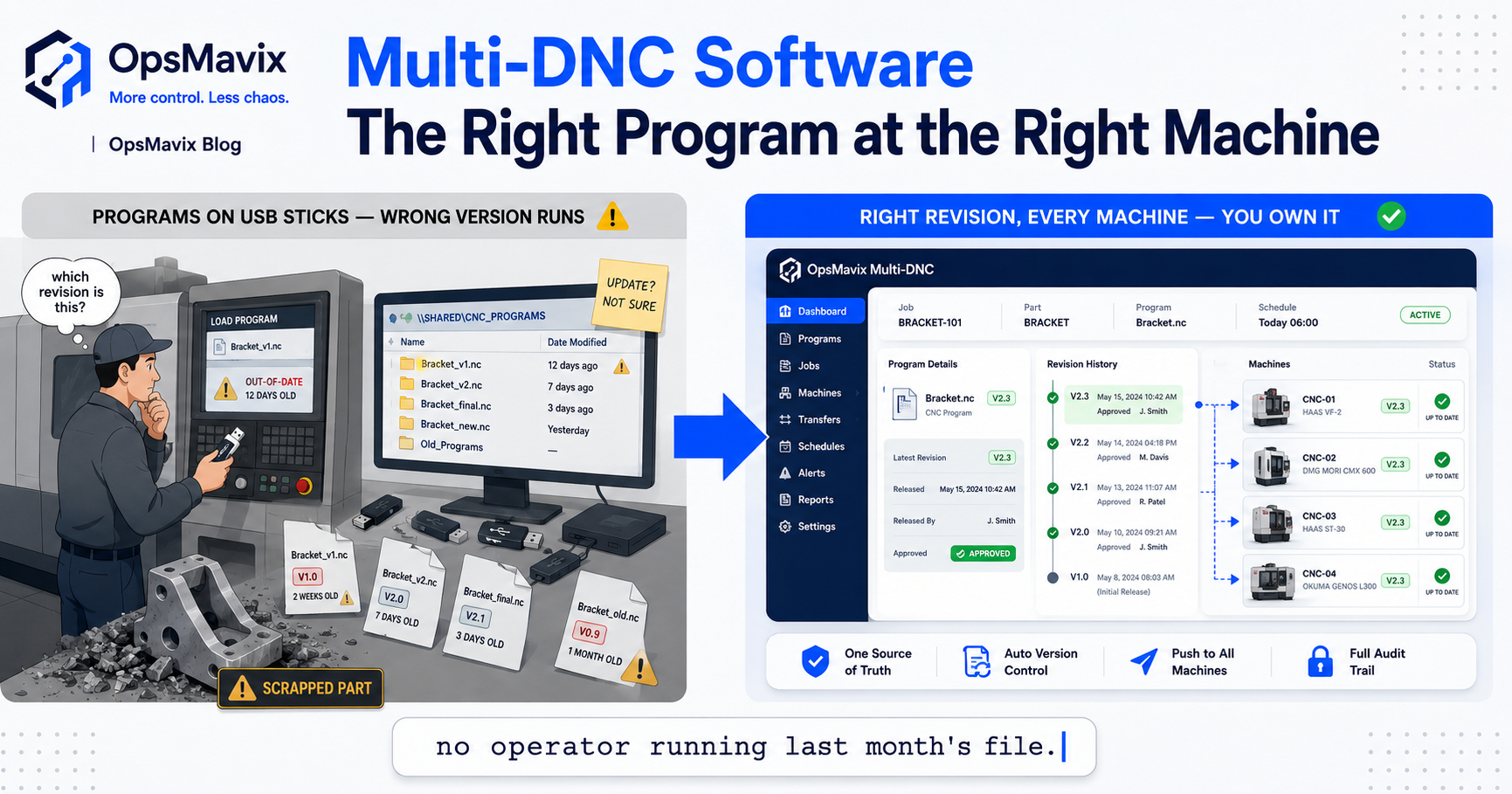
Multi-DNC software is the layer that pushes CNC and NC programs out to the machines on your shop floor and keeps control of which program version each machine should be running. DNC — Distributed Numerical Control — started as the plumbing that moved a program file from an office computer down to a machine’s control, replacing the days of punched tape and hand-keyed code. “Multi-DNC” is the same idea across many machines at once: a central program library serving a whole floor of controls, old and new, from different makers, over serial or network, so an operator loads the correct file instead of hunting for it. The part most people underrate is the second half of the job — not moving the file, but knowing it’s the right file, the current revision, tied to the job that’s actually running.
This post covers what DNC and multi-DNC do, the specific mess that builds when programs live on memory sticks and shared drives, why revision control is the difference between a good part and a scrapped batch, and where a bare DNC tool stops and a connected shop floor begins. If you want the wider “run and track the whole floor” picture rather than the program layer specifically, the manufacturing execution system explainer covers that; this one stays on the program-and-machine problem.
Key Takeaways
- Multi-DNC software distributes CNC/NC programs to many machines from one central library and controls which version each machine runs.
- The real value isn’t the file transfer — it’s revision control: making sure no operator ever loads an out-of-date program.
- Programs scattered across USB sticks, a shared folder, and one engineer’s PC is the failure mode most shops actually live in.
- A wrong or old program version doesn’t just waste time — it can scrap a whole batch, crash a spindle, or ship a bad part.
- Bare DNC moves files. A connected system ties the program to the job, the part, and the schedule, so the floor knows what to run and why.
- Where OpsMavix adds value is that program-to-job link — the missing thread between the file layer and the wider production picture.
1. What DNC and Multi-DNC Actually Do
At its simplest, DNC is a delivery service for machine code. A CNC or NC machine runs a program — the instructions that tell it where to move, how fast, when to change tools. That program has to get from wherever it was written or edited onto the machine’s control. DNC is the software and connection that does the moving: over an RS-232 serial cable on older kit, over Ethernet or a network share on newer controls, sometimes both on the same floor because machine shops rarely replace everything at once.
Multi-DNC is that job scaled to a whole floor. Instead of one link to one machine, you have a central program library serving many machines at once — a lathe from one decade next to a five-axis mill from another, each with its own control quirks, all pulling from the same managed source. One machine-shop owner described the before-state plainly: “every machine had its own way of getting a program, and half of them were a person walking over with a stick.” Multi-DNC replaces that walk with a system: the operator requests or receives the program at the machine, and the software handles the format, the handshake, and the connection underneath.
2. The Mess: USB Sticks, a Shared Folder, and One Person’s PC
Most shops don’t decide against multi-DNC. They just never set it up, and the program layer grows like weeds. The current version of a part lives on a memory stick in a drawer. A backup — maybe current, maybe not — sits in a shared folder nobody prunes. The definitive copy, the one the senior programmer trusts, is on his own PC in a folder only he understands. When he’s off, the floor either guesses or waits.
This isn’t sloppiness; it’s what happens when the program library has no owner and no single source. The symptoms are familiar: two files with almost the same name and no way to tell which is live, an edit made at the machine that never made it back to the master, a proven program that got overwritten by an experimental one. The cost hides until it doesn’t. A shop running this way spends real hours every week just confirming which file to trust — and every one of those confirmations is a chance to get it wrong. This is the same shape of problem as shop-floor job tracking done on paper: the information exists, but not anywhere you can trust at a glance.
3. Revision Control: the Half That Actually Matters
Moving a file is the easy half. Knowing it’s the correct, current, approved revision is the half that pays for the software. A CNC program changes over its life — a feed rate tuned, a tool path fixed after a crash, a tweak spot corrected once a part came back. Every one of those edits creates a version, and the whole game is making sure the machine only ever runs the approved one.
Good revision control gives each program a version history: who changed it, when, why, and which revision is the released one cleared for production. An operator loading a program sees the current release, not a five-versions-ago copy someone left on the control. Edits made at the machine don’t silently become the new master — they’re checked, approved, and versioned back in, or discarded. The distinction between a machine shop that has this and one that doesn’t is the difference between a controlled library and a folder full of files named part_final, part_final_v2, and part_final_USE_THIS.
4. What Goes Wrong When the Version Is Wrong
The failure isn’t abstract. Run an out-of-date program and the machine does exactly what it’s told — cuts to the old dimensions, uses the tool path that was superseded for a reason, misses the correction that was added after the last scrap. The operator can be doing everything right and still make a bad part, because the instructions were wrong before they ever pressed cycle-start.
The consequences scale with the part. On a cheap component it’s a few units in the bin. On an expensive billet or a long cycle, a wrong revision can scrap a whole batch, wreck a fixture, or crash a spindle into a workholding — hours of downtime and a repair bill on top of the wasted material. Consider a shop that machines a batch of aerospace brackets from a bar of titanium: the program was revised to correct an undersized pocket, but the old file was still on the stick. The batch runs to the old revision overnight, and by morning there’s £6,000 of scrapped material and metal that has to be re-ordered — plus a late delivery to a customer who now doubts the shop. None of it was the operator’s mistake. It was a version-control gap. Multi-DNC with proper revision control is precisely what makes that overnight run impossible.
5. Beyond File Transfer: Connecting the Program to the Job
Here’s where most DNC tools stop and the interesting problem starts. Bare DNC answers “how do I get the file to the machine.” It doesn’t answer “is this the right file for the job that’s actually scheduled on this machine right now.” Those are different questions, and the gap between them is where shops still lose time even after they’ve bought DNC software.
A connected shop floor closes that gap. The program isn’t just a file in a library — it’s linked to the part number, the work order, and the schedule. When a job is loaded to a machine, the system already knows which program revision that job requires, so the operator isn’t matching files to jobs from memory. The right program follows the right job to the right machine, automatically, and the floor’s live picture — what’s running, what’s queued, what’s late — includes which program each job needs. That’s the same connected view a production monitoring system gives you, extended down to the program layer. File transfer alone leaves a human holding that link in their head; connecting it is what removes the last place a wrong revision can sneak in.
6. Multi-DNC vs a Full MES: Don’t Buy the Wrong Layer
It’s worth being clear about scope, because it’s easy to over- or under-buy. Multi-DNC is the program-and-machine layer: distributing files, controlling revisions, connecting to the controls. A manufacturing execution system is the wider layer that runs and tracks all of production — work-order dispatch, live tracking, data collection, OEE, traceability — of which the program layer is one part.
The mistake is treating them as either/or. A shop whose sharpest pain is “the wrong program keeps ending up on the machine” needs solid multi-DNC and revision control first; a full MES bought to solve a program-version problem is an expensive way to miss the point. Equally, a shop that has DNC working but still can’t see what’s running or trace a batch has a production-visibility problem the DNC tool was never meant to solve. Match the tool to the pain. Often the highest-value move isn’t a bigger platform — it’s connecting the DNC layer you have to the job and schedule layer you already run, so the two stop living in separate worlds.
7. What a Connected Program-and-Machine Layer Delivers
Put the pieces together and the day-to-day changes in specific ways. There’s one program library, owned, versioned, and backed up — not a scatter of sticks and folders. Every machine pulls from it, old serial controls and new networked ones alike, without anyone walking a file across the shop. Each program carries a revision history, and only the released version reaches the floor. When a job is scheduled to a machine, the correct program revision is already tied to it, so the operator confirms rather than hunts.
The difference from a bare DNC install is that the program stops being an island. It’s connected to the part, the work order, and the schedule, which means the same system that knows a job is running also knows which program it needs and whether that program is current. That’s the thread most shops are missing: not file transfer, which plenty of tools do, but the link between the file and the job it belongs to. Built around how your floor actually runs — your mix of controls, your part numbers, your scheduling — and connected to the tools you already use rather than replacing them. For the production side of that, see our manufacturing production tracking.
FAQ
What is multi-DNC software?
Multi-DNC software distributes CNC and NC programs from a central library out to many machines on a shop floor at once, and controls which program version each machine should run. DNC stands for Distributed Numerical Control — originally the method of sending program files to machine controls instead of loading them by hand or punched tape. “Multi” means doing it across a whole floor of mixed machines and controls. The two jobs it does are moving the right file to the right machine, and — more importantly — making sure that file is the current, approved revision.
What’s the difference between DNC and an MES?
DNC handles the program-and-machine layer: getting files to controls and managing their versions. An MES is the wider system that runs and tracks all of production — dispatching work orders, showing what’s running live, collecting floor data, traceability, and performance metrics. The program layer is one piece of what an MES touches. A shop whose main pain is wrong program versions needs good multi-DNC first; a shop that can’t see its floor at all has a broader problem. They connect well, but they’re not the same thing.
Why is revision control the important part of DNC?
Because moving a file is easy and getting the wrong file is expensive. CNC programs get edited over their life — tuned feeds, corrected tool paths, fixes after a scrapped part. Without revision control, an operator can load an old version that looks identical and cut parts to superseded dimensions or a tool path that was fixed for a reason. Revision control keeps a version history and makes sure only the released, approved program reaches the machine, so a good operator can’t unknowingly run a bad file.
Can’t we just use a shared folder for our CNC programs?
You can, and many shops do until it bites them. A shared folder has no version control, no record of who changed what, and no way to stop someone loading the wrong file or overwriting a proven program with an experimental one. It works until two near-identical files appear, or an edit made at the machine never makes it back, or the one person who understands the folder structure is off. The point of multi-DNC isn’t a fancier folder — it’s a single owned library with revision control so the floor can trust what it loads.
How does connecting programs to jobs help beyond basic DNC?
Basic DNC gets a file to a machine but leaves a human to decide which file the current job needs. Connecting the program to the job, part number, and schedule removes that decision: when a work order is loaded to a machine, the system already knows which program revision it requires. The right program follows the right job to the right machine automatically. That’s the last place a wrong version can slip in, and it’s the link most standalone DNC tools don’t provide — which is exactly the gap a connected build closes.
How OpsMavix Can Help
OpsMavix builds the connected program-and-machine layer that most machine shops are missing — not a bare file-transfer tool, but one program library, versioned and owned, tied to the jobs and schedule your floor actually runs. Every machine pulls from a single source, old serial controls and new networked ones alike; only released revisions reach the floor; and each program is linked to its part number and work order, so the correct version follows the job to the machine instead of living in an operator’s memory or on someone’s PC. It’s shaped to your mix of machines and your part numbers, connected to the production tracking and scheduling tools you already use rather than replacing them, and owned outright — built in weeks from a fixed scope, with a delivery guarantee.
If the wrong program keeps ending up on a machine, or the “real” version of a part lives on one person’s computer, that’s a leak with a price on it — measured in scrapped batches, lost hours, and late jobs. Start by seeing exactly where it costs you. Book a Free Operations Leak Audit
Keep reading
Getting value from OpsMavix? Add us as a preferred source on Google — you'll see more of our operations content in your AI Overviews, AI Mode and Search.