
Leaving Linnworks: What Breaks, and How to Migrate Cleanly
Linnworks problems tend to build slowly — a workaround here, a stock figure that won't reconcile there — until moving off starts to look like the only fix. This is the honest exit guide: which pains are fit versus config, what to export before you leave, how to map your data into a new system, and how to run a phased cutover without losing history or throwing your stock into chaos.
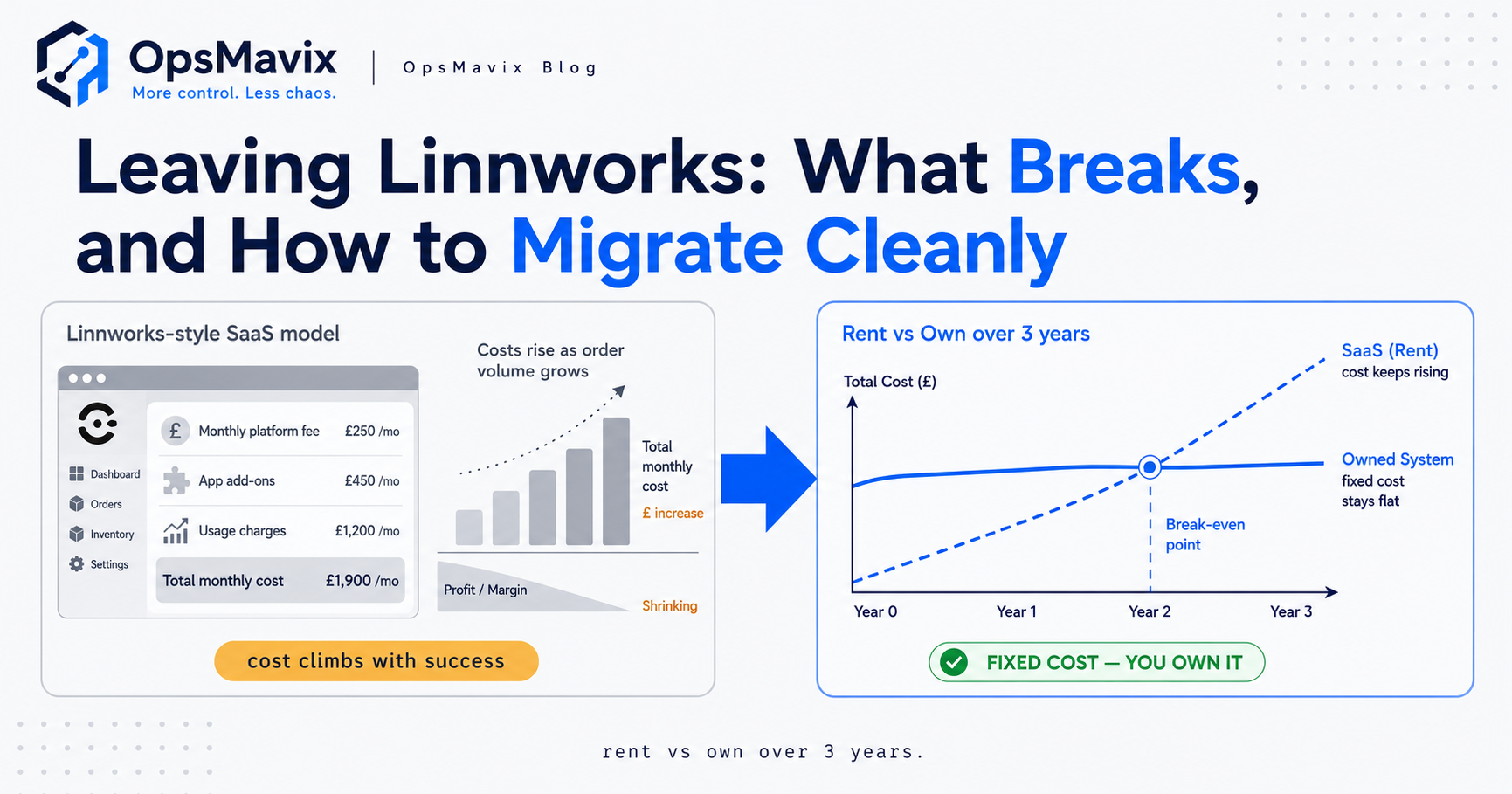
Linnworks problems rarely arrive as one dramatic failure — they accumulate. A price tier the product has no clean home for, a stock figure that won’t reconcile against the shelf, a report you can’t get out without exporting to a spreadsheet, a per-order bill that climbs every good month. Individually each is a shrug. Together they cross a line, and one morning “we should look at moving off Linnworks” stops being a grumble and becomes a plan. This post is for that morning.
It’s an honest exit guide, not a sales pitch for switching. Linnworks is a UK multichannel inventory and order management platform that does a real job for the sellers it fits, and some of the pains that push people towards the door are fixable inside the tool — ripping out working software to solve a configuration mistake is its own expensive leak. So we’ll separate the pains worth moving for from the ones worth fixing, then walk the actual mechanics: what to export before you leave, how to map it into a new system, and how to cut over in phases so you don’t lose your history or oversell your way through the transition.
Key Takeaways
- Linnworks problems that justify a move are fit problems, not config problems — the tool can’t hold how you actually run, no matter how you set it up. Pains that a rebuild of your settings would fix aren’t reasons to migrate.
- Diagnose before you export. List every pain, mark each one “fit” or “config”, and if the list is mostly config, fix it in place — migration is the wrong, costly answer to a solvable setup.
- Export everything while you still have access. Stock items and levels, processed and open orders, product data, channel mappings, customers and supplier records — pulled out in full before any contract lapses, not after.
- Map, don’t dump. Every field in the old system needs a home in the new one; the migration is a translation exercise, and unmapped history is history you’ve thrown away.
- Cut over in parallel, never in one jump. Run the new system alongside Linnworks on live data until the numbers agree, then switch. A big-bang cutover is how stock chaos and lost orders happen.
- Protect the stock figure through the switch. A migration is the single most likely moment for a discrepancy to open up; reconcile the count before, during and after, and freeze changes at the cutover point.
The Pains That Actually Trigger a Move
People don’t go looking to leave a working tool for fun — something specific pushes them. The most common trigger is fit drift: your operation grew a shape the product wasn’t built to hold. A wholesale price tier that lives in a side-spreadsheet because there’s no field for it. A bundle drawn from three SKUs the stock logic can’t track cleanly. Orders arriving by phone or email that never fit the marketplace-feed assumption. Each workaround is a small tax, and past a point the workarounds are the job.
The second trigger is cost that fights growth. Linnworks prices around order volume, with pay-per-use charges when you exceed included limits or reach for premium features. That’s fine while you’re small and predictable; it starts to sting when a strong quarter means a bigger bill for doing better. The third is reporting you can’t get — the number you need for a decision lives somewhere the standard reports won’t surface, so you export to a spreadsheet every week and rebuild it by hand. None of these is a crisis on its own. Stacked, they’re a signal.
Is It Fit, or Is It Config? (Don’t Rip Out What’s Fixable)
Here’s the discipline that saves you a wasted six-figure decision: before you plan any exit, sort your pains into two piles. Config problems are things a better setup would fix — you never mapped a channel properly, nobody built the report view that exists but is buried, the automation rules were set once and never revisited, a staff member wasn’t trained on a feature that does exactly what you’re doing by hand. Fit problems are things no amount of configuration will solve — the data model can’t represent your pricing, the order intake can’t hold your real channels, the tool assumes a 3PL-style flow you don’t run.
If your list is mostly config, migration is the wrong answer. Fix the setup, get someone who knows the platform to audit your configuration, and you may recover most of what’s annoying you for a fraction of the cost and risk of moving. Ripping out a tool you configured badly and configuring the next one just as badly is the classic mistake. Only fit problems earn a migration — because they’re the ones that follow you no matter how well you set the current tool up. And if they do earn it, what you move to is its own decision, weighed in when to move off Linnworks and what to replace it with.
What to Export Before You Leave
The cardinal rule of any migration: get your data out in full while you still have live access, not on the last day of a contract. Linnworks lets you export the things that matter — stock items and current stock levels, processed orders, open orders, product and listing data, and the query/dashboard reports that summarise your history. Some exports route through FTP/SFTP or Dropbox rather than straight to your machine, so give yourself time to set that up rather than discovering the constraint under deadline pressure.
Pull a complete set, and pull it early. Your master product catalogue with SKUs, barcodes, descriptions and attributes. Current stock levels per location. Full order history, both processed and still-open, with line items, prices and dates. Customer and supplier records. Channel and listing mappings — the glue between your SKUs and each marketplace’s identifiers, which is tedious to rebuild from scratch. Purchase orders and any goods-in history. Then verify the exports actually contain what you think: open the files, count the rows against what the dashboard says, and spot-check a handful of records. An export you haven’t checked is a backup you’re only pretending to have.
Mapping Data Into the New System
A clean migration is a translation exercise, not a file copy. Every field in the old system needs a defined home in the new one, and the work is deciding those mappings deliberately rather than dumping a CSV and hoping. Your Linnworks SKU maps to the new system’s product identifier; its stock level maps to the new location record; each order’s channel, line items, pricing and status map to the new order model. Where the new system is shaped to your actual flow, some old workarounds simply dissolve — the price tier that lived in a spreadsheet becomes a real field, so there’s nothing to migrate, just a behaviour to rebuild properly.
Two things separate a good mapping from a painful one. First, preserve history — order dates, past prices, who bought what and when. Losing it means losing your ability to answer “what did this customer pay last year” and breaking any trend you report on. Second, agree the identifiers up front: if SKUs or barcodes are changing, you need a crosswalk table linking old to new so nothing orphans. This is exactly the stage where a built-for-you system earns its shape — instead of forcing your data into a fixed template, the model is drawn around how your orders and stock actually behave, which is the whole argument in Linnworks vs a custom system.
Phased Cutover: Run in Parallel, Then Switch
The single biggest mistake in any operations migration is the big-bang switch — flip everything to the new system on a Monday and pray. Don’t. Run a parallel period instead: the new system live alongside Linnworks, both fed the same real orders and stock movements, for long enough to prove the new one produces the same numbers under real load. You’re not testing whether the software works in a demo; you’re testing whether it matches reality when your actual volume hits it.
During the parallel run, reconcile daily. Does the new system’s stock figure agree with Linnworks and with the shelf? Do orders land, allocate and dispatch correctly? Are the reports giving numbers you’d stake a decision on? When the two systems agree consistently for a defined stretch — not one clean day, a sustained one — you switch the source of truth over and wind Linnworks down. Pick a low-volume window for the actual cutover, freeze stock changes at the switch point so nothing moves in the gap, and keep Linnworks readable for a while after as a reference. A parallel run costs you a period of double-entry; a big-bang cutover can cost you a month of untangling.
Protecting the Stock Figure Through the Switch
A migration is the single most likely moment for a stock discrepancy to open up, because you have two systems, live sales, and a moving count all at once. If Linnworks says 40 units, the new system was seeded at 38, and three sold during the changeover, you now have a divergence nobody planned and a customer about to be told the wrong thing. Guard against it deliberately. Reconcile the stock figure to a physical count immediately before you seed the new system, so you start from truth rather than importing an existing drift. Freeze stock-affecting activity at the cutover point — a short, planned pause beats an unmanaged gap. And reconcile again straight after, before you trust the new number.
Know what you’re guarding against, too. Migration is a prime moment for the ordinary causes of drift to strike — a mis-mapped unit of measure, a bundle that decrements wrong, an in-flight order counted in one system but not the other. It’s worth going in with your eyes open on the common types of stock discrepancy so you recognise one forming instead of finding it at the next stock-take. If a divergence does appear, the discipline for chasing it down is the same as any other: trace the movement, don’t just adjust the number, which is the point of treating inventory discrepancies as investigations rather than corrections.
What “Done Right” Looks Like
A migration done right is boring, and that’s the goal. On the far side you have one live stock figure every channel reads from, your full order and product history carried across and queryable, the workarounds gone because the new system holds the shapes that used to need spreadsheets, and a cutover nobody outside the ops team really noticed. The numbers reconciled before you switched, so you never spent a fortnight explaining a discrepancy to a customer. Linnworks stayed readable long enough to check anything you needed, then wound down on your terms rather than at a contract’s mercy.
Done wrong looks like the opposite: a big-bang switch over a weekend, history left behind because nobody mapped the old fields, a stock count that was never reconciled so the new system launched already wrong, and a month of firefighting that sours the whole team on the tool that was meant to help. The difference between the two is almost never the software — it’s the discipline of the move. Diagnose fit versus config, export in full and verify it, map every field deliberately, run in parallel until the numbers agree, and protect the stock figure through the switch. That’s the whole method, and it’s what turns “leaving Linnworks” from a gamble into a controlled change.
FAQ
What are the most common Linnworks problems that make people leave?
The usual triggers are fit drift, cost, and reporting. Fit drift is when your operation grows a shape the product wasn’t built for — price tiers, bundles or order channels that need side-spreadsheets to hold. Cost is order-volume pricing that climbs as you grow, so a strong month means a bigger bill. Reporting is needing a number the standard reports won’t surface, so you export to a spreadsheet and rebuild it weekly. Any one is a shrug; stacked together, they’re a signal your operation may have outgrown the template.
How do I know if my Linnworks problem is fit or config?
Sort each pain into two piles. Config problems are things a better setup would fix — an unmapped channel, an unbuilt report, automation rules never revisited, a feature nobody was trained on. Fit problems are things no configuration solves — the data model can’t represent your pricing, the intake can’t hold your channels, the tool assumes a flow you don’t run. If your list is mostly config, don’t migrate; fix the setup, ideally with someone who knows the platform. Only fit problems earn a move, because they follow you no matter how well you configure the current tool.
What should I export before leaving Linnworks?
Everything, while you still have live access. Your master product catalogue with SKUs, barcodes and attributes; current stock levels per location; full order history, processed and open, with line items, prices and dates; customer and supplier records; channel and listing mappings; and purchase-order/goods-in history. Some exports route through FTP/SFTP or Dropbox rather than direct download, so allow time to set that up. Then open the files and verify the row counts and a sample of records — an unchecked export is not a backup.
How do I migrate off Linnworks without losing stock accuracy?
Reconcile the stock figure to a physical count before you seed the new system, so you start from truth rather than importing an existing drift. Run the new system in parallel with Linnworks on live data until the counts agree consistently. Freeze stock-affecting activity at the actual cutover so nothing moves in the gap, then reconcile again immediately after. Migration is the most likely moment for a discrepancy to open up, so count before, freeze during, and reconcile after — skipping any of the three seeds the new system with an error.
Should I switch everything over at once?
No. A big-bang cutover is the most common way migrations go wrong. Run the new system alongside Linnworks, both fed the same real orders, until the new one reliably matches under real volume — a sustained stretch, not one clean day. Then switch the source of truth in a low-volume window, freeze changes at the point of switch, and keep the old system readable for a while as a reference. The parallel period costs you some double-entry; the big-bang alternative can cost you a month of untangling.
How OpsMavix Can Help
OpsMavix builds multichannel inventory and order systems shaped to how you actually take orders and move stock — one live stock figure every channel reads from, the price tiers and bundles and odd order channels held as real fields instead of side-spreadsheets, and your full history carried across so nothing you’d want to report on gets left behind. You own it outright: no per-order creep for growing, and nothing a vendor can reprice or switch off. Crucially, we’ll tell you when not to move — if your Linnworks pains are configuration, the honest answer is fix them in place, and we’ll say so before you spend a penny on a migration you don’t need.
If you’re staring at a stack of Linnworks workarounds and can’t tell whether it’s time to leave or time to fix, start by seeing the leak clearly. Book a Free Operations Leak Audit and we’ll map which of your pains are fit versus config, what the workarounds and per-order costs are costing you now, and whether a clean migration to a right-sized system is genuinely worth the move — or whether you’re better off staying put and tuning what you have.
Keep reading
Getting value from OpsMavix? Add us as a preferred source on Google — you'll see more of our operations content in your AI Overviews, AI Mode and Search.