
HR Software for Small Business: What to Look For Before You Buy
Choosing the right HR platform can save a small team from hours of repetitive admin, scattered documents and avoidable payroll headaches. Good hr software for small business brings people data, absence, onboarding, payroll information and everyday HR tasks into one clear place, so owners and managers can spend more time supporting staff and less time chasing forms.
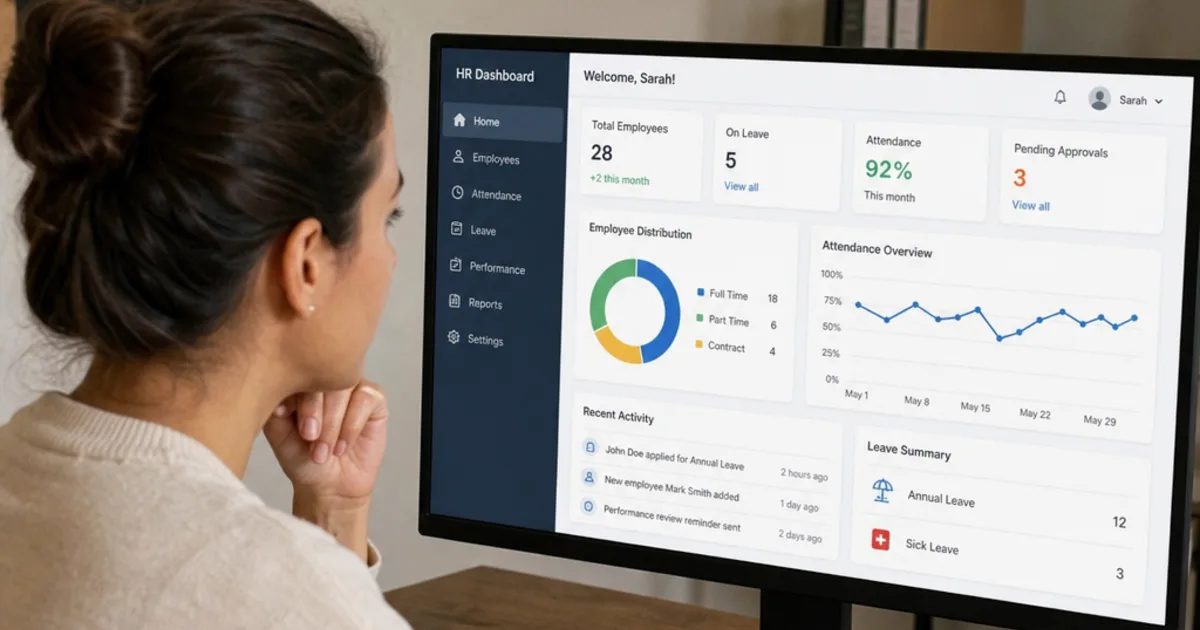
Choosing hr software for small business means deciding which people records, approvals and payroll inputs need one controlled home, then buying the simplest tool that handles them properly. For a UK employer, that includes evidence of right to work checks, holiday balances that follow the statutory rules, payroll changes that reach HMRC on time and personal data handled under UK GDPR.
The practical problem is rarely a missing feature. It is that contracts sit in email, holiday is tracked in a spreadsheet, salary changes reach payroll by message and nobody is sure which copy is current. This guide explains what to look for, how pricing works, how to test suppliers with the same script and how to work out the total cost before you sign.

HR software should make everyday people tasks visible to the right people in a small team. Illustrative photograph, not an OpsMavix project.
Image credit: Vitaly Gariev, Unsplash License. No edits.
Key Takeaways
- Start with the HR tasks that cost the most time or carry the most legal risk, not a feature wishlist.
- UK requirements such as right to work evidence, statutory holiday, RTI payroll reporting and record retention should shape the requirements.
- HR software and payroll software are often separate products; the handoff between them needs an owner and a cut-off.
- Pricing models differ (per employee, banded or add-on based), so compare suppliers on one headcount scenario over three years.
- Run every demonstration from the same script using your own awkward cases, such as a part-time holiday request or a leaver.
- Configuration, integration, a focused custom application or a wider ERP can each fit, depending on the gap you actually need to close.
In this guide:
- 1. Decide What the Software Must Do
- 2. Map UK Legal Requirements Before Demos
- 3. Handle Employee Data Under UK GDPR
- 4. Plan the Payroll and Accounts Connection
- 5. Compare Pricing Models
- 6. Work Out the Total Cost of Ownership
- 7. Run a Scripted Demonstration
- 8. Prepare Data and Go Live in Stages
- Frequently Asked Questions
- How OpsMavix Can Help
1. Decide What the Software Must Do
Start with the work, not the module list
Write down what happens today when someone joins, books holiday, phones in sick, changes hours, gets a pay rise or leaves. For each event, note who records it, where the record lives, who approves it and how payroll finds out. The gaps in that list are your requirements.
Most small business HR products are built from a similar set of modules. You rarely need all of them on day one.
| Module | What it should do | Questions to ask |
|---|---|---|
| Employee records | Hold personal, contract and job details with document storage | Can we add our own fields and see a change history? |
| Absence and holiday | Requests, approvals, balances and a team calendar | Does it handle part-time, irregular hours and carry-over rules we use? |
| Onboarding | New starter forms, task lists and policy acknowledgements | Can tasks be assigned to managers and operations, not only HR? |
| Self-service | Staff update details, request leave and read policies | Does it work well on a phone for people without a desk? |
| Documents and e-signature | Contracts, letters and certificates with expiry reminders | Are documents linked to the employee record and retention rules? |
| Rota and time | Shifts, clock-in and hours for payroll | Is it included or a paid add-on? |
| Performance and training | Reviews, objectives and training records | Do we need this now or in two years? |
| Reporting | Headcount, absence, holiday liability and expiring documents | Can we export the data behind each report? |
Separate must-haves from later options
Mark each module as required now, required within a year or not needed. A five-person firm may need records, holiday and documents only. A firm with shift workers may need rota and time capture before anything else. Buying a large suite for features nobody will use adds cost and training without solving the original problem.
2. Map UK Legal Requirements Before Demos
Right to work checks
GOV.UK says you must check that a job applicant is allowed to work in the UK before you employ them. Checks can be made manually with original documents, online with a share code or through an identity service provider for some applicants. You must keep copies during employment and for 2 years after the person stops working for you, and record the date of the check. Where permission is time-limited, the check must be repeated before it expires.
The penalty guidance states a civil penalty of up to £60,000 for each illegal worker. HR software cannot make the check for you, but it can store the evidence, the check date and a follow-up reminder against the right person.
Written statement and holiday
GOV.UK says the employer must provide the principal written statement on the first day of employment, with the wider written statement due within 2 months. An onboarding workflow can track that both were issued and acknowledged.
For holiday, almost all workers are entitled to 5.6 weeks of paid holiday a year, capped at 28 days. Bank holidays can count towards that statutory entitlement. Irregular hours and part-year workers build up leave based on hours worked, so test that the software handles your contract types.
Records you must keep
| Record | Retention requirement | Source |
|---|---|---|
| Right to work check copies | During employment and 2 years after it ends | GOV.UK right to work |
| Payroll records, including pay, deductions, leave and sickness absence | 3 years from the end of the tax year they relate to | GOV.UK PAYE records |
| National Minimum Wage records (created on or after 1 April 2021) | At least 6 years | GOV.UK minimum wage for employers |
Ask each supplier whether retention periods can be set per document type, and whether records are deleted or anonymised automatically or only flagged for review. A system that keeps everything forever creates its own data protection problem.
3. Handle Employee Data Under UK GDPR
What the ICO expects
The ICO’s employment records checklists cover points HR software should support: a documented lawful basis, privacy information for new workers, access limited to staff who need it, clear retention policies, and secure disposal when records are no longer needed. Where a supplier processes data for you, the contract should require appropriate security.
Workers can ask for a copy of their data. The ICO says employers must respond to a subject access request without delay and within one month, extendable by up to two months for complex or multiple requests. A system that can export one person’s record, documents and history quickly makes that deadline easier to meet.
Organisations that use personal information also need to pay a data protection fee unless they are exempt. Check your position with the ICO.
Data protection questions for suppliers
- Where is our data hosted, and which sub-processors are used?
- Can permissions separate managers, payroll, HR and the employee?
- Can health and sickness notes be restricted further than general records?
- Is there an audit trail of who viewed or changed sensitive fields?
- Can we export one person’s complete record for a subject access request?
- Can we set retention by document type and delete or anonymise leavers?
- What happens to our data, and in what format can we export it, if we leave?
4. Plan the Payroll and Accounts Connection
Know what payroll must do
Under RTI, employers send a Full Payment Submission on or before employees’ payday. GOV.UK says you must get payroll software that reports PAYE information online unless you are exempt, and lists HMRC-recognised products. It also warns that some products do not support features such as payslips, pension deductions or mixed pay periods, so check before you choose.
Some HR products include payroll; many connect to a separate payroll product or a bureau. Either can work. What matters is that the right changes reach payroll before the cut-off and that someone can prove they did.
Define the handoff
| Change in HR | What payroll needs | Control to test |
|---|---|---|
| New starter | Start date, pay rate, tax and pension details | Payroll cannot run for a starter missing required fields |
| Pay rise or hours change | Effective date and new rate | Approved changes only, with the approver recorded |
| Unpaid leave or sickness | Dates and type of absence | Absence reaches payroll in the right pay period |
| Leaver | Last working day and holiday balance | Outstanding holiday is visible before the final pay run |
| Bank detail change | New account details | Change is verified and logged before it is used |
Ask whether the connection is a live integration, a scheduled sync or a file export. A file export can be perfectly adequate for a small team if the cut-off and reconciliation are clear. Also check how payroll totals reach the accounts package, since journals for wages, PAYE and pensions usually end up there. For a wider view of connecting business systems, see integrated business management software.
5. Compare Pricing Models
The common models
| Model | How it is charged | Watch for |
|---|---|---|
| Per employee per month | A rate multiplied by headcount | Minimum charges and whether leavers or contractors count |
| Banded flat fee | One price for a headcount band | Cost jumps when you cross into the next band |
| Core plan plus add-ons | Base HR plan, extra modules charged separately | Rota, time, recruitment or payroll may not be included |
| Annual versus monthly billing | Discount for paying a year upfront | Notice periods and refunds if you leave early |
| One-off fees | Setup, data import or training | Whether migration is included or quoted separately |
A verified example
As checked on 23 October 2026, Breathe’s pricing page showed banded plans charged per business by total number of employees, including £44 per month for 11 to 20 employees and £99 per month for 21 to 50 employees, with add-ons such as rota, time and attendance charged separately. All prices were shown exclusive of VAT. Prices change, so confirm them on the supplier’s own page before you budget.
This is one example of the banded model, not a recommendation. Other suppliers charge per employee or bundle modules differently, which is why a shared headcount scenario is the fairest way to compare.

Compare suppliers on the full cost over several years, not the first monthly price. Illustrative photograph, not an OpsMavix project.
Image credit: Mikhail Nilov, Pexels License. No edits.
6. Work Out the Total Cost of Ownership
Hypothetical worked example
A hypothetical business has 18 employees in year 1, 22 in year 2 and 26 in year 3. It compares two fictional suppliers over three years. All figures are hypothetical and exclude VAT.
- Supplier A charges £6 per employee per month, includes rota and has no setup fee.
- Supplier B charges a banded fee of £45 per month for up to 20 employees and £100 per month for 21 to 50, plus a £12 per month rota add-on and a £300 one-off setup fee.
Both need the same internal effort: 20 hours to clean and import data and 10 hours of training, valued at £25 per hour, which is £750.
| Cost item | Supplier A | Supplier B |
|---|---|---|
| Year 1 subscription | £1,296 | £540 |
| Year 2 subscription | £1,584 | £1,200 |
| Year 3 subscription | £1,872 | £1,200 |
| Rota add-on over 36 months | £0 | £432 |
| One-off setup fee | £0 | £300 |
| Internal migration and training time | £750 | £750 |
| Three-year total | £5,502 | £4,422 |
Supplier A’s subscription is 18 × £6 × 12 = £1,296 in year 1, 22 × £6 × 12 = £1,584 in year 2 and 26 × £6 × 12 = £1,872 in year 3. Supplier B is £45 × 12 = £540 in year 1, then £100 × 12 = £1,200 in each later year after crossing 20 employees.
Supplier B is £1,080 cheaper over three years in this scenario. If headcount stayed at 18, Supplier B would cost £45 × 36 = £1,620 plus £432 and £300, so £2,352 before internal time, against £3,888 for Supplier A. The ranking can change with headcount, add-ons and which modules you actually need.
Costs that are easy to miss
- Payroll software or bureau fees, if payroll is not included.
- Integration or export setup with your payroll and accounts tools.
- Manager time spent learning approvals.
- Annual price rises written into the contract.
- The cost of exporting data and switching later.
7. Run a Scripted Demonstration
Use your own awkward cases
Send every supplier the same script in advance and ask them to run it live, using a trial account where possible. Score each step as demonstrated, configurable, needs an add-on or not supported.
- Create a new starter, record a right to work check with its date and set a follow-up reminder for time-limited permission.
- Issue a contract and confirm the principal written statement was sent on day one.
- Set up a part-time employee working 3 days a week and show the statutory holiday balance (5.6 weeks × 3 days = 16.8 days).
- Book holiday for an irregular hours worker and show how leave accrues.
- Record a sickness absence and restrict who can see the reason.
- Approve a pay rise effective mid-month and show how payroll receives it before cut-off.
- Process a leaver, show the outstanding holiday balance and apply the retention rule to their documents.
- Export one employee’s full record as if responding to a subject access request.
- Log in as a line manager and confirm they cannot see colleagues’ salaries.
- Export all employee data in a usable format.
Score fairly
| Step | Supplier A | Supplier B | Notes |
|---|---|---|---|
| Right to work evidence and reminder | |||
| Part-time and irregular hours holiday | |||
| Payroll handoff and cut-off | |||
| Permissions and sensitive data | |||
| Leaver, retention and export |
Packaged HR software suits most small businesses because these workflows are common and well supported. If the script fails on something specific to how you work, such as linking shift hours to job costs or project records, consider whether integration or a focused custom application closes that gap better than another HR product. The talent management guide covers performance and learning features if those are on your later list.
8. Prepare Data and Go Live in Stages
Clean the data first
Before importing, agree one list of current employees with start dates, contracted hours, holiday year, carried-over leave and document locations. Remove duplicate and outdated files rather than importing them. Check that holiday balances at go-live match what payroll and managers expect.
Go live in a sensible order
- Employee records and documents.
- Holiday and absence, with balances agreed at a set date.
- Self-service for staff and managers.
- The payroll handoff, run in parallel with the old method for at least one pay period.
- Onboarding, performance or rota modules once the basics are stable.
Go-live checklist
- Every employee has a complete record and the right documents attached.
- Right to work evidence and check dates are recorded for current staff.
- Holiday balances have been checked by managers.
- Permissions have been tested for each role.
- Payroll totals match between the old and new process for the parallel run.
- Retention rules are set and someone owns the review.
- Staff know where to request leave and update their details.
If you are also reviewing finance, stock or order systems, the small business ERP guide explains when wider integration is worth considering. For the data and reporting side of a growing HR function, see human resources information services.
Frequently Asked Questions
What should HR software for a small business include as a minimum?
Employee records with documents, holiday and absence management, self-service for staff and managers, role-based permissions and exports. Add onboarding, rota or performance modules when a real process needs them.
Does HR software need to run payroll?
No. Many small businesses use separate payroll software or a bureau. What matters is that approved changes reach payroll before the cut-off and that payroll reports to HMRC on or before payday.
Can HR software do right to work checks for me?
It can store evidence, check dates and reminders. The employer still has to carry out the check correctly using a method GOV.UK accepts, and keep copies for the required period.
How long should we keep employee records?
It depends on the record. Right to work copies are kept during employment and 2 years after; payroll records for 3 years from the end of the tax year; minimum wage records created on or after 1 April 2021 for at least 6 years. Set other retention periods in your own policy and review them.
How is small business HR software usually priced?
Commonly per employee per month, by headcount band or as a core plan with paid add-ons. Compare the total over three years for your expected headcount, including setup, add-ons and VAT.
How long does it take to set up?
That depends on data quality, the number of modules and the payroll connection. Ask suppliers for a plan with named tasks, and allow at least one parallel payroll run before switching over.
Is a spreadsheet enough for a very small team?
For a handful of people it can work, but it is harder to control access, keep an audit trail, apply retention and send reminders. Once several managers approve leave or handle sensitive data, dedicated software is usually easier to control.
Can OpsMavix build HR or people management software?
Yes. OpsMavix can build focused applications or a full custom ERP, and can configure or integrate suitable existing HR and payroll tools where those approaches fit the requirements.
How OpsMavix Can Help
For many small businesses, a packaged HR product is the right answer. OpsMavix helps where HR records need to connect with the rest of the operation, such as shift hours feeding job costs, staff availability affecting production or projects, or approvals that span HR and finance.
That may involve connecting existing tools, building a project operations dashboard, introducing invoice approval workflows or extending production tracking with labour and attendance data.
Contact OpsMavix with one recent new starter or leaver, the records behind it and the handoff that creates the most rework. We can use that evidence to define requirements and a practical pilot.
Keep reading
Getting value from OpsMavix? Add us as a preferred source on Google — you'll see more of our operations content in your AI Overviews, AI Mode and Search.