
Human Resources Information Services: Building an HR Function That Runs on Reliable Data
HR teams are expected to move quickly, support people well and keep sensitive workforce information accurate. Human resources information services help by bringing employee data, HR workflows and reporting into a more organised, reliable environment.
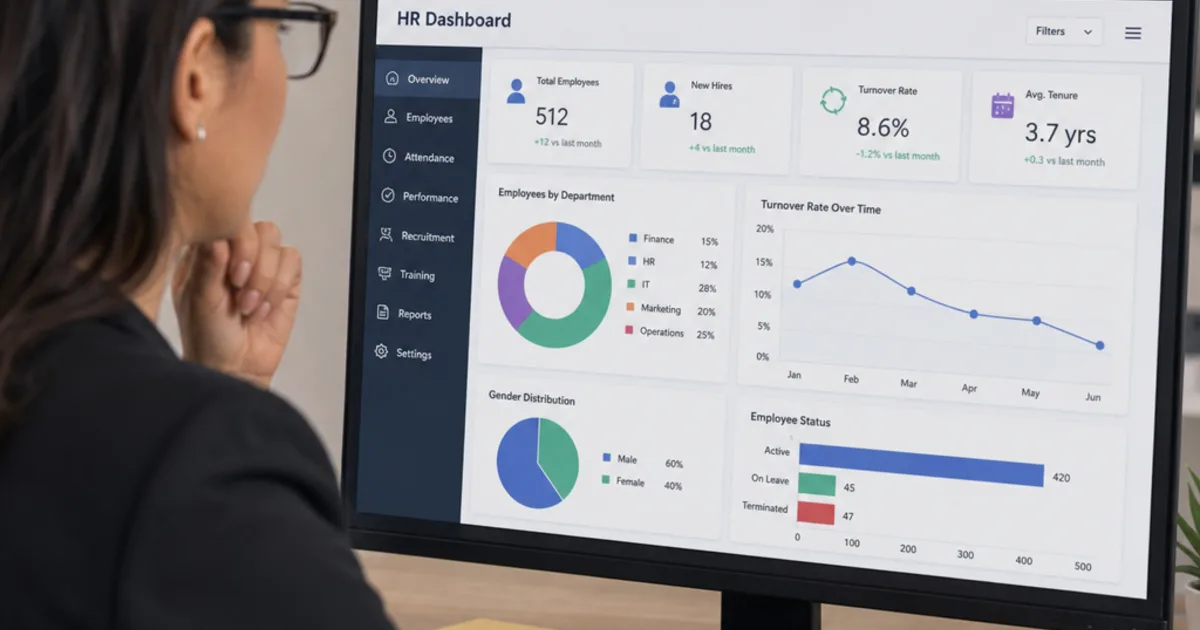
Human resources information services are the people, processes and systems that create, maintain, protect and report on an organisation’s employee data. In practice that means one trusted employee record, clear ownership of each field, reliable handoffs to payroll and finance, and reports that leaders can explain line by line.
The practical problem is rarely a lack of software. It is that the same person exists in a payroll export, a recruitment tracker, a manager’s spreadsheet and an email thread, each slightly different. When a start date, salary or leaving date disagrees between them, payroll errors, wrong headcount figures and privacy risks follow.

Every HR record needs a known home, a label and an owner, whether it sits in a drawer or a database. Illustrative photograph, not an OpsMavix project.
Image credit: MIKE STOLL, Unsplash License. No edits.
Key Takeaways
- An HR information function is about trusted employee data, not only about which HRIS you buy.
- Treat one employee record as the source of truth and give every key field a named owner.
- Map how starters, changes and leavers reach payroll and finance, including what happens when a transfer fails.
- Write down the formula, period and population behind every headcount, absence and turnover figure.
- UK GDPR sets principles rather than fixed retention periods, so build a retention schedule from your own legal and business needs.
- Spreadsheets, an HRIS, integrations and a custom application each fit different levels of volume, risk and complexity.
In this guide:
- 1. Understand What HR Information Services Mean
- 2. Make the Employee Record the Source of Truth
- 3. Assign Clear Ownership for People Data
- 4. Map Data Flows to Payroll and Finance
- 5. Report Headcount, Absence and Turnover Correctly
- 6. Build Data Quality Controls Into the Process
- 7. Handle UK GDPR and Retention Properly
- 8. Choose Spreadsheets, HRIS, Integrations or a Custom App
- Frequently Asked Questions
- How OpsMavix Can Help
1. Understand What HR Information Services Mean
Separate the function from the software
HRIS stands for human resources information system: software that stores employee records and supports HR processes such as onboarding, absence, contract changes and reporting. Human resources information services is the wider function around it. It covers who captures each piece of data, how it is checked, where it flows next and who is allowed to see it.
A business can have an expensive HRIS and still run a weak information function if managers keep their own lists and payroll is updated from emails. Equally, a small team can run a disciplined function on a well-controlled spreadsheet for a while.
Know the related terms
| Term | Plain-English meaning | Typical focus |
|---|---|---|
| HRIS | Human resources information system | Employee records, core HR workflows, reporting |
| HRMS | Human resource management system | Often used for broader suites that add payroll, time or performance |
| HCM | Human capital management | Usually the widest suite, including talent and workforce planning |
| HR information services | The function that runs HR data | Ownership, data quality, integrations, reporting, privacy |
Vendors use these labels inconsistently, so judge any product by the processes it demonstrably supports rather than the acronym. If you are comparing packaged tools, our separate guide to HR software for small business covers features, pricing questions and supplier selection. This guide stays on the information function underneath.
Start from the questions the business asks
Useful HR information answers recurring questions: How many people do we employ, and where? Who is starting or leaving this month? What is our absence rate? Who has access to which records? If those answers take a day of manual reconciliation, the information function needs attention, whatever software is in place.
2. Make the Employee Record the Source of Truth
Define the core record
The employee record should hold the facts other processes depend on. Keep it focused; every extra field needs someone to maintain it.
| Data group | Example fields | Why it matters downstream |
|---|---|---|
| Identity | Employee ID, legal name, date of birth, contact details | Matching records across payroll, pensions and IT access |
| Employment | Start date, contract type, job title, department, manager, location | Headcount, reporting lines, cost allocation |
| Pay and hours | Salary or rate, contracted hours, FTE, pay frequency | Payroll, budgets, absence calculations |
| Absence | Leave and sickness dates, reasons where lawful and necessary | Pay, absence reporting, wellbeing follow up |
| Compliance | Right to work check date and evidence, training where required | Legal obligations and audits |
| Leaving | Leaving date, reason category, final pay status | Turnover reporting, final payroll, access removal |
Use a stable identifier
Give every employee a unique ID that never changes and is never reused. Names change and can be duplicated; email addresses are reissued. Every system that holds employee data, from payroll to the IT directory, should carry the same ID so records can be matched without guesswork.
Keep history, not just the current value
When someone changes department or salary, record the new value with an effective date rather than overwriting the old one. Without effective dating you cannot reproduce last quarter’s headcount by department, check when a pay change should have taken effect or explain a historic payslip.
3. Assign Clear Ownership for People Data
Give each field a named owner
Ownership means the person or role responsible for the field being correct, not necessarily the person who types it. Self-service can let employees update contact details while HR still owns the policy for checking them.
| Record or field | Example owner | Control to demonstrate |
|---|---|---|
| Personal contact details | Employee via self-service, HR as policy owner | Changes are logged and bank detail changes are verified |
| Job, department and manager | HR, on manager request | Changes need an effective date and approval |
| Salary and pay rate | HR with finance approval | Two-person approval and a record of the authorising document |
| Absence entries | Line manager, reviewed by HR | Return dates and reasons recorded within an agreed time |
| Payroll outputs | Payroll or finance | Reconciled to HR changes each pay period |
| System access rights | HR with IT | Leavers removed promptly and access reviewed periodically |
These are suggested responsibilities, not a universal organisation chart. Assign ownership to the roles that actually run your process.
Write the decisions down
A short data dictionary prevents most reporting arguments. For each field, record its definition, allowed values, owner, source system and who may view it. For example, “department” should use a controlled list, not free text, so “Ops”, “Operations” and “Operations Team” do not appear as three departments in a report.
4. Map Data Flows to Payroll and Finance
Follow starters, changes and leavers
Most costly HR data errors appear at the payroll boundary. HMRC requires employers to send a Full Payment Submission on or before employees’ payday, and new employees must be reported on or before their first payday. That makes the timing of HR changes a payroll matter, not just an administrative one.
| Event | HR record | Payroll and finance impact | Typical failure |
|---|---|---|---|
| New starter | Start date, pay, hours, tax and contact details | Added to payroll and reported to HMRC | Starter details arrive after the payroll cutoff |
| Pay change | New rate with effective date | Pay calculation and budget forecast | Change applied a month late or backdated without arrears |
| Department move | New cost centre with effective date | Staff cost allocation in management accounts | Finance reports cost against the old department |
| Long-term sickness | Absence dates | Sick pay calculation | Absence recorded in HR but not passed to payroll |
| Leaver | Leaving date and final pay items | Final pay, holiday balance, reporting to HMRC | Employee paid after leaving or access left open |
Decide how data moves
There are three common patterns. Manual rekeying from an HR change form is simple but error-prone. A scheduled file export and import is better if both systems validate the file. A direct integration through an API can be the most reliable, but only when someone monitors failed transfers.
Whichever pattern you use, agree a payroll cutoff, a change log that payroll can reconcile against and a named person who resolves rejected records. Finance should be able to tie total gross pay by cost centre back to the HR headcount for the same period.
Reconcile every pay period
A simple reconciliation compares the HR active employee list with the payroll list for the period. Anyone on one list but not the other is either a timing difference with an explanation or an error to correct before the run is approved.
5. Report Headcount, Absence and Turnover Correctly
Agree the definitions first
The same data can produce different answers if the formula, period or population changes. Write each metric down before building reports.
| Metric | Common formula | Decisions to document |
|---|---|---|
| Headcount | Number of people employed on a given date | Include or exclude contractors, agency staff, people on long-term leave |
| FTE | Contracted hours divided by standard full-time hours | What counts as full time for each role |
| Turnover rate | Leavers in period divided by average headcount, multiplied by 100 | Voluntary only or all leavers; how average headcount is calculated |
| Absence rate | Working days lost divided by working days available, multiplied by 100 | Which absence types count; how part-time days are treated |
These are widely used definitions, not legal requirements. What matters is that you use the same one every period and state it on the report.
Worked example (hypothetical)
A hypothetical company employs 80 people on 1 January and 90 people on 31 December. During the year, 17 people leave.
| Step | Calculation | Result |
|---|---|---|
| Average headcount | (80 + 90) divided by 2 | 85 |
| Turnover rate | 17 divided by 85, multiplied by 100 | 20.0% |
| Same leavers against closing headcount | 17 divided by 90, multiplied by 100 | 18.9% |
| Two duplicate leaver records included in error | 19 divided by 85, multiplied by 100 | 22.4% |
The same year can be reported as 18.9%, 20.0% or 22.4% depending on the denominator and the data quality. A simple average of opening and closing headcount is acceptable for a small, stable business; a business that grows or shrinks sharply may prefer an average of monthly headcounts.
For absence, take the first quarter of the same hypothetical company. Eighty employees each had 60 working days available, giving 4,800 available days. Sickness absence totalled 144 days.
| Step | Calculation | Result |
|---|---|---|
| Working days available | 80 multiplied by 60 | 4,800 |
| Working days lost | From absence records | 144 |
| Absence rate | 144 divided by 4,800, multiplied by 100 | 3.0% |
| Average days lost per employee | 144 divided by 80 | 1.8 |
If 24 days of absence were recorded in a manager’s spreadsheet but never entered in the HR record, the system would show 120 days and a rate of 2.5%. The report would look tidy and still be wrong.

Workforce reports are only as reliable as the definitions and records behind them. Illustrative photograph, not an OpsMavix project.
Image credit: Vitaly Gariev, Unsplash License. No edits.
Show the basis on every report
Each report should state its period, population, formula and the date the data was extracted. A reader should be able to ask “who are the 17 leavers?” and get a list that matches.
6. Build Data Quality Controls Into the Process
Prevent errors at the point of entry
Controls are cheaper at entry than at report time. Use required fields for anything payroll or reporting depends on, drop-down lists for departments, locations and leaving reasons, date validation so a leaving date cannot precede a start date, and approvals for pay and bank detail changes.
Check regularly
| Check | How often | What it catches |
|---|---|---|
| HR to payroll active list match | Every pay period | Missing starters, unprocessed leavers |
| Missing mandatory fields | Monthly | Records without a manager, department or contract type |
| Duplicate employees | Monthly | The same person created twice, often on rehire |
| Leavers with active system access | Monthly | Accounts not removed after leaving |
| Right to work evidence present | Quarterly | Missing or expired evidence |
| Permission review | Quarterly or on role change | People who can see more than their role needs |
Measure completeness simply
A hypothetical example: of 85 active records, 6 have no line manager. Completeness for that field is 79 divided by 85, or 92.9%. Track the figure monthly and fix the cause, such as a starter form that does not ask for the manager, not just the six records.
Practical data quality checklist
- Every employee has a unique, permanent ID.
- Every key field has a definition, an owner and allowed values.
- Pay, department and job changes carry an effective date.
- HR and payroll lists are reconciled before every pay run.
- Leavers trigger final pay and access removal from one record.
- Reports state their formula, period, population and extraction date.
- Corrections are logged, not silently overwritten.
7. Handle UK GDPR and Retention Properly
Know what the ICO expects
The ICO’s guidance on keeping employment records covers lawful basis, accuracy, security, retention and workers’ rights. The ICO notes that this guidance is under review following the Data (Use and Access) Act, so check the current version before finalising policies.
Key points from the ICO’s collecting and keeping employment records guidance:
- You must take all reasonable steps to keep workers’ information accurate and up to date.
- Health information, including sickness records, is special category data. You need a lawful basis and a separate condition under Article 9 of the UK GDPR, and some conditions also require an appropriate policy document.
- Records should only be accessible to people authorised to see them; sensitive data such as health information should be restricted further.
- Workers can request their records, and you must respond without delay and within one month, extendable by up to two further months in some circumstances.
Build a retention schedule
The ICO states that data protection law does not set specific time limits for keeping workers’ information, and warns against a one-size-fits-all approach. Retention should follow your purposes and any legal requirements, and information should be erased or anonymised when no longer needed. Some periods are set by other rules:
| Record type | Minimum retention set elsewhere | Source |
|---|---|---|
| Payroll records, including pay, deductions, leave and sickness absences | 3 years from the end of the tax year they relate to | GOV.UK: PAYE records |
| National Minimum Wage records | At least 6 years for records in scope of the current rules | GOV.UK: minimum wage for employers |
| Right to work document copies | During employment and for 2 years after it ends | GOV.UK: checking right to work |
These are minimums for specific purposes, not a complete schedule. Pensions, health and safety, and potential legal claims may justify other periods; take advice where the position is unclear. Your HR system should be able to flag records for review or deletion when their retention period ends.
8. Choose Spreadsheets, HRIS, Integrations or a Custom App
Match the approach to the gap
| Approach | Where it fits | What to check |
|---|---|---|
| Controlled spreadsheet | Small headcount, one HR owner, few changes | Access control, version history, no copies in email, a planned exit |
| Packaged HRIS | Standard records, absence, onboarding and self-service | Fit with your processes, reporting, permissions, data export |
| Integrations between existing tools | HRIS and payroll work individually but handoffs fail | Shared employee ID, error handling, who monitors failures |
| Focused custom application | A specific workflow or report packaged tools handle poorly | Ownership, support, security and integration scope |
| Full ERP, packaged or custom | HR data must drive costing, scheduling or project resourcing | Scope, migration, delivery capacity and continuity |
Company size alone does not decide the answer. A 40-person business with shift patterns, multiple sites and labour cost allocation may need more than a 150-person office with simple contracts.
Signs the current setup has run out
- Headcount figures differ between HR, payroll and finance.
- Reports need a day of manual reconciliation before they can be shared.
- Leavers are discovered on payroll after their final pay date.
- Nobody can say who has access to sensitive records.
- Retention is never applied because nobody can find all the copies.
Pilot before rolling out
Test any new approach on one full cycle: a starter, a pay change, a sickness absence and a leaver, through to payroll and the month-end report. Agree the expected result first, then check that every number on the report can be traced back to a record. If you are also reviewing talent and performance tools, see talent management system features and integration.
Frequently Asked Questions
What are human resources information services?
They are the function that manages an organisation’s employee data: capturing it, keeping it accurate, moving it to payroll and finance, reporting on it and protecting it. Software such as an HRIS supports the function but does not replace the ownership and controls around it.
What is the difference between an HRIS and an HRMS?
Both terms describe HR software. HRIS usually refers to core employee records and HR workflows, while HRMS is often used for broader suites that may add payroll, time tracking or performance. Vendors use the terms inconsistently, so check the actual modules.
How do you calculate staff turnover?
A common formula is leavers in the period divided by average headcount in the period, multiplied by 100. In the hypothetical example above, 17 leavers against an average of 85 employees gives 20.0%. Document whether you include all leavers or only voluntary ones.
How do you calculate the absence rate?
Divide working days lost to absence by working days available and multiply by 100. Agree which absence types count and how part-time working days are handled, then apply the same method every period.
How long should we keep employee records?
UK GDPR does not set fixed periods, so build a retention schedule from your purposes and legal requirements. Some minimums apply, such as 3 years from the end of the tax year for PAYE records and 2 years after employment ends for right to work copies.
Is a spreadsheet acceptable for HR records?
It can work for a small team if access is controlled, there is one master copy and changes are logged. It becomes risky as headcount, change volume and the number of people needing access grow.
Who should own HR data?
HR usually owns the overall employee record and its policies, but individual fields can have different owners, such as finance for approved pay changes or employees for their own contact details. Write the ownership down.
Can OpsMavix build an HR information system?
Yes. OpsMavix can build focused applications or a full custom ERP, and can configure or integrate suitable existing HR and payroll tools where those approaches fit the requirements.
How OpsMavix Can Help
OpsMavix can map how employee data moves from HR into payroll, finance and operational reporting, then define the controls and system scope needed to make each figure traceable.
That may mean connecting an existing HRIS to payroll, building a project operations dashboard that uses reliable headcount and labour data, adding approval workflows for changes that affect cost, or developing a full custom ERP.
Contact OpsMavix with one recent headcount or absence report, the records behind it and the handoff to payroll that creates the most rework. We can use that evidence to define requirements and a practical pilot.
Getting value from OpsMavix? Add us as a preferred source on Google — you'll see more of our operations content in your AI Overviews, AI Mode and Search.