
Expense Management Software: Getting Staff Claims Off Spreadsheets and Shoeboxes
Expense management software is the system that handles employee spending — a member of staff pays for something out of pocket or on a company card, snaps the receipt, and the claim flows through approval into your accounts. Here's how the point-of-spend capture, the approval flow, card reconciliation and VAT reclaim actually fit together, and why the spreadsheet-and-shoebox version quietly costs you money every month.
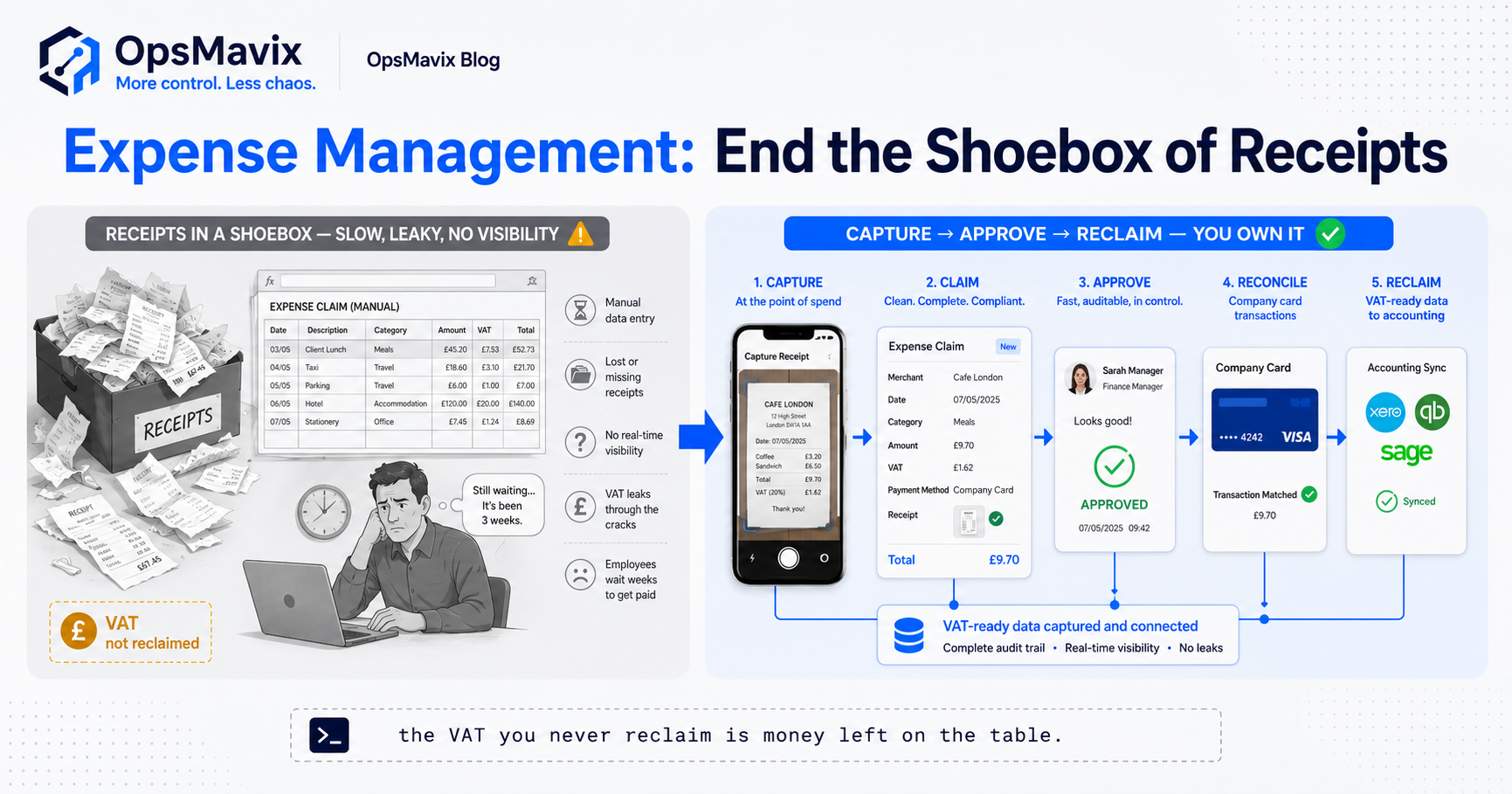
Expense management software is the system that handles money your staff spend on the company’s behalf — a train fare paid out of their own pocket, a client lunch on the company card, a tank of diesel on the way to a site — and turns each of those into a captured receipt, a checked claim, and a line your accounts can actually use. It covers the whole loop: grabbing the receipt at the moment of spend, submitting the claim, getting it approved, reconciling it against the card statement, and feeding it into your accounting system so the VAT gets reclaimed and the person gets paid back. This is employee expenses, not supplier bills — the money is going out of a staff member’s wallet, and the job is getting it back in cleanly.
The version most growing businesses actually run is a monthly ritual: someone empties a shoebox of curling receipts onto a desk, types them into a spreadsheet, guesses at the ones that faded, and emails it to a manager who approves it without really reading it. It works, in the sense that people eventually get paid. But it’s slow, it’s invisible until month-end, and it leaks — faded receipts nobody can reclaim VAT on, claims that sit for six weeks, and no way to see who’s spending what until the card bill lands. The cost isn’t dramatic on any single claim. It’s the drip across a year of claims nobody had the tools to check properly.
Key Takeaways
- Expense management software handles employee spending — staff paying out of pocket or on a company card and claiming it back — which is a separate job from paying supplier invoices.
- The single biggest win is capturing the receipt at the point of spend, on a phone, before it fades, gets lost, or the VAT on it becomes unreclaimable.
- A proper claim-and-approval flow replaces the month-end spreadsheet: submit, route to the right approver, check against policy, reimburse — with a trail.
- Company-card reconciliation matches every card transaction to a receipt, so you know what each swipe was for instead of chasing statements after the fact.
- Policy limits and mileage stop being things people remember or forget — spend caps, per-diems and mileage rates are built into the claim, not left to honesty.
- The leak is real £: VAT never reclaimed on lost receipts, hours burned at month-end, and no visibility of spend until it’s already gone.
1. What Expense Management Actually Covers (and What It Doesn’t)
It’s worth drawing the line early, because “expenses” gets used to mean two very different things. Expense management is about money a person spends and claims back — the employee is out of pocket, or has used a company card, and the business needs to record it, approve it, reimburse it, and account for it. That’s mileage to a client site, a hotel on an overnight job, software one of your developers expensed, a round of coffees for an interview panel. The defining feature is that a human made the spend decision in the moment, often with their own money, and now there’s a receipt to deal with.
What it isn’t is accounts payable — the supplier invoices you receive and pay on terms. Those are a different animal: a bill arrives, it gets matched against a purchase order, someone approves it, and it’s paid from the company account. Nobody’s out of pocket and there’s no receipt to snap. If your problem is supplier bills piling up and getting paid late, that’s invoice approvals and three-way matching, not expense management. Keeping the two separate matters, because the tools, the approvers and the VAT treatment are all different — and businesses that lump them together end up with a system that does neither job well.
2. Capture the Receipt Where the Money Is Spent
Here’s the part that fixes more than anything else: the receipt gets captured at the moment of spend, not weeks later at a desk. A member of staff pays, opens their phone, photographs the receipt, and it’s logged — date, amount, VAT, category — before they’ve left the car park. That one change kills the two failures that cause most of the leak: the receipt that’s lost by month-end, and the receipt that’s faded into a blank strip of thermal paper by the time anyone types it up.
The reason this matters so much is VAT. To reclaim VAT on a business expense, HMRC wants a valid VAT receipt — and a receipt you can’t produce is VAT you can’t reclaim. On a fuel receipt, a hotel, a stack of client lunches across a year, that reclaimed VAT is real money the business is entitled to and simply doesn’t collect because the paper went missing. One finance manager we spoke to reckoned a good chunk of their reclaimable VAT quietly evaporated every year, not through any decision, but because half the receipts never made it back legible. Capture at the point of spend turns a shoebox of maybes into a clean, timestamped record the moment the card is put away.
3. The Claim and Approval Flow
Once the receipt is captured, it becomes a claim, and the claim needs to go somewhere — this is where the spreadsheet version really shows its age. A proper flow is simple to describe: the staff member submits the claim (often the receipts they’ve captured all month, batched), it routes automatically to the right approver — their line manager, or whoever owns that budget — the approver sees each line with the receipt attached, checks it against policy, and approves or queries it. Approved claims flow to reimbursement; queried ones go back with a reason. Nothing sits in an inbox with no owner.
Compare that to the manual reality, where the claim is a spreadsheet emailed to a manager who “approves” it by replying fine without opening a single receipt. That’s not approval, it’s a rubber stamp — the same problem that plagues manual sign-off in invoice approvals. The value of a real flow isn’t bureaucracy; it’s that the approver is shown exactly what they’re agreeing to, the claim can’t skip a step, and there’s a record of who approved what and when. When a claim is odd — a suspiciously round number, a category that doesn’t fit the role, a spend over the limit — it’s flagged instead of waved through. The routing logic here is close cousin to a purchase requisition: the request goes to the person with the authority to say yes, automatically.
4. Company Cards and the Reconciliation Problem
Company cards solve one problem and create another. They mean staff don’t have to front the money — good, especially for anyone junior who can’t float a £400 hotel on a personal card. But every swipe on a company card is a transaction the business now has to explain: what was this £62 at a supermarket, this £140 at a hotel, this £30 at a petrol station? Without a system, that explaining happens at month-end when the statement lands, and it’s a fortnight of chasing people to remember what they bought three weeks ago.
Reconciliation is the job of matching every card transaction to a captured receipt with a reason attached. Done properly, the card feed and the receipt capture meet in the middle: the transaction appears, the person who made it attaches the receipt they already snapped, categorises it, and the line is closed. The transactions that don’t have a receipt against them stand out immediately — those are the ones finance needs to chase, and now there’s a short list instead of a whole statement. This is the difference between knowing what every swipe was for by the time the statement arrives, and spending the first week of every month playing detective. It also closes a genuine control gap: a company card with no reconciliation is spending you can’t see until it’s already happened.
5. Policy Limits, Mileage and the Rules Nobody Remembers
Every business has an expenses policy, and in the spreadsheet world it lives in a document nobody’s read since induction. What’s the daily meal allowance? What can you spend on a hotel? Do you need approval before booking? The answers exist, but they’re enforced by memory and goodwill, which means they’re enforced unevenly — one manager waves through a £200 dinner, another queries a £15 lunch, and nobody’s consistent because the rule isn’t in front of them at the point of decision.
Software puts the policy into the claim itself. A spend cap means a claim over the limit flags automatically. A per-diem means the meal allowance is applied without anyone calculating it. And mileage — the one every field-based business gets wrong by hand — becomes a matter of entering the journey and letting the system apply the HMRC rate (currently 45p a mile for the first 10,000 business miles in a car, then 25p), rather than someone guessing the distance and the rate and getting both slightly off. Mileage done manually is either underclaimed, because people can’t be bothered to work it out, or overclaimed, because the distances are rounded up hopefully. Neither is what you want. The policy stops being a document and starts being the rails the claim runs on.
6. Feeding Accounting and Reclaiming the VAT
An expense claim isn’t finished when it’s approved — it’s finished when it’s landed in your accounts correctly, coded to the right category, with the VAT split out so it can be reclaimed. This is the step the manual process handles worst, because it involves someone re-typing the spreadsheet into the accounting system, category by category, and every re-type is a chance to miscode a line, drop a VAT element, or transpose a figure. Do that across a hundred claims a month and the error rate is quietly baked in.
A connected system carries the data straight through: the claim that was captured, categorised and approved becomes an accounting entry without anyone keying it again. The VAT that was recorded at capture flows through to the VAT return, so the reclaim happens by default rather than depending on someone remembering to split it. That’s the whole point of capturing VAT properly at the receipt — it’s only worth anything if it survives the journey into your accounts. The before-and-after is stark: before, a month-end scramble of re-typing and reconciling that eats a day or two of finance time and still misses VAT; after, claims that flow through coded and VAT-ready, with people looking only at the exceptions. The same principle that makes invoice approval workflow automation pay off — data captured once, moving cleanly instead of being re-keyed — applies just as hard to expenses.
7. Building Expense Management That Fits How Your People Actually Spend
The market is full of standalone expense apps, and for a lot of businesses one of them is a perfectly good buy — this isn’t a pitch to custom-build what you can buy off the shelf. Our honest view at OpsMavix: if your only problem is receipt capture and simple claims, use a dedicated app and move on. Where a right-sized custom system earns its place is when expenses aren’t a standalone problem — when the approval routing needs to match your actual org chart, when card reconciliation has to tie into the rest of your finance data, when project-based businesses need every expense coded to a job so you can see the true cost of each piece of work, or when the expense flow is one part of a wider operations system you’re already having built.
That’s the real question: is expenses a bolt-on, or a thread in something bigger? For a project-based services firm, an expense that isn’t tagged to a job is a hole in your job costing — the diesel, the site parking, the materials bought on the day all belong against the work they were for, and a generic expense app won’t know your jobs exist. That’s where connecting the expense flow to the system that already knows your projects, your people and your budgets turns a filing chore into live cost visibility. Before, expenses are a separate spreadsheet reconciled once a month against nothing in particular. After, every claim is captured at spend, routed to the right approver, reconciled against the card, coded to the job, and fed to your accounts VAT-ready — and you can see who’s spending what, on what, this week rather than next month.
FAQ
What is expense management software?
Expense management software is the system that handles employee spending — money a member of staff pays out of their own pocket or on a company card and then claims back. It covers capturing the receipt at the point of spend, submitting and approving the claim, reconciling company-card transactions, applying policy limits and mileage rates, and feeding the result into your accounting system so the VAT is reclaimed and the person is reimbursed. It’s a distinct job from paying supplier invoices, where nobody is out of pocket and there’s no receipt to capture.
How is expense management different from accounts payable?
Expense management deals with money that leaves a person’s wallet — a staff member spends, then claims it back. Accounts payable deals with money that leaves the company’s account — a supplier sends a bill, it’s matched and approved, and it’s paid on terms. The approvers, the VAT treatment and the whole workflow differ, which is why they belong in separate systems. If your issue is late supplier bills, look at invoice approvals and three-way matching; if it’s staff claims and receipts, that’s expense management.
Does expense management software help with VAT reclaim?
Yes, and it’s one of the strongest reasons to move off spreadsheets. Reclaiming VAT on a business expense needs a valid VAT receipt, and receipts that fade or go missing are VAT you simply can’t reclaim. By capturing the receipt and its VAT at the moment of spend, then carrying that data straight through to your accounting system, the software turns reclaim from a thing someone has to remember into something that happens by default — instead of a year of small amounts evaporating because the paper never made it back legible.
How does company-card reconciliation work?
The card provides a feed of every transaction, and reconciliation is the job of matching each of those transactions to a captured receipt with a category and a reason. When staff photograph receipts at the point of spend, the transaction and the receipt meet in the middle and the line closes itself. The transactions with no receipt attached stand out as a short list to chase, rather than finance having to account for a whole statement from memory each month. It means you know what every swipe was for by the time the statement lands.
Can it handle mileage claims?
Yes — mileage is one of the things software handles far better than a spreadsheet. Rather than someone estimating the distance and applying a rate by hand (and getting one or both slightly wrong), you enter the journey and the system applies the correct HMRC rate automatically. That stops mileage being underclaimed because people can’t face the maths, or overclaimed because distances get rounded up hopefully — and it keeps a consistent, auditable record of business travel that your accounts and any HMRC check will accept.
How OpsMavix Can Help
OpsMavix builds right-sized systems for businesses stuck in the gap — outgrowing spreadsheets and disconnected tools — and staff expenses are one of the clearest places that gap quietly costs money. Where a standalone app fits, we’ll tell you to buy one. Where it doesn’t — because your approval routing needs to match your real org chart, your card reconciliation has to tie into the rest of your finance data, or every expense needs coding to a job so your project costs are true — we build the expense flow into the operations system that already knows your people, budgets and work. Receipts captured at spend, claims routed to the right approver, cards reconciled as they happen, and everything fed to your accounts VAT-ready.
If your expenses live in a month-end spreadsheet and a shoebox of curling receipts, you’re paying for it in slow reimbursements, unreclaimed VAT and no idea who’s spending what until the bill arrives. We’ll show you exactly where the leak is, what it’s worth, and whether the fix is a simple app or a proper thread in your wider system — the same way invoice approval workflow automation tightens the money going the other way. Book a Free Operations Leak Audit.
Keep reading

Getting value from OpsMavix? Add us as a preferred source on Google — you'll see more of our operations content in your AI Overviews, AI Mode and Search.